The best B2B marketing automation software does not automatically fix a broken marketing system or flood your pipeline with high-quality leads.
Automation is a multiplier of whatever exists. If your team already struggles with dirty, siloed data, automation will only amplify that problem.
This article covers the two critical things you must do to prepare for successful B2B marketing automation campaigns. We’ll then review the best marketing automation software tools that can turn your marketing strategy into measurable outcomes.
Key takeaways
- Marketing automation for B2B companies uses software to automate lead qualification and scoring, trigger marketing campaigns based on behavioral signals, and route sales-ready leads to the right account managers.
- Before buying an automation tool, unify your customer data and map the user journey to identify the crucial touchpoints you need to automate.
- Choose marketing automation software that syncs with your existing tech stack and supports multi-step workflows, lead scoring, lead routing, multi-channel journey orchestration, and revenue attribution.
- GetResponse automates the customer lifecycle through omnichannel automation across email, SMS, and push notifications. We offer a visual automation builder, lead scoring, and revenue attribution reporting so you can track campaign ROI.
Top B2B marketing automation software comparison
| Tool | Best for | Key automation features | Limitations | Pricing |
|---|---|---|---|---|
| HubSpot Marketing Hub | All-in-one automation tool | Lead scoring and routing Slack sales alerts Helpful Breeze AI assistant |
Steep learning curveExpensive | $800/mo for advanced automations |
| GetResponse | Customer lifecycle automation | Visual automation builder Lead scoring Unlimited contact tagging Multichannel marketing Conversion funnel builder |
Multi-channel marketing (SMS and mobile push) is only available on the Enterprise plan. | $48.38/mo |
| Customer.io | Data unification | Data enrichment and unification Cross-channel journey orchestration Campaign attribution |
Learning curve Syncing with data warehouses gets expensive. |
$100/mo |
| ActiveCampaign | AI automations | AI-powered workflows Data-driven AI recommendations Pipeline management (add-on) |
Gets expensive as your needs grow | $79/mo for advanced capabilities like dynamic content |
| Zoho Marketing Automation | Budget-friendly automations | Automated lead routing Multi-channel automations Helpful analytics from BI dashboard |
Fairly steep learning curve Costs increase as you add more Zoho tools. |
$22/mo |
How to build the foundation for marketing automation
Do these two things before paying for a marketing automation tool.
Unify your customer data
The first thing you must do before spending a dollar on a marketing automation platform is to unify all your customer data.
44% of B2B respondents in a Marketing Charts survey report that their marketing tech stack consists of 5 to 10 tools. Another 30% have up to 20 tools in their tech stack.
Each of those tools contains crucial customer data.
Automation systems need all that data to run effectively. These systems rely on customer data to trigger workflows. If the data is fragmented across multiple platforms and the system can’t access all of them, the automation system won’t have a complete picture of the customer.
This results in cases where hot leads who should have been targeted with personalized outreach fall through the cracks.
Siloed customer data also messes with lead scoring. Effective lead scoring relies on the system having access to everything a customer does. The pages they visit, campaigns they open, product features they use, and so on.
Automation tools are doomed to fail if that data lives in different systems that don’t talk to each other.
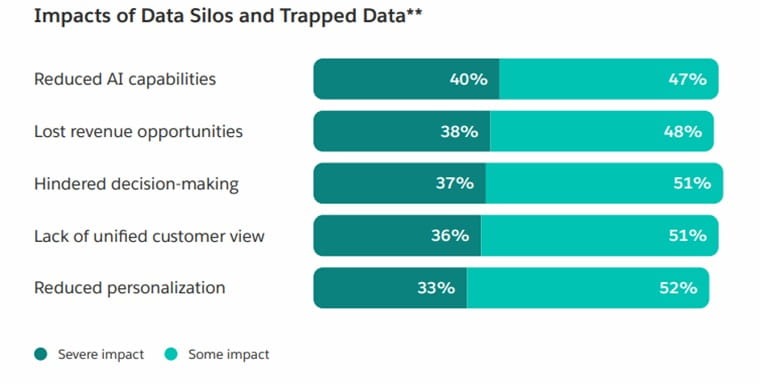
According to Salesforce, 40% of marketers report that siloed and trapped data have a severe impact on AI capabilities. Another 38% say data silos severely reduce revenue opportunities.
But unifying the data is not enough. The quality of that data matters, too.
The same Salesforce report shows that 46% of marketers using agents in their workflows report that data quality issues hurt their sales.
Duplicate data can result in the same lead going through the same campaign multiple times. This creates frustrating user experiences. It’s also likely to hurt your email deliverability and increase spam complaints in the long run.
Similarly, inaccurate or conflicting customer data can trigger the wrong automated workflows.
As you unify the customer data, clean it to make sure there are no duplicates, inaccuracies, or missing records.
Some of the best marketing automation software provides customer data platforms (CDPs) to resolve these problems. HubSpot and Customer.io, for example, help with unifying customer data from the different sources used by modern businesses.
Seamless integration with the tools your business uses is another way to ensure the automation system has access to all the data it needs to function effectively.
Map the customer journey
Mapping the customer journey shows the crucial touchpoints and stages customers go through as they engage your business. This process helps you identify friction points where leads drop off.
It also highlights the key stages and milestones within your customer journey.
In both cases, you get to see crucial lifecycle touchpoints where automation can have the biggest impact. This allows you to prioritize your automation campaigns for the highest ROI. This is a smarter strategy than trying to automate everything, which is expensive and time-consuming to maintain.
Use existing customer data from your CRM, product analytics tool, and marketing platform to understand your customer journey. Combine that quantitative data with qualitative data by talking to customers directly.
Lastly, talk to your sales, customer support, and customer success teams. Those teams have valuable insights into customers’ objections, pain points, decision triggers, and goals. Their insights tell you where to deploy automation workflows and what content to use in those campaigns.
Best marketing automation tools for B2B brands
Here are five B2B marketing automation tools and their best use cases.
1. HubSpot Marketing Hub – Best all-in-one automation tool
HubSpot offers a built-in CRM and data management tool. It also supports integrations with dozens of other business solutions. This makes HubSpot one of the best marketing automation tools that can put your customer data to good use.
The automation platform is found within HubSpot’s Marketing Hub. It includes a visual automation builder for creating your workflows.
The platform comes with several prebuilt workflows for common campaigns. Think welcome series, lead nurturing sequences, and re-engagement campaigns.
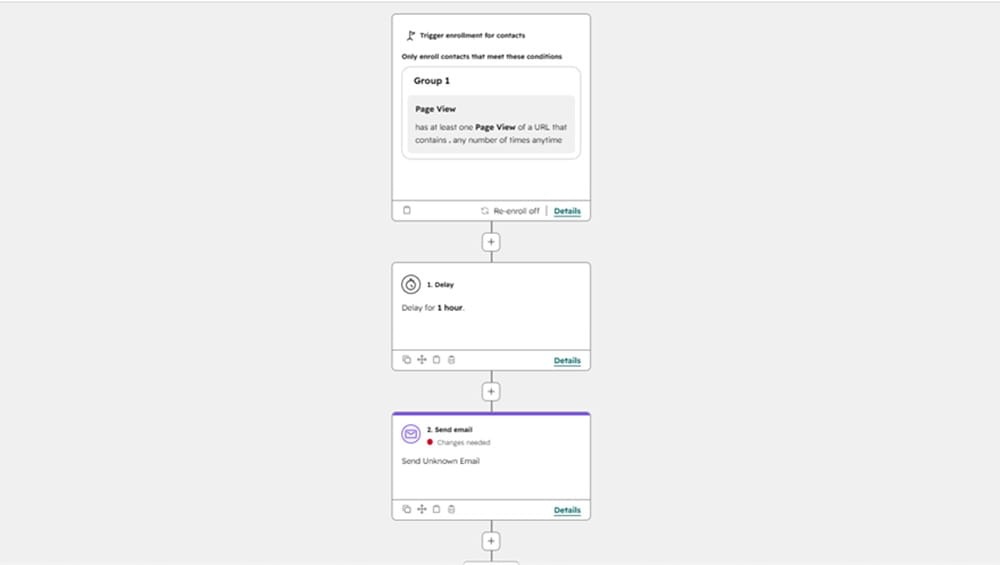
HubSpot offers an automated lead scoring system. The platform tracks user behavior on your site. It checks the pages users visit and assigns them scores based on your set criteria. Leads visiting high-intent pages like pricing pages get higher scores than visits to a standard blog post, for example.
Additionally, the platform tracks the emails customers open and the links they click.
These behavioral signals are used for both lead scoring and matching leads with relevant workflows.
The campaigns are further supported by dynamic content. This is where users receive unique content based on their attributes and behaviors.
For example, if you offer different products/services to SMBs vs enterprise customers, HubSpot can track those attributes and make sure leads only see relevant content. And when the leads are hot and ready for a sales conversation, the platform alerts your sales team through Slack notifications.
The automation builder lets you create multi-step workflows with split logic and time delays. You can take leads through different paths based on how they engage with your content and as their scores change. This helps you orchestrate personalized customer journeys for better user experiences.
Breeze AI is the other standout feature within HubSpot’s platform. The AI assistant is grounded in your customer data since it has access to your CRM data. So it can analyze campaigns, recommend improvements, and execute commands.
You can prompt it to create workflows, for example. You can even prompt it to create agents based on your CRM data and segment contacts.
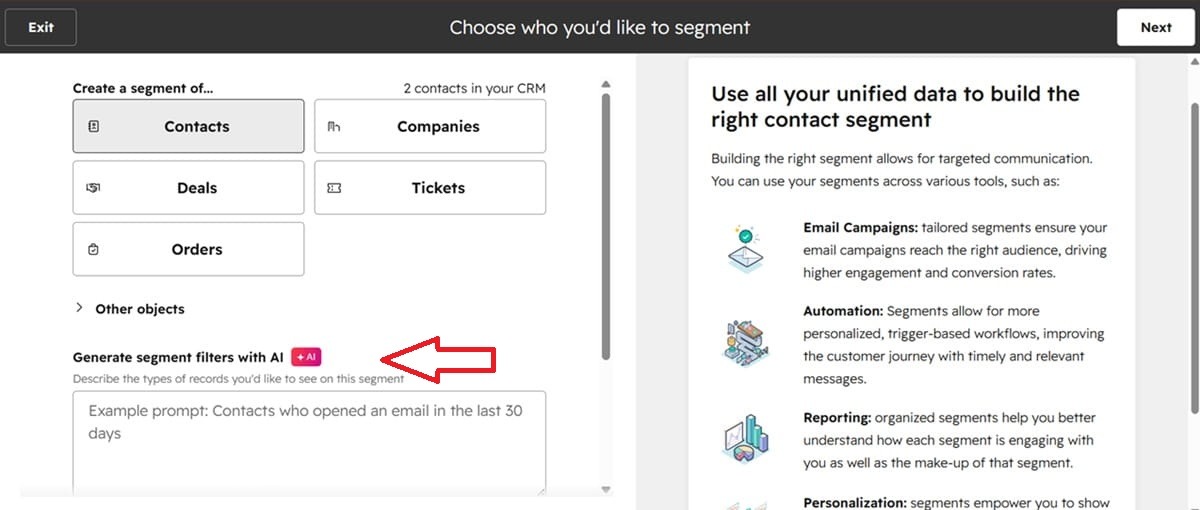
But you should know that you need HubSpot credits to use the conversational AI assistant and other HubSpot agents. You don’t get unlimited access to the AI tools even with the Professional and Enterprise plans.
Key features
- Omnichannel marketing automation – HubSpot supports marketing automation across various channels, including email, SMS, your website, social media, chat, and paid ads.
- Agent Hub – Use the Breeze Assistant to create custom agents that work alongside your team to support their unique tasks. Build agents for prospecting and social campaigns to automate repetitive tasks.
- Multi-touch revenue attribution – Track what marketing activities drive revenue so you know where to invest.
- Marketing studio – An AI-powered workspace that allows sales and marketing teams to manage and create assets together.
- Behavioral event triggers and reporting – Use behavioral signals to trigger specific email marketing campaigns and website notifications. The reports show how the triggered automations perform, e.g., what events were executed and how many users completed the desired action.
- Customer journey analytics – Get data on the impact of each touchpoint in your user journeys and conversion rates. The platform also shows how much time users spend between each touchpoint.
Limitations
- Steep learning curve
- Expensive
Pricing
For B2B businesses, you need at least the professional plan, which starts at $800/mo for three core seats ($45/mo for additional seats) to run advanced automations.
This plan supports marketing automation for up to 2,000 contacts. You can add more contacts at $225/mo for 5,000 contacts if your contact list size is between 2,000 and 22,000. The rate drops as the contact list size increases past 22K.
That plan includes 3,000 HubSpot credits, which you need for the AI features.
Although the Pro plan includes omnichannel automation, agent hub, marketing studio, and social media tools, it misses several advanced features.
Multi-touch revenue attribution, user journey analytics, and behavioral event triggers and reports are only available on the $3,600/mo Enterprise plan. This is the same price range as other enterprise automation platforms like Adobe Marketo.
That plan includes five core seats, with additional seats coming at $75/mo. It offers 5,000 HubSpot credits.
Note that the number of credits consumed depends on the task at hand. For example, executing an action in a workflow consumes 10 credits, while getting one outreach recommendation to a lead from the prospecting agent consumes 100 credits.
You can buy additional credits separately at $9 per 1,000 credits.
2. GetResponse – Best for automating the customer lifecycle
GetResponse’s marketing automation tool connects with your website to activate site tracking. The platform also supports seamless integrations with CRM and business tools, like Microsoft Dynamics, HubSpot, Zoho, Google Analytics, Zapier, and Slack.
This gives the automation tool access to critical customer data for behavior-triggered workflows.
Building these flows is super easy, thanks to our drag-and-drop automation builder. You don’t need to be a developer to create the flows.
Plus, we have a library of prebuilt workflows for critical customer lifecycle automations. We have flows for every stage of the customer journey, from lead nurturing to re-engagement and milestone celebrations.
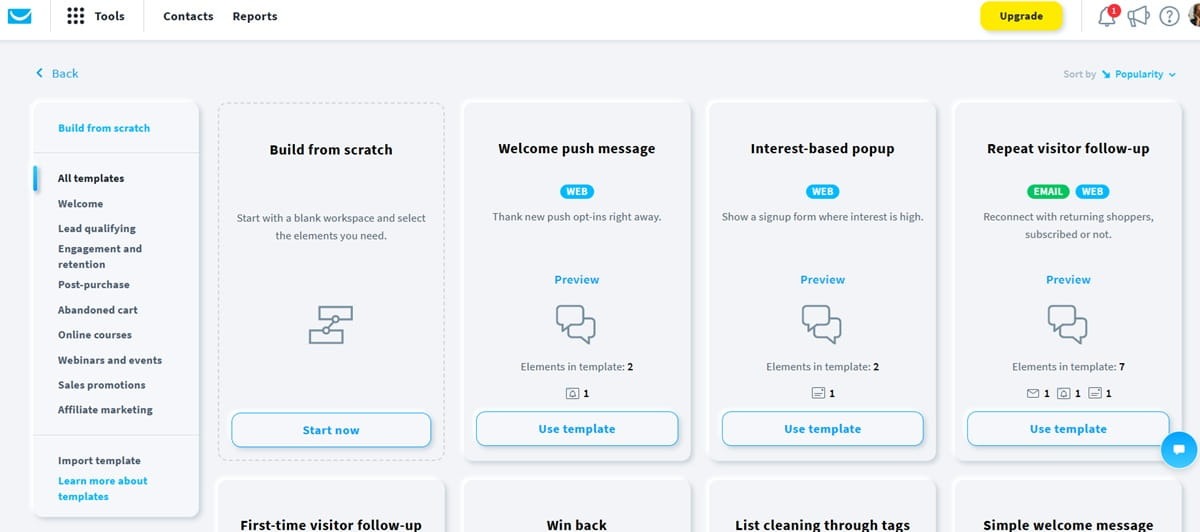
The visual automation builder lets you create complex multi-step workflows.
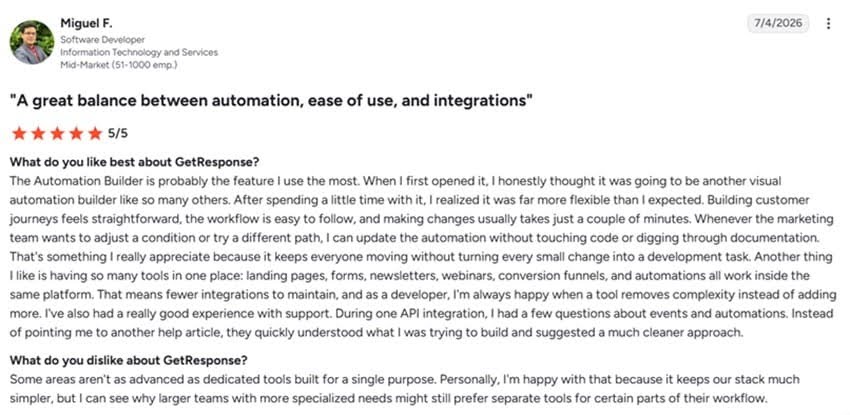
It supports branching and conditional logic as well as dynamic content while staying very flexible and user-friendly. This is one of the reasons customers like Miguel enjoy using GetResponse automation, as explained by this G2 user review.
Like HubSpot, GetResponse also supports omnichannel automation. It lets you automate email, SMS, and push notifications from one place. That means less tool hopping for your team and fewer software subscriptions for you.
GetResponse supports automated lead scoring and unlimited contact tagging. The platform scores leads based on their engagement levels with your campaigns and their actions on your site. This makes it easier for your sales executives to identify and prioritize hot leads.
Contact tagging lets you label leads. Use it to label leads based on the services they’ve shown interest in. This supports advanced contact segmentation, allowing you to target leads more effectively.
You can also use contact tags to mark leads when they enter and complete specific workflows. For instance, you could have “started_onboarding” and “completed_onboarding” tags for your onboarding workflow.
This allows you to track where leads sit in the user journey. Plus, you can use the tags as triggers to activate relevant follow-up sequences.
You can also search contacts by the assigned tags. This makes it easier for you to track contacts who’ve hit important milestones.
Finally, GetResponse offers a reliable email sending infrastructure to support enterprise B2B needs. Our platform maintains a 99% email deliverability rate. You can send up to 5 million emails per hour while ensuring inbox placement.
Enterprise users also get dedicated 24/7 customer support, a dedicated IP address, and a dedicated customer experience manager.
Key features
- Digital marketing reporting software – The reporting tool lets you track revenue and campaign metrics like opens, clicks, and unsubscribes. It offers click maps to track what campaign elements resonate with users and autoresponder analytics to track the performance of specific sequences.
GetResponse filters both traffic and clicks so you get clean, actionable insights.
- Revenue attribution for automation – Shows how much revenue an automation, autoresponder, or newsletter campaign drove. Ecommerce brands also see the average order value, number of orders, and total attributed revenue.
- Lead generation tools – We provide tools for creating landing pages, signup forms, and pop-ups for lead generation. Connect your landing pages to the automation tool to track what pages users visit so you can target them with relevant content.
- Conversion funnels – Build lead magnet, sales, and webinar funnels to generate leads and convert them into paying customers.
- A/B testing – Test different elements of your email campaigns as well as landing pages to optimize your conversion rate.
- Transactional email service – Use GetResponse to send time-sensitive transactional emails like account activation, order receipts, password resets, and ecommerce campaigns like order confirmations.
Limitations
- You can only access multi-channel marketing (SMS and mobile push notifications) if you’re on the enterprise plan.
Pricing
The GetResponse marketer plan offers unlimited automation workflows at just $48.38/mo for 1,000 contacts. This plan comes with landing pages, sales funnels, unlimited web push notifications, advanced audience segmentation, and signup forms and pop-ups.
The plan works well for most startups and mid-market brands.
For bigger B2B businesses, we recommend the enterprise package. This plan includes webinar tools, SMS marketing, mobile push notifications, transactional email marketing service, single sign-on, and a dedicated sending domain and IP addresses for optimal deliverability.
Contact our team to get a custom price based on your specific business needs.
3. Customer.io – Best for data unification
Customer.io is a data unification platform with a marketing automation solution built on top. The platform resolves the data silo issue that causes so many automation campaigns to break down.
Additionally, it supports data enrichment, which allows the automation system to access more customer data for even better targeting.
The data enrichment process starts right from your lead generation form. That means you can keep your lead capture forms brief to prevent drop-offs. The system enriches whatever data users provide to make sure both your sales team and automation system have the data they need for lead qualification and outreach.
Customer.io supports data enrichment through integrations with data sources via APIs, SDKs, webhooks, and prebuilt integrations. It connects to tools like HubSpot, Facebook Lead Ads, Google Ads, Salesforce, Google BigQuery, and Microsoft SQL Server.
Building automations is straightforward enough with the visual workflow builder. Customer.io also supports cross-channel journey orchestration. It lets you create marketing workflows that are deployed via email, SMS, in-app, WhatsApp, and website from one dashboard.
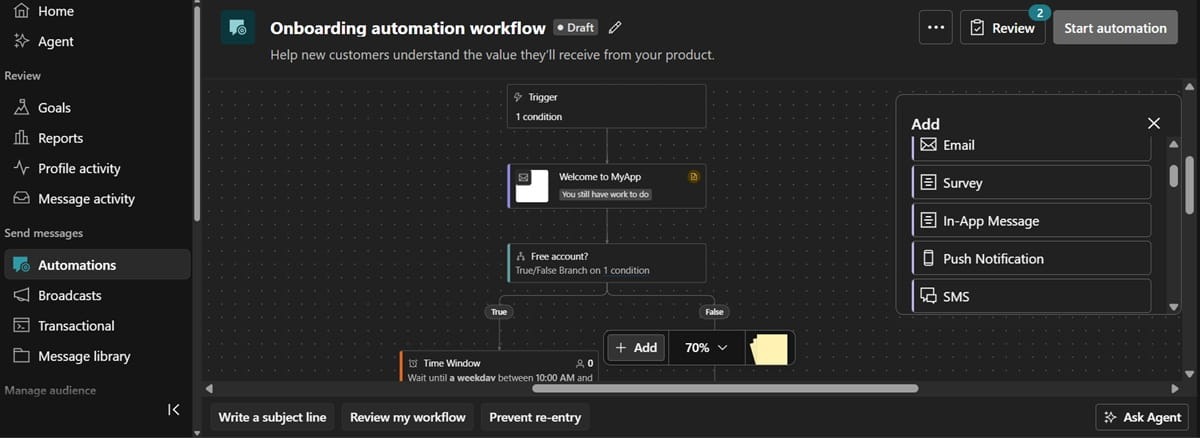
The platform tracks users’ channel preferences and makes sure campaigns are delivered there for optimal engagement. Meanwhile, intelligent timing ensures campaigns are sent at the right time for maximum opens and clicks.
Customer.io offers an MCP server that lets you connect it with AI platforms like ChatGPT and Claude. This gives the AI tools access to your Customer.io data and campaigns.
You can then interact with ChatGPT or Claude directly to ask it about your campaigns and even create new ones through prompts.
It also lets you run LLM prompts within workflows. For example, you can add an LLM action as a step when a lead enters a particular sequence. The action could be to search the lead’s company size, recent activity, or role.
That data is then added as an attribute within the workflow. It can also determine what happens next. For example, the data could be used to qualify leads before the workflow continues, as shown below.
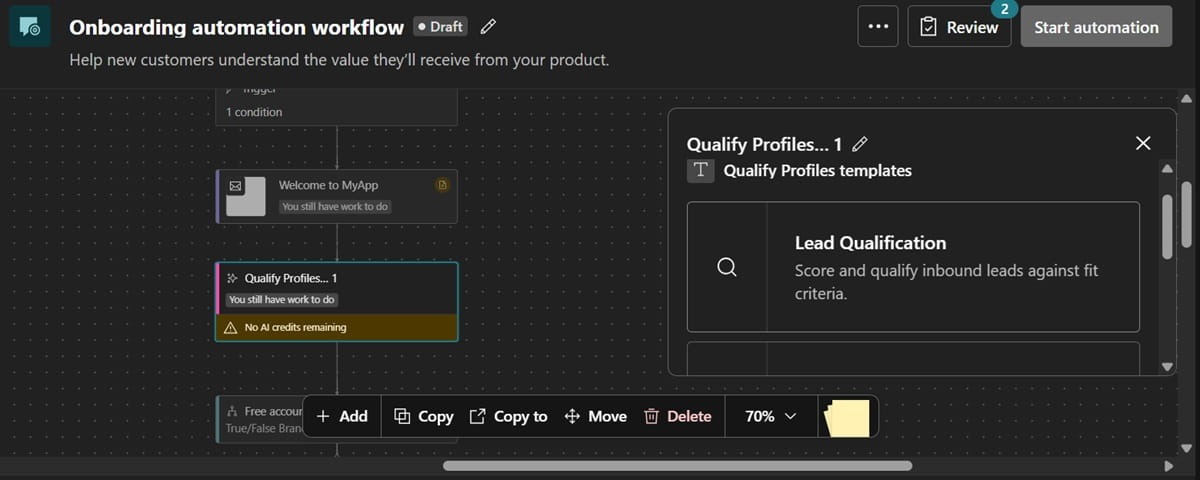
But note that every LLM action consumes AI credits. Credit consumption depends on the LLM model you use and the task in question.
Customer.io delivers detailed analytics on campaign and automation performance. It supports revenue attribution, which connects revenue to specific marketing workflows.
You can also engage the built-in AI agent to analyze performance. Simply ask the conversational AI questions, and it will query your data to provide the answers.
The platform filters bot activity from performance metrics and lets you monitor inbox placement.
Lastly, Customer.io is HIPAA-compliant. This makes it an ideal choice if you’re a B2B business in the healthcare space. But HIPAA compliance is only available on the expensive premium plan.
Key features
- Audience management – The audience management tool supports data-driven segmentation using real-time customer data. This facilitates precise targeting to deliver personalized user experiences. It also provides a profile view showing the messages a user has received, their engagement levels, and attributes.
- AI agent – Use the agent to build workflows, analyze results, and get smart campaign recommendations. The AI remembers your business context, like brand voice and goals, and implements it consistently across every campaign.
- Transactional messages – Send transactional emails conveniently on the same platform.
- A/B testing – Test your campaigns and receive relevant next-step recommendations from the AI agents.
- Sync audiences with ad networks – Connect your Customer.io segments with major ad networks for retargeting campaigns. The platform syncs lists every hour once you’ve set it up.
Limitations
- The UI doesn’t feel very intuitive, which creates a bit of a learning curve.
- Customers like Grace from G2 report that syncing the platform with data warehouses can also get expensive
Pricing
Marketing automation is available from the Essentials plan, starting at $100/mo for 5K profiles and 1 million monthly email sends. This plan supports basic integrations and comes with the visual workflow builder.
HIPAA compliance, advanced AI agent limits with custom skills, and premium chat and email support are available on the $1,000/mo Premium plan. You get custom profile volume and email sends.
Upgrade to the enterprise plan to get a dedicated customer success manager, audit logging, data governance, priority technical support, and dedicated hardware. The plan is available at a custom price.
If you are a B2B brand that has raised less than $10M, you may qualify for Customer.io’s startup program. This lets you use the platform for free for 12 months. You must have built your contact list organically and not be a previous customer to access the program.
Like HubSpot, using Customer.io’s AI agent requires credits. Paid users get 100,000 credits, after which you need to buy credits in packs of 100,000 credits at $10 per pack.
4. ActiveCampaign – Best for AI-powered workflows
ActiveCampaign is one of the best marketing automation platforms with agentic capabilities. The software offers a built-in AI assistant called Active Intelligence. This assistant is present throughout the platform. It provides suggestions, executes commands, and tracks campaign performance.
ActiveCampaign also comes with a built-in CRM platform. Basic CRM features like profile management and contact tagging are included with the standard plans. Advanced features like lead scoring and pipeline management are available as an add-on.
The context-aware AI helps you build powerful automations on ActiveCampaign. The AI tracks audience insights and suggests high-impact segments and workflows, for example.
Active Intelligence also monitors user actions like the pages customers visit, features they use, and when they open campaigns. These data points are used to enhance automations through tailored content and personalized timing.
Building workflows is straightforward, too. As you set up your ActiveCampaign account, the platform analyzes your website to understand your product offerings. It also asks for your business goals. You can add multiple goals, depending on the paid plan you pick.
The AI then suggests and builds several prebuilt workflows based on your product offerings and goals.
These workflows support branching paths and dynamic content to deliver personalized user journeys.
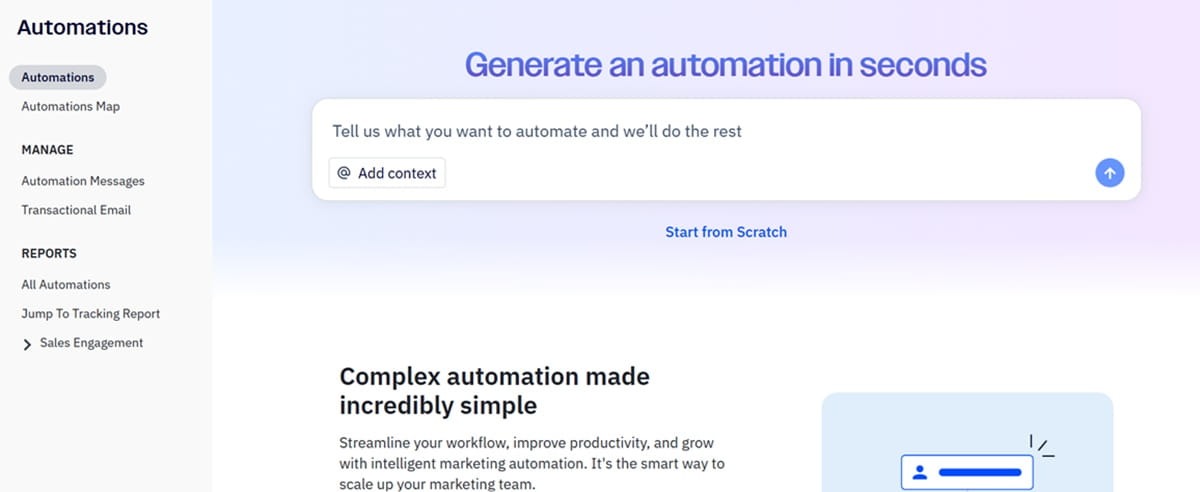
After creating the workflows, Active Intelligence continues to track performance in the background. It then delivers occasional suggestions on what you can do to hit your business goals.
What’s unique about the suggestions is that they’re not just based on your business and customer data. ActiveCampaign uses anonymized data from other businesses to provide campaign suggestions. It can recommend sequences it has seen produce results with businesses similar to yours, for example.
ActiveCampaign connects to more than 950 apps. This includes CRM systems, product analytics tools, scheduling software, payment processors, and collaboration tools. These integrations help ActiveCampaign track user activity on other platforms and use those actions as workflow triggers.
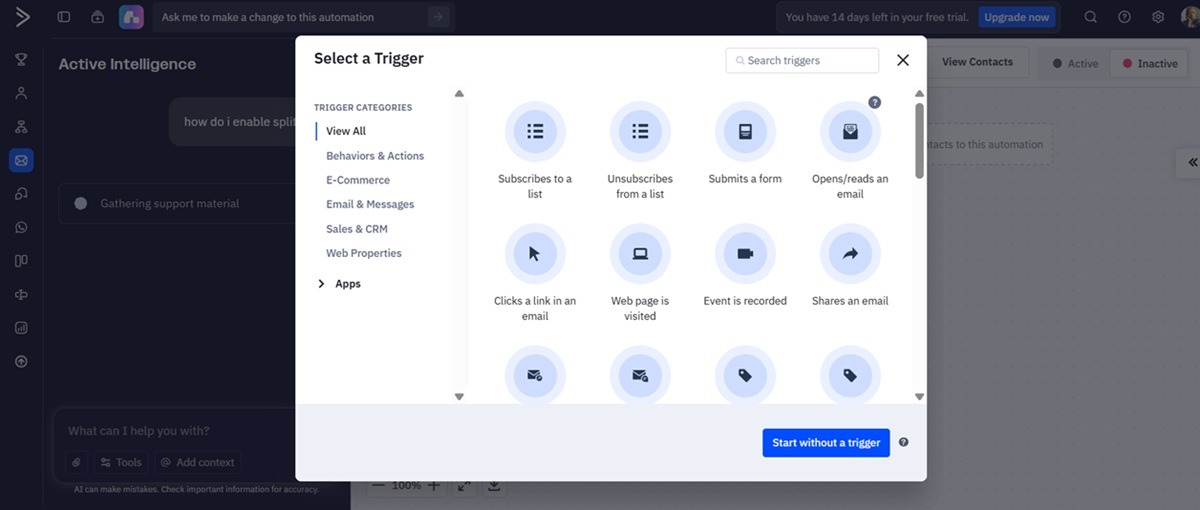
It even supports premium integrations with B2B marketing tools like Microsoft Dynamics and Salesforce. But premium integrations are only available in the enterprise plan.
People migrate to ActiveCampaign from automation platforms like Mailchimp because they want complex automation workflows. But as the user review below shows, ActiveCampaign does have a bit of a learning curve.
Steep pricing is another common complaint associated with this automation platform.
Key features
- Cross-channel orchestration – Build and manage automations across multiple marketing channels from one platform. ActiveCampaign supports email, SMS, WhatsApp, web, and social media automation.
- AI translations – Reach contacts across different markets in their native language. This is great for B2B companies with a global presence. You create a campaign once, and it’s auto-translated into multiple languages.
- Marketing attribution – Track the specific workflows, campaigns, and channels generating the most revenue for your business. It supports attribution and conversion tracking, custom event tracking, and sales process reporting.
- Pipeline management tool – Supports lead scoring and lets you manage deal and account records. It also tracks opportunities and automates lead assignment and outreach campaigns. Sales teams can collaborate on the platform, and you get instant alerts as deal statuses change.
Limitations
- Expensive
- Has a learning curve
Pricing
ActiveCampaign’s marketing automation plans start at $15/mo for 1,000 email contacts. But the entry plans lack critical automation features like advanced segmentation and conditional content. Even the $49/mo Plus plan doesn’t include conditional content or predictive sending.
You need the Pro plan, at $79/mo, to access conditional content, predictive sending, email marketing automation A/B testing, BotSense (to detect and filter bot activities), and automation maps. This plan lets you add up to 200 active business goals.
The Enterprise plan starts at $145/mo for five users. It includes single sign-on (SSO), premium CRM integrations, custom objects for segmentation, HIPAA support, custom reporting, and a dedicated account team.
ActiveCampaign does not support unlimited email sends, like other alternatives such as GetResponse. The number of monthly email sends is tied to your contact list size. The Pro plan’s starting price supports 1,000 contacts and 12X the contact list size for email sends (12,000).
Advanced sales tools like lead scoring, pipeline, and deal management are available as an add-on. Custom reporting is also available as an add-on if you’re on the Pro or Plus plans.
WhatsApp messaging, SMS, and transactional email services are sold separately, too.
5. Zoho marketing automation – Best for budget-friendly automations
Zoho lets you automate campaigns that generate, nurture, and convert leads. The platform has a built-in CRM, meaning your automation workflows can easily access user data for personalization.
It also syncs with other CRM providers, including Salesforce, HubSpot, and Dynamics 365.
Additionally, Zoho connects with messaging platforms, cloud storage services, and social platforms. The integrations help it track user behavior across different platforms to deliver curated user journeys.
It lets you build multi-channel workflows from one place. You can target users across email, WhatsApp, SMS, and your website. They offer prebuilt workflow templates you can customize and deploy in minutes. You can also build your own multi-step automation workflow with the visual editor.
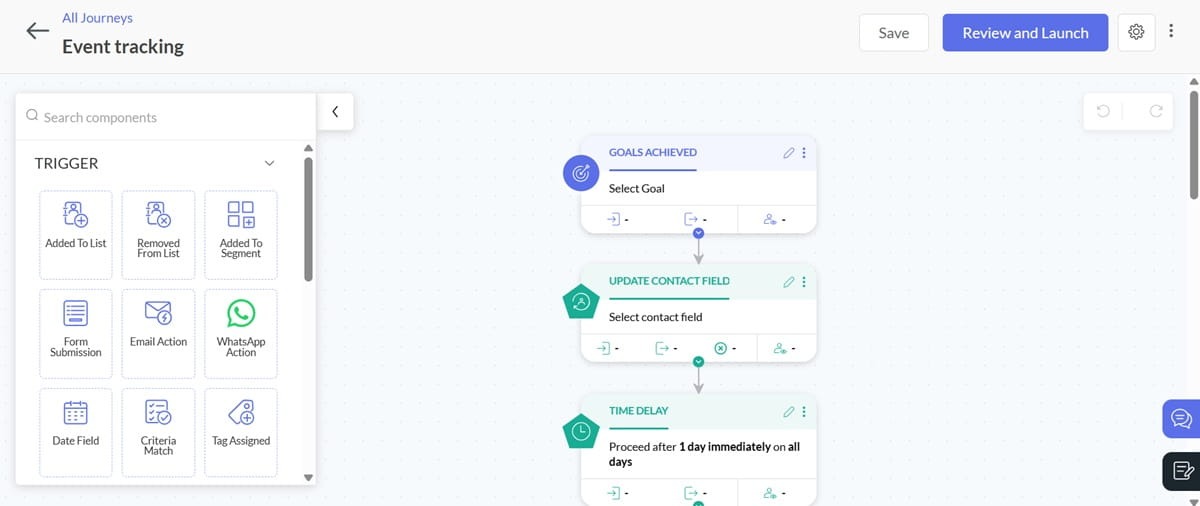
The platform uses different triggers like lead score updates, assigned tags, lead stage updates, pages viewed, and email responses to activate workflows. But the plan you choose determines which automation triggers you can access.
For example, “tag assigned” and “tag removed” are only available on Professional and Enterprise plans. Data field triggers are available on the Enterprise plan.
Zoho automations include split logic that takes users through unique customer journeys based on their actions and attributes.
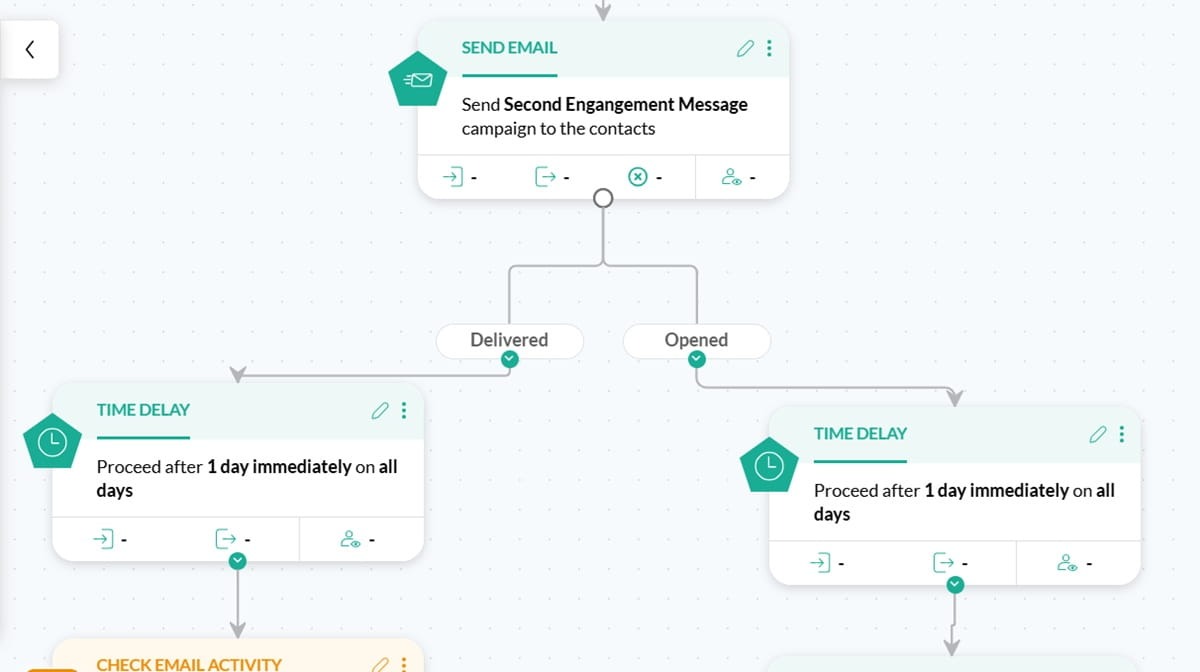
It supports contact scoring and automated lead routing. This prevents leads from dropping off and ensures sales teams spend their valuable time on accounts ready to convert.
The platform provides a lead management dashboard where you can track leads by stage and see active vs inactive leads. It also shows marketing-qualified leads and sales-qualified leads.
The dashboard helps with tracking the impact of your lead generation and nurturing campaigns.
Advanced analytics are available through the Zoho Business Intelligence dashboard. It provides lead attribution reports showing which touchpoints and campaigns have the biggest impact on revenue.
You can also set specific goals for different pages on your website and track them from the BI dashboard.
Key features
- Marketing planner – This collaborative dashboard lets sales and marketing teams create and manage campaigns across various marketing channels.
- Account-based marketing solution – The ABM solution for Zoho CRM lets you segment accounts by industry, region, behavior, and other attributes. It lets you target the accounts with personalized automated campaigns. But this is only available with the CRM tool.
- Website and in-app tracking – Track how users engage with your website and navigate your app. In-app tracking shows features customers use, how they move between features, and time spent on the different features. Use that data for precise segmentation and targeting.
- Lead generation tools – Build sign-up forms, pop-ups, and landing pages to capture leads.
- Smart URLs – Create custom URLs and use them in your campaigns to track how different marketing efforts drive traffic to your website.
Limitations
- Zoho has lots of marketing and automation features, so most users feel overwhelmed at first. It takes time to learn your way around the platform.
Pricing
Marketing automation is available from the Standard plan. This starts at $14/mo for 1,000 contacts and 2,000 website visitors.
But that plan doesn’t support advanced segmentation, contact management, webhooks, wait conditions, or journey templates with reports.
You need the $22/mo Professional plan to access those features. The Pro plan includes contact path tracing, custom re-entry criteria in journeys, WhatsApp marketing automation, and smart URLs.
The enterprise plan starts at $44/mo for 1,000 contacts and 10,000 website visitors. It accommodates 25 users and offers advanced targeting pop-ups, lead attribution, custom roles, and webhooks. A dedicated IP address is available on this plan as an add-on.
WhatsApp messaging and SMS marketing are sold separately. 1,000 monthly SMS messages in the US cost $13, while 1,000 WhatsApp messages cost $4.
In closing: Which B2B marketing automation platform is right for you?
The best B2B marketing automation tool hugely depends on several factors like your specific business goals and the complexity of your customer journey.
You want a platform that either has a built-in customer relationship management system or a customer data platform. Alternatively, you need an automation platform that supports seamless integration with your marketing tech stack to ensure data flows freely between the systems.
Remember, the automation platform relies on that data to trigger workflows. If the connection breaks, so do your workflows.
The GetResponse automation platform is a good option for B2B brands that want to automate the entire customer lifecycle. We support workflow automation for every stage of the user journey to move leads along in your sales pipeline, accelerate conversions, and drive high LTV.
Sign up for a free trial today to start closing deals faster. No credit card required.
Marketing automation for B2B FAQs
1. What is the best B2B marketing automation platform?
The best B2B marketing automation platform depends on your specific business scenario, but HubSpot, GetResponse, ActiveCampaign, Customer.io, and Zoho are popular options. Each of these tools has its strengths and weaknesses. Use our guide to identify the right automation tool for your business needs.
2. What are the essential features of B2B marketing automation software?
The most essential features of B2B marketing automation software are seamless CRM integration, contact scoring and management, advanced segmentation, and multi-channel automation. Powerful analytics with accurate revenue attribution are also crucial to track your workflow’s ROI.
3. What is the most effective platform for B2B marketing?
GetResponse is a good marketing software tool because it supports omnichannel marketing automation, lead scoring, contact tagging, and revenue attribution. Our platform also has a reliable sending infrastructure that ensures inbox placement for B2B businesses sending high-volume campaigns.