[ad_1]

Most people use “SMS” and “text message” as if they mean exactly the same thing. They nearly do, but the small difference between them explains why a long text counts as several messages on your bill, why a single emoji can split your message in two, and why some text bubbles are green and others blue.
This guide covers what SMS actually stands for, how a message travels from your phone to someone else’s, why it stops at 160 characters, and how it compares to MMS, RCS, and iMessage. Then, if you’re looking at SMS for your business, we’ll get into what changes when you text customers instead of friends.
What does SMS mean?
SMS is short for Short Message Service. It’s the 160-character, text-only messaging standard that sends over cellular networks. It launched in the early 1990s as a way to send short bursts of text between mobile phones, and it still runs on the same core cellular infrastructure today.
If a message left your phone with no Wi-Fi and no mobile data, it was almost certainly an SMS.
Three things define an SMS:
- It’s text only. No images, no video, no formatting. Just characters.
- It’s capped at 160 characters per message (more on why below).
- It uses the cellular network, not the internet. That’s why a text still sends when your data is off or there’s no Wi-Fi around.
That last point is the reason SMS refuses to die. It works on every mobile phone ever made, with no app to download and no connection to lose.
Is SMS the same as a text message?
In everyday language, these messages are known as “texts,” and “SMS” has fallen out of common usage. This is true for the United States and the rest of the English-speaking world.
However, there are places in continental Europe that still use the saying: send me an “SMS.” In most modern usage, the term “text message” offers sufficient context to describe an SMS.
Technically, there’s a small distinction. “Text message” is the umbrella term for anything you send from the Messages app. “SMS” is one specific type of text message. Send a photo and it becomes an MMS. Send it to another iPhone over Wi-Fi and it becomes an iMessage. All of those are “texts.”
Only the plain, cellular one is an SMS. Every SMS is a text message, but not every text message is an SMS.
Why SMS stops at 160 characters
When SMS was designed, engineers found that most messages fit comfortably in 160 characters using a compact system called GSM-7 encoding (7 bits per character). So 160 characters became the limit.
Two things happen when you push past it:
- Use an emoji or an accented letter (é, ñ, ü), and the whole message switches to a heavier encoding called Unicode (UCS-2). Your limit drops from 160 to 70 characters per segment. One 😀 can turn a single message into two.
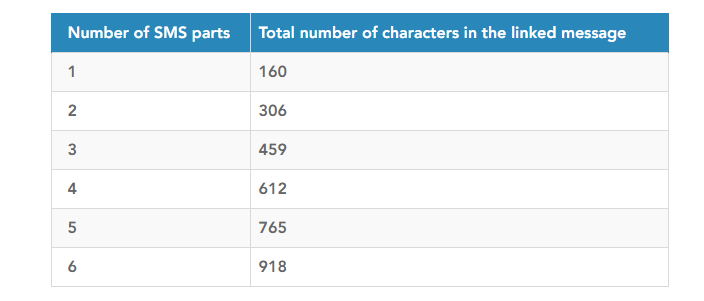
- Go over 160 characters, and your phone splits the message into segments and stitches them back together on the other end. Concatenated messages hold 153 characters each. The other characters carry the “join these back together” instructions. A long message can run up to 6 linked parts, or 918 characters total.
⚠️ For businesses sending at scale, this is a hidden drain on messaging budget. A message you think of as “one text” can bill as two or three. If you’re writing campaigns, our free SMS length calculator shows the segment count before you send.
SMS vs MMS vs RCS vs iMessage
Four names, one Messages app. Here’s how they actually differ:
- RCS and iMessage are the newer, internet-based messaging optionswith read receipts, typing indicators, and encryption.
- SMS is the plain text, 160 characters message, sent over the mobile network.
- MMS is SMS plus media (images, video, audio), sent over your mobile data connection.
SMS is the lowest common denominator that always works. RCS and iMessage are richer, but they depend on both people being on the same platform with a data connection.
How SMS actually works
An SMS doesn’t go straight from your phone to your friend’s. It makes a quick stop. Here’s the path:
- You hit send. Your phone hands the message to the nearest cell tower.
- The tower passes it to an SMSC (Short Message Service Center), the carrier infrastructure that routes every text.
- The SMSC stores and forwards it. If the recipient’s phone is off or out of range, the SMSC holds the message and retries later.
- It routes to the recipient’s carrier, then to the tower nearest them.
- The message lands.
The whole trip takes a second or two.
“Sent as SMS” and the green vs blue bubble
- “Sent as SMS text message” appears when iMessage can’t go through. This happens when the other person isn’t on an iPhone, or there’s no data connection. Your iPhone quietly falls back to regular SMS so the message still arrives.
- Green vs blue bubbles: blue means iMessage (Apple to Apple, over the internet). Green means a standard SMS or MMS. Green bubbles are plain SMS, which is why they lack typing indicators and read receipts.
💡 With RCS now supported on iPhones, some green-bubble chats are getting richer features.
Is SMS secure?
SMS is reliable, but it was never built for privacy.
- SMS is not encrypted. The message travels as readable text through carrier infrastructure.
- It can be spoofed or spammed. “Smishing” (phishing over SMS) uses fake sender names to trick people into clicking bad links.
That’s fine for an appointment reminder or a delivery update. For passwords or genuinely sensitive data, an encrypted channel is the safer choice.
For businesses, the practical protection is staying compliant and only messaging people who opted in, which is where SMS compliance comes in.
SMS for business: what actually changes
Most of the SMS you receive already comes from businesses.
The delivery update, the appointment reminder, the 2FA code, the “your table is ready” are all plain SMS, chosen for the same reason: they reach every phone, instantly, with no app required.
SMS open rates sit near 98%, and most texts are read within minutes. But texting customers isn’t the same as texting friends. Three things change:
- You need consent. People have to opt in before you message them, and every message needs an opt-out path.
- You need a dedicated number. In the US, sending business SMS from standard local numbers means registering for 10DLC. Toll-free numbers are another route for higher volume.
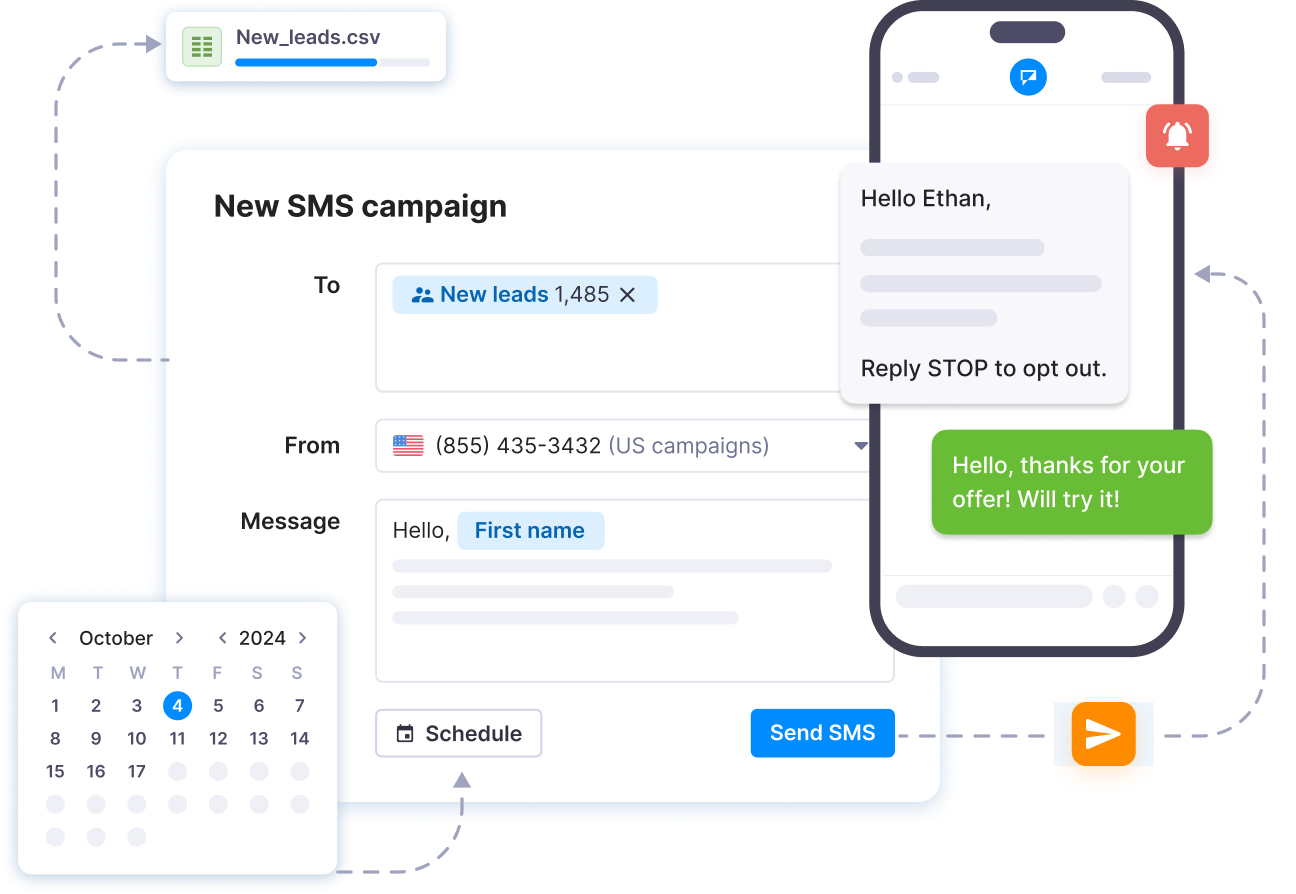
- You send through a platform, not your phone. A business texting platform or an SMS API handles delivery, replies, contacts, and reporting at scale.
When to use SMS, MMS, or RCS
- Reach the most people, most reliably: use SMS. It works on every phone with no internet.
- Send a photo, coupon, or short video: use MMS, and expect it to cost more per message. SMS attachments can also be used and are more cost-effective.
- Run rich, interactive chats where everyone’s on a supported device: RCS or iMessage shine, but they’re not universal.
For business messaging, SMS remains the safe default because it reaches everyone. You can layer richer formats on top once you know your audience supports them.
Make SMS work
for your business
Start connecting with
customers today.
Frequently Asked Questions (FAQs)
Not in everyday use.
While SMS (Short Message Service) is technically the protocol used to send messages, the term “text message” is what most users recognize and use in casual language. For the average user, there’s no practical distinction.
A typical SMS allows up to 160 characters using GSM 7-bit encoding.
For languages that require Unicode (such as Arabic or Chinese), the limit reduces to 70 characters. Longer texts are broken up and sent as multiple linked messages.
Those are MMS messages (Multimedia Messaging Service), not SMS.
MMS lets users send rich content like photos, videos, or longer messages, though it requires a data connection and typically costs more per message than SMS.
To support secure and consistent delivery, advanced SMS platforms like Textmagic provide tools like sender ID verification, retry logic, real-time delivery status, and encoding compatibility.
These capabilities help maintain compliance and optimize message success rates.
[ad_2]
Source_link