Key takeaways
- Business accounts: Unlock Ads Manager, advanced analytics, third-party scheduling tools like Hootsuite, and TikTok Shop, but restrict access to trending sounds and creator monetization programs.
- Personal accounts: Offer the full sound library, Creator Rewards eligibility, and privacy settings, but lack advertising tools and third-party platform integrations.
- Switching between account types is free and reversible, but you may lose analytics history, and TikTok advises against switching frequently.
- The right account type depends on whether you prioritize content creation flexibility (personal) or business growth tools like ads and ecommerce (business).
What are the different types of TikTok accounts?
TikTok currently offers three account types: Personal, Business, and Organization. Organization accounts are designed for larger institutions and have their own requirements, so this guide focuses on the two types most relevant to creators and brands: Personal and Business. Every new TikTok account starts as a Personal account by default, and upgrading to a Business account is free.
Here’s a quick overview of what each account type offers:
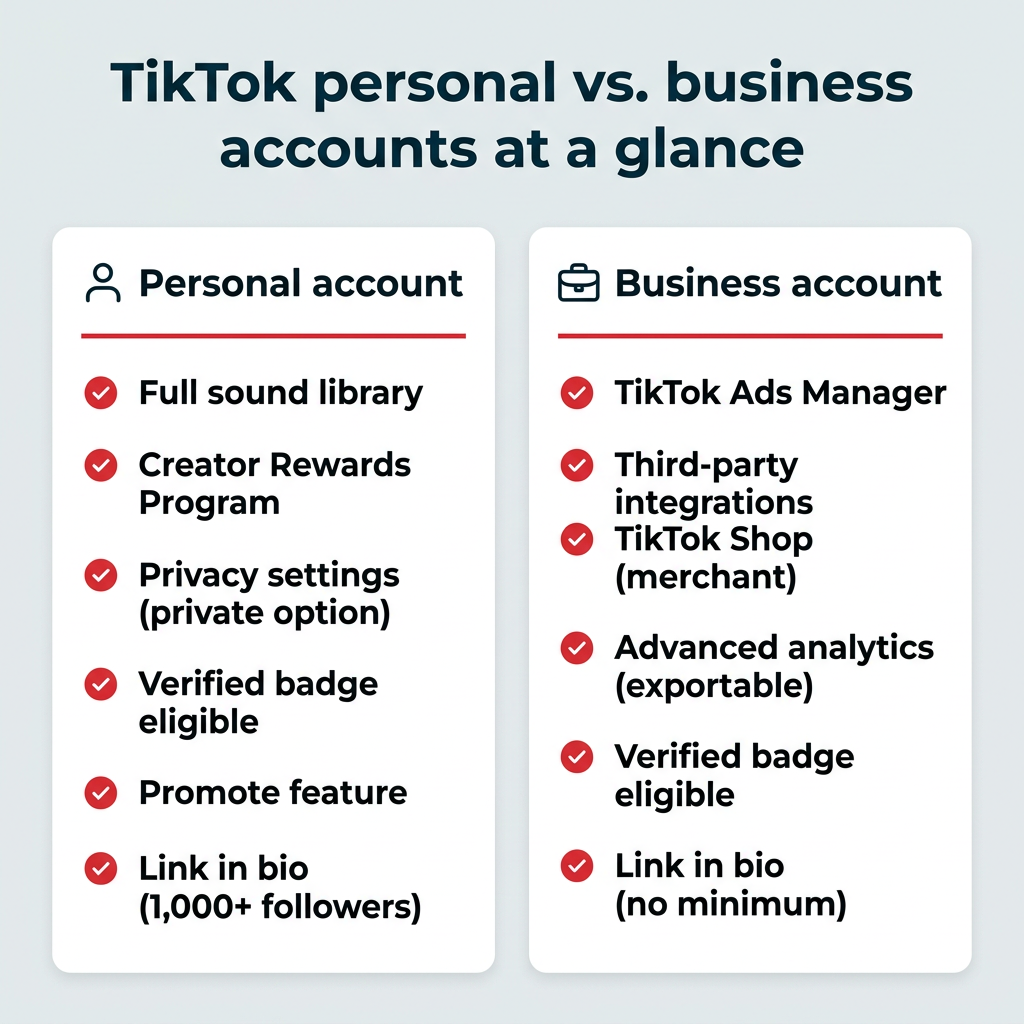
TikTok previously distinguished between “creator” and “Personal” accounts, but these were merged years ago. Today, the terms “Personal account” and “creator account” refer to the same thing.
Bonus: Get a free TikTok Growth Checklist from famous TikTok creator Tiffy Chen that shows you how to gain 1.6 million followers with only 3 studio lights and iMovie.
What is a TikTok Personal account?
A Personal account (also called a creator account) is the default TikTok account type. If you just signed up for TikTok, you already have one. Personal accounts are designed for individual creators, influencers, and general users who want to post content, grow a following, and access creator-specific monetization programs.
What is a TikTok Business account?
A TikTok Business account is designed for brands and businesses of all sizes. It unlocks advanced features like TikTok Ads Manager, third-party platform integrations, and ecommerce tools. Upgrading is free and only takes a few seconds, and you can switch back to a Personal account if you change your mind.
What are the advantages of a TikTok Personal account?
Personal accounts offer several features that business accounts don’t, especially when it comes to content creation flexibility and monetization. Here are the key advantages:
- Full sound library access: Personal accounts can use both the general Sounds library and Commercial Sounds. That means you can use any trending audio in your videos without worrying about copyright restrictions. Business accounts are limited to Commercial Sounds only, which can make it harder to jump on audio-driven trends.
- Privacy settings: Personal accounts can be set to private. Business accounts are locked to public with no option to toggle.
- Verification: Personal accounts are eligible for TikTok’s verified badge, which helps build credibility and visibility on the platform.
- Creator monetization programs: Personal accounts have access to the Creator Rewards Program (which replaced the original Creator Fund), Creator Next, Gifts, and other monetization features. These programs pay eligible creators based on video performance metrics, with the potential to earn up to 20x more than the original Creator Fund. Business accounts cannot participate.
- Access to special development programs: Personal accounts can access creator-specific programs like Creator Next, which helps creators monetize as they grow their communities.
- Promote feature: Personal accounts can use TikTok’s Promote tool to boost individual videos and gain more followers. Promote is only available for videos using original or commercially cleared audio.
- Link in bio: Personal accounts can add a link to their bio if they have at least 1,000 followers.
Both Business and Personal accounts can access the Creator Marketplace, which connects brands and creators for collaboration opportunities.
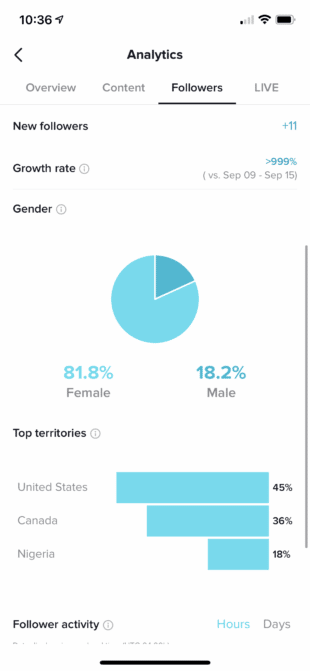
Personal accounts can access basic analytics through Creator Tools.
What sounds and music can Personal accounts access?
The sound library difference is one of the biggest reasons creators hesitate to switch to a Business account. Personal accounts have access to TikTok’s entire music and sound catalog, including licensed songs from major artists and user-generated audio clips that go viral.
This matters because audio trends drive a huge portion of TikTok content. When a sound goes viral, creators with Personal accounts can immediately use it in their videos. Business accounts are restricted to the Commercial Sounds library, a curated collection of royalty-free tracks and sounds pre-cleared for commercial use. While the Commercial Sounds library is substantial, it doesn’t include every trending audio clip.
If your content strategy relies heavily on participating in audio-driven trends, this restriction is worth weighing carefully.
What are the disadvantages of a TikTok Personal account?
Personal accounts come with meaningful limitations, especially for brands and businesses trying to scale their TikTok presence:
- No TikTok Ads Manager access: Personal accounts can boost posts with the Promote feature, but they cannot access TikTok Ads Manager to create full advertising campaigns with advanced targeting, budgeting, and reporting.
- No third-party platform integrations: Personal accounts cannot connect to third-party social media management tools like Hootsuite. That means no auto-publishing, no centralized comment management, and no cross-platform scheduling.
- Limited analytics: Personal accounts have access to basic analytics under Creator Tools, but the data cannot be exported. While TikTok offers date ranges up to 365 days and custom reporting within the app, the inability to download reports makes it difficult to share performance data with team members or track trends externally.
- Limited ecommerce tools: Personal accounts don’t have access to TikTok Shop’s full merchant features, including product catalogs and in-app checkout. Creators can participate in affiliate product promotion, but the full selling toolkit requires a Business account.
- Restricted scheduling: Without third-party tool access, Personal accounts are limited to TikTok’s built-in scheduling feature, which has a 10-day posting window.
What are the advantages of a TikTok Business account?
Business accounts are built for brands that want to use TikTok as a growth channel. They unlock tools for advertising, selling, and managing your presence at scale. Here are the key advantages:
- Third-party platform management: Business accounts can connect to social media management platforms like Hootsuite, giving you access to scheduling beyond TikTok’s 10-day limit, centralized comment management, cross-platform analytics, and best-time-to-post recommendations.
- TikTok Ads Manager: Business accounts unlock full access to TikTok Ads Manager, where you can create, manage, and optimize advertising campaigns with advanced targeting and reporting.
- TikTok Shop: Business accounts can set up a product catalog, enable in-app checkout, and sell products directly on TikTok through video, live streams, and a dedicated shop tab.
- Advanced analytics: Business accounts get more detailed performance data, including the ability to download analytics reports for sharing with team members and stakeholders.
- Verification: Business accounts are eligible for TikTok’s verified badge, which can increase visibility and build trust with your audience.
- Promote feature: Like Personal accounts, Business accounts can use TikTok’s Promote tool to boost individual videos. Promote is only available for videos using original or commercially cleared audio.
- Link in bio: Business accounts can add a website link to their bio with no follower minimum, which is a straightforward way to drive traffic from TikTok to your site.
What advertising tools do Business accounts unlock?
The Promote feature is available to both Personal and Business accounts, but TikTok Ads Manager is exclusive to Business accounts. This is a significant distinction.
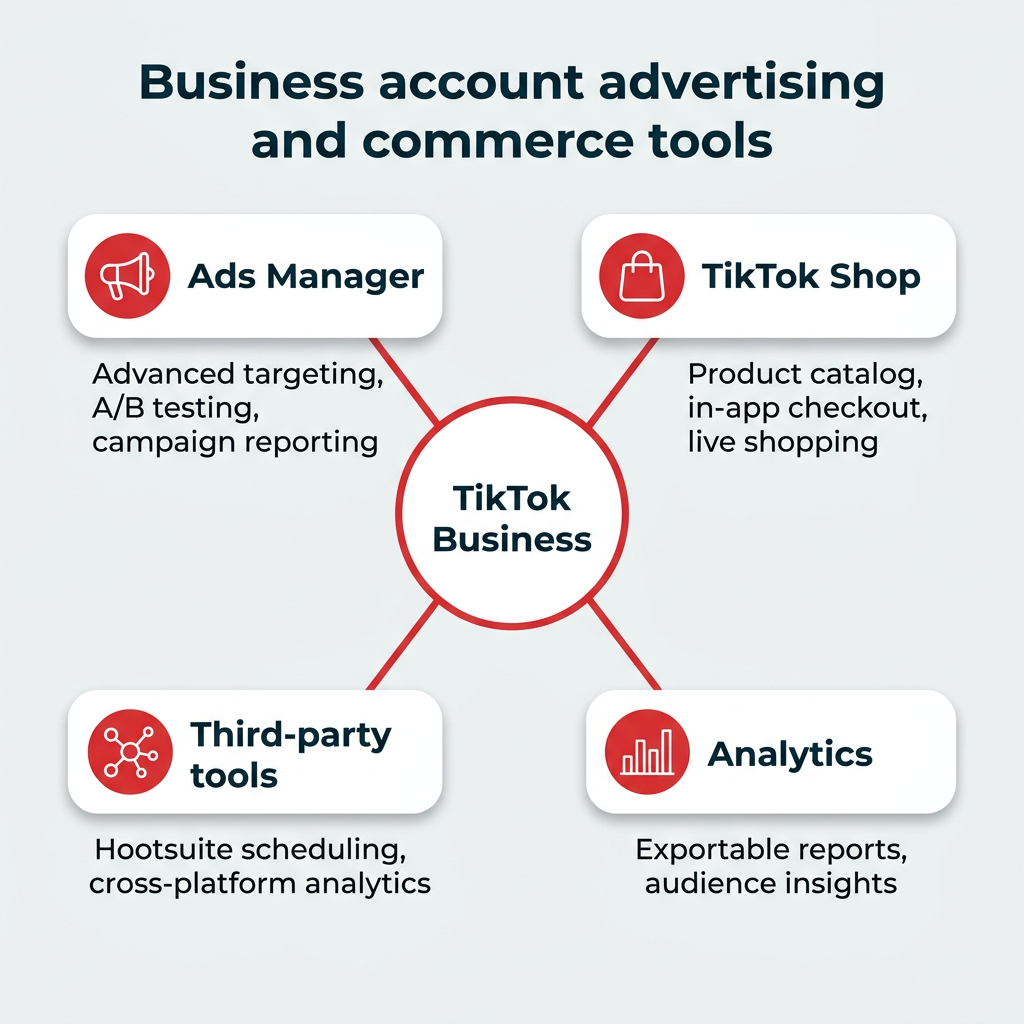
With Ads Manager, you can create full advertising campaigns with objectives like traffic, conversions, and app installs. You get access to advanced audience targeting, budget controls, A/B testing, and detailed campaign reporting. Personal accounts are limited to boosting existing videos through Promote, which offers far less control over targeting and optimization.
If paid advertising is part of your TikTok strategy, a Business account is required.
How does TikTok Shop work with a Business account?
TikTok Shop, which now accounts for 18.2% of U.S. social commerce, lets Business accounts sell products directly within the app. You can create a product catalog, tag products in videos and live streams, and enable in-app checkout so customers never have to leave TikTok to complete a purchase.
Business accounts can also connect their Shopify store to sync inventory and manage orders. Live shopping, where you showcase products during a live stream and viewers can purchase in real time, has become an increasingly popular feature for brands on the platform.
Personal accounts can participate in TikTok Shop as affiliates, promoting other brands’ products for a commission. But the full merchant toolkit, including your own product catalog and checkout, requires a Business account.
What are the disadvantages of a TikTok Business account?
Business accounts trade some creative flexibility for their advanced tools. Here are the main drawbacks:
- Restricted sound library: Business accounts only have access to Commercial Sounds, a library of tracks pre-cleared for commercial use. You won’t have access to every trending sound on TikTok, which can limit your ability to participate in audio-driven trends.
- No creator monetization programs: Business accounts cannot access the Creator Rewards Program, Gifts, Diamonds, or other creator-specific monetization features. Revenue generation for Business accounts comes through selling products and running ads, not through TikTok’s creator payment programs.
- No private account option: Business accounts are always public. If you need the ability to toggle your profile to private, you’ll need a Personal account.
- Perceived organic reach impact: Some users report lower organic reach after switching to a Business account, though TikTok has not confirmed any algorithmic difference between account types (more on this below).
Business accounts can still access the Creator Marketplace to connect with creators and find influencers for collaboration.
Does a TikTok Business account affect organic reach?
This is one of the most common concerns about switching to a Business account, and the short answer is: TikTok has not confirmed that Business accounts receive lower organic reach than Personal accounts.
That said, many creators and marketers report anecdotal differences in reach after switching. Some attribute this to the restricted sound library, since videos using trending audio tend to get more distribution. Others point to changes in content strategy that coincide with the switch.
What TikTok’s algorithm does prioritize is content quality, watch time, engagement signals, and relevance to the viewer. Account type is not a confirmed ranking factor. If your content performs well on these metrics, a Business account should not inherently limit your reach.
The bottom line: There’s no official evidence that Business accounts are penalized in the algorithm, but the restricted sound library may indirectly affect your ability to ride trending audio waves.

#1 for TikTok marketing
Schedule TikToks, answer comments, and show off your results in beautiful reports. It’s so easy.
How do monetization options differ between TikTok account types?
Monetization works differently depending on your account type. Personal accounts have access to TikTok’s creator payment programs, while Business accounts monetize through commerce and advertising.
Here’s how the options break down:
|
Monetization feature |
Personal account |
Business account |
|---|---|---|
|
Creator Rewards Program |
Yes |
No |
|
Gifts and Diamonds (live and video) |
Yes |
No |
|
Series (paid content) |
Yes |
No |
|
Creator Marketplace (brand deals) |
Yes |
Yes |
|
TikTok Shop (merchant) |
No |
Yes |
|
TikTok Ads Manager |
No |
Yes |
|
Promote (boosting videos) |
Yes |
Yes |
|
Affiliate product promotion |
Yes |
Yes |
If you’re a creator looking to earn directly from your content through TikTok’s payment programs, a Personal account is the way to go. If you’re a brand focused on selling products or running ad campaigns, a Business account gives you the tools you need.
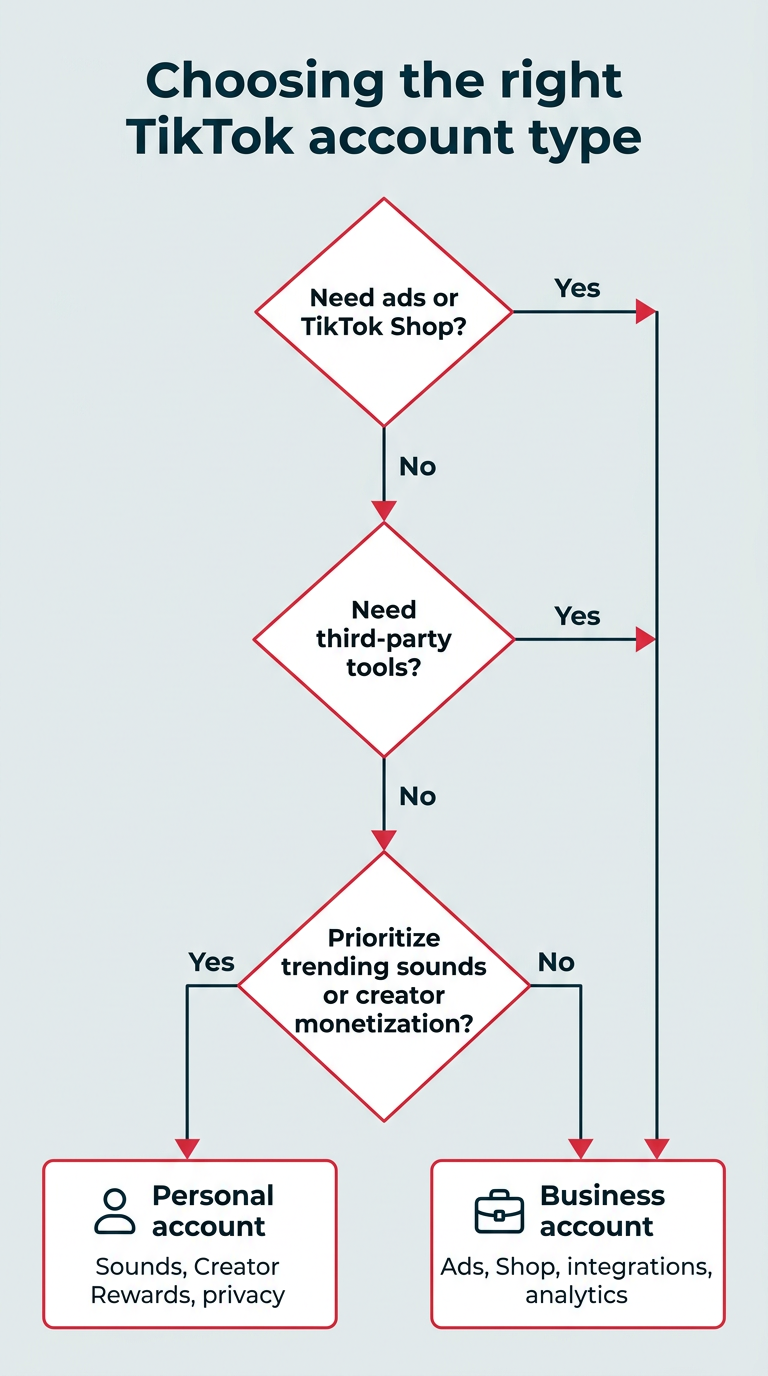
How do you choose between a TikTok Business and Personal account?
The right account type depends on what you’re trying to accomplish on TikTok. Here’s a comprehensive comparison of features across both account types:
Choose a Personal account if you:
- Are an individual creator, influencer, or public figure
- Want to earn through the Creator Rewards Program, Gifts, or Diamonds
- Rely on trending sounds and audio for your content strategy
- Need the option to set your profile to private
- Don’t need third-party scheduling or advanced advertising tools
Choose a Business account if you:
- Represent a brand, company, or organization of any size
- Want to run advertising campaigns through TikTok Ads Manager
- Need to sell products through TikTok Shop
- Want to connect to a third-party management platform like Hootsuite for scheduling, analytics, and comment management
- Need downloadable analytics reports for your team or stakeholders
- Are managing TikTok as part of a larger multi-platform social strategy
For most brands and businesses, a Business account is the better choice. TikTok continues to expand its commerce and advertising features, and a Business account ensures you have access to the full toolkit.
How do you switch TikTok account types?
Switching between TikTok account types is free and takes less than a minute. Here’s how to do it in both directions.
How to switch to a TikTok Business account
- Tap Profile in the bottom right to go to your profile.
- Tap the Menu ☰ button at the top.
- Tap Settings and privacy.
- Tap Account.
- Tap Switch to Business Account.
- Follow the instructions to finish.
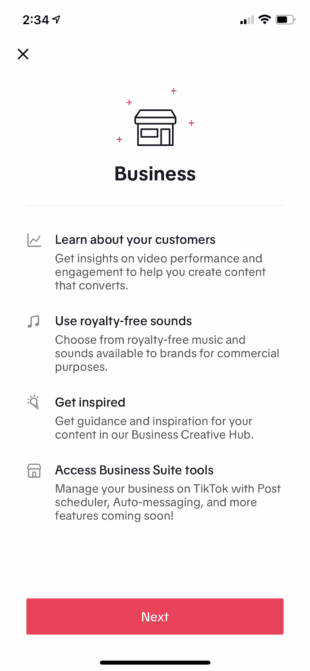
Switching to a business account takes just a few taps in your settings.
How to switch back to a TikTok Personal account
If you’re not loving the Business account features, you can revert to a Personal account. TikTok doesn’t recommend switching back and forth between Business and Personal accounts, but if you need to, it’s straightforward:
- Tap Profile in the bottom right to go to your profile.
- Tap the Menu ☰ button at the top.
- Tap Settings and privacy.
- Tap Account.
- Tap Switch to Personal Account.
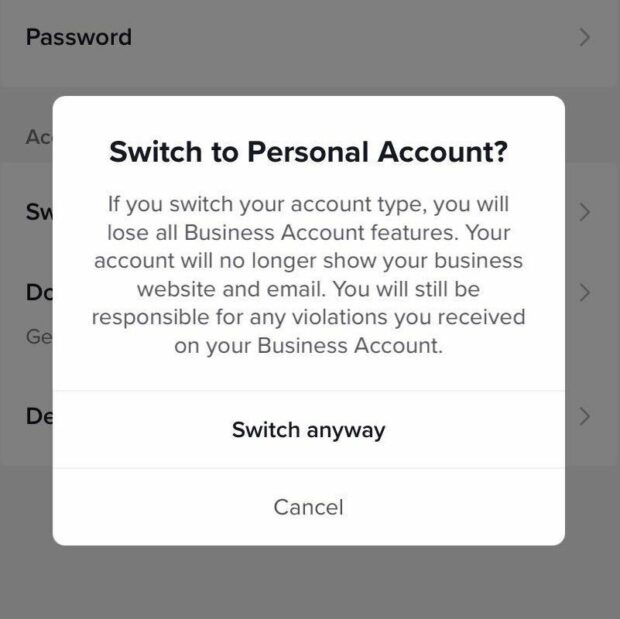
You can switch back to a Personal account at any time through your settings.
What happens when you switch TikTok account types?
Switching account types won’t affect your followers, your existing videos, or your profile information. All of that stays intact.
What does change is your feature access. If you switch from Personal to business, you’ll immediately lose access to the full sound library and creator monetization programs. If you switch from business to personal, you’ll lose Ads Manager access, TikTok Shop merchant features, and the ability to connect third-party tools.
Your analytics history may also be affected. Some users report losing access to previously collected analytics data after switching, so it’s worth downloading any reports you need before making the change.
TikTok recommends choosing one account type and sticking with it rather than switching back and forth frequently.
How to manage your TikTok Business account with Hootsuite
Once you’ve switched to a Business account, connecting it to Hootsuite gives you a centralized hub for managing your TikTok presence alongside your other social channels.
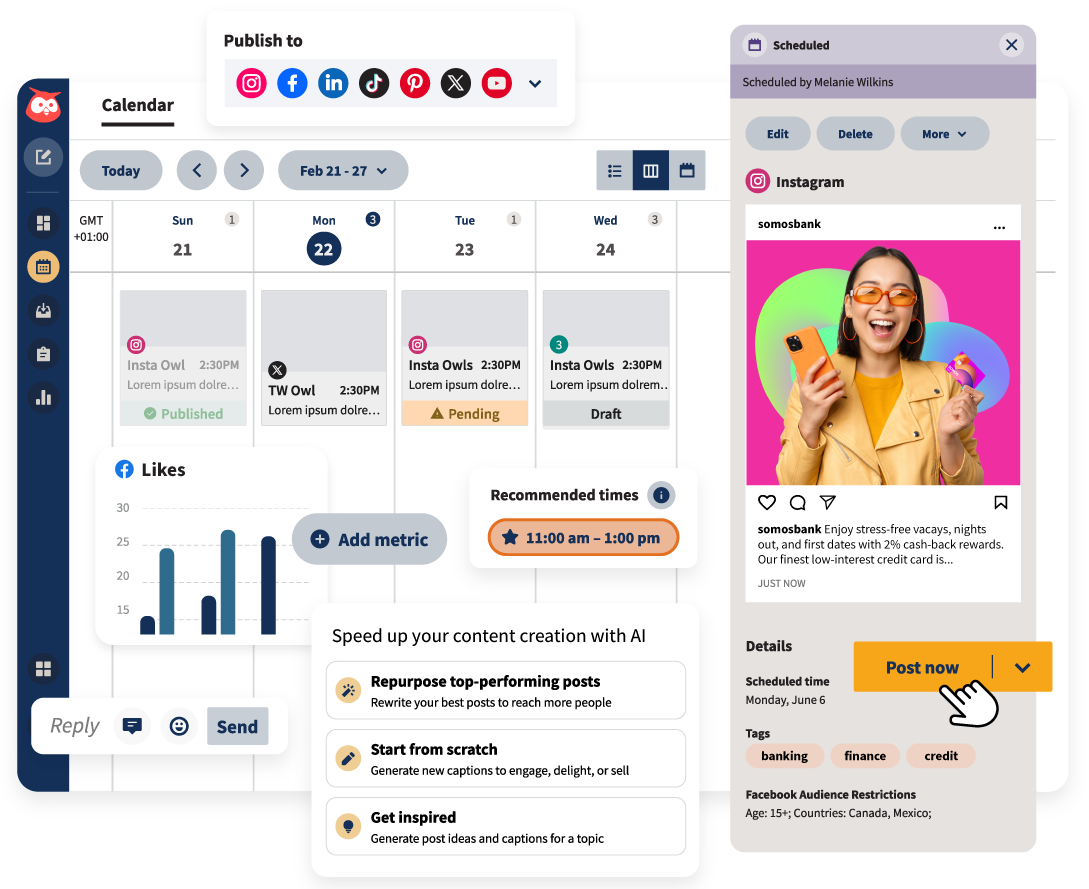
With Hootsuite, you can:
- Schedule TikTok videos for any date in the future, well beyond TikTok’s built-in 10-day scheduling limit
- Get best-time-to-post recommendations based on when your audience is most active
- Manage comments and DMs from a single inbox alongside your other platforms
- Track performance with customizable analytics and downloadable reports
- Plan content visually with a drag-and-drop calendar that shows your full publishing schedule across every network
Hootsuite works with TikTok Business accounts only. Personal accounts cannot connect to third-party management platforms due to TikTok’s API restrictions.
Frequently asked questions
Is it better to have a Personal or Business TikTok account?
Whether it’s better to have a Personal or Business TikTok account depends on your goals. Business accounts are better for brands that need analytics, advertising tools, and ecommerce features like TikTok Shop. Personal accounts suit creators focused on monetization through programs like Creator Rewards and who want full access to trending sounds. Most brands and businesses benefit from a Business account, while individual creators and influencers are better served by a Personal account.
What are the disadvantages of a TikTok Business account?
The main disadvantages of a TikTok Business account are restricted access to trending sounds (you’re limited to Commercial Sounds), no eligibility for creator monetization programs like Creator Rewards or Gifts, and the inability to set your profile to private. Some users also report perceived differences in organic reach, though TikTok has not confirmed any algorithmic distinction between account types.
Does switching to a TikTok Business account affect your reach?
Switching to a TikTok Business account does not officially affect your reach—TikTok has not confirmed that Business accounts receive lower organic reach than Personal accounts. Some users report anecdotal differences after switching, but this may be related to the restricted sound library rather than algorithmic penalties. Content quality, engagement, and watch time remain the primary factors that drive distribution on TikTok regardless of account type.
Can you run TikTok ads with a Personal account?
You can run TikTok ads with a Personal account using the Promote feature to boost individual videos, but only Business accounts have access to TikTok Ads Manager for creating full advertising campaigns. Ads Manager offers advanced targeting, budget controls, A/B testing, and detailed campaign reporting that Promote does not provide.
Do you lose followers when you switch TikTok account types?
No, switching between TikTok account types does not affect your follower count or your existing content. Your videos, profile information, and followers all remain intact. What changes is your access to specific features like the sound library, monetization programs, and business tools.
Can you use TikTok Shop with a Personal account?
You cannot use TikTok Shop’s full merchant features with a Personal account—product catalogs and in-app checkout are available only to Business accounts. Personal accounts can participate in affiliate product promotion, earning commissions by featuring other brands’ products, but cannot set up their own storefront or manage inventory through TikTok Shop.
What is the TikTok Creator Rewards Program?
The TikTok Creator Rewards Program (which replaced the original Creator Fund) pays eligible creators based on video performance metrics like qualified views. It is only available to Personal account holders who meet TikTok’s eligibility requirements. Business accounts cannot participate in this program.
Can you schedule TikTok posts with a Personal account?
You can schedule TikTok posts with a Personal account, but only using TikTok’s built-in scheduling feature with its 10-day posting window—Personal accounts cannot connect to third-party scheduling tools like Hootsuite. Business accounts can connect to third-party platforms for more flexible scheduling, including the ability to plan and queue content weeks or months in advance.
How much does it cost to switch to a TikTok Business account?
Switching to a TikTok Business account is completely free and takes less than a minute through your account settings. There is no paid tier or subscription required. You can switch back to a Personal account at any time, also at no cost.
Can you switch back from a Business account to a Personal account on TikTok?
Yes, you can switch back from a Business account to a Personal account at any time through your account settings. However, TikTok recommends against switching frequently, and you will immediately lose access to business-specific features like Ads Manager, TikTok Shop merchant tools, and third-party platform integrations. Your followers and content will not be affected.
Save time managing your social media marketing strategy with Hootsuite. Publish and schedule posts, find relevant conversions, measure results, and more — all from one dashboard. Try it free today.