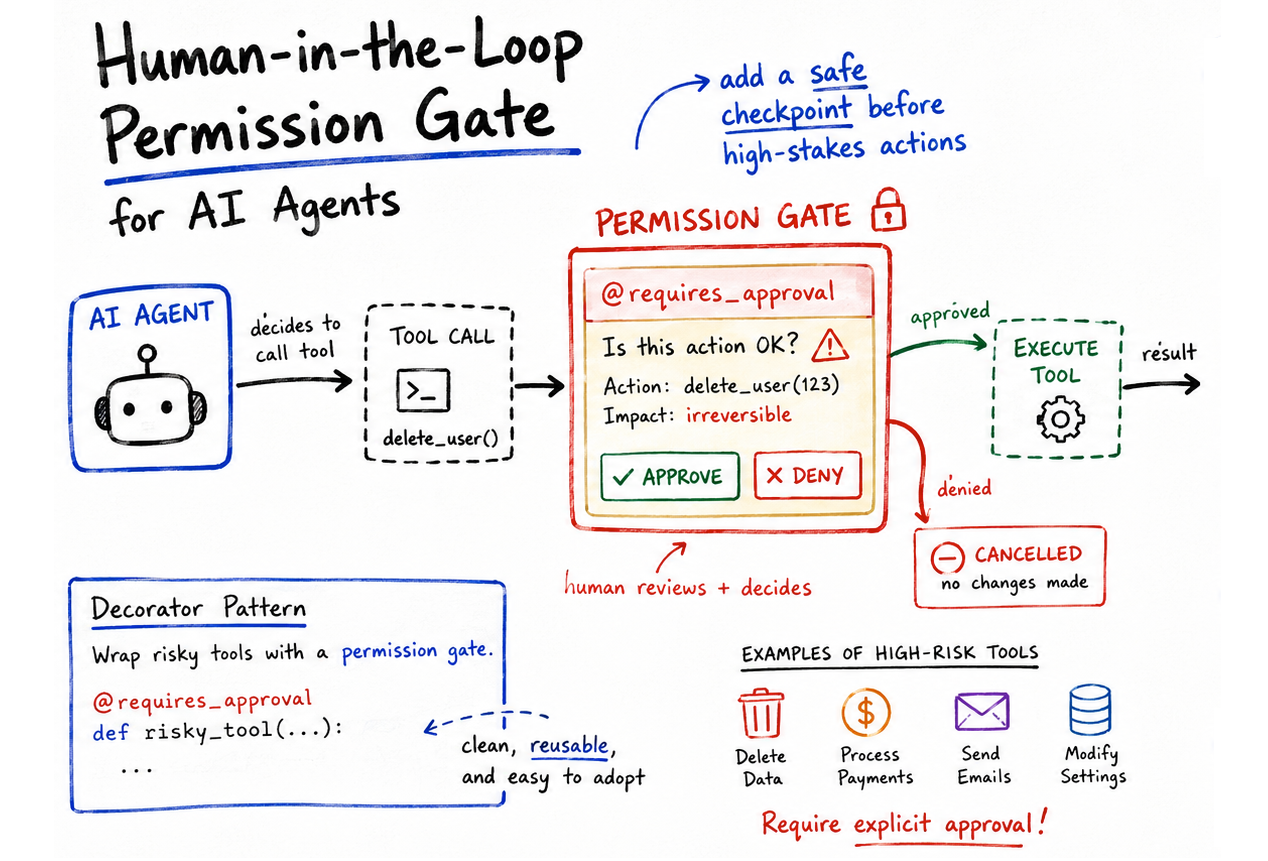
In this article, you will learn how to implement a human-in-the-loop permission gate for autonomous AI agents using a Python decorator pattern.
Topics we will cover include:
- Why high-stakes tool calls in AI agents require human oversight, and how a decorator-based approach addresses this cleanly.
- How to build a
@requires_approvaldecorator that intercepts tool execution and requests explicit human confirmation before proceeding. - How this pattern scales toward production environments, such as replacing the CLI prompt with asynchronous webhooks or admin dashboards.
Implementing Permission-Gated Tool Calling in Python Agents
Introduction
AI agents have evolved beyond passive chatbots. They are nowadays built as active software entities that can perform actions autonomously, such as executing external code. Unsurprisingly, there is an overall risk increase associated with these autonomous tool-calling capabilities.
Low-risk actions such as querying a weather API are usually run in the background and are deemed safe. Meanwhile, high-stakes actions like initiating financial transactions, manipulating a database, or delivering emails require much more rigorous oversight mechanisms. One such strategy to address this is to inject a middle human-in-the-loop layer.
This article illustrates how to implement a permission-gated tool in a Python agent, relying completely on built-in language functionality. The result: a robust, cost-free interception mechanism based on a simple decorator pattern.
Our example solution will not hardcode safety checks directly into the agent’s main reasoning loop or within the business logic. Instead, we will use a Python decorator named @requires_approval. This decorator acts as a gateway: if the agent tries to use a wrapped tool, the gateway interrupts the execution flow, displays the arguments to a human decision-maker, and awaits explicit approval.
The proposed implementation relies fully on Python’s functools library, with no paid services or external APIs required when run locally.
The Python Decorator Function
The first part of the code defines our main Python decorator function. It wraps a function and adds a “human approval” layer before executing the function passed as an argument, func. When any other function (which we will define later) is decorated with @requires_approval, the decorator will print a security alert message, show the proposed arguments, and request the user’s approval or denial through a simple text input — ‘y’ for approval, ‘n’ for denial.
|
1 2 3 4 5 6 7 8 9 10 11 12 13 14 15 16 17 18 19 20 21 22 |
import functools
# 1. Interceptor (Middle Layer) def requires_approval(func): “”“Decorator to pause execution and request human validation.”“” @functools.wraps(func) def wrapper(*args, **kwargs): print(f“\n[SECURITY ALERT] Agent attempting high-risk action: ‘{func.__name__}'”) print(f“-> Proposed Arguments: args={args}, kwargs={kwargs}”)
# Simulating Human-in-the-Loop via CLI input approval = input(“-> Approve this execution? (y/n): “).strip().lower()
if approval == ‘y’: print(“[SYSTEM] Action approved. Executing…\n”) return func(*args, **kwargs) else: print(“[SYSTEM] Action blocked by human overseer.\n”) # Returning a string to let the agent know the tool failed return “ERROR: Tool execution blocked by administrator.”
return wrapper |
The Agent’s Tools
Next, we define two functions that constitute the agent’s available tools. For simplicity, they simulate tool use by an agent rather than relying on real external tools.
- The first one, intended for retrieving the current date and time, is deemed a low-risk tool and can be executed autonomously.
- The second one — which simulates permanently deleting a table in a database — is labeled a high-risk operation. We decorate it so that before its execution, the previously defined decorator intercepts the call and requests human approval.
|
# 2. Defining the Agent’s Tools def get_current_time(timezone): “”“Low-risk tool: Can be executed autonomously.”“” return f“The simulated time in {timezone} is 10:00 AM.”
@requires_approval def drop_database_table(table_name): “”“High-risk tool: Guarded by the HITL decorator.”“” return f“SUCCESS: Table ‘{table_name}’ has been permanently deleted.” |
Running The Simulation
Next, simulate_agent() contains a simulated sequence of actions an agent would typically perform by calling the two tools defined above. Log messages will be printed throughout the process.
|
# 3. Simulating the Agent’s Execution Pipeline def simulate_agent(): print(“Agent Log: User asked for the time.”) time_result = get_current_time(“UTC”) print(f“Tool Result: {time_result}\n”)
print(“Agent Log: User asked to clear the staging database.”) # Agent’s attempt to call the high-risk tool db_result = drop_database_table(table_name=“staging_users”) print(f“Tool Result: {db_result}”) |
We are now ready to run the simulation. We define a main block that invokes the simulated agent workflow:
|
# Run the simulation if __name__ == “__main__”: simulate_agent() |
The following output is obtained — note that the user has typed ‘y’ in the interface to approve execution after the security alert was triggered:
|
Agent Log: User asked for the time. Tool Result: The simulated time in UTC is 10:00 AM.
Agent Log: User asked to clear the staging database.
[SECURITY ALERT] Agent attempting high–risk action: ‘drop_database_table’ -> Proposed Arguments: args=(), kwargs={‘table_name’: ‘staging_users’} -> Approve this execution? (y/n): y [SYSTEM] Action approved. Executing...
Tool Result: SUCCESS: Table ‘staging_users’ has been permanently deleted. |
Simple but effective. One question you might be asking is: how does this middle-layer solution scale? The decorator-based strategy scales nicely for production environments. You may want to replace the simple input() call inside the wrapper with an asynchronous webhook. The wrapper could send a payload to an internal admin dashboard or even to a Slack channel, passing the function name and its arguments. The agent will keep waiting for the webhook’s response — a human approval or denial from the comfort of a mobile phone.
Wrapping Up
In this article, I showed you the core programmatic ideas behind implementing a permission-gated tool-calling mechanism for autonomous AI agents using a Python decorator — a practical approach for controlling the execution of high-risk tasks that may require human approval.