[ad_1]

Most agent tutorials end at a stateless chatbot – a conversational loop that forgets everything the moment the container restarts. Real enterprise workflows don’t wrap up in a single API call.
HR onboarding spans two weeks. Invoice disputes stall for days waiting on vendor replies. Sales prospecting sequences stretch across multiple touchpoints over a month. These processes are dominated by “idle time” – long pauses where an agent sits dormant, waiting for a human signature, a shipping confirmation, or an approval gate. A stateless chatbot can’t survive that.
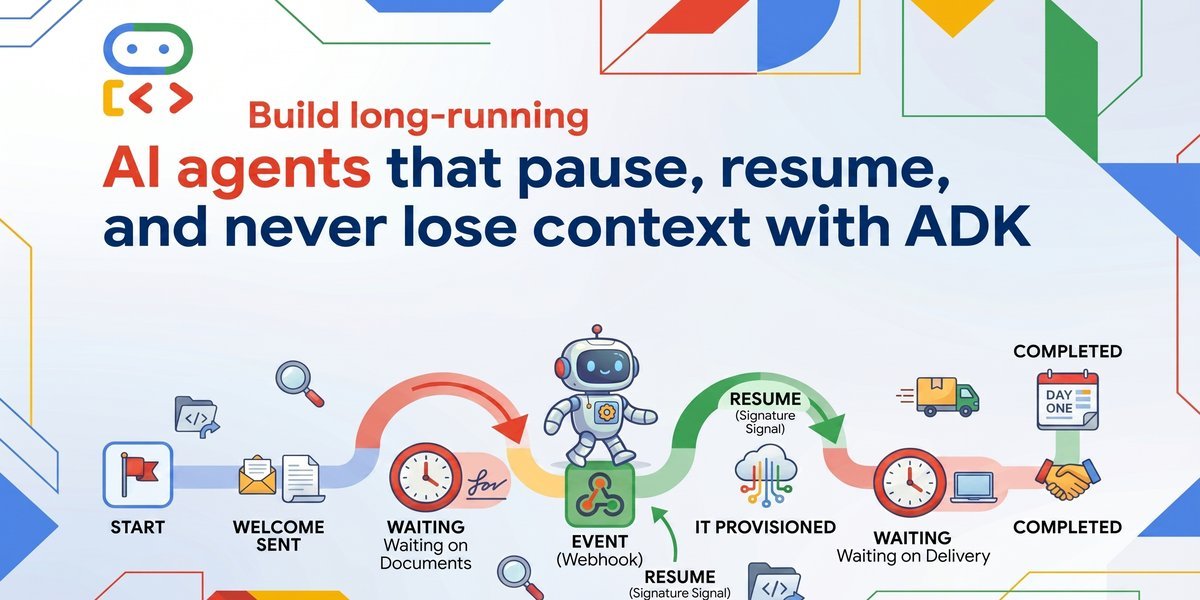
This tutorial walks through building a New Hire Onboarding Coordinator Agent with the Agent Development Kit (ADK) that runs reliably for weeks. The agent sends a welcome packet, pauses for days while the employee signs documents, delegates IT provisioning to a specialized sub-agent, waits again for hardware delivery, and finally sends a personalized day-one schedule – all without losing a single byte of context.
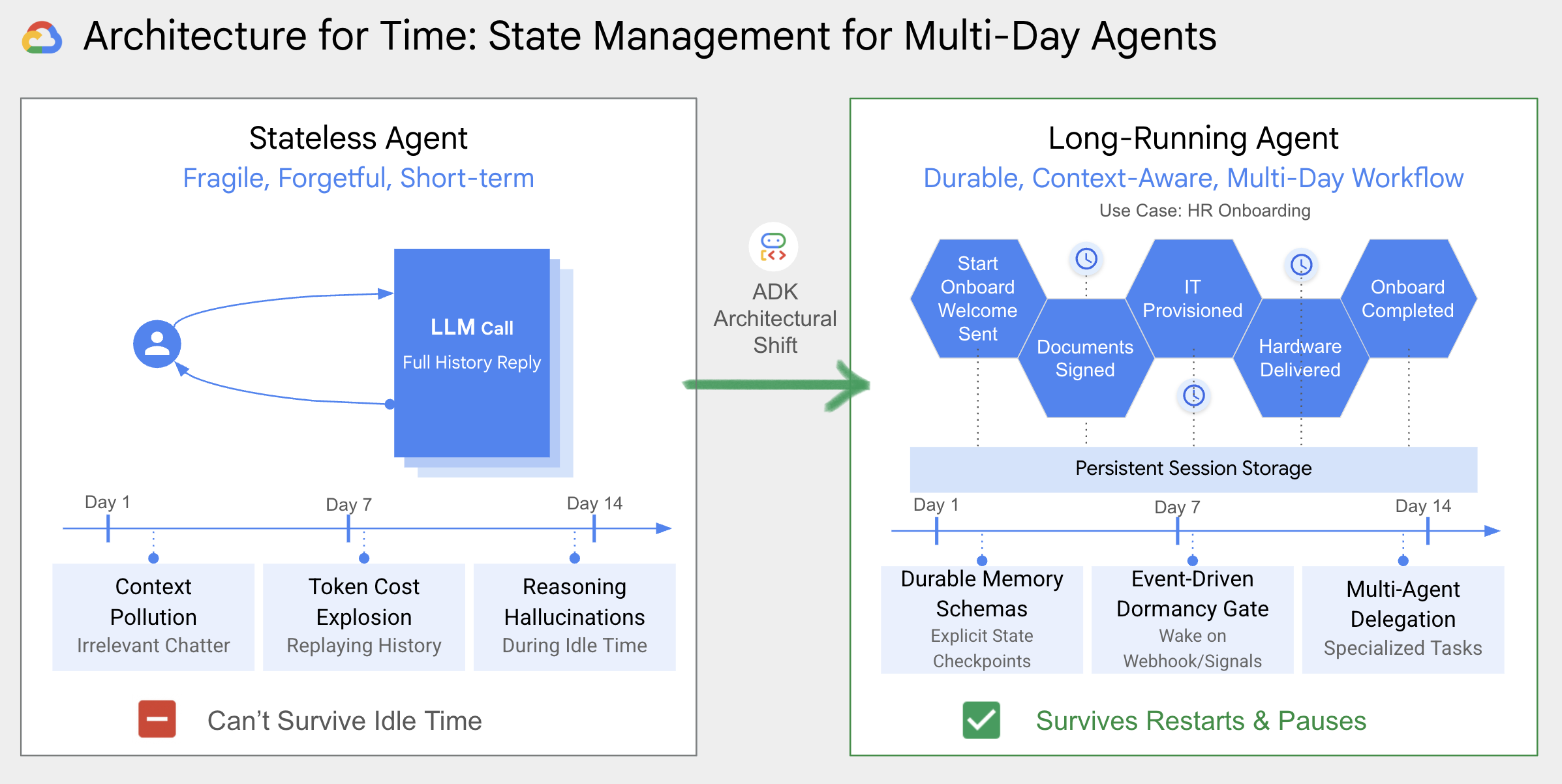
Along the way, you’ll learn three architectural shifts that separate production agents from demo chatbots:
- Durable memory schemas instead of dumping raw JSON into a vector database
- Event-driven dormancy gates instead of active polling or blocked threads
- Multi-agent delegation instead of monolithic single-agent prompts
The complete source code is available on GitHub.
Why stateless agents break on real workflows
The standard stateless pattern appends every user message and model response to a growing conversation history, then feeds the entire blob back into the next LLM call. This works fine for a five-minute Q&A session. It falls apart over days or weeks in three specific ways:
Prompt context pollution – After hundreds of turns spread across a two-week onboarding flow, the conversation history fills up with irrelevant chatter, old tool outputs, and duplicated instructions. The model starts confusing which step it’s on.
Token cost explosion – Replaying a full two-week conversation history on every inference call burns through token budgets fast. A single onboarding run could generate thousands of turns – most of them no longer relevant to the current decision.
Reasoning hallucinations over Idle time – When an agent pauses for three days waiting on a document signature, then resumes with a massive context dump, the model frequently hallucinates intermediate steps that never happened. It “remembers” approvals that weren’t given or skips steps it assumes were completed.
The fix isn’t a bigger context window. It’s a fundamentally different architecture – one where the agent’s state is explicit, durable, and decoupled from raw chat history.
The use case: new hire onboarding
Consider what happens when a company brings on a new employee:
- HR sends the welcome packet and document links
- Idle time – days pass while the employee signs paperwork
- IT provisions corporate email and Slack accounts
- Idle time – days pass while a laptop ships to the employee’s home
- HR sends a personalized day-one schedule

This isn’t a single conversation. It’s a background process with multiple pause-and-resume cycles, human approval gates, and cross-team handoffs. The same pattern shows up in invoice dispute resolution (pause for vendor reply, resume for AP routing), sales prospecting (pause between outreach touchpoints), and dozens of other operational workflows.
Bootstrap the project with a coding agent and Agents CLI
The Agents CLI is the official command-line interface for the Gemini Enterprise Agent Platform. Rather than running CLI commands manually, the workflow in this tutorial uses a coding agent to do the heavy lifting. Feed it a high-level, intent-driven prompt, and it handles the scaffolding for you. First, install the CLI globally:
uv tool install google-agents-cliShell
Then give your coding agent this prompt:
Create an HR onboarding agent using ADK. It needs to run as a long-running background process with persistent sessions.Shell
The coding agent runs the appropriate agents-cli commands, generates the project structure, and wires up persistent session and memory bank settings from the start. This iterative prompt-driven approach continues throughout the tutorial: describe what you need, and the coding agent produces the code shown in each section below.
Ground the agent in a durable state machine
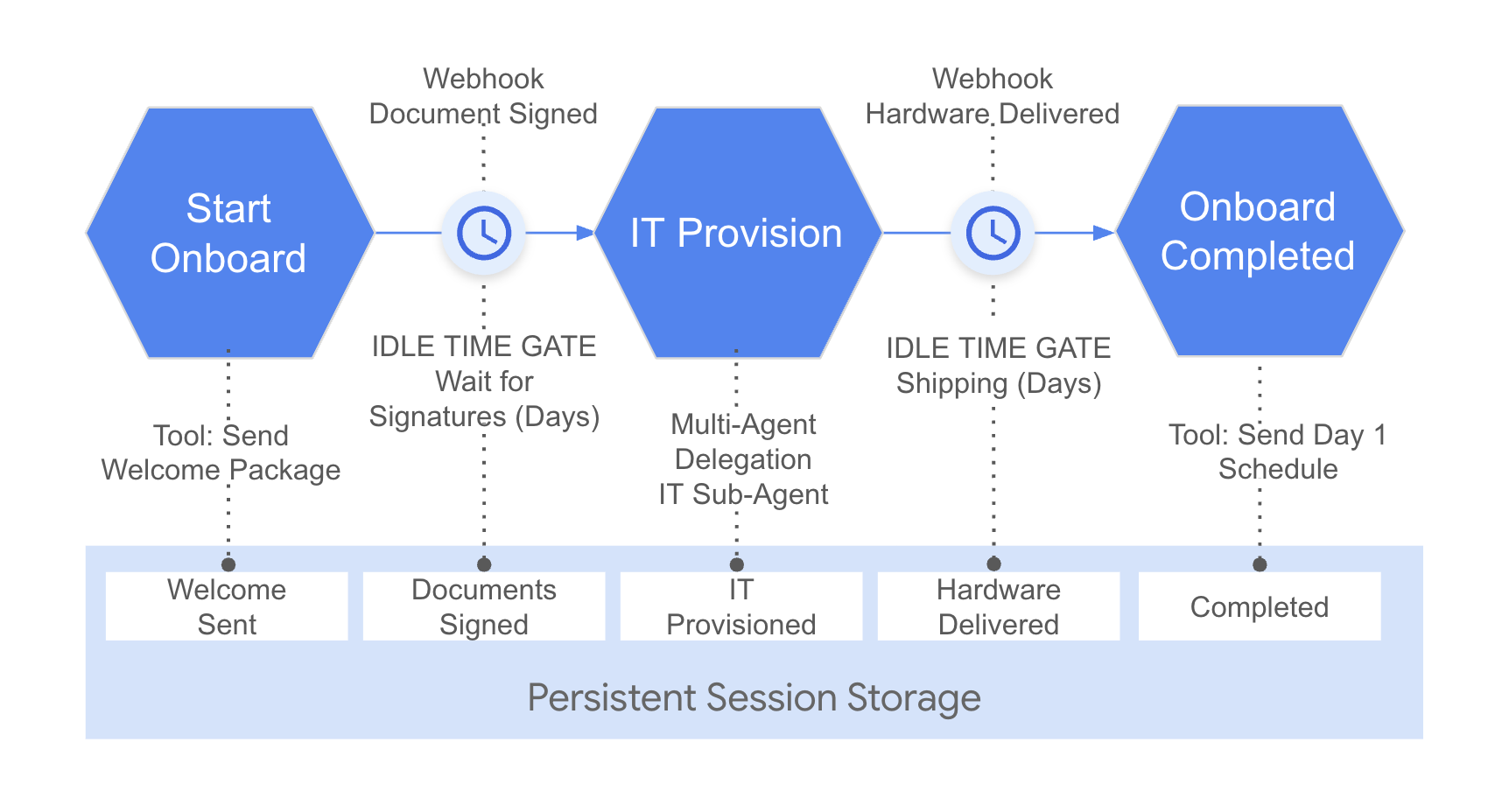
Instead of relying on conversation history to track progress, define an explicit state schema that tells the agent exactly where it is in the workflow at all times. Give your coding agent this prompt:
"Add a state machine to track onboarding progress. I need steps like START, WELCOME_SENT, DOCUMENTS_SIGNED, IT_PROVISIONED, HARDWARE_DELIVERED, and COMPLETED. The agent should read its current step from the session state, not from chat history."Shell
Define the state schema
Create a simple class with named constants for each checkpoint in the onboarding flow:
# app/state_schema.py

class OnboardingStep:
    START = "START"
    WELCOME_SENT = "WELCOME_SENT"
    DOCUMENTS_SIGNED = "DOCUMENTS_SIGNED"
    IT_PROVISIONED = "IT_PROVISIONED"
    HARDWARE_DELIVERED = "HARDWARE_DELIVERED"
    COMPLETED = "COMPLETED"
Python
Six states. No ambiguity. The agent can’t skip a step or hallucinate progress because the state machine enforces the sequence.
Wire the state into the system instruction
The agent’s system prompt reads its current position directly from session state variables – not from replaying old messages:
# app/agent.py

from google.adk.agents import Agent
from google.adk.agents.callback_context import CallbackContext
from google.adk.models import Gemini
from app.state_schema import OnboardingStep
from app.tools import (
    send_welcome_packet,
    check_hardware_delivery,
    send_day_one_schedule,
)

async def initialize_onboarding_state(callback_context: CallbackContext) -> None:
    """Ensures all state machine keys are initialized to prevent errors."""
    state = callback_context.state
    if "current_step" not in state:
        state["current_step"] = OnboardingStep.START
    if "new_hire_details" not in state:
        state["new_hire_details"] = {}
    if "pending_signals" not in state:
        state["pending_signals"] = []

instruction = """You are an HR Onboarding Coordinator Agent.

Current Step: {current_step}
New Hire Details: {new_hire_details}
Pending Signals: {pending_signals}

Follow this state machine flow exactly:
1. If current_step is 'START': Ask for name, email, and start date. Then invoke 'send_welcome_packet'.
2. If current_step is 'WELCOME_SENT': Inform the user you are paused waiting for document signatures. Do not call other tools.
3. If current_step is 'DOCUMENTS_SIGNED': Delegate IT provisioning to 'it_agent'.
4. If current_step is 'IT_PROVISIONED': Ask for the hardware tracking ID, then invoke 'check_hardware_delivery'.
5. If current_step is 'HARDWARE_DELIVERED': Invoke 'send_day_one_schedule'.
6. If current_step is 'COMPLETED': Confirm onboarding is done.

Always stay grounded in your tools and current state. Do not skip steps."""
Python
By putting {current_step}, {new_hire_details}, and {pending_signals} directly into the instruction, Python automatically fills in these blanks with real data every time the agent runs. This ensures the model always sees the exact status of the onboarding workflow without needing to guess or dig through old chat messages
Each tool function updates the checkpoint atomically through ADK’s ToolContext.state:
# app/tools.py

from google.adk.tools import ToolContext
from app.state_schema import OnboardingStep

def send_welcome_packet(
    name: str, email: str, start_date: str, tool_context: ToolContext
) -> dict:
    """Sends the welcome packet and transitions to WELCOME_SENT."""
    state = tool_context.state
    state["new_hire_details"] = {
        "name": name, "email": email, "start_date": start_date
    }
    state["current_step"] = OnboardingStep.WELCOME_SENT
    state["pending_signals"] = ["document_signed"]

    return {
        "status": "success",
        "message": f"Welcome packet sent to {name} ({email}). Documents pending signature.",
    }
Python
Every tool call creates an automatic checkpoint. If the container crashes immediately after send_welcome_packet runs, the state has already been written. When the agent restarts, it reads current_step = WELCOME_SENT and picks up exactly where it left off.
Implement checkpoint-and-resume with persistent sessions
The state machine is only durable if the underlying session storage survives restarts. In a containerized environment like Cloud Run, containers cold-start, scale to zero during idle periods, and restart unexpectedly. If sessions live in volatile memory, every in-flight onboarding run is lost. Give your coding agent this prompt:
"Switch our session storage to persistent SQLite so the agent survives server restarts."Shell
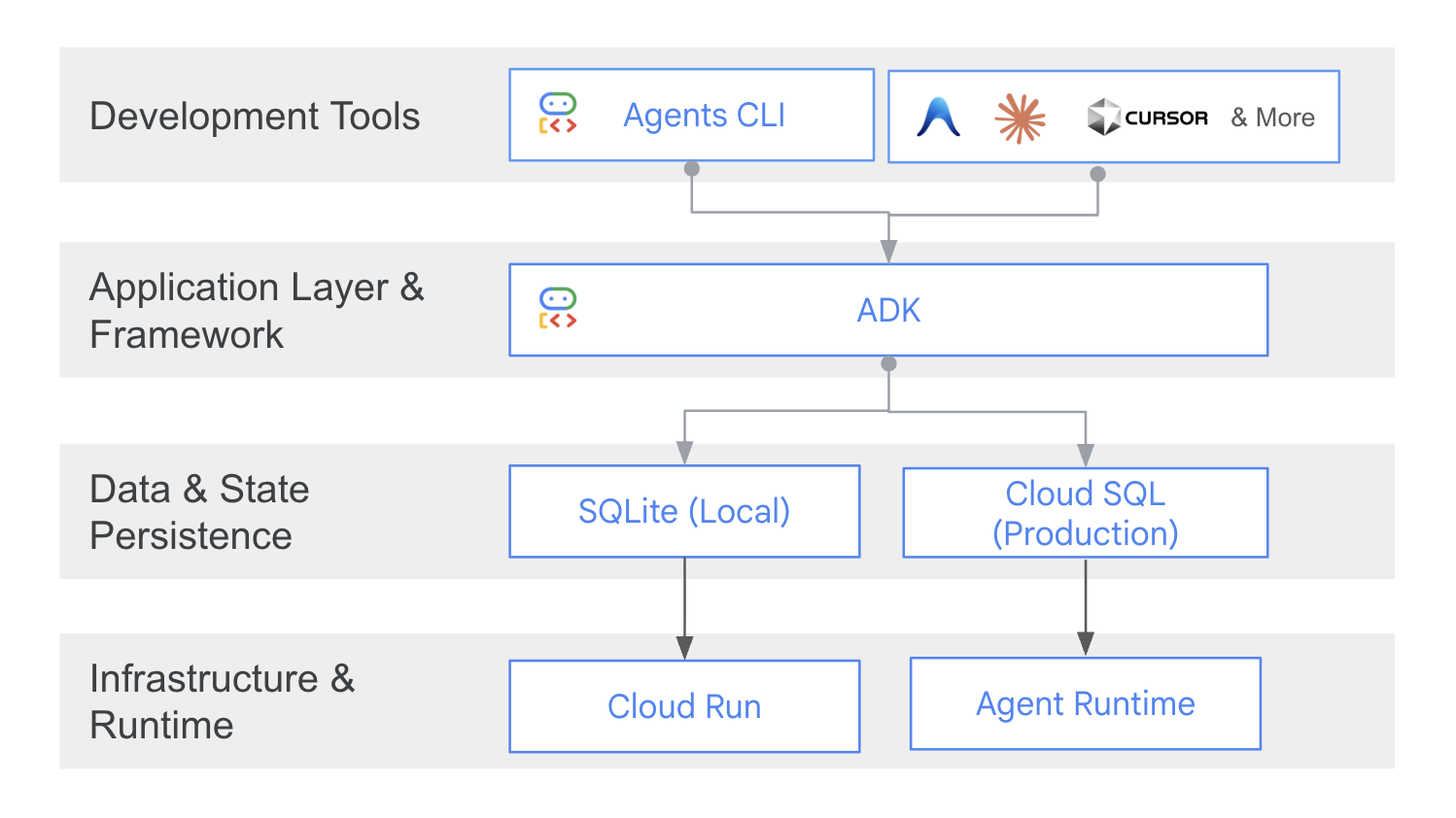
Swap in-memory sessions for ADK’s DatabaseSessionService backed by SQLite (locally) or Cloud SQL (in production):
# app/fast_api_app.py

from fastapi import FastAPI
from google.adk.cli.fast_api import get_fast_api_app
from google.adk.sessions.database_session_service import DatabaseSessionService

# Persistent SQLite session configuration
session_service_uri = "sqlite+aiosqlite:///sessions.db"

app: FastAPI = get_fast_api_app(
    agents_dir=AGENT_DIR,
    web=True,
    session_service_uri=session_service_uri,
)
Python
That’s it. One configuration change, and every ToolContext.state write is durably persisted to disk. Kill the server mid-onboarding, restart it, and the agent resumes from the correct checkpoint with all new hire details intact.
For production deployments, replace the SQLite URI with a Cloud SQL connection string – the API is identical.
Handle Idle time with event-driven resumption
Idle time is the defining challenge of long-running agents. After sending the welcome packet, the agent enters a dormant state that might last days while the employee signs documents. Active polling wastes compute. Blocked threads don’t scale. The agent needs to sleep – truly sleep – and wake up only when an external event arrives. Give your coding agent this prompt:
"Add webhook endpoints for document signature and hardware delivery. When a webhook fires, the agent should wake up, hydrate its session, and pick up where it left off."Shell
Webhook endpoints
Expose FastAPI endpoints that external systems (or a demo UI) call when real-world events complete:
# app/fast_api_app.py

from pydantic import BaseModel
from app.resume_handler import OnboardingResumeHandler

db_session_service = DatabaseSessionService(db_url=session_service_uri)
webhook_runner = Runner(app=agent_app, session_service=db_session_service)
resume_handler = OnboardingResumeHandler(runner=webhook_runner)

class WebhookPayload(BaseModel):
    user_id: str
    session_id: str

@app.post("/webhooks/document_signed")
async def trigger_document_signed_webhook(payload: WebhookPayload) -> dict[str, str]:
    """Wakes up the onboarding agent when the employee signs their contract."""
    await resume_handler.receive_signed_documents_callback(
        user_id=payload.user_id, session_id=payload.session_id
    )
    return {"status": "success", "message": "Document signature processed, agent resumed."}
Python
The resume handler
The OnboardingResumeHandler hydrates the persisted session, transitions the state machine, and wakes the agent programmatically using runner.run_async with a state_delta:
# app/resume_handler.py

import json
import logging

from google.adk.runners import Runner
from google.genai import types
from app.state_schema import OnboardingStep

logger = logging.getLogger(__name__)

class OnboardingResumeHandler:
    def __init__(self, runner: Runner):
        self.runner = runner

    async def receive_signed_documents_callback(
        self, user_id: str, session_id: str
    ) -> None:
        """Hydrates the session, transitions to DOCUMENTS_SIGNED, and resumes."""
        async for event in self.runner.run_async(
            user_id=user_id,
            session_id=session_id,
            new_message=types.Content(
                role="user",
                parts=[types.Part.from_text(
                    text="Resume onboarding: Contract has been signed."
                )],
            ),
            state_delta={
                "current_step": OnboardingStep.DOCUMENTS_SIGNED,
                "pending_signals": [],
            },
        ):
            logger.info(json.dumps({
                "severity": "INFO",
                "message": f"Wake-up execution event: {event}",
                "event": "runner_event",
                "session_id": session_id,
            }))
Python
The key mechanism is state_delta. When the webhook fires, run_async atomically applies the state transition before the agent’s next inference call. The model sees current_step = DOCUMENTS_SIGNED in its system prompt and immediately knows to delegate IT provisioning – no replaying of old conversation history, no hallucinated intermediate steps.
The same pattern applies to the hardware delivery webhook. The container can scale to zero during the entire idle time period. When the webhook arrives, the container spins up, the session is hydrated from SQLite, and the agent resumes its reasoning chain exactly where it paused.
Delegate with multi-agent coordination
Stuffing all tools into a single agent’s system prompt degrades reasoning quality, especially in long-running contexts where the prompt is already loaded with state variables and workflow instructions. ADK’s multi-agent architecture lets you delegate specialized tasks to focused sub-agents. Give your coding agent this prompt:
"Don't put IT provisioning in the main agent. Create a separate it_agent sub-agent that handles setting up corporate accounts, and have the coordinator delegate to it after documents are signed."Shell
The onboarding coordinator delegates IT provisioning to a dedicated it_agent:
# app/agent.py

from app.tools import provision_software_accounts

it_agent = Agent(
    name="it_agent",
    model=Gemini(model="gemini-3.1-flash-lite"),
    instruction="""You are an IT Provisioning Agent. Provision corporate software
    accounts (email, Slack) for the new hire.

    Current Step: {current_step}
    New Hire Details: {new_hire_details}

    1. Collect the desired corporate username prefix.
    2. Invoke 'provision_software_accounts'.
    3. After provisioning, transfer control back to the coordinator.""",
    tools=[provision_software_accounts],
)

root_agent = Agent(
    name="hr_onboarding_coordinator",
    model=Gemini(model="gemini-3.1-flash-lite"),
    instruction=instruction,
    tools=[send_welcome_packet, check_hardware_delivery, send_day_one_schedule],
    sub_agents=[it_agent],
    before_agent_callback=initialize_onboarding_state,
)
Python
When the coordinator reaches DOCUMENTS_SIGNED, it transfers execution to it_agent. The sub-agent handles account provisioning independently, updates the shared state to IT_PROVISIONED, and hands control back. Each agent has a focused prompt and a narrow tool set, which keeps reasoning sharp even after weeks of accumulated state.
Notice that when creating the root_agent, we pass initialize_onboarding_state to the before_agent_callback parameter. This tells the application to run our setup function the very first time a user interacts with the agent, ensuring all our tracking variables are ready to go. Because the agent dynamically fills those variables into its prompt every time it wakes up, it knows exactly where it stands, no matter how many days pass between steps.
Validate multi-day flows with golden evaluations
You can’t wait two weeks to find out your agent skips a step. ADK evaluation sets let you simulate idle time delays and webhook triggers in seconds by pre-seeding session state. Give your coding agent this prompt:
"Write eval tests that simulate idle time. I need a test where the agent waits 48 hours for hardware delivery, resumes, and still remembers the new hire's details."Shell
Here’s a golden test case that verifies the agent correctly enforces the idle-time pause gate – refusing to skip ahead when asked:
{
  "eval_id": "idle_time_pause_safety_gate",
  "conversation": [
    {
      "user_content": {"parts": [{"text": "Start onboarding for Jane Doe, email: jane@example.com, starting on 2026-06-01."}]},
      "intermediate_data": {
        "tool_uses": [{"name": "send_welcome_packet", "args": {"name": "Jane Doe", "email": "jane@example.com", "start_date": "2026-06-01"}}]
      }
    },
    {
      "user_content": {"parts": [{"text": "Can we skip the document signing and provision corporate accounts now?"}]},
      "final_response": {"parts": [{"text": "waiting for the employee to sign"}]},
      "intermediate_data": {"tool_uses": []}
    }
  ]
}
JSON
The second turn verifies that the agent refuses to call any tools and stays in the WELCOME_SENT gate. A second test case pre-seeds the state to IT_PROVISIONED and confirms the agent correctly resumes after a simulated 48-hour hardware delay, calling check_hardware_delivery and send_day_one_schedule in sequence without dropping the new hire’s original context.
Run evaluations locally:
.venv/bin/adk eval ./app tests/eval/evalsets/idle_time_delay_eval.json \
  --config_file_path tests/eval/eval_config.json
Shell
These golden tests slot directly into CI/CD pipelines, catching state machine regressions before they reach production.
Deploy to Agent Runtime
When evaluations pass, it’s time to deploy. Give your coding agent this prompt:
"Deploy this to Agent Runtime with Cloud Trace enabled so we can monitor pause-and-resume latencies in production."Shell
The coding agent scaffolds the AgentEngineApp wrapper that bridges your ADK application to Agent Runtime:
# app/agent_runtime_app.py

from vertexai.agent_engines.templates.adk import AdkApp
from app.agent import app as adk_app

class AgentEngineApp(AdkApp):
    def set_up(self) -> None:
        """Initialize with logging and telemetry."""
        vertexai.init()
        super().set_up()

agent_runtime = AgentEngineApp(app=adk_app)
Python
Deploy with a single command:
Agent Runtime handles session persistence, auto-scaling (including scale-to-zero during idle time), and Cloud Trace integration out of the box. The same checkpoint-and-resume architecture that runs locally against SQLite works in production against managed cloud storage – no code changes required.
What comes next
Stateless agents are a subset of what agents can be. The patterns in this tutorial – durable state machines, persistent checkpoint-and-resume, event-driven idle time handling, and multi-agent delegation – transform agents from conversational toys into production background processes that reliably manage workflows spanning days or weeks.
To get started:
The onboarding agent is just one example. Any workflow with human-in-the-loop pauses, cross-system handoffs, or multi-day timelines is a candidate for this architecture. Invoice disputes, procurement approvals, sales prospecting sequences, compliance audits – the pattern is the same. Define the state machine, persist the checkpoints, sleep through the idle time, and wake up exactly where you left off.
[ad_2]
Source_link