Key takeaways:
- Production AI agents need more than LLMs: RAG, IAM, tool controls, trajectory evaluation, observability, and human approval.
- Start with the workflow, not the model: define business outcomes, autonomy boundaries, system access, and measurable acceptance criteria first.
- Single-agent architectures should remain the default: add multiple agents only for specialization, security boundaries, or parallel execution.
- Enterprise custom AI agent development typically costs $50K + $500K+, with production deployments taking roughly four to nine months.
- Measure economics through cost per successful task: token prices ignore retries, failures, escalations, and incomplete agent trajectories.
Generative AI gave enterprises and growing businesses a faster way to search, summarize, create, and analyze information. Custom AI Agent Development takes the next step, helping AI agents reason through a task, call APIs, use tools, and act across business systems.
Business adoption is already moving in that direction.. Cisco’s 2025 AI Readiness Index found that 83% of companies plan to develop or deploy AI agents. The harder part starts after the prototype works.
A production agent needs controlled access to CRM, ERP, data warehouses, payment systems, and internal APIs. Its LLM must work with RAG pipelines, memory, tool calling, identity controls, and defined human approval points. Each action must stay traceable.
This makes custom AI agent development a software engineering problem, not just a prompt engineering exercise. Teams must make choices around architecture, models, integrations, security, evaluation, deployment, and runtime costs. This guide explains how to make those choices and build custom AI agents that can handle enterprise workloads at scale.
85% of Companies Are Customizing AI Agents
Your competitors are moving beyond generic AI. Build an agent engineered around your workflows, enterprise data, and systems.
How Does a Custom AI Agent Work?
A custom AI agent is software built to complete a defined business goal with limited human input. It combines an AI model with enterprise data, memory, tools, business rules, and system access.
The agent usually runs through a continuous execution loop:
Input or event → Context retrieval → Reasoning and planning → Tool selection → Action → Observation → Evaluation → Continue, exit, or escalate
Take an invoice exception as an example. The agent receives the exception and retrieves the invoice, purchase order, and vendor record. It reasons about the mismatch and selects an approved ERP or procurement API. The agent then takes the permitted action and checks the result. It can continue the workflow, close the task, or send the case for human review.
This execution loop separates an AI agent from a standard generative AI application. An LLM can generate an answer from a prompt. An agent works toward a goal and changes its next action based on the result of the previous step.
Custom AI Agent vs Chatbot vs Copilot vs Traditional Automation
A quick overview table showcasing the differences in capabilities between different agents, chatbots and copilots.
| Capability | Traditional Automation | AI Chatbot | AI Copilot | Custom AI Agent |
|---|---|---|---|---|
| Reasoning | Uses predefined rules | Limited conversational reasoning | Reasons within user-led tasks | Reasons across tasks and workflow states |
| Autonomy | Executes fixed triggers | Low | User remains in control | Can act within defined autonomy limits |
| Multi-step planning | Follows predefined sequences | Limited | Supports multi-step user tasks | Plans and executes multi-step tasks |
| Tool execution | Calls predefined systems | Usually limited | Uses approved tools with user direction | Selects and calls approved tools based on context |
| Dynamic decision-making | Rule-driven | Limited | Recommends next actions | Chooses actions based on goals, context, and results |
| Enterprise integration | APIs, RPA, workflow engines | Usually knowledge or channel integrations | Connects with selected business applications | Works across APIs, databases, SaaS, and internal systems |
| Memory/state | Stores predefined workflow state | Mainly conversation context | Maintains task and user context | Maintains task, workflow, and permitted long-term state |
| Human escalation | Uses predefined exception rules | Transfers conversations | Requests user action | Escalates based on risk, policy, confidence, or failure thresholds |
When Should You Build a Custom AI Agent
Enterprise AI agent solutions fit workflows where fixed rules struggle with changing context, exceptions, or multi-step decisions. The target workflow should have a clear business outcome and enough complexity to justify agent autonomy.
That workflow choice matters. Gartner predicts that more than 40% of autonomous agent projects will be canceled by the end of 2027 due to rising costs, unclear business value, or inadequate risk controls.
| Strong Agent Candidate | Enterprise Example |
|---|---|
| Context-dependent decisions | Reviewing refund requests using customer history, policy, transaction value, and account risk |
| Unstructured data | Reading contracts, claims, emails, PDFs, or service records before taking action |
| Exception-heavy workflows | Investigating invoice mismatches across purchase orders, receipts, and vendor records |
| Multi-system workflows | Resolving a support request across CRM, billing, inventory, and ticketing systems |
| Dynamic tool selection | Choosing between database queries, APIs, search, or specialist agents during execution |
| Complex rule engines | Handling procurement or compliance cases with frequent policy changes and exceptions |
| Iterative reasoning | Diagnosing an infrastructure incident, testing a fix, checking the result, and selecting the next action |
When an AI Agent Is Unnecessary
An agent adds unnecessary complexity to a stable, predictable process. Custom business process automation solutions work best as deterministic software, APIs, workflow engines, or RPA where fixed logic already produces reliable results.
This applies to workflows with no reasoning requirement, stable business rules, and fixed execution paths, where RPA already handles the job reliably. Deterministic software is also the better choice where every input must produce the same predefined action.
Data readiness remains a major constraint. Gartner predicts that through 2026, organizations will abandon 60% of AI projects unsupported by AI-ready data.
AI Agent Readiness Checklist
Before starting custom AI agent development for your business, check these eight areas:
- Business case: Defined workflow and expected business outcome.
- Data: Accessible, governed, and usable enterprise data strategy.
- APIs: Available integration points for required systems.
- IAM: Defined agent identities, permissions, and access limits.
- Governance: Approved policies for data use, actions, and oversight.
- Evaluation: Representative test cases and expected outcomes.
- Ownership: Named business and technical owners.
- KPIs: Measurable performance baseline and target.
10-Step Development Process to Build a Custom AI Agent
Custom AI agent development moves from workflow design to controlled production deployment. Each stage should produce a testable artifact or decision before development moves ahead.
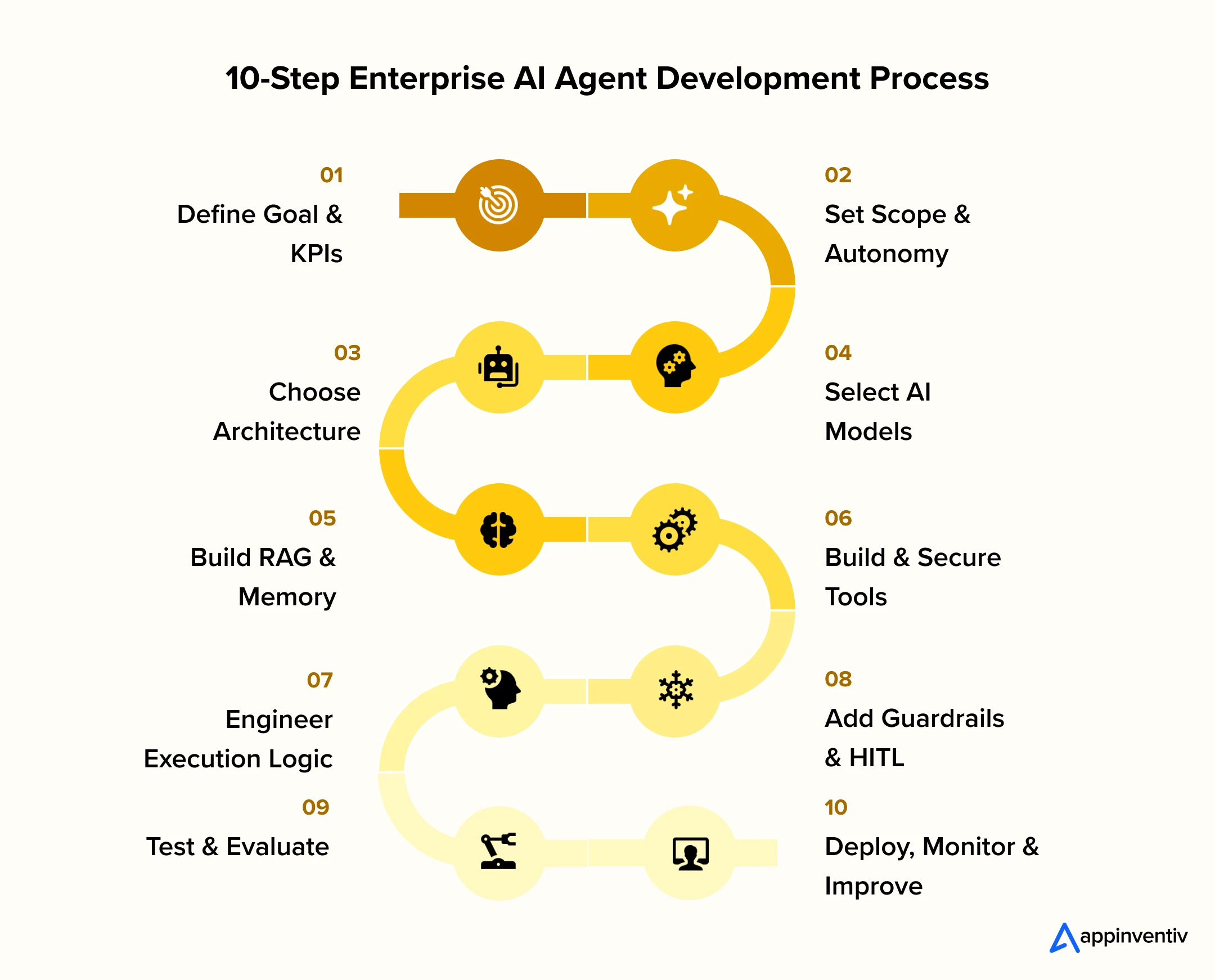
Step 1: Define the Business Goal, Workflow, and Success Metrics
Start with the workflow, not the model. Map the current process from trigger to completion. Record task owners, decision points, participating systems, and exceptions. Capture the current performance baseline.
Document these workflow elements:
- Trigger: What starts the process?
- Users: Who requests, reviews, or receives the result?
- Inputs: Which data, documents, or events enter the workflow?
- Decisions: Which steps require judgment?
- Systems: Which applications participate in execution?
- Outputs: What must the workflow produce or change?
- Exceptions: Which cases leave the normal path?
- Outcome: What measurable result should improve?
Set baseline and target values for the metrics tied to that workflow.
| Metric | What it measures |
|---|---|
| Task Completion Rate | Percentage of assigned tasks completed correctly |
| Processing Time | Time from workflow trigger to completion |
| Escalation Rate | Percentage of tasks transferred to a person |
| Error Rate | Incorrect decisions, outputs, or actions |
| Cost Per Task | Runtime and operational cost for each completed task |
| Business KPI | Workflow-specific impact on SLA, throughput, revenue, or resolution |
These baselines give the team measurable acceptance criteria for later evaluation.
Step 2: Choose the Development Approach, Architecture, and Autonomy
Every custom AI agent development project starts by defining how much authority the agent should have before selecting the technology used to build it. Match autonomy to the operational risk of each action.
A practical autonomy model follows five levels:
Assist → Recommend → Act with Approval → Act Within Limits → Autonomous
Create an authority matrix for the target workflow.
| Decision | Required Definition |
|---|---|
| What can it decide? | Permitted decisions and thresholds |
| What can it access? | Systems, records, fields, and data scopes |
| What can it change? | Permitted write operations |
| What needs approval? | Sensitive or high-impact actions |
| What triggers escalation? | Risk, confidence, error, and retry thresholds |
Also Read: AI Agent Security for Business
The next decision is selecting the development approach. The right Custom AI Agent Solutions strategy depends on the required control, governance, customization, and deployment speed.
| Factor | Custom Code | Agent Framework | Low-Code / No-Code |
|---|---|---|---|
| Control | Highest | High | Platform-dependent |
| Development Speed | Slower | Moderate to fast | Fast |
| Customization | Full | High | Moderate |
| Governance Ownership | Internal | Internal | Shared with provider |
| Integration Effort | High | Moderate to high | Lower for supported connectors |
| Best Fit | Proprietary enterprise workflows | Reusable enterprise runtimes | Pilots and bounded workflows |
Custom code offers maximum control over runtime behavior, infrastructure, and permissions. Frameworks such as LangGraph, CrewAI, AutoGen, Semantic Kernel, and the Agents SDK help build AI agents with LangChain-style orchestration, reusable state management, and tool execution patterns. Platforms such as n8n and Flowise fit bounded workflows with supported integrations.
Choose between single-agent and multi-agent frameworks based on workflow complexity, domain specialization, security boundaries, and parallel execution requirements.
Step 3: Select Models and Build the Knowledge Layer
Choose models using representative business tasks instead of general benchmark scores. Evaluate each candidate against reasoning accuracy, tool-call accuracy, structured outputs, context length, latency, privacy requirements, hosting options, and token cost.
One agent rarely relies on a single model.
Also Read: Private LLM vs Public LLM
Route each task to the model best suited for that operation.
- Complex planning and decisions → Reasoning model
- Classification and extraction → Small language model
- Semantic retrieval → Embedding model
- Retrieval refinement → Reranking model
Use a smaller model only after it reaches the required evaluation threshold for its assigned task.
The knowledge layer determines what information reaches the model during execution. Build a RAG pipeline that prepares approved business data for retrieval.
Typical RAG Pipeline
Data Ingestion → Cleaning → Chunking → Embeddings → Indexing → Retrieval → Reranking → Context Assembly
Choose chunking based on source structure. Contracts often use clauses or sections, while product documentation benefits from headings and semantic blocks. Structured transactional records usually work better through database queries than vector retrieval.
Attach metadata such as document owner, business unit, classification, version, region, and access group. Use metadata filters to narrow retrieval, and apply access controls before retrieved content enters model context.
Update frequently changing sources through event-driven ingestion. Stable repositories can use scheduled indexing. Keep persistent memory selective by defining what information can persist, how long it remains available, and when it should be updated or removed.
RAG vs Fine-Tuning vs Context Engineering
| Method | Best Suited For | Poor Fit For |
|---|---|---|
| RAG | Current enterprise facts, policies, documents, and records | Changing model behavior |
| Fine-Tuning | Domain behavior, repeated task patterns, specialized adaptation | Frequently changing knowledge |
| Context Engineering | Instructions, retrieved data, workflow state, tool results, and examples | Long-term knowledge storage |
Choose between RAG vs fine-tuning based on the type of knowledge or behavior the agent requires, along with evaluation results, latency targets, and runtime economics.
Also Read: Data Mesh vs Data Fabric
Step 4: Build Agent Logic, Tools, and Enterprise Integrations
Turn every permitted business operation into a controlled tool contract as part of your broader enterprise application integration strategy.
Define these properties for every tool:
- Purpose
- Input schema
- Output schema
- Authentication method
- Permission scope
- Timeout
- Retry policy
- Idempotency behavior
- Risk classification
Validate tool parameters outside the model. A valid function call is not automatically an authorized business action.
Classify tools by operational impact:
Read-only → Reversible write → High-risk or irreversible
Use idempotency for payments, orders, tickets, and database writes. Handle failures through bounded retries and defined error states.
Agent behavior should be treated as version-controlled prompt engineering rather than ad hoc prompt writing.
Define:
- Agent role and objective
- Permitted and prohibited actions
- Business rules
- Tool-selection rules
- Required output schemas
- Examples for difficult cases
- Exception handling
- Exit conditions
- Escalation conditions
Context engineering determines what reaches the model during execution. That includes workflow state, retrieved records, available tools, previous tool results, and task-specific examples.
Keep permissions, approvals, spending limits, and deterministic business rules in application code rather than inside prompts. Define execution limits, retries, timeouts, runtime budgets, and fallback behavior for failed tools, unavailable models, invalid outputs, and missing data.
Step 5: Secure, Govern, and Validate the Agent
Production agents need runtime controls that protect enterprise systems before actions are executed. Apply validation across inputs, retrieved context, model outputs, and tool execution as part of a broader AI governance framework.
Implement controls for:
- Input validation to detect malformed requests and prompt injection attempts
- Retrieval validation to block records outside the active user’s permitted data scope
- Output validation to reject malformed schemas and values outside business constraints
- Tool authorization to verify identities, operations, and action thresholds before execution
Require human approval for:
- High-value financial actions
- Destructive or irreversible changes
- Regulated decisions
- Sensitive account or permission changes
- Low-confidence cases
- Repeated execution failures
Record every approval request, decision, approver, and execution result in the audit trail.
Once runtime controls are in place, evaluate the complete execution path rather than only the final response. Build evaluation datasets from production workflows, edge cases, historical failures, policy boundaries, and adversarial inputs.
Gartner predicts that by 2028, 25% of enterprise security breaches will be linked to AI agent abuse, making security validation a core part of enterprise testing rather than a final release checklist.
| Evaluation Area | What to Measure |
|---|---|
| Functional | Task completion, tool selection, parameter accuracy |
| Agentic | Trajectory correctness, step count, recovery behavior, goal completion |
| Quality | Groundedness, relevance, hallucination rate |
| Non-Functional | Latency, runtime cost, concurrency, resilience |
| Adversarial | Prompt injection, tool abuse, data exfiltration, permission escalation |
Progress testing through:
Offline Evals → Simulation → Sandbox → Shadow Mode → Controlled Pilot
Shadow mode lets the agent process live workflows without executing production actions. Compare proposed decisions with production outcomes before granting write permissions. Add failed cases to the regression suite and re-run them after changes to models, prompts, retrieval logic, tools, or workflow rules.
Also Read: LLM as a Judge
Step 6: Deploy and Monitor the Agent
Successful AI agent implementation depends on selecting the right runtime for the workload. Short-running tasks can use serverless inference, while long-running workflows typically require containers, durable state, queues, and orchestration.
Version application code alongside prompts, tool schemas, model configurations, and evaluation datasets. Run regression evaluations before promoting changes into production.
Monitor production using operational metrics such as:
- Task completion rate
- Tool-call success rate
- Failure and retry rate
- Human escalation rate
- End-to-end latency
- Model and token cost
- Retrieval quality
These metrics establish the operational baseline for production performance.
Step 7: Optimize, Scale, and Operate in Production
Production agents require continuous improvement after deployment. Version every model, prompt, tool schema, retrieval configuration, and evaluation dataset so changes remain measurable and reversible.
AgentOps, LLMOps, and the broader MLOps vs DevOps landscape connect operational metrics with changes to models, prompts, tools, enterprise data, and infrastructure. Teams can measure the impact of every release before expanding deployment.
Use trajectory-level tracing across model calls, retrieval operations, tool execution, state transitions, approvals, and failures. This allows engineering teams to pinpoint where an execution failed instead of relying only on the final output.
Review business KPIs alongside operational metrics. Monitor cost per completed task, escalation rates, latency, retrieval quality, and overall workflow performance. Feed production failures back into evaluation datasets so every release improves reliability, reduces operating costs, and expands the agent’s production readiness.
Custom AI Agent Architecture for Modern Businesses
Custom AI agent solutions separate reasoning, context, state, tool execution, and security into controlled layers. The runtime coordinates execution, models handle reasoning, retrieval supplies enterprise context, and tools connect the agent to business systems.
Model and Reasoning Layer
Teams that build AI agents using LLMs interpret tasks, plan actions, and select the next step, either with one LLM or by routing operations across several models.
Proprietary models provide managed inference and access to advanced reasoning capabilities. Open-weight models give enterprises more control over hosting, data boundaries, and customization.
Larger reasoning models fit complex planning, ambiguous decisions, and difficult tool selection. Smaller models can handle classification, extraction, routing, and other narrow tasks at lower latency and cost. A model router assigns operations based on required accuracy, latency, and inference cost.
Also Read: Fine-Tuning Large Language Models
Context, Knowledge, and Memory Layer
Context, knowledge, and memory serve different functions and should remain logically separated.
Context contains information required for the current execution, such as the user request, workflow state, permissions, and recent tool results.
Knowledge provides enterprise information outside the model’s training data. Building a RAG-powered application means using embeddings, vector or hybrid retrieval, metadata filters, and reranking to select relevant records before they enter model context.
Hybrid retrieval combines semantic and lexical search. This is useful for enterprise data containing product IDs, policy numbers, technical terms, and exact names.
Memory stores approved information across reasoning steps or sessions. Short-term memory supports active interaction. Long-term memory retains permitted information across sessions. Workflow state records completed steps, pending actions, and tool results.
Tools and Enterprise Integration Layer
AI agent integration connects model decisions to databases, APIs, SaaS applications, internal services, legacy systems, and other agents.
| Tool Type | Purpose | Example |
|---|---|---|
| Retrieval | Read information | Query CRM records or search documents |
| Action | Change data or trigger operations | Update ERP records or create tickets |
| Computation | Run deterministic processing | Calculate tax or validate transactions |
| Agent | Delegate specialized work | Send contract analysis to a legal agent |
Function calling exposes defined schemas for tool execution. Business system connections can use REST or GraphQL API development, database interfaces, webhooks, event streams, and computer-use models for systems without suitable APIs.
Model Context Protocol (MCP) provides a standard interface for exposing tools, resources, and context to compatible AI applications. MCP standardizes connectivity, but authentication, authorization, credentials, and audit controls still govern what an agent can access or change.
Orchestration and State Layer
The orchestration layer, often built on microservice architecture, is what allows Autonomous AI Agents to manage execution state, model calls, tool invocation, checkpoints, retries, timeouts, exit conditions, and failure recovery.
Start with a single agent where one execution path can manage the workflow. Move to multiple agents where domains require specialization, tools become ambiguous, security boundaries differ, or independent tasks benefit from parallel execution.
Common patterns include:
- Manager/Supervisor: A central agent delegates to specialists.
- Handoff: One agent transfers execution to another.
- Sequential: Agents complete stages in order.
- Parallel: Agents execute independent tasks concurrently.
- Reviewer: Another agent checks an output or proposed action.
Each additional agent creates another reasoning path, state transition, and failure point. Multi-agent architecture should solve a defined orchestration requirement rather than serve as the default.
Guardrails, Identity, and Observability Layer
Production agents require cross-cutting controls for IAM, guardrails, human approval, logging, tracing, and evaluation.
These controls govern access, restrict unsafe actions, record execution paths, and provide traceability from the initial request through model decisions and system actions.
Build vs Buy vs Partner for Custom AI Agent Development
Which Custom AI Agent Solutions option fits your business best? The answer rests on internal tech skills, timeline goals, and security needs.
| Factor | Build In-House | Agent Platform | Custom Partner |
|---|---|---|---|
| Customization | Very High | Depends on Platform | Very High |
| Deployment Speed | Slower | Fastest | Moderate |
| Integration Work | Internal Team | Easy for Supported Tools | Fits Complex Systems |
| Governance | Full Internal Ownership | Platform Rules | Custom Company Rules |
| Tech Skill Needed | High | Medium | Low Internal Need |
| Maintenance | Internal Team | Platform Vendor | Shared Responsibility |
| Best Fit | Mature AI Teams | Standard Workflows | Unique Workflows |
Enterprises that hire AI agent developers in-house can own development and operations where mature AI, data, platform, and security teams already exist. Buy an agent platform for standardized workflows where available integrations and controls meet requirements. Work with an enterprise AI consulting partner for proprietary workflows, complex enterprise integrations, regulated environments, or limited internal specialist capacity.
Custom AI Agent Development Technology Stack
AI services and solutions should follow the workflow, security model, database model choice, and deployment architecture rather than dictate them.
| Layer | Potential Technologies | Purpose |
|---|---|---|
| Programming | Python, TypeScript | Agent and application logic |
| Models | GPT, Claude, Gemini, Llama, Mistral | Reasoning, planning, and generation |
| Agent Frameworks | LangGraph, CrewAI, AutoGen, Semantic Kernel, Agents SDK | Agent runtime and orchestration |
| Rag | LangChain, LlamaIndex | Retrieval and knowledge pipelines |
| Vector Layer | Pinecone, Weaviate, Milvus, pgvector | Embedding storage and semantic retrieval |
| State And Cache | Redis, PostgreSQL | Session, workflow, and persistent state |
| Integration | REST, GraphQL, MCP | Enterprise system and tool connectivity |
| Messaging | Apache Kafka, RabbitMQ | Events and asynchronous execution |
| Observability | LangSmith, Phoenix, AgentOps, OpenTelemetry | Tracing, evaluation, and runtime monitoring |
| Infrastructure | AWS, Azure, Google Cloud, Kubernetes | Hosting, compute, and workload scaling |
| Identity And Security | OAuth 2.0, OIDC, KMS, Vault | Authentication, authorization, keys, and secrets |
Security, Governance and Compliance in Enterprise AI Agent Development
Enterprise AI agents introduce security risks beyond standard LLM applications since they can access data, invoke tools, and change business systems, making AI governance consulting a growing priority. That access creates a direct governance concern. IBM found that 63% of organizations lacked AI governance policies as part of their cybersecurity risk management to manage AI or prevent shadow AI in 2025.
Major Security Risks
OWASP guidance for LLM and agentic systems highlights risks tied to autonomous execution, external tools, persistent memory, and untrusted inputs.
- Prompt injection: Malicious instructions alter intended agent behavior.
- Excessive agency: The agent receives more authority than its assigned task requires.
- Tool misuse: Approved tools execute unintended or manipulated operations.
- Data leakage: Sensitive information reaches prompts, outputs, logs, or external services.
- Insecure retrieval: Unauthorized or poisoned information enters model context.
- Memory poisoning: Malicious information persists and affects later decisions.
- Unauthorized actions: The agent acts outside the requesting user’s permitted scope.
- Credential exposure: API keys, access tokens, or service credentials become exposed.
Enterprise Security Controls
- RBAC and ABAC: Restrict access using roles, attributes, resource sensitivity, and workflow context.
- User-delegated authorization: Keep agent actions within the requesting user’s authorization boundary.
- Short-lived credentials: Use temporary access tokens instead of persistent credentials.
- Secrets management: Keep keys, tokens, and certificates outside prompts and agent memory.
- Network isolation: Restrict runtimes to approved networks, endpoints, and services, backed by regular vulnerability assessment.
- Sandboxing: Isolate code execution, computer-use sessions, and other high-risk operations.
- Encryption and DLP: Protect sensitive data at rest, in transit, and during model interactions.
- Immutable audit logs: Preserve tamper-resistant records of access and actions.
Also Read: Enterprise Application Security
AI Agent Governance
Maintain an inventory of production agents, models, tools, data sources, approved use cases, and owners.
Assign each agent a risk tier based on autonomy, data sensitivity, action impact, and regulatory exposure. Apply stricter release and review requirements as risk increases.
Set change-control policies for model replacements, prompt revisions, new tools, permission changes, and data-source updates. Material changes should trigger regression testing and security review.
Assign a business owner and technical owner to every production agent. Review incidents, policy exceptions, permissions, model changes, and continued business need throughout its operating lifecycle.
Regulatory and Compliance Considerations
Global programs can map controls against the NIST AI Risk Management Framework, ISO 27001, and SOC 2. European deployments require assessment against the EU AI Act and GDPR compliance. California operations may require CCPA/CPRA controls for personal information.
Industry requirements still apply. Healthcare agents handling protected health information fall under strict healthcare compliance requirements like HIPAA. Agents that store, process, or transmit payment card data can enter PCI DSS scope.
Compliance should follow what the agent accesses, decides, and changes within the underlying business process.
Production Agents Cannot Afford Security Gaps
Build agentic systems with IAM, guardrails, auditability, HITL, and governance engineered before production access is granted.
Common Custom AI Agent Development Challenges and Solutions
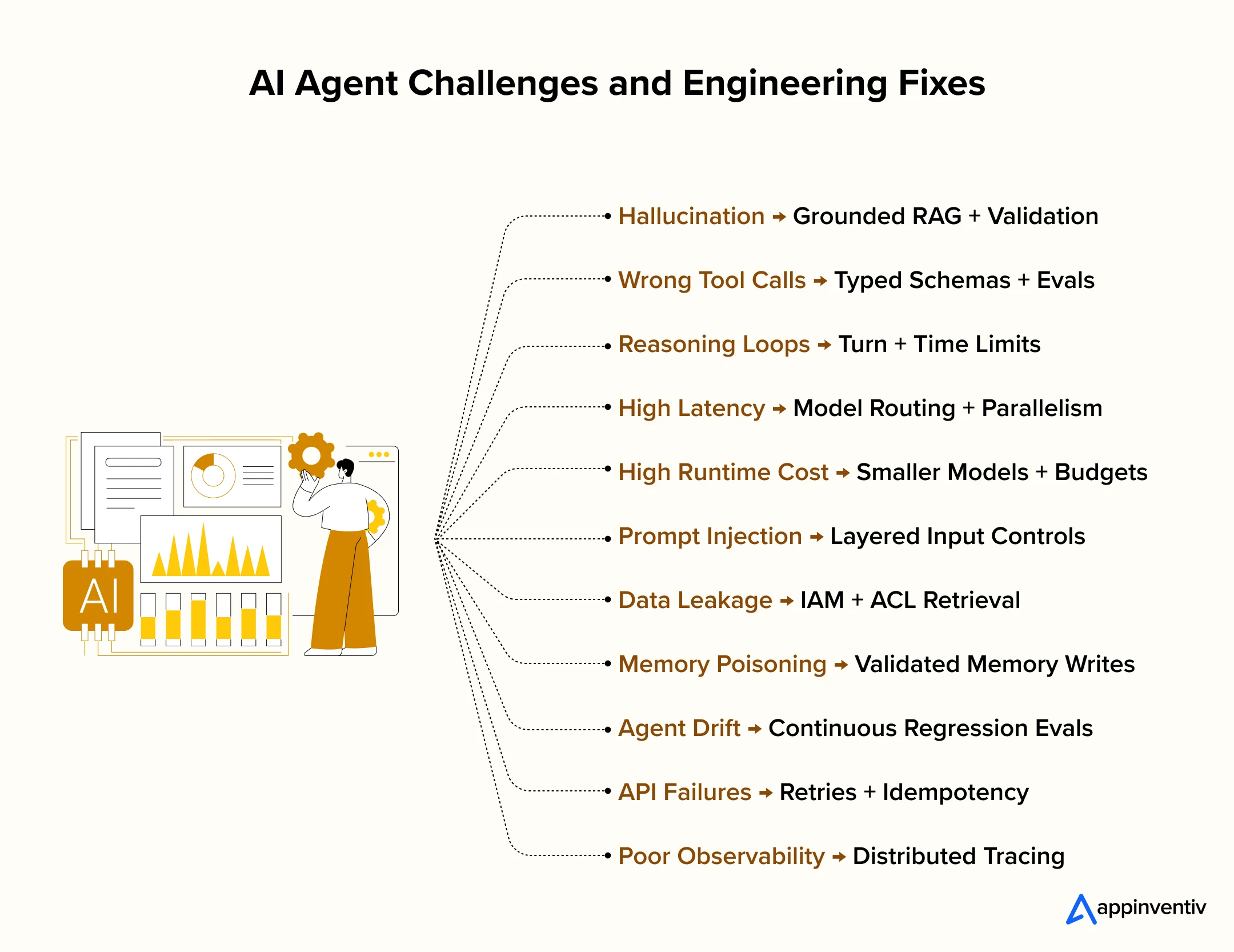
Production failures often come from the interaction between models, tools, data, permissions, and multi-step execution. Teams need to identify the failure source before changing prompts or models.
Hallucination
Poor grounding can lead to AI hallucinations, where the agent generates unsupported facts or bases actions on incorrect information. Use grounded RAG, source validation, structured outputs, and factuality checks before downstream execution.
Also Read: Why RAG Systems Fail: A Technical Analysis of Root Causes
Wrong Tool Calls
Similar tool names, unclear descriptions, or overlapping schemas can lead to incorrect tool selection. Give tools distinct purposes, typed parameters, clear descriptions, and test selection accuracy through tool-call evals.
Reasoning Loops
An agent can repeat actions or revisit the same state when termination rules are weak. Set maximum turns, execution time limits, retry ceilings, and explicit exit conditions.
High Latency
Sequential model, retrieval, and tool calls can increase end-to-end response time. Route simpler tasks to faster models and run independent operations in parallel.
High Runtime Cost
Long trajectories, repeated retrieval, and unnecessary calls increase inference costs. Use smaller models for narrow tasks, cap execution budgets, and track cost per completed task.
Cost pressure is already visible. Deloitte reports that 74% of companies expect agentic AI to increase their overall AI costs, with usage volume and agent complexity among the factors driving spending.
Prompt Injection
Untrusted instructions can enter through users, documents, websites, or connected tools. Separate trusted instructions from external content and apply layered validation before sensitive actions.
Data Leakage
Broad permissions can expose records outside the user’s authorized scope. Enforce IAM policies and ACL-aware retrieval at the data-access layer.
Memory Poisoning
Unvalidated information written to persistent memory can influence future executions. Validate memory writes, restrict what can persist, and track the source of stored information.
Agent Drift
Model updates, prompt changes, new tools, and changing enterprise data can alter production behavior. Run continuous evaluations and regression tests against versioned benchmarks.
API and Tool Failures
Rate limits, timeouts, unavailable services, and malformed responses can interrupt workflows. Add bounded retries, timeout handling, idempotency controls, and defined failure states.
Poor Observability
Multi-step execution makes failures difficult to diagnose from final outputs alone. Use distributed tracing to capture model calls, retrieval operations, tool execution, state transitions, and errors across each agent run.
Best Practices for Building Custom AI Agents That Scale
Production agents need engineering controls that keep execution predictable as workflows, models, tools, and data change.
Start With the Smallest Viable Agent
Use one agent and a limited toolset first. Add specialist agents only where evaluation results show a clear need for separate reasoning, permissions, or execution paths.
Keep Deterministic Rules Outside the LLM
Enforce permissions, transaction limits, required approvals, schema validation, and hard business rules in application code. Do not rely on model instructions for controls that software can enforce directly.
Give Every Tool the Minimum Required Access
Use least-privilege permissions and separate read, write, and high-risk actions. Validate authorization again before executing sensitive tool calls.
Evaluate Complete Agent Trajectories
Test the steps an agent takes, not only its final answer. Track tool selection, parameters, state transitions, retries, approvals, and exit behavior.
Version Every Agent Component
Version models, prompts, tool schemas, retrieval configurations, policies, and evaluation datasets. Run regression evals before production changes.
Design Failure Paths Before Production
Define timeouts, retry limits, fallback models, tool failure states, human handoffs, and rollback procedures before granting production access.
Enterprise Use Cases: Where Custom AI Agents Deliver ROI
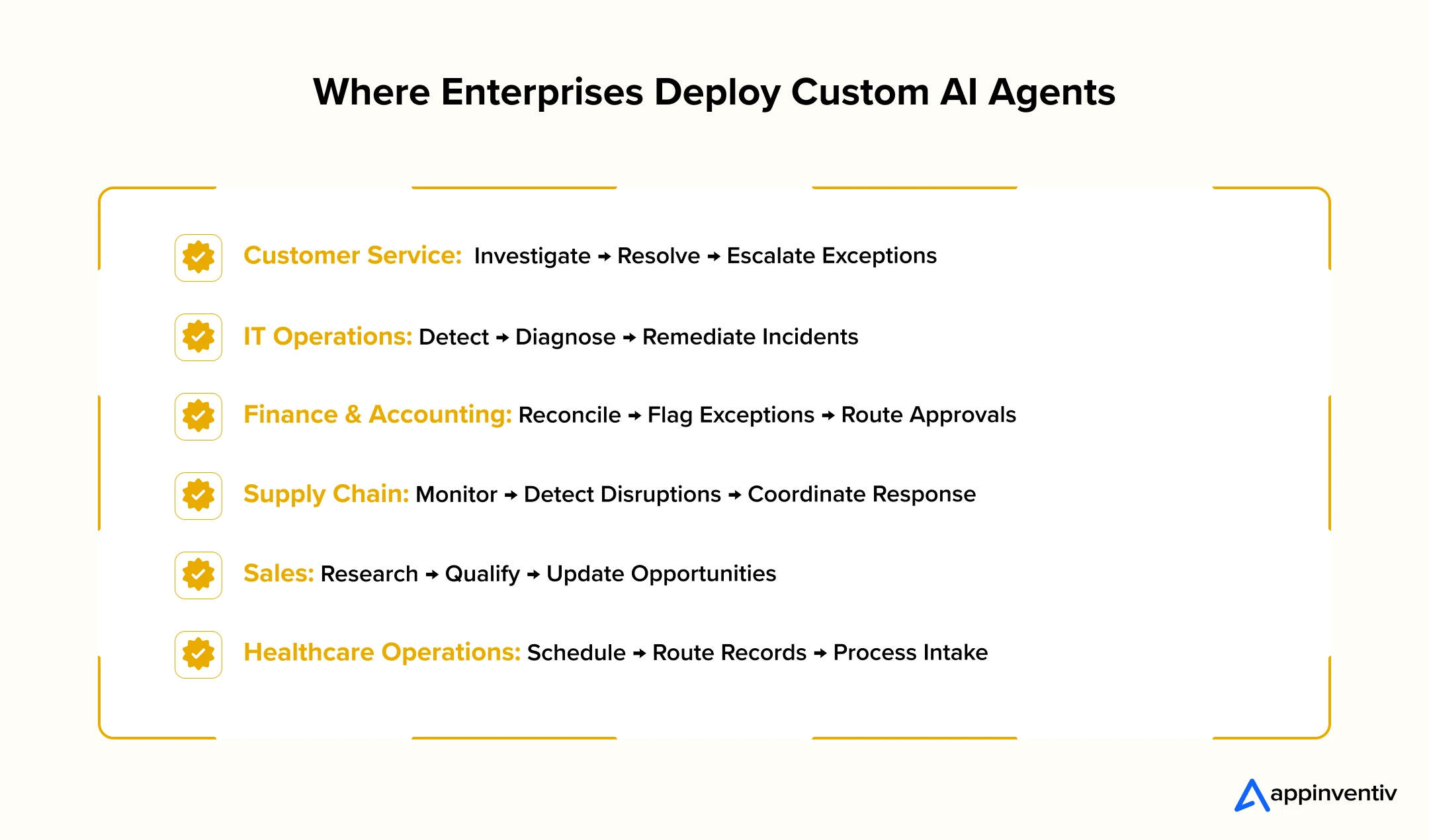
Custom AI Agent Solutions can execute bounded workflows across enterprise systems, with human approval retained for sensitive or high-impact actions.
The expected impact is already material. PwC found that 88% of executives plan to increase AI budgets due to agentic AI, and 79% say AI agents are already being adopted in their companies.
Customer Service
Customer service agents, often powered by conversational AI, investigate user requests. They pull account data, review billing records, and execute approved steps. They connect directly to CRMs, databases, and order management tools. Staff members still approve refunds and policy exceptions.
IT Operations
IT agents review system alerts, logs, and ticket histories to study incidents. They update ITSM records, run diagnostic tools, and complete fixed tasks in cloud systems. System administrators keep full control over major infrastructure changes.
Finance and Accounting
Agentic AI in finance balances transactions and matches invoices to purchase orders. They flag errors and send flagged items to team members. They pull facts from ERP, accounts payable, and procurement systems. Managers approve all outgoing payments and debt write-offs.
Supply Chain
Supply chain agents track inventory shortages, shipment delays, and vendor changes. They gather data from ERP, warehouse management, and shipping platforms. Leaders approve vendor shifts, contract edits, and large inventory purchases.
Sales
Sales agents research target companies, score leads, and write brief overviews. They update CRM files and fetch current price lists. The software cuts manual administrative work. Managers maintain complete control over discounts, custom terms, and contract signings.
Healthcare Operations
Agentic AI in healthcare manages office workflows, scheduling patient visits, routing medical records, and processing intake files. They connect to EHR tools, APIs, and calendar systems. Doctors and staff handle medical decisions and approve patient record edits.
How Much Does Custom AI Agent Development Cost and How Long Does It Take?
The AI agent development cost ranges between $50K and $500K+ depending on scope. A basic agent reaches an MVP stage in 8 to 12 weeks. Full enterprise deployments take 4 to 9 months. Systems with regulated data, legacy tools, or strict governance take longer.
Investment Ranges
Projects fall into three main price tiers:
- Single-workflow agent ($50K – $100K): Covers one task, standard APIs, basic database connections, and limited automation.
- Enterprise agent ($100K – $250K): Covers multiple systems, custom data tools, activity tracking, security rules, and approval steps.
- Multi-agent system ($250K – $500K+): Covers specialized teams of agents, complex coordination, high data volumes, and strict industry compliance.
These numbers are estimates. Final costs shift based on existing tech infrastructure, data quality, and setup requirements.
Key Cost Factors
Task complexity, data pipelines, model choices, and security rules drive final pricing. Old software, scattered files, and custom permissions add extra engineering work even on small projects.
Project Timelines
AI agent implementation typically follows these build phases
- Discovery and design: 2 to 4 weeks
- Proof of Concept (PoC): 3 to 6 weeks
- MVP release: 8 to 12 weeks
- Production launch: 4 to 9 months
- Full-scale deployment: 6 to 12+ months across teams and regions
These phases overlap. Do not add the weeks together for a total timeline. A PoC proves the core concept in a test space. Full production takes longer. Engineers must build secure system ties, set up user access, pass security audits, and prepare infrastructure.
Total Cost of Ownership
Initial development is one part of the total bill. Companies calculate total lifetime expenses with this breakdown:
Total Cost = Build Costs + Model Fees + Server Infrastructure + Data Tools + System Monitoring + Maintenance + Security Rules
How to Measure the ROI of Custom AI Agent Development
Measure agent ROI against the workflow baseline set before development, ideally starting with an AI maturity assessment. Track both technical performance and measurable business impact. The gap between AI investment and realized value remains wide. PwC found that the top 20% of companies capture 74% of AI-driven returns.
Technical KPIs
Track task success rate, tool-call success rate, human escalation rate, end-to-end latency, and error rate. These metrics show whether the agent can complete assigned work reliably.
Business KPIs
Measure cost per task, cycle-time reduction, human hours saved, throughput, SLA improvement, error reduction, and revenue or conversion impact where the workflow affects commercial outcomes.
One useful operating metric is:
Cost per successful task = Total agent operating cost ÷ Successfully completed tasks
For example, an agent costing $20,000 per month that successfully completes 10,000 tasks has a cost per successful task of $2.
Token cost alone is a poor measure of agent economics. A cheaper model run provides little value if failed tasks, retries, or human escalations raise the actual cost of completing the workflow.
Stop Paying for AI That Cannot Deliver
Engineer around cost per successful task, not cheap model calls that disappear into retries, failures, and escalations.
How Appinventiv Helps Businesses Build and Scale Custom AI Agents
Appinventiv’s AI agent development services help enterprises build and scale custom AI agents across strategy, architecture, engineering, integration, evaluation, deployment, and AgentOps.
Our 200+ data scientists and AI engineers build RAG pipelines, memory systems, tools, orchestration layers, and single- and multi-agent systems. We connect agents with CRM, ERP, cloud platforms, APIs, enterprise data, and legacy applications. IAM, human approval, governance, evaluation, and production monitoring are built into the delivery model.
We have deployed 100+ autonomous AI agents and trained and deployed 150+ custom AI models across 35+ industries. Our AI engagements have delivered up to 50% reduction in manual processes, 90%+ agent task accuracy, and 2x scalability through our Custom AI Agent Development engagements.
Let’s connect and build your custom AI agent with production controls.
Frequently Asked Questions
Q. How to build custom AI agents for business?
A. Custom AI Agent Development for business starts by selecting a workflow that requires reasoning, multiple system interactions, or exception handling. Define the agent’s autonomy, data access, and KPIs. Then select models, build RAG and memory, create tool integrations, and add guardrails. Test complete execution trajectories in a sandbox before granting production access and continuously monitor task success.
Q. What are the typical costs for building a personalized AI assistant?
A. Building a personalized AI assistant typically costs $50K to $500K+. A focused assistant with basic RAG and API connections sits near the lower range. Enterprise systems with persistent memory, custom integrations, multi-agent orchestration, IAM, compliance controls, and high workloads cost more. Ongoing model usage, infrastructure, monitoring, and maintenance add to TCO.
Q. How to build AI agents for business automation?
A. Start AI agent development by mapping one business workflow from trigger to completion. Identify decisions, exceptions, users, data sources, connected systems, and current performance. Set measurable targets for task completion, processing time, errors, escalation, and cost. Then define autonomy boundaries and build a controlled proof of concept before connecting the agent to production systems.
Q. How to integrate AI agents with CRM software?
A. AI agent integration with CRM software happens through approved APIs, webhooks, or standardized tool interfaces. Define separate tools for retrieving, creating, and updating CRM records. Authenticate each request through OAuth or service identities and apply least-privilege permissions. Validate tool parameters, use idempotency for writes, maintain audit logs, and require approval for sensitive changes.
Q. What are the key challenges when integrating AI agents into existing business workflows?
A. Common challenges include fragmented enterprise data, legacy systems, weak APIs, excessive permissions, unreliable tool calls, prompt injection, workflow exceptions, and poor observability. Agents can also conflict with existing approval processes or deterministic business rules. Teams need controlled integrations, IAM, ACL-aware retrieval, validation, human approval gates, failure recovery, and trajectory-level monitoring to manage these risks.
Q. What learning resources can help teams build custom AI agents?
A. Teams can learn through tutorials, webinars, guides, YouTube resources, and prebuilt AI frameworks such as AutoGen, LangChain, and CrewAI. Resources such as MindStudio Bootcamp, AgentiveHub.com, AI agency communities, and AI entrepreneur communities can support AI-powered workflow development through community feedback, troubleshooting, and dedicated support teams.
Q. What guardrails are needed for responsible AI agent development?
A. Responsible AI practices combine LLM-based guardrails, rules-based guardrails, relevance and safety classifiers, PII filters, and moderation APIs with strong access controls and authentication and authorization protocols. Enterprises should address data privacy risks and use human oversight or human-in-the-loop intervention for sensitive, high-risk, or low-confidence agent actions.