
I evaluated 20+ spend management software to identify the seven solutions that consistently stood out across G2 reviews, buyer feedback, and category research. The top ones are BILL Spend & Expense, Ramp, Rippling Spend, Brex, Navan, Payhawk, and Paylocity.
As I’ve looked at how growing companies manage budgets, purchasing decisions, and operational expenses, I’ve found that financial clarity becomes harder to maintain long before spending becomes a problem. New software subscriptions, vendor payments, travel costs, and department-level purchases can gradually reduce visibility if the right controls aren’t in place.
That reality led me to take a closer look at the platforms organizations use to manage spending day to day. While many products in this category promise greater control, they often solve very different problems. Some are built around corporate cards and proactive spend controls, while others focus on travel management, procurement oversight, or broader financial operations.
Whether you’re looking for the best desktop software for spending oversight or evaluating platforms that can support more complex financial processes, this guide breaks down where each solution performs best and which organizations are most likely to benefit from it.
7 best spend management software for 2026: My top picks
-
BILL Spend & Expense: Best for proactive budget enforcement
Combines customizable spending limits, approval workflows, virtual cards, budget controls, and real-time visibility to help finance teams prevent out-of-policy purchases before they occur. (free to use)
-
Ramp: Best for automated expense administration
Brings together automated receipt collection, expense categorization, spend monitoring, corporate cards, and accounting integrations to minimize administrative work across growing organizations. ($15/user/month)
-
Rippling Spend: Best for integrated payroll and HR spend
Connects expense management, corporate cards, reimbursements, payroll, benefits, and employee lifecycle workflows within a single workforce management platform. (custom pricing)
-
Brex: Best for global corporate card programs
Offers corporate cards, multi-currency support, global expense management, travel booking, reimbursements, and spend controls for companies operating across regions. ($12/user/month)
-
Navan: Best for unified travel and expense management
Combines travel booking, expense reporting, policy enforcement, real-time savings insights, reimbursement workflows, and spend visibility in a single platform. (custom pricing)
-
Paylocity: Best for workforce-connected spend controls
Combines expense management, payroll, HR administration, employee self-service, reporting, and workforce management tools within a unified platform. (custom pricing)
-
Payhawk: Best for procurement and vendor spend control
Brings together corporate cards, purchase approvals, vendor payments, procurement workflows, ERP integrations, and spend analytics for greater purchasing oversight. (custom pricing)
*These spend management platforms are top-rated in their category, according to the 2026 Summer G2 Grid Report. I’ve included their standout capabilities and pricing information to make comparisons easier.
7 best spend management software I recommend for finance teams seeking greater spending control
At its core, spend management software helps organizations understand where money is going and ensure spending aligns with company policies, budgets, and approvals. Today’s platforms do much more than expense tracking, supporting everything from corporate cards and procurement oversight to purchase order workflows that help finance teams stay ahead of spending decisions.
As I evaluated products in this category, I found that organizations increasingly want systems that guide spending before money leaves the business, not just tools that report on expenses afterward. That shift is reflected in the market itself. The global business spend management (BSM) software market size was valued at $25.98 billion in 2025 and is projected to grow from $28.98 billion in 2026 to $66.31 billion by 2034.
The products in this guide stood out for solving different spending challenges exceptionally well. Some are better suited for employee expense controls, while others excel at travel oversight, corporate card programs, or serving as the best software for vendor spend management.
Many also complement broader financial systems, making them a valuable addition alongside modern ERP systems. During my evaluation, those distinctions often mattered more than feature count alone, especially when comparing the best spend management software for different business needs.
How did I find and evaluate the best spend management software?
I started with G2’s latest Grid Reports to identify spend management platforms with strong market presence, customer satisfaction, and review volume. From there, I narrowed the list to products that play a meaningful role in managing company spending, whether through expense controls, corporate cards, procurement workflows, travel management, or financial operations.
As I evaluated each platform, I focused on factors such as spending visibility, approval workflows, budget controls, reporting, reimbursements, integrations, and scalability.
I also used AI-assisted analysis to review verified G2 feedback at scale and identify recurring patterns in user experiences, strengths, and operational challenges. The final list reflects a combination of G2 data, user feedback, product capabilities, and overall fit for organizations evaluating the best spend management software.
The screenshots featured throughout this article come from G2 vendor profiles and publicly available product materials.
What makes the best spend management software: My criteria
After evaluating 20+ products, I found that identifying the best spend management software requires looking beyond expense tracking alone. Modern platforms increasingly sit at the center of purchasing, approvals, budgeting, vendor oversight, and financial operations. The criteria below reflect the areas that mattered most during my evaluation.
- Spend visibility and budget tracking: I looked at how effectively each platform helps finance teams monitor spending as it happens rather than after the fact. Products that combined real-time visibility with proactive controls, budget tracking, and accountability scored higher.
- Approval controls and policy enforcement: Strong spend management software should help organizations create consistent purchasing processes. I prioritized products that support configurable approval workflows, spending thresholds, policy controls, and automated governance without creating unnecessary administrative work.
- Procurement and vendor oversight: Since spend management extends beyond employee expenses, I evaluated how well each platform supports procurement, vendor management, purchasing workflows, and supplier-related spending controls. Solutions that provided greater oversight across the purchasing lifecycle stood out.
- Corporate spend and expense operations: I examined how effectively each product handles employee spending, reimbursements, card programs, and broader expense management workflows. Platforms that reduced manual effort while maintaining financial control earned stronger consideration.
- Financial system connectivity: Spend data becomes far more valuable when it moves seamlessly across the finance stack. I prioritized products with strong integrations for accounting, ERP, payroll, banking, and related financial systems.
- Scalability for growing organizations: Spending processes often become more complex as companies grow. I favored platforms that support flexible permissions, multi-entity operations, customizable workflows, and evolving governance requirements without requiring teams to rebuild processes.
- Reporting, analysis, and savings opportunities: Beyond transaction tracking, I looked for platforms that help finance teams identify spending trends, uncover savings opportunities, and make more informed purchasing decisions through reporting and analytics.
- Verified user sentiment and long-term fit: While analyzing G2 reviews, I focused on recurring patterns related to usability, reliability, workflow fit, implementation experiences, and overall satisfaction. This helped me understand which products continued to deliver value after adoption, not just during initial rollout.
The list below contains genuine user reviews from the Spend Management software category page. To be included in this category, a solution must:
- Provide a centralized repository of procurement and purchasing data
- Manage corporate or procurement spend
- Include rules and workflows to approve purchases and payments
- Match purchase orders, supplier invoices, and payments
- Compare procurement budgets with actual spending
- Provide real-time reporting of spend transactions
- Analyze historical data and identify changes and trends in spending
- Deliver suggestions for savings by product, supplier, or department
*This data was pulled from G2 in 2026. Some reviews may have been edited for clarity.
1. BILL Spend & Expense: Best for proactive budget enforcement
I expected BILL Spend & Expense to be another platform focused primarily on expense reporting. But I found its strongest differentiator lies in how it helps organizations control spending before purchases happen rather than simply tracking expenses after the fact. That proactive approach is one reason BILL Spend & Expense remains one of the best-rated software for controlling company expenses and continues to earn strong satisfaction scores among finance teams.
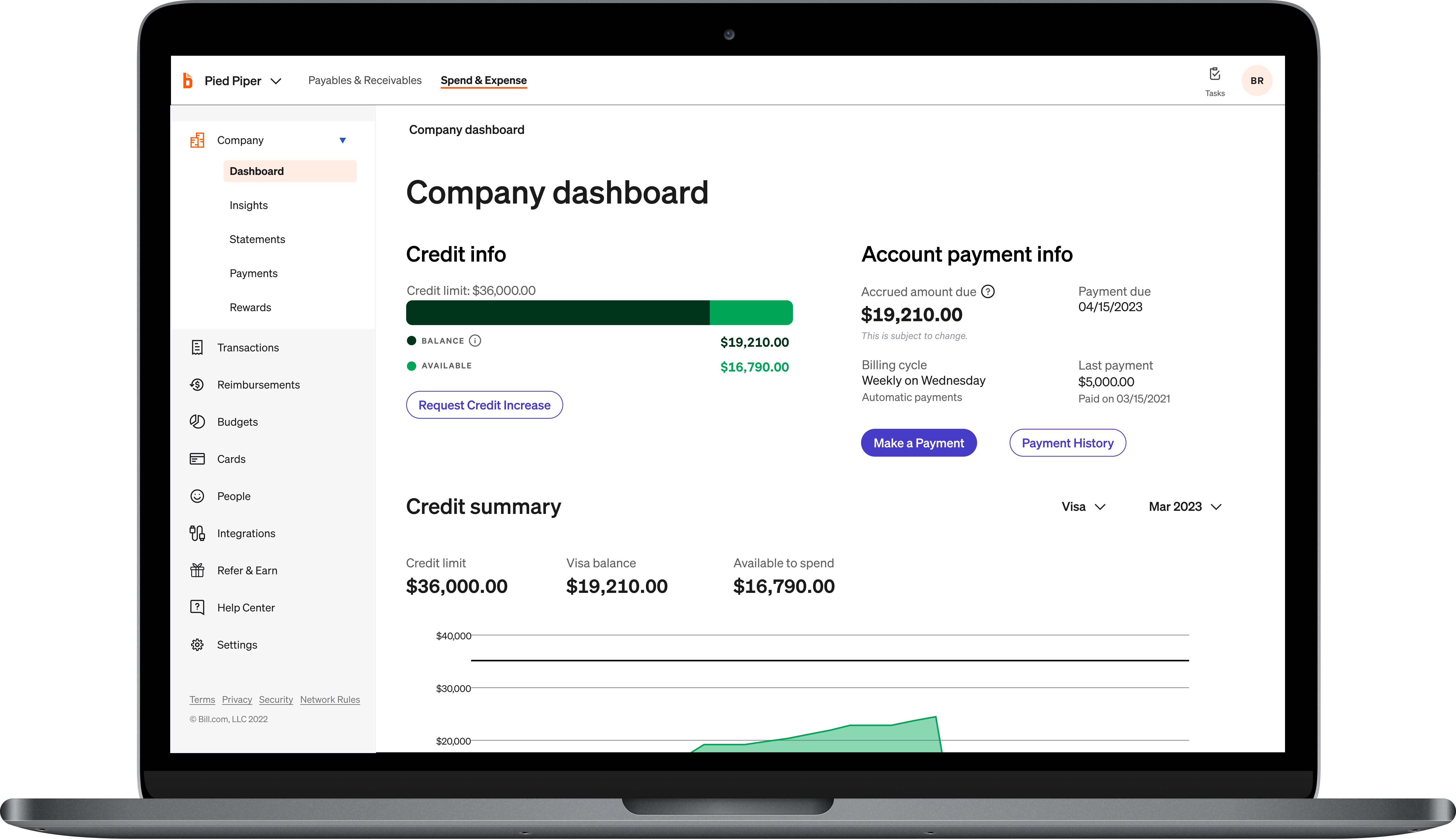
On G2, BILL Spend & Expense holds a 4.5 out of 5 rating. The platform’s budget-first philosophy appears throughout the user experience. Based on the G2 reviews I analyzed, finance teams appreciate the ability to set spending limits tied directly to employees, departments, projects, or events via virtual and physical cards. Instead of relying on reimbursement-heavy workflows, organizations can establish spending boundaries upfront while still giving employees the flexibility to make purchases when needed.
That control extends into real-time visibility. BILL Spend & Expense earned a 91% rating for real-time capabilities on G2, and reviewers frequently highlighted how quickly they could monitor transactions, review spending activity, and identify budget concerns. Rather than waiting for end-of-month reporting cycles, teams can track spending as it occurs and respond before small issues become larger financial problems.
Another recurring strength was ease of use. BILL Spend & Expense maintains a 92% ease-of-use rating and a 90% ease-of-setup rating, which aligned closely with the feedback I reviewed. Users regularly described the platform as intuitive for both administrators and employees, particularly when managing receipts, submitting expenses, approving purchases, and monitoring card activity.
I also noticed consistent praise for its integration capabilities. Reviewers frequently referenced connections with accounting platforms such as QuickBooks, Intacct, and Xero, helping finance teams reduce manual data entry and streamline reconciliation processes. For organizations already using broader financial systems or complementary payroll software, these integrations help create a more connected finance workflow.
Expense reporting and compliance management emerged as another strong theme. Multiple reviewers highlighted receipt capture, transaction categorization, approval documentation, and audit-friendly reporting as significant time savers. Businesses evaluating expense management software often need a balance between employee flexibility and financial oversight, and BILL Spend & Expense generally performs well on both fronts.
Teams with highly customized approval structures or businesses transitioning between multiple BILL products may need additional time to configure workflows and onboard users effectively. For companies prioritizing budget governance and spending accountability, the platform’s core strengths remain compelling.
Teams that depend heavily on automated receipt matching, highly customized policy exceptions, or complex transaction categorization may occasionally encounter manual review work for edge cases. For most finance teams, those considerations are outweighed by the visibility and control the platform provides.
BILL Spend & Expense is particularly well-suited for growing organizations that want to establish stronger spending discipline without creating excessive administrative overhead. If you’re researching what the best spend management app is for small businesses, BILL Spend & Expense stands out because it combines proactive controls, real-time visibility, and ease of adoption in a way that supports both finance teams and everyday cardholders.
What I like about BILL Spend & Expense:
- One theme that surfaced repeatedly in G2 feedback was BILL Spend & Expense’s ability to enforce spending controls before purchases happen through virtual cards, approval rules, and customizable permissions.
- As I reviewed user feedback on G2, I found that many customers appreciate the balance between finance visibility and employee usability, allowing teams to manage expenses without adding friction.
What G2 users like about BILL Spend & Expense:
“The virtual card platform allows us to use a credit card to pay our bills. It’s amazing how employees can have different budgets and permissions. It allows us to stay on top of their spending, review, and approve all their expenses. I also really like how we can order physical cards for them, too.”
– BILL Spend & Expense review, Sarah P.
What I dislike about BILL Spend & Expense:
- G2 reviewers managing highly customized approval structures often mention spending additional time connecting workflows and onboarding users across broader BILL environments.
- While users generally praise the platform’s automation capabilities, some G2 reviews reference occasional exceptions where receipt matching or transaction categorization still requires manual review.
What G2 users dislike about BILL Spend & Expense:
“The implementation and onboarding process were notably disjointed. For a tool that is supposed to streamline operations, the setup felt fragmented and lacked a cohesive ‘white-glove’ experience. I found the transition between the credit approval phase and the actual platform utility to be fumbled, leading to significant delays in getting the system fully operational. Operationally, it feels like several different tools stitched together rather than one fluid ecosystem.”
– BILL Spend & Expense review, Sean R.
Organizations using BILL Spend & Expense often connect it with broader financial workflows. Explore the G2 Accounting Software category to compare solutions that support reconciliation, reporting, and financial management alongside spend controls.
2. Ramp: Best for automated expense administration
The most interesting thing I discovered while evaluating Ramp wasn’t its corporate card program or expense management features. It was how frequently users described the platform in terms of time savings. Across the G2 reviews I analyzed, teams repeatedly emphasized how much manual work Ramp removes from expense reporting, receipt collection, approvals, reimbursements, and day-to-day financial administration.
That focus on efficiency helps explain Ramp’s strong market adoption. According to G2 data, Ramp holds a Leader position, maintains a 4.8 out of 5 rating across 2,000+ reviews, and receives recommendations from 96% of users. The platform also has particularly strong adoption among growing organizations, with 59% of users coming from small businesses and another 38% from mid-market companies.
Receipt collection and expense processing emerged as one of Ramp’s most consistently praised capabilities. Multiple reviewers highlighted automated receipt matching, email scanning, transaction categorization, and AI-assisted expense workflows that reduce the need for manual follow-up. Based on the G2 reviews I examined, finance teams spend less time chasing documentation and more time focusing on higher-value work.
Real-time visibility is another area where Ramp excels. The platform earned a 96% rating for real-time capabilities on G2, and reviewers frequently referenced how quickly they could monitor spending activity, review transactions, and identify unusual expenses. That level of transparency helps organizations stay ahead of budget concerns before they become larger problems.
Ease of use surfaced throughout my evaluation as well. Ramp maintains 96% ease-of-use and 94% ease-of-setup scores, which align closely with reviewer sentiment. Whether users were managing reimbursements, issuing cards, reviewing approvals, or tracking expenses, the platform was consistently described as intuitive and easy to navigate.
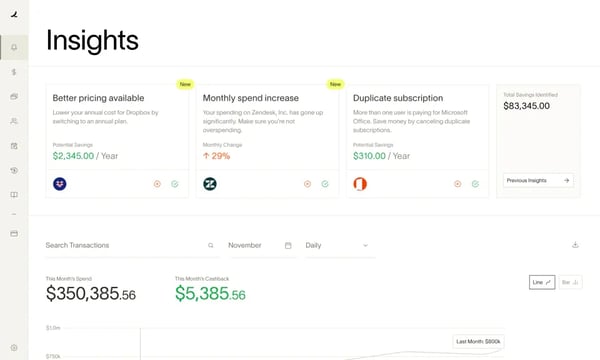
Corporate card management also plays a significant role in Ramp’s appeal. Users frequently praised virtual cards, spending controls, policy enforcement, and automated compliance checks. Organizations evaluating a corporate credit card solution alongside spend management tools may find particular value in the tight integration between these capabilities.
The mobile experience received positive feedback as well. Several reviewers specifically highlighted submitting receipts, reviewing expenses, and monitoring spending activity while away from their desks. If you’re researching what mobile app is best for business spend tracking, Ramp’s combination of real-time visibility, receipt capture, and mobile accessibility makes it a strong contender.
Teams with highly customized accounting environments or niche software ecosystems may occasionally need additional integration work when connecting Ramp to existing systems. For businesses prioritizing efficiency and automation, the platform’s core strengths remain highly compelling. Ramp is best for teams that want to automate financial workflows and reduce administrative effort.
Finance teams that require highly customized reporting structures or unique export formats may occasionally need manual adjustments. For most companies, those considerations are outweighed by the operational efficiency Ramp delivers. The platform performs best when organizations adopt its workflow-driven approach to spend management.
Ramp earns its place among the best spend management software options because it consistently removes friction from financial operations. Organizations looking to reduce manual expense administration, improve spending visibility, and modernize financial workflows will likely find the value becomes clear very quickly.
What I like about Ramp:
- One capability that stood out across the G2 reviews I analyzed was Ramp’s ability to automate repetitive finance tasks, from receipt collection and expense categorization to approvals and policy enforcement.
- Throughout the G2 feedback I reviewed, users frequently praised the combination of real-time spend visibility, card controls, and intuitive workflows that help finance teams stay in control without creating friction for employees.
What G2 users like about Ramp:
“It’s the easiest tool for issuing funds to collaborators and holding them accountable by collecting receipts in an incredible, user-friendly interface. Gathering receipts and invoices is automated, having an AI scan your email, or your gallery, and matching receipts to expenses, making the process much less tedious.”
– Ramp review, Alejandro L.
What I dislike about Ramp:
- Some G2 customers mentioned needing additional configuration when connecting Ramp to less common accounting systems or specialized financial workflows.
- While reporting capabilities are generally well received, a few G2 reviewers noted that highly customized exports and financial analyses may occasionally require supplemental work outside the platform.
What G2 users dislike about Ramp:
“Though Ramp integrates with many accounting software brands, it does not connect with ours. We still have to download a spreadsheet.”
– Ramp review, Colette F.
3. Rippling Spend: Best for integrated payroll and HR spend
Most spend management platforms focus on expenses first and employee records second. As I evaluated Rippling Spend, I found that its biggest advantage comes from treating spending as part of the broader employee lifecycle rather than as a standalone finance process. That approach makes the platform feel less like another finance tool and more like an operational layer connecting HR, payroll, approvals, and employee spending.
Rippling Spend holds a 4.7 out of 5 rating across 1,800+ reviews on G2 and earned the highest Satisfaction score among products in the spend management category. With 98% of users rating it four or five stars and 95% indicating they would recommend it, the platform has built strong momentum among organizations looking to consolidate workforce and finance workflows.
One theme that surfaced repeatedly in the reviews I analyzed was how much easier employee expense management becomes when reimbursements, approvals, payroll records, and employee data are all housed in a single system. Employee reimbursements are one of Rippling Spend’s highest-rated capabilities, earning a 93% satisfaction score on G2.
Reviewers frequently highlighted automated reimbursements, receipt collection, mileage tracking, and approval routing as significant time savers. Organizations comparing modern expense management software will likely appreciate how closely these workflows connect to the broader employee lifecycle.
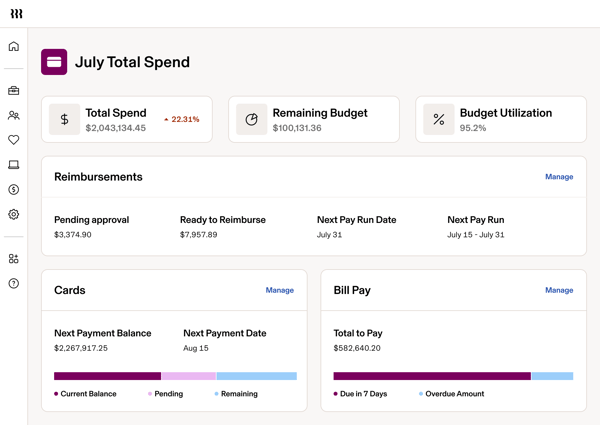
Visibility and governance also emerged as recurring strengths. Rippling Spend earned 92% for real-time functionality and 91% for controls. Based on the G2 reviews I examined, finance leaders value the ability to monitor spending activity, enforce policies, and review approvals without introducing additional administrative work.
I also noticed consistent praise for ease of use, automation, and integrations. Rippling Spend maintains 94% ease-of-use and 92% ease-of-setup scores, while reviewers frequently referenced QuickBooks connectivity, AI-assisted receipt scanning, automated categorization, and approval workflows that reduce manual reconciliation work.
Those efficiencies appear to translate into measurable business value as well. According to G2 data, Rippling Spend achieves an average user adoption rate of 90%, and organizations typically realize ROI in approximately seven months. Companies already evaluating payroll software may find additional value in how naturally these capabilities connect within the broader Rippling ecosystem.
Teams with highly customized reporting requirements or organizations using finance systems outside the Rippling ecosystem may spend additional time configuring integrations and reconciliation workflows. For businesses prioritizing operational consistency, the platform’s core value remains clear. Rippling Spend is designed for organizations that want to consolidate employee spending, reimbursements, payroll, and approvals within a unified platform.
Organizations with more advanced governance structures may need additional time for onboarding to fully configure workflows and reporting preferences. For companies seeking a connected employee and finance experience, that initial investment is often offset by long-term efficiency gains. The platform also offers considerable flexibility across approvals, policies, and administrative settings.
Rippling Spend is particularly well-suited for organizations that want to manage spending as part of broader workforce operations. Its combination of payroll connectivity, employee-centric workflows, automation, and visibility makes it one of the best spend management software options for businesses looking to reduce friction between HR and finance teams.
What I like about Rippling Spend:
- A recurring strength in the G2 reviews I analyzed was how seamlessly Rippling Spend connects employee spending with existing HR and payroll workflows.
- Many G2 users highlighted automated reimbursements, AI-powered receipt capture, approval routing, and payroll integration as key drivers of administrative efficiency.
What G2 users like about Rippling Spend:
“This is a Spend tool that’s simple to implement, easy to use, and manage. We were previously using a standalone spend tool, but after switching to Rippling HCM, we decided to watch a demo of the spend tool as well, and it was an instant yes for us. We aim to provide a simple, consistent experience for our team members, and now they don’t have to log in to another app to enter expenses or submit reimbursement requests. Rippling is the single app they need to use for their day-to-day needs. As the payroll admin, I now have an almost automated way to manage spend and process it alongside payroll.”
– Rippling Spend review, Ayush G.
What I dislike about Rippling Spend:
- Some G2 reviewers noted that organizations operating outside the broader Rippling ecosystem may spend additional time connecting accounting systems and financial workflows.
- A few users on G2 mentioned that highly customized approval structures and reporting requirements can require extra configuration before workflows fully align with internal processes.
What G2 users dislike about Rippling Spend:
“The biggest drawback was that getting full value out of Rippling Spend really depends on being in the broader Rippling ecosystem — the integrations with our existing accounting and HR tools weren’t always as deep as we wanted, and a few syncs required manual reconciliation that we’d hoped to avoid. On the UI/UX side, while the core flows are clean, some of the more advanced reporting and admin settings are buried in menus that take a while to learn, and navigating between modules isn’t always intuitive for occasional users.”
– Rippling Spend review, Tanu J.
Organizations using Rippling Spend often extend automation into invoice processing and vendor payments as well. Explore these leading solutions in our guide to the best accounts payable automation software.
4. Brex: Best for global corporate card programs
As I evaluated Brex, I found that its strongest differentiator isn’t simply expense management or corporate cards. It’s how effectively the platform supports organizations with distributed employees, multiple spending owners, and increasingly global operations. Rather than forcing finance teams to choose between control and flexibility, Brex focuses on making both possible at scale.
That approach has resonated with users. Brex has a 4.8 out of 5 rating across 1,500+ reviews on G2, with 98% of users rating it 4 or 5 stars and 95% indicating they would recommend it. Its largest representation comes from the computer software industry, which helps explain why it frequently appears in conversations around the top tools for spend management in tech companies.
Corporate card management remains one of Brex’s biggest strengths. Based on the G2 reviews I analyzed, users consistently praised the ability to issue physical and virtual cards, create spending limits, assign budgets, and manage purchases across distributed teams. Brex earned a 94% rating for physical cards on G2, and reviewers frequently highlighted how easy it is to maintain visibility without relying on shared cards or manual oversight.
Real-time spend tracking and proactive controls surfaced throughout my evaluation as well. Brex earned 95% for proactive assistance and 94% for notifications, enabling finance teams to monitor spending activity in real time rather than waiting for month-end reporting. Several reviewers also mentioned forecasting, budgeting, and spend analysis capabilities that helped them make more informed financial decisions.
Another recurring theme was ease of adoption. Brex maintains 96% ease-of-use and 94% ease-of-setup scores on G2, which align closely with reviewer feedback. Users regularly described onboarding as smooth and intuitive, and that experience is reflected in the platform’s average implementation time of just one month, allowing organizations to begin managing spend relatively quickly.
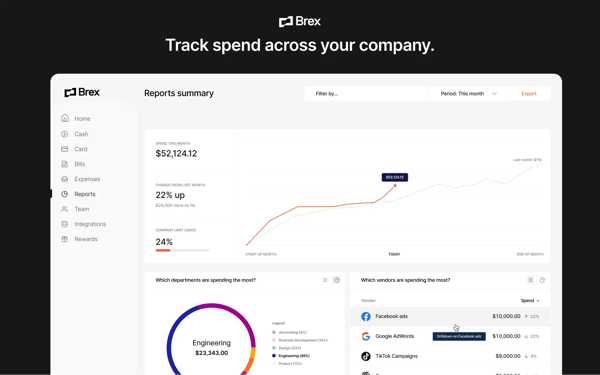
I also noticed frequent praise for integrations and financial workflows. G2 reviewers highlighted connections with major ERP systems and operational tools that reduce manual work and improve transaction visibility. Organizations evaluating solutions beyond expense tracking may also appreciate Brex’s ability to support broader finance operations, including workflows commonly associated with invoice management software.
Travel-related spending emerged as another area where Brex delivers value. Several reviewers referenced managing travel expenses, booking workflows, and employee spending within the same ecosystem. Organizations comparing modern travel management software may find Brex particularly appealing when travel spending is closely tied to broader expense controls.
Teams operating within highly customized accounting environments may occasionally spend additional time configuring integrations and data flows to align with existing financial processes. For companies prioritizing speed and spend control, the platform’s core strengths remain highly effective. Brex is ideal for teams that want a centralized approach to corporate cards, employee spending, and financial visibility.
Teams that need granular reporting views or detailed spend analytics broken down by role, category, or cost center may find Brex’s current reporting configuration requires supplemental work. For distributed organizations managing spending across multiple teams, the platform’s core controls and visibility remain highly effective. The platform performs best when standard reporting outputs meet the organization’s analytical needs.
Brex is a good choice for growing and distributed organizations that need modern spend controls without sacrificing agility. Its combination of global card programs, visibility, automation, and ease of adoption makes it one of the best spend management software options for companies managing spending across locations and teams.
What I like about Brex:
- One theme that surfaced repeatedly in G2 feedback was Brex’s ability to give employees spending flexibility while maintaining strong financial controls through virtual cards, limits, and real-time visibility.
- The G2 reviews I analyzed frequently highlighted fast onboarding, automated workflows, and proactive spend controls that help reduce administrative work across growing organizations.
What G2 users like about Brex:
Brex integrates seamlessly with our accounting systems, enabling automated transaction syncing. This is especially useful for managing recurring subscriptions like Replit, Claude, and other tools. The integrations reduce manual effort and improve accuracy in financial tracking. The platform performs reliably with real-time updates on transactions and spending. This immediate visibility ensures faster decision-making and helps flag unusual activity quickly. Overall, it handles day-to-day financial operations efficiently without noticeable delays.
– Brex review, Prateek R.
What I dislike about Brex:
- Some G2 reviewers noted the need to invest additional effort in configuring integrations and transaction workflows to align with highly customized accounting environments.
- A few G2 reviewers noted that teams with more complex analytical needs — such as custom reporting views filtered by role, category, or cost center — may occasionally need to supplement Brex’s built-in reporting with additional tools or manual exports.
What G2 users dislike about Brex:
“I would recommend the ability for more seamless integrations with your banking or accounting software. At the moment, we don’t use that. But I think if the process is seamless, just the way you can connect using APIs, it would be good.”
– Brex review, Adeshina A.
5. Navan: Best for unified travel and expense management
Travel spending creates a unique challenge for finance teams. Unlike software subscriptions or vendor payments, expenses are often generated by employees making real-time decisions. As I evaluated Navan, I found that its biggest strength is bringing travel booking, expense management, reimbursements, and policy controls into a single workflow rather than treating them as separate processes.
Navan has a 4.7 out of 5 rating across 9,000+ reviews on G2, with 97% of users rating it 4 or 5 stars and 94% indicating they would recommend it. The platform serves a particularly large mid-market audience, with 62% of its customers coming from mid-sized businesses. That aligns closely with the feedback I reviewed, where users frequently described balancing employee travel flexibility with growing compliance and budget requirements.
One theme that surfaced repeatedly in the reviews I analyzed was how much easier business travel becomes when booking and expense reporting happen on the same platform. Rather than managing flights, hotels, receipts, reimbursements, and approvals across multiple systems, employees can complete much of the process within a single environment. Several reviewers specifically praised the ability to view itineraries, manage bookings, and track expenses without switching tools.
Expense visibility is another area where Navan excels. Employee reimbursements earned a 96% satisfaction score on G2, while notifications scored 95%. Reviewers frequently mentioned receipt capture, automated categorization, reimbursement tracking, and approval transparency as meaningful time savers. Teams currently relying on spreadsheets or a free business expense tracker may find the centralized experience particularly valuable as spending volume increases.
I also noticed strong praise for policy enforcement and real-time oversight. Navan earned a 94% score for real-time functionality, helping finance teams identify spending activity as it occurs rather than after month-end reconciliation. Several users highlighted how company travel policies, approval requirements, and spending limits are embedded directly into the booking process. That level of visibility can help reduce the risks often associated with unmanaged expense activity and expense fraud.
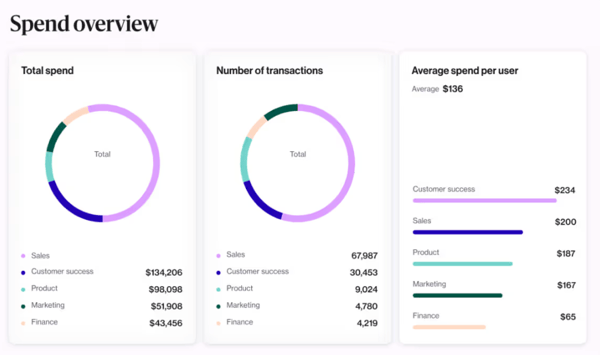
Ease of adoption emerged as another consistent strength. Navan maintains 96% ease-of-use and 95% ease-of-setup scores, which align with reviewer feedback on intuitive booking workflows, mobile accessibility, and streamlined reimbursement processes. For organizations evaluating best spend management software, usability can significantly reduce friction during rollout.
Companies with highly specialized reimbursement requirements or complex tax scenarios may occasionally encounter situations requiring additional review before expenses are finalized. For most organizations, the platform’s automation still removes substantial administrative effort. Navan is designed for organizations that want travel management and expense controls operating within the same system.
Teams managing highly customized itineraries, unusual regional requirements, or multi-step travel approvals may occasionally encounter additional booking steps. For organizations seeking the best spend management software for large enterprises, Navan’s combination of scale, visibility, and travel-specific controls remains a compelling option. The platform also works best when travel follows relatively standard booking workflows.
Navan is ideal for teams where travel represents a significant portion of employee spending. Its ability to connect bookings, expenses, reimbursements, and policy compliance within a single workflow makes it a strong choice for growing businesses and enterprise teams alike.
What I like about Navan:
- Throughout the G2 feedback I reviewed, users frequently praised Navan for bringing travel booking, expense reporting, and reimbursements into a single streamlined workflow.
- A recurring theme in G2 reviews was the platform’s ability to provide real-time spend visibility through embedded policies, approval workflows, and travel controls.
What G2 users like about Navan:
“The user experience is extremely intuitive. If you’ve booked travel before, you can quickly figure it out. The mobile-first application makes on-the-go, real-time expense submission a breeze. By eliminating traditional expense reports, it lets users focus on their core responsibilities instead of non-value-added compliance reviews. Compliance is built into the policies, and out-of-policy transactions are automatically flagged for review.”
– Navan review, Michael B.
What I dislike about Navan:
- Some G2 reviewers noted that specialized reimbursement scenarios, tax requirements, or non-standard expense categories can occasionally require additional review before expenses are finalized.
- A few users on G2 mentioned that highly customized travel itineraries or complex approval structures may involve more coordination than standard travel booking workflows.
What G2 users dislike about Navan:
“One issue that I faced recently was while submitting a food reimbursement. The bill had taxes listed separately (CGST and SGST), which were not auto-captured from the receipt, and I had to manually update the tax values for logging the expense. It’s not a big deal, but it would be great if the OCR reads the taxes and adds them automatically instead of having to do a manual entry.”
– Navan review, Rahul B.
6. Paylocity: Best for workforce-connected spend controls
As I evaluated Paylocity, I noticed something different from the other platforms in this category. Most spend management products start with expenses and build outward. Paylocity first approaches the challenge from the workforce side. Spending, payroll, onboarding, benefits, employee records, and workforce administration all operate within the same ecosystem, creating stronger connections between financial processes and employee operations.
That broader approach has helped Paylocity build a significant market presence. The platform holds a 4.4 out of 5 rating across 5,000+ reviews on G2 and has the largest Market Presence among products in the spend management category. Additionally, 96% of users rate it 4 or 5 stars, while its satisfaction and likelihood-to-recommend rates stand at 92%, reflecting consistent confidence among organizations using the platform across multiple business functions.
One theme that surfaced repeatedly in the reviews I analyzed was simplicity. Users frequently described payroll administration, onboarding, employee self-service, and workforce management processes as easy to navigate. Rather than forcing employees to rely on HR teams for routine updates, Paylocity allows users to manage personal information, payroll details, benefits, and administrative tasks independently.
Payroll remains one of the platform’s biggest strengths. Multiple reviewers highlighted streamlined payroll processing, multi-state tax support, direct deposit management, and employee onboarding workflows as significant time savers. Several users also noted that consolidating payroll and HR functions reduced administrative work and improved consistency across teams.
The workforce management capabilities also stood out. Organizations evaluating modern workforce management software often need stronger connections between employee data, scheduling, onboarding, payroll, and workforce planning. Based on the G2 reviews I examined, Paylocity performs particularly well when organizations want these processes operating from a single system rather than across multiple disconnected applications.
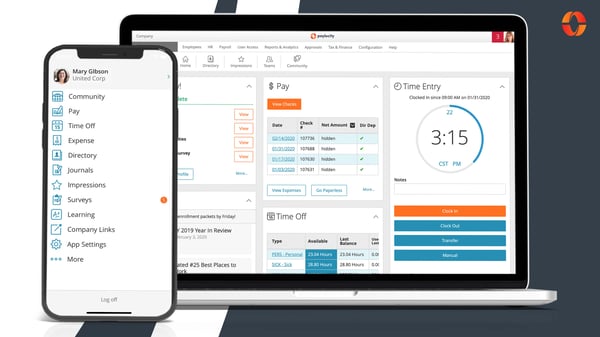
Ease of use emerged as another recurring strength. Paylocity earned a 93% score for both Ease of Use and Meets Requirements on G2. Employee reimbursements, recurring virtual cards, and one-time virtual cards each received 94% satisfaction scores, demonstrating that the platform extends beyond traditional HR workflows into spend-related processes as well.
I also noticed frequent praise for onboarding and implementation support. Many reviewers highlighted guided rollouts, training resources, responsive service teams, and modernized workflows that helped organizations transition from legacy systems. Mid-market businesses appeared particularly well represented throughout the review set, which aligns with questions such as which spend management solution do mid-sized firms prefer. Organizations exploring expense management software for mid-market teams may find Paylocity’s broader operational approach especially appealing.
Companies with highly specialized payroll calculations, complex reporting requirements, or unique compliance scenarios may occasionally spend additional time configuring workflows and validating outputs. For organizations prioritizing operational consistency, the platform’s broader value remains substantial. Paylocity is designed for organizations that want payroll, HR administration, workforce management, and spending processes integrated into a single platform.
Teams implementing multiple modules simultaneously may need additional onboarding and training time before every process is fully optimized. For organizations seeking a unified employee and financial operations experience, that investment often creates meaningful long-term efficiencies. The platform also offers extensive functionality across HR, payroll, benefits, onboarding, and workforce administration.
Paylocity stands apart from many traditional spend tools because it connects spending activity to the broader employee lifecycle. Its combination of payroll management, workforce administration, onboarding, and financial oversight makes it a compelling option among the best spend management software solutions for organizations seeking operational alignment across HR and finance.
What I like about Paylocity:
- The G2 reviews I analyzed frequently highlighted Paylocity’s ability to connect payroll, onboarding, workforce management, and spend-related processes within a single platform.
- Many users on G2 praised the platform’s self-service capabilities and operational efficiencies, which help reduce reliance on multiple disconnected systems.
What G2 users like about Paylocity:
“What sets Paylocity apart is how seamlessly it integrates everything from onboarding to performance tracking. Instead of juggling multiple disjointed systems, having a single, intuitive source of truth saves our team hours of administrative work and creates a frictionless experience for new hires from day one.”
– Paylocity review, Ahtziri A.
What I dislike about Paylocity:
- Some G2 reviewers noted that highly specialized payroll calculations, reporting requirements, or compliance workflows can require additional configuration and validation.
- A recurring theme in G2 feedback was that advanced reporting, benefits administration, and workforce management workflows may require extra setup and process refinement, particularly in larger implementations.
What G2 users dislike about Paylocity:
“The reporting is a little lacking. It’s frustrating not to be able to report on everything that is in the system and not be able to link tables. I think they could also make some changes to the administrative side and make some things a little easier with events tracking and other compliance issues.”
– Paylocity review, Jennifer N.
7. Payhawk: Best for procurement and vendor spend control
Most spend management platforms focus heavily on employee expenses, but as I evaluated Payhawk, I found that its strongest value comes from helping finance teams maintain control over purchasing decisions before money leaves the business. The platform brings together procurement, card management, approvals, reimbursements, and vendor payments in a way that creates a clearer picture of how organizational spending actually happens.
Payhawk holds a 4.5 out of 5 rating across 850+ reviews on G2. Additionally, 98% of users rate it four or five stars, and 91% say they would recommend it. Those numbers reflect a platform that has built strong credibility among organizations looking for tighter control over operational spending without creating unnecessary friction for employees.
One theme that consistently emerged in the reviews I analyzed was visibility. Users frequently highlighted how easy it is to track spending across departments, entities, budgets, and approval workflows from a single system. Rather than relying on disconnected processes, finance teams can manage company cards, expenses, invoices, and approvals from one centralized environment.
Procurement governance emerged as another major strength. Several reviewers noted that approval workflows, spending limits, category controls, and automated policy enforcement help prevent purchasing decisions from bypassing internal processes. Organizations investing in procurement automation often seek a balance between control and efficiency, and Payhawk excels in that area.
The platform also received strong marks for automation and day-to-day usability. Payhawk earned a 93% Ease of Use score on G2, while recurring virtual cards, controls, and employee reimbursements all received 90% satisfaction scores. Based on the reviews I examined, users particularly value automated receipt capture, streamlined reimbursement workflows, and the ability to reduce manual administrative work for both employees and finance teams.
Integration capabilities surfaced repeatedly as well. Reviewers frequently mentioned accounting system connectivity, ERP synchronization, and consolidated reporting as meaningful advantages. Businesses evaluating broader financial operations alongside spend management may appreciate how Payhawk supports workflows that extend into enterprise resource planning systems and accounting environments.
I also noticed a recurring theme around scalability. The platform supports multiple entities, approval structures, and spending controls while maintaining a relatively intuitive user experience. That flexibility makes it particularly relevant for growing organizations and businesses evaluating leading spend management services for startups that expect operational complexity to increase over time.
Teams with highly specialized accounting configurations or deeply customized reporting requirements may occasionally spend additional time tailoring workflows and integrations. For businesses prioritizing spending visibility and control, the platform’s core value remains compelling. Payhawk is designed for organizations that want stronger governance across procurement, vendor spending, and employee expenses.
Organizations introducing highly detailed procurement policies may need additional onboarding and configuration time before every workflow reflects their preferred controls. For finance teams seeking consistency and accountability across purchasing decisions, that investment can create long-term operational benefits. The platform also offers significant flexibility across categories, entities, and approval structures.
Payhawk stands out among the best spend management software options for organizations that want procurement controls, vendor oversight, and spend visibility operating from a single platform. Its combination of governance, automation, and financial transparency makes it particularly attractive for growing businesses that need stronger purchasing discipline without slowing operations down.
What I like about Payhawk:
- One capability that stood out across the G2 reviews I analyzed was Payhawk’s ability to centralize procurement, approvals, expenses, and vendor spending within a single workflow.
- Many G2 users highlighted the platform’s balance of governance and usability, citing automated controls, reimbursement workflows, and spending policies as key strengths.
What G2 users like about Payhawk:
“Having used Payhawk, it is clear that this platform is designed for companies that want to stay ahead of the curve. It strikes a rare balance between deep functionality and a user-friendly interface. We use the software intensively on a daily basis, and it has become an indispensable part of our workflow.”
– Payhawk review, Keoma G.
What I dislike about Payhawk:
- Some G2 reviewers mentioned spending additional time configuring highly customized approval workflows, reporting structures, or integrations to match internal requirements.
- A few users on G2 noted that managing multiple entities, currencies, or specialized accounting processes can occasionally require additional adjustments and administrative oversight.
What G2 users dislike about Payhawk:
“The initial configuration can be somewhat complex, particularly when setting up approval workflows, custom fields, and integrations simultaneously. It requires careful planning and close collaboration with the Payhawk support team to get everything right from the start. Additionally, the mobile app, while functional, still has room for improvement in terms of user experience — some of our end users have flagged occasional friction when submitting expenses on the go. These are not dealbreakers, but areas where we hope to see continued development.”
– Payhawk review, Alvaro H.
Teams focused on strengthening supplier oversight often evaluate spend management alongside dedicated vendor governance tools. Explore our guide to the best vendor management software.
Frequently asked questions about spend management software
Have more questions? G2 has the answers!
Q1. What is the most trusted spend management platform by procurement managers based on user reviews?
Ramp, Payhawk, and BILL Spend & Expense consistently earn strong feedback from procurement professionals. G2 reviewers frequently highlight their approval workflows, spending controls, visibility into company expenses, and ease of managing purchasing across growing organizations.
Q2. What is the highest rated spend management system for achieving cost reduction goals?
Ramp, BILL Spend & Expense, and Payhawk help organizations reduce unnecessary spending through automated approvals, policy enforcement, virtual cards, and real-time budget visibility. G2 reviewers frequently credit these capabilities with improving financial control and reducing manual purchasing inefficiencies.
Q3. What are the spend management platforms that maintain control while improving procurement speed?
Payhawk, Ramp, and Brex are frequently praised for balancing procurement speed with financial governance. G2 reviewers highlight automated approvals, configurable spending policies, and real-time visibility that help teams accelerate purchasing without sacrificing control.
Q4. What is the most reliable spend management platform based on reviews from procurement teams?
BILL Spend & Expense, Ramp, and Payhawk consistently receive positive feedback for reliability. G2 reviewers frequently mention dependable approval workflows, accurate spend tracking, and stable financial processes that support procurement and finance operations.
Q5. Which spend management software integrates with accounting and supplier networks and systems?
BILL Spend & Expense, Ramp, and Payhawk integrate with popular accounting systems and financial workflows. G2 reviewers frequently mention smoother reconciliation, synchronized financial data, and stronger visibility across purchasing, invoicing, and supplier management.
Q6. Which spend management platforms give procurement teams the clearest visibility into budget vs. actual across departments?
Ramp, Payhawk, and Brex provide strong visibility into organizational spending. G2 reviewers frequently praise their dashboards, reporting, and real-time budget tracking for helping procurement and finance teams monitor spending across departments.
Q7. Which spend management systems accelerate approval workflows without reducing control and visibility?
Payhawk, BILL Spend & Expense, and Ramp consistently receive positive feedback for approval automation. G2 reviewers frequently highlight configurable workflows, policy-based controls, and centralized spend visibility that help organizations approve purchases more efficiently.
Q8. What are the top spend management solutions with real-time visibility into company spending?
Ramp, Brex, and Payhawk stand out for providing real-time spend visibility. G2 reviewers frequently highlight live transaction tracking, spending alerts, reporting dashboards, and financial insights that help organizations make faster procurement decisions.
Q9. What are the best spend management platforms for companies reducing maverick spending significantly?
Payhawk, Ramp, and BILL Spend & Expense help organizations reduce off-policy purchasing through approval workflows, spending limits, virtual cards, and procurement controls. G2 reviewers frequently mention stronger compliance and better visibility into company-wide spending.
Q10. What is the best spend management software for controlling spending while enabling procurement?
Ramp, Payhawk, and BILL Spend & Expense are among the strongest options for balancing procurement efficiency with financial control. Based on G2 user feedback, they help organizations automate approvals, improve spend visibility, and enforce purchasing policies without slowing procurement.
Your spending problem is the clue
The companies that get the most value from the best spend management software usually start by identifying where spending becomes difficult to control. During my evaluation, I found that each platform on this list solves a different operational challenge particularly well.
- Choose BILL Spend & Expense if proactive budget controls are your top priority.
- Choose Ramp if reducing manual finance work matters most.
- Choose Rippling Spend if employee spending needs to connect closely with payroll and HR.
- Choose Brex if you’re managing spending across distributed teams.
- Choose Navan if travel and expense management are tightly linked.
- Choose Payhawk if procurement and vendor oversight require stronger governance.
- Choose Paylocity if spending is part of broader workforce operations.
Once you’ve identified where spend originates and who is responsible for it, narrowing the shortlist becomes significantly easier. The right platform is usually the one that fits your operational workflow, not necessarily the one with the most features.
If improving vendor payments and invoice processing is your next priority, explore the best AP automation tools. They can help finance teams reduce manual work, improve payment accuracy, and streamline accounts payable operations after spending decisions are approved.