[ad_1]

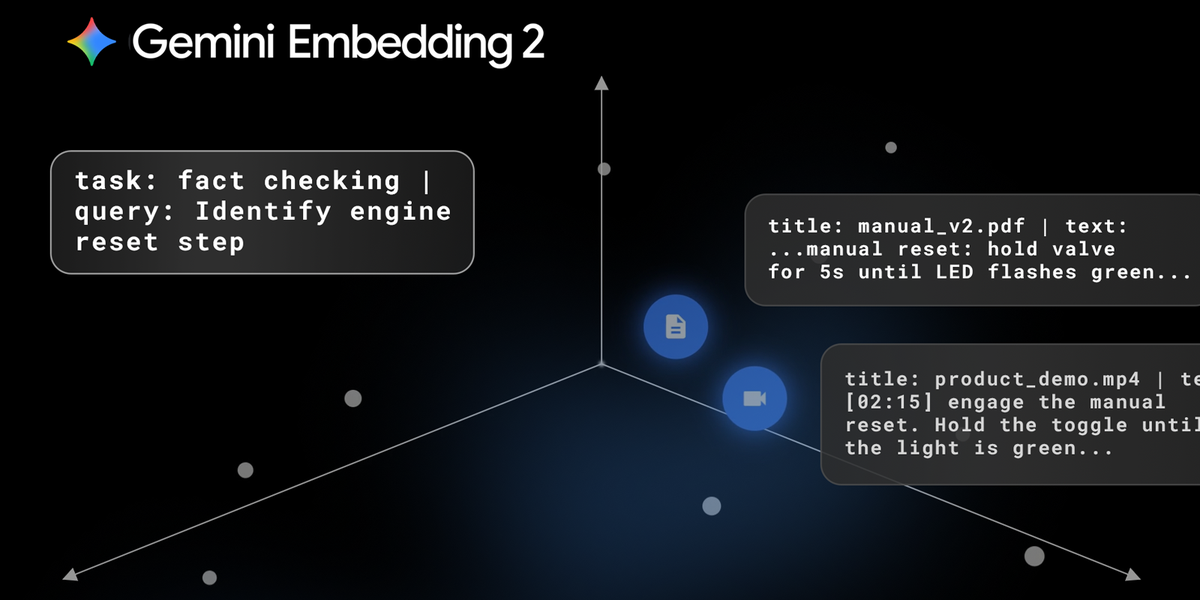
Last week, we announced the General Availability (GA) of Gemini Embedding 2 via the Gemini API and Gemini Enterprise Agent Platform. It’s the first embedding model in the Gemini API that maps text, images, video, audio, and documents into a single embedding space, supporting over 100 languages.
In this post, we will explore the diverse use cases this unified model unlocks, from agentic multimodal RAG to visual search, and show you exactly how to start building them.
About Gemini Embedding 2
The model handles an expansive range of inputs in a single call: up to 8,192 text tokens, 6 images, 120 seconds of video, 180 seconds of audio, and 6 pages of PDFs. By mapping different modalities in the same semantic space, developers can build diverse experiences that “see” and “hear” proprietary data.
The true power of Gemini Embedding 2 is its ability to process interleaved inputs—such as a combination of text and images—in a single request:
from google import genai
from google.genai import types

client = genai.Client()

with open('dog.png', 'rb') as f:
    image_bytes = f.read()

result = client.models.embed_content(
    model='gemini-embedding-2',
    contents=[
        "An image of a dog",
        types.Part.from_bytes(
            data=image_bytes,
            mime_type='image/png',
        ),
    ]
)

print(result.embeddings)
Python
This enables a more accurate, holistic understanding of complex, real-world data. If you need separate embeddings for individual inputs instead of one aggregated vector, use the Batch API (support coming soon for Agent Platform).
Agentic retrieval-augmented generation (RAG)
Multimodal embeddings enable AI agents to execute multi-step reasoning tasks, such as scanning hundreds of files to fix a codebase or cross-referencing disparate PDFs, with improved understanding and accuracy.
To build these pipelines with the Gemini API, you can use task prefixes based on the agent’s goal. These prefixes optimize the resulting embeddings for your specific task, helping the model bridge the gap between short queries and long documents:
# Generate embedding for your task's query:
def prepare_query(query):
    return f"task: question answering | query: {content}"
    # return f"task: fact checking | query: {content}"
    # return f"task: code retrieval | query: {content}"
    # return f"task: search result | query: {content}"

# Generate embedding for document of an asymmetric retrieval task:
def prepare_document(content, title=None):
    if title is None:
        title = "none"
    return f"title: {title} | text: {content}"
Python
Applying these prefixes at both index time and query time can significantly improve retrieval accuracy.
Many users are already seeing a positive impact from adopting Gemini Embedding 2. Harvey, a legal research platform for law firms and enterprises, has seen a 3% increase in Recall@20 precision on legal-specific benchmarks compared to their previous embeddings, leading to more accurate citations and answers for law firms and enterprises.
Supermemory is building a “vector database for memory” that enables conceptual searching across disjointed memos. Since integrating the model, they’ve achieved a 40% increase in search Recall@1 accuracy and leveraged these embeddings to drive performance across their core retrieval pipelines, spanning indexing, search, and Q&A.
Multimodal search
You can also use Gemini Embedding 2 to build tools that search across data based on a multimodal input. To perform this task, you would use the following prefix: “task: search result | query: {content}”.
Nuuly, URBN’s clothing rental company, uses Gemini Embedding 2 for their in-house visual search tool that matches photos taken on the warehouse floor against their catalog to identify untagged garments. This implementation pushed their Match@20 accuracy from 60% to nearly 87%, and their total successful product identification rate from 74% to over 90%.
A user takes a picture of an untagged garment and finds a match based on the photo and brand name.
Search reranking
For retrieval pipelines, you can use embeddings to rerank initial results to get the absolute best answers. To do this, you can calculate distance metrics—like cosine similarity or dot product scores—between the embedded search results and the user’s query:
# 1. Define a function to calculate the dot product (cosine similarity)
def dot_product(a: np.ndarray, b: np.ndarray):
  return (np.array(a) @ np.array(b).T)

# 2. Retrieve your embeddings
# (Assuming 'summaries' is your list of search results)
search_res = get_embeddings(summaries)
embedded_query = get_embeddings([query])

# 3. Calculate similarity scores
sim_value = dot_product(search_res, embedded_query)

# 4. Select the most relevant result
best_match_index = np.argmax(sim_value)
Python
By prompting the model to generate a baseline hypothetical answer to a query using its internal knowledge, you can embed that template and compare its similarity score against your retrieved data to rank the most accurate and contextually rich match.
Learn how in the search reranking notebook.
Clustering, classification, and anomaly detection
Embeddings are useful for grasping relationships between data by creating clusters based on similarities. You can also quickly identify hidden trends or outliers, making this same technique the perfect foundation for sentiment analysis and anomaly detection.
Unlike the asymmetric retrieval tasks above, these are symmetric use cases where you use the same task prefix for both the query and the document:
# Generate embedding for query & document of your task.
def prepare_query_and_document(content):
    # return f'task: clustering | query: {content}'
    # return f'task: sentence similarity | query: {content}'
    # return f'task: classification | query: {content}'
Python
Try these tasks out in the clustering, text classification, and anomaly detection notebooks.
Storing and using embeddings efficiently
You can store your embeddings in vector databases like Agent Platform Vector Search, Pinecone, Weaviate, Qdrant, or ChromaDB.
Gemini Embedding 2 is trained using Matryoshka Representation Learning (MRL), so you can truncate the default 3072-dimensional vectors down to smaller dimensions using the output_dimensionality parameter for more efficient storage. (We recommend 1536 or 768 for highest efficiency.)
result = client.models.embed_content(
    model="gemini-embedding-2",
    contents="What is the meaning of life?",
    config={"output_dimensionality": 768}
)
Python
This results in lower costs while maintaining high accuracy out of the box. For additional cost-efficiency, the Batch API achieves much higher throughput at 50% of the default embedding price.
Get started with Gemini Embedding 2
We’re excited to see how natively multimodal embeddings improve understanding of complex data across industries and use cases.
Ready to get started? Explore the model in Gemini API or Agent Platform.
[ad_2]
Source_link