Most IT admins and MSPs don’t think about SaaS backup until something breaks. By then, the gaps are already there: an accidental deletion with no clean restore path, an audit with missing retention records, or a recovery that takes far longer than anyone planned.
The best backup software for SaaS applications closes that gap. So I evaluated the top-rated platforms on G2, analyzed what IT admins, MSPs, and data teams running Microsoft 365, Google Workspace, and Salesforce actually say about them, and narrowed it down to 8 tools worth considering.
I’ve reviewed G2 Data across hundreds of verified users running SaaS backup in real environments, and the same frustration comes up repeatedly. Teams assume their SaaS provider handles protection, then find out the hard way that native retention was never built for operational recovery or compliance.
In this guide, I break down what each does best, where it falls short, and which environments it fits.
8 best backup software for SaaS applications: My top picks
- Acronis Cyber Protect Cloud: Best for unified SaaS backup with security oversight
Broad backup coverage paired with endpoint and security controls is commonly chosen when teams want fewer tools to manage and clearer operational ownership. (Free trial available; Pricing is available on request.) - Druva Data Security Cloud: Best for governance-led SaaS data protection
Centralized policy management, strong audit alignment, and predictable restores show up repeatedly in review patterns from compliance-focused organizations. (Free trial available; Pricing is available on request.) - Salesforce Backup & Recover: Best for native Salesforce data recovery.
Purpose-built restores, object-level recovery, and tight Salesforce alignment without external tooling complexity. (Free trial available; Pricing is available on request.) - Barracuda Cloud-to-Cloud Backup: Best for Microsoft 365 and Google Workspace
Simple setup, reliable coverage, and clear admin processes for teams prioritizing speed over deep customization. (Free trial available; Pricing is available on request.) - IDrive Online and SaaS Backup, Object Storage e2: Best for small-scale SaaS backup coverage
Frequently selected when teams want broad SaaS support with flexible storage options under tighter budgets. (Free trial available; Paid plans start at $24.75 per year.) - Cove Data Protection: Best for MSP-led SaaS backup operations
Multi-tenant management, consistent recovery workflows, and reporting designed for service providers. (Free trial available; Pricing available on request; vendor typically provides custom MSP quotes.) - Keepit: Best for SaaS-native backup with strong compliance focus
Independent cloud architecture and immutable backups are commonly cited by regulated and EU-focused organizations. (Free trial available; Pricing available on request.) - SpinOne: Best for SaaS backup with built-in security context
Backup combined with ransomware detection and anomaly monitoring for security-aware teams. (Free trial available; Paid plans start at $3 /user/month.)
*These SaaS backup tools are top-rated in their category based on G2’s Winter Grid® Report. I’ve highlighted what each tool is commonly picked for to help you narrow down the right platform without guesswork.
8 best backup software for SaaS applications I recommend
From what I’ve seen across G2 review patterns, the tools that build long-term trust in this category all handle recovery in a consistent, reliable way. Whether it’s identifying retention gaps, restoring individual records, or applying policies across apps like Microsoft 365, Google Workspace, or Salesforce, strong tools remove guesswork and make outcomes clear.
At a broader level, a good SaaS backup software supports what modern cloud operations depend on. It gives teams clear visibility into what is protected, a reliable way to recover data, and confidence that critical business information stays accessible when it is needed.
How did I find and evaluate the best backup software for Saas applications?>
I started by using G2’s Winter Grid® Report to shortlist SaaS backup platforms based on verified user satisfaction and market presence across small teams, mid-market organizations, and enterprises.
I then analyzed patterns across a large volume of verified user reviews to understand how these tools behave in real SaaS backup scenarios. The analysis focused on recurring feedback around backup coverage, restore granularity, retention handling, access controls, audit preparedness, recovery speed, and how reliably platforms hold up when something goes wrong. This helped surface which tools consistently support recovery workflows and which introduce friction at scale.
I also used AI to analyze patterns across verified G2 reviews, focusing on recurring themes around backup coverage, restore reliability, and recovery performance. Product visuals and references used in this article come from G2 vendor listings and publicly available product documentation.
What makes the best backup software for SaaS applications worth it: My criteria
After reviewing a large volume of G2 user reviews, studying how SaaS data protection workflows operate within IT and security teams, and analyzing recurring feedback from administrators and data owners, the same themes emerged. Here’s what I prioritized when evaluating the best backup software for SaaS applications:
- Clear and complete SaaS coverage without blind spots: The strongest SaaS backup tools make it immediately clear what is protected and what is not. Reviews consistently highlight frustration when coverage is partial, object types are excluded, or new SaaS features lag behind. I prioritized platforms that reduce ambiguity by clearly defining backup scope across users, files, records, and configurations so teams are not discovering gaps during recovery.
- Targeted restore options that reduce impact: Backup only matters when the restore is precise. I looked closely at review patterns around record-level, file-level, and user-level recovery.
- Predictable recovery speed during real incidents: Recovery performance under pressure separates dependable tools from risky ones. Reviews often call out issues with throttled restores, long queues, or unpredictable recovery times. I rated tools higher when users consistently described stable, repeatable recovery behavior, especially during high-stress scenarios like security incidents, audits, or accidental deletions.
- Retention and versioning aligned with compliance needs: Retention is not just about storing data longer. It is about proving what existed, when it changed, and whether it can be restored on demand. I prioritized tools where reviews emphasized transparent retention policies, clear version history, and audit-friendly exports.
- Access controls that reflect real team boundaries: Backup systems sit at the intersection of IT, security, and compliance. I looked for consistent feedback around role-based access, restoring permissions, and clear boundaries between who can access data and who can restore it.
- Integration with existing identity and monitoring workflows: SaaS backup tools should not operate as isolated systems. I prioritized platforms that integrate cleanly with identity providers, alerting systems, and reporting workflows. Reviews often turn negative when tools require separate credentials, manual checks, or disconnected dashboards that drift from daily operations.
- Consistency as data volume and tenants scale: Many tools perform well early and degrade as environments grow. I paid close attention to feedback from teams managing larger user counts, multiple SaaS apps, or MSP-style environments. Platforms that maintain predictable behavior as scale increases consistently earn stronger long-term ratings.
These criteria helped narrow the field to tools that handle recovery, governance, and long-term reliability well. Strengths vary by use case, since no platform is strongest everywhere. Some teams prioritize compliance certainty, others prioritize speed or simplicity. The right fit depends on the risks you need to control most tightly.
Below, you’ll find authentic user reviews from the Backup Software for SaaS Applications category. To appear in this category, a tool must:
- Provide independent backup and restore capabilities for SaaS applications
- Support granular recovery beyond full-account rollbacks
- Store backup data outside the native SaaS provider environment
- Enable reporting or visibility into backup and restore activity
These backup software for SaaS applications are evaluated based on aggregated user review patterns and category standards reflected in the G2 Winter Grid Report landscape.
1. Acronis Cyber Protect Cloud: Best for unified SaaS backup with security oversight
Acronis Cyber Protect Cloud is built for teams that want backup, cybersecurity, and endpoint management handled from a single platform rather than across separate tools. It is commonly chosen by organizations looking to consolidate protection without sacrificing depth in any of the three areas.
One of the platform’s defining strengths is how it brings backup, cybersecurity, and IT management into one SaaS environment. Teams schedule backups, monitor job status, and initiate restores from one console, which simplifies day-to-day administration. This structure helps teams maintain visibility and control without adding extra process layers or making workflows harder to manage.
The platform’s strongest capabilities align directly with core SaaS backup needs. Remote backup is one of its highest-rated features on G2 at 95%. Users consistently describe restores as dependable and fast, which matters most when data loss or device failure becomes a real business risk. Reviewers consistently describe restores as fast and dependable — exactly what teams need when data loss becomes a real business risk.
Acronis also performs well in environments where IT responsibility needs to be shared. Many reviewers point out that the interface is approachable enough that not every admin needs deep specialization to manage backups effectively. This shows up in its user base, where roughly 70% of customers are small businesses and another 26% are mid-market teams, according to G2. The product feels designed for organizations that need strong coverage without dedicating a full team solely to backup operations.
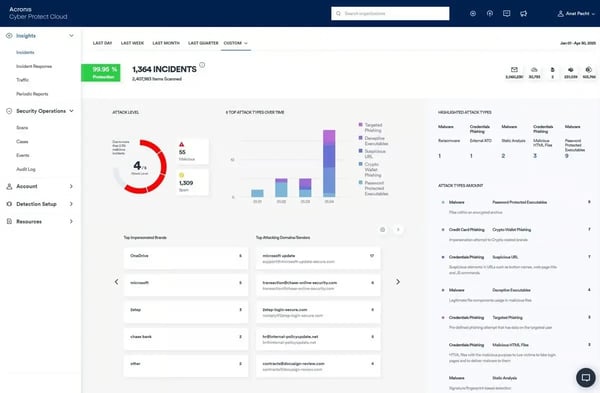
G2 users repeatedly mention the value of combining backup with anti-malware and vulnerability management in one workflow. That integration cuts down on multiple tools and keeps backups tied to a broader protection strategy, especially against ransomware and other modern threats.
Acronis is also frequently used in environments with compliance and governance requirements. Reviewers mention relying on its reporting, logging, and policy controls to support standards such as GDPR, HIPAA, and ISO frameworks. This makes the platform useful not only for recovery but also for staying prepared for audits and demonstrating data protection practices as part of broader risk management efforts.
G2 reviewers also highlight Acronis’s patch management and endpoint protection as a meaningful part of the platform’s daily value. Teams managing multiple devices describe being able to handle vulnerability patching, software updates, and threat detection from the same console used for backup, removing the need for a separate patch management tool. This consolidation reduces the number of active systems an admin needs to monitor.
Acronis offers deep configuration options across backup, security, and endpoint management. Teams that are new to multi-function platforms or prefer minimal-touch setup may need more onboarding time than with lighter, single-purpose backup tools. Once the initial configuration is complete, the platform operates predictably and requires little day-to-day intervention.
The platform’s security and protection features are optimized for desktops, servers, and infrastructure workloads. Teams with a significant share of mobile devices may find that mobile backup coverage is narrower than desktop and server protection. For organizations whose primary protection needs center on workstations and cloud workloads, this scope aligns well with how the platform is designed.
Acronis Cyber Protect Cloud is well-suited for organizations that want SaaS backup to be centralized, dependable, and closely integrated with security controls.
What I like about Acronis Cyber Protect Cloud:
- Acronis Cyber Protect Cloud brings SaaS backup, cybersecurity, and management into a single platform, which reduces tool sprawl and keeps backup operations tightly aligned with overall protection.
- G2 reviewers highlight reliable core features, with remote and scheduled backups enabling fast, dependable restores that support business continuity.
What G2 users like about Acronis Cyber Protect Cloud:
“What I appreciate most about Acronis Cyber Protect Cloud is how it brings together backup, protection, and management tools within a single platform. The dashboard is user-friendly, making routine tasks such as monitoring and scheduling straightforward. This not only saves time but also helps keep everything well-organized.”
– Acronis Cyber Protect Cloud review, Nivetha A.
What I dislike about Acronis Cyber Protect Cloud:
- Acronis covers a broad feature set across backup, security, and endpoint management. Teams preferring minimal setup may need more onboarding time, though day-to-day use is straightforward once configured.
- Mobile device backup is supported, but narrower than desktop and server coverage. Teams primarily protecting workstations and infrastructure workloads will find the scope well-matched to their needs.
What G2 users dislike about Acronis Cyber Protect Cloud:
“One area that could be improved is that some integrations with third-party tools require extra configuration, which can take time. However, once everything is set up, the platform works seamlessly and delivers excellent protection.”
– Acronis Cyber Protect Cloud review, Moses Afotey N.
2. Druva Data Security Cloud: Best for governance-led SaaS data protection
Druva Data Security Cloud is commonly chosen by mid-market and enterprise teams that need SaaS, cloud, and on-prem data protected from a single, centralized platform. With 62% of users coming from mid-market and 32% from enterprise environments, it is built for organizations where backup reliability, compliance, and fast recovery are treated as core business requirements.
SaaS, cloud, and infrastructure backups are all managed through one interface, removing the need to switch between tools or maintain separate systems. This “single pane of glass” approach reduces extra efforts and helps teams maintain consistent data protection policies across environments.
That integration means fewer tools and keeps backups part of a larger protection plan. This ease of deployment helps teams move from planning to active protection faster, especially in environments where backup coverage needs to scale without long setup timelines.
Encrypted storage and remote backup both score an impressive 98% on G2, which aligns with how users describe their experience. Daily and weekly security reports give teams consistent visibility into backup health, and restore workflows are described as dependable for business-critical data. This focus matches the platform’s adoption by larger organizations that typically operate under stricter compliance and recovery expectations.
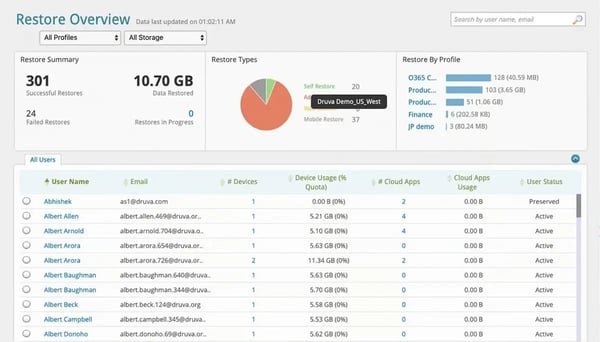
Beyond recovery and security outcomes, users also point out strong visibility into backup health and status. Monitoring dashboards let teams track backup jobs, coverage, and system state from anywhere.
Druva allows data to be restored to alternate or secondary machines, enabling teams to validate recovery processes without disrupting live systems. This capability is especially valuable for testing, audits, and recovery drills where production impact needs to be avoided.
Support and service continuity also receive consistent mention in reviews. Dru Assist, Druva’s AI-driven support capability, is cited by users as helpful in resolving complex backup and recovery scenarios without immediate escalation. Combined with generally strong support feedback, this reinforces Druva’s fit for teams that prioritize predictable outcomes and reduced disruptions to daily work.
Alerting and notifications are comprehensive, but the system favors broad visibility over granular tuning, so teams looking for highly customized alert thresholds may see the configuration as more standardized. Security standards are rated at 98% on G2, reflecting that core protection remains consistently strong regardless of alerting configuration.
Advanced analytics and adaptive learning capabilities are present in Druva but sit behind the platform’s primary focus on backup execution and recovery reliability. Teams expecting AI-driven automation to actively optimize backup schedules or drive day-to-day decisions may find these features more supportive than central. For organizations whose priority is dependable, governed data protection rather than automation-led optimization, this reflects how the platform is intentionally designed.
Druva Data Security Cloud is a strong fit for organizations that view SaaS backup through a governance and reliability lens. Its adoption among mid-market and enterprise teams, paired with high G2 scores across security and reliability, underscores its relevance for environments where consistent, compliant data protection is a strategic priority.
What I like about Druva Data Security Cloud:
- Druva unifies SaaS, cloud, and on-prem backups in a single cloud-native platform, simplifying daily backup and recovery.
- Its strong focus on reliability and security, encrypted storage, remote backup, and robust standards keeps critical data protected and recoverable.
What G2 users like about Druva Data Security Cloud:
“This product stands out for its ease of use, quick deployment, and dependable performance. The customer support provided is also excellent.”
– Druva Data Security Cloud review, Robert C.
What I dislike about Druva Data Security Cloud:
- Druva’s alerting favors broad coverage over granular tuning. Teams needing highly customized alert thresholds per workload may find the configuration more standardized, though core data protection remains unaffected.
- Advanced analytics and adaptive learning play a supporting role rather than driving daily workflows. Teams primarily focused on reliable backup and recovery will find the platform well-matched to that priority.
What G2 users dislike about Druva Data Security Cloud:
“While the platform is user-friendly, the reporting features could be more customizable for detailed compliance needs. Customer support is knowledgeable, but response times for advanced queries can sometimes be slower than expected.”
– Druva Data Security Cloud review, Aijaz L
3. Salesforce Backup & Recover: Best for native Salesforce data recovery
Salesforce Backup & Recover treats Salesforce as mission-critical infrastructure that requires continuous, reliable protection. It focuses on protecting Salesforce data, metadata, and continuity in a way that reflects how central the platform is to revenue operations, customer history, and day-to-day business workflows.
Salesforce Backup & Recover sits among the more trusted solutions in the SaaS Backup category. Usage skews toward larger operational environments, with 55% of users coming from mid-market companies and 32% from enterprises. That distribution suggests the platform is optimized for teams managing scale, retention requirements, and business risk, rather than lightweight or ad-hoc backup needs.
Scheduled Backups are rated 96% on G2, and that score reflects how reviewers describe the experience. Policies are easy to define, backup frequency is fully configurable, and once jobs are running, teams interact mainly with logs and alerts rather than manual processes. This predictable execution is especially valued by teams managing complex Salesforce environments where consistent, uninterrupted backup coverage directly reduces administrative work needed to keep things running smoothly.
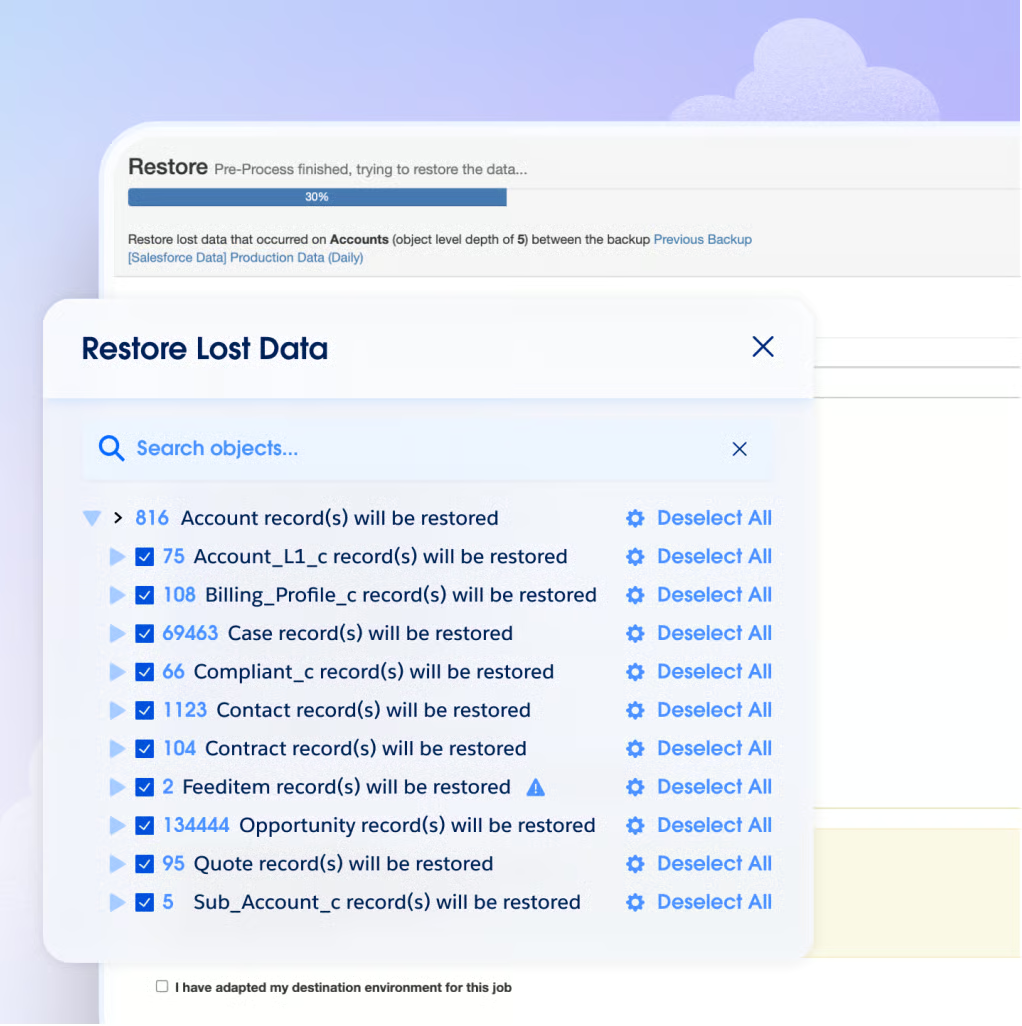
The native Salesforce integration is where the platform clearly sets itself apart. Archived data stays accessible directly on Salesforce record pages, making historical context usable without triggering full restores, while granular recovery and metadata coverage support precise responses to deletions, schema changes, and audit needs.
Review feedback consistently highlights measurable storage savings from archiving large objects, positioning backup as an active way to manage Salesforce storage limits. Teams dealing with growing data volumes describe this as a meaningful cost control, reducing storage consumption in the main Salesforce org without losing access to historical records.
Beyond recovery, teams use it to protect scheduling and workflow data tied to Salesforce workflows, with automation providing control and risk reduction without adding ongoing extra admin work.
The platform’s ability to pull backed-up production data directly into sandbox environments means teams can work with realistic, current data during development and testing cycles without manual exports or separate data preparation steps. Several G2 reviewers highlight this as a practical daily use case that extends the platform’s value beyond pure recovery scenarios.
Teams that prefer frequent hands-on control points or active orchestration across multiple systems may find this automated model less visible day to day. The platform’s scheduled execution, clear logging, and configurable policy controls give administrators consistent oversight without requiring constant intervention.
Restoring large or complex datasets can run into API and record-volume boundaries, which slows recovery time when data volumes are high. Teams managing large Salesforce orgs or running frequent high-volume restores are more likely to encounter this than teams with smaller, more contained environments. For most standard recovery scenarios, individual record restores, metadata recovery, and routine deletions, the platform handles requests reliably and without friction.
Salesforce Backup & Recover is a strong fit for organizations that run their business on Salesforce. Its high G2 scores, deep native integration, and automation-led design make it especially well-suited for mid-market and enterprise teams that prioritize reliable recovery, staying prepared for audits, and long-term Salesforce data governance.
What I like about Salesforce Backup & Recover:
- Native Salesforce integration makes recovery practical. Archived data is accessible directly on record pages, with granular restore and metadata coverage that keeps recovery precise and non-disruptive.
- Once backup policies are set, the platform runs with minimal oversight. Scheduled backups, flexible frequency, and clear logs reduce manual effort while maintaining strong control over Salesforce data.
What G2 users like about Salesforce Backup & Recover:
“The reduction of storage in the main Salesforce org is beneficial, and having archived data accessible directly on the record page makes it easier to track previous information as well. Also, during the implementation, customer support or onboarding specialists were super awesome (not to forget that Will Penn helped a lot during this process), and the integration was also easy.
Just set up the policy, run the policy, and check the logs. Also, the policy can be set up in such a way that we can set our own frequency of use for that.”
– Salesforce Backup & Recover review, Saujan B.
What I dislike about Salesforce Backup & Recover:
- The platform runs in the background once policies are set, with minimal prompts for manual interaction. Teams that prefer active, hands-on orchestration may find this model less visible day to day, though scheduled execution and clear logging keep administrators informed without extra steps.
- Large or complex data restores can encounter API and record-volume boundaries, which slow recovery for high-volume scenarios. Standard restores, individual records, metadata, and routine deletions are completed reliably without these constraints.
What G2 users dislike about Salesforce Backup & Recover:
“Own from Salesforce can feel limited during large or complex data restores due to API and record-volume constraints.”
– Salesforce Backup & Recover review, Vishal G.
4. Barracuda Cloud-to-Cloud Backup: Best for Microsoft 365 and Google Workspace
Barracuda Cloud-to-Cloud Backup is built for teams that need dependable Microsoft 365 protection without complexity. It focuses on making backups predictable and recoveries straightforward.
Core backup execution is one of its most reliable strengths. Scheduled backups run automatically in the background, remote recovery is built in, and unlimited storage and retention are included in the base price. This structure is frequently mentioned in reviews, particularly by teams managing user offboarding or long-term data retention without needing to track storage consumption.
The platform shows strong adoption and steady performance across real-world environments. Usage is led by the mid-market (61%), followed by small businesses (24%) and enterprises (15%), suggesting it’s most often chosen by teams that need dependable Microsoft 365 protection without the burden of managing complex backup infrastructure.
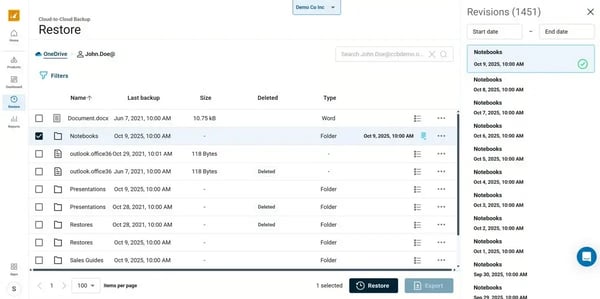
Recovery workflows are another area where users express confidence. Teams mention restoring anything from a single email to an entire SharePoint site as straightforward through a centralized interface. Compared to native admin tools, this process is faster and more intuitive, which reduces time spent navigating older portals during audits, security incidents, or routine restore requests.
Daily reports provide clear, high-level summaries of backup activity and status, allowing teams to review coverage during weekly check-ins without manual compilation.G2 reviewers consistently describe Barracuda as a set-and-forget platform. Remote Backup is rated 93% on G2, and once configured, backups run automatically without daily intervention or ongoing management. Lean IT teams managing multiple responsibilities alongside backup operations cite this as one of the clearest reasons they stay with the platform.
Barracuda retains email and OneDrive data for departed or unlicensed users, keeping it searchable and recoverable without requiring active Salesforce accounts or extended license windows. Teams managing regular staff turnover mention this as removing a persistent data continuity risk from the offboarding process.
Administrators authenticate using existing Azure credentials with MFA support, removing the need for separate login management or additional identity tooling. This alignment with existing Microsoft identity infrastructure reduces friction for teams already standardized on the Microsoft 365 ecosystem.
Barracuda’s SaaS coverage centers on Microsoft 365, with protection for Exchange, OneDrive, SharePoint, and Teams as its core scope. Teams that also need to protect Google Workspace, Salesforce, or other SaaS platforms from the same tool will find this a narrower fit. For organizations standardized on Microsoft 365 as their primary SaaS environment, this focused scope delivers reliable, predictable coverage without the added complexity of managing a broader multi-platform tool.
Reporting in Barracuda is designed around high-level daily summaries rather than detailed drill-down analysis. Teams that need customized reports, granular job-level detail, or compliance-specific exports may find the reporting depth more limited than expected. Daily summary visibility is sufficient for most routine oversight needs, and the platform’s consistent backup execution means fewer anomalies requiring deeper investigation in the first place.
All in all, Barracuda Cloud-to-Cloud Backup is well-suited for organizations that prioritize reliable, automated, and cost-predictable SaaS backup over broad feature sets. With strong Storage Capacity scores 94%, dependable scheduling ratings, and fast, granular recovery, it remains a platform consistently associated with steady operational protection, especially for teams managing Microsoft 365 at scale.
What I like about Barracuda Cloud-to-Cloud Backup:
- Unlimited storage and retention in base pricing remove concerns about data growth as Microsoft 365 scales.
- Granular restores for emails, OneDrive, and SharePoint are fast and predictable through a centralized interface.
What G2 users like about Barracuda Cloud-to-Cloud Backup:
“Barracuda offers unlimited storage and retention in its base price, which is a big advantage over competitors that charge by data volume.”
– Barracuda Cloud-to-Cloud Backup review, Jessy D.
What I dislike about Barracuda Cloud-to-Cloud Backup:
- Barracuda’s coverage is focused on Microsoft 365. Teams needing protection across additional SaaS platforms like Google Workspace or Salesforce will require separate tooling to cover those environments alongside it.
- Reporting is built around high-level daily summaries rather than granular job analytics. Teams with detailed compliance reporting requirements may find the depth more limited, though standard oversight needs are well covered by the daily output.
What G2 users dislike about Barracuda Cloud-to-Cloud Backup:
“The only dislike is with the licensing. Cloud-to-Cloud Backup and Message Archiver are now separate licenses. When you purchase the appliance, they both come included. This was something I was not told until after my purchase. However, the product is worth the money and priced competitively within the market.”
– Barracuda Cloud-to-Cloud Backup review, Bryan B.
5. IDrive Online and SaaS Backup, Object Storage e2: Best for small-scale SaaS backup coverage
IDrive Online and SaaS Backup, Object Storage e2, is best suited for small-scale SaaS backup scenarios. It’s built around protecting files, photos, videos, and business data in the cloud with minimal setup, which makes it feel oriented toward everyday backup reliability rather than complex policy management.
That focus shows up in who uses it. Small businesses account for 93% of its user base, while adoption in the mid-market and enterprise remains limited, according to G2 Data. This concentration signals a product designed around simplicity, quick setup, and dependable backup rather than layered governance or complex policy controls. For small teams and individual operators, that alignment cuts down on the daily effort needed to maintain consistent protection without dedicated IT resources.
Ease of setup is one of the most frequently cited strengths. Reviewers describe the initial configuration as straightforward, with default settings that allow scheduled backups to start running quickly. This low barrier to entry helps teams establish protection without dedicating time to detailed configuration or ongoing tuning.
Once running, backup operations remain largely hands-off. Scheduled backups operate with minimal intervention, allowing users to rely on consistent protection without daily management. This approach fits well for individuals and small teams that want backups to work quietly in the background rather than require active oversight.
Security capabilities provide additional reassurance. Remote backup support and strong encryption, rated at 91% on G2, ensure that data remains protected once it leaves local devices. These protections align with how users describe their confidence in storing sensitive personal and business data off-site.
Multi-device support is another area where IDrive delivers clear value. Users frequently mention the ability to back up laptops, desktops, and mobile devices under a single account. This simplifies backup management for people working across multiple devices without needing separate tools or licenses.
Object Storage e2 extends this value for larger datasets. It is commonly used as a cost-effective way to store and retain backups in the cloud while keeping management simple. For teams dealing with growing data volumes, it offers predictable storage without changing how backups are managed day to day.
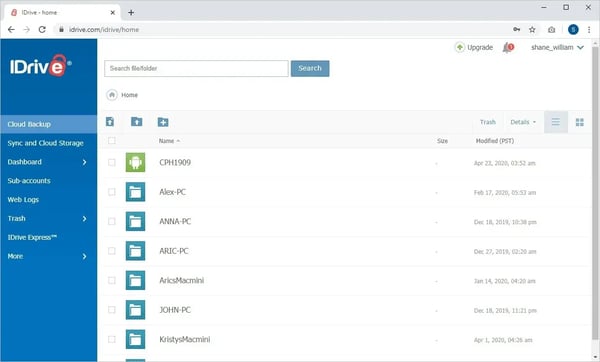
Administrators can review completed backup jobs, check for failures, and navigate directly to specific files or directory paths for granular restores, all without digging through separate monitoring tools. For small teams that want clear confirmation that backups ran correctly without building a separate reporting workflow, this transparency covers the need simply and directly.
Initial full backups take longer when uploading large datasets for the first time, particularly for users managing multi-terabyte volumes or working with limited bandwidth. Teams rolling out IDrive across multiple devices simultaneously may want to plan for extended initial upload windows. Once the first backup completes, subsequent scheduled backups run incrementally and finish far more quickly.
Versioning and real-time sync are designed around backup reliability rather than continuous file collaboration. Teams that need frequent version snapshots, granular version history, or live sync across distributed users will find this scope narrower than dedicated file-sync or version-control tools. For standard backup and recovery needs, protecting files, photos, and business data on a scheduled basis, the versioning depth covers most use cases reliably.
IDrive Online and SaaS Backup, Object Storage e2 is well-suited for organizations seeking secure, affordable, and low-effort SaaS backup. With strong encryption, dependable scheduling, high satisfaction among small businesses, and simple multi-device support, it remains a practical choice for teams that prioritize simplicity and predictable costs over enterprise-scale breadth.
What I like about IDrive Online and SaaS Backup, Object Storage e2:
- The platform is cost-effective for cloud and SaaS backups, making it accessible for small teams managing large data volumes.
- Strong encryption and a simple setup make it easy to protect multiple devices from a single account with automated, scheduled backups.
What G2 users like about IDrive Online and SaaS Backup, Object Storage e2:
“I like that IDrive Online and SaaS Backup, Object Storage e2 is affordable, making it a great option for large backups. The encryption feature keeps my data secure, giving me peace of mind about protecting my photos and videos. I also appreciate the multi-device support, which allows me to protect multiple devices from one account, making it very convenient to use.”
– IDrive Online and SaaS Backup, Object Storage e2 review, Rahul D.
What I dislike about IDrive Online and SaaS Backup, Object Storage e2:
- Initial full backups take longer for large datasets, especially over limited bandwidth. Teams managing multi-terabyte volumes should plan for extended upload windows on the first run, with incremental backups running much faster after that.
- Versioning and real-time sync prioritize backup reliability over continuous collaboration. Teams needing frequent granular version snapshots or live file sync will find this scope narrower than dedicated sync tools.
What G2 users dislike about IDrive Online and SaaS Backup, Object Storage e2:
“The main improvement I would suggest is faster upload speeds, especially when handling large data sets like multi-terabyte backups. Faster initial backup performance would make the experience even better.”
– IDrive Online and SaaS Backup, Object Storage e2 review, Ram B.
6. Cove Data Protection: Best for MSP-led SaaS backup operations
Cove Data Protection is built for MSP-led environments that need reliable, encrypted, cloud-first backup for endpoints and SaaS applications with minimal day-to-day management.
Deployment and rollout are frequently described as friction-free. Agent installation does not require server reboots, which simplifies onboarding in environments where downtime must be avoided. This allows MSPs and IT teams to scale backup coverage quickly without disrupting customer systems.
Once backups are running, Cove stays largely in the background. Teams define policies upfront, automation handles day-to-day operation, and configurable reporting provides regular assurance without requiring manual checks. For MSPs managing multiple client environments, that quiet dependability is what keeps Cove in place long after the initial setup.
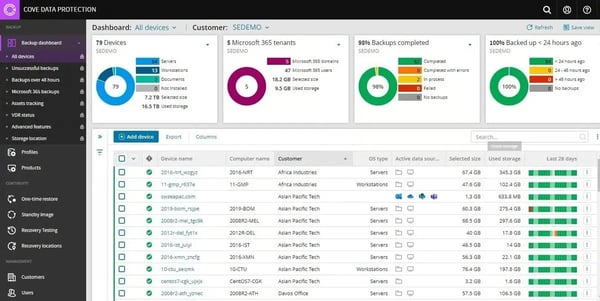
Cove supports servers, workstations, laptops, and Microsoft 365 tenants, allowing MSPs to manage diverse customer environments from a single platform. Recovery workflows are described as straightforward once data is available, reducing complexity during restore scenarios.
Cove runs automated recovery tests on a schedule and sends results directly to clients. MSPs get built-in proof that backups are restorable without running manual checks or compiling separate reports. This keeps clients informed and removes a recurring verification task from the team’s workload.
G2 reviewers also point to Cove’s email reporting options as a reliable visibility layer. Configurable reports arrive on schedule, covering backup status across tenants without requiring admins to log in and check manually. MSPs managing multiple client environments cite this as keeping oversight consistent without adding to their daily workload.
Nearly 80% of users come from small businesses, according to G2 Data, which reflects a product optimized for ease of use and predictability rather than layered governance. This alignment makes it especially suitable for MSPs serving SMB clients.
Cove’s recovery model depends on internet connectivity, which means restore speeds are tied to available bandwidth. Teams that need to recover large volumes quickly, or those operating in environments with unreliable connections, will feel this constraint more than others. Backups themselves run reliably in the background regardless, and most standard restore scenarios complete without issue under normal network conditions.
New users managing Microsoft 365 tenants sometimes need a short ramp-up period with the billing and user management sections of the platform. The interface prioritizes simplicity overall, and the support team responds quickly when questions come up during setup. Day-to-day use after that initial period is straightforward across the board.
Cove fits small and mid-market teams really well. Cove resonates with organizations seeking secure, low-maintenance SaaS and endpoint backup. As cloud-first models and automation expectations grow, buyers will prioritize reliable coverage with minimal effort to maintain. Cove’s strong security, highly rated remote backup, and low day-to-day effort make it a practical, scalable solution for MSPs and IT teams protecting SaaS data at scale.
What I like about Cove Data Protection:
- Cove makes SaaS and endpoint backups simple and predictable. Agent deployment is non-disruptive, backups run quietly, and automated reports provide clear visibility without daily oversight.
- Strong security and reliability stand out, especially for Microsoft 365. Encrypted, immutable storage and dependable remote backups make it easy to trust with critical data.
What G2 users like about Cove Data Protection:
“The user interface is very nice and easy to use. No reboots are needed when installing the agents, and they are not limited to the storage size of a local appliance. Customer service is good as there are different options and good response times.”
– Cove Data Protection review, Darius L.
What I dislike about Cove Data Protection:
- Restore speeds depend on internet connectivity. Teams recovering large volumes or working in low-bandwidth environments will notice this more, though standard restores under normal network conditions complete without issue.
- The Microsoft 365 billing and user management sections can take some getting used to for new users. Support is responsive during setup, and ongoing use is straightforward once the initial configuration is done.
What G2 users dislike about Cove Data Protection:
“The deployment process can be a little bit confusing at first, but their support team is great and always ready to help.”
– Cove Data Protection review, Ronan E.
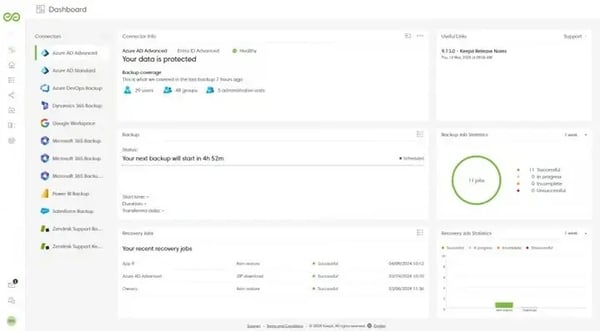
7. Keepit: Best for SaaS-native backup with strong compliance focus
Keepit is best for teams responsible for protecting client data while staying compliant. Reviews repeatedly highlight smooth backup execution, easy administration, and reliable data protection with minimal effort. That emphasis on reliability and compliance shows up clearly in G2 reviews as well. Keepit is designed to quietly do its job well, protecting critical cloud data without demanding constant attention.
Backups for Microsoft 365 and similar SaaS platforms run entirely on Keepit’s infrastructure, eliminating concerns around local bandwidth, on-prem storage, or internal job management. This approach reduces reliance on customer environments and supports consistent protection regardless of internal infrastructure constraints.
Backup plans are described as highly automated, allowing teams to set policies once and rely on predictable execution. When recovery is needed, restoring individual objects or datasets is straightforward, which helps teams respond quickly to accidental deletions or data loss scenarios.
The platform’s design prioritizes both retention and long-term growth, which is reflected in its 96% rating for Storage Capacity on G2. This capability helps teams retain data to meet compliance requirements without needing to actively manage storage as data volumes increase.
Users also consistently highlight the platform’s dependable backup execution over time. Reviewers describe jobs running reliably without frequent failure or intervention, which builds confidence that critical SaaS data is continuously protected. This steady behavior is often valued by teams managing regulated or client-sensitive data, where consistency and reliability are critical.
Many users reference a smooth onboarding experience supported by Keepit’s implementation team, which helps reduce setup friction. Day-to-day administration is described as simple and predictable, which matters in SaaS backup; this is not a tool most teams want to think about every day.
Looking at the makeup of Keepit’s user base reinforces who this platform naturally serves. Its customer base includes 23% of Keepit’s customers are small businesses, while 63% are mid-market companies, and 14% come from enterprise organizations, according to G2 Data. That distribution suggests Keepit resonates with teams that need strong backup capabilities without the complexity of large enterprise solutions.
Restoring data in Keepit is granular and browsable. Administrators can drill down into individual mailboxes, locate specific files or emails, and restore them in place without triggering broader recovery workflows. Teams also have the option to share mailbox access with users via links, which speeds up targeted recovery requests without requiring admin involvement at every step.
Some advanced capabilities, such as PowerShell API access, are not fully self-documented and require direct contact with Keepit’s support team to activate. Teams that prefer all integrations to be immediately self-service will need that extra coordination step during setup. Support response is consistently described as prompt and helpful, so the interaction itself tends to be quick rather than a drawn-out process.
Certain areas of the interface, particularly the options menu and restore wizard, prioritize functional depth over visual guidance. Users encountering these sections for the first time may need a short adjustment period before navigation feels intuitive. Once familiar with the layout, day-to-day administration is straightforward, and most tasks are completed without friction.
Within the SaaS backup category, Keepit is a strong fit for organizations that prioritize compliant, predictable SaaS backup with minimal day-to-day effort. Its SaaS-native design, highly rated storage capacity, and steady support experience make it especially relevant for mid-market and service-oriented teams. For environments where confidence and compliance matter more than constant tuning, Keepit stands out as a dependable choice.
What I like about Keepit:
- Keepit runs SaaS backups quietly in the background once plans are set, without requiring teams to manage infrastructure or daily backup tasks.
- Data recovery is straightforward, and responsive support during setup and ongoing use adds confidence, especially for protecting Microsoft 365 data.
What G2 users like about Keepit:
“I love how Keepit provides worry-free backup solutions for my clients, ensuring compliance and safeguarding their emails and other essential data. The ease of administering Keepit and its seamless operation are standout features that make it a reliable choice. I am impressed with how straightforward the initial setup was,s thanks to the skilled implementation support provided by the Keepit staff, which made the transition smooth and hassle-free. I am very enthusiastic about recommending Keepit and confident in selling it as a solution to my current and potential clients.”
– Keepit review, Ron M.
What I dislike about Keepit:
- PowerShell API access requires quick coordination with Keepit’s support team to get started. Teams planning API-dependent workflows early on should flag this during onboarding so it does not slow things down later.
- Parts of the options menu and restore wizard take some getting used to before navigation feels natural. Once past that initial adjustment, routine administration is straightforward and low-effort.
What G2 users dislike about Keepit:
“It can be a little hard to tell how many users I have available in my license. It can be slow sometimes when trying to access specific files or folders.”
SpinOne is commonly picked by teams that want Google Workspace backup to run quietly in the background without ongoing management, making it a strong fit for mid-market and small business environments that prioritize automation over configuration.
Over half of its user base comes from mid-market organizations (55%), with another 41% from small businesses. Enterprise adoption is comparatively limited at 5%, which aligns with how the platform is designed: quick to deploy, straightforward to manage, and reliable once it’s in place. It’s built for teams that want backup coverage without dedicating significant time or staff to ongoing administration.
SpinOne leans heavily into automation and predictability. Setup is repeatedly described as fast, with backups for Gmail, Drive, and Shared Drives coming online in minutes. Once configured, it runs quietly in the background. This is reinforced by its strongest G2-rating of Proactive Assistance (79%), which reflects a focus on stability and automation.
Autonomous Task Execution is rated 80% on G2, reflecting how consistently SpinOne handles backup operations without requiring manual input. The platform runs without prompting, freeing up admin time for higher-priority work rather than routine backup oversight.
G2 reviewers also highlight SpinOne’s strong customer support experience. Teams mention timely, proactive assistance and helpful training that improve onboarding and ongoing operations. This responsiveness helps reduce friction as administrators configure, monitor, and troubleshoot backup workflows.
SpinOne handles access and data lifecycle management. Active and archive license separation allows organizations to keep data accessible while clearly segmenting it based on user status. For many teams, this removes the need for separate eDiscovery tooling and cuts down on manual work, especially when retrieving historical data or handling internal audits.
From a business outcomes perspective, reviewers consistently frame SpinOne as a tool they don’t need to revisit or replace. It addresses the core risks around accidental deletion, sync issues, and ransomware exposure within Google Workspace, while enabling fast, point-in-time restores that limit disruption.
SpinOne covers security posture management, data leak prevention, and third-party app risk monitoring from the same dashboard. Teams managing Google Workspace or Microsoft 365 security alongside backup get a single place to track risk, review permissions, and act on alerts, without switching between separate tools for each function.
SpinOne’s retention model follows standard Google Workspace and Microsoft 365 policy structures, without group-level customization. Teams managing distinct compliance requirements across different user groups may need to handle that segmentation outside the platform. That said, the core backup and recovery execution remains consistent and reliable regardless of how retention is configured.
In larger Google Workspace environments, data refresh operations can take longer and occasionally slow the interface during sync. This is most noticeable during domain-wide refreshes rather than routine use. Individual file and mailbox restores are not affected by this; they complete quickly and accurately even in large environments.
SpinOne is a strong fit for teams that want Google Workspace backup to run quietly and reliably without ongoing management overhead.
“You can’t back up from Google and then restore to Microsoft or vice versa. This would help make migrations significantly easier, and something spin should really look into. I also think they could benefit from a client-based backup solution. In some cases, we need a client on a desktop or a server as the data does not play well with Google or Microsoft Cloud Storage.”
*These backup software for SaaS applications are top-rated in their category, based on G2’s Winter Grid® Report 2026. All offer free trials or demos; pricing availability varies by vendor.
Organizations that prioritize being prepared for audits and enforcing policies tend to choose Druva or Keepit, while teams focused on fast, low-friction recovery often prefer Barracuda.
If backup responsibility overlaps with security or endpoint protection, Acronis stands out. The best choice is the platform that aligns with your recovery pressure points, not the longest feature list.
Native SaaS retention is designed for platform stability, not active recovery or compliance. Third-party SaaS backup becomes essential when teams need granular restores, long-term retention, independent storage, or proof during audits. Most organizations adopt these tools after realizing that native protections don’t cover user deletions, permission drift, or compliance-driven recovery scenarios.
Tools such as Acronis, Druva, and Barracuda consistently surface in reviews as reliable under pressure, particularly for granular restores and predictable recovery times. The difference lies in how much control teams want during recovery: Barracuda prioritizes speed and simplicity, while Druva and Acronis offer deeper governance and security controls during incidents.
Most modern SaaS backup tools are designed to be low-touch after setup. Platforms like Barracuda, SpinOne, and Keepit are often described as “set it and trust it,” while Acronis and Druva may require more upfront configuration to support complex environments. Once policies and connectors are in place, ongoing management is typically minimal across the category.
Pricing varies based on users, data volume, or workloads rather than flat licenses. Cost-conscious teams often gravitate toward IDrive or SpinOne, while mid-market and enterprise buyers accept higher pricing from Druva, Keepit, or Salesforce Backup & Recover in exchange for governance and compliance confidence. The primary pricing risk often surfaces during delayed or incomplete recovery rather than license cost alone.
Druva, Keepit, Salesforce Backup & Recover, are most commonly associated with compliance-driven environments. These platforms emphasize retention visibility, version history, access controls, and audit-friendly reporting. Tools optimized for simplicity may still support compliance needs, but often with fewer controls or less reporting depth.
Not all SaaS backup platforms scale equally. Some perform well at small sizes but introduce friction as users, tenants, or data volumes increase. Based on review patterns, Druva, Acronis, and Keepit, maintain more predictable performance at scale, making them safer long-term choices for growing or multi-tenant environments.
Switching SaaS backup tools is possible but requires careful planning to avoid retention gaps or restore blind spots. The biggest risks come from losing historical versions, breaking audit trails, or misconfiguring access controls during transition. For organizations with strict compliance or long retention needs, choosing a scalable, future-proof platform early reduces switching risk later.
Acronis is the strongest fit. It combines backup, endpoint protection, and patch management from one console. SpinOne is the alternative if the environment is Google Workspace — it adds ransomware detection and anomaly monitoring directly alongside backup.
The most important factor is not how many SaaS apps a tool supports, but how confidently your team can restore the right data at the right time under pressure. The best SaaS backup software provides clear coverage, granular recovery, predictable performance, and access controls that match real organizational boundaries. If recovery feels uncertain or complex, the tool is likely the wrong fit.
Reliable tools minimize stress and uncertainty during critical operations. They establish clear coverage and predictable recovery by defining IT, security, and compliance responsibilities, which ensures exceptions are visible and addressed before they become major issues.
Over time, strong choices compound into fewer fire drills, shorter downtime, and less rework. Poor choices do the opposite: scope drifts, runbooks go stale, and trust erodes. Once lost, confidence is hard to rebuild.
Choose based on how reliably you can recover the specific objects your business depends on, how clear the restore path is for the people who will execute it, and how well the process stays intact as your environment changes. If you can validate those realities upfront, you can commit with confidence and avoid learning the hard way during the next failure event.
Want to understand how SaaS data stays protected beyond backups? Check out common SaaS security risks and how teams address them.