📌 THE GIST
- Your POS system is one of the most expensive line items in your business — and most small business owners have no idea how much it costs them.
- Square quietly raised online processing fees 14% in January 2026 with no warning. A retailer processing $10,000/month absorbed an extra $40/month overnight with zero recourse — because they were locked in.
- Zoho POS launched in the US on June 1, 2026 at $15/month — no contracts, no proprietary hardware, and native integration with accounting, CRM, and email marketing. This review breaks down who it’s for and whether it’s worth switching.
I wanted to do a Zoho POS review because small business owners need to find money wherever they can without sacrificing customer experience. This is it.
The best POS system for small business isn’t always the one with the biggest name or the flashiest hardware. Most of the time, it’s the one that stops quietly draining your cash.
I’ve watched small business owners get squeezed by their POS systems for years. Proprietary hardware that costs $800 before they ring a single sale. “Free” software that charges 2.75% per swipe. Loyalty programs that cost extra. Accounting that doesn’t sync. And then a fee increase — no warning, no negotiation, no option to leave without losing everything you’ve already paid for.
Zoho POS launched in the United States on June 1, 2026. At $15/month with no long-term contracts and no proprietary hardware requirements, it’s making a direct argument: your current POS system is overcharging you, and there’s a better option now.
This Zoho POS review covers features, pricing, a head-to-head comparison with Square and Clover, and an honest assessment of who should switch and who should wait.
Why Is Your POS System Draining More Cash Than You Think?
In January 2026, Square raised its online processing fee from 2.9% + $0.30 to 3.3% + $0.30 — a 14% increase — with no advance notice and no grandfather clause for existing customers. A retailer processing $10,000 per month online went from paying $290/month to $330/month in processing fees alone. That’s $480 per year, gone, with no opt-out option short of ripping out their entire POS setup.
This is how POS vendor lock-in works. You bought hardware that only runs on their software. Your customer data lives inside their system. The accounting integration you built breaks the moment you try to leave. By the time a vendor decides to raise prices, you’ve already built a cage around yourself.
According to research on POS switching behavior, more than 60% of small businesses that switched POS systems in the last two years cited unexpected fees as the primary reason. The second most common reason? Software that doesn’t integrate with anything else they use.
The small business marketing budget risk analysis I wrote earlier this year found the same pattern across tools: the advertised price is never the real price. With POS systems, that gap between advertised and actual cost is one of the widest in the software category.
💡 STRATEGY ALERT
Before evaluating any POS system, run your true cost calculation: monthly software fee + processing fees (as a % of monthly revenue) + hardware amortized over 3 years + the cost of any add-ons you need (loyalty programs, reporting, multi-location). Then add a 15% buffer for inevitable fee increases. That’s your real number. Compare that number — not the headline price.
What Is Zoho POS and What Does It Do?
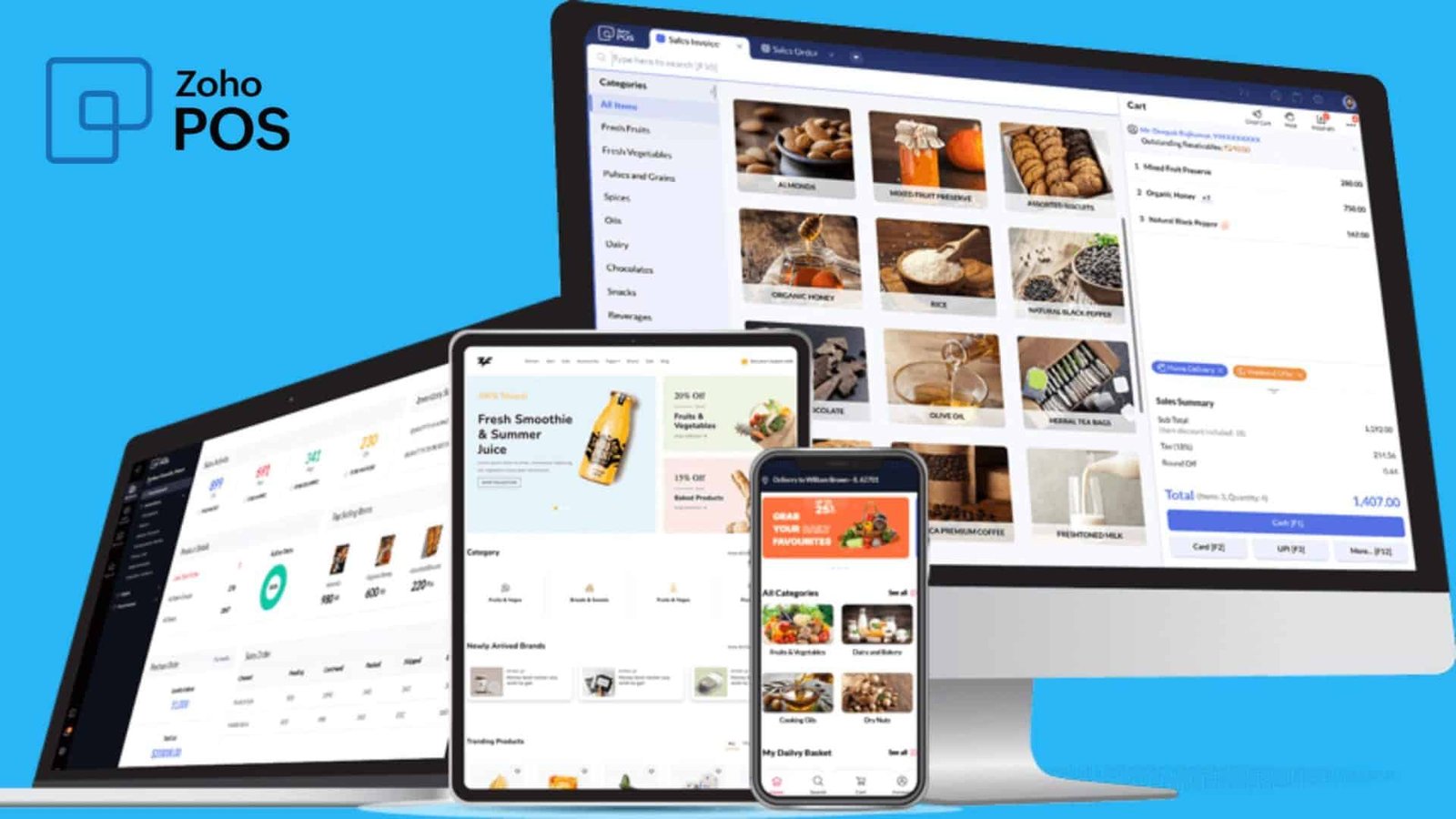
Zoho POS is a cloud-based, retail-focused point-of-sale platform that launched in the US market on June 1, 2026. It starts at $15/month billed annually and handles all core store operations: checkout, inventory tracking across multiple locations, retail analytics, price management, and cashier controls.
It runs on mobile phones, tablets, and desktops. It works with any compatible peripheral hardware — barcode scanners, cash drawers, receipt printers, customer-facing displays, and weighing machines. Bring your existing hardware. There’s no proprietary equipment requirement.
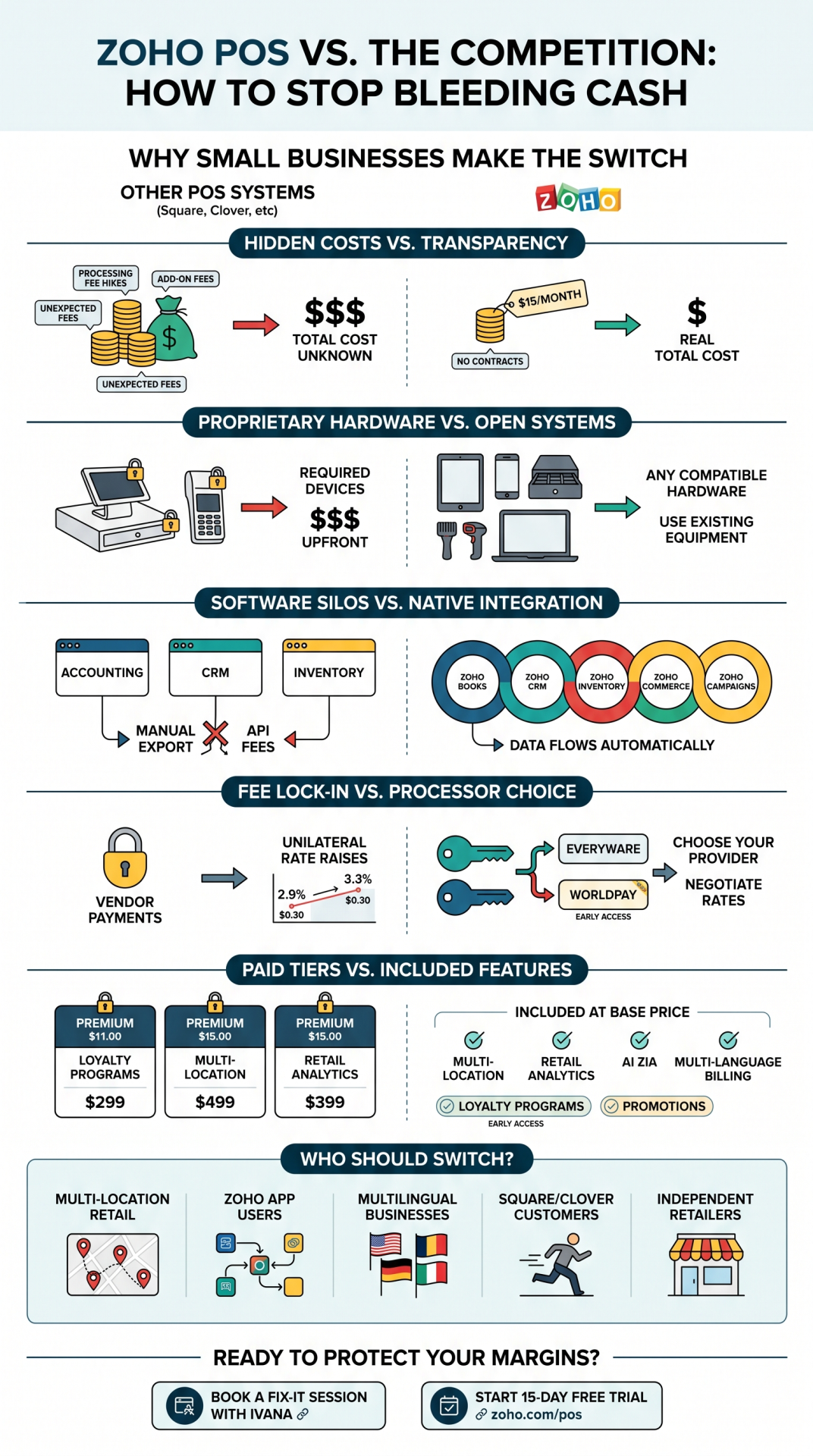
The platform integrates natively with Zoho Books (accounting), Zoho Commerce (e-commerce), Zoho CRM (customer management), and Zoho Campaigns (email marketing). If you’re already using any Zoho app in your business, the POS data flows automatically into those tools. No Zapier. No manual export. No third-party connector fee.
It also includes Zoho’s AI assistant Zia, which lets you query inventory, automate workflows, and monitor operations through natural-language prompts — a feature most POS vendors charge a premium tier for, if they offer it at all.
Zoho POS Review — Pricing vs Square, Clover, and Shopify
The pricing comparison looks straightforward on paper. Where it gets interesting is when you factor in the total cost of ownership — especially processing fees, hardware costs, and feature access at each tier.
| Platform | Monthly Fee | In-Person Processing | Hardware | Free Trial |
|---|---|---|---|---|
| Zoho POS | $15/mo (annual) | Choose your provider | Any compatible hardware | 15 days |
| Square POS | $0 (free plan) | 2.6% + $0.15 | Square hardware preferred | Free plan |
| Clover POS | $14.95/mo | 2.3–2.6% + $0.10 | Clover ecosystem required | None standard |
| Shopify POS | $39/mo + $89/location POS Pro | 2.6% + $0.10 | Shopify-compatible | 3 days |
| Toast POS | $0–$69/mo | 2.49% + $0.15 | Toast hardware ($1,799+) | Limited demo |
The Shopify number deserves a second look. A two-location retailer on Shopify POS pays $39/month for the base plan plus $89/month per location for POS Pro — that’s $217/month before processing fees. Zoho POS covers multi-location management at the $15/month base price. That’s a $202/month difference on software alone for a two-location business, or roughly $2,400 per year.
Square’s free plan looks like the most attractive entry point until you account for processing fees. (Square’s current fee schedule is here.) At 2.75% for in-person transactions, a business doing $20,000/month in sales pays $550/month in processing fees through Square. Zoho POS lets you connect to an independent payment provider and negotiate your own rate. That one decision alone returns hundreds of dollars per month depending on your volume.
The 7 Biggest POS Complaints — and How Zoho Addresses Each One
The grievances small business owners have with their POS systems are consistent across the industry. Here’s where Zoho POS directly responds to each one:
Proprietary hardware lock-in
Clover’s hardware ecosystem is completely closed. Toast’s restaurant terminals run $1,799 or more per location. Buy their hardware, and you’re committed. Zoho POS works with any compatible standard peripheral — barcode scanners, cash drawers, receipt printers, customer-facing displays. If you already own standard hardware, you likely don’t need to buy anything new to start.
Software silos and integration fatigue
This is the one that kills small business owners slowly. The POS doesn’t sync with accounting. Inventory lives in a separate system. Customer data is locked in the loyalty app. Every month-end reconciliation is a manual export-and-pray exercise. Zoho POS eliminates this inside the Zoho ecosystem — it syncs natively with Zoho Books, Zoho Commerce, Zoho CRM, and Zoho Inventory. No connectors, no Zapier fees, no API maintenance.
Hidden fees and unilateral price hikes
Square raised fees 14% in January 2026 with no notice and no options. Zoho POS separates software pricing from payment processing — you choose your own payment provider (currently Everyware, with Worldpay in early access). If a payment partner raises rates, you switch payment providers, not your entire POS system.
Long-term contracts and switching penalties
Many Clover contracts require multi-year commitments with steep early termination fees. Zoho POS is explicitly no long-term contracts. The 15-day free trial lets you test the full system before spending anything.
Key features locked behind expensive tiers
Loyalty programs, advanced reporting, and multi-location management are “premium” features on most POS platforms — you pay more to access them. Zoho POS includes multi-location management, retail analytics, multi-device support, and price management at the $15/month base price. Loyalty programs and promotions are available through Early Access (contact Zoho POS support to enable) rather than locked behind a paid tier.
Poor customer support
When a POS goes down at noon on a Saturday, every minute costs real money. Zoho has an established global support infrastructure with multilingual interfaces supporting 10 or more languages — including English, French, and Spanish — which addresses both the support gap and the accessibility gap for businesses serving diverse communities.
Complexity vs. capability trade-off
Small business owners describe a frustrating binary: use simple tools that lack depth, or pay for complex systems that require a consultant to set up. Zoho has built this argument before — Bigin (their simple CRM), Zoho Books (accounting without an accountant on payroll), Zoho Campaigns (email without a marketing team). Zoho POS is the same bet: enterprise-grade features, small-business-friendly operation.
⚠️ REALITY CHECK
Zoho POS is retail-focused. If you run a restaurant or food service operation, Toast and Square have significantly deeper food-service features — kitchen display systems, menu modifiers, table management. Zoho POS is built for retail inventory, not restaurant operations. Make sure you’re evaluating the right category before switching.
Why Does the Zoho Ecosystem Matter for Small Business Retailers?
Individual POS features matter, but the genuine competitive advantage of Zoho POS isn’t any single feature. It’s the ecosystem.
Zoho One is Zoho’s all-in-one business operating system — 40+ integrated apps covering sales, marketing, service, finance, HR, and operations. I reviewed Zoho One in depth and found the value proposition for small businesses to be genuinely unusual in the software market: one platform, one price, one login, everything talking to everything else.
Adding Zoho POS to that stack means a small retailer gets point-of-sale data automatically syncing into Zoho Books for accounting — no export, no reconciliation headache. They use customer purchase data from the POS to trigger post-purchase email sequences in Zoho Campaigns. They track inventory across online (Zoho Commerce) and in-store (Zoho POS) from the same dashboard. Zoho Inventory, which already connects to Shopify, Amazon, and eBay, slots directly into this picture.
For businesses not already in the Zoho ecosystem, this is a significant upfront decision. You’re not buying a POS alone — you’re evaluating whether Zoho is the right operating system for your whole business. That’s a bigger question. But for the businesses already using Zoho Books, or Zoho CRM, or even Zoho Mail, adding Zoho POS is almost a no-brainer: the integration value is immediate and costs nothing extra to configure.
This also connects directly to customer loyalty strategy. Zoho POS includes built-in loyalty programs in Early Access — which lets a retailer run loyalty campaigns directly from the platform, with the customer data already linked to their CRM and email marketing. That’s a capability most competitors charge separately for, if they offer it at all. Customer loyalty statistics consistently show that repeat customers spend 67% more than new ones — and a POS that feeds your loyalty program automatically removes the main barrier to running one.
Who Should Switch to Zoho POS — and Who Should Wait?
Based on this Zoho POS review, the platform is a strong fit for independent retailers who are already using any Zoho app — Books, CRM, Campaigns, Commerce, or Inventory. The integration value is immediate and the switching cost is relatively low.
It’s also a strong fit for multi-location retail businesses. Most platforms charge per-location fees for multi-store management. Zoho POS includes cross-state multi-location management at the base price. For a business running two or three locations, that difference pays for the platform several times over.
Businesses serving multilingual customer bases will find the 10-language billing interface to be a meaningful operational feature — not a novelty.
And if you’re on Square, Clover, or Shopify POS and you’ve absorbed a fee increase in the last 12 months without any way to push back, Zoho POS is worth a hard look. The 15-day free trial costs nothing. Your current POS setup’s switching cost is real — but so is the ongoing cost of staying.
Protecting your profit margins means auditing every recurring cost, including the ones buried in processing fees and add-on subscriptions. Your POS processing fees, software subscriptions, and hardware amortization are costs that compound monthly. If any of those numbers have risen in the last year without a corresponding increase in value, that’s worth investigating.
🛑 DON’T COPY BLINDLY
Zoho POS is new. It launched June 1, 2026. Some Early Access features — loyalty programs, promotions engine, self-checkout kiosks, Worldpay integration — require contacting support to enable and are still in development. If your business absolutely depends on one of these features being fully production-ready today, test during the free trial before committing. The platform has a clear roadmap, but “Early Access” means early.
How to Start With Zoho POS (Step by Step)
The onboarding path is straightforward. Here’s the sequence that makes sense for a small retail business:
Step 1: Start the 15-day free trial at zoho.com/pos. No credit card required upfront. Use this time to run real transactions and test your existing hardware compatibility.
Step 2: Audit your current hardware. Most standard barcode scanners, cash drawers, and receipt printers are compatible with Zoho POS. Make a list before you start so you know immediately whether you’re good to go or need anything new.
Step 3: Connect your existing Zoho apps. If you use Zoho Books, Zoho Commerce, or Zoho Inventory, this is standard configuration work. The integration is native and the setup is documented in Zoho’s help center.
Step 4: Contact Zoho POS support to enable Early Access features. Loyalty programs, promotions management, self-checkout kiosks, and Worldpay integration are available but must be activated by the support team. Do this at the start of your trial to evaluate the full feature set.
Step 5: Evaluate payment provider options. Everyware is currently live for payment processing. Worldpay is in Early Access. Compare their processing rates against what you’re currently paying. This is where the real savings analysis happens.
Step 6: Set up multi-store views if you have more than one location. Multi-location management is a core feature at the base price — not an add-on. Configure it during your trial to see what cross-location reporting looks like in practice.
If you want help auditing your current POS costs before you switch — or figuring out whether the Zoho ecosystem makes sense for your specific business setup — that’s exactly what a Fix-It Session is designed for.
Zoho POS Review — Frequently Asked Questions
Is Zoho POS good for small business?
Zoho POS is specifically designed for small and independent retailers. At $15/month with no long-term contracts and no proprietary hardware requirements, it’s one of the most cost-accessible POS platforms with enterprise-grade features currently available. It’s a particularly strong fit for businesses already using other Zoho apps — Books, CRM, Commerce, or Inventory — because the integrations are native and automatic. Businesses not yet in the Zoho ecosystem should evaluate the full platform before switching, since the value compounds across the whole suite.
How does Zoho POS compare to Square?
Square has a free plan and a well-established brand. Zoho POS costs $15/month but offers meaningful structural advantages: no proprietary hardware requirement, the ability to connect your own payment provider (instead of being tied to Square’s processing fees), native integration with accounting and CRM, and built-in multi-location management at the base price. The biggest risk with Square is fee dependency — Square controls your processing rate and raises it unilaterally, as it did in January 2026 with a 14% online processing fee increase. Zoho POS gives you processor flexibility, which creates leverage.
What payment processors work with Zoho POS?
Zoho POS currently supports Everyware for payment processing. Worldpay integration is in Early Access and gets enabled by contacting Zoho POS support. This open-processor model is one of Zoho POS’s strongest differentiators — most competitors lock you into their own payment processing or a preferred partner with limited negotiating room on rates.
Does Zoho POS work offline?
Zoho POS is a cloud-based platform, which means reliable internet connectivity is important for full functionality. If your business operates in an area with inconsistent connectivity, evaluate your internet situation carefully during the free trial period. This is worth testing before committing to the platform.
Does Zoho POS work with existing hardware?
Zoho POS supports any compatible standard billing peripherals, including barcode scanners, cash drawers, receipt printers, customer-facing displays, weighing machines, and pole displays. Most standard retail hardware is compatible. Unlike Clover, which requires its own proprietary hardware ecosystem, Zoho POS does not require you to buy new equipment to get started. Verify compatibility for your specific devices during the 15-day free trial.