I hate making video – thinking it through, recording (and re-recording and re-recording and then just when you think you’re done, recording again), finding the best parts, editing, and whatever else is involved.
I. Don’t. Like. It.
And yet. I’m a TikTok addict. I’ve lost entire Sunday afternoons watching entrepreneurs break down business concepts in 90 seconds. I’ve learned more from short tutorial videos than from marketing books I’ve paid actual money for.
So what gives? Why do I love watching certain kinds of videos but hate making video?
After months of wrestling with this contradiction—and testing more low cost video creation tools than I care to admit—I finally figured it out. The problem was never video itself. The problem was that most editing tools are built for video people, not marketing people who need video.
I’m not a videographer. I’m a content marketing ceator who occasionally needs to turn a 45-minute expert interview into something people will actually watch. And I finally found the workflow that doesn’t make me want to throw my laptop out the window.
The Tool Graveyard on My Credit Card Statement
Before I tell you what worked, let me tell you what worked before until it didn’t.
Descript. I was an early adopter. Loved it. The transcript-based editing felt like magic—delete a word from the text, and it disappears from the video. Revolutionary.
Then they kept adding features. And adding. And adding. The interface got cluttered. Simple tasks started requiring multiple clicks. Exporting something that looked professional became a research project. I found myself spending more time fighting the tool than using it.
Don’t get me wrong. They’ve made a LOT of improvements and I will still use it, but it’s not the tool I go to in a pinch or when I want to create a quick snippet of video.
Minvo. Tried it for pulling clips from long interviews. The promise was enticing: AI finds your best moments automatically. The reality? The interface felt like slogging through mud when I wanted to customize anything. And the “viral” clips it suggested weren’t always the moments that actually mattered for my audience.
Various “AI video” tools. I’ve tested at least a dozen that promised to revolutionize my workflow. Most delivered complicated dashboards, confusing pricing tiers, and output that looked obviously AI-generated.
The common thread? They were all built for people who like editing video. People who enjoy tweaking keyframes and color grading and aspect ratios.
That’s not me. I want to record something useful, make it look decent, add captions, and get it out into the world before I lose interest.
Then I Found VEED (And Finally Understood What “Done Beats Perfect” Means)
Here’s what I needed: a tool that treats video editing like a means to an end, not an art form.
VEED gets this.
What I Use
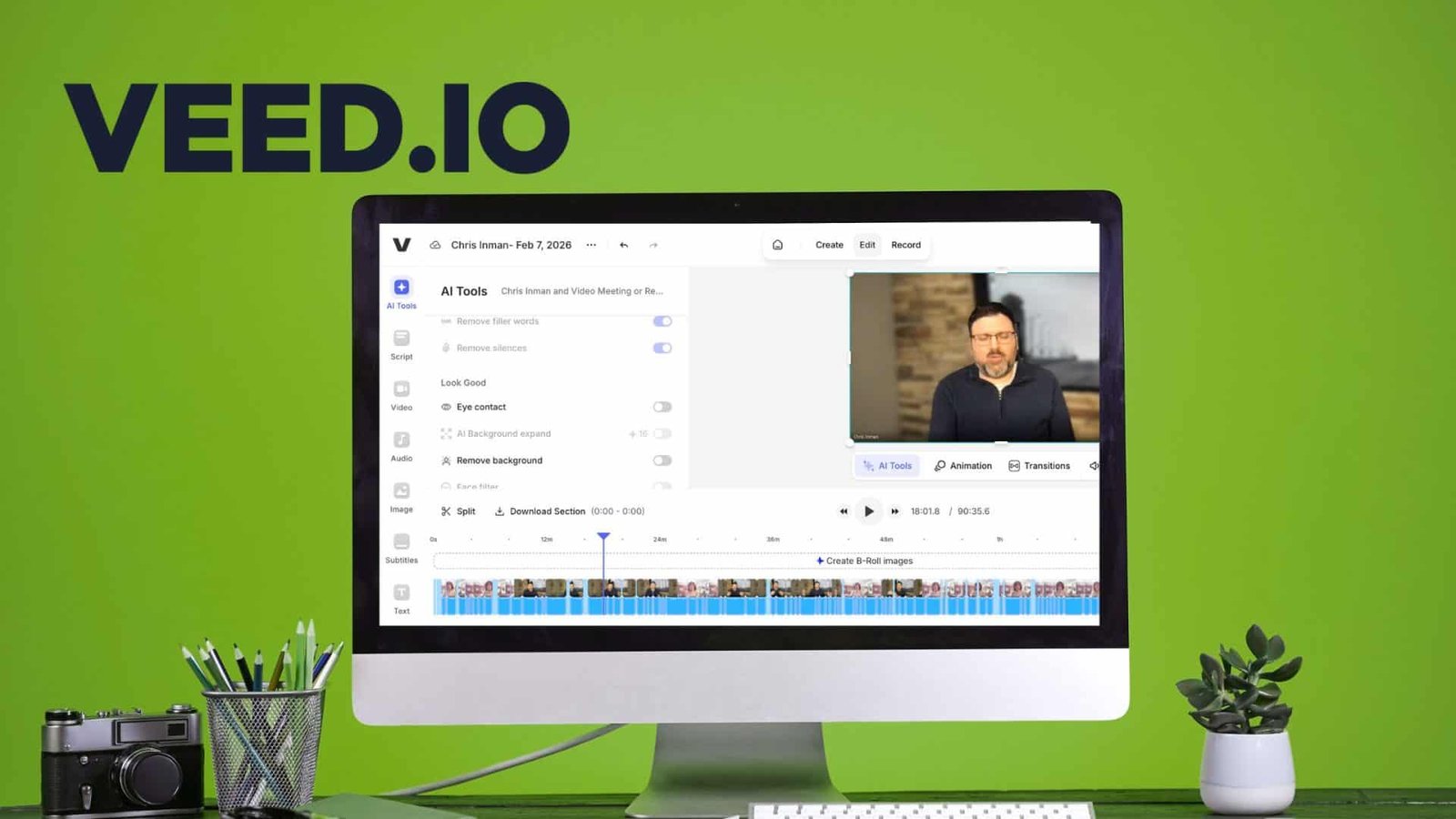
VEED.IO AI Assisted Video Creator and Editor
Ready to create stunning videos without the tech headache?
VEED.IO’s AI-assisted video creator is your new best friend. Designed for small business owners and startups, it transforms your ideas into professional videos in minutes. No experience?
No problem!
Simply describe your topic, choose a style, and let VEED.IO handle the rest. From product demos to social media clips, this tool does it all.
Plus, with features like automatic subtitles and translations, reaching a global audience has never been easier. Say goodbye to complicated software and hello to effortless video creation with VEED.IO!
We earn a commission if you make a purchase, at no additional cost to you.
I’m not saying it’s the most powerful editor. I’m saying it’s the fastest path from “raw footage on my hard drive” to “something I can post on LinkedIn without embarrassment.” And for small business owners doing marketing on a shoestring, that matters more than features you’ll never use.
Let me show you what I mean.
I recently interviewed Chris Inman, a video strategist who runs Idea Cleveland. We talked for almost an hour about video strategy, AI tools, and why most small business marketing fails. Great conversation. Terrible as-is for social media.
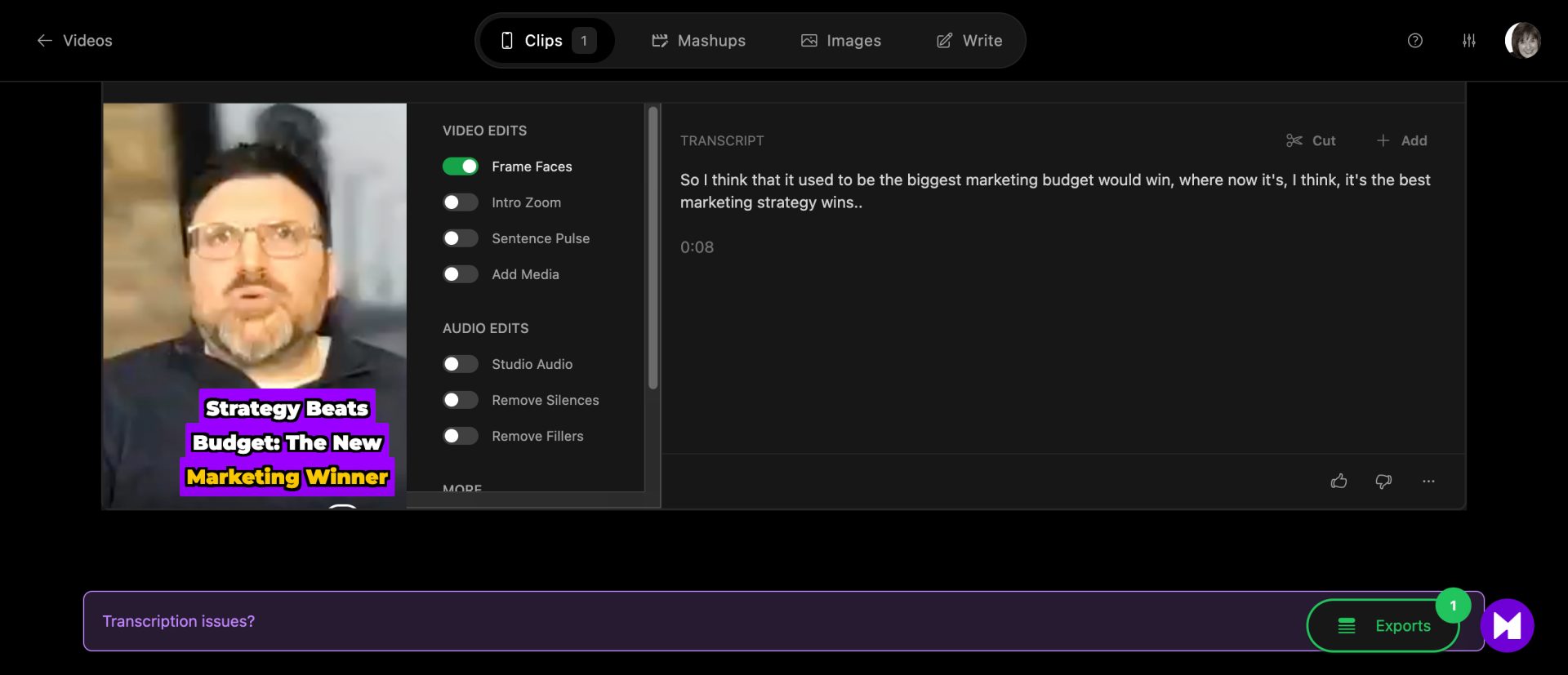
“The biggest marketing budget no longer guarantees success; instead, the best marketing strategy wins.”
— Chris Inman, Video Strategist & Founder, Idea Cleveland
In VEED, I:
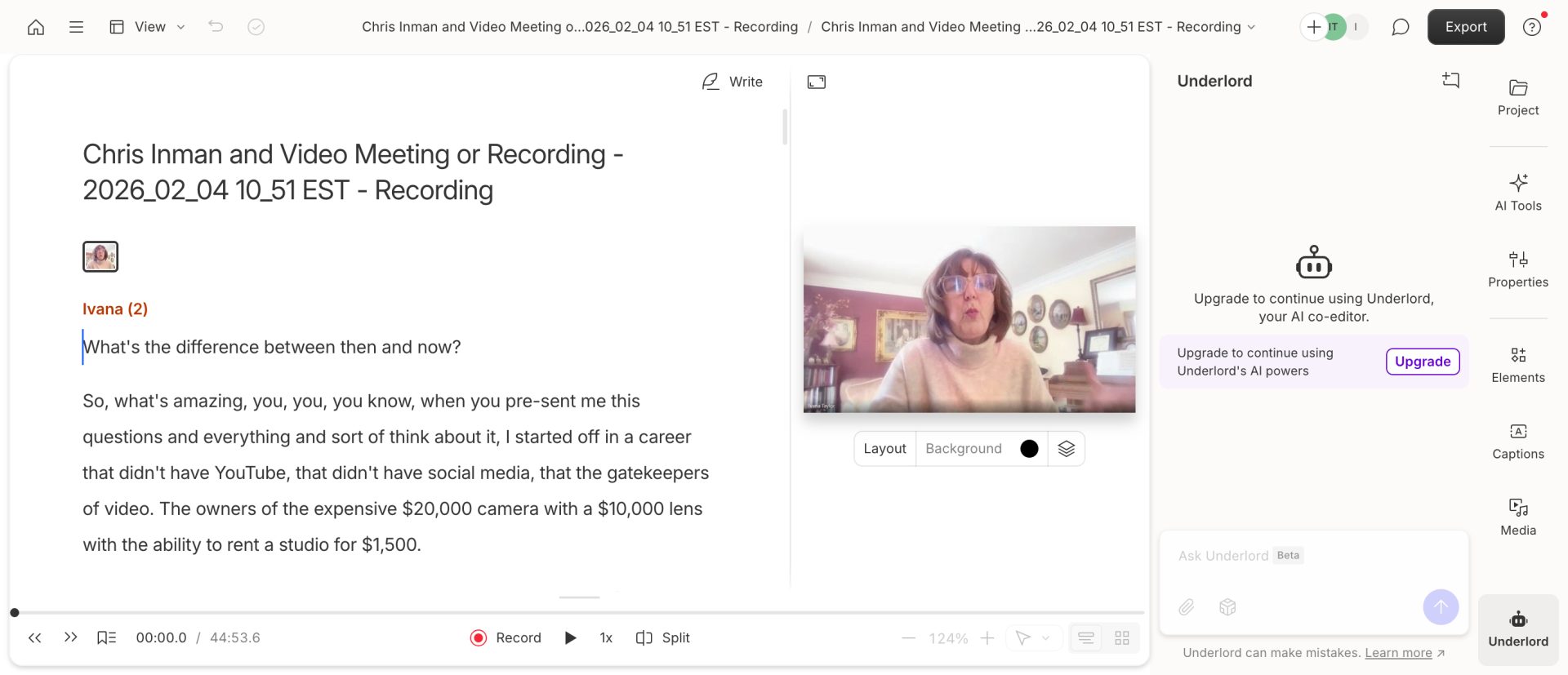
- Uploaded the raw Zoom recording
- Used the auto-transcript to find the three moments worth clipping
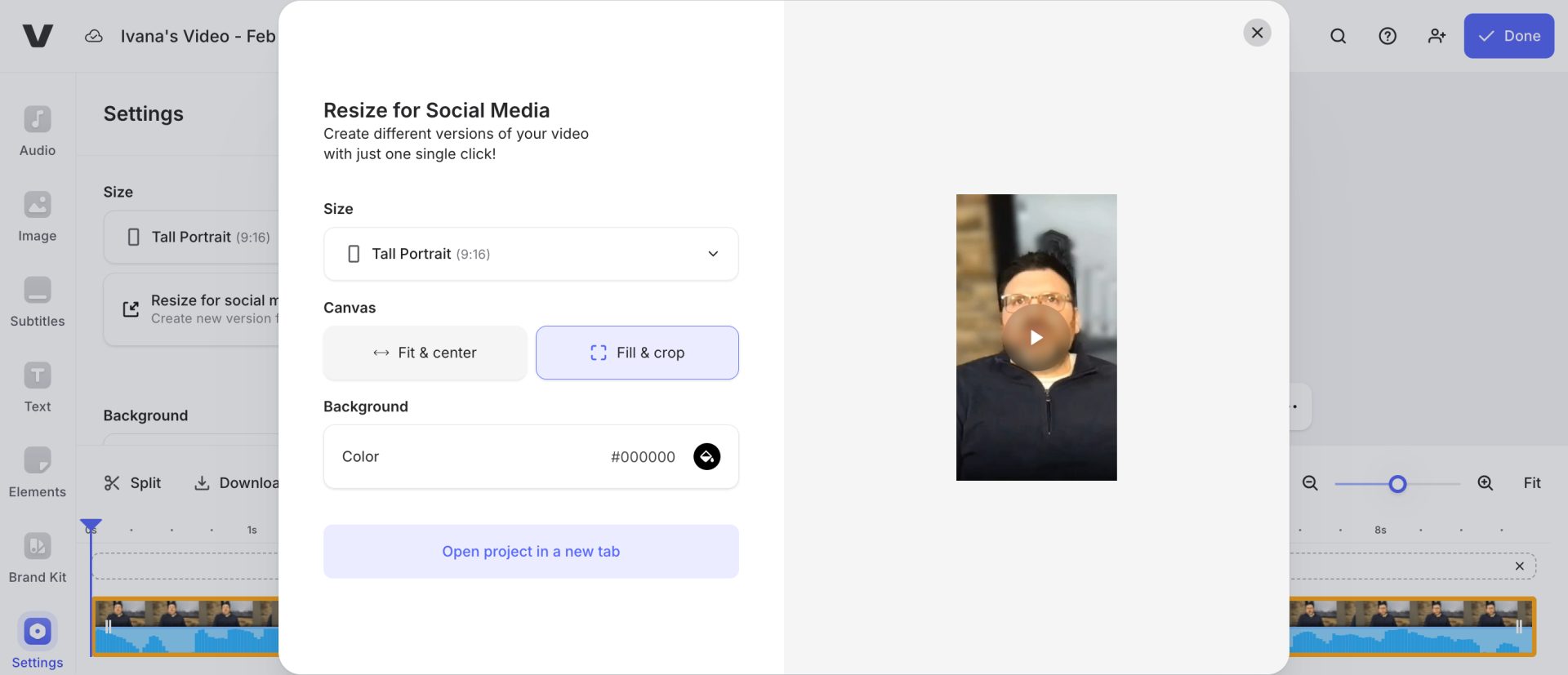
- Resized from horizontal (Zoom default) to vertical (Instagram/LinkedIn)
- Added captions with one click
- Exported all three clips
Total time: maybe 12 minutes. And I’m slow.
Let me show you how I did this.
- Upload the WHOLE video to VEED.io
- Got the transcript from VEED
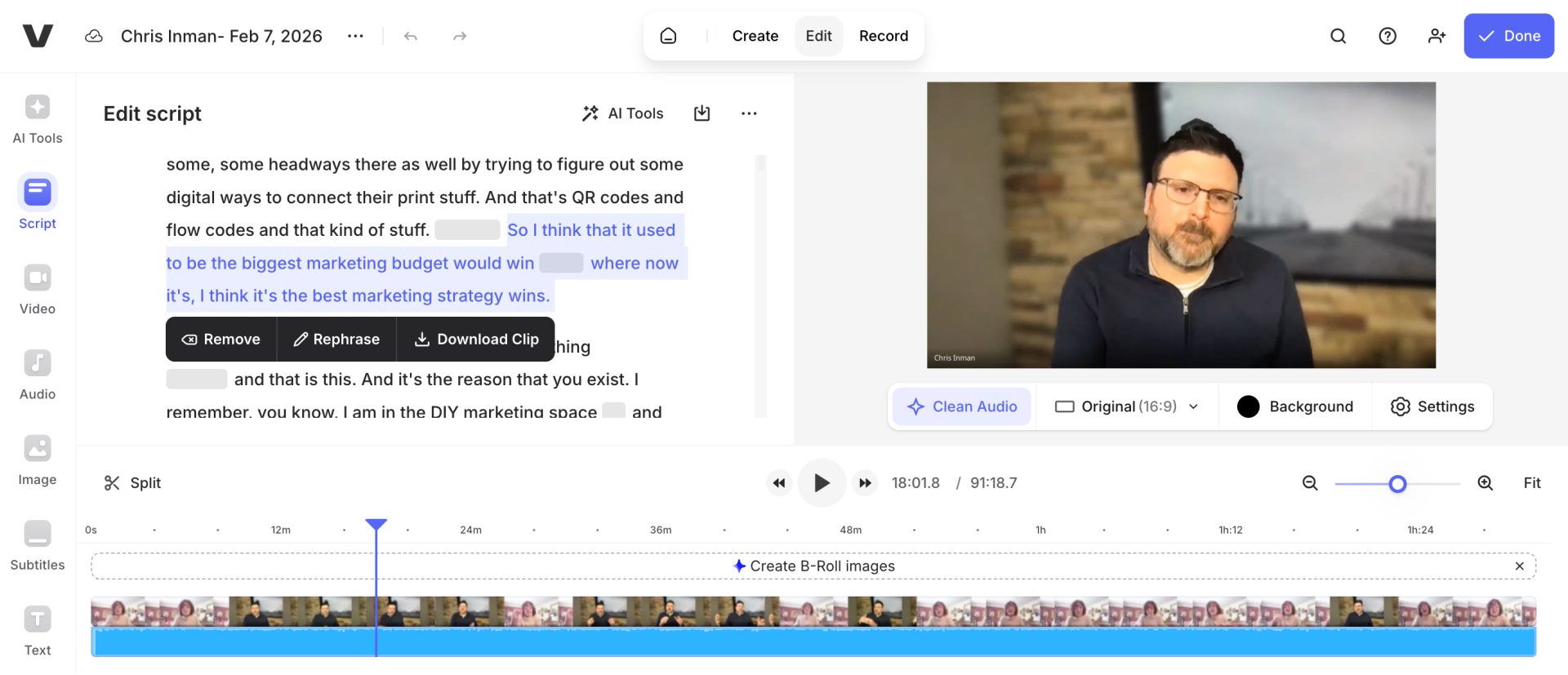
3. Edit the clip into the format you want
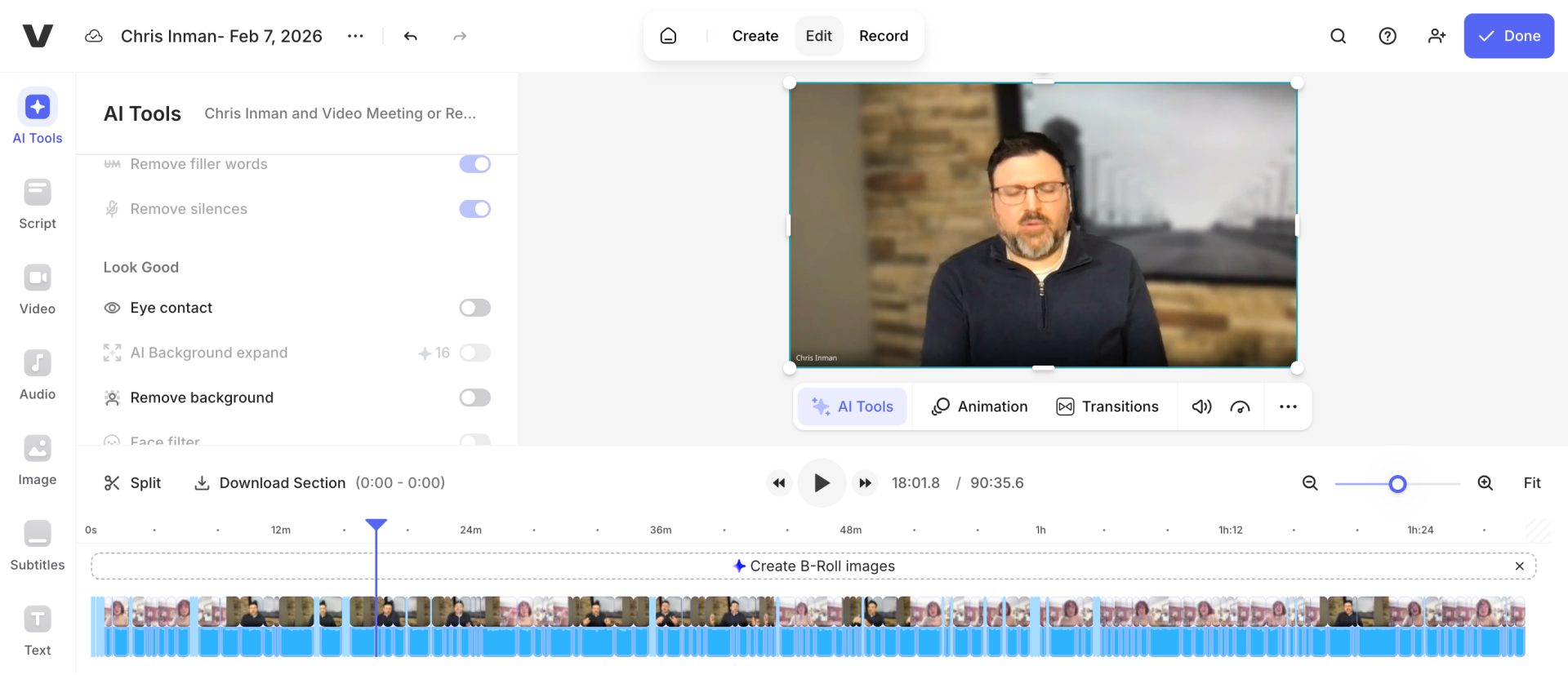
4. Play with AI features
And BOOM — this here is the end result.
The clips aren’t cinema. They don’t need to be. They’re a marketing asset that moves people one step closer to knowing who I am and what I do. That’s the job.
VEED’s basic plan runs about $12-18/month depending on your subscription. That’s roughly 50 cents a day. Even the pro tier stays under $1/day. For context, you probably spend more on your morning coffee than on video editing software. When I talk about low cost marketing tools that actually work, this is what I mean—professional output without the agency invoice.
What My Video Expert Friend Told Me (That Changed How I Think About This)
Here’s the thing about being a reluctant video creator: I needed someone who actually knows video to gut-check my approach.
Chris Inman has been doing video production since the days when it required expensive equipment and studio rentals that only corporations could afford. He’s watched the entire industry transform. So when he validates a strategy, I listen.
During our interview, he said something that stopped me mid-note-taking:
“The biggest marketing budget no longer guarantees success; instead, the best marketing strategy wins.”
Read that again.
This is the shift that makes low cost video creation tools viable for small business owners. You’re not competing on production value anymore. You’re competing on whether your content actually helps people.
Chris went further: “The focus has shifted from outspending to creating authentic, value-adding content.”
That’s permission to stop obsessing over whether your lighting is perfect. Your audience doesn’t care if you shot on an iPhone or a RED camera. They care if you’re solving their problem.
The “Slot Machine Marketing” Trap (And How Video Tools Feed It)
Chris and I got into a conversation about why so many small business owners feel like marketing doesn’t work for them. His diagnosis was brutal and accurate:
“Chasing shiny objects—where businesses adopt tactics like starting a newsletter or being on TikTok without a clear strategy—leads to ineffective results and the belief that ‘marketing doesn’t work’ in their industry.”
I call this “slot machine marketing.” You throw money and time at random tactics, hoping something hits. When it doesn’t, you blame the tactic instead of the missing strategy.
Video tools can feed this trap. It’s easy to think, “If I just had better editing software, my videos would perform better.” So you buy another subscription. Learn another interface. Create more content that still doesn’t connect.
The tool isn’t the problem. The missing strategy is. <div style=”background-color: #f2dede; border: 1px solid #ebccd1; padding: 15px; border-radius: 4px; margin-bottom: 20px;”><strong>🛑 Before You Buy Another Tool:</strong><br>
Ask yourself: Do I know exactly how this video will move someone toward becoming a customer? If you can’t answer that clearly, no editing software will save you. As Chris put it, “Every marketing piece must try to get somebody into the sales funnel.” Start there.</div>
Why VEED Works for Non-Video People Like Me
Let me be specific about what makes VEED different from the tools I abandoned.
It’s browser-based. No downloading massive software. No waiting for updates. I open a tab, drag in my footage, and start editing. For someone with limited patience (hi, that’s me), this removes a friction point that used to kill my momentum.
The AI features solve real problems. Auto-captions that are actually accurate. Background noise removal that works. One-click resizing for different platforms. These aren’t gimmicks—they’re the tedious tasks I used to spend 30 minutes on manually.
It doesn’t assume I know video terminology. Descript expects you to understand transcripts and overdubs. Premiere expects you to know timelines and keyframes. VEED expects you to want a finished video. The interface guides you toward output, not toward learning video production.
The export looks professional without fussing. Clean captions, proper formatting, reasonable file sizes. I don’t have to become a compression expert to share something that doesn’t look amateur.
Is it the most powerful editor? No. Can you do complex motion graphics or color grading? Not really. But I don’t need that. I need to turn my Chris Inman interview into three LinkedIn clips before I get distracted by something else.
VEED gets that job done.
The AI Shift Chris Inman Predicted (That’s Already Here)
One thing Chris said during our interview felt almost prophetic:
“AI can quickly move elements around to shape a storyline, drastically reducing the time spent on creating a rough draft—a process that used to take hours.”
He’s describing exactly what I experienced with VEED. The AI doesn’t make my video for me. It gives me a rough draft to work from. Captions I can tweak instead of type from scratch. Clip suggestions I can accept or reject. Noise reduction that happens in the background.
“
AI can quickly move elements around to shape a storyline, drastically reducing the time spent on creating a rough draft—a process that used to take hours.
CI
Chris Inman
Video Strategist, Idea Cleveland
The time savings compound. What used to be an afternoon project is now a coffee-break task.
Chris also made a point that surprised me: “AI, like ChatGPT, can be used to eliminate certain paid subscriptions by creating custom prompts for equivalent functionality.”
Translation: before you pay for another specialized tool, ask ChatGPT if it can do the same thing. Sometimes the answer is yes.
My Actual Workflow (For Fellow Reluctant Video Creators)
Here’s exactly what I do now. Steal this if it helps.
⚡ STEAL THIS WORKFLOW
The 12-Minute Interview-to-Instagram Method:
Record with 2-3 target moments in mind → Upload to VEED → Use transcript to find quotes → Cut to 60 seconds → Add captions → Resize for platform → Post before you overthink it.
That’s it. No color grading. No fancy transitions. Done beats perfect.
Step 1: Record with purpose. Before I hit record, I know the 2-3 moments I’m hoping to capture. With Chris, I knew I wanted his take on AI editing, his “slot machine marketing” concept, and his advice on strategy vs. budget. Having targets makes the editing phase faster.
Step 2: Let the transcript do the finding. I upload to VEED and let it generate the transcript. Then I scan for my target moments using Command+F. No scrubbing through footage manually.
Step 3: Cut ruthlessly. My interviews run 30-60 minutes. My clips run 30-90 seconds. That means cutting 95% of what I recorded. This is where most people get stuck—they want to use everything. Don’t. Find the gold, cut the rest.
Step 4: Resize once, export multiple times. I create a vertical version for Instagram/TikTok/LinkedIn Reels and a horizontal version for YouTube. VEED’s AI background expansion handles the resizing without awkward crops.
Step 5: Captions are mandatory. Over half of social video is watched on mute. Captions aren’t optional. VEED’s auto-captions get me 90% there; I spend 2 minutes fixing any errors.
Step 6: Post before I overthink. This is the most important step. The video is never going to feel “ready.” Post it anyway. Done beats perfect, every single time.
What About Descript and Minvo? When They Make Sense
I’m not saying these tools are bad. They’re just built for different workflows.
Use Descript if: You’re primarily working with podcasts or audio content. The transcript-based editing is still best-in-class for long-form audio. If you’re editing a 2-hour podcast into a polished episode, Descript earns its complexity.
“
Personally, I’m currently learning how to do more short podcast/storytelling videos and I have to say that Descript is a much better tool for that kind of more intense editing if you aren’t a video editor or podcasting editor.
— Ivana Taylor, DIYMarketers
Use Minvo or Opus Clip if: You need to extract dozens of clips from massive content libraries. If you’re a podcast network processing hundreds of hours of footage, the algorithmic “viral clip” detection saves real time at scale.
🔥 Important
Yes, these AI tools will absolutely create clips, but don’t expect perfect clips. Great clips come from interviews with great talking points and how well you organize them. It takes great structure and great content to create a great clip. Usually, you won’t have that. So I’ve found that going through the script and pulling out clips I know are good is the best way to go. (sorry AI overlords)
Use VEED if: You’re a small business owner who needs 3-5 clips per week from interviews, webinars, or talking-head content. You want fast, you want simple, and you want something that doesn’t make video feel like a second job.
The right tool depends on your actual workflow, not what some listicle ranks as “best.”
The Rachel Ray Principle of Marketing Tools
Here’s how I think about this stuff.
Rachel Ray isn’t a chef. She’s a cook. She doesn’t make you feel stupid for not knowing what “julienne” means. She shows you how to get dinner on the table in 30 minutes using ingredients you already have.
That’s the approach I take with marketing tools at DIYMarketers. I’m not a video expert. I’m a marketer who figured out the low cost video creation workflow that gets content out the door without expensive agencies or steep learning curves.
VEED is my video equivalent of a sharp knife and a good pan. It’s not fancy. It does the job.
And if it does the job, who cares if a “real” video editor would use something else?
The Numbers Behind Why This Matters
Let me ground this in data so you know I’m not just ranting about my preferences.
According to Wyzowl’s 2026 research, 91% of businesses now use video as a marketing tool. But here’s the number that matters: 19% of marketers who don’t use video say it’s because they don’t have enough time, and 37% say they don’t know where to start.
Time and confusion. Those are the real barriers—not budget, not equipment.
Meanwhile, 85% of people have been convinced to buy a product or service after watching a video. The ROI is there. The audience is there. The only missing piece is a workflow that doesn’t require becoming a video professional.
That’s the gap low cost video creation tools like VEED fill.
What Chris Said That I Keep Coming Back To
Near the end of our interview, Chris made a point about why small business owners keep wasting money on marketing:
“Small business owners must stop wasting money on marketing by developing strategy and becoming general contractor for marketing vendors.”
General contractor. That framing stuck with me.
You don’t need to learn video editing any more than you need to learn plumbing. But you do need to know enough to hire the right plumber and recognize when they’re doing good work.
Same with video tools. You don’t need to master color grading. You need to know whether your tool is helping you create content that actually supports your business—or just giving you busywork that feels productive.
For me, VEED passes that test. Descript used to, then stopped. Your mileage may vary. The principle stays the same: the tool serves the strategy, not the other way around.
Frequently Asked Questions
What’s the best low cost video creation tool for small business owners?
After testing dozens of video tools for DIYMarketers readers—most of whom are working with tight budgets and zero time—VEED is the one I keep coming back to. It’s browser-based, intuitive, and gets you from raw footage to finished clip in under 15 minutes without a learning curve. No expensive software. No tutorials required. Just results.
How much does video creation actually cost for small business marketing?
Here’s what I tell everyone who asks: you can run a solid video workflow for less than your weekly coffee habit. VEED’s paid plans run $12-24/month depending on features. Add a decent USB microphone (a one-time $50-100 investment) and you’re set. This is exactly the kind of shoestring marketing setup I’ve been teaching at DIYMarketers for over a decade—professional results without the professional price tag.
Do I need expensive equipment to create professional-looking video?
No, and I’ll fight anyone who tells you otherwise. Your smartphone shoots better video than the $20,000 cameras Chris Inman started his career with. A $30 ring light makes more difference than an expensive camera ever will. And AI tools like VEED clean up audio and enhance footage automatically. I’ve built my entire brand—Ivana Taylor, DIYMarketers, all of it—on proving that smart beats expensive every single time.
How long should my social media video clips be?
For LinkedIn, Instagram Reels, and TikTok, aim for 30-90 seconds. Your audience has the attention span of a goldfish with a phone addiction—deliver one clear idea and get out. Save the deep dives for YouTube or your blog. This is something I drill into every Fix-It Session client: shorter clips, more often, beats one “perfect” video you never publish.
Should I hire a video editor or do it myself?
Here’s my rule of thumb: if you’re creating fewer than 10 clips per month, DIY with a tool like VEED. Your time is valuable, but so is your cash flow. If you’re producing higher volumes or need broadcast-quality production, then consider an unlimited editing service like Chris Inman’s company offers. But for most small business owners I work with? The DIY route with the right tool saves thousands per year—and that money is better spent on marketing that actually drives revenue.
The Bottom Line (For Fellow Video-Haters)
I still don’t love making video. I probably never will.
But I’ve stopped dreading it. And that shift came from finding the right tool for how I actually work—not how video experts think I should work.
VEED gives me a low cost video creation workflow that fits my patience level, my budget, and my goal of getting marketing content out into the world without losing my mind.
If you’re a small business owner who knows you should be creating video but keeps putting it off because the tools feel overwhelming, start here. Record one short interview. Pull one clip. Post it.
Done beats perfect. Always.
Stuck on Which Marketing Tools Are Worth Your Money?
You don’t need more subscriptions. You need the right ones for YOUR business.
In a Fix-It Session, I’ll review your current tool stack, identify what’s working and what’s wasting money, and give you a prioritized action plan—all for $150. It’s the fastest way to stop spinning and start marketing on a shoestring that actually gets results.