
Anytime a parent completes registration on your website, they expect an email confirming their registration.
Scratch that. Anytime someone makes a reservation or purchase online, they expect an email confirming what they just did.
Registration for camp is no different. And crafting an email confirming registration is not necessarily a straightforward task. It’s important to put some time and thought into putting this confirmation together.
You don’t want to include TOO MUCH information in your email so that any important notes or messages get lost. But you do want to include the right information so parents don’t feel compelled to reach out to ask questions that could have been covered in your email.
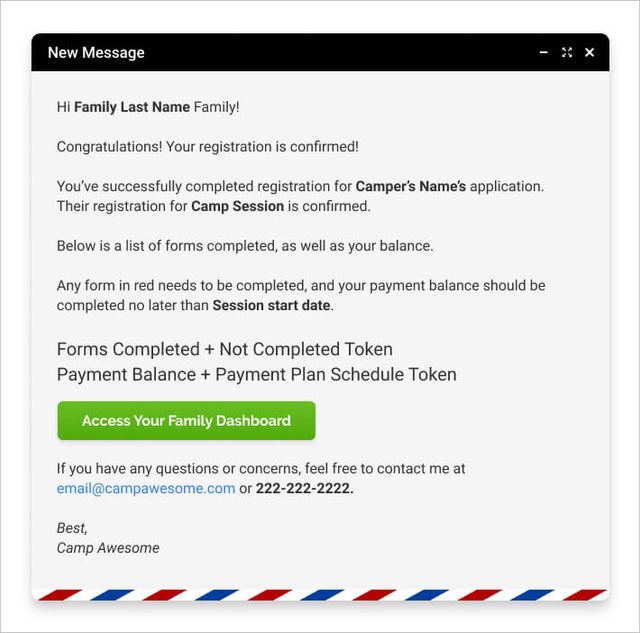
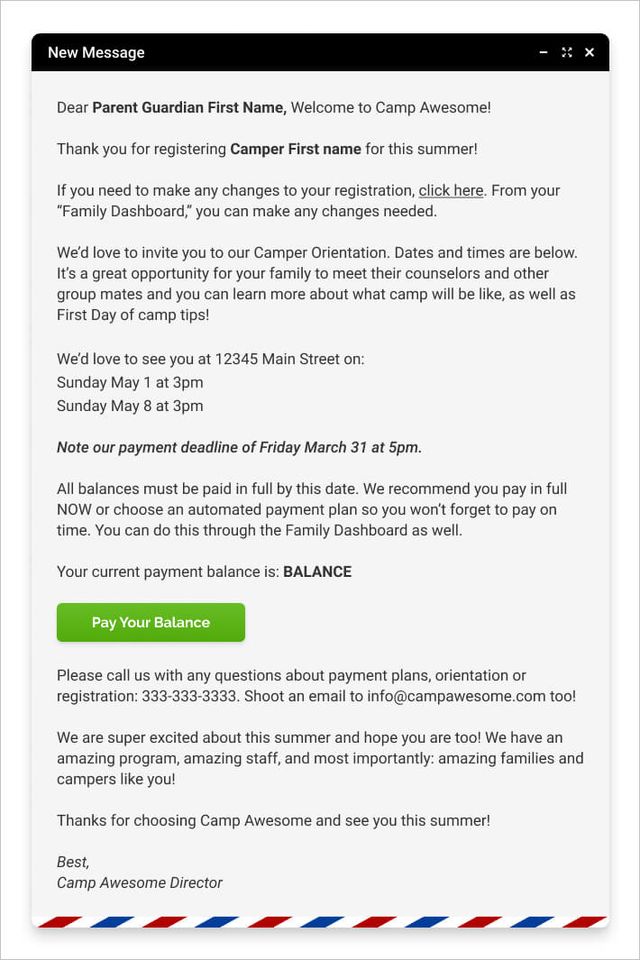
Below are two examples of a camp registration confirmation email you can use for your own camp.
I’ve also included some tips on how to create your own confirmation email that will contain the right elements for a successful email.

Registration Confirmation Email Template #1
See your numbers
Get a personalized, no-commitment savings report.
Have a question?
Ask Regpack AI anything.
Registration Confirmation Email Template #2
What makes these registration confirmation emails so effective?
You’ll notice that both of these emails contain some “tokens” or the text that is in the bold.
Any camp registration software worth its salt will have these tokens. A token will pull the specific information from your database into the email.
Tokens are great for setting up emails in bulk but keeping the information in each email personalized. The goal is to have the email read as though it was written specifically for them by you.
The common tokens that are important for registration confirmation for a camp include:
- Family name token / Parent Name token: Used in the greeting of the email.
- Camper name token: Confirmation of this camper’s registration. This is especially helpful for a family with more than one child to differentiate the children and their sign-ups, balances, etc.
- Session Name: This helps personalize the email so the parent has confirmation they registered for the right session.
- Payment information, including balance due. You can also include a payment plan token and a payment history token to show all payments received to date, and any balance due and their due date.
- Forms Complete/Incomplete token: This is helpful for sending an overview of forms that are done and forms that are still needed. This helps give the parent the bigger picture of where their application stands and how much more they need to go.
A few other aspects of these email templates to note:
Your camp’s contact information is included
This falls under general good communication skills, but I wanted to point it out just in case.
You want me to make sure the email is sending from the email you’d like a response to. People will inevitably want to ask a question and will hit reply more often than they will copy and paste an email address you put in the body of the email.
You always want to make it as easy as possible for your clients to connect with you. And, you don’t want to upset a client if they respond to your email and it bounces back.
You’ll see in both emails that a phone number and email are provided for contact. What you can’t see, but should note, is that the email “sender” should be either someone specific or an “info@yourcampname” email that someone monitors.
Important Due Dates Are Highlighted
Both emails include important due dates, most importantly: payment deadlines.
The first thing to make this even better, and easier, is to have payment plans and automatic payments set up with your registration software. This will cut down on payment reminder emails and following up with parents and ensure you get paid on time.
Some parents, however, won’t set up a payment plan or automatic payment, so you want to ensure you are clear about when they need to pay. The token for their balance is helpful here. It can be used both in a registration confirmation email and in follow up payment reminder emails.
Your dashboard and payment processor are linked
Even if a family has all of their forms completed, and payments made, they might still want to check on their form details, make a change or add a session. Providing a link to their registration dashboard is helpful for them to make this quick edit.
Additionally, parents might bookmark this email so if they want to update something at a later date, they know they can find the info they need in their email.
If the family has any outstanding payments or forms they need to complete, making it easy to find the link where they can do this + the tokens used to show what forms these are / how much they owe, will generally allow you to get these loose ends tied up.
You don’t want to overwhelm parents with too much info, but you also want to provide them with all the info they need to take action on their own, including completing forms and paying you!
The Call to Action is Obvious
Notice in both emails there is a big green button! In one email it is linking to the family dashboard. In another, it’s an invitation to close their balance.
Depending on your content, you can have this button say anything you want and go anywhere you want. You could have it go to the last incomplete form, to the payment page, or the dashboard.
The purpose of this button is to draw the eye and get the reader to do whatever it is you need – in this case it will be to finish up their application and/or view their completed application. It’s an easy way to get them back to your registration portal so they can access it as needed.
Upcoming Events are Included
The second email includes a note about attending an orientation. While I definitely recommend sending out another email closer to the date of that event, it’s always nice to include a brief shout-out for that in the registration completion email so it’s on the parent’s radar.
This section is a great example of how camps are different and knowing your audience is key. Depending on the type of camp and the parents you have, sending TOO much information will backfire. Other camps, this isn’t the case and there is value in mentioning events way in advance to ensure everyone comes.
The takeaway here is to be very thoughtful about what you include and ensure it will be a benefit to send the information in the email. Always make sure you personalize as much of it as possible.
For example, if you want to include the orientation information but this event is ONLY for new camp families, send the same email, one version with and one without the orientation information. Ensure you filter for all returning families for the first email, and filter for new families for the second version. That way you are customizing who receives what.
Conclusion: Writing a good registration confirmation email is crucial.
Why did I dedicate an entire post to writing a good registration confirmation email? Because it’s important! The goal of an effective email is to cut down on email replies or phone calls asking questions that were either covered or should have been covered, by your email.
The beauty of automating business processes, registration emails included, is to cut down on the manual time to expend completing these admin tasks. This leaves your time free to have more meaningful and productive conversations with staff, parents as well as more time for planning your awesome sessions!
Check out all of our camp email template posts The Essential Summer Camp Email Templates.