
If you’ve been wondering why some sites keep getting cited by ChatGPT, Perplexity, and Google’s AI Overviews while yours stays invisible, the answer is probably less mysterious than you think. A big part of it comes down to structured data.
Structured data is one of those technical SEO topics that sounds way more intimidating than it actually is. The good news? You don’t need a developer or a computer science degree to use it. You just need to understand what it does, why AI systems care about it, and how to add it to your site without breaking anything.
Here’s everything you need to know.
Key Takeaways:
- Structured data is information organized in a predictable, machine-readable format. Unstructured data is everything else (free text, images, video, audio).
- AI systems, search engines, and analytics tools rely heavily on structured data and schema markup to understand what a page is about and decide what to cite.
- Pages with proper schema are more likely to show up in AI Overview results, Knowledge Panels, and featured snippets.
- You don’t need to write code. Free tools generate the JSON-LD for you, and Google’s Rich Results Test validates it before you publish.
- Adding structured data to your site is usually a 5-minute job in WordPress, Shopify, or whatever CMS you’re on.

Link building cheat sheet
Gain access to the 3-step strategy we use to earn over 86 high-quality backlinks each month.
What is Structured Data & How it Affects AI Citations
Structured data is information organized in a predictable, predefined format that machines can read without guesswork.
Think rows and columns in a database, fields in a spreadsheet, or schema tags on a webpage. Every piece of structured information lives in a specific place with a specific data type attached to it, which means an AI algorithm can look at it and know exactly what it’s looking at.
Unstructured data is the opposite. Free-flowing text, images, audio, video, emails, PDFs, social posts.
None of it follows a standardized format. A human can read an article and understand the author’s argument, but for AI models, parsing unstructured data is harder, slower, and more error-prone. There’s also semi structured data, which sits in between (JSON files, XML documents, that kind of thing).
To put it in storage terms: structured data lives neatly in a relational database where you can run SQL queries against it. Unstructured data usually sits in flat storage and needs heavier processing before anyone can pull insight out of it.
So why does this matter for AI citations?
When ChatGPT, Perplexity, or Google’s AI Overview decides which sources to cite in an answer, it leans on machine-readable signals to figure out what each page is about.
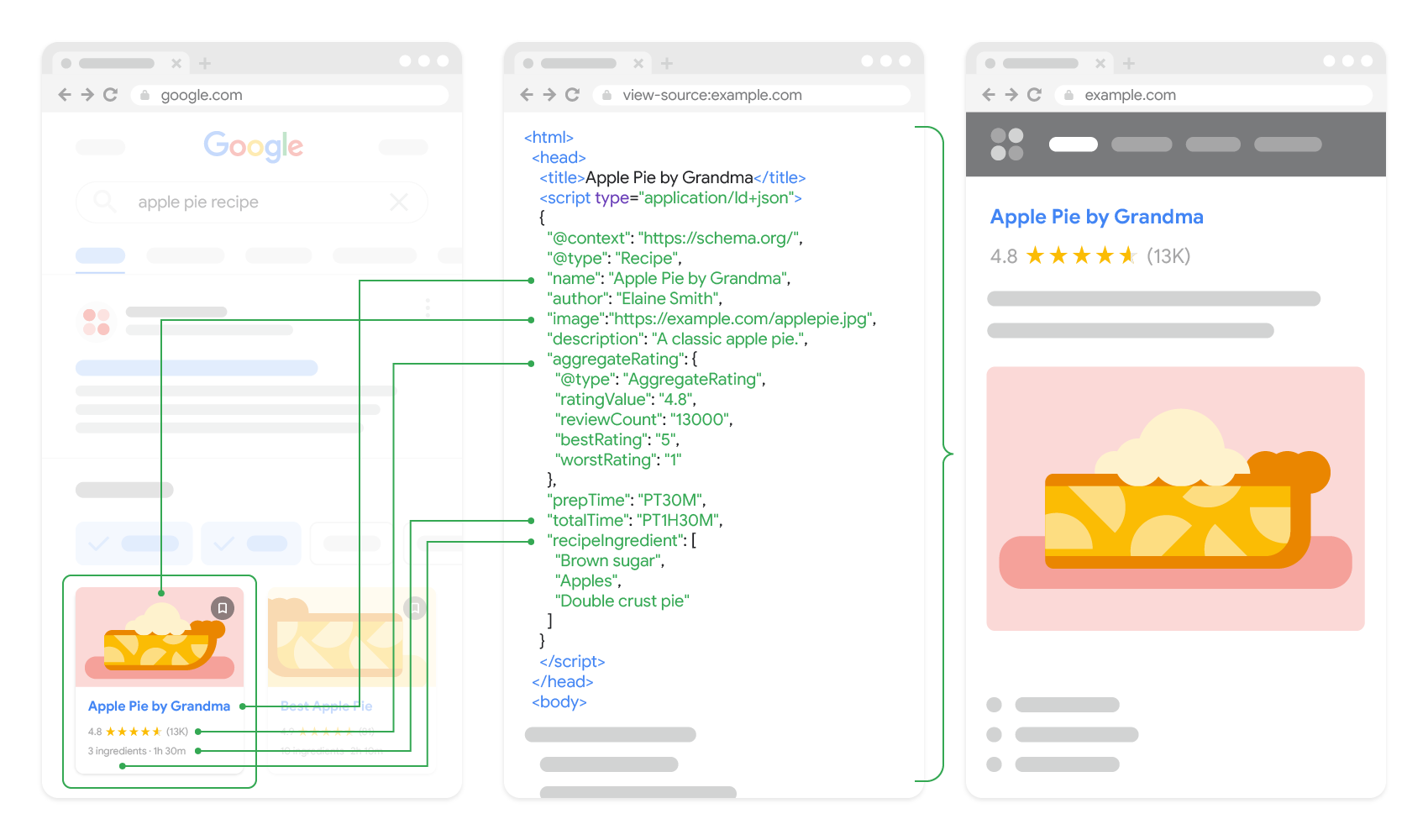
A well-marked-up page with schema tags is essentially handing the AI a cheat sheet: “this is a product, here’s the price, here’s the rating, here’s the author, here’s when it was published.”
Compare that to a raw HTML page with no schema, where the AI has to infer everything from unstructured data alone.
Generative AI tools don’t just want content.
They want content they can confidently parse. Pages with strong schema markup get pulled into AI responses, knowledge graph entries, and rich results more often because the AI can verify what it’s citing.
Structured data also helps maintain data integrity and data consistency across how your content gets represented in different AI surfaces, which means fewer mistakes when an AI summarizes you.
In short: structured data work pays off twice. Once for traditional SEO, and once for AI search visibility.
Structured Data Types
There are dozens of types of structured data and structured data markup formats out there. Here’s a quick rundown of the ones that matter most for SEO and AI citations:
- Article schema. For blog posts, news articles, and editorial content. Tells search engines and AI models the author, publish date, headline, and image.
- Product schema. For ecommerce. Covers price, availability, ratings, SKU, brand. Critical if you want to show up in shopping results or AI-generated product recommendations.
- FAQ schema. Marks up question-and-answer sections so they can appear as rich results or get pulled directly into AI answers.
- HowTo schema. For step-by-step guides. Helps your tutorials get cited when someone asks an AI “how do I do X.”
- Organization schema. Defines your business: name, logo, social profiles, contact info. Feeds directly into Knowledge Panels.
- Person schema. For author bios and individual profiles. Builds the entity-level data AI systems use to attribute expertise.
- Recipe schema. A specific data model for cooking content, including ingredients, cook time, and nutrition.
- Review and Rating schema. Captures structured ratings as a data element AI tools can pull into comparison answers.
- Event schema. For concerts, webinars, conferences. Date, location, ticket info.
- LocalBusiness schema. Critical for local SEO. Address, hours, phone number.
- VideoObject schema. For embedded video content, including thumbnail and duration.
- BreadcrumbList schema. Helps machines understand your site’s hierarchy.
There are also broader structured data containers like a structured database, structured dataset, or even big data systems that store structured information in a specific format at scale.
On the web specifically, the most common formats are JSON-LD (recommended by Google), Microdata, and RDFa, with linked data principles underlying how it all connects. J
SON-LD is the easiest to implement because it sits in the head of your page and doesn’t touch your visible HTML.
XML documents and sitemaps are another form of structured data your site is probably already using, just in a different context.
How to Create Structured Data?
Here’s the part most people overthink: you don’t need to know how to code.
There are plenty of free tools that generate the schema markup for you. The most popular ones:
- Google’s Structured Data Markup Helper. Built specifically for this. Pick a content type, paste your URL, and tag the elements visually.
- Merkle’s Schema Markup Generator. Clean interface for generating JSON-LD across all the common schema types.
- Schema.org’s own generator. A bit more technical but the most comprehensive.
- TechnicalSEO.com’s Schema Markup Generator. Free, fast, and well-maintained.
Pick the schema type that matches your content (Article, Product, FAQ, etc.), fill in the fields, and the tool spits out a JSON-LD snippet ready to drop into your page.
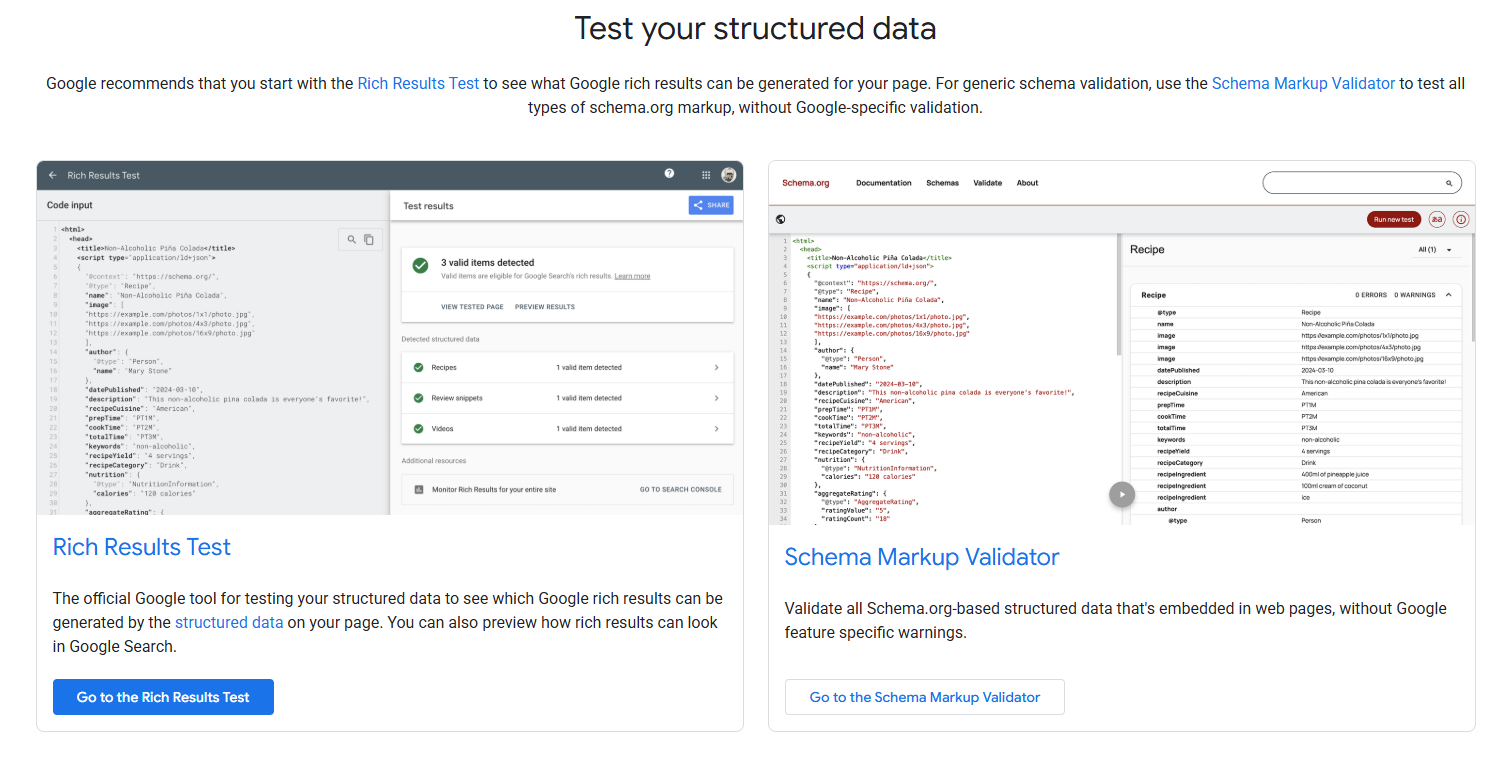
Once you’ve got the snippet, validate it. Google’s Rich Results Test is the go-to tool here.
Paste your code or live URL, and it’ll tell you whether the schema is valid and which rich result types your page is eligible for. If anything’s broken, the tool will point to the exact field. Fix it, retest, repeat until it’s clean.
Then you actually add it to your site. How depends on your CMS:
- WordPress. Plugins like Rank Math, Yoast SEO, or Schema Pro will auto-generate most of the schema you need. For custom snippets, paste the JSON-LD into the head of your page using a header script plugin or your theme settings.
- Shopify. Most modern themes include basic Product and Organization schema. For custom additions, edit your theme.liquid file and paste the JSON-LD into the head section.
- Webflow. Drop the JSON-LD into the page settings under “Inside head tag.”
- Custom-built sites. Hand it to your developer or paste it directly into the head of the page template.
That’s it. No backend systems, coding experience needed. Schema markup is a 5-minute job once you’ve got the snippet.
Link building cheat sheet
Gain access to the 3-step strategy we use to earn over 86 high-quality backlinks each month.
Now Over to You
Structured data isn’t optional anymore. As AI Overview results and AI citations become more central to how people discover content, the sites that make it easy for machines to understand them are going to win.
The good news is that adding schema is one of the lowest-effort, highest-ROI things you can do for your site this quarter. No code skills required, no expensive analytics platform needed, no team to hire. Pick a generator, validate with Google’s Rich Results Test, drop it in your CMS, and move on.
If you want to take it further, pair your structured data with a solid link building strategy. Schema tells AI systems what your content is about. Backlinks tell them whether to trust it. Together, that’s the formula for showing up consistently in AI answers.
Place an order and we’ll handle all of the heavy lifting for you.
Frequently Asked Questions (FAQ)
What’s the difference between structured data and unstructured data?
Structured data follows a predefined format that machines can read directly, like rows in a database or schema markup on a webpage. Unstructured data is free-form content like text, images, or video that requires more processing to interpret.
Does structured data actually help with AI citations?
Yes. AI systems use schema and structured data signals to verify what a page is about before citing it. Pages with clean schema markup are more likely to be pulled into AI-generated answers and rich results than pages without.
Do I need to know how to code to add structured data?
No. Free tools generate the JSON-LD snippet for you, and most CMS platforms let you paste it in without touching code. WordPress plugins handle most of it automatically.
What’s the best schema format to use?
JSON-LD. Google explicitly recommends it, and it’s the easiest to implement because it lives in the head of your page without touching your visible HTML.
How is website schema different from structured data in a database?
Same underlying idea, different scale. Website schema is small structured data added to individual pages.
A relational database or data warehouse holds structured data at scale for analytics and business operations. Both make the data easier to read and analyze, but the tools and use cases are completely different.