With more than 40 million registered users, Bluesky is fast becoming a decentralized force to be reckoned with — and with good reason.
Among the new wave of fediverse platforms and decentralized networks, Bluesky is possibly the easiest to get to grips with, thanks to its clean interface and ever-increasing community of all sorts of creators. From science to K-pop, there’s a space for everyone on the network.
If you’re new to Bluesky and the world of decentralized social media, here’s a quick summary: Bluesky was created by former Twitter CEO Jack Dorsey, and is a decentralized social network built on an open-source protocol called AT Protocol.
With the protocol, Bluesky’s mission is to create “an open foundation for the social internet so that we can all shape its future” because “social media is too important to be controlled by a few corporations.”
Here’s a great graphic by artist Davis Bickford that explains the company’s vision:
To mark the occasion, we teamed up with @davis.social to create a comic illustrating what Bluesky is all about.
See if you can spot the easter eggs! 👀
[1/3]
— Bluesky (@bsky.app) Feb 6, 2024 at 16:10
Initially an invite-only network, Bluesky opened its proverbial doors in February 2024, welcoming more than one million new users in just one day.
🦋
That said, adding another platform to your social media mix is a big decision. With Buffer, we hope to make that a little easier for you with handy planning, publishing, and crossposting features.
Another helpful feature to note for those familiar with the idea of decentralized networks and the fediverse: while Bluesky is decentralized, it’s not technically part of the fediverse. That’s because Bluesky’s AT Protocol is different from ActivityPub, the open protocol that fediverse platforms like Mastodon and Threads leverage.
In a nutshell, Buffer allows you to share your Bluesky content on the fediverse, too, if you crosspost to Mastodon.
Sound good? Whether you’re just getting started on Bluesky or ready to dive in, here’s how to connect your account to Buffer and start posting.
Connect your Bluesky account to Buffer
First things first: before you can schedule or crosspost, you’ll need to add Bluesky as a channel in Buffer. It only takes a few minutes.
- Sign in to Buffer (if you’ve not yet signed up, no sweat — you can do that for free here).
- In a new tab, sign in to Bluesky.
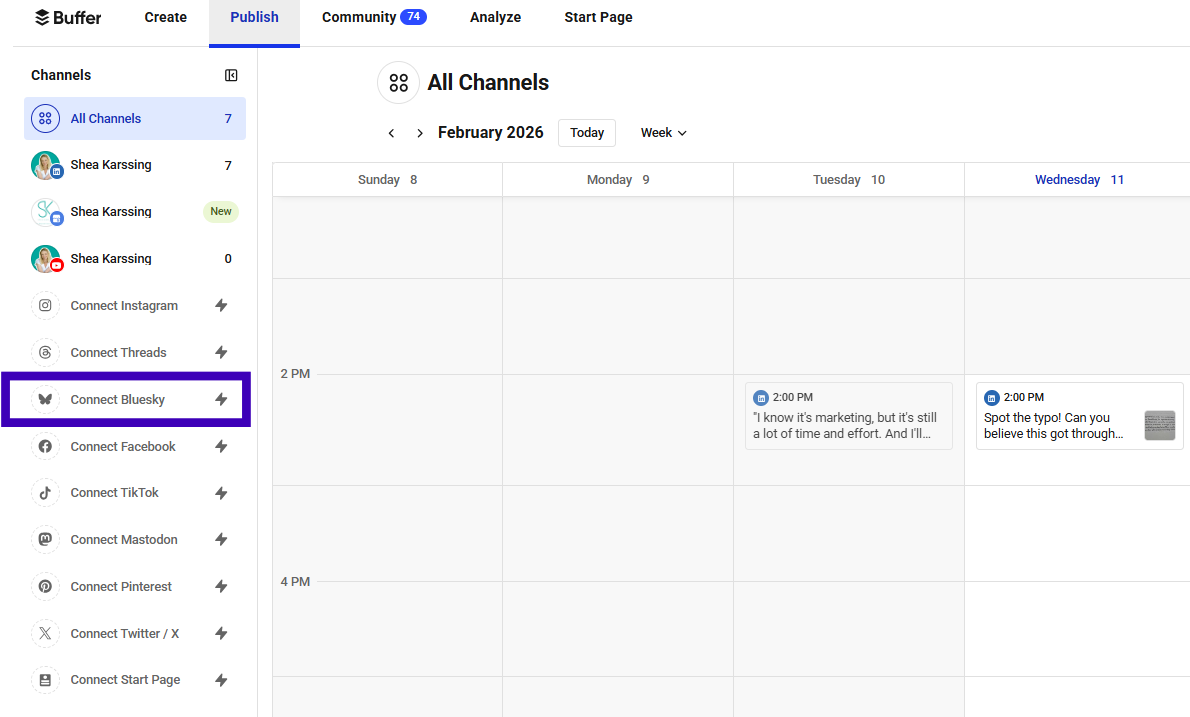
- In Buffer, navigate to publish.buffer.com. On the left-hand side of the screen, click the Connect Bluesky button underneath your channels list.
- This will open the dialog box below:
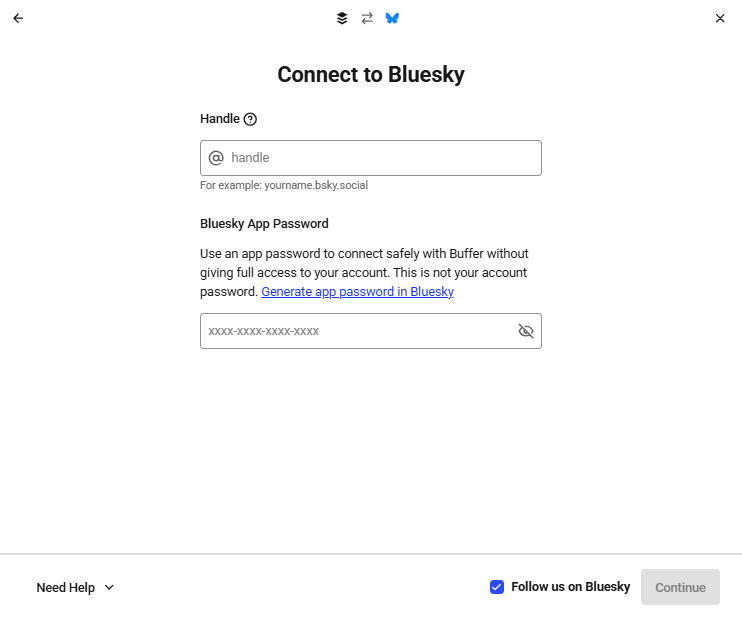
- Leave your Buffer tab open, and navigate to your Bluesky tab. Click the profile icon on the left-hand side to go to your profile page.
- At the top of the page under your name, you’ll find your Bluesky handle. Unless you’ve customized your domain, it should look something like this: @yourname.bksy.social.
- Copy that over to the dialog box you left open in Buffer.
- Now head back to Bluesky. Click on the settings cog on the left to navigate to the Settings menu. Choose Privacy and Security to find the App passwords option.
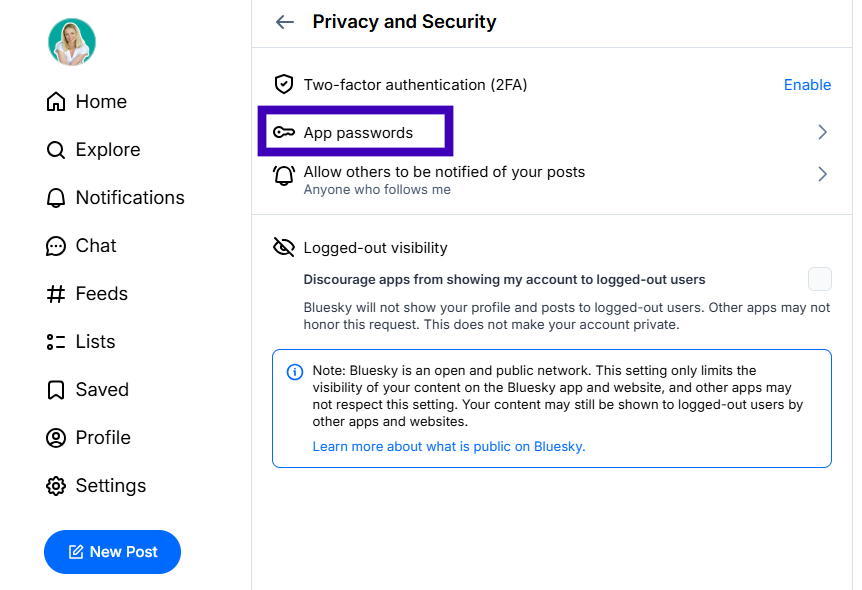
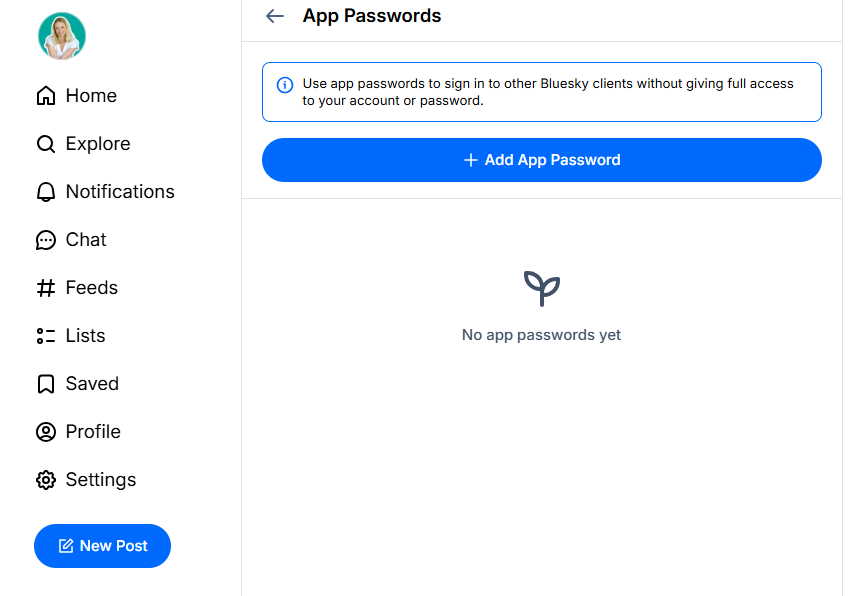
- This will open a dialog box that allows you to create a new app password. You can stick with the default password name or create your own. (Note that this is not your login password — it’s more like a key that will unlock Bluesky for your Buffer account.)
- Your password will appear in the next window. Copy that and head back to Buffer, where you can paste it into the Bluesky App Password box. Now, the window will look something like this:
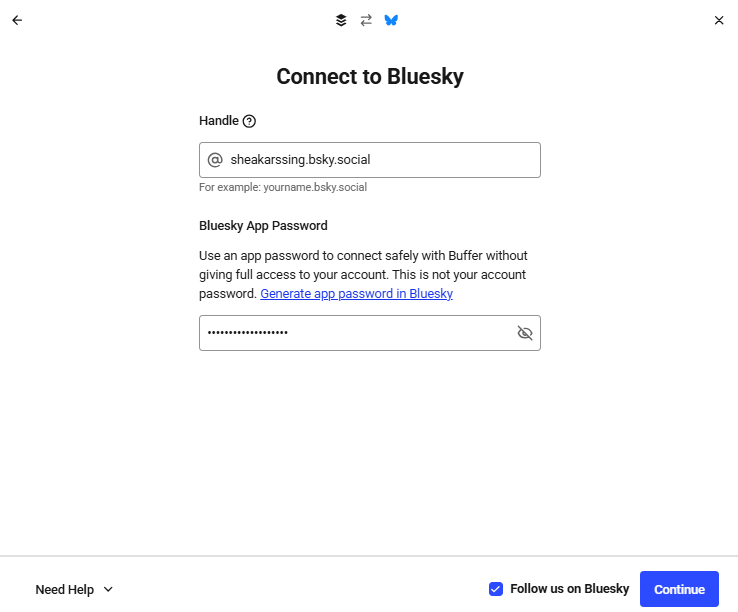
- Click Continue, and you’re all done. Congratulations — your Bluesky account is now connected to Buffer.
Schedule and crosspost your Bluesky content
Here’s the 30-second version:
- Open Buffer and click + New.
- Select Bluesky (and any other channels)
- Draft your text, images, or video.
- Choose when you’d like to post.
- Review it any time from your Buffer calendar.
There are many routes to creating a new post in Buffer. We’ll start with the + New button on the top right of publish.buffer.com — it’s the quickest way to get started. (You can also create posts by clicking the + icon next to any channel, or by clicking on calendar or queue slots.)
The process will be similar for whichever option you choose.
- Log in to Buffer, then click on the Publish tab at the top.
- Click the + New button on the top right.
- In the composer window, be sure to choose Bluesky from your channels list at the top. To crosspost, choose the other channels you want to publish to as well.
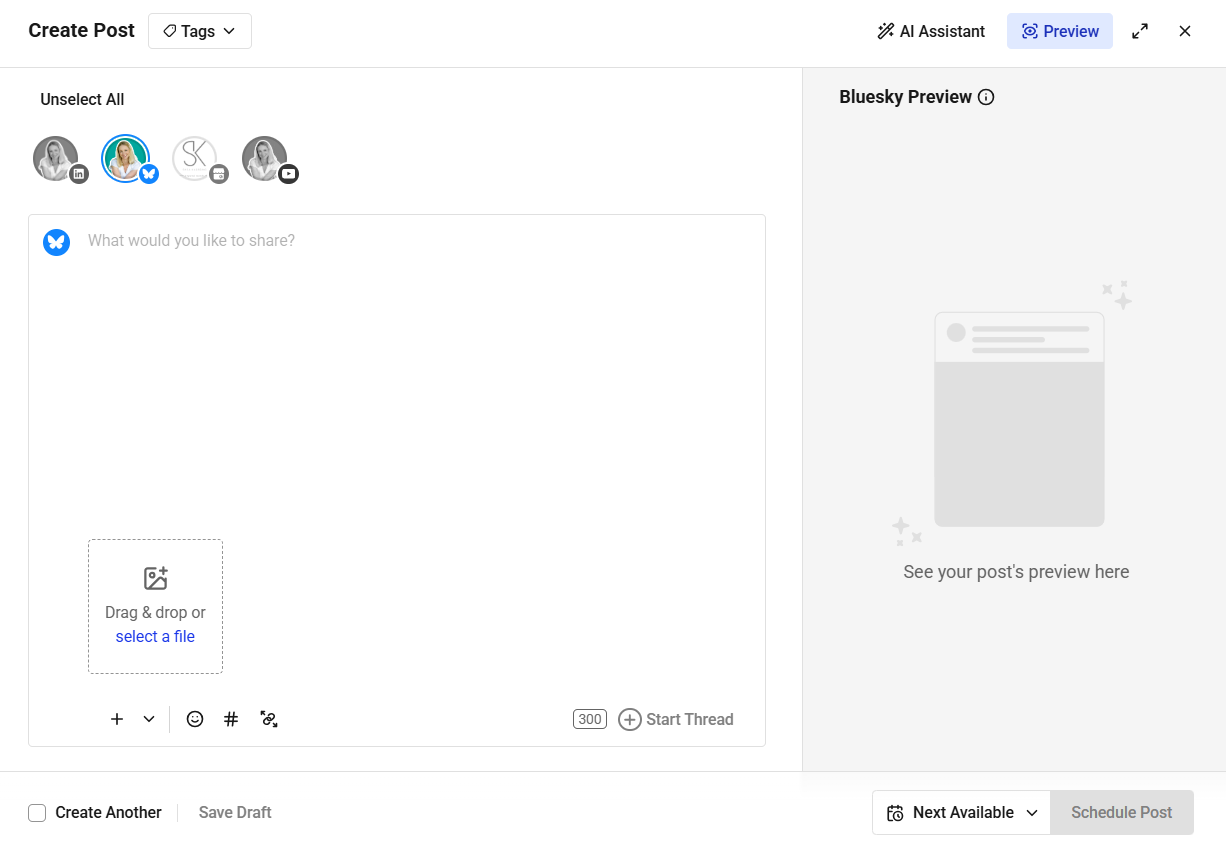
- Add your text or media to the main composer window. If you’re crossposting, you can customize for each platform by clicking within the boxes that correspond to each of the channels you’ve selected.
- When you’re ready to post, pick your preferred option:
- Next Available — publish in the next available slot in each platform’s custom queue
- Prioritize — bump your post to the top of the queue
- Now — publish right away
- Set Date and Time — publish at a specific time
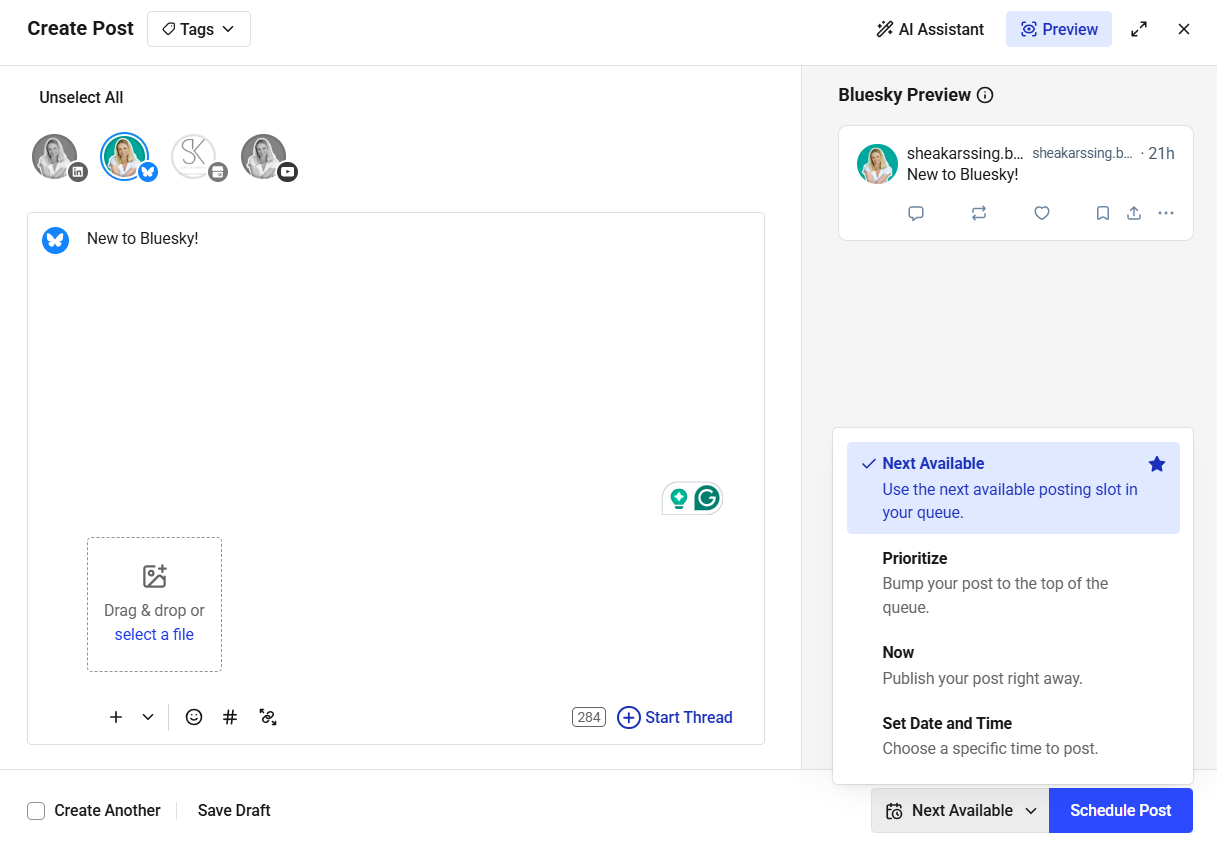
- To move your posts around, head to your calendar in Buffer and drag the post to a new slot, or hover over the post and click Edit.
And that’s it. Your post is scheduled and ready to go live on your chosen platforms at your chosen times. One less thing to worry about.
Getting started with Bluesky
If you’re new to the platform (or want to level up), we have a bunch of resources to help make things a little easier. Here’s my recommended reading:
Let’s connect on Bluesky!
Bluesky is an exciting new network, and I’d love to connect with you there. You can find me here and Buffer here.
I hope this guide made things easier. If you run into any questions as you’re getting set up, our support team is always here to help.
FAQs about Bluesky
What if I’m self-hosting my Bluesky account — can I still use Buffer?
You can; we support custom servers in Buffer, so go ahead and connect your account.
What is self-hosting?
Self-hosting means running your Bluesky account on a server you control rather than Bluesky’s default servers. Unlike other social networks, you can self-host an instance of Bluesky. Think of the difference like this:
- Hosted: Using the standard Bluesky instance (similar to using wordpress.com).
- Self-hosted: Running Bluesky on your own server for total data privacy and control (similar to a custom domain).
So on Bluesky, most people are using the Bluesky-hosted instance, which is what anyone gets when they sign up. If you, however, would prefer to host Bluesky yourself on your own server, you can do that. Some people prefer this for better data privacy and overall control.
Does Bluesky have built-in scheduling?
No. Bluesky doesn’t offer native scheduling right now. If you want to plan posts ahead, connect your Bluesky account to Buffer, pick a time, and we’ll publish it for you.
Can I schedule Bluesky threads in Buffer?
Yes. In the Buffer composer, click Start thread, add each post, then choose when you want it to go live. Buffer will publish the entire thread in order, right on time.
Can I crosspost my Bluesky content to other platforms with Buffer?
Yes. In the Buffer composer, select Bluesky along with any other channels you’d like. Customize each version if needed, pick your times, and Buffer will publish to every platform for you.













![How to ask for donations on social media [tips + examples]](https://mgrowtech.com/wp-content/uploads/2025/12/examples-of-social-media-donations-120x86.png)