[ad_1]
The registration desk wasn’t planned; it became the default. Today, rising attendee expectations and tighter budgets expose the flaws in that old model: long lines, misprinted badges, and burned-out volunteers create a poor first impression. Read on to learn how modern event badge printing and check-in workflows, including fast check-in solutions events rely on, can turn arrival from a bottleneck into a welcome experience.
Introduction: Why Your Check-In Experience Deserves a Second Look
Registration is the first interaction every attendee has with your event, and it sets expectations for everything that follows. Yet too many events still rely on the same arrival ritual: pre-printed badges in alphabetical bins, a long table, and a line that snakes through the lobby.
The result can be costly. In the “Escape the Lobby” webinar, EventMobi CEO Bob Vaez noted attendees commonly wait eight minutes or longer in check-in lines. For a 1,000-person event, that translates to roughly 133 collective hours lost — time that could be spent networking, attending sessions, or engaging sponsors.
This article explains why the traditional registration desk breaks down, quantifies what pre-printed badges and missing QR codes really cost, and shows how modern event check-in and on-demand badge printing workflows can transform the arrival experience. Whether you run events for 200 attendees or 2,000, these practical event check-in ideas and badge printing options will help you deliver a faster, data-rich arrival that improves the overall attendee experience and sponsor ROI.
Why the Traditional Registration Desk Fails
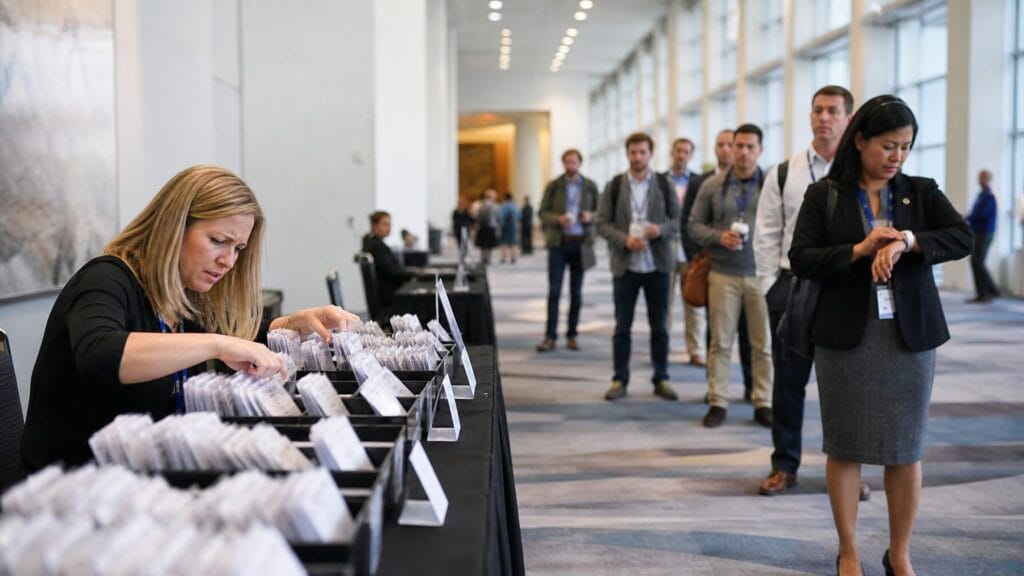
The old registration desk forces every attendee through the same manual, location-bound workflow at the same time. It was built for smaller, simpler events and hasn’t kept pace with the scale, speed, and data needs of modern programs, so organizers end up managing lines and logistics instead of the attendee experience.
Think about your last event arrival: a long table, volunteers rifling through bins of pre-printed badges, and a line that creeps through the lobby. That pattern is essentially unchanged from decades ago, and it produces predictable problems for event check-in and registration.
As event technology specialist Brandt Krueger observed during EventMobi’s “Escape the Lobby” webinar:
“Nobody designed it this way. It just became the default and we built every event around it ever since without really asking why.”
At scale, the traditional desk creates predictable bottlenecks:
- Fixed location: Check-in confined to one spot funnels all arrivals into the same line instead of matching flow to venue traffic
- Manual sorting: Staff spend hours sorting pre-printed badge stacks by last name instead of helping attendees
- Peak arrival surges: Narrow arrival windows overwhelm desks, lengthening wait times and creating stress for attendees
- No flexibility: Walk-ins, name changes, and last-minute registrations require manual workarounds that slow everything further
For event organizers comparing fast check-in solutions for events, the first step is recognizing the bottleneck is the process, not the people. A well-designed event check-in process shifts work away from manual sorting and toward distributed, data-driven stations that reduce lines and improve the attendee experience.
How Long Should Event Check-In Take?
Industry benchmarks and EventMobi onsite operations data suggest a well-run check-in can process each attendee in under 30 seconds. If your average is two to three minutes per person, the setup and check-in process, not staff performance, are the likely causes. See our linked case studies and the webinar transcript for examples of teams that reduced average check-in time by adopting distributed, on-demand badge printing.
The Hidden Costs of Pre-Printed Badges
Pre-printed badges often look cheaper on a quote, but once you add reprints, shipping, waste, and staff hours, the total cost of ownership rises quickly. Many event teams only see the line-item print price, not the downstream costs that make pre-printing more expensive than on-demand badge printing for most mid-size events.Pre-print workflows mean you finalize a file weeks before your event, receive boxes of badges, and then spend time sorting them onsite. Those steps introduce a set of predictable hidden costs that rarely appear in a single budget line:
- List management overhead: Every name correction, cancellation, or late registration requires file updates and potential reprints — which adds time and cost to registration management.
- Shipping and logistics: Printed badges must arrive on time and intact. Rush shipping, lost boxes, or venue delivery fees increase costs and risk delays to registration.
- Reprints and rush fees: Last-minute registrants or corrected names often require rush reprints at premium rates.
- Wasted badges: No-shows leave printed badges unused. EventMobi’s experience with mid-size events shows a meaningful share of pre-printed badges never get claimed, creating material waste and lost budget.
- Staff time: Sorting, organizing, and troubleshooting stacks of badges can consume hours of staff or volunteer time that could be spent improving on-site attendee experience.
- Security risks: Pre-printed badges displayed on tables are accessible to anyone, increasing the risk that non-registered visitors pick up badges or impersonate attendees.
Put together, these costs often exceed the apparent savings of a low print quote. For example (conservative sample math for a 1,000-person event):
- Base print quote: $600
- Rush reprints and corrections: $350
- Shipping & logistics: $120
- Staff sorting / labor (10 hours @ $25/hr): $250
- Wasted badges (5% unclaimed): $150
- Estimated total TCO: $1,470 (vs. base quote $600)
Those sample numbers show how quickly “invisible” costs appear. For planners evaluating event badge printing and check-in options, total cost of ownership, including printing, shipping, staff time, and waste, matters more than the sticker price. On-demand printing typically shifts many of these costs away from the budget line and into a predictable per-station or per-label expense.
What Badges Without QR Codes Cost You
A badge without a working QR code is only an identifier, not a tool. It tells you who someone is, but it can’t track session attendance, capture sponsor leads, or feed post-event analytics. That missing link costs you measurable data, reduces sponsor value, and weakens the overall check-in experience.
As Bob Vaez, EventMobi’s CEO, bluntly puts it:
“A badge without a working QR code is just a name tag.”
Put simply, a scannable badge connects the physical event to your digital event platform. Without that connection you lose:
- Session tracking: No way to scan attendees into breakout sessions or workshops for accurate attendance data
- Lead retrieval for sponsors: Exhibitors can’t scan badges to capture leads, which directly reduces sponsor ROI and jeopardizes renewals
- Networking tools: Easy attendee-to-attendee contact exchange requires a scannable identifier
- Post-event analytics: No reliable data on who attended which sessions, how long they stayed, or where they went, limiting your reporting and optimization
- Access control: No quick way to verify VIP, speaker, or restricted-area credentials at doors or sessions
In practice, externally pre-printed badges often lack QR codes tied to live registration systems. Even when a QR code appears on a badge, it may not sync to real-time data, so the badge looks finished but delivers little data value to sponsors and organizers.
Quick design checklist for scannable badges
- QR size and placement: Aim for a 1″–1.5″ square in a clear area with contrast to ensure reliable scans
- Error correction: Use at least medium error correction (M) so minor damage or dirt won’t break the code
- Live-data linkage: Ensure the QR encodes an ID that maps to your registration platform in real time, not a static URL
Adding functional QR codes to badges turns them into instruments: they enable accurate attendance data, simpler sponsor lead capture, faster on-site check-in flows, and richer post-event analytics. For organizers focused on measurable outcomes, QR-enabled badge printing and check-in are no longer optional, they’re essential.
On-Demand Badge Printing: The Practical Middle Ground
On-demand event badge printing removes the risks and timing problems of pre-print runs: instead of printing thousands of badges weeks ahead, you generate each badge when the attendee arrives. That approach eliminates many reprints, slashes waste, and guarantees every badge includes a live QR code synced to your registration data so session tracking and lead capture work from the first scan.
BadgeON , EventMobi’s onsite badge printing solution, uses a compact label-based workflow: an iPad running the check-in app, a small label printer, and a stand. Setup takes about 30 seconds and the device prints a personalized label that adheres to your branded badge stock, whether laminated, PVC, metal, cardboard, or RFID material.
How it works (simple 4-step flow):
- 1. Lookup: Scan a registration QR, search by name, or check in via the app.
- 2. Verify & Edit: Make any name or affiliation edits in the registration system.
- 3. Print label: The compact printer outputs a personalized label with a live QR code.
- 4. Apply & go: Stick the label to your badge stock and the attendee is ready to enter with a scannable badge.
In practical terms, on-demand printing delivers these benefits:
- Walk-ins handled instantly: New registrations get a badge on the spot, with no reprint runs required.
- Painless name changes: Edit the record in the event app and reprint immediately.
- No wasted badges: You print only what you need, when you need it, reducing material waste and cost.
- QR codes by default: Every badge prints with a live, synced QR code tied to registration and check-in data for session tracking and lead retrieval.
- Multi-label capability: The same printers handle badge fronts/backs, luggage tags, meal tickets, swag labels, and table cards, consolidating printers and reducing hardware needs.
Cost and operations: BadgeON equipment starts at approximately $1,250 per station to purchase, with rental options for teams that run fewer events annually. Because rental or per-station pricing removes large pre-print runs, when you factor in eliminated reprint fees, reduced waste, and fewer staff hours, on-demand printing is often more affordable than traditional pre-printing for mid-size events.
Operational note: EventMobi’s internal data indicates roughly 90% of BadgeON customers self-manage on event day with no technician required, a model that reduces reliance on specialist hardware support while giving organizers control over onsite badge printing and check-in.
Curious if on-demand printing fits your event? Book a demo to see sample TCO comparisons, hardware options, and badge design templates that show how print badges, printers, and onsite workflow combine into a scalable, affordable solution.
Escape the Lobby with Wireless Event Badge Printing and Check-In
Wireless event check-in frees you from a single desk and lets you meet attendees where they arrive. Battery-powered, SIM-connected stations mean you can place check-in points at entrances, hallways, parking garages, or even off-site locations such as hotel lobbies and airports, reducing lobby congestion and improving arrival flow.
BadgeON’s wireless floor-stand stations let you place check-in wherever attendees naturally gather, with no fixed desk required.
Each station runs on battery power and includes a cellular (5G-capable) SIM connection, eliminating the need for wall outlets, ethernet runs, or heavy IT support. That hardware and connectivity model gives organizers flexible placement options and predictable onsite performance for printing badges and capturing check-in data.
These setups are proven in the field: at a recent MPI event, organizers used a BadgeON station at the airport to greet attendees on arrival, and Go West Live deployed wireless stations across multiple entry points to spread load and eliminate lobby bottlenecks.
Event badge printing and check-in doesn’t need to be tied to a single desk. Remove physical constraints and you can design an arrival experience that matches real attendee movement, reduces wait times, and improves the overall onsite experience.
Planning to try wireless event badge printing and check-in? Key practical questions:
- How many entry points does your venue have, and where do attendees naturally flow?
- Can you staff multiple, smaller stations rather than a single large desk to reduce peak queues?
- Do you need off-site check-in (hotels, shuttles, airports) to smooth arrival timing?
- How many simultaneous check-in stations will you need to cover your peak arrival window?
EventMobi recommends planning wireless station layout, testing badge designs, and training staff at least three to four weeks before the event. Through One World Rental, EventMobi’s distribution partner operating in 50+ countries, equipment delivery and local support are available globally.
Can you check in attendees at multiple locations?
Yes, with wireless, battery-powered stations like BadgeON, you can set up check-in at venue entrances, parking areas, hotels, or airports. Each station operates independently with its own power and cellular connection, removing the need for venue infrastructure and letting organizers design a check-in process that fits attendee movement and event goals.
The Bottom Line
Your registration desk doesn’t have to be the weakest link in the attendee journey. Pre-printed badges carry hidden costs, including logistics, waste, staff time, and lost data, and badges without QR codes remove session tracking, lead retrieval, and the analytics event teams and sponsors rely on.
On-demand badge printing and wireless check-in provide a practical solution: faster onsite processing, real-time data, and flexible placement across your venue. Solutions like BadgeON let you print high-quality badges anywhere onsite without specialist technicians, reduce pre-print waste, and keep the focus on attendee experience, branding, and measurable outcomes.
The arrival experience sets the tone for everything that follows. Design it to be fast, data-driven, and on-brand.

The post Event Badge Printing and Check-In: How to Rethink the Arrivals Experience appeared first on EventMobi.
[ad_2]
Source_link