[ad_1]
Key takeaways:
- AWS modernization improves the application itself, not just where it runs.
- The right modernization path depends on workload risk, value, and effort.
- Hidden dependencies, fragile integrations, and buried logic cause the biggest failures.
- Data modernization is critical for reporting, analytics, automation, and AI readiness, making data modernization AWS a key consideration for enterprises modernizing legacy workloads.
- AWS modernization works best as a phased, continuous program, not a one-time move.
Legacy systems still support core workflows, but many of them now slow down releases, integration, scalability, and security improvements. That is why AWS application modernization has become a priority for enterprises that want cloud value without breaking business continuity.
However, modernization is different from migration. AWS states that the benefits of elasticity, resilience, deployment speed, management simplicity and flexibility of AWS do not follow legacy applications when the applications are rehosted via lift and shift methodology. The architecture, data security, operation and delivery models have to be considered together in a strong application modernization strategy.
For enterprises, the goal is not to modernize everything at once. The right approach is to decide what should be rehosted, replatformed, refactored, rebuilt, retained, or retired, based on business value and risk.
This guide explains how to manage legacy application modernization AWS programs across readiness assessment, architecture patterns, cost control, data modernization, security, downtime reduction, and long-term optimization.
Cut Cloud Waste by Up to 50% With Smarter Modernization
Build an AWS modernization roadmap that improves workload performance, reduces infrastructure overhead, and keeps business-critical systems stable during transition.
Why Legacy Systems Need More Than Cloud Migration
Moving a legacy application via cloud migration can improve where it runs. It does not always improve how it works.
That is the part many modernization programs discover late. The application leaves the data center, but the same monolith, old database, batch jobs, hard-coded integrations, and manual release process come along with it. Teams still wait on long release windows. Security fixes still need careful handling. New integrations still take longer than they should.
This is where AWS application modernization becomes different from lift and shift. It looks at the application layer itself: how the code is structured, how data moves, how systems communicate, how releases are pushed, how access is controlled, and how issues are traced in production.
For enterprises, the objective is not only to move legacy systems to AWS. It is to make critical applications easier to update, govern, scale, monitor, and prepare for analytics, automation, and AI as AWS modern applications.
Common Signs Your Legacy Application Is Holding Back Business Growth
A legacy system does not need to fail completely to slow the business down. The warning signs usually show up in everyday delivery and operations.
- Releases take weeks because testing and deployment are still manual
- A small update creates failures in an unrelated module
- Engineering teams hesitate to touch core code because dependencies are unclear
- Infrastructure costs increase without a clear performance gain
- Data remains stuck across outdated databases and disconnected systems
- Integrations depend on scripts, file transfers, or fragile middleware
- Security patches take longer because the stack is old or unsupported
- APIs are limited, poorly documented, or unavailable
- Business teams depend on spreadsheets, duplicate entries, and manual approvals
When these patterns become normal, cloud migration alone is too shallow. The system needs a wider application modernization strategy that fixes architecture, data, delivery, security, and operations together.
AWS Migration vs Modernization vs Optimization: What’s the Difference?
These three terms often get bundled together in cloud discussions. In real projects, they mean very different things.
A workload can be moved to AWS and still feel old. Releases may still take too long. Integrations may still be fragile. Costs may still be hard to explain. That is why AWS application migration vs. modernization is not just a wording difference. It changes the scope of the entire program.
| Area | What it really means | What changes | What enterprises gain |
|---|---|---|---|
| AWS Migration | Moving applications, databases, or infrastructure to AWS | Hosting environment, infrastructure setup, database location, storage | Faster cloud entry, reduced data center dependency, more infrastructure flexibility |
| AWS Modernization | Improving the application so it works better on AWS | Architecture, code structure, data layer, APIs, deployment process, security model, monitoring | Faster releases, better scalability, stronger resilience, easier integrations, AI and analytics readiness |
| AWS Optimization | Improving workloads after they are already running on AWS | Resource sizing, performance tuning, cost controls, reliability checks, security reviews | Better performance, lower waste, stronger governance, more predictable cloud spend |
AWS Migration
AWS migration is the move from on-premises infrastructure, private cloud, or another hosting setup to AWS. It is often the fastest route for data center exits or infrastructure consolidation.
But the application may remain largely unchanged. Same codebase. Same release process. Same integration issues. Just running in a new environment.
AWS Modernization
The move is a first step for AWS modernization. It impacts the method for which the application is constructed, deployed, secured, integrated, and observed.
Managed databases, APIs, containers, serverless components, CI/CD pipelines, event-driven flows and more robust observability are where teams can add these. This is typically the point of the real business value for legacy systems.
AWS modernization goes deeper than the move. It changes how the application is built, deployed, secured, integrated, and observed.
This is where teams may bring in managed databases, APIs, containers, serverless components, CI/CD pipelines, event-driven flows, and stronger observability. For legacy systems, this is usually where the real business value starts.
This is also where organizations begin to realize the broader benefits of modernizing applications on AWS, including improved scalability, governance, and innovation readiness.
AWS Optimization
AWS optimization is done after workloads are running on AWS. It maintains a clean, efficient and accountable environment.
This involves right sizing resources, tuning databases, eliminating unnecessary resources, auditing service use, enhancing reliability, reducing access and keeping cloud spending in check.
Migration changes where the application runs. Modernization changes how it works. Optimization makes sure the AWS environment does not become the next source of waste.
When Should Enterprises Modernize Legacy Applications on AWS?
Most businesses are not going to upgrade an “old” system simply because it is old. This decision typically comes after the system becomes too expensive, too slow for too many teams, or poses increased risk of being unmanageable in audits and board reviews.
The signals are often easy to spot:
- Infrastructure and maintenance costs keep increasing
- Outages, latency, or performance issues keep coming back
- Releases need long windows, manual checks, and too many approvals
- Security patches are delayed because the stack is outdated
- Compliance teams struggle with access logs, audit trails, or data controls
- Customers or employees work around the system instead of through it
- New integrations require custom scripts, middleware, or repeated fixes
- Data stays locked in old databases and disconnected reporting layers
- AI and analytics teams cannot access clean, usable, governed data
- Hardware, databases, or frameworks are nearing end of life
- Hiring people to maintain the old stack is becoming difficult
This is where application modernization with AWS starts to make business sense. It gives teams a way to reduce risk, improve delivery speed, and prepare core systems for newer digital and AI use cases without rebuilding everything at once.
Modernization Should Start Where Business Risk and Business Value Overlap
Not every old application deserves immediate refactoring. Some systems are stable, rarely changed, and still good enough to retain for now.
The stronger candidates for legacy application modernization AWS programs are different. They are expensive to maintain, difficult to change, and connected to revenue, operations, compliance, customer experience, or reporting.
A practical legacy application modernization strategy should start there. Modernize the systems where the current risk is visible and the business value is clear enough to justify the effort.
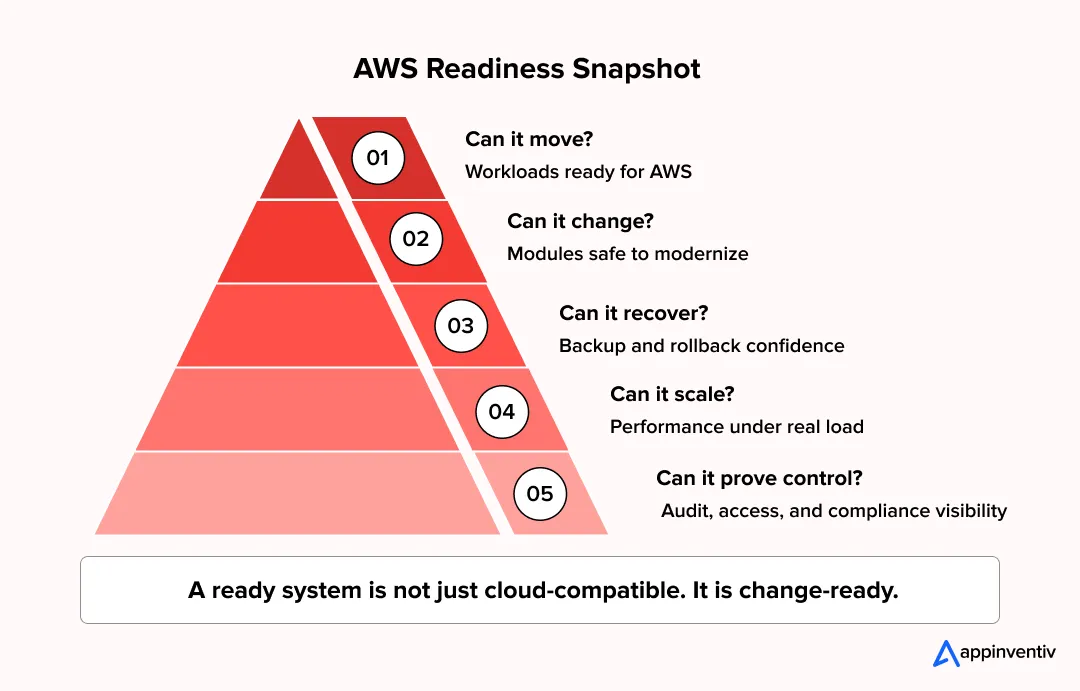
How to Assess Legacy Application Readiness for AWS Modernization
An AWS modernization plan should start with the application, not the AWS service list.
Teams need a clear read on what the system runs on, what it connects to, who owns it, and what breaks during downtime. Without that, the roadmap stays too loose for production systems.
Application and Architecture
Review the codebase, runtime, servers, APIs, libraries, integrations, release process, and known failure points.
Pay close attention to tightly linked modules, unsupported frameworks, manual deployment steps, hardcoded values, and services understood by only one or two people. Ownership should be clear across releases, incidents, access, fixes, and production support.
Data and Database
Check the database type, version, schema, stored procedures, data volume, backups, recovery targets, batch jobs, exports, and reporting links.
In many legacy systems, key business logic sits outside the main codebase. It may live in stored procedures, reconciliation scripts, nightly jobs, or old reports. These links need to be mapped before the workload moves to AWS.
Security and Compliance
Review user roles, shared credentials, encryption gaps, audit logs, exposed endpoints, sensitive data movement, backup rules, retention needs, and regulatory requirements.
The task is not to copy old controls into AWS. Weak access, missing logs, and unclear data flows should be fixed before migration.
Business Workflows
Map the workflows the application supports: orders, billing, claims, approvals, reports, customer requests, employee tasks, and compliance checks.
This shows which parts can move early and which need a slower, controlled sequence.
A readiness assessment should leave teams with a clear answer: what can move now, what needs cleanup, and what should wait.
How to Prioritize Legacy Systems for AWS Modernization
Not every legacy system should move into modernization at the same time. Some applications need urgent attention. Some need stabilization first. Some can be migrated now and improved later. A few may not be worth keeping at all.
A practical AWS modernization strategy for enterprises should rank systems by business value, risk, and effort, not just by age.
Build a Modernization Priority Matrix
Firstly rate each application on business, technical, security, data and operational criteria. It aims to gain insight into the points where modernization will do less harm and points where measurable value can be realised.
Key factors to review include:
- Business criticality: Does the system support revenue, operations, compliance, or customer experience?
- Technical debt: Is the codebase hard to test, release, extend, or maintain?
- Security risk: Are there unsupported frameworks, delayed patches, or weak access controls?
- Compliance exposure: Does the system handle regulated data, reporting, retention, or audit trails?
- User impact: How many customers, employees, partners, or internal teams depend on it?
- Integration complexity: How many upstream and downstream systems does it connect with?
- Cost pressure: Are infrastructure, licensing, support, or maintenance costs rising?
- Downtime tolerance: Can the system pause, or does it need near-continuous availability?
- Data importance: Does it hold data needed for analytics, reporting, automation, or AI?
- Modernization effort: How difficult will it be to migrate, refactor, test, and govern?
This helps teams avoid two common mistakes: modernizing the easiest systems first or trying to refactor the most complex ones before the business is ready.
Group Applications Into Modernization Buckets
Once the scoring is done, group systems into practical execution buckets.
| Bucket | Best Fit | Recommended Action |
|---|---|---|
| Modernize First | High business value, high technical debt, manageable risk | Prioritize for replatforming, refactoring, API enablement, database modernization, or DevOps automation |
| Stabilize Before Modernizing | High business value, high risk, poor documentation, complex dependencies | Improve documentation, monitoring, backup, ownership, and dependency mapping before deeper changes |
| Migrate First, Modernize Later | Systems that need quick infrastructure movement, but not immediate redesign | Rehost or replatform first, then plan modernization once workloads are stable on AWS |
| Retain Temporarily | Stable systems with low change demand or modernization risk that outweighs value | Keep as-is for now, but monitor cost, security, supportability, and business dependency |
| Retire or Replace | Duplicate, low-value, unused, or end-of-life systems | Decommission, consolidate, or replace with SaaS or a modern platform |
This keeps application modernization AWS programs realistic. The goal is not to modernize everything. The goal is to move the right systems first, protect business continuity, and focus effort where modernization creates measurable value.
AWS Modernization Strategies for Legacy Applications
Legacy applications do not age the same way. A billing engine may still run fine but cost too much to maintain. An ERP module may be stable, yet hard to change. A customer portal may look usable from the outside but struggle during traffic spikes. A claims system may carry years of business logic that nobody wants to touch.
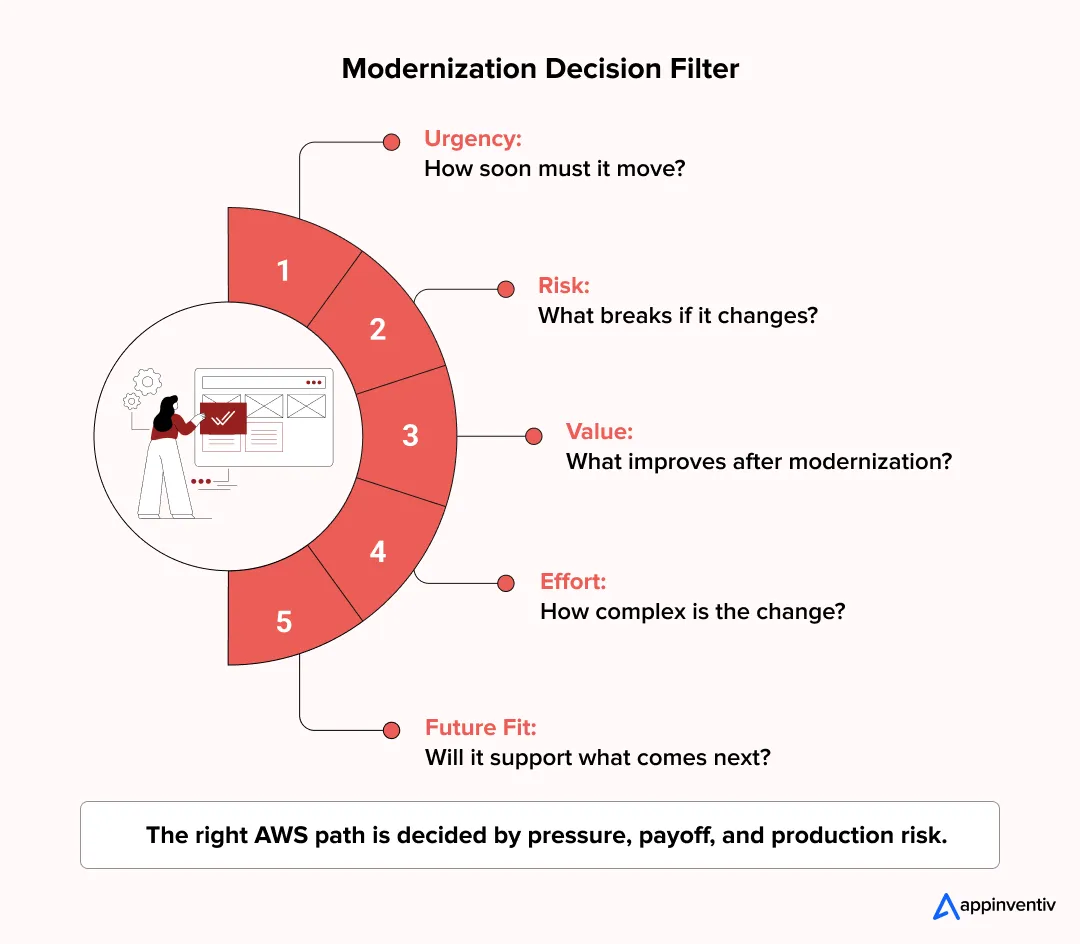
So the AWS modernization path cannot be picked from a standard checklist. Different AWS app modernization use cases require different strategies depending on workload complexity, business value, and operational risk.
Some workloads only need to move to Amazon EC2 for now. Some need Amazon RDS, managed backups, and better monitoring. Others need cleaner APIs, containers, release pipelines, and event-based flows before they can support new products, analytics, or AI work.
Rehost
Rehosting is the “move first, fix later” path. The application shifts to AWS with little change to the code or architecture.
Teams usually rebuild the current setup using Amazon EC2, Amazon EBS, Amazon S3, VPC, Elastic Load Balancing, and security groups. It is useful when the business needs to exit a data center quickly or move workloads without disturbing core operations.
Best for: Data center exits, urgent cloud moves, and workloads that need stability before deeper changes.
Replatform
Replatforming makes small but useful changes around the application. The core code stays mostly the same, but the operating layer improves.
A team may move a self-managed database to Amazon RDS or Aurora. Static files may move to S3. Backups, scaling, load balancing, and monitoring may shift to managed AWS services.
This path works well when the application is still useful but too heavy to run manually.
Best for: Applications that need better reliability and less infrastructure effort without a full rebuild.
Refactor
Refactoring goes after the parts that cause real pain. The goal is not to rewrite everything. The goal is to fix the areas that slow releases, break often, or make every small change risky.
This may include splitting tightly connected modules, cleaning up APIs, removing duplicate logic, improving slow components, or moving parts of the workload to Amazon ECS, Amazon EKS, or AWS Fargate.
Best for: High-value applications that still matter to the business but need better speed, scale, and maintainability.
Re-architect
Re-architecting changes how the application is built and connected.
A monolith may be split into smaller services. Access may move through Amazon API Gateway. EventBridge, SQS, or SNS may handle asynchronous communication. Lambda and Step Functions may take over certain workflows.
This path is usually taken when the current design blocks growth. The system may still run, but it cannot support faster releases, higher traffic, or cleaner integration without a deeper change.
Best for: Systems that need higher scale, faster delivery, better fault isolation, and cleaner connections with other platforms.
Rebuild
Rebuilding implies starting from a more sanitary technical base. This isn’t an option for all legacy systems. It makes sense when the existing code base, framework, and/or data model have grown so brittle that it is no longer safe to extend.
With a rebuild, teams have the space to establish service boundaries, select the right databases, embrace CI/CD, use infrastructure as code, implement observability and define access controls and design the APIs appropriately from the start.
Ideal for: Legacy systems with minimal new value added by keeping the old build in place.
Replace
Replacing means moving from a custom legacy system to a SaaS product or third-party platform.
This can reduce custom development work, but it does not remove the hard parts. Teams still need to plan identity integration, data migration, API connections, reports, user roles, retention rules, and business change.
Best for: Standard business functions where custom ownership adds cost but gives little advantage.
Retain
Retaining means leaving the system as it is for now. That can be the right call when an application is stable, rarely changed, or too risky to touch in the current phase.
But retained systems still need basic control. Teams should track vendor support, patch status, backup health, access rights, running cost, and future dependency risk.
Best for: Stable systems with low change demand or high modernization risk.
Retire
Retiring removes applications, modules, or workloads that no longer serve a clear purpose.
Before shutdown, teams need to check data retention rules, audit needs, downstream dependencies, reports, and user access. A system may look unused, but it may still feed a report, archive, or compliance process.
Best for: Duplicate systems, unused tools, low-value workloads, and end-of-life applications.
Most AWS modernization programs use more than one path. The right mix depends on what the workload does today, how risky it is to change, and what role it needs to play next.
Not Sure Which AWS Modernization Path Fits Your Legacy System?
Get a workload-level assessment to decide what should be rehosted, replatformed, refactored, rebuilt, retained, or retired.
AWS Architecture Patterns for Legacy Application Modernization
Legacy modernization rarely works well as a single hard cutover. These systems usually sit behind live orders, billing, approvals, reporting, customer records, or internal operations. So the real question is not just what to modernize. It is what can be changed safely without disturbing the business.
The pattern depends on where the pressure is highest: integrations, APIs, data, deployment, scale, or core business logic.
Strangler Fig Pattern
The strangler fig pattern is used when replacing the whole system at once is too risky. The legacy application keeps running while one function at a time is moved into newer AWS-based services.
For example, the core transaction engine may stay untouched while search, alerts, pricing, reporting, or customer-facing workflows are separated first.
Use this pattern when:
- A full rebuild creates too much operational risk
- Critical workflows cannot stop
- Some modules can be separated without touching the full system
- The business needs a controlled exit from the legacy core
API-First Modernization
API-first modernization creates a controlled access layer around legacy functions. Instead of other systems depending on database calls, file transfers, or custom scripts, selected capabilities are exposed through APIs.
On AWS, this may use Amazon API Gateway with Lambda, ECS, or EKS-backed services. It also helps teams manage authentication, throttling, versioning, logging, and access policies in a cleaner way.
Use this pattern when:
- Mobile apps, portals, partners, or internal tools need access to legacy functions
- Current integrations are too tightly coupled
- API governance, logging, and access control need improvement
- Deeper refactoring is needed but cannot start safely yet
Containerization
Containerization helps when the application is still useful, but deployment has become difficult to control. Packaging the application with its dependencies makes the runtime more consistent across development, testing, and production.
Depending on the workload, teams can run containers on Amazon ECS, Amazon EKS, or AWS Fargate.
Use this pattern when:
- The application behaves differently across environments
- Releases depend on manual deployment steps
- Scaling is limited by the current setup
- Teams need portability before deeper refactoring
Serverless Extension Pattern
Serverless works well when new workflows can be added around the legacy system instead of inside it. This is useful when the core application is fragile but the business still needs faster delivery.
AWS Lambda can handle background tasks, Step Functions can manage multi-step flows, API Gateway can expose new endpoints, and EventBridge can connect old systems with newer services.
Use this pattern when:
- New features can sit outside the legacy core
- The main application is risky to change
- Background jobs or event processing need independent scale
- Teams need to deliver selected use cases faster
Event-Driven Modernization
Event-driven modernization reduces direct dependency between systems. Instead of one application calling another at every step, events move through services such as Amazon SQS, SNS, EventBridge, or Kinesis.
This helps in legacy environments where point-to-point integrations have become hard to maintain. It also makes retries, failure handling, workload isolation, and real-time processing easier to design.
Use this pattern when:
- Workflows need asynchronous communication
- Real-time processing matters
- Integrations are fragile or too tightly linked
- A downstream failure should not stop the whole process
Database Modernization
The database is often the part that slows AWS application modernization the most. Years of stored procedures, reporting tables, batch jobs, direct integrations, and old schemas can make the data layer harder to move than the application code.
Teams may move workloads to Amazon RDS, Aurora, DynamoDB, Redshift, S3-based data lakes, or another purpose-built data store. The aim is not just to move data, but to improve performance, reporting, scalability, governance, and AI readiness. A well-planned data modernization AWS strategy helps organizations unlock greater value from enterprise data while reducing operational complexity.
Use this pattern when:
- Database performance is holding back the application
- Reports depend on old schemas or overnight batch jobs
- The current database is hard to scale, patch, or operate
Data modernization also creates the foundation for AI in legacy application modernization, where cleaner data access and governed workflows matter.
Step-by-Step AWS Application Modernization Roadmap
An AWS application modernization roadmap keeps the work from turning into scattered cloud activity and helps teams follow proven application modernization best practices throughout the program.
That happens more often than teams admit. One team moves servers. Another team changes the database. A third team adds pipelines. Everyone is busy, but the real production risks still sit underneath: broken dependencies, unclear ownership, weak rollback plans, and systems nobody fully understands.
A roadmap brings that work into one sequence.
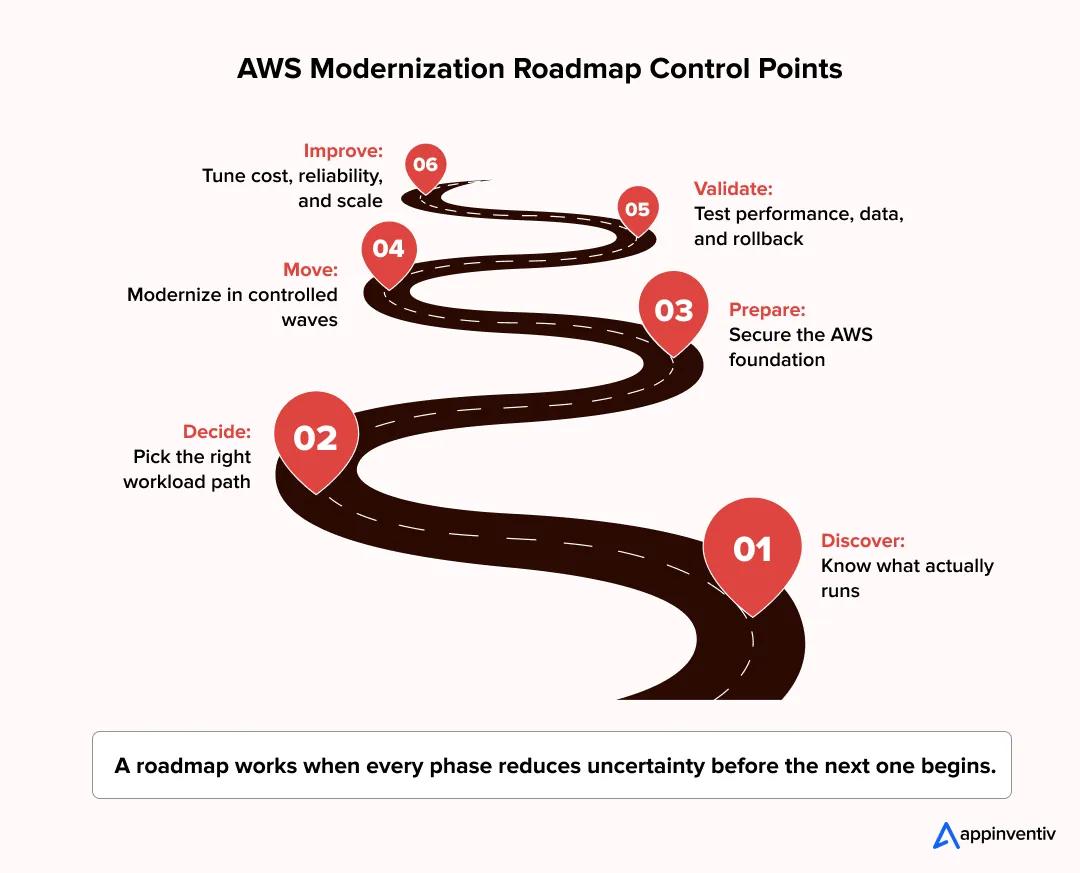
Step 1: Assess the Existing Application Estate
Start with what is running today.
Map the applications, servers, databases, batch jobs, APIs, file transfers, integrations, owners, traffic patterns, security gaps, and business-critical workflows.
This step often reveals more than expected. A reporting tool may depend on an old database. A customer portal may pull data from a batch job that runs overnight. A small internal app may be tied to a finance workflow.
The goal is simple: know what can move now, what needs cleanup, and what should not be touched too early.
Step 2: Define Business and Technical Goals
Do not modernize only because the application is old. Old does not always mean broken.
The reason has to be clear. The business may need to exit a data center. Engineering may need faster releases. Operations may want lower support effort. Security teams may need better controls. Product teams may need better scale, cleaner data, or AI readiness.
The goal decides the plan. Without that, modernization becomes a cloud migration with a better name.
Step 3: Select the Right Modernization Strategy per Workload
Each workload needs its own treatment.
One application may be rehosted for speed. Another may need replatforming to reduce manual database and backup work. A high-value platform may need refactoring. A low-use tool may be retired.
This is where the modernization strategy becomes practical. The team stops asking, “What should we do with everything?” and starts asking, “What does this workload need?”
Step 4: Build the AWS Foundation
Set up the AWS base before critical systems move.
This includes landing zones, account structure, IAM, VPCs, encryption, logging, backup, monitoring, tagging, and governance controls.
When this layer is rushed, the problems show up later. Costs spread across accounts. Access becomes hard to review. Teams struggle to trace incidents. Backups exist, but nobody trusts the restore path.
A clean AWS foundation saves a lot of repair work later.
Step 5: Modernize Data and Integrations
In many AWS application modernization programs, the hardest work sits around the application.
Old databases, stored procedures, file transfers, reports, batch jobs, APIs, and third-party integrations can slow the whole project. The application may move cleanly, but the connected systems may not be ready.
Map these early. A clear cloud data migration strategy helps teams validate schemas, reporting needs, reconciliation rules, and downstream data flows before production movement.
Step 6: Introduce DevOps and Automation
Modernization should not only be more quick, but more secure.
Introduce CI/CD pipelines, IAC, automated testing, configuration management, release approvals, rollback paths, and observability.
This provides teams with a more effective means of taking changes to production. This also helps to minimize the type of on-the-job tasks that produce confusion over ownership, late night repairs and missed steps.
Step 7: Modernize in Phases
Start small.
Pick a pilot workload or a low-risk module. Use it to test the architecture pattern, pipeline, access model, monitoring setup, rollback process, and operating playbook.
Once that pattern works, move to more critical systems. This keeps the program grounded in real production behavior instead of slide-level planning.
Step 8: Validate Performance, Security, and Continuity
Test before cutover.
Check load handling, failover, rollback, data consistency, user journeys, API behavior, access controls, audit logs, and integration performance.
For critical workflows, use staged releases or parallel runs. This gives teams time to catch issues before users, finance teams, support teams, or compliance teams feel the impact.
Step 9: Tune Cost and Performance
After workloads move to AWS, review how they behave.
Right-size compute. Check database performance. Remove unused resources. Review managed service fit. Track usage through tags and dashboards. Watch storage, data transfer, and environment sprawl.
This step keeps AWS application modernization cost visible and prevents cloud migration costs from turning into long-term AWS waste.
Step 10: Move Into Continuous Modernization
Modernization should not stop after the first release.
Teams should keep improving architecture, security, release pipelines, observability, data performance, cost controls, and user experience.
The best AWS application modernization programs become part of normal engineering work. They do not sit as a one-time cloud project that ends after migration.
AWS Services Used in Legacy Application Modernization
AWS gives teams a lot to work with, but legacy modernization rarely needs a crowded architecture. Most programs use a few service groups, based on what the application needs now and what it must support next.
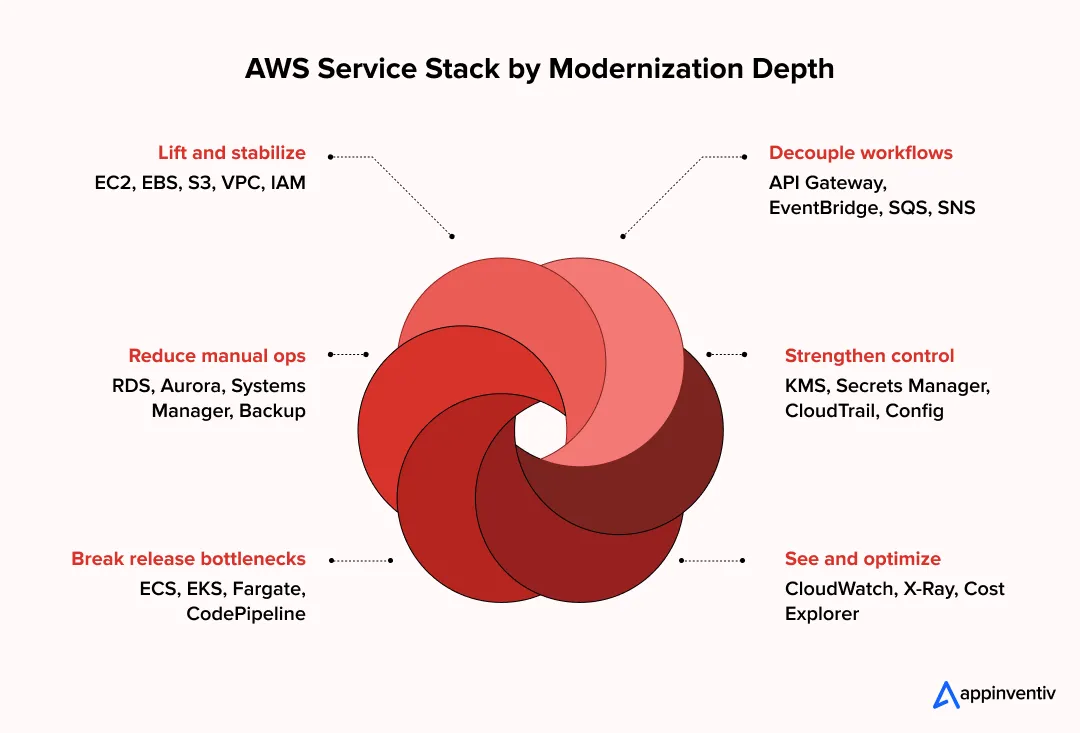
A simple lift-and-shift may use EC2, EBS, S3, VPC, CloudWatch, IAM, and backup. A deeper rebuild may need containers, managed databases, API Gateway, queues, CI/CD, tracing, and stronger security controls.
The service list should come after the workload review.
Assessment and Migration
The first job is to find out what is running.
AWS Migration Hub, AWS Application Discovery Service, AWS Application Migration Service, AWS Database Migration Service, and AWS Schema Conversion Tool help teams map servers, applications, databases, dependencies, and migration progress.
This helps during data center exits, phased AWS moves, and database migrations where one missed dependency can slow the whole plan.
Compute and Containers
Amazon EC2 is still useful for workloads that need to move fast with little code change. It gives teams a familiar place to run older applications on AWS.
Amazon ECS, Amazon EKS, and AWS Fargate fit applications that are being containerized. They help break release work into smaller parts and give teams better control over deployment patterns.
AWS Lambda fits background jobs, scheduled tasks, event-based workflows, and small pieces of logic that do not need servers running all the time.
Databases and Data Stores
Legacy complexity often sits in the database layer.
Amazon RDS and Amazon Aurora help teams move relational databases away from manual patching, backup, failover, and scaling work. Amazon DynamoDB works for high-scale key-value and document use cases.
Amazon S3 is used for object storage, logs, backups, archives, and data lake patterns. Amazon Redshift supports analytics workloads. Amazon ElastiCache helps reduce latency for read-heavy applications.
APIs and Integrations
Old systems often talk to each other through direct links, file drops, batch jobs, or fragile custom scripts. These connections make change risky.
Amazon API Gateway helps expose controlled APIs. Amazon EventBridge supports event-based flows. Amazon SQS manages queues. Amazon SNS handles pub/sub messaging.
AWS Step Functions helps coordinate multi-step workflows. Amazon Kinesis supports streaming data where teams need near real-time movement.
DevOps and Automation
Modernization should reduce release friction.
AWS CodePipeline, CodeBuild, and CodeDeploy help teams set up build, test, and deployment flows. AWS CloudFormation and AWS CDK let teams define infrastructure through code instead of manual console work.
AWS Systems Manager helps with patching, configuration, runbooks, and operational control across AWS environments.
Security and Compliance
Weak access, missing logs, and unclear data flows should be fixed early to protect data security during cloud migration and modernization.
AWS IAM manages identity and access. AWS KMS handles encryption keys. AWS Secrets Manager stores credentials and secrets. AWS WAF protects web applications from common attack patterns.
Amazon GuardDuty, AWS Security Hub, AWS CloudTrail, and AWS Config help teams track threats, account activity, configuration changes, and control gaps.
Monitoring and Observability
Modernized applications need better visibility in production.
Amazon CloudWatch covers logs, metrics, alarms, and service behavior. AWS X-Ray traces requests across distributed services. Amazon OpenSearch Service helps teams search logs, events, and operational data.
This becomes more useful after refactoring, where one user action may pass through several services before it completes.
Cost Control
Cost should be checked from the start because AWS application modernization cost can increase quickly when resource sizing, storage growth, and environment sprawl are not actively managed.
AWS Cost Explorer shows usage and spend patterns. AWS Budgets sends alerts against planned limits. AWS Compute Optimizer suggests right-sizing options. AWS Trusted Advisor flags cost, security, reliability, performance, and service-limit issues.
These services support ongoing cloud cost optimization after workloads move. And help teams catch waste early, before unused resources and oversized workloads become normal.
Choosing the Right AWS Service Mix
A rehosted workload may only need EC2, EBS, S3, VPC, IAM, KMS, CloudWatch, and backup.
A refactored platform may need ECS or EKS, Fargate, API Gateway, EventBridge, SQS, RDS or Aurora, CodePipeline, CloudTrail, Config, X-Ray, and stronger logging.
The goal is simple. Use the AWS services that remove manual work, reduce production risk, and make the application easier to change later while supporting the evolution of AWS modern applications.
How to Reduce Downtime and Business Risk During AWS Modernization
Downtime is usually the first concern in AWS application modernization and that too for a good reason. Many legacy systems still sit behind payments, orders, claims, inventory, approvals, reporting, and internal operations. These workflows cannot pause just because the backend is being changed.
The bigger risk is often not a full outage. It is the chain reaction around it. Data does not match after migration. A third-party API behaves differently. User roles do not map cleanly. Queues start backing up. A report pulls the wrong number. The rollback plan exists, but no one has tested it under real conditions.
For payment-heavy or transaction-led systems, a zero-downtime modernization approach helps protect revenue flows during phased AWS movement.
So modernization should move in controlled steps. Phased migration, blue-green deployments, canary releases, feature flags, and parallel runs give teams a safer way to shift traffic.
Recovery planning should be part of the engineering work.
The same applies to monitoring. Teams should already be watching logs, metrics, traces, API latency, database load, queue depth, error rates, access activity, and integration health before the cutover window begins.
Do Not Treat Cutover as the First Real Test
A cutover should confirm what has already been proven in lower-risk conditions. It should not be the first time the new setup handles real users, real data, and real failure scenarios.
Before switching traffic, validate:
- Core user journeys and business workflows
- Data migration, sync, and reconciliation rules
- APIs and third-party integrations
- Identity, roles, permissions, and access flows
- Failover, rollback, backup, and restore paths
- Performance under normal and peak load
- Audit logs, alerts, dashboards, and incident response steps
This makes application modernization with AWS safer for systems where even a small failure can affect revenue, compliance, or customer trust.
10 Common AWS Legacy Modernization Challenges
The hardest challenges in AWS application modernization are rarely about choosing AWS services. They usually appear when old systems meet real business pressure. A workload moves, but month-end reporting breaks. A release goes live, but the support team does not know who owns the incident. A database migrates, but finance does not trust the numbers.
These are the challenges enterprises need to plan for early. Addressing them proactively is one of the most important application modernization best practices for reducing delivery and operational risk.
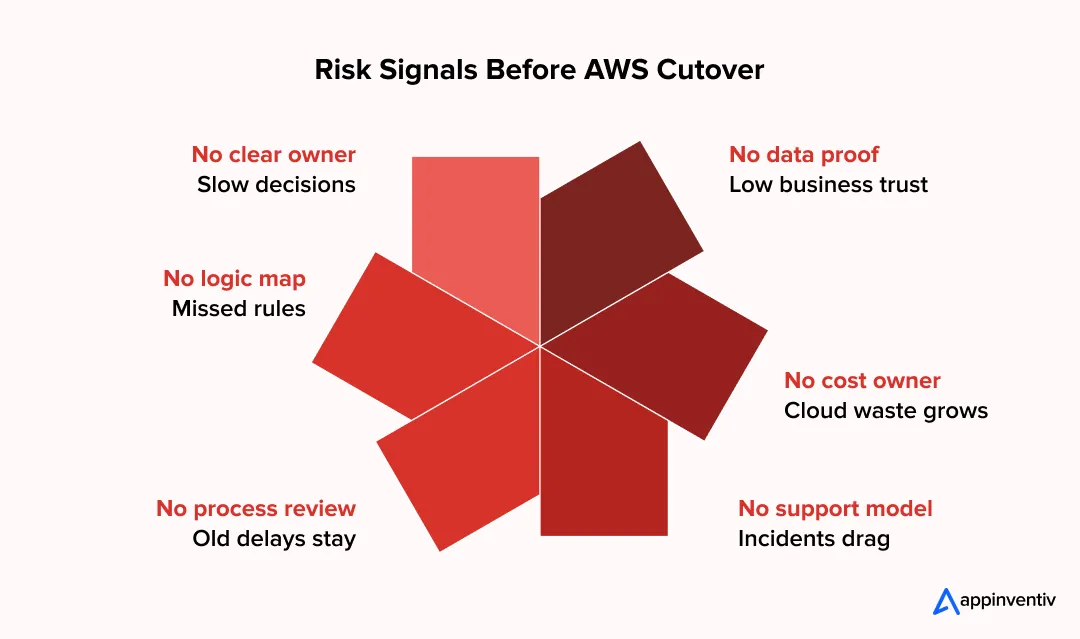
1. The Legacy System Has No Single Owner
Many legacy applications are supported by a mix of old vendors, internal teams, business users, and tribal knowledge. No one fully owns the code, the data, the integrations, and the production impact.
How to manage it: Assign clear ownership before modernization starts. Define who owns application logic, data validation, access approvals, release decisions, and incident response.
2. Business Logic Is Hidden in Places No One Checks
In legacy systems, business rules are not always available in the application code. They can be part of stored procedures, excel uploads, batch jobs, web service middle tier scripts, reporting queries or manual approval processes.
How to manage it: Trace the full workflow before redesigning it. Review code, database logic, scheduled jobs, reports, user workarounds, and exception handling used by business teams.
3. Teams Modernize the App but Leave the Process Broken
A system can move to AWS and still depend on email approvals, manual data fixes, CSV uploads, or offline reconciliation. The infrastructure becomes modern, but the workflow remains slow.
How to manage it: Map the operational process along with the application. Identify where teams still depend on manual checks, duplicate entries, spreadsheet controls, or delayed approvals.
4. The Data Moves but Trust Does Not
Data migration may pass technical checks, but business teams may still question the numbers. This is common when reports, dashboards, and reconciliation logic change after modernization.
How to manage it: Validate data with business users, not only database teams. Run parallel reports, compare record counts, test financial totals, check exception cases, and document reconciliation rules.
5. Integrations Are More Fragile Than the Core App
Many legacy systems survive because of custom scripts, nightly file drops, shared tables, old middleware, and undocumented APIs. These connections often break first during modernization.
How to manage it: Treat integrations as first-class modernization work. Replace fragile links with APIs, queues, events, or managed integration patterns where possible. Test failure handling, retries, timeouts, and duplicate events.
6. Cutover Windows Do Not Match Business Reality
A technical team may plan cutover for a weekend, but the business may have payroll, billing cycles, inventory updates, compliance submissions, or month-end reporting running at the same time.
How to manage it: Build the migration calendar around business cycles. Avoid peak periods, financial close windows, seasonal demand, audit deadlines, and operational blackout dates.
7. Cloud Cost Becomes Everyone’s Concern but No One’s Job
After modernization, finance sees the bill. Engineering sees usage. Product sees feature demand. Operations sees incidents. But no one owns workload-level cost accountability.
How to manage it: Assign cost ownership by application and environment. Use tagging, budgets, right-sizing reviews, and FinOps checkpoints before scale increases.
8. Security Controls Are Recreated Instead of Rethought
Copying old roles, shared accounts, broad permissions, and weak audit trails into AWS carries the same risk forward. It may even make the environment harder to govern at scale.
How to manage it: Redesign IAM, secrets, encryption, network access, logging, and audit controls during modernization. Do not treat security as a post-migration cleanup task.
9. The Team Can Build on AWS but Cannot Operate It Yet
A modernized application needs new runbooks, alerts, escalation paths, dashboards, backup checks, and incident response habits. Without these, production support becomes reactive.
How to manage it: Build the operating model before go-live. Define SLOs, alert thresholds, ownership, support handoffs, rollback steps, and post-release monitoring routines.
10. Modernization Creates Change Fatigue
Business teams may support modernization at first, but resistance grows when workflows, screens, reports, access rules, and approval steps change together.
How to manage it: Phase user-facing change carefully. Communicate what will change, what will not, and when users need to validate workflows. Keep training and support close to the release window.
The real risk in AWS application modernization is not only technical failure. It is modernization that looks successful in architecture reviews but creates confusion in finance, operations, compliance, support, or customer-facing teams. A strong program plans for those realities before the production movement begins.
Turn Modernization Risks Into a Controlled AWS Roadmap
Identify hidden dependencies, data risks, cost gaps, and cutover issues before they disrupt production.
How Appinventiv Helps Enterprises Modernize Legacy Applications on AWS
Appinventiv looks at AWS application modernization services from the systems side first. Before recommending a move to AWS, we study what the legacy application is still doing for the business. Which workflows depend on it? Which integrations are fragile? Where does the data move? Which parts are too risky to change in the first phase?
That assessment covers the codebase, infrastructure, databases, release process, access controls, reporting dependencies, and user workflows. From there, the modernization path becomes clearer. Some workloads can be rehosted. Some need replatforming. Some need refactoring around APIs, containers, managed databases, serverless workflows, or CI/CD. Some are better retained or retired.
We also treat the AWS foundation as part of the build, not setup work at the edge. That means landing zones, IAM, networking, encryption, backup, logging, monitoring, governance, and rollback planning are designed before critical workloads move. The same goes for data. Schema changes, stored procedures, reconciliation rules, reporting continuity, and data pipelines are reviewed early so the application does not move cleanly while the business loses trust in its numbers.
A relevant example is our airport services modernization work, where the platform was rebuilt on AWS with a multi-AZ setup, Terraform-led infrastructure, GitHub Actions, ArgoCD, Grafana, Prometheus, and Loki. The outcome was not just a cleaner cloud setup. The platform achieved 99.95% uptime, around 50% lower infrastructure cost, nearly 4x faster releases, and about 25% lower API latency.
The takeaway is straightforward. AWS modernization should protect live operations while making the application easier to scale, secure, release, monitor, and improve. That only happens when architecture, data, security, DevOps, cost, and business continuity move together.
FAQs
Q. What is AWS application modernization?
A. AWS application modernization is the process of improving legacy applications using AWS cloud-native services, managed infrastructure, APIs, containers, serverless architecture, DevOps automation, modern databases, and stronger observability.
Q. How is AWS modernization different from AWS migration?
A. AWS migration moves workloads to AWS. AWS modernization improves how applications are built, deployed, secured, integrated, scaled, and managed after or during the move.
Q. How do you modernize legacy applications on AWS?
A. Start with application assessment, dependency mapping, business goal definition, modernization strategy selection, AWS foundation setup, phased migration, data modernization, DevOps automation, security integration, testing, and continuous optimization.
Q. Should enterprises rehost, replatform, or refactor legacy applications?
A. It depends on business value, technical debt, risk, cost, and long-term roadmap. Some systems can be rehosted first, while high-value systems may need replatforming, refactoring, re-architecting, or rebuilding.
Q. How do you control AWS modernization costs?
A. Enterprises can control costs by creating a baseline, tagging workloads, right-sizing resources, monitoring data transfer, using AWS Budgets and Cost Explorer, decommissioning unused infrastructure, and applying FinOps governance.
Q. How does AWS modernization support AI readiness?
A. AWS modernization helps expose business logic through APIs, clean and structure data pipelines, improve scalability, enable event-driven workflows, strengthen access control, and prepare systems for AI services like Amazon Bedrock and SageMaker.
Q. What are the biggest risks in legacy application modernization?
A. Common risks include hidden dependencies, poor data migration planning, weak rollback strategy, security gaps, cost overruns, incomplete testing, integration failures, stakeholder misalignment, and disruption to business workflows.
[ad_2]
Source_link