Reading Time: 22 minutes
The best email marketing automation software in 2026 includes MoEngage, ActiveCampaign, HubSpot, MailerLite, Klaviyo, Brevo, Drip, Mailchimp, GetResponse, and Constant Contact. The right choice depends on your business type, automation needs, customer data, and budget.
You see, the pace of the world is incredibly fast. It’s wild how everyone expects instant communication from the brands they regularly interact with. Modern businesses need email marketing automation software to help them handle tasks efficiently, as manual processes are no longer viable in today’s ever-shifting environment.
Now’s as good a time as any to streamline your email workflows. The trick? Finding the right tool for your unique business case.
In this post, we’ll compare the top email marketing automation platforms, their key features, best-fit use cases, and how to choose the right software for automating your brand’s email marketing campaigns.
Here. We. Go.
TL;DR: Which Email Marketing Automation Tool Should You Choose?
- Best for B2C, Ecommerce, and Shopify brands: MoEngage
- Best for Ecommerce personalization: Klaviyo
- Best for advanced automation workflows: ActiveCampaign
- Best for CRM-driven email automation: HubSpot
- Best for beginners: MailerLite
- Best budget option: Brevo
- Best for Ecommerce revenue workflows: Drip
- Best for basic email automation campaigns and templates: Mailchimp
- Best for local businesses and events: Constant Contact
- Best for funnels, webinars, and lead capture: GetResponse

Email Marketing Automation Platforms Comparison
The best email marketing automation platform depends on your brand type, automation needs, CRM requirements, and pricing model. For B2C and Ecommerce teams, the strongest tools usually combine behavior-based automation, segmentation, personalization, product recommendations, analytics, and scalable customer engagement workflows.
Use this table as a shortlist builder. If you already know your main use case, this comparison can help you narrow the field quickly.
| Platform | G2 Rating | Best For | Core Strength | CRM | Automation Depth | Pricing Style |
| MoEngage | 4.5/5 | Enterprise and mid-market B2C, Ecommerce, and Shopify brands focused on lifecycle marketing, retention, and omnichannel customer engagement | AI-powered customer journey orchestration across email, SMS, push, in-app, and web | Integrates with CRMs and has a native CDP | Advanced | Monthly Tracked Users (MTUs) |
| ActiveCampaign | 4.4/5 | Growing teams that need advanced workflow automation | Visual automation builder, branching logic, behavioral triggers, and lead scoring | Built-in CRM | Advanced | Contact-based |
| HubSpot Marketing Hub | 4.4/5 | CRM-led marketing and sales teams | CRM-native email workflows, lead nurturing, lifecycle reporting, and sales alignment | Full CRM | Advanced | Tiered/contact-based |
| MailerLite | 4.6/5 | Beginners and small teams | Simple email builder, landing pages, forms, and easy automation setup | Limited CRM features | Basic to moderate | Subscriber-based |
| Klaviyo | 4.6/5 | Small to mid-sized Ecommerce and DTC brands | Ecommerce segmentation, product recommendations, and revenue-focused automation | Ecommerce customer profiles, not a full CRM | Advanced | Profile-based |
| Brevo | 4.5/5 | Budget-conscious teams needing email, SMS, WhatsApp, and transactional email | Volume-based pricing with multichannel messaging and basic automation | Basic CRM | Moderate | Send-volume-based |
| Drip | 4.4/5 | Ecommerce brands focused on revenue workflows | Purchase-based automation, visual workflows, and Ecommerce revenue attribution | Limited CRM functionality | Strong | Contact-based |
| Mailchimp | 4.3/5 | Small businesses running basic campaigns and newsletters | Templates, beginner-friendly campaign creation, and broad integrations | Basic audience management | Basic to moderate | Contact-based |
| GetResponse | 4.3/5 | Teams that need email, landing pages, funnels, and webinars | All-in-one marketing tools for lead capture, email automation, and webinars | Basic CRM features | Moderate | Contact-based |
| Constant Contact | 4.1/5 | Local brands, nonprofits, and healthcare orgs with simple email automation needs | Beginner-friendly email campaigns, event marketing, social tools, templates, and simple automations | Basic contact management | Basic to moderate | Contact-based |
Now that you’ve got the bird’s-eye view, let’s quickly define what email marketing automation software is and what it actually does.
What is Email Marketing Automation Software?
Email marketing automation software is a smart tool that streamlines your email campaigns by automatically sending personalized, timely messages at scale to segmented audiences. It tracks email engagement and optimizes your outreach, so marketers like you can generate sales, nurture leads efficiently, and boost overall ROI.
Basically, it’s like your own digital assistant that takes care of everything related to email marketing. For example, email automation software can send a welcome email when someone signs up, a cart reminder when someone abandons checkout, a post-purchase email after an order, or a win-back campaign when a customer hasn’t engaged in a while.
That’s why B2C and Ecommerce teams use email marketing automation tools to manage customer journeys without manually sending every message.
4 Benefits of Using Email Marketing Automation Tools
Why should email marketing automation software tools be a part of your email marketing strategy today? Let’s dive into these four advantages to find out:
- Save time: Instead of manually drafting and sending each email, you set up a simple trigger, and your software tool does the rest. This means you can shift your focus to more high-impact projects, boosting productivity without burning out your team.
- Improve customer experience: You can automate and personalize your email campaigns at scale with software. This makes your customers feel valued, which not only boosts satisfaction but also builds deeper trust over time.
- Drive more sales: Email marketing automation tools let you use targeted segmentation so your emails can speak directly to each audience group’s needs or pain points. With detailed analytics, you can keep refining your strategy to drive higher conversion rates and more sales.
- Nurture leads more effectively: With software tools, you can set up a series of carefully timed, personalized follow-up emails that steadily guide leads through their customer journeys. This nurturing process keeps your brand on top of their minds while building trust, slowly and steadily.
In short, email automation tools help brands save time, improve customer experience, drive revenue, and nurture customers across the lifecycle. The stronger your segmentation and triggers, the more relevant your automated emails become. Now, let’s get to the good part already: the tools themselves.
What are the Top 10 Email Marketing Automation Tools in 2026?
Different brands have different needs. You need to decide what features and capabilities matter the most for your brand’s email campaigns. Our goal here is to help you find the best fit for email marketing automation. So here are our top picks for 2026:
1. Best for B2C Omnichannel Engagement and Email Performance Tracking: MoEngage
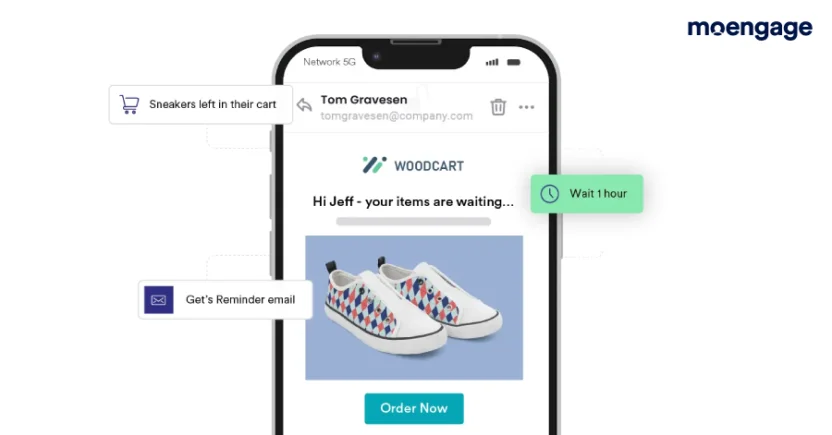
Well, we did say we’re going to help you pick the best email marketing software on the market. And our 1,350 customers, like SoundCloud and Poshmark, do say we’re one of the best, so… (ahem)
MoEngage is an agentic customer engagement platform built for B2C brands that need to automate customer journeys across email and other channels. You can use it to send behavior-triggered emails, build lifecycle campaigns, and personalize messages at scale. You can also monitor key email marketing metrics and how your email campaigns impact engagement, retention, and conversions with MoEngage Analytics.
As for your customers’ omnichannel experience, MoEngage helps you keep it consistent. Some automated email campaigns might involve other channels like SMS, push notifications, in-app messaging, and so on. Using this platform can help you continue the conversation with customers across all touchpoints.
What stands out about this solution: MoEngage comes with powerful predictive capabilities to boost email engagement rates. It can help you tailor your email campaigns to your customers’ next best action.
Best fit: Enterprise and mid-market B2C, Ecommerce, subscription, retail, media, and fintech brands that need lifecycle automation, customer segmentation, personalization, and omnichannel engagement in one place.
2. Best for Advanced Automation Workflows: ActiveCampaign
If your team needs complex branching logic, behavioral triggers, lead scoring, and multi-step customer journeys, ActiveCampaign is hard to ignore.
Its visual automation builder is the main draw. You can create workflows based on email clicks, website activity, tags, purchases, CRM updates, and other customer actions. You can also use if/then conditions to send different follow-ups based on what a customer does or doesn’t do.
For teams that have outgrown basic welcome sequences and simple drip campaigns, ActiveCampaign gives you far more control over automation logic.
What stands out about this solution: ActiveCampaign’s automation builder is one of the strongest in the market, especially for teams that need advanced branching, behavioral triggers, and CRM-connected journeys.
Best fit: Growing businesses that need advanced workflow automation, segmentation, lead scoring, and customer journey logic.
Consideration: The platform is powerful, but the learning curve is steeper than beginner-friendly tools like MailerLite or Mailchimp.
3. Best for CRM Email Marketing Automation: HubSpot Marketing Hub
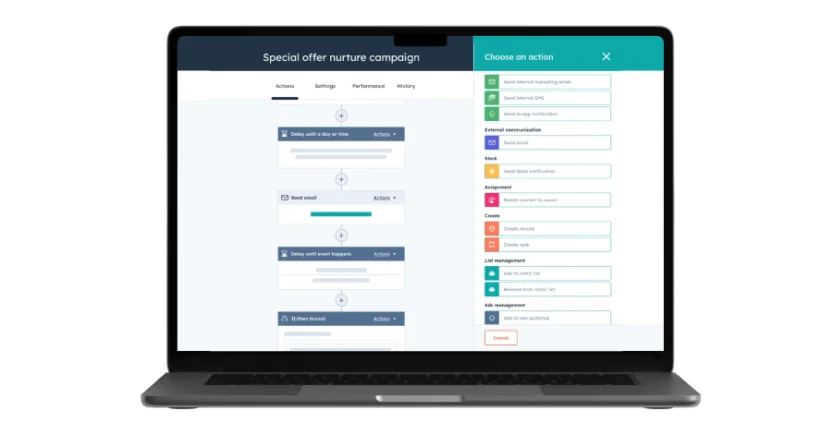
Ah, HubSpot — the CRM software giant. A boon not only for marketing and sales teams, but also for customer service teams.
The email automation tools in HubSpot’s Marketing Hub let you automate follow-up emails and trigger specific actions based on audience engagement. You can also use CRM data, including contact name, lifecycle stage, and more, to automatically personalize your emails with the most relevant subject lines, CTAs, and links.
HubSpot is especially useful when email automation needs to connect with sales activity. For example, you can trigger a nurture sequence after a form submission, notify sales when a lead visits a pricing page, or move a contact into a new workflow when their lifecycle stage changes.
From email reply tracking and email health reporting to customer journey analytics and predictive lead scoring, HubSpot’s features make it one of the best email marketing automation tools out there.
What stands out about this solution: HubSpot connects email automation directly to CRM data, which makes it easier to align marketing campaigns with sales pipelines, lead nurturing, and revenue reporting.
Best fit: B2B, sales-led, or CRM-heavy teams that need email marketing automation tied to contact records, lifecycle stages, and reporting.
Consideration: Advanced automation, A/B testing, and custom reporting can get expensive on higher-tier plans.
4. Best for Multi-Trigger Email Automation: MailerLite
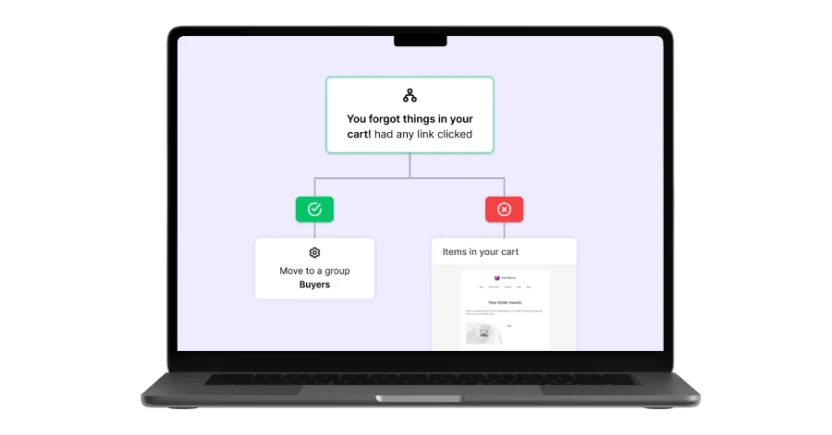
Much like Drip (listed below), MailerLite is known for its simple UI. Whether your customer fills out a form, clicks a link, joins a group, or buys a product from a specific category, you can easily trigger an automated email workflow without too much setup chaos.
Its clean interface makes it one of the easiest email marketing automation tools to learn. You can create newsletters, landing pages, signup forms, and simple workflows from the same platform. Setting up a welcome sequence or basic nurture campaign takes only a few minutes.
The best part is, you can create multi-step workflows, segment subscribers, and track and view past actions in your email automation workflow since its activation date. The tool also lets you A/B test up to 3 email workflow variations.
What stands out about this solution: Each email automation can have up to 3 triggers. MailerLite also offers a library of email automated workflow templates, so you don’t have to create workflows from scratch.
Best fit: Beginners, small teams, and brands that need simple automation without a steep learning curve.
Consideration: It’s less suitable for complex customer journeys, advanced Ecommerce retention, or omnichannel lifecycle campaigns.
5. Best for Ecommerce Personalization: Klaviyo
Klaviyo is one of the most commonly recommended email marketing automation tools for Ecommerce brands, especially Shopify and WooCommerce stores.
It’s designed around customer and purchase data. That means you can segment shoppers based on browsing behavior, order history, product interest, customer lifetime value, and engagement. You can also automate abandoned cart emails, browse abandonment flows, post-purchase emails, win-back campaigns, and product recommendation emails.
What stands out about this solution: Klaviyo is strong for Ecommerce personalization. Its predictive analytics can help brands identify likely repeat buyers, churn risks, and high-value customers.
Best fit: Small and mid-sized Ecommerce and DTC brands that want advanced segmentation, product recommendations, and revenue-focused email automation.
Consideration: Klaviyo pricing can become expensive as your profiles grow, since it bills you based on the number of profiles you have in your database, not how many emails you send or how many customers actually engage with your emails.
6. Best Budget-Friendly Email, SMS, and Transactional Automation: Brevo
Brevo, formerly Sendinblue, is a popular choice for teams that want email automation without contact-based pricing getting out of hand.
Unlike many platforms that charge based on the size of your contact list, Brevo’s pricing is usually tied more closely to email volume. That makes it useful for brands with large lists that don’t email every subscriber every day.
Brevo also supports SMS, WhatsApp, transactional emails, and basic CRM features. So if you want promotional emails and transactional emails in one place, it’s worth considering.
You can set up welcome emails, abandoned cart flows, follow-up sequences, and simple behavior-based automations. It won’t give you the same workflow depth as MoEngage, ActiveCampaign, or HubSpot, though, but for simpler automation needs, it gets the job done.
What stands out about this solution: Brevo’s volume-based pricing and multichannel features make it a strong value pick for budget-conscious teams.
Best fit: Small to mid-sized teams that need affordable email automation, SMS, WhatsApp, and transactional email.
Consideration: Email automation depth is more limited compared to advanced platforms.
7. Best for Ecommerce Revenue Workflows: Drip
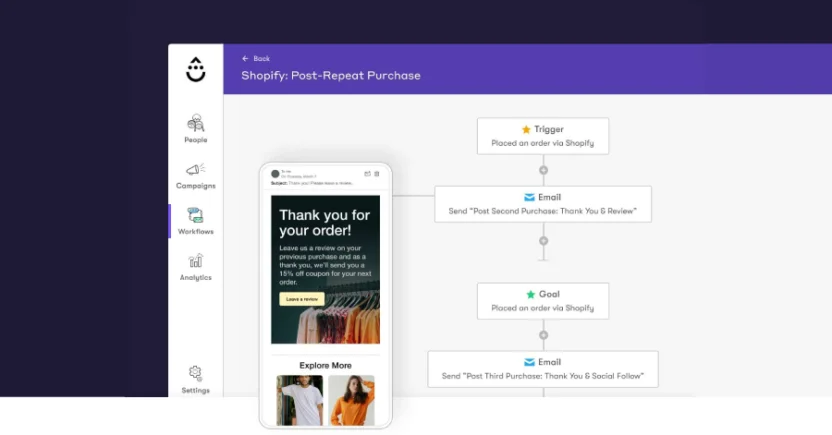
Drip is one of the easiest-to-use email marketing automation tools for Ecommerce brands. Its simple dashboards and intuitive interface have already won hearts. You can go beyond basic personalization to segment your audience based on their behavior.
It’s also easy to get crucial Ecommerce data by syncing Drip with over 50 integrated Ecommerce platforms like Shopify, LoyaltyLion, WooCommerce, and other store tools. That makes it useful for automating campaigns based on product views, purchases, cart activity, and customer behavior.
From welcome series and abandoned cart emails to post-purchase and win-back emails, Drip gives Ecommerce teams a practical way to build revenue-focused workflows.
What stands out about this solution: From welcome series and abandoned cart emails to post-purchase and win-back emails, you’ll find more than 20 pre-built email automation workflow templates on Drip.
Best fit: Ecommerce brands that want purchase-based segmentation, abandoned cart campaigns, and revenue-focused automation.
Consideration: The tool doesn’t let you simultaneously have more than 50 active automated email workflows.
8. Best for Basic Campaigns and Templates: Mailchimp
Mailchimp is one of the most widely used email marketing automation software platforms, and for good reason. It’s beginner-friendly, has a large template library, and works well for newsletters, announcements, promotions, and basic customer journeys.
If you’re just getting started with automated email marketing, Mailchimp can help you set up welcome emails, abandoned cart reminders, product follow-ups, and simple drip campaigns. It also offers AI-assisted content tools, audience segmentation, landing pages, and integrations with Ecommerce platforms and websites.
That said, Mailchimp is no longer the automatic winner for every brand. If you need advanced workflow logic, deep Ecommerce personalization, or complex lifecycle automation, tools like MoEngage, ActiveCampaign, and HubSpot offer more depth.
What stands out about this solution: Mailchimp is easy to use and has strong templates, making it a practical starting point for simple email campaigns.
Best fit: Small businesses and teams that need basic email marketing, templates, newsletters, and simple automations.
Consideration: Advanced automation and segmentation are more limited compared to specialist platforms.
9. Best for Funnels, Webinars, and Lead Capture: GetResponse
GetResponse is more than an email automation tool. It also includes landing pages, signup forms, popups, webinars, funnels, and basic website-building features.
That makes it useful for teams that want to grow their list and automate follow-up emails from the same platform. You can create autoresponders, lead nurturing sequences, webinar reminders, promotional campaigns, and conversion funnels without stitching together too many tools.
Its AI email generator can help create campaign drafts, subject lines, and email content. And its automation builder supports behavior-based workflows for common marketing use cases.
What stands out about this solution: GetResponse is strong when lead capture and email automation need to work together. The built-in webinar and funnel tools are also useful for teams that run events, courses, or educational campaigns.
Best fit: Brands that need email marketing automation, landing pages, webinars, funnels, and lead capture tools in one platform.
Consideration: Some advanced automation and Ecommerce features require higher-tier plans.
10. Best for Local Businesses, Events, and Simple Multichannel Marketing: Constant Contact
Constant Contact is a well-known email marketing platform for small businesses, local brands, nonprofits, event-based businesses, and service providers.
Its strength is simplicity. You can create email campaigns, use templates, manage contacts, promote events, and run basic automation without spending weeks learning the platform. It also includes tools for social posting, SMS in some regions, and AI-assisted content creation.
For automated email campaigns, Constant Contact works well for welcome emails, birthday emails, event reminders, newsletters, and simple follow-ups. It’s not the deepest automation tool on this list, but it’s a solid option if your team values ease of use and support.
What stands out about this solution: Constant Contact combines email, events, social tools, and simple automation in a beginner-friendly platform.
Best fit: Local businesses, nonprofits, healthcare organizations, event-based businesses, and small B2C teams with straightforward email automation needs.
Consideration: Constant Contact’s email automation is less advanced than that of MoEngage, ActiveCampaign, or HubSpot.
Anyway, now that you’ve seen what the best tools are, let’s examine the most important features you should look out for.
8 Key Features to Look for in Email Marketing Automation Software
Not all email marketing automation tools are created equal, despite their marketing promises. So before you pick an email automation tool, look for these 8 features:
1. Visual Workflow Builder and Pre-built Email Templates
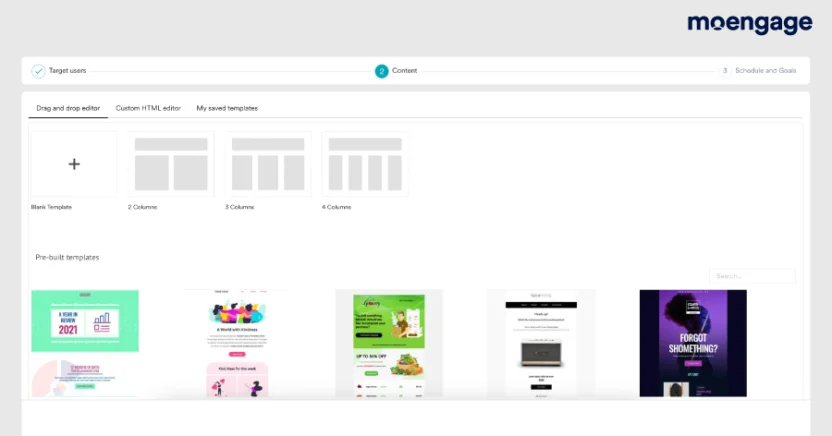
Thoughts like “Should the text go here?” and “Does the image look good there?” shouldn’t flood your mind when setting up automated email marketing campaigns. To begin sending engaging emails immediately, you need a visual workflow builder to map customer journeys, and pre-built automated email templates. The workflow builder helps you design automated email sequences without code. The templates help you create polished emails without starting from a blank screen every single time. You should also be able to customize them in keeping with your brand identity and your audience’s behavior and preferences.
Welcome emails, cart abandonment emails, post-purchase follow-ups, win-back campaigns — you should be able to build all of them without disturbing your design team every 10 minutes.
Why this is a key criterion: Visual workflows and email templates speed up automated campaign creation. They also make it easier for email marketing managers to build repeatable journeys, maintain brand consistency, and reduce manual campaign work.
2. Email Personalization and Segmentation
Imagine you own a pet food store and you’ve accidentally sent an email about dog food to a cat mom.
That’s a facepalm moment for sure, but if you had used an email marketing automation software tool to personalize your emails, you might have avoided making that embarrassing mistake by segmenting customers based on who they are, what they do, and what they’re likely to do next.
Useful segmentation criteria include location, purchase history, product interest, browsing behavior, engagement level, lifecycle stage, loyalty tier, churn risk, and customer lifetime value.
But segmentation is only half the job. The other half is personalization.
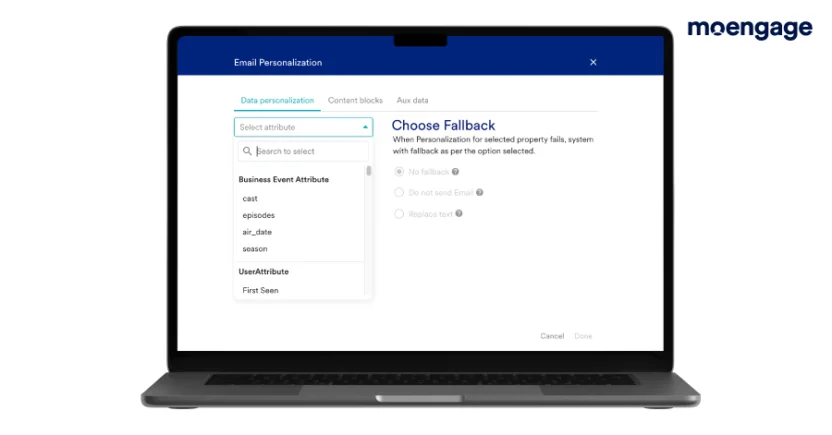
It goes beyond just using the recipient’s first name, though. Personalization also involves tailoring your email subject lines, content, images, and URLs to the recipient’s behavior, needs, and preferences. More specifically, the tool should let you use personalization attributes like “{{firstname}}”, “{{location}}”, and “{{sender name}}”. And with image personalization, you can insert contextual images in your cart abandonment follow-ups.
Why this is a key criterion: Segmentation and personalization help you create dynamic user-specific emails. That means customers receive messages that actually feel relevant, which can improve engagement, conversions, and retention.
3. Email AI Features and Best Time to Send Optimization
Every email marketing automation tool claims to have AI now. Shocking, we know.
But useful AI does more than generate a subject line and call it a day.
Look for AI features that help with:
- Email copy generation
- Subject line suggestions
- Product or content recommendations
- Predictive segmentation
- Churn prediction
- Optimizing the best time to send emails
- Send frequency optimization
- Journey performance insights
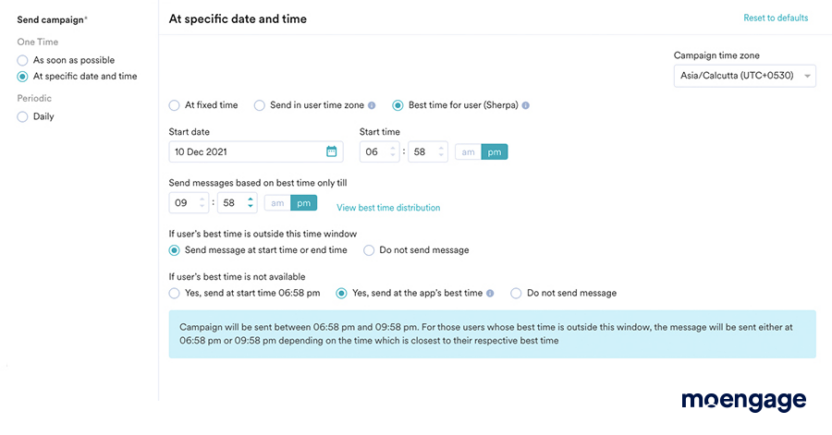
Best-time-to-send is especially useful for B2C brands. Instead of blasting every customer at 10 AM because ‘that feels right’, AI can analyze each customer’s past engagement behavior and send emails when they’re most likely to open or click them.
Why this is a key criterion: What’s the use of sending automated emails when the recipients aren’t likely to interact with them at all? Reaching them at the right moment means higher open rates and better email engagement. AI features like this one can help email marketing teams work faster and make smarter campaign decisions. Both your resources and your time are saved in the process.
4. Behavior-Based Triggers
Email automation only works when emails go out at the right moment.
That’s where behavior-based triggers come in. These triggers let your email marketing automation software send messages automatically when a customer takes a specific action.
For example:
- A customer signs up > send a welcome email
- A shopper views a product > send a browse abandonment email
- A customer adds an item to cart but doesn’t buy > send a cart recovery email
- A customer makes a purchase > send a post-purchase email
- A customer goes inactive > send a win-back email
Why this is a key criterion: Behavior-triggered emails are usually more relevant than batch-and-blast campaigns. They help B2C brands send timely, personalized messages based on real customer actions, not guesswork.
5. A/B Testing
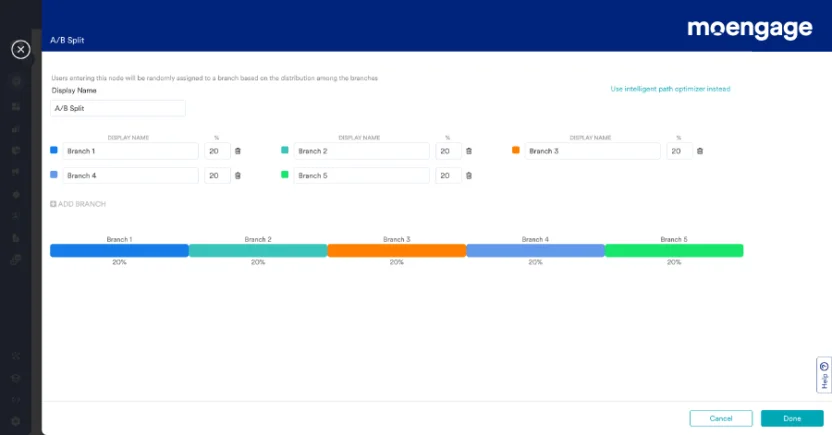
No matter which email marketing automation tool you choose, it should let you test and optimize content, email send times, and subject lines.
If you can’t compare different versions of the same email, you won’t understand which version your audience resonates most with. In turn, you won’t understand what email elements are most effective in converting the recipients into your customers.
Why this is a key criterion: A/B testing provides data-backed insights that allow you to refine every aspect of your email — from the copy to the CTA. By methodically testing different variations, you ensure your emails are always evolving to meet customer preferences and improve your overall ROI.
6. Email Deliverability and Compliance
Even the best automated email campaign is useless if it lands in spam. So yes, deliverability matters. A lot.
Your email marketing automation software should support strong deliverability and email compliance features, including:
- SPF, DKIM, and DMARC authentication
- Bounce handling
- Suppression lists
- Unsubscribe management
- Consent management
- Spam complaint monitoring
- Email health reporting
- Preference centers
- Dedicated IP support, if needed
Your platform should also help support CAN-SPAM compliance. And if your automated journeys include SMS, you’ll also need to consider new TCPA rules and requirements. Not the most glamorous part of email marketing, but necessary.
Why this is a key criterion: Email deliverability and compliance protect your sender reputation, reduce spam risk, and help your emails reach the inbox. No inbox placement, no engagement. In turn, no engagement, no ROI.
7. Email Marketing Analytics and Reporting
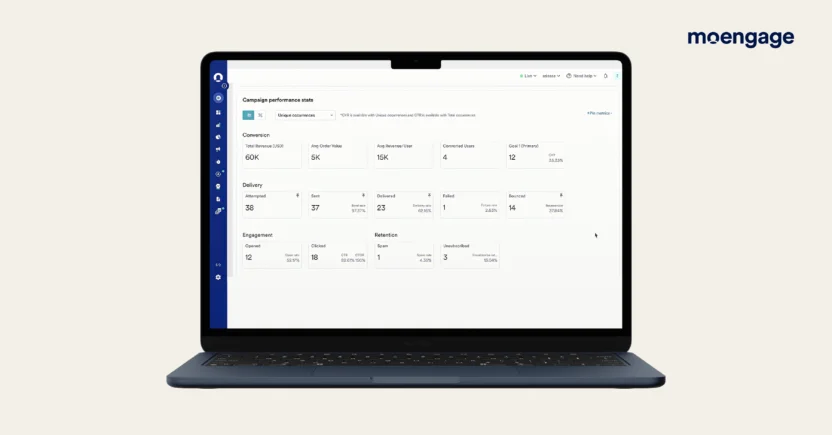
Launching an email campaign is just the first step. To truly succeed, you need to understand how your campaigns perform.
“Easier said than done.” No, it isn’t, with the best email marketing automation tools — no kidding!
The tool you pick should help you track the open rate, Click-to-open rate (CTOR), unsubscribe rate, and other crucial email marketing metrics. These insights can help you fine-tune your automated marketing emails so they perform better in the future.
Why this is a key criterion: Email analytics turn numbers into actionable strategies. When you see, for example, that your open rate is lower than expected, you know it’s time to craft more compelling subject lines. If your unsubscribe rate is creeping upwards of 1%, it’s a clear signal that your email content isn’t meeting customer needs. In short, analytics let you make smarter, data-driven decisions that help you make your emails more and more effective.
8. Ecommerce and CRM Integrations
Your email automation software needs to connect with the systems where your customer data already lives, especially if you’re running Ecommerce, retail, subscription, or app-based campaigns.
For Ecommerce brands, important integrations include Shopify, WooCommerce, Magento, BigCommerce, product catalogs, payment tools, loyalty platforms, and customer review platforms.
For CRM-led teams, useful integrations include CRM systems, Customer Data Platforms (CDPs), customer support tools, analytics platforms, and mobile app and website behavior data.
These integrations help your automated emails use real customer signals, like product views, purchases, abandoned carts, loyalty status, and lifecycle stage.
Why this is a key criterion: Ecommerce and CRM integrations make your email marketing automation system more accurate. Without connected customer data, your automated campaigns are just fancy scheduled emails. With connected data, they become personalized customer journeys.
If a tool checks most of these boxes, it’s probably a serious email marketing automation platform. If it only supports simple newsletters and basic welcome sequences, it might still be useful, but it might not be enough for advanced lifecycle marketing, Ecommerce retention, or behavior-triggered email campaigns.
At this point, you know the tools and the features. Now let’s compare them in terms of the features that actually separate these platforms.
Email Marketing Software With the Best Automation Features (Comparison)
The feature-level comparison table below compares 5 widely used email marketing automation tools across the features that matter most for B2C, Ecommerce, and lifecycle marketing teams.
| Feature | MoEngage | ActiveCampaign | HubSpot | MailerLite | Brevo |
| Visual workflow builder | Yes | Yes | Yes | Yes | Yes |
| Behavior-based triggers | Yes | Yes | Yes | Limited | Yes |
| Advanced segmentation | Yes | Yes | Yes | Limited | Limited |
| Dynamic personalization | Yes | Yes | Yes | Limited | Limited |
| Product recommendations | Yes | Limited | Limited | No | Limited |
| Omnichannel messaging | Yes | Limited | Limited | No | Yes |
| Advanced analytics and reporting | Yes | Yes | Yes | Limited | Limited |
| AI features | Yes | Yes | Yes | Basic | Basic |
The feature table shows you what each tool can do. But your business type also matters.
Quick Email Automation Tool Recommendations by Business Size or Type
A startup sending basic newsletters does not need the same email automation software as an enterprise Ecommerce brand running cart recovery, product recommendations, win-back flows, and omnichannel lifecycle campaigns.
Use this table to match your business type with the email automation tools that generally fit best.
| Business Type or Size | Recommended Email Automation Tools |
| Startup | Brevo, Mailchimp, MailerLite |
| Small business | ActiveCampaign, Brevo, Mailchimp, Constant Contact |
| Growth-stage B2C brand | MoEngage, ActiveCampaign |
| Enterprise B2C brand | MoEngage |
| Mid-market or enterprise B2B brand | HubSpot |
| Shopify store | MoEngage, Klaviyo |
| Retail or Ecommerce brand | MoEngage, Klaviyo, Drip |
| Subscription business | MoEngage, ActiveCampaign |
| Local business or nonprofit | Constant Contact, Mailchimp, Brevo |
| Budget-conscious team | Brevo, MailerLite |
| Team running webinars | GetResponse |
Smaller teams usually need ease of use and affordable automation. Growing B2C and Ecommerce brands need stronger segmentation, behavioral triggers, customer journey analytics, and personalization. Enterprise B2C brands usually need a platform that can manage email as part of a broader omnichannel engagement strategy.
That’s the simplest way to think about it: choose the platform based on your main automation job. If your top priority is newsletters, don’t overbuy. If your top priority is lifecycle marketing, product recommendations, retention, and omnichannel engagement, don’t underbuy.
Next, let’s look at how to actually choose the right email marketing automation software without getting lost in feature overload.
How to Choose Email Marketing Automation Software
The easiest way to choose the right email marketing automation platform is to match it to 3 things: your business type, your automation complexity, and your growth plans.
1. Start With Your Primary Business Need
Before you compare platforms, get clear on what you actually need the software to do.
Are you trying to recover abandoned carts? Automate welcome emails? Send personalized product recommendations? Build customer lifecycle journeys? Connect emails to CRM data? Or just send newsletters without losing your mind?
Different tools are built for different jobs. In practice, MoEngage fits B2C and Ecommerce lifecycle automation, ActiveCampaign fits advanced workflow logic, HubSpot fits CRM-driven automation, Brevo fits budget-conscious teams, and MailerLite fits beginners.
Why does this matter? Well, a platform built for newsletters might not handle Ecommerce retention well. A CRM-first tool might be overkill for simple campaigns. And a basic email automation tool might not support the kind of real-time customer journeys B2C brands need.
2. Evaluate Automation and Workflow Depth
Once you’ve got a vendor shortlist, look closely at how triggers and actions actually work inside each platform. This is where tools differ a lot more than their marketing pages let on.
Basic email marketing software sends scheduled blasts on a calendar. What you actually want is a tool that reacts to what your customers are doing in real time. A few things worth checking specifically:
- Triggers: Does the platform track page visits, cart abandonments, and custom behavioral tags, or just list membership and sign-up date?
- Visual builders: Can you actually see and map your customer journey, or are you configuring rules through menus and dropdowns?
- Testing: Is A/B testing built in for subject lines and send times, or is it a bolt-on that requires a higher-tier plan?
If a platform’s automation stops at ‘send this email three days after signup’, it’s not going to hold up once your customer journeys get more complex.
3. Check Pricing and Scaling Costs
Free plans and low starting prices are tempting. We get it.
But email marketing automation pricing can change quickly as your list grows, your send volume increases, or your team needs advanced features.
Before choosing a tool, check:
- Free limits: What are the actual subscriber caps and monthly email limits on the free plan (if any), and how quickly will you outgrow them?
- Tier jumps: How much does the price increase the moment you cross a subscriber milestone like 5K, 10K, or even 1M contacts?
- Hidden fees: Are the email automation features you actually need locked behind a much more expensive enterprise plan?
Also check monthly email send limits, SMS or WhatsApp costs, automation limits, user limits, AI feature access, reporting limits, onboarding or migration costs, and dedicated IP or deliverability add-ons.
One more thing to evaluate is the tool’s pricing model. Some platforms charge by contacts, while some charge by email volume. Some use usage-based pricing instead. Still others use custom pricing for larger teams.
Why this matters: The cheapest email automation software today might not be the most cost-effective platform 6 months from now.
4. Test the Platform With a Real Workflow
Don’t judge the email marketing automation tool only by the demo.
Before committing, build a real workflow inside the platform that your team would actually use. It could be a welcome journey, a cart abandonment flow, a Shopify post-purchase email sequence, a win-back campaign, or anything else.
While testing, ask these questions:
- Is the workflow builder easy to use?
- Can the platform access the right customer data?
- Can you personalize the email content?
- Can you add conditions and exclusions?
- Can you test and report on the journey?
- Can your team manage this without engineering help?
That hands-on test will tell you more than any pricing page ever will.
At the end of the day, the best email marketing automation software is the one that helps your team send more relevant emails, automate the right journeys, and improve customer engagement without making your workflow harder than it needs to be.
Once you’ve chosen the right tool, the next step is building the actual workflows.
How to Automate Email Marketing Campaigns With Software
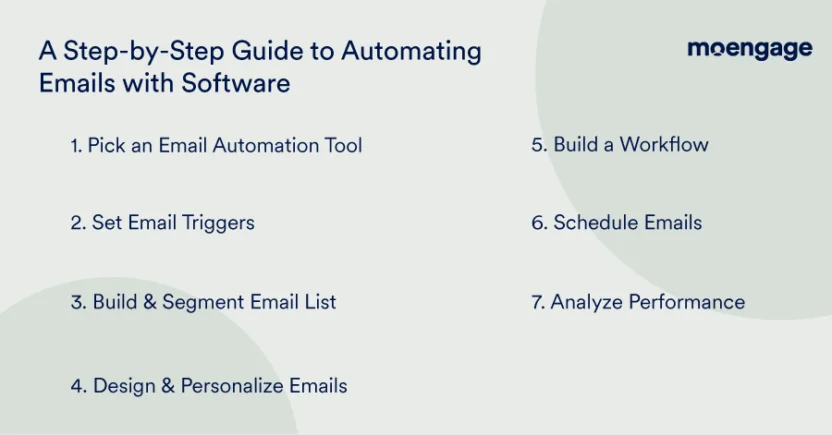
Let’s look at how you can make the most of your email marketing automation tools. Here’s a step-by-step guide to automate your emails on Shopify or elsewhere using any platform:
1. Select an Email Marketing Automation Software Tool
Alright, back to square one, folks! Before you can start firing off automated emails, you need to pick the right tool that suits your needs. Does it match your budget and your overall marketing goals? Maybe you’re drawn to tools with robust segmentation, detailed analytics, and seamless integrations.
For instance, some platforms (like MoEngage, for example) come with built-in automation features that let you select targeted audience groups and even integrate your emails effortlessly with other channels, like push notifications and SMS.
2. Set Email Automation Triggers
Automation triggers are the specific actions or conditions (like a new sign-up, an abandoned cart, or an anniversary) that prompt your system to send an email. By setting these up, you ensure that every customer receives timely and relevant content without you having to lift a finger.
Let’s say a customer signs up to your online store, browses your product range, and then pops back in later. With the right trigger setup, your email marketing automation software can send a tailored reminder email at just the right moment.
3. Create and Segment Your Email List
Not speaking to the right audience? How would you know what the right message is to send then?
This is where managing your email list comes in handy. Start by gathering subscribers through signup forms. Then, categorize your audience into specific groups based on their behavior, location, purchase history, and even more factors.
Some software platforms let you segment your audience with a few clicks. MoEngage, for instance, offers deep segmentation features that help you target your subscribers based on everything, from past purchases to browsing habits.
You can also create customer segments (like ‘Promising’, ‘Price-sensitive’, ‘Hibernating’, and so on) using an RFM analysis on MoEngage. Basically, it lets you categorize customers based on their recency (when they last interacted with your website), frequency (how often they interacted with your website), and monetary value (what their last purchase was worth).
The result? Higher open rates, better engagement, and emails that truly resonate because they’re speaking directly to the person reading them.
4. Built-In AI to Design and Personalize Your Emails
Your emails should look as good as they sound. Period.
Start with a compelling subject line that encourages your audience to open your emails. Use templates to maintain consistency in your branding, and include dynamic content fields for personalized touches.
MoEngage offers a library of email templates with responsive design elements that look great on any device. Drag and drop images, text blocks, and CTAs to customize email templates and design amazing emails.
You can also use MoEngage’s Merlin AI to personalize your emails based on customers’ browsing history, interests, and behavior. And with Merlin AI from MoEngage, just use a pre-built prompt from a dropdown list or enter your own prompts to get high-quality images and email copy in seconds.
5. Build an Email Workflow (Optional)
Crafting a workflow can transform a one-off email into a natural conversation with your customer. It’s basically an email marketing journey, aligning with the customer journey — from a welcome email, through a series of educational messages, to a follow-up after a purchase.
Some email marketing automation platforms allow you to set branch points where recipients can receive different content based on actions taken or not taken. For example, when using MoEngage, you can build a personalized series that feels more like a conversation than a cold, automated sequence. This builds a stronger relationship with your audience over time.
6. Schedule Your Emails
Scheduling ensures that your emails hit inboxes when your audiences are most likely to engage.
MoEngage’s Merlin AI lets you consider time zones and peak open times for each customer, so your emails are always as impactful as possible. This means Merlin AI can tell you the best time to send an email for higher response rates and conversions.
7. Monitor Your Performance
Last but not least, you need to monitor and tweak your campaigns based on performance metrics. Keep an eye on open rates, click-through rates, conversions, and overall email engagement.
Some tools offer built-in analytics dashboards that give you detailed insights into how your emails are performing. MoEngage comes with robust reporting features that not only track key metrics, but also help you optimize your future campaigns with A/B testing and detailed engagement reports.
What’s more, MoEngage’s Merlin AI generates email performance reports as PDFs, charts, CSVs, and any other format you need. Need a report on quarterly email conversion rates over the last year? All you need to do is ask.

Choose the Best Email Marketing Automation Software Today
Still not sure?
Think — what if your email marketing automation software could help you:
- Build custom emails with zero code
- Automate emails based on your customer journey, from welcome emails to win-back follow-ups
- Personalize content or product recommendations at scale with AI
- Automatically update your customers about their bank balance, passwords, and delivery status on time
- Land your emails in customers’ inboxes, not their spam folders
- Predict what would work best for higher email engagement
You’re in luck. Because you’ll find all these features and more on MoEngage.
Take a 1-1 demo and see what wonders MoEngage can work for your automated email campaigns.
The post Best Email Marketing Automation Software (2026) appeared first on MoEngage.