I evaluated 8 free tools using G2 Data and reviews to finalize the 8 best free contract management software for small businesses. These are ContractSafe, GetAccept, Jotform Sign, Oneflow, PandaDoc, Proposify, Qwilr, and Signeasy.
Most small businesses manage contracts via email threads and a spreadsheet of renewal dates, so the first sign of trouble is usually a contract that auto-renewed on last year’s terms because nobody got an alert.
Behind that missed alert sits a bigger problem: one person, usually the owner or an office manager, creating, sending, chasing, signing, and storing every agreement by hand. The best contract management software takes that busywork off their plate, and you don’t have to pay to start.
For this guide, I looked only at tools that a small business can use for free, whether through a free-forever plan, a freemium tier, or a trial. I evaluated each on three things: a searchable home for every agreement, renewal reminders that fire on their own, and a signing experience clean enough for a client who never logs in again.
Then I routed each tool to the job it does best.
What are the best free contract management software for small businesses in 2026?
- ContractSafe: Best for a searchable contract repository with renewal alerts
For businesses that need one searchable home for every signed contract, plus automatic reminders so no renewal or deadline slips through. - GetAccept: Best for sending trackable proposals and contracts with engagement insight
For businesses that want to send a professional contract, see exactly when the client opens it, and collect the e-signature, all tied to their customer relationship management (CRM) system. - Jotform Sign: Best for turning forms into signable documents on a free plan
For businesses that need a free, forms-native way to build a document, drop in signature fields, and collect legally binding signatures by link, with no account required for the signer. - Oneflow: Best for signing and tracking unlimited PDF contracts free
For businesses that want to sign and track unlimited PDF contracts at no cost, with a clear path to interactive, editable contracts as they grow. - PandaDoc: Best for creating, sending, and e-signing documents on a free plan
For businesses that want to build a polished contract, send it, and collect a legally binding signature for free, with a low-cost step up as volume grows. - Proposify: Best for polished, on-brand proposals and quotes with client tracking
For small businesses that win work through branded, professional proposals and want to see when clients open them. - Qwilr: Best for interactive, web-based proposals that stand out
For small businesses that want modern, interactive proposals with built-in e-sign, payments, and CRM sync. - Signeasy: Best for fast, no-fuss e-signing across desktop and mobile
For businesses that want the simplest way to sign and send a few contracts a month for free, with strong mobile apps for signing on the go.
Tools are listed alphabetically. These tools offer free trials, free forever options, or freemium models.
Comparison of the best free contract management software for small businesses
| Tool | G2 rating | What the free plan covers | Paid starts at |
|---|---|---|---|
| ContractSafe | 4.7/5 ⭐ | • 7-day free trial, all features (no free-forever tier) • Unlimited users on every plan (no per-seat fee) • Unlimited archive, storage, and automated key-date reminders during trial |
$450/month |
| GetAccept | 4.6/5 ⭐ | • 14-day free trial (no free-forever tier) • Unlimited documents, Deal Rooms, and e-signatures during trial • Templates, content library, and engagement/tracking analytics included |
$25/user/month |
| Jotform Sign | 4.7/5 ⭐ | • Free forever (Starter plan) • 10 signed documents/month, 5 active forms, 100 submissions/month • 100 MB storage; Jotform branding shown on free plan |
$39/month |
| Oneflow | 4.4/5 ⭐ | • Free forever (PDF-contract plan) plus a 14-day full-platform trial • Upload, send, track, and sign unlimited PDF contracts • PDF-only: interactive web contracts and live editing require a paid plan |
$292/month |
| PandaDoc | 4.7/5 ⭐ | • Free forever (Free eSign plan) plus a 14-day trial of paid features • 60 documents/year, 2 recipients per document, up to 5 templates • Unlimited seats and document storage; no shareable links or integrations |
$19/user/month |
| Proposify | 4.6/5 ⭐ | • Free trial on Basic and Team plans, no credit card (no free-forever tier) • Full features to test: e-signatures, payments, tracking, template library • After trial, Basic caps sends (extra sends $1.99 each) |
$19/user/month (annual billing) |
| Qwilr | 4.6/5 ⭐ | • 14-day Starter trial, full Starter access, no credit card (no free-forever tier) • 1 user, unlimited shareable Qwilr pages, e-sign, analytics, QwilrPay • After expiry, pages stay live 30 days but account access ends |
$35/user/month |
| Signeasy | 4.7/5 ⭐ | • Free forever (Free plan) plus a 14-day free trial • 3 documents/month, single user • Templates, unlimited sends, and AI term extraction are paid-only |
$10/month |
All pricing details mentioned in this article are based on publicly available data at the time of publication and are subject to change.
Poorly managed contracts quietly cost the average business almost 9% of its value annually, and for a small team without a legal function, one missed renewal can swallow that margin fast.
How did I find and evaluate these free contract management tools?
I started with G2’s contract management software category, which gathers the tools offering free plans, trials, or freemium models. I took the products as they rank on the page and pressure-tested the free option on each one. Can an owner get working the same day without a sales gate? Do renewal alerts fire on their own? Is there one searchable place every contract lives? And can a client sign without ever creating an account? Then I cross-referenced verified G2 user reviews for each tool to catch the patterns my own evaluation might miss. The review data was pulled in 2026, filtered to the small-business segment, with mid-market reviews standing in where small-business coverage was thin. The screenshots featured in this article may be a mix of those taken from the vendor’s G2 page or from publicly available materials.
What I look for in free contract management software for small businesses
Six things carried the most weight for a small business managing contracts without a legal team or a budget.
- Free to start, no sales gate: Can you get moving the same day without booking a demo or handing over a card? Many dedicated contract tools only offer a “request a demo” path, so a real free plan or self-serve trial was heavily weighted.
- Alerts that fire on their own: Small teams have no one whose job is to watch dates. I looked for automatic reminders ahead of renewals, expirations, and milestones, not a tool that assumes someone will check a spreadsheet.
- A searchable central repository: One place where every signed contract lives and turns up by name, tag, or clause in seconds. For a 50-person shop, the real pain is agreements scattered across inboxes and desktops.
- Fast setup with reusable templates: With no legal or ops hire, I favored tools you can stand up in days and that ship templates, so an owner produces a correct contract without drafting from scratch each time.
- A clean signing experience for the other side: Most small-business contracts get signed by someone who never logs in again. I checked how easily an external party can open, sign, and return a document without an account or download.
- An upgrade wall you can see coming: Exactly where the free tier stops (document caps, seat limits, locked automation), so you know the ceiling before you hit it mid-deal.
To be included on this list, a tool must:
- Include a repository of documents that can be stored in different categories for each type of contract.
- Offer templates that can be customized by users involved in the creation of business contracts.
- Provide the ability to easily create, edit, share, and collaborate on contracts internally (with other employees) and externally (with customers or partners).
- Enable users to send notifications for significant milestones, like contract expiry or renewal.
- Comply with business legal requirements as well as the internal business rules of the parties involved in the contract.
This data was pulled from G2 in July 2026. Some reviews may have been edited for clarity.
1. ContractSafe: Best for a searchable contract repository with renewal alerts
ContractSafe skips the create-and-sign side of contract work entirely. Its job starts after the ink dries: one searchable home for every agreement you have signed, with automated reminders on every key date. For an owner digging through inboxes and shared drives to find last year’s vendor agreement, that’s the exact itch.
It’s super easy to use. There’s quick setup and no per-seat fees, which matters when the entire contracts team is one person and a bookkeeper. It doesn’t build proposals and doesn’t pretend to. It keeps a signed agreement findable and its renewal from creeping up on you.
What does ContractSafe’s free plan include?
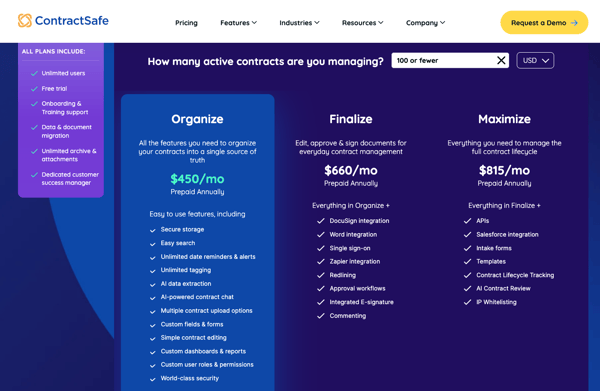
- 7-day free trial with access to all ContractSafe features (no free-forever tier)
- Unlimited users on every plan, including the trial (no per-seat charge)
- Unlimited archive, attachments, and document storage
- Automated key-date reminders for renewals, expirations, and milestones
- Full-text search, tagging, and metadata extraction across your contract library
- Onboarding, training, data migration, and a dedicated customer success manager included
When should you upgrade your ContractSafe free plan?
The trial runs seven days, so the trigger is simply the clock. Once your agreements are loaded and the reminders have proven themselves, keeping them means the entry Organize plan at $450/month, priced by contract volume rather than headcount. Users stay unlimited on every tier, so adding a co-owner later never raises the bill.
Where ContractSafe stands out:
- Automated renewal and deadline reminders that catch dates small teams would otherwise miss. It’s the feature G2 reviewers name first.
- A searchable, well-organized repository that ends the “where did we save that contract?” scramble, with fast search, tagging, and Google Workspace integration keeping everything in one place.
What G2 users like about ContractSafe:
“The best thing about ContractSafe is that it has enabled my team to stay organized during times of pressure. It is very easy to forget about things with numerous agreements and deadlines, and with everything recorded and getting reminders, there is nothing that gets missed. The notes and history features make conversations and approvals transparent and thus minimize friction and ensure that everyone achieves their duties on time.”
– ContractSafe review, Mike D.
Is ContractSafe right for your small business?
Best for: Small businesses whose main pain is storing, finding, and tracking already-signed contracts and never missing a renewal.
Not ideal for: Owners who mainly need to draft, send, and e-sign new proposals or contracts from scratch, which is a document or e-sign tool’s job, not a repository’s.
What I dislike about ContractSafe:
- Field customization runs lean, so a non-standard agreement can need a manual workaround to capture extra detail. That’s the price of a simple, adoption-first design, and it rarely gets in the way of a small business with fairly standard contracts.
- Extraction accuracy isn’t perfect on the first pass, and some G2 users describe stepping in with manual corrections to keep results clean. Varied or unstructured documents at volume make that add up, while standardized document types move through review quickly with little touch-up needed.
What G2 users dislike about ContractSafe:
“I do not like that some of the features, such as filtering large volumes of contracts or multiple entries at the same time, are not as malleable as they might be. The establishment of importing old contracts had to be done with great care to avoid mistakes. Using the system daily will result in mismatched or lost files that require manual adjustment. Noise settings might also be customized to a greater extent to fit the way various teams handle contracts.”
– ContractSafe review, Lisa M.
2. GetAccept: Best for sending trackable proposals and contracts with engagement insight
Did the client even open the contract? That question drives more anxious follow-up emails than any other part of small-business sales, and answering it is what GetAccept is built around. It’s a digital sales room: you build the proposal, send it, watch the client engage with it, and collect the signature in one branded space.
In practice, it works like a follow-up assistant. The tracking shows when a client viewed your contract and for how long, which is the timing signal a one-person sales effort needs to nudge. HubSpot and CRM sync spare you from re-keying deal details, and templates plus a content library take the repetition out of similar agreements. It’s a tool that retires untracked email attachments.
What does GetAccept’s free plan include?
- 14-day free trial with no credit card required (no free-forever tier)
- Create and send unlimited documents and Deal Rooms during the trial
- Unlimited electronic signatures (basic click-to-sign)
- Engagement analytics: see when and how long a recipient views your document
- Templates, content library, and in-app editor for building branded contracts
- CRM integration setup (for example, HubSpot) during the trial
When should you upgrade your GetAccept free plan?
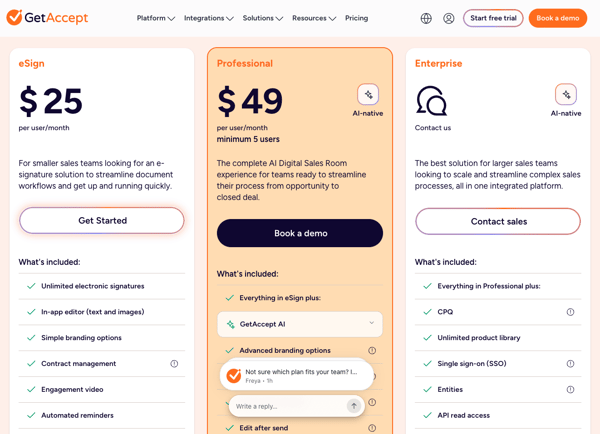
The trial lasts 14 days, so the trigger is wanting to keep sending trackable, signable contracts after it ends, plus features like automated renewal reminders. That’s the eSign plan at $25/user/month. The heavier Digital Sales Room layers on artificial intelligence (AI), meaning smart content, meeting summaries, and mutual action plans, on the Professional plan at $49/user/month with a five-user minimum.
Where GetAccept stands out:
- Engagement tracking that tells reps exactly when to follow up. The view-and-time analytics are what reviewers call their sharpest timing signal.
- Clean CRM sync, HubSpot especially, that removes double data entry and pulls the whole sales operation into one place.
What G2 users like about GetAccept:
“GetAccept is a game-changer and an essential foundation for structuring a sales organization. The tool is fully integrated with our HubSpot CRM, providing a single source of information to centralize sales operations. This solution has been a key component, a central building block, in the transformation of Doinsport’s sales organization.”
– GetAccept review, Franck T.
Is GetAccept right for your small business?
Best for: Businesses that send proposals or contracts to win deals and want to see client engagement and e-sign in one CRM-connected flow.
Not ideal for: Owners who just need a cheap, no-frills e-signature or a pure storage repository, because GetAccept’s sales-room depth (and per-seat pricing) is more than that job needs.
What I dislike about GetAccept:
- Workarounds creep in when customization hits its ceiling, a pattern G2 users describe while managing contracts in GetAccept. Highly tailored workflows or branding run into that constraint the most, while teams working within a standard contract setup maintain a process that stays efficient and easy to manage day-to-day.
- Intricate documents slow the editor down, with G2 feedback noting that complex, multi-part builds require extra steps. That added effort lands on teams doing heavy customization, but those working with standard document structures get an editing process that stays quick and gets the job done.
What G2 users dislike about GetAccept:
“The initial setup of templates and field mapping takes some patience, especially if you want everything to play perfectly with an existing CRM setup.”
– GetAccept review, Frederik R.
3. Jotform Sign: Best for turning forms into signable documents on a free plan
If your business already uses intake forms, waivers, or client agreements, Jotform Sign approaches contracts from the forms side. It layers legally binding e-signatures onto documents, and recipients sign by link with no account. The pull for a budget-conscious owner is a real free-forever plan, not a trial, that covers a small monthly volume end-to-end.
Almost nothing sits between “I have a document” and “it’s signed and back in my inbox.” Upload a PDF and it auto-detects signature, date, and name fields. Share a link and the client signs on any device. I liked how easy it was to get rid of the print-sign-scan routine. The catch I noticed was the 10 signed documents per month limit on the free plan, and keeping lots of different document types organized in one place can get cumbersome as your workload grows.
What does Jotform Sign’s free plan include?
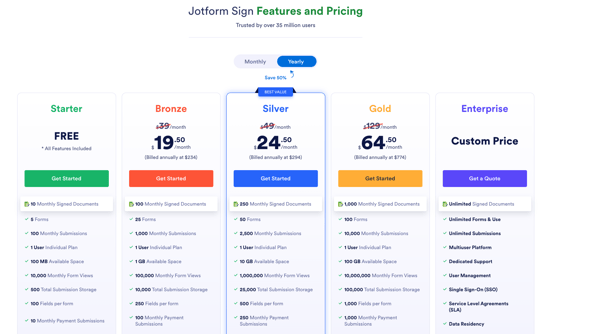
- Free forever on the Starter plan ($0, no trial expiry)
- 10 signed documents per month via Jotform Sign
- 5 active forms, 100 monthly submissions, 1,000 monthly form views
- Drag-and-drop signature fields with automatic field detection; link-based signing, no signer account needed
- Templates, plus 100 fields per form and 100 MB upload space
- Jotform branding shown on forms; Health Insurance Portability and Accountability Act (HIPAA) features not available on the free tier
When should you upgrade from the free Jotform Sign plan?
The first wall is the 10-signed-documents-a-month cap, or the wish to drop Jotform branding for a cleaner client-facing look. The Bronze plan at about $39/month (billed annually) solves both, lifting you to 100 signed documents a month, 25 forms, and unbranded documents. Silver and Gold scale to 250 and 1,000 signed documents.
Where Jotform Sign stands out:
- A free-forever tier that’s usable in practice, paired with link-based signing that asks nothing of the signer. Affordability and the frictionless client experience come up constantly.
- A forms-to-signature workflow that keeps intake, agreements, and tracking together, with automatic field detection and status dashboards replacing print-and-scan.
What G2 users like about Jotform Sign:
“I use Jotform Sign to create forms for my clients to sign, and it makes collecting signatures remotely easy and seamless. I like how affordable the plans are, and the features on the website are great for all of my business needs. The workflow feature is especially great for my tax preparation business, as it keeps all my client flows in one place and helps me track progress. The initial setup wasn’t complicated, which was nice.”
– Jotform Sign review, Rashanae P.
Is Jotform Sign right for your small business?
Best for: Businesses that already use forms (intake, waivers, agreements) and want free, link-based e-signatures with no signer account.
Not ideal for: Teams that send a high monthly volume of contracts or need a polished, unbranded document builder from day one, because they will hit the free cap and Jotform branding quickly.
What I dislike about Jotform Sign:
- Lower-tier plans limit the number of signatures teams can send, and pricing doesn’t budge much for occasional use, per G2 feedback. Teams that send documents rarely can end up paying for room they never fill, while steady senders get a plan that fits their volume and keeps costs easy to predict.
- Shaping documents exactly how you want is where customization runs out, with G2 users saying the options cover the basics and stop there. Heavily branded or detailed documents hit that wall, but teams sending standard contracts and forms get a signing process that stays fast and easy to set up.
What G2 users dislike about Jotform Sign:
“I’d like it to be more intuitive when uploading long forms, such as employment applications. I’m still trying to figure out that part.”
– Jotform Sign review, Amy P.
4. Oneflow: Best for signing and tracking unlimited PDF contracts free
Unlimited is a rare word on a free trial, and it’s Oneflow‘s opening move: upload, send, track, and sign as many PDF contracts as you like, at no cost, forever. The platform’s bigger idea is to turn static agreements into interactive documents you can edit even after sending, but that experience is reserved for the paid side until you’re ready for it.
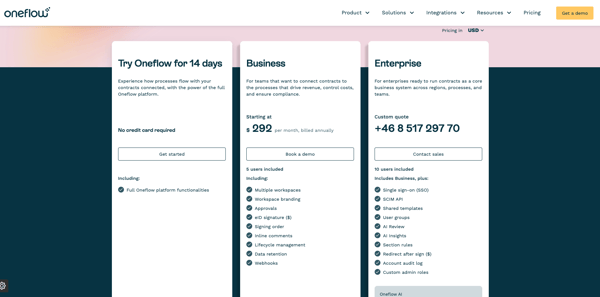
The free plan is what a small business reaches for first, since it covers unlimited PDF signing plus renewal reminders without a cent up front. I found the automatic reminders and clean, modern contract flow easy to appreciate from the start. There is a short ramp-up when moving into the richer interactive editor. The 14-day trial is how you decide whether the interactive contracts justify stepping up.
What does Oneflow’s free plan include?
- Free forever for PDF contracts (no expiry)
- Upload, send, track, and sign unlimited PDF contracts
- Renewal reminders to help you stay ahead of key dates
- 14-day trial of the full platform available on top (no credit card), reverting to the free plan afterward
- Interactive web-based contracts, live editing after send, and full contract lifecycle management (CLM) and AI features are reserved for the trial and paid plans
When should you upgrade your Oneflow free plan?
The free plan tops out at static PDFs, so the trigger is wanting interactive, editable web contracts, real-time collaboration, and automatic per-document renewal handling. That’s the Business plan at $292/month, billed annually, with 5 users and core AI and CLM functionality included. It’s a steeper jump than the e-signature tools here, so it fits businesses where contracts drive revenue or compliance.
Where Oneflow stands out:
- Renewal reminders that keep small teams ahead of their dates, the feature reviewers credit with keeping them on track.
- A clean, collaborative contract experience once you step into the interactive editor, with real-time collaboration and CRM integrations that beat static PDFs and email threads.
What G2 users like about Oneflow:
“The reminder feature is very useful for keeping track of renewals.”
– Oneflow review, Lee-Anne L.
Is Oneflow right for your small business?
Best for: Small businesses that want free unlimited PDF signing now, with renewal reminders, and a path to interactive contracts as contracts become central to the business.
Not ideal for: Very budget-tight owners who only ever need basic e-sign, because the paid step up ($292/month) is a bigger jump than the e-signature-first tools here.
What I dislike about Oneflow:
- Customization, integrations, and bulk contract handling are the gaps G2 users point to in Oneflow’s current offering. Complex, high-volume contract work across multiple systems feels those gaps most, while teams managing standard volume with a simpler tool stack get a workflow that stays efficient without the added complexity.
- Inline comments and an easier way to migrate existing contracts top the wish list in feedback on G2. Moving a big contract library from another system is where that gap shows, but teams starting fresh or with a smaller library get a management workflow that’s simple to set up and use from day one.
What G2 users dislike about Oneflow:
“Oneflow has no spell check and their formatting options are horrible.”
– Oneflow review, Franki F.
5. PandaDoc: Best for creating, sending, and e-signing documents on a free plan
PandaDoc is the all-rounder here. Build a contract in a drag-and-drop editor, send it, track it, and collect a legally binding signature, with a free eSign plan covering a modest yearly volume. After trying it out, I could see why so many businesses compare it to DocuSign. For everyday client agreements, it feels like a more flexible and affordable alternative.
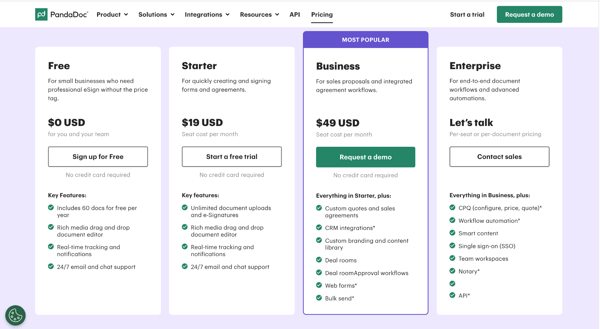
The appeal is breadth without a setup tax. On the free plan, one or two people can upload a document, drop in fields, and send it for signature the same day, and reviewers consistently call the onboarding easy. The shareable-link workflow, on paid, gets documents signed on a client’s phone in minutes.
What does PandaDoc’s free plan include?
- Free forever on the Free eSign plan ($0, no expiry)
- 60 documents per year, with unlimited seats (whole team can log in)
- 2 recipients per document
- Up to 5 templates, unlimited signature and fillable fields, unlimited document storage
- Rich media drag-and-drop editor, real-time tracking and notifications, 24/7 email and chat support
- Signature requests sent by email only (no shareable links); integrations and payments not included on Free
When should you upgrade your PandaDoc free plan?
You hit the ceiling when you send more than about 60 documents a year, need more than 2 recipients on a contract, or want shareable signing links and integrations. The Starter plan at $19/user/month lifts document limits and adds audit trails, bulk import, and in-line comments. The Business plan at $49/user/month adds CRM integrations, custom branding, a content library, and approval workflows.
Where PandaDoc stands out:
- Fast, easy document creation and signing that teams get value from on day one, with same-day setup and an interface reviewers find simpler than DocuSign.
- A shareable-link signing flow that gets clients signing on their phones in minutes, which reviewers rate above email attachments.
What G2 users like about PandaDoc:
“As a Sales Executive, I really like PandaDoc because it keeps all of my client-facing forms in one place. It’s integrated with our HubSpot instance, which allows me to auto-generate and initiate pricing proposals directly from HubSpot. We are able to load all of our pricing tables and everything. So putting together that proposal is a very quick, easy, and seamless process, and the PandaDoc UI is on point and makes it virtually effortless.”
– PandaDoc review, Bobby C.
Is PandaDoc right for your small business?
Best for: Businesses that want one tool to create, send, and e-sign professional contracts and proposals, and can start free before a low-cost step up.
Not ideal for: Owners whose need is purely a large-volume, bare-bones e-signature at the lowest possible per-document cost, because the free-plan yearly cap and per-seat paid pricing suit document creation more than high-volume signing.
What I dislike about PandaDoc:
- Document expiration controls and horizontal cell merging are missing from the current feature set, per feedback shared on G2. Automated expiration workflows and complex table layouts feel those gaps most, while teams with simpler documents and manual tracking get a tool that stays lightweight and easy to manage.
- Cost can be a tough sell for smaller teams, G2 users say, especially once online form submissions factor into the plan. Tight budgets and lower volumes make that price harder to justify, but teams running steady document and form volume get a platform whose cost lines up with everything it replaces.
What G2 users dislike about PandaDoc:
“There is an extra row that appears on our proposal when building that I always have to delete.”
– PandaDoc review, Adrienne H.
Comparing document tools? See G2’s roundup of free e-signature software to weigh PandaDoc’s document-creation depth against simpler signing tools.
6. Proposify: Best for polished, on-brand proposals and quotes with client tracking
Some contracts just need a signature. Others have to win the work first. Proposify is built for the second kind, serving agencies, consultancies, and service firms whose proposals need to look the part every time. The pull is design polish plus analytics: templates that keep every quote on-brand, and tracking that shows when a client opened the proposal and where they lingered.
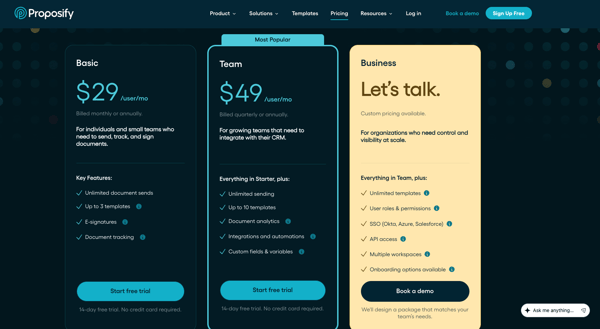
The promise is proposals that look like you hired a designer, without hiring one. I liked how quickly the workflow came together. Once a template is built, sending proposals takes just minutes, with analytics helping time follow-ups and e-signatures completing the process.
What does Proposify’s free plan include?
- Free trial on the Basic and Team plans, no credit card required (no free-forever tier)
- Full feature access during the trial: drag-and-drop editor, template library, e-signatures, payments, and tracking
- Proposal analytics showing when a client opens and views the document
- Basic plan (after trial) includes 1 collaborator and a monthly document-send limit (extra sends $1.99 each)
- Team plan adds unlimited document sends and unlimited users
When should you upgrade your Proposify free plan?
Since the free access is a trial, the decision lands when it ends. A solo owner can stay on the Basic plan at $19/user/month, but a business sending proposals regularly will want the Team plan at $41/user/month for unlimited sends, CRM integrations, and custom branding. The Business plan at $65/user/month adds single sign-on, application programming interface (API) access, and approval workflows.
Where Proposify stands out:
- Polished, on-brand proposal output that lifts win rates without a designer on staff. The professional look and reusable templates draw the most praise.
- Proposal analytics and e-signature that tighten follow-up and close the deal in one place, with open-and-view tracking reviewers lean on daily.
What G2 users like about Proposify:
“I like Proposify for being the real workhorse for our sales team, taking the grunt work out of writing, sending, and chasing proposals. The Salesforce integration is the part I lean on hardest because I only have to update a deal in one place, and everything flows through. Our Salesforce admin built out the tracking views so I can see exactly where each proposal sits without flipping between tabs. Marketing has taken to it too, since they finally have a way to lock down our branding and boilerplate language without playing whack-a-mole every time a rep tweaks a template.”
– Proposify review, Maria A.
Is Proposify right for your small business?
Best for: Small agencies, consultancies, and service businesses that win work through professional, branded proposals and quotes.
Not ideal for: Owners who just need to store or e-sign the occasional contract, because Proposify’s proposal-design depth and per-user pricing are more than that job requires.
What I dislike about Proposify:
- Deeper tailoring is where Proposify’s customization runs thin, G2 users say. Complex proposals bump into that ceiling, while teams making standard, professional ones get a builder that stays quick and simple.
- The design workflow bends less than expected when shaping layouts, per feedback on G2. Fine-grained control is where that shows, but teams working within the existing templates get an editor that stays fast and easy to use.
What G2 users dislike about Proposify:
“For integrating MS Excel and other office files to the quote plans, you will need to buy the premium plan of Proposify, and the premium plan is also a little costly. As a quotation is something which can also be made in other software, so spending a large amount of money for its premium is not worth it at all according to my experience but I generally prefer using its free plan.”
– Proposify review, Rohan T.
7. Qwilr: Best for interactive, web-based proposals that stand out
Qwilr doesn’t send a document at all. It sends a web page: drag-and-drop blocks, embedded media, interactive pricing, and built-in e-sign, all behind one shareable link. For a small business trying to look bigger and more modern than its size, that presentation is the whole draw. I could put together polished proposals in minutes instead of spending hours formatting them.
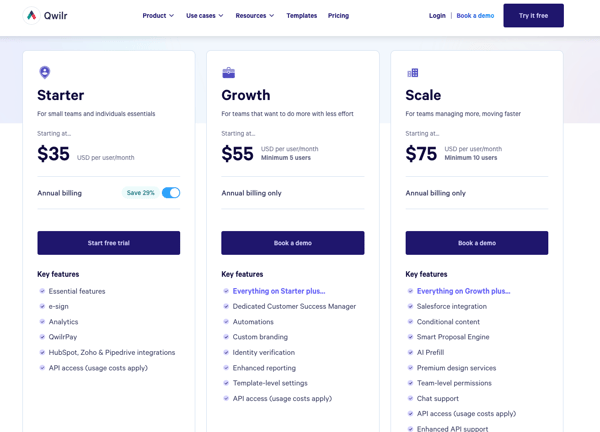
Buyers can pick options right on the page through interactive quote blocks, and clean CRM sync, HubSpot especially, keeps deal data flowing without re-entry.
What does Qwilr’s free plan include?
- 14-day free trial of the Starter plan, full Starter access, no credit card (no free-forever tier)
- Unlimited shareable, link-based Qwilr pages
- Built-in e-sign, analytics, and QwilrPay (payments)
- HubSpot, Zoho, and Pipedrive integrations; interactive quote blocks and a return on investment (ROI) calculator
- Free usage credits for automation and AI to try before you buy
- After the trial, Qwilr Pages stay live for 30 days, but account access ends unless you subscribe
When should you upgrade your Qwilr free plan?
The trigger is simply the end of the 14-day trial: keeping the interactive proposals means the Starter plan at $35/user/month. Removing Qwilr branding, adding automations, identity verification, and Salesforce, or getting a dedicated customer success manager moves you to the Growth plan at $55/user/month (five-user minimum).
Where Qwilr stands out:
- Interactive, professional-looking proposals built fast from drag-and-drop blocks. How quick and polished the output is draws the most praise.
- Interactive pricing and quote blocks, plus CRM sync, that speed up quoting, with tiers bundled on a single page alongside HubSpot and Salesforce.
What G2 users like about Qwilr:
“I love how flexible it is to build different proposal blocks that I can simply drag and drop into my presentation. It also integrates really well with HubSpot. At $35/user/month, the pricing was a no-brainer for me. The LLM and AI elements genuinely speed things up and help my presentation look great. The program is very easy to use and reliably performs when I need it to. I also appreciate that it always saves my place if I get pulled away to another task. Support has been stellar and very responsive.”
– Qwilr review, Ryan P.
Is Qwilr right for your small business?
Best for: Businesses that win work through standout, interactive proposals and want e-sign, payments, and CRM sync in one modern page.
Not ideal for: Owners who mainly need to store or e-sign standard contracts, because Qwilr’s interactive-proposal focus (and $35/seat entry) is more than that job needs.
What I dislike about Qwilr:
- HubSpot and QuickBooks are the connections G2 users flag as less smooth than expected. Workflows built around those two tools feel that friction, while teams running Qwilr with a lighter or different stack get a proposal platform that fits cleanly into their setup.
- Design flexibility narrows past the essentials, per feedback on G2. Highly customized layouts and brand-specific formatting hit that limit, but teams building clean, professional proposals within the existing structure get a tool that stays fast to set up and easy to send.
What G2 users dislike about Qwilr:
“It’s a bit of a hassle that you have to use the exact same email address in both Qwilr and HubSpot for the pages to link correctly. Even a small mismatch in login credentials can prevent the integration from triggering the way it should, which is frustrating when you’re trying to keep your CRM data organized and connected without having to do manual troubleshooting.”
– Qwilr review, Tyson C.
8. Signeasy: Best for fast, no-fuss e-signing across desktop and mobile
Everything on this list does more than Signeasy. None of it does less, and that’s the pitch. Signeasy makes signing and sending a document about as frictionless as it gets on any device, with a free plan for light volume and transparent, low-cost paid tiers. No printing, no scanning, no platform to learn.
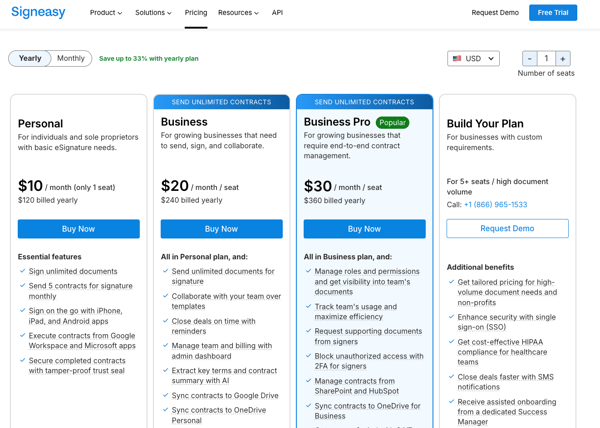
This is the tool for the owner who signs a handful of contracts a month and wants nothing to study. It comes with strong mobile apps, Google Drive integration, and stored contacts that spare you from re-entering client details. The free plan covers three documents a month, and the $10 Personal tier is a small step up.
What does Signeasy’s free plan include?
- Free forever on the Free plan (3 documents per month)
- Sign documents yourself and send a few for signature at no cost
- Online document signer that imports 25+ file formats
- Mobile apps for iPhone, iPad, and Android
- 14-day free trial of paid features on top (no credit card; 100-day money-back guarantee)
- Templates, unlimited sends, team collaboration, and AI term extraction are reserved for paid plans
When should you upgrade your Signeasy free plan?
The three-documents-a-month cap is the wall most businesses hit first. Sending more, or wanting templates and automated reminders, means the Personal plan at $10/month (five sends and five templates) or the Business plan at $20/user/month for unlimited sends, team templates, and reminders. Business Pro at $30/user/month adds end-to-end contract management and AI term extraction.
Where Signeasy stands out:
- Effortless signing across desktop and mobile that small teams adopt on the spot. Simple, fast, and “almost too easy” is how reviewers put it.
- A usable free tier plus affordable, transparent pricing, with handy touches like stored contacts and reusable templates. Value for money comes up again and again.
What G2 users like about Signeasy:
“I really like Signeasy’s free tier, which is excellent for small companies like ours. It’s a great way to start with digitally signed documents, especially if you’re only signing two or three documents per month since it’s all free. I also find it extremely valuable that Signeasy stores contacts after you send documents. This feature makes subsequent document signing much easier since you don’t have to re-enter contact information each time.”
– Signeasy review, Vivek T.
Is Signeasy right for your small business?
Best for: Businesses that mainly need to sign and send a low-to-moderate volume of contracts quickly, especially on mobile, at a low, transparent price.
Not ideal for: Owners who need proposal design, deep CRM-connected sales rooms, or a full contract repository, because Signeasy is deliberately focused on signing, not creating or managing at scale.
What I dislike about Signeasy:
Pricing is higher than some individuals and small businesses expect for what they need day-to-day, and G2 reviewers suggest the plans could flex more for smaller-scale use. Solo users or small teams with lighter proposal volume may find that cost harder to justify. Growing teams sending proposals regularly, though, get a platform whose price matches the volume and polish it delivers.
What G2 users dislike about Signeasy:
“Support services barely answer my queries. Company plans can be costly, especially for small companies.”
– Signeasy review, Nick M.
Frequently asked questions about free contract management software for small businesses
Have more questions? Find more answers below.
1. What is the best free contract management software for small businesses in 2026?
There is no single winner, because the best tool depends on the job. PandaDoc is the strongest free all-rounder for creating, sending, and e-signing documents; Jotform Sign is best if you already work in forms; Signeasy is best for the simplest possible signing; and Oneflow is best for signing unlimited PDF contracts free. If your real pain is storing contracts and catching renewals, ContractSafe is purpose-built for that, though it is trial-only.
2. Is any of this software free forever, or is everything just a free trial?
Both exist on this list. Four tools have true free-forever tiers: Jotform Sign, Oneflow, PandaDoc, and Signeasy. The other four are free-trial only: ContractSafe (7 days), GetAccept (14 days), Proposify, and Qwilr (14 days). “Free” here covers free-forever plans, freemium tiers, and free trials.
3. Which free contract management tools have no time limit on the free plan?
The free-forever tools have no expiry: Jotform Sign (Starter plan), Oneflow (PDF plan), PandaDoc (Free eSign plan), and Signeasy (Free plan). The other four (ContractSafe, GetAccept, Proposify, and Qwilr) are time-boxed trials that end after 7 or 14 days.
4. What is the best free way to organize and store all of a business’s contracts in one place?
ContractSafe is purpose-built for this, with a searchable central repository, tagging, and metadata extraction that keep every signed contract findable in seconds. It is worth noting that ContractSafe is trial-only rather than free-forever, so it suits businesses ready to commit once the trial proves the value. For lighter needs, PandaDoc offers unlimited document storage on its free plan.
5. Free plan vs paid plan: when does a small business need to upgrade from the free tier?
Upgrade when one of three triggers hits: you exceed the free document cap, more than one or two people need to collaborate (or you need shareable links, integrations, and branding removed), or you need automation and a searchable repository rather than static signed files. The cheapest step up is Signeasy Personal at $10/month, followed by PandaDoc Starter and Proposify Basic at $19/user/month.
6. Is a free e-signature tool enough, or does a small business need full contract management software?
For most small businesses that mainly sign and send agreements, a free e-signature tool like Signeasy, Jotform Sign, or PandaDoc’s free plan is enough. You need fuller contract management when you have to track renewals, search a growing archive, or manage interactive contracts. That is where a repository like ContractSafe or a platform like Oneflow earns its place.
Free gets you further than you think
Most small businesses overthink this decision. The right free contract management software isn’t the one with the longest feature list.
It’s the one that removes friction from how your team actually creates, signs, and tracks contracts. Try one. Run your real contracts through it for a week.
Ready to compare the full market? Explore G2’s highest-rated contract management software for ratings and reviews across every tool.