I evaluated 20+ tools to find the 7 best reference management software for 2026. These include Paperguide, EasyBib.com, Mendeley, Logically, EndNote, Scopus, and ReadCube.
If you’ve ever faced the task of retracing your steps to find that one article you swore you saved, you’re not alone. I’ve been there more times than I care to admit.
As someone who works on research-heavy projects daily, I’ve learned the hard way that relying on bookmarks, spreadsheets, or memory just doesn’t cut it. Whether I’m gathering industry reports for a whitepaper, pulling data for SEO content, or citing research papers in thought leadership pieces, keeping track of references is a job in itself.
For a long time, I relied on a messy system of browser tabs, hastily named files, and scattered notes, until I realized how many hours it was costing me. That’s when I looked into the best reference manager tools, built to organize and cite sources without the manual overhead.
Reference management software isn’t just about keeping sources organized, it’s about reclaiming time and reducing the stress of last-minute formatting or forgotten citations.
To narrow the field, I analyzed more than 20 tools, comparing their functionality, ease of use, and fit for different research workflows using G2 reviews and product documentation.
Whether you’re working on academic research, content creation, or any other project that demands precise referencing, my list of the 7 best reference managers is here to match your needs.
7 best reference manager tools for 2026: My top picks
- Paperguide: Best for AI-assisted academic writing
Runs deep-research searches, extracts findings into literature-review tables, and helps draft cited papers for students and individual researchers. (start from $12/month) - EasyBib.com: Best for students generating quick citations
Generates citations in MLA, APA, and Chicago reference formats and checks grammar and plagiarism for student papers. (pricing on request) - Mendeley: Best for free, cross-platform reference management
Imports sources across browsers and operating systems and shares libraries with research groups. (starts from $4.99/month) - Logically: Best for AI chat across your research library
Lets you question your own documents with a choice of AI models, plus reference management and annotation. (starts from $12/user/month) - EndNote: Best for Word-based citation management at scale
Cites while you write for Microsoft Word, thousands of output styles, and cloud sync for large libraries. (One-time license, starts from $120 for students) - Scopus: Best for tracking research citation impact
Monitors authorship, journal quality, and scholarly output across fields and maintains multidisciplinary abstract and citation database. (pricing on request) - ReadCube: Best for annotating scholarly PDFs
Streamlines discovery, organization, citation, and highlighting of scholarly articles synced across desktop and iPad. (starts from $7/month)
*These reference management tools are top-rated in their category, according to G2’s Summer 2026 Grid Reports. I’ve also included their starting price of paid plans to facilitate easier comparisons for you.
7 best reference manager and citation tools I analyzed
Reference management software organizes, stores, and cites your sources from one place. In research-heavy work, that is the difference between articles, whitepapers, and shared resource lists coming together quickly and a pile of browser tabs to retrace later.
The pressure here only grows. Worldwide research output reached about 3.5 million articles in 2024, up from 2 million in 2010.
That volume is the backdrop to every tool I compared here: the better tools handle everything from automatic citation generation to cloud-based collaboration.
How did I find and evaluate the best reference manager?
First, I identified popular tools based on G2 grid reports, user reviews, and their commonly recommended features by professionals. Then, I compared how each tool handles the jobs reference management tools are bought for: organizing references for articles, building resource lists, and citing sources in collaborative and solo projects.
I examined each one on the criteria that decide these purchases, such as ease of use, integration with writing platforms like Google Docs and Microsoft Word, ability to handle various source types, and speed in generating accurate citations. I also looked for additional features such as cloud syncing, mobile access, and the flexibility to manage shared references within teams.
I also used AI to analyze product reviews on G2, digging into real users’ needs, motivations, and pain points.
The screenshots in this article come from each vendor’s G2 page and public product pages.
How I picked the best reference managers: My checklist
Think of reference managers as digital librarians: they keep your references in one place, format them for you, and connect to your writing tools. For the content-heavy projects I cover, a capable one is part of the core toolkit, not an afterthought.
Here are the factors I weighed, and focused on what set these seven apart:
- Ease of use and interface: I prioritized a clean, intuitive interface with a shallow learning curve. The faster you can add and organize references without fighting the navigation, the better a tool holds up under deadline pressure, which is what reviewers reward most.
- Citation accuracy and flexibility: Accurate citations across APA, MLA, Chicago, and other styles are the baseline I checked first. I also looked for customization, like editing a citation format or adding fields for less common source types such as reports and datasets.
- AI research and writing assistance: AI moved from an add-on to a general expectation in this category, so I weighed it directly. I looked at how each tool uses AI to summarize papers, answer questions about your own documents, suggest or check citations, and draft text, and how well those features stay grounded in your sources instead of inventing them.
- Integration with writing platforms: I compared how well each tool integrated with writing platforms typically used daily, like Google Docs. A strong citation manager should be able to pull citations directly from the tool’s library and insert them into documents with just a click. This integration is a time-saver and ensures the workflow stays smooth and uninterrupted.
- Source importing and accuracy: I looked for software that made it easy to import sources from various platforms, like academic journals, websites, and PDFs. The ability to automatically fetch accurate metadata from these sources was key. I checked whether the software could detect and extract the correct author names, titles, publication dates, and other necessary details without requiring manual adjustments.
- Collaboration and sharing: For easy virtual collaboration, I looked at shared libraries, notes on individual references, and real-time updates that keep a group from duplicating resources. It’s integral to research teams.
- Cloud syncing and multi-device access: Lastly, I gave credit for reliable cloud sync across desktop, web, and mobile, so a library stays current wherever you pick it up. For anyone moving between office and home machines, this is the difference between one source of truth and several stale copies.
- Data security, backup, and export: Because a reference library is years of work, I looked at where data is stored, how it is backed up, and how easily you can export everything (for example, to BibTeX or RIS) if you switch tools. Easy export is the best insurance against lock-in before a long contract.
- Pricing and plans: Pricing shifted across this category, so I compared plans side by side: free tiers, monthly and annual subscriptions, one-time licenses like EndNote’s, student and academic discounts, and quote-only enterprise pricing like Scopus’s. I also checked what the entry paid tier actually includes, since a free plan often caps storage or AI use.
After careful evaluation, I’ve identified the 7 reference management software managers that stood out the most. These reference and citation managers excelled in usability, functionality, and efficiency, making them perfect for researchers, writers, and professionals.
The list below contains genuine user reviews from the best reference management software category page. To be included in this category, a solution must:
- Provide multiple options for citation format
- Generate citations for various materials such as books, websites, journals, etc.
- Provide features that organize research and source information.
*This data was pulled from G2 in 2026. Some reviews may have been edited for clarity.
Did you know? The global market for reference management tools is valued at around USD 0.46 billion in 2026 and is projected to grow to USD 0.88 billion by 2035, with an estimated compound annual growth rate (CAGR) of 7.5% between 2026 and 2035.
1. Paperguide: Best for AI-assisted academic writing
Paperguide is an AI research assistant that helps you find sources, question them, and draft from them in one place. I’d point a solo researcher or graduate student to it when the writing itself, not just storing references, is the job.
It’s the highest-rated tool in this roundup: G2 Data gives it the top satisfaction score in Reference Management and a 4.6 out of 5 rating across 100+ reviews, with every reviewer rating it four or five stars. It’s also the youngest here, founded in 2023, and its reviewers cluster in higher education, health research, and consulting.
Paperguide’s center of gravity is the AI writing assistant. G2 reviewers describe outlining, drafting, and tightening a paper inside the tool, with the AI suggesting structure and phrasing as they go. The reviewers I read reach for it most when they are stuck at the start of a draft, and that blank-page help is the clearest reason to choose it over a plain reference manager.
It pairs that with an AI-assisted literature search. You pose a research question and Paperguide surfaces and summarizes relevant papers. I’d treat the results as a starting point rather than a finished review, but reviewers value how quickly it maps a topic and pulls candidate sources to work from.
On the references side, Paperguide generates and manages citations as you write, formatting them and keeping a library attached to the draft. This comes up almost as often as the writing features in the reviews I analyzed, and for a student, it means the bibliography builds alongside the paper.
You can also chat with a PDF, asking a single paper for a method or a finding without reading it end to end. Reviewers use this to get oriented in dense papers fast, and I’d point to it as the feature that turns a reading pile into something you can interrogate.
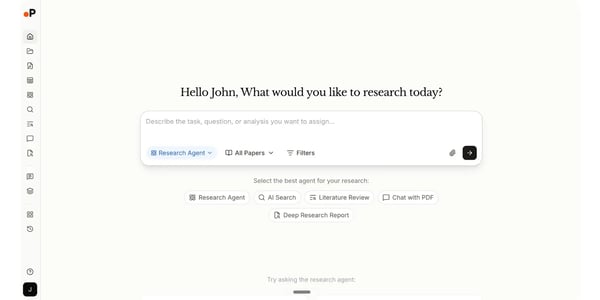
A capability reviewers single out as less common is structured data extraction. Paperguide pulls findings from a set of papers into a comparison table, the bones of a literature review. I’d weigh this for anyone synthesizing many studies, since it replaces a stack of manual notes.
Holding it together is an all-in-one workspace reviewers find easy to start with, search, read, chat, cite, and write without switching tools. G2 Data puts its ease-of-use satisfaction at 90%, and the highest overall satisfaction in the category tracks with how little friction reviewers report.
The most common point in recent reviews is speed on long documents. As a draft grows, reviewers say Paperguide can slow down. For everyday writing, it keeps up, and the same reviewers tend to call it reliable in the same breath, but if you work in very long files, I’d expect some waiting.
It’s also a young product still filling gaps. A few reviewers note that individual pieces aren’t yet as deep as a dedicated specialist tool, with the occasional feature hiccup or a result that needs a second pass. The breadth is the appeal for most, but if you need best-in-class depth in one narrow area, I’d test that piece before relying on it.
For a researcher or graduate student who wants help moving from sources to a finished draft, Paperguide is the tool I’d reach for first: it covers search, reading, citation, and writing in one place, and its reviewers, the most satisfied in this category, keep returning to that.
What I like about Paperguide:
- What I’d point to first is the writing help: reviewers describe handing it a blank page and getting an outline and a draft to shape, which is where it goes beyond a reference manager.
- I also rate the data-extraction tables, which reviewers use to pull findings from many papers into one comparison grid, the start of a literature review without the manual note-taking.
What G2 users like about Paperguide:
“I love this platform as it gives researchers most of the assistance required for in-depth analysis to come to a conclusion for the research. The platform also has other useful features, like a reference manager that allows users to find out all the sources of the article. Other than this, the writing assistant helps in summarizing, editing, and making the article grammatically correct while also providing the capacity to brainstorm with existing documents or completely new documents. Other than this, I also love the capability of this platform to allow chatting with PDF files, which allows users to grab the content of the document faster. Frankly, I am satisfied with the performance of this platform.”
– Paperguide review, Konjengbam M.
What I dislike about Paperguide:
- It keeps up for everyday writing, but reviewers say it can slow down on long documents, so for very large drafts, I’d expect some lag; the same reviewers still call it reliable.
- For a newer entrant in this category, it covers a lot, but a few reviewers note that some pieces aren’t as deep as a specialist app yet, so if one feature is critical to you, I’d test that piece first.
What G2 users dislike about Paperguide:
“I don’t think the search is quite there yet, and I find the interface a bit overloading. But they have a tough challenge and I think they are moving in the right direction.”
– Paperguide review, Lance C.
If managing your references is one-half of maintaining academic integrity, the other half ensures your work is plagiarism-free. Get the best plagiarism checkers to safeguard your work.
2. EasyBib.com: Best for students generating quick citations
EasyBib is a web-based citation generator built for students who need correct references fast. It is the tool I’d point a student to when the goal is a clean bibliography in minutes, not a full research library.
It has the largest Market Presence in G2’s Reference Management category, with a 4.6 out of 5 rating across 150+ reviews. The reviewer base is roughly half small businesses, with the rest split almost evenly between mid-market and enterprise users, and education is the dominant industry. That matches the reviews I read: this is an academic-first reference tool for students, researchers, and educators.
The clearest pattern I found across EasyBib’s reviews is how little there is to getting started. G2 reviewers describe a clean interface where you start typing a source and the tool returns a formatted citation, with no setup. G2 Data puts its ease-of-use satisfaction at 93%, above the category average, so for a student on a deadline that means citing without a tutorial.
That ease shows up most in speed. When I compared how the tools handle a quick one-off citation, EasyBib is hard to beat for a single source: reviewers say it generates citations in seconds and cuts the small mistakes that come from formatting by hand. You search or paste, copy the result, and move on.
Beyond speed, reviewers point to the range of sources it handles, books, journal articles, websites, and videos, pulling author, title, and date automatically. I cross-referenced this against the review text, and it holds up: you can cite a mix of media in one bibliography without switching tools.
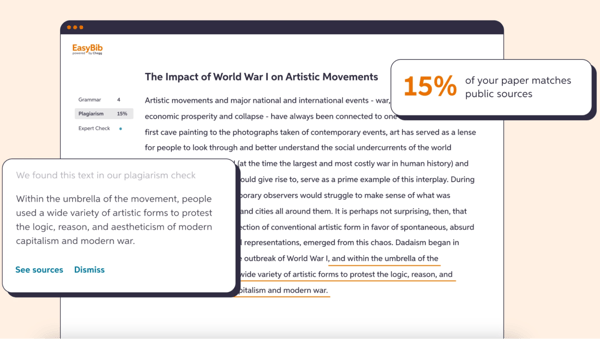
EasyBib also covers the citation styles coursework demands, APA, MLA, and Chicago, with thousands more in its paid tier. Reviewers who move between classes call this out as why they keep it, and it is the feature I’d weigh most for anyone juggling formats from different professors.
What separates EasyBib from a plain citation generator is the built-in plagiarism checker. Roughly a sixth of the reviews I analyzed singled it out, using it to check originality before submitting. For coursework with strict academic-integrity rules, that check happens in the same place you make your citations.
Several G2 reviewers pair that with EasyBib’s grammar and writing checks, which a number of them, particularly non-native English writers, describe as the reason they open it daily. I’d read this as EasyBib leaning on its Chegg writing tools: you fix a sentence and cite a source in one pass.
The free tier covers everyday citing, but reviewers note that auto-bibliography and extra storage sit behind the paid plan. I’d point heavy users, anyone writing long papers, toward the upgrade, while occasional users stay free without missing much. This is the leading dislike theme, and it lands on students, who are exactly EasyBib’s core users.
On the free version the core tools are genuinely free to use, though reviewers find the ads and pop-ups distracting during longer sessions, the most common gripe after pricing. For quick lookups they fade into the background, and the paid tier removes them, so the impact depends on how long you sit in the tool.
For a student who needs citations done right and fast, EasyBib is the first option I’d reach for. It formats to the styles coursework asks for, checks writing along the way, and gets out of the way.
What I like about EasyBib.com:
- What I keep coming back to in the reviews is how fast it is to start. Reviewers describe typing in a source and getting a formatted citation in seconds, with nothing to set up.
- Reviewers, particularly non-native English writers, repeatedly credit the built-in plagiarism and grammar checks, which I’d flag as what lifts EasyBib above a plain citation generator.
What G2 users like about EasyBib.com:
“EasyBib.com is a very reliable and convenient tool for generating citations and managing references. The platform is intuitive, making it easy to create accurate citations in multiple formats with just a few clicks. The additional features like grammar checks and plagiarism detection are also very useful for maintaining academic integrity and improving overall writing quality.”
– EasyBib.com review, Aakash T.
What I dislike about EasyBib.com:
- The free tier handles everyday citing, but reviewers note auto-bibliography and added storage sit behind the paid plan, so I’d steer anyone writing long papers toward the upgrade, while lighter users stay free.
- The core tools are free to use, though reviewers find the ads and pop-ups distracting in longer sessions; for quick lookups, they barely register, and the paid tier clears them out.
What G2 users dislike about EasyBib.com:
“In the free version, there can be more suggestions, and there are too many ads in the free version. It takes time to search for any specific topic.”
– EasyBib.com review, Dheeraj P.
3. Mendeley: Best for free, cross-platform reference management
Mendeley is a free reference manager that academic teams use to store references, read and annotate papers, and cite them in their writing. Its shared groups are the reason I’d point a research team to it when several people draw on the same sources.
Mendeley holds a 4.3 out of 5 rating across 240+ G2 reviews, with 86% of reviewers saying they would recommend it. Higher education and research dominate its reviewer base, which fits its academic focus. And while it is free for individuals, nearly half of reviewers come from organizations with more than 1,000 employees, pointing to use across both solo research workflows and larger institutions.
Mendeley’s biggest draw across the reviews I analyzed is its citation handling. The Word plugin lets you insert references, switch styles, and build a bibliography inside your document, and citation or referencing comes up more than any other feature. For anyone writing papers, that is the core job done well.
From what I read from G2 reviewers, many consistently call it easy to set up and use, often the most user-friendly manager they have tried. You add references and start organizing without a manual, and I’d rate onboarding as one of its real strengths.
I noticed that adding sources is fast. Several reviewers say Web Importer pulls a reference straight from a journal page, and Mendeley auto-extracts titles, authors, and years from PDFs. Reviewers say this saves hours over manual entry, and it is the step I’d expect to save you the most time.
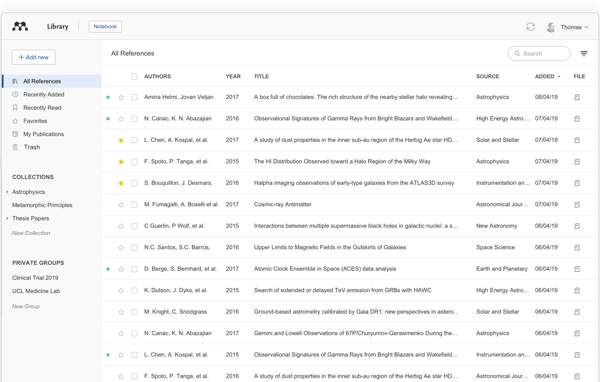
Inside the app, you read and annotate PDFs directly, with highlights and notes that stay attached to the document. A large share of the G2 reviews I read treat it as a reading workspace, so for working through a stack of papers, your notes live next to the source.
Mendeley’s shared groups are the feature behind its positioning here. A team can pool references, annotate the same documents, and comment on each other’s notes. On G2, many reviewers on group projects describe this as what keeps overlapping sources straight, and I’d weigh it most for labs and co-authored work.
The reason I’d flag it for anyone working to a budget is all of this is free for individuals, across Windows, Mac, Linux, and the web. Many reviewers on free plan note that a capable manager at no cost is rare, particularly for students and early-career researchers.
For everyday libraries Mendeley runs fine, but a few reviewers say it slows down once a library grows large. If you store thousands of references, I’d expect some lag and would keep the library tidy; for typical collections, it stays responsive.
Auto-extraction works well on recent, well-formatted papers, which is most of what you will add. Where reviewers hit friction is older or poorly scanned PDFs, where author names or dates can import wrong and need a manual fix. I’d budget a little cleanup time for legacy documents, not for day-to-day importing.
Mendeley remains a solid choice for managing references and integrating citations into academic writing, especially for those primarily working on desktop environments.
What I like about Mendeley:
- The auto-populated metadata is what I’d point to first: reviewers describe dropping in a PDF and having author, title, and journal filled in, which cuts the manual entry that eats research time.
- Reviewers on team projects credit the shared folders, where a group adds sources, annotates documents, and comments on each other’s notes without ending up with duplicate references.
What G2 users like about Mendeley:
“I have used Mendeley extensively, and it has been very helpful for managing a large volume of journal articles, which is a daily necessity in research. It makes the overall process feel seamless, organized, and well structured.”
– Mendeley review, Muzammil Sharief D.
What I dislike about Mendeley:
- For most libraries, it is responsive, but reviewers note it can slow down with very large collections, so I’d keep a big library organized; everyday use stays smooth.
- Metadata lands cleanly for newer papers, though reviewers say older or poorly scanned PDFs can import the wrong author or date, which means a quick manual fix on legacy files.
What G2 users dislike about Mendeley:
“One limitation of the application is that it does not display all the folders or collections in which a reference is located. This can make organization and navigation more difficult in complex projects. Additionally, the application would benefit from deeper integration with other productivity and knowledge management tools such as Obsidian or Notion, to better support connected and flexible research workflows.”
– Mendeley review, Oscar O.
4. Logically: Best for AI chat across your research library
Logically (formerly Afforai) is an AI workspace built around chatting with your own documents: you load a research library and ask it questions. I’d point to it when the job is interrogating sources you have already gathered, rather than drafting a paper from scratch.
Logically holds a 4.5 rating across more than 140 reviews and 91% of reviewers saying they would recommend it. Its base is broader than the academic tools here: marketing, consulting, and higher education all show up, which fits a tool built to question any set of documents.
Logically’s core is chatting with your documents. You upload papers, reports, or a whole library and ask questions across all of them, and reviewers describe building a private chatbot over their own resources to query instead of re-reading. I’d point to this multi-document Q&A as the reason to pick it: the answers come from what you loaded, not the open web.
What sets it apart from most assistants is letting you choose the AI model. Reviewers mention switching between leading models depending on the task, and I’d weigh that for anyone who wants control over which engine answers rather than being locked to a single provider.
Its answers come back grounded in your sources, with citations, which reviewers tie to research credibility; one point to the large database of papers behind it. For work where a claim needs a traceable source, I’d value that the answer links back to the document it came from.
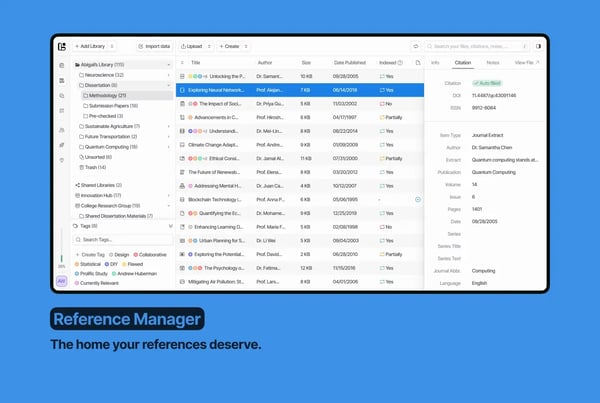
Around the chat sits a reference manager and annotator. You organize the library, highlight, and keep notes alongside the documents you are questioning. Reviewers treat it as a place to both store and interrogate sources, which I’d call the difference between a chatbot and a workspace.
It also summarizes papers and long documents on demand, giving you the gist before you commit to a full read. Many reviewers lean on this to triage a reading list, and I’d use it the same way, as a filter before spending time on a paper.
All of this stays easy to use, the single most common point of praise in its reviews, with a quick setup. G2 Data puts its ease-of-use satisfaction at 92% and quality of support at 94%, and that low-friction start is part of why reviewers adopt it quickly.
The sharpest recent complaint is the plan changes. Reviewers place it on the higher-end, and a few say their plan’s storage or model access was reduced or re-tiered after purchase. Lower tiers may be enough for light use, but if you are weighing a paid plan, I’d confirm exactly what your tier includes first, particularly given how quickly the product has been changing.
Reviewers also note that the AI assistant can be slow to respond, sometimes ten seconds or more, particularly across a large library. For a handful of questions, that is fine, but for heavy back-and-forth, I’d expect some waiting, and it is the most frequent functional gripe in the reviews.
For someone who has gathered a pile of sources and wants to question them with AI, on their own choice of model and within their own library, Logically is the tool I’d reach for.
What I like about Logically:
- What I’d point to first is the document chat. G2 reviewers describe loading their own resources and building a chatbot they can question, which saves re-reading to find one answer.
- I also rate the model choice and the cited answers; reviewers value picking the AI engine and getting responses that point back to the source they came from.
What G2 users like about Logically:
“I was able to build my own chatbot that could load various professional resources and enquire about them.
I was able to save time researching and thinking about them, which increased my productivity.”
– Logically review, Mihara E.
What I dislike about Logically:
- The lower tiers can be enough, but reviewers find it expensive, and a few report plan or storage changes after buying, so I’d confirm what a tier includes before paying.
- It handles a few questions fine, though reviewers say the assistant can take ten seconds or more to answer across a big library, so for heavy use, I’d expect some waiting.
What G2 users dislike about Logically:
“The range of functions could be larger, for example, in the area of deep research. An agent system for deeper research, correction, or writing of articles would also be cool.”
– Logically review, Marian Z.
5. EndNote: Best for Word-based citation management at scale
EndNote is the tool I recommend when in need of a powerful reference manager with deep control over styles for large-scale and demanding projects. It’s a desktop reference manager built for researchers handling complex bibliographies and need exacting citation formats.
EndNote has a large market presence and a long track record in academia, with a 4.1 rating across more than 180 G2 reviews. Its reviewers skew to higher education, research, and medical fields, the power users it is really built for. It is a paid, desktop-first tool, which shapes who it suits.
EndNote’s central job is citing inside MS Word, and it is what I saw praised most alongside its styles. The Cite While You Write plugin inserts references and rebuilds the bibliography automatically as you add or remove citations. For a long manuscript, the reference list stays correct without you touching it.
The strongest theme in EndNote’s reviews is its citation styles. It ships with thousands and lets you modify one or build a new style to a specific journal’s rules. I’d weigh this strongly for anyone who submits to journals with strict or unusual formatting, where lighter tools run out of room.
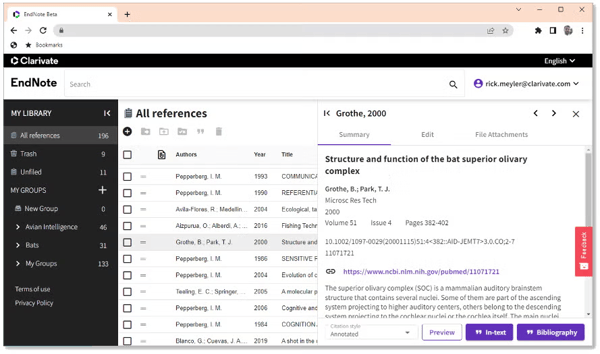
EndNote is built for scale. It handles libraries of thousands of references and flags duplicates automatically on import. I’d point to that as the reason it holds up for systematic reviews and multi-year projects, the work where smaller managers start to strain.
Many reviewers describe setting up a group that tracks only the references cited in a draft, and I’d find that automatic grouping most useful once a library grows past a few hundred items.
Retrieval stays fast. I can see from the reviews that you search and filter by keyword, author, or publication type and get results in seconds. For a large collection, that speed is part of what justifies a dedicated desktop app over a browser tool.
EndNote also attaches PDFs to their references, so the full text sits with the citation and you read or annotate in one place. Reviewers who manage reading lists alongside citations call this out, and I’d treat it as what makes EndNote a library rather than just a citation generator.
EndNote’s power comes with a learning curve, and this is the clearest pattern in its reviews. The interface is dense, and reviewers describe trial and error before they are comfortable, which lines up with its below-average ease-of-use score in G2 Data. I’d budget real onboarding time, but committed power users say the payoff comes once you are past it.
EndNote is also a paid option in a field of free rivals. It requires a one-time license rather than a subscription, with major version upgrades costing extra. Institutions often provide it free to members, so many academic users never see the bill, but independent researchers and students without that access do.
For a researcher with a heavy library and exacting citation needs who works on the desktop, EndNote is the tool I’d still recommend: deep style control, scale, and tight Word integration in one place. In fields where citation precision matters most, that depth is why it has lasted.
What I like about EndNote:
- What I’d point to first is the pairing of Word integration and citation styles: reviewers describe inserting citations in Word and having them formatted to a journal’s exact style without manual cleanup.
- I also rate the smart groups, which reviewers use to auto-collect references by keyword, year, or tag, so a group can track just the sources cited in a current draft.
What G2 users like about EndNote:
“Ever since, I have used many referencing applications during my research at university. Still, I found EndNote to be one of the most profound applications with numerous benefits over conventional apps. It manages the references effectively and can attach PDF documents. It offers the ability to edit the pre-made library or make a new one at a time. Furthermore, building and effectively managing any kind of project is helpful. I would recommend it to writers, scientists, and students to enjoy this resource for effective research project management or development.
In short, I found it very helpful in integration with Microsoft Word, Excel, and other Word Processors; mainly, the integration process is easy and automatically added to the secondary software.”
– EndNote review, Nabeel S.
What I dislike about EndNote:
- The range of features and power of EndNote is real, but reviewers say there’s a learning curve and a dense interface before it clicks. So I’d plan for some ramp-up. Once you’re past it, the time savings compound.
- It does the job well, though it’s the paid option among free rivals and charges for major upgrades, which I’d weigh if you’re an individual and don’t have an institutional license.
What G2 users dislike about EndNote:
“While EndNote offers numerous benefits, the software was initially somewhat challenging to learn. It isn’t that the user interface is unclear — quite the opposite — it just is not the most intuitive and requires a bit of trial and error before achieving a place of comfort with the software. However, once this expertise is completed, the time saved grows exponentially.
Users should think of this as an initial time investment — yes, it will take a bit of extra time in the beginning, perhaps even above and beyond that of simply organizing the references manually. Still, after several uses, the saved time becomes immeasurable.”
– EndNote review, Zachary Z.
6. Scopus: Best for tracking research citation impact
Scopus is an abstract and citation database from Elsevier, best for researchers who need to track citations and measure research impact across disciplines. When I sorted this lineup by the job each tool does, Scopus landed in its own category: it is where I’d go for bibliometrics and literature discovery, not for managing a personal library.
I’ll call Scopus the outlier here, and say it plainly: it’s an abstract and citation database, not a traditional reference manager. On G2, it holds a 4.6 out of 5 rating, with reviewers split fairly evenly across small business, mid-market, and enterprise organizations. It earns its spot for one job: tracking research impact, which I’d call a standard in academia.
Scopus’s core is citation tracking: cited-by counts, citation trends over time, and the ability to follow which papers cite a study. In the reviews I analyzed, this is the first thing people reach for, and I’d point to it as the main reason to open Scopus, you see how a study landed and trace the work built on it.
It also profiles authors and their metrics, h-index, total output, and co-authors. I read several G2 reviewers using these to size up a researcher’s profile, and I’d find that useful whether you are vetting a collaborator or documenting your own track record.

For deciding where to publish, Scopus reports journal metrics like CiteScore, SJR, and SNIP. Reviewers single these out for judging a journal’s standing quickly, and it is the metric set I’d lean on for anyone choosing where to submit.
Search is detailed and filterable, and I can see why that matters in the reviews. You query by subject area, author, ISSN, or publisher, then narrow by date, citation count, or document type. That control is what I’d want for pulling relevant studies without wading through noise.
Underpinning all of it is broad, vetted indexing, millions of peer-reviewed articles and conference proceedings. Reviewers value not second-guessing what they find, and that credibility is why I’d reach for it over an open web search for serious work.
For this lineup specifically, I’d frame Scopus as the discovery-and-metrics layer that feeds your reference manager. It can export records to Mendeley and EndNote, so I’d treat it as a complement to the tool you write in, not a replacement.
Coverage is deep for established literature, but the point I saw raised most in the reviews is that indexing can lag. Some journals don’t show current-year coverage, and citation counts can take weeks to appear. For a retrospective review that rarely matters, for job or grant applications, I’d verify recent items directly.
Most academic users reach Scopus through an institution, where access is smooth. The limit I’d flag is that it’s subscription-only and individuals, independent researchers, or anyone between affiliations typically hit a paywall and pay a price. With campus access, this is a non-issue; without it, I’d factor the cost in first.
For a researcher focused on bibliometrics, author discovery, and literature mapping, Scopus is the tool I’d reach for to measure impact and find vetted sources, then export what I need into a reference manager to write.
What I like about Scopus:
- What I’d point to first is the citation tracking. Several reviewers describe checking how often a paper has been cited and following the chain of work that built on it, and that is how I’d size up a study’s impact.
- The indexing is broad and vetted, and what I take from the reviews is that researchers trust the credibility of what they find across disciplines, without bouncing between databases.
What G2 users like about Scopus:
“Researcher resumes have scopus cited points (citation scores) added to their resume. These citations also help in evaluating a resercher’s profile and to know the impact of their work or to identify emerging trends in their field.
Updating one research profile is very easy. All my reserch is freequntly and sometime automatically added up to my profile. It is easily integrated with orcid.
Scopus has a reliable customer support system. I like the FAQ section offering a decent level of self-help for common issues.
However, the response time for specific queries would take a little time, may be because of different time zones.”
– Scopus review, Sudheer K.
What I dislike about Scopus:
- Coverage runs deep for established work, but reviewers note some journals lag on current-year indexing and citation counts can appear late, so for anything time-sensitive, I’d confirm recent records directly.
- Through an institution, access is smooth, though I’d flag that Scopus is subscription-only and expensive for individuals, which I’d weigh carefully if you don’t have campus access.
What G2 users dislike about Scopus:
“There is no downside in Scopus. But I can give a suggestion that some journals are not showing the present year coverage, but they have an excellent citescore, SJR, and SNIP.”
– Scopus review, Arunvinodh C.
7. ReadCube: Best for annotating scholarly PDFs
ReadCube (sold as Papers) is a reading-first reference manager built for researchers who spend their day inside PDFs. For marking up papers and keeping a large library searchable, it is the tool I’d put in front of a heavy reader.
ReadCube’s G2 profile is very much research-led. It holds 4.4 out of 5 rating across 170+ reviews, with 87% of reviewers saying they would recommend it. Research, higher education, and biotech lead the industry mix, and the unusual split between small businesses (53%) and enterprises (34%) actually fits the category. It points to a tool used both by individual researchers and small labs, and by larger universities, biotech teams, and research organizations.
ReadCube’s enhanced PDF reader is the feature reviewers name first, and it’s where I’d start too. You highlight, drop sticky notes, and mark up a paper directly as you read, with notes saved against the document. For a researcher working through dense papers, this keeps your thinking attached to the source instead of in a separate file.
Once papers are in, ReadCube pulls them into a central library and downloads the PDF and supplementary files automatically. Across the reviews I analyzed, organizing a large collection is the single most-praised capability: reviewers describe dropping in a mix of articles and reports and having them sorted without manual filing.
Where a big library usually slows you down, ReadCube’s search keeps it usable. Reviewers say search works both inside their own library and across external sources, and you can search within a PDF by author, title, or keyword. I’d weigh this heavily for anyone whose library runs to hundreds of papers, since you retrieve a specific line, not just a file.
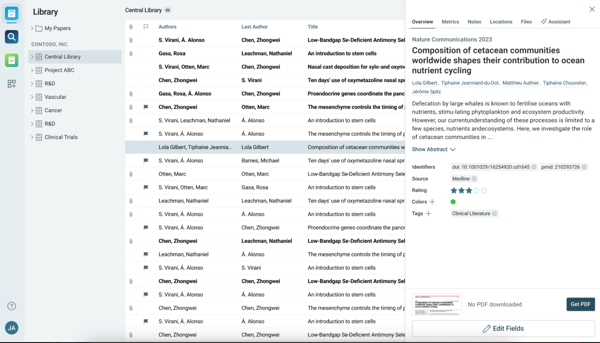
On the writing side, ReadCube manages references and inserts citations into Word and Google Docs, with a deep list of styles and export formats. Reviewers who build bibliographies point to that breadth of styles, which I’d flag as its main workflow draw, as the reason it fits how they write.
ReadCube also runs across the web, iOS, and Android, so you can read and annotate on an iPad and pick up the same library on a desktop. This came up often in the reviews I read, particularly from people who read on a tablet and write on a laptop.
Beyond managing what you have, ReadCube recommends related papers based on what you’re reading. Reviewers describe this as a useful nudge during a literature review. I’d treat it as a discovery aid rather than a precise filter, but for early-stage research, it widens the net.
The core reader is dependable for everyday reading, but some reviewers report that features like the reference-style display or the Word plugin intermittently stop working. If you rely on the Word integration all day, I’d run a trial before committing; for reading and annotation alone, this rarely gets in the way.
Importing is smooth when you already have the PDF in hand. The friction reviewers hit is the other direction: without the PDF, pulling in a reference is harder because there is no BibTeX or copy-paste import. Anyone migrating a database export or coming from older Papers versions should test that path first, while people who import one PDF at a time won’t notice.
For a researcher who reads and marks up papers all day, ReadCube is the one I’d put forward as a reading-first reference manager: annotate in the PDF, keep everything in one searchable library, and carry it across devices.
What I like about ReadCube:
- The annotation tools are what reviewers return to most: highlighting, sticky notes, and markup straight on the PDF, which is where I’d point a heavy reader first.
- I keep seeing the same point in the reviews. The central library and in-PDF search make a big collection searchable, so you can find a paper or a specific line without skimming.
What G2 users like about ReadCube:
“It supports multiple platforms (web, Android, iOS). But the best thing about Papers is the annotations you can do on your papers. I like to annotate my papers a lot, and you can easily do annotations and review your highlights.
I used Papers 3 (legacy), a Mac application, during my PhD, which was already awesome. The New Papers app is even better because of its multi-platform support.”
– ReadCube review, Prasidha K.
What I dislike about ReadCube:
- Day to day, the core reader holds up, but some reviewers, including recent ones, say features like the reference-style display or the Word plugin stop working intermittently. If you live in Word, I’d trial it first, though lighter users rarely hit it.
- Import is smooth when you have the PDF, though reviewers note it’s harder to pull a reference without one since there’s no BibTeX paste. For anyone importing straight from a database, I’d test that path early.
What G2 users dislike about ReadCube:
“It would be nice to have the option to save more searches, i.e., create more types of smart lists. It would also be great to have options to visualize connections between papers in my library. And finally, if there were a way to use my digital pen in the reading mode, that would be life-changing.”
– ReadCube review, Inka L.
Frequently asked questions about the best reference manager tools
Have more questions? Find more answers below.
Q. Which reference managers do researchers trust most, based on user reviews?
Paperguide earns the highest satisfaction score on G2 in reference management, with every reviewer rating it four or five stars. Among established tools, Mendeley and ReadCube draw the most consistent praise from researchers for organizing and citing sources. EndNote stays trusted for large, complex bibliographies despite a steeper learning curve.
Q. What is the best reference management software for enterprise and growing research teams?
EndNote scales best for enterprise and growing teams. It handles libraries of thousands of references with duplicate detection and institutional site licenses. Mendeley suits teams that want free shared groups for pooling and annotating sources. Organizations tracking research output across departments often add Scopus for its citation analytics and author metrics.
Q. Which reference tools offer the best cross-platform compatibility?
Mendeley offers the widest cross-platform support, with apps for Windows, Mac, Linux, and the web, worth checking before a multi-year commitment. ReadCube syncs across desktop, web, and iPad for researchers who read on tablets. For Mac specifically, both run natively, while browser-based tools like Logically and EasyBib work anywhere.
Q. How do reference managers handle data backup and library security?
Before a long-term contract, check backup and export options. Cloud-based tools like Mendeley, ReadCube, and Logically sync libraries automatically, while EndNote keeps a local library with cloud sync. To guard against lock-in, prioritize easy export to standard formats such as BibTeX or RIS, which Mendeley and EndNote both support.
Q. Which reference managers integrate best with writing tools like Word and Google Docs?
EndNote and Mendeley integrate most deeply with Microsoft Word, inserting citations and rebuilding bibliographies automatically as you edit. ReadCube also connects to Word and Google Docs. Paperguide takes a different route, drafting and citing inside its own AI editor rather than plugging into an external word processor, which suits writing-first workflows.
Q. Which platforms have the best citation accuracy and format support?
EndNote leads on format support, with thousands of citation styles and the option to build custom styles for specific journals. EasyBib handles the common styles, MLA, APA, and Chicago, accurately for students. Across tools, reviewers note that auto-generated citations still need a quick check on older or unusual sources, so verify before submitting.
Q. What is the best reference management software for full-text search and annotation?
ReadCube is the strongest pick for full-text search and annotation: you search inside PDFs by keyword and highlight or add sticky notes directly on the document. Mendeley also annotates PDFs and searches across a library. For AI-driven search, Logically lets you question your documents and answers from their full text.
Q. What are the best tools for research collaboration and reference sharing?
Mendeley is the first choice for collaboration: its free shared groups let teams pool references, annotate the same documents, and comment on each other’s notes. ReadCube also supports shared libraries for research teams. EndNote allows library sharing too, though every collaborator must install the software, which adds friction for ad-hoc groups.
Q. What is the best free reference management software?
Mendeley is the best fully free reference manager: it offers cloud sync, PDF annotation, Word integration, and shared groups at no cost, with only extra storage behind a paywall. EasyBib provides a free citation generator for quick references. Paperguide and Logically offer free tiers of their AI tools, with limits on paid features.
Q. Mendeley vs EndNote: which reference manager is better?
It depends on your work. Mendeley suits researchers who want a free, easy tool with shared groups and cross-platform access. EndNote fits power users managing large, complex bibliographies who need custom citation styles and deep Word integration, and who can absorb its learning curve and cost. For most students, Mendeley is the easier start.
Your next research chapter starts here.
Picking the right reference management software is a lot like finding a research partner. It has to match your style, adapt to your needs, and, most importantly, make your life easier.
For me, the best reference management software isn’t just about organizing citations; it’s about finding a system that keeps me focused and productive without getting in the way.
Whether you’re writing a paper, conducting extensive research, or just keeping track of sources for your next big project, I hope my review helps you find the perfect fit for your work.
If your research or projects involve teamwork, file sharing, or version tracking, getting the right cloud content collaboration software will ensure everyone stays on the same page.