Meta Advertiser Field Notes
Weekly observations from inside Meta ads
Meta made a couple of announcements this week that could have a real impact, especially if the new one-click, no-cost Conversions API is as simple as it sounds. Beyond that, there were several smaller updates that are easy to overlook now, but could matter later.
- No-cost, one-click Conversions API
- Meta pixel upgrade adds AI-powered data
- Expanded custom audience labels and value rules
- What are Dataset Attributes?
- Live video ads
- New creative workflow helps consolidate ads
Let’s get to it…
1. No-Cost, One-Click Conversions API
Meta made a couple of announcements recently, and this one could be the most impactful.
Meta announced a simpler way to set up Conversions API for web:
…we’re also making it significantly easier to set up the Conversions API for web, with the introduction of a Meta-enabled Conversions API setup – a one-click option that requires no technical expertise, no costs, no ongoing maintenance, and will allow businesses to get set up in minutes.
This could be a really big deal. Meta has pushed the benefits of the Conversions API for years (this announcement mentions a 17.8% lower cost when implemented), but technical hurdles and costs have always been obstacles, particularly for smaller businesses. Meta doesn’t provide details of this solution, but they used all of the magic words: “one-click,” “no technical expertise,” “no ongoing maintenance,” “set up in minutes,” and “NO COSTS.”
No costs? Really? In addition to being easy to set up? Sign me up.
The main question will be what downsides, if any, there are related to this new option. Otherwise, third-party vendors that generate revenue from these integrations could see a noticeable hit to their profits.
2. Meta Pixel Upgrade Adds AI-Powered Data
Meta actually led that announcement with what I believe is a less interesting update, though that may depend on your needs: An upgraded Meta pixel.
We’re introducing a new Meta Pixel feature that allows businesses to use AI to automatically include additional page and product information – such as product names, availability, and business details – with the events you share with Meta.
If you run ads for an e-commerce company, you surely know all about the importance of product catalogs. Advertisers can run catalog ads that dynamically pull product information from a feed provided by the company. The accuracy of that feed, of course, is critical.
Will this new automated way be more accurate? Will it be as accurate? Without more details, it’s difficult to grasp how exactly this will work and what potential downfalls there may be.
Apparently, this change will be forced on all advertisers in the future, though it can be turned off. From Meta:
Existing Meta Pixel users will receive a notification with a 30-day window to review the feature before it’s enabled. Advertisers can adjust or turn it off at any time through Events Manager, and they can also review and manage which specific data categories are shared so that they can optimize best for their business and compliance needs.
How does this impact advertisers who don’t already utilize a product catalog? Will it be a good thing or a detriment?
Look for this addition soon in your Events Manager.
3. Expanded Custom Audience Labels and Value Rules
Some advertisers have the option to add labels to custom audiences. Up until now, labels have only been for customer list custom audiences, and options included the following:
- Qualified Leads
- Disqualified Leads
- Customers
- High Value Customers
- Low Value Customers
I’m part of a test that expands these labels. Not only are there more options, but they also apply to website custom audiences.

There are now four categories of labels: Engaged Audiences, Customers, Restricted Audiences, and Other Audiences.
Engaged Audiences include labels for Qualified Leads, Disqualified Leads, App Installers, Trial Users, Cart Abandoners, and Other Engaged Users.

Customers include High Value, Low Value, Recent Purchasers, At Risk, Disengaged, and All Customers.

Restricted Audiences would only be those you can’t legally serve ads to.

And then Other includes Personas and three “Other” groups.

These labels don’t seem to have anything to do with Audience Segments. I’ve added labels and they did not impact the definitions of my Engaged Audience and Existing Customers in Advertising Settings.
So, what are labels for? That’s where the fun stuff starts. If you have these expanded labels, you probably also have a new value rule for Audiences.

These value rules then allow you to bid more or less based on the label.
This is something I’m currently digging into, and I’ll be covering it on my blog shortly. Stay tuned!
4. What Are Dataset Attributes?
Earlier this week, a field for Dataset Attributes appeared in my ad sets when using the Website conversion location and optimizing for conversions.

The tooltip says that this allows you to “track and measure the performance of the ad delivery for prioritized attributes from your dataset.”
What does that mean, exactly? The dropdown menu to select said attributes was empty. And based on every example I saw, others ran into the same thing.
Might this be related to event parameters? So, instead of focusing only on a purchase, it’s the purchase of a specific product, product category, price, or something else? While you could do this with custom conversions, Dataset Attributes would make that process easier so that custom conversions wouldn’t be required.
I’m only speculating since I can’t find any documentation and the feature has since disappeared. But I’m sure we’ll see this again soon.
5. Create Live Video Ads
If you host live Videos to your Facebook page, you can run Live Video Ads that promote your video while it broadcasts or after it ends.
To run Live Video Ads, you first need to have created a live video on your page and satisfy eligibility requirements. Then you may see the following option when in the ad set…

While similar to a regular video ad, Live Video Ads will highlight a “Live” icon while the video is being broadcast.
I don’t actively host live videos on my Facebook page, so I don’t have anything to share from personal experience. But you can learn more about how to set these up here.
6. New Creative Workflow Helps Consolidate Ads
I’m part of the test for Meta’s new creative workflow, and I think it will solve a lot of structural problems. The biggest opportunity is that it can help consolidate ads that may have otherwise resulted in inefficiencies. Let me explain…
Advertisers have become hyper-focused on creating diverse ads to lean into the power of Andromeda. That includes leveraging different formats. While prioritizing diverse formats is a solid goal, the old workflow presented some obstacles.
Single image or video ads gave advertisers the ability to build ads around one image or video. If you wanted to utilize both an image and video, you generally had to create separate ads. You could try to work around this by creating one ad, but you’d need to customize it to showcase an image in some placements and a video in others.
Neither option was ideal. If you created separate ads, would you utilize the same primary text and headlines in each ad? That conflicts with creative diversification, but it may also feel unnecessary and burdensome to create five primary text and headline options for an image and a completely different set for a video when the same text could have worked for both.
And customizing by placement for one ad wasn’t the best option either. You may assume that certain placements may be better for images and videos, but we’re not giving Meta much flexibility.
What’s funny is that Meta has been taunting us with a solution for a while. Related Media was the precursor to the new creative workflow. It allowed us to add multiple images and videos to a single ad.
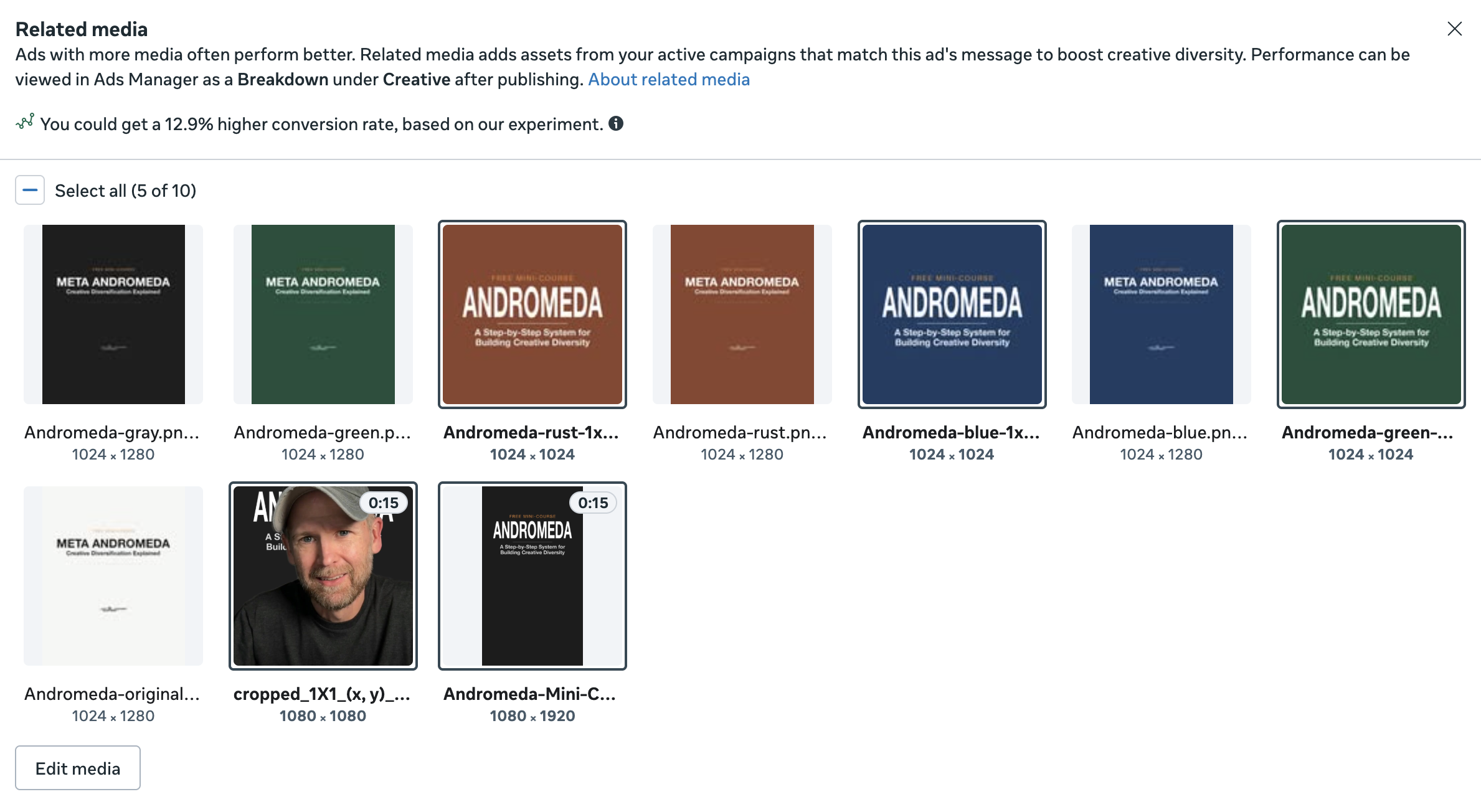
The main problem was that we were limited to the creative Meta recommended. And the customization of that Related Media is nonexistent.
The new creative workflow is exactly what I’ve been begging for. I want to create one ad that gives Meta multiple options of images and videos that could work with a specific set of text options. Then Meta can figure out which format and version would work for each person in a particular placement.
I’ve already consolidated my ads quite drastically. I’ve combined 36 ads from a single ad set into six.

And that includes two carousels that are different only by color. If I could combine them, I would (I’ll likely eventually turn one off as I see more results).
At minimum, this is much cleaner from an organizational standpoint. Will it lead to better results? That’s the part we’ll find out next.
Your Turn
What do you think about these updates?
Let me know in the comments below!