When I first explored AI video generators, I consistently came across two names: Synthesia and HeyGen. It was hard to ignore them, given their emerging popularity in crafting videos with lifelike virtual presenters.
Both platforms take text-to-speech and avatar technology to the next level, allowing users to create polished videos from scripts. However, as I delved deeper, it became clear that they cater to different audiences.
Synthesia, founded in 2017, is often the go-to choice for corporate training and multilingual internal communications. On the other hand, HeyGen has carved out a niche for itself among small businesses and content creators seeking hyper-realistic avatars. HeyGen was recently recognized as G2’s #1 Fastest Growing Product of 2025.
User ratings on G2 are telling. Synthesia holds a solid average of 4.7 out of 5 across around 2,376 reviews, while HeyGen takes a slight lead with 4.8 out of 5 from about 1194 reviews.
In this article, I’ll dive deep into the features, performance, and user experiences of both platforms to help you decide which AI video generator might be the best fit for your needs.
Synthesia vs. HeyGen: At a glance
To give you a quick view of how these two platforms stack up, here’s a feature comparison:
| Category | Synthesia | HeyGen |
| G2 rating | 4.7/5 | 4.8/5 |
| AI avatar type | Primarily pre-made corporate avatars; option to create custom avatars via upload (with extra process) | Strong support for user-generated personalized avatars (upload photo, clone voice, face-swap) |
| Language support | 140+ languages reported in some sources | 175+ languages (or higher, depending on plan) reported in some sources |
| Editing interface and workflow | Slide-deck-style editor, geared for structured content | Modern conversational AI editor, more flexible for marketing/social videos |
| Output format and quality | Standard MP4; higher-resolution downloads often require an upgrade/custom plan | MP4 download with 720p without upgrade; higher quality may require a higher tier |
| Ideal use case | Medium-to-large enterprises, training/learning & development, internal communications | Solo creators, small teams, marketing/social content, rapid generation of engaging videos |
| Customization and special features | Strong brand-kit support, scene transitions, enterprise integrations, and multilingual translation workflow | Advanced avatar features (talking photo avatars, face-swap, voice cloning), fast turnaround |
| Pricing and value | Pricing focused on enterprise tiers with minute limits on lower plans | More accessible pricing for creators/small teams with unlimited video minutes in some plans is claimed |
Synthesia vs. HeyGen: Differences and similarities
Below is a quick overview of the differences and similarities in the two AI video generation platforms.
Synthesia vs. HeyGen: What are the differences?
Both platforms showcase AI avatars and text-to-video capabilities, but they have distinct differences:
- AI avatars: Synthesia’s pre-made avatars provide enterprises with numerous on-brand presenter options, whereas HeyGen’s focus has been on making user-generated avatars easy to create. You can record a short video of yourself, and HeyGen will create a personalized avatar from it.
- Languages and voice technology: HeyGen supports 175+ languages and dialects, slightly more than Synthesia’s 140+ language palette. Each offers many accents and voices. Users can simply select a language and an AI voice, and the avatar will speak the script. HeyGen allows you to create a clone of your own voice from a sample. Synthesia has historically not offered self-service voice cloning, although it does allow users to upload their own recorded audio for an avatar to lip-sync.
- Editing interface: Synthesia’s interface is like a slide deck editor (similar to Google Slides). You build the video scene by scene, using text boxes, images, and the avatar, with dozens of business-oriented templates. HeyGen also utilizes a scene-based editor, but it comes with a larger library of creative templates and a richer built-in asset library. In terms of advanced features, Synthesia has introduced interactive video elements and provides an API for enterprise automation, reflecting its enterprise focus. HeyGen’s focus has been on rapid content creation; for instance, its new video agent AI generates videos from a prompt or URL, and it emphasizes ease of use over heavy integration.
- Performance and scalability: HeyGen is frequently praised for its speed. Users report that it generates videos and even revisions very fast, saving hours in content production. Synthesia is also generally fast, but some users have observed that at peak times (if many jobs are in the queue), rendering can slow down a bit.
Synthesia vs. HeyGen: What’s similar?
Here are some similarities between the two AI video generator platforms:
- Stock avatars + custom avatars: Each offers a sizeable built-in avatar library and the option to create a personal/custom avatar. These cover common business personas such as presenters, trainers, sales reps, and product explainers.
- Multilingual voices and dubbing: Both support broad language coverage for narration and localization, enabling global content. It enables fast localization workflows and maintains visual consistency when changing narration across regions.
- Browser-based editors with templates: Both provide web editors and ready-made templates for business and marketing use cases. This lowers the learning curve and shortens time-to-value. Teams move from script to finished video in minutes, not days.
- HD exports and standard formats: Both plans offer downloadable HD videos (MP4) on paid tiers; free tiers are available with usage/quality limits. It makes free plans suitable for testing, not production. For serious business use, HD exports on paid tiers are table stakes, and both platforms meet that expectation.
How I compared Synthesia and HeyGen: My evaluation criteria
I tested the platforms on their free version. To fairly assess Synthesia and HeyGen, I focused on several key criteria:
- User interface
- Avatar realism
- Voice quality
- Editing flexibility
- Output quality and formats
On Synthesia, I had to follow a manual route, selecting a template, writing the script, and then editing and generating the video. During my first test, I prompted the AI to develop the script and create the outline. However, when I tried to use it again, the platform required an upgrade to a paid plan. This is why I had to take a manual approach while testing Synthesia.
In the case of HeyGen, I simply described what I wanted to create, and the platform was quick to develop a plan using conversational AI. Once I approved the plan and made the required changes, I was able to create the first draft of the video.
This comparison is based on research conducted in November 2025. Any updates made to the software after this date may not be reflected in this analysis. This is an initial impression of the two software. Insights drawn from this comparison may or may not inform your choice for enterprise or more complex use cases.
Synthesia vs. HeyGen: How they performed in my tests
Here’s how both platforms performed based on my evaluations:
User interface
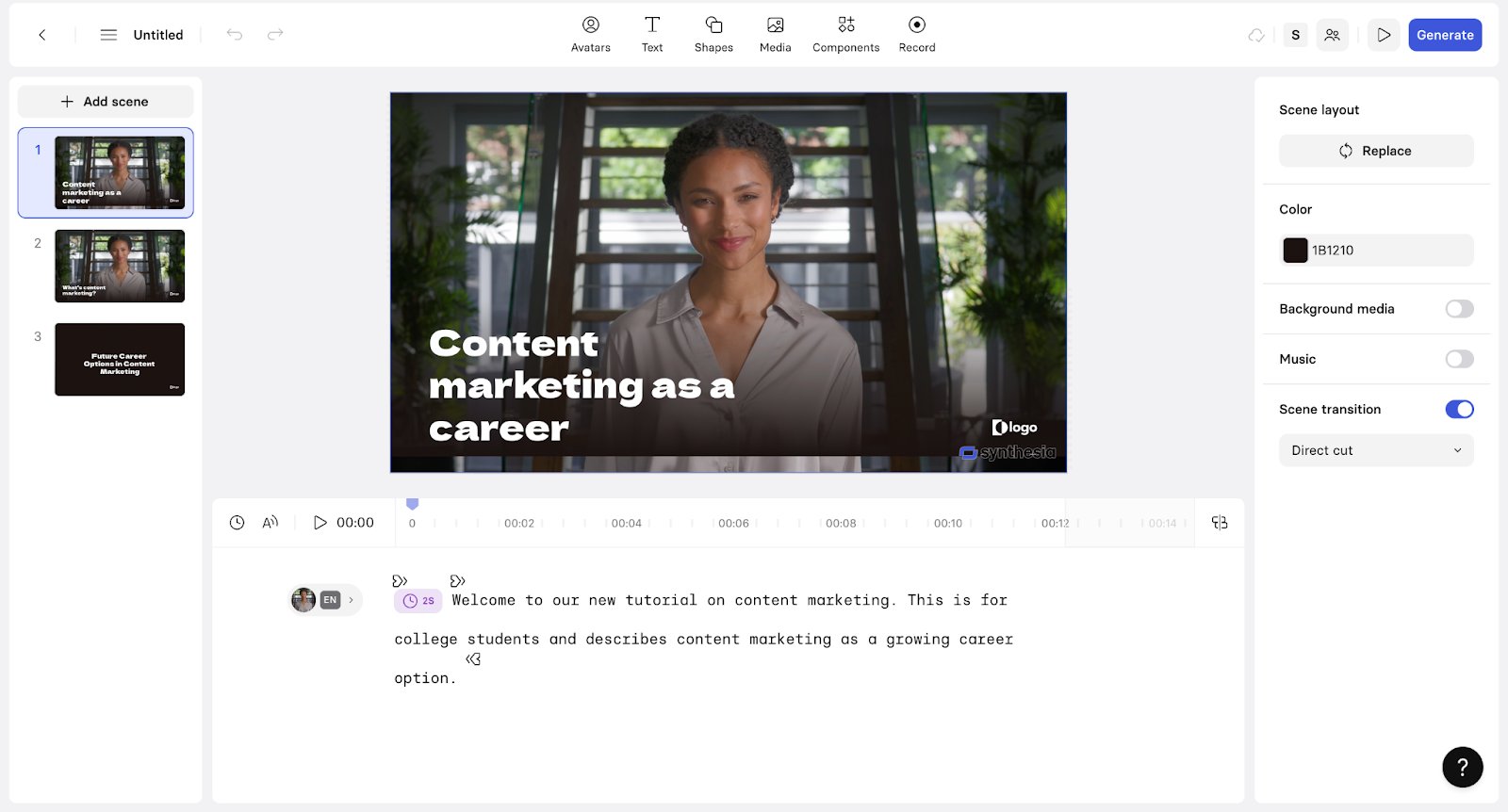
Synthesia welcomed me with quick onboarding and a clean interface. It offered options to edit the video outline with flexibility.
Here, you can edit the script, the background, choose different avatars, and add more components to your video. The editing interface felt intuitive, and I worked things out quite seamlessly, being a first-time user of the software. Synthesia has a more corporate feel, making it more suitable for learning, development, and training purposes. You feel like you’re working on a presentation where you can make changes and customizations to individual scenes as needed.
When I tried to use AI to generate the video, I was prompted to switch to a Starter Plan. Due to this, I manually added the script and made changes to the scene and text within it.
HeyGen features a modern interface that allows you to engage in a conversation with a chatbot. It was more intuitive than Synthesia. I gave it a prompt to create a video explaining content marketing in under 60 seconds for college students. HeyGen drafted a video plan and, post approval, produced the video for the respective prompt. The process was relatively seamless.
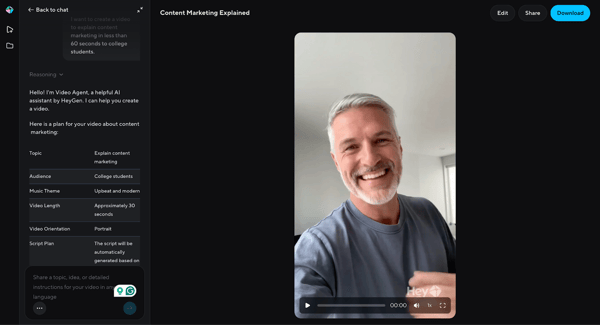
Winner: Tie. Both platforms are strong but serve different needs.
The Synthesia interface is well-suited for corporate training use cases and is easier to work with for individuals who frequently give presentations. I found HeyGen to be better suited for sales and marketing-related use cases that are already familiar with conversational AI to some extent, and want to keep a casual and friendly tone.
Avatar realism
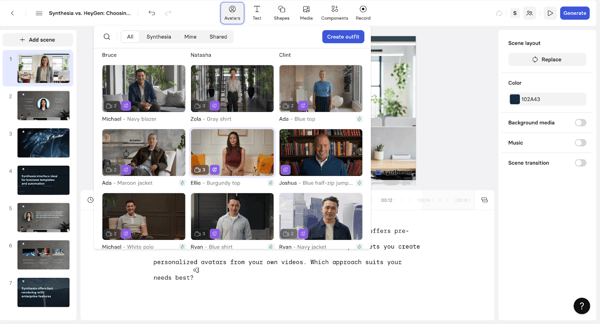
In the video editor, Synthesia offers a variety of avatars for you to choose from. While there are a few options available on the free plan, some would require you to upgrade to the paid version.. The avatars look realistic but have a more formal tone. On Synthesia, you have the option to personalize your avatar with custom outfits.
HeyGen also gives you a wide range of avatars to choose from. I found its avatars to be modern and realistic. There are different angles of the same avatar that you can use based on what fits your content delivery the best.
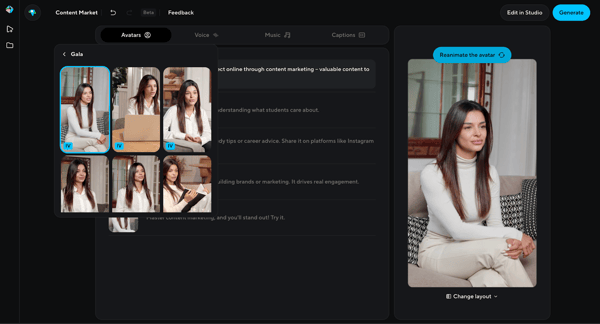
I felt HeyGen has better avatar realism compared to Synthesia. Alternatively, it may be a bias because Synthesia uses more corporate avatars, which are similar to those found in stock images.
Winner: HeyGen, since it has more realistic avatars compared to Synthesia.
Voice quality and options
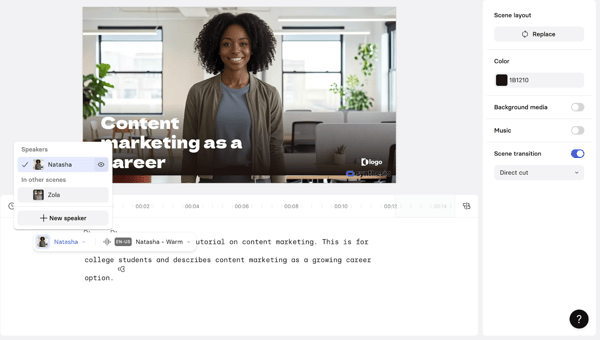
Voice quality is based on the avatar you choose. In Synthesia, you have different voice options tied to different speakers, but when you change, it changes the avatar, too. The voice quality is decent and has a somewhat professional tone.
HeyGen gives you options to customize the voice in your video. You can listen to different audio, just like on Instagram, and choose the voice you like the most. When you choose the voice, it doesn’t change the avatar. In HeyGen, choosing voice options is easier, as it provides context about the voices (formal, young, middle-aged, etc.). It becomes easier to make a choice.
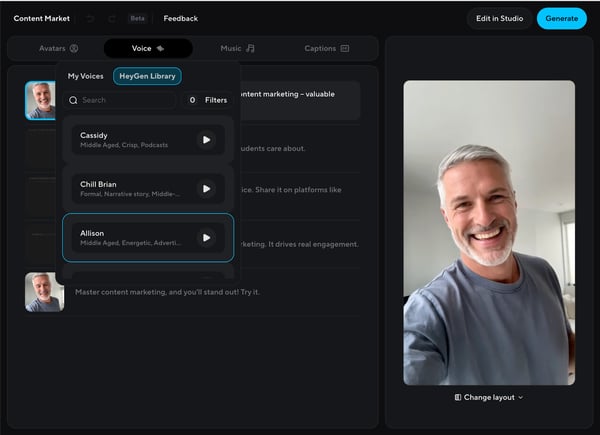
Winner: HeyGen, because it’s easier to choose the best-fit voice for the video.
Editing flexibility
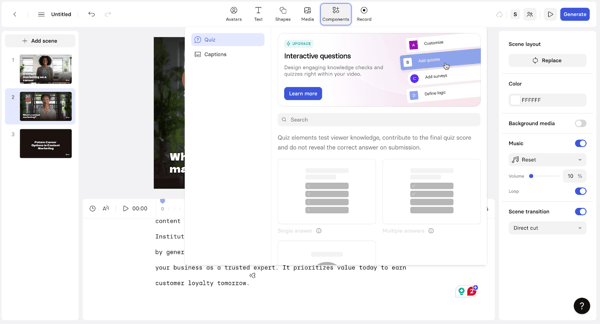
You’ll find Synthesia to be more flexible if you have worked with presentations and slideshows. You have the option to customize the layout, background, avatar, text, and various components of the video individually. Although it may take some getting used to at first, once you’re hands-on, editing these videos becomes a lot easier.
You can add different types of components, such as interactive elements on the video, to make it more engaging. It’s a sought-after feature for creating training videos to increase audience participation and engagement.
Similarly, HeyGen also offers a wide range of editing options. The editing studio offers you the flexibility to customize various elements in your video. Most importantly, it provides an AI option to describe the changes you need in the video and allows you to make them seamlessly.
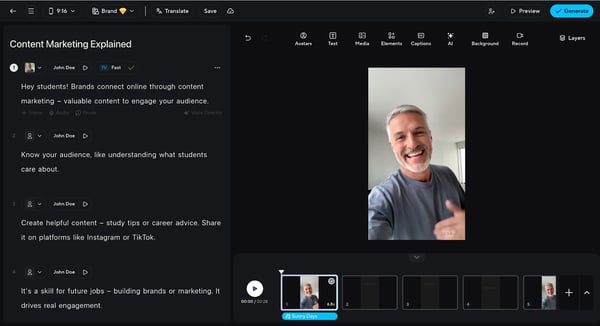
On HeyGen, you’ll feel like you’re editing a video just like you do on Instagram or Facebook.
Winner: Tie. Both platforms offer a range of customization and editing options. Based on the use case, they’ll deliver reliable editing flexibility.
Output quality and formats
Both Synthesia and HeyGen generate videos in MP4 format with a reliably clear output.
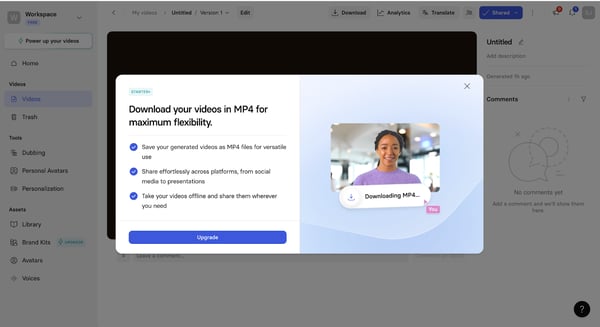
When asked to download in MP4, Synthesia prompts to upgrade to a paid plan. However, you can create a link to share the video with others, which is available in the free plan.
HeyGen stands out here as it lets you download MP4 videos in 720p, which is a decent quality, on the free plan. If you require 1080p or 4K video quality, the platform will require you to upgrade to a paid plan. HeyGen also lets you create a shareable link that you can use to distribute your content. It also provides the option to generate an embed code, allowing you to integrate your video content into a webpage.
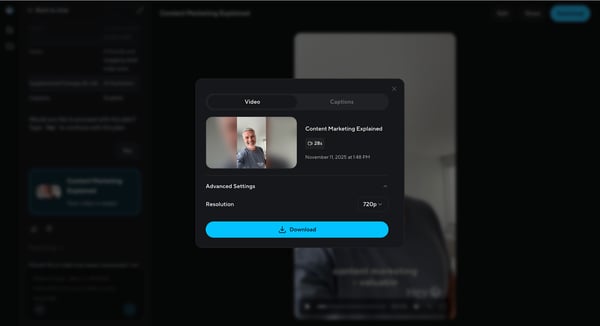
Winner: HeyGen, because it offers the ability to download videos of decent quality without requiring a switch to a paid plan.
Here’s a quick overview of our comparison between Synthesia and HeyGen:
| Feature | Winner 🏆 | Why It Won |
| User interface | Tie | Both interfaces are well-suited for their specific use cases. Synthesia, for creating corporate style training videos, and HeyGen, for creating more casual videos for sales and marketing. |
| Avatar realism | HeyGen | HeyGen created more realistic avatars with close to perfect lip sync in their videos. |
| Voice options | HeyGen | Because it’s easier to choose the best-fit voice for the video. |
| Editing flexibility | Tie | Both platforms offer a range of customization and editing options. Based on the use case, they’ll deliver reliable editing flexibility. |
| Output quality and format | HeyGen | It offers the ability to download videos of decent quality without requiring a switch to a paid plan. |
Key insights on Synthesia vs. HeyGen from G2 Data
I also reviewed data on G2 to identify advantages and usage patterns for Synthesia and HeyGen. Here’s what stood out:
Satisfaction ratings
- Synthesia excels in ease of use (92%), ease of setup (94%), and ease of doing business (91%).
- HeyGen has strong ease-of-use ratings (93%) and solid satisfaction ratings for ease of setup (93%) and ease of doing business (91%).
Top industries represented
- Synthesia dominates in computer software, consulting, and e-learning.
- HeyGen has a strong presence in marketing and advertising, e-learning, and consulting.
Highest-rated features
- Synthesia excels in video creation (88%), languages (88%), and file exporting (87%).
- HeyGen excels in customer avatar (93%) and avatar quality (93%).
Lowest-rated features
- Synthesia struggles with text-to-image (77%), range of sentiments (77%), and metadata (77%).
- HeyGen struggles with a range of tones (78%), accents (82%), and AI text summarization (83%).
Frequently asked questions (FAQs) on Synthesia vs. HeyGen
Below are some questions users frequently ask when comparing Synthesia and HeyGen.
Q1. What platform offers more realistic AI avatars?
Currently, HeyGen’s avatars are generally considered more realistic by users. In G2 reviews, HeyGen scores higher for avatar quality (9.2/10 vs Synthesia’s 8.2), and users frequently praise how lifelike and human the HeyGen avatars look. That said, Synthesia’s avatars are also high-quality and realistic, albeit slightly less so. Both platforms are top-tier in terms of realism, but HeyGen has a slight edge in avatar realism and natural movement, according to user reviews.
Q2. What are the key use cases for Synthesia?
Synthesia is commonly used for corporate training videos, e-learning content, onboarding tutorials, internal communications, and similar business video needs. Many companies use it to create training modules (for HR, compliance, and software tutorials). Synthesia’s support for 140+ languages makes it ideal for multilingual content localization. You can create one video and then easily generate versions in different languages for global teams or audiences.
Q3. How do the pricing structures differ between Synthesia and HeyGen?
Here’s an overview of the differences in the pricing structures of Synthesia and HeyGen:
| Feature | Synthesia | HeyGen |
| Free/trial option | Free plan: includes close to 3 minutes/month of video. | Free plan: create up to three videos/month, no credit card required. |
| Entry paid plan cost (annual billing) | The Starter plan starts at US $18/month billed yearly. | The Creator plan is approximately US $24/month, billed yearly (or US $29/month). |
| Collaboration tier | One editor in the starter. Higher tiers offer more seating and accommodate more guests. | The Team plan starts with two seats. |
Q4. Is Synthesia free?
Yes, Synthesia has a free tier offering 3 minutes of video per month. However, it’s very limited, and for regular use, a paid plan is required.
Q5. Is HeyGen free?
Yes, HeyGen also has a free plan that allows for three videos per month, each up to 3 minutes long. However, these videos will have lower resolution and a watermark.
Synthesia vs. HeyGen: The final verdict
Both Synthesia and HeyGen offer impressive AI video generation capabilities, but they cater to different needs. If you require a tool for corporate training and polished presentations, Synthesia’s extensive features and avatar library make it a strong choice.
Conversely, for those looking for hyper-realistic avatars and creative flexibility, HeyGen stands out. Ultimately, your choice will depend on your specific use case.
Ready to dive into the world of AI video generation? Discover the top AI video generation platforms curated by an expert on G2.