You open Instagram to grab a trending audio for a reel. Just one quick thing.
Two hours later, you’re still scrolling. You haven’t created anything. You haven’t even saved the audio you meant to find. And now it’s 10 p.m., and you’re mentally exhausted — and a little sad, tbh — from consuming content instead of making it. (Seriously, why is Instagram’s search function on the Explore page?)
Oh, wait, that was me. Hi. 👋
High up on the list of Things I Do Not Have Time For (along with low-carb diets, marathons, and the new season of Stranger Things) is doomscrolling.
I’m a mom with a full-time job, and I’m an active creator. I also have ADHD. For what it’s worth, I actually really enjoy my life and feel very lucky I’ve found a way to balance my responsibilities with my passions. But I’ve had to get really intentional about how I protect my focus when it comes to social media.
One of the things that has helped me the most is actually quite simple. It’s more of a mindset shift than a full-blown strategy: mentally splitting my time into two distinct modes — creation mode and consumption mode.
Let’s unpack what that means, exactly — along with the tools (it’s me, of course, there are tools!) I use to put this mindset into practice.
First, let’s not add more guilt to the mix
Before we dig in, I really want to emphasize something. Getting sucked into a scroll is not a sign of ‘weakness’ or failure on your part as a creator.
The algorithms are engineered to work like this. Every time you open Instagram, TikTok, or LinkedIn to post something, you’re walking into an environment specifically designed to hold your attention.
For creators, this creates a weird paradox. We need to be on these platforms to grow our audiences and stay on top of trends. But the very act of being on the platform makes it harder to find time to actually create.
For new creators especially — people creating while holding down a 9-to-5 job, managing family responsibilities, and actually living their lives — this loop (open social platform to post → get sucked into scrolling instead) can be a dealbreaker.
Unintentional scrolls can steal anything from 15 minutes (if I’m lucky) to 3 hours of my time. I do not have that kind of time. Not if I want to stay active on my chosen platforms and, you know, sleep.
Which is where my create vs. consume mindset shift comes in.
What are ‘creation mode’ and ‘consumption mode’?
I’d love to share a fun anecdote or ‘aha’ moment when I started thinking in this way. I don’t really have one, though. It’s something that started happening kind of organically in my internal chat. (“Right, Kirsti, today we’re not scrolling, we’re replying to comments.” — whispered under my breath to myself x 10).
But the idea really crystallized when we started chatting about product shifts at Buffer. We’re all active creators and talk a lot about how we manage to stay consistent. We know that consistency is essential for success on every platform, but tools to help folks do this were something we started to feel were really lacking.
I think I must have raised the idea of being very intentional about when you’re online to scroll vs. when you’re online to create, and it may have been Hailley Griffis who coined “creation vs. consumption” mode. Even having that language to explain what I was doing helped me refine my process.
Creation mode is when I’m actively making content. Gathering ideas, writing captions and scripts, filming and editing videos, scheduling posts, and replying to comments. This is focused, intentional work with a clear output at the end.
Consumption mode is when I’m scrolling for inspiration, staying on top of trends, or engaging with other creators’ content. This is also valuable work for a creator — but it’s a completely different mindset, and it needs clear boundaries.
Here’s a helpful way to draw a line between the two:
- Creation mode = This work will directly impact the growth of my audience.
- Consumption mode = This work might impact the growth of my audience, but less directly.
These two modes don’t mix. At all. When I try to do both at the same time I end up doing neither well.
So now, I treat them as separate activities that happen at different times and — most importantly — in different tools.
Here’s where things get practical. The biggest game-changer has been using other tools in creation mode, so I don’t need to open the apps to create. With this stack, I can save ideas, write captions, schedule posts — all without opening the actual social media apps.
Now, with the launch of Community, I don’t even have to be on the platform to reply to comments.
Here’s how I do it:
1. Ideation: Buffer
Every idea I have, no matter how half-baked, gets added as a card to my Create Space.
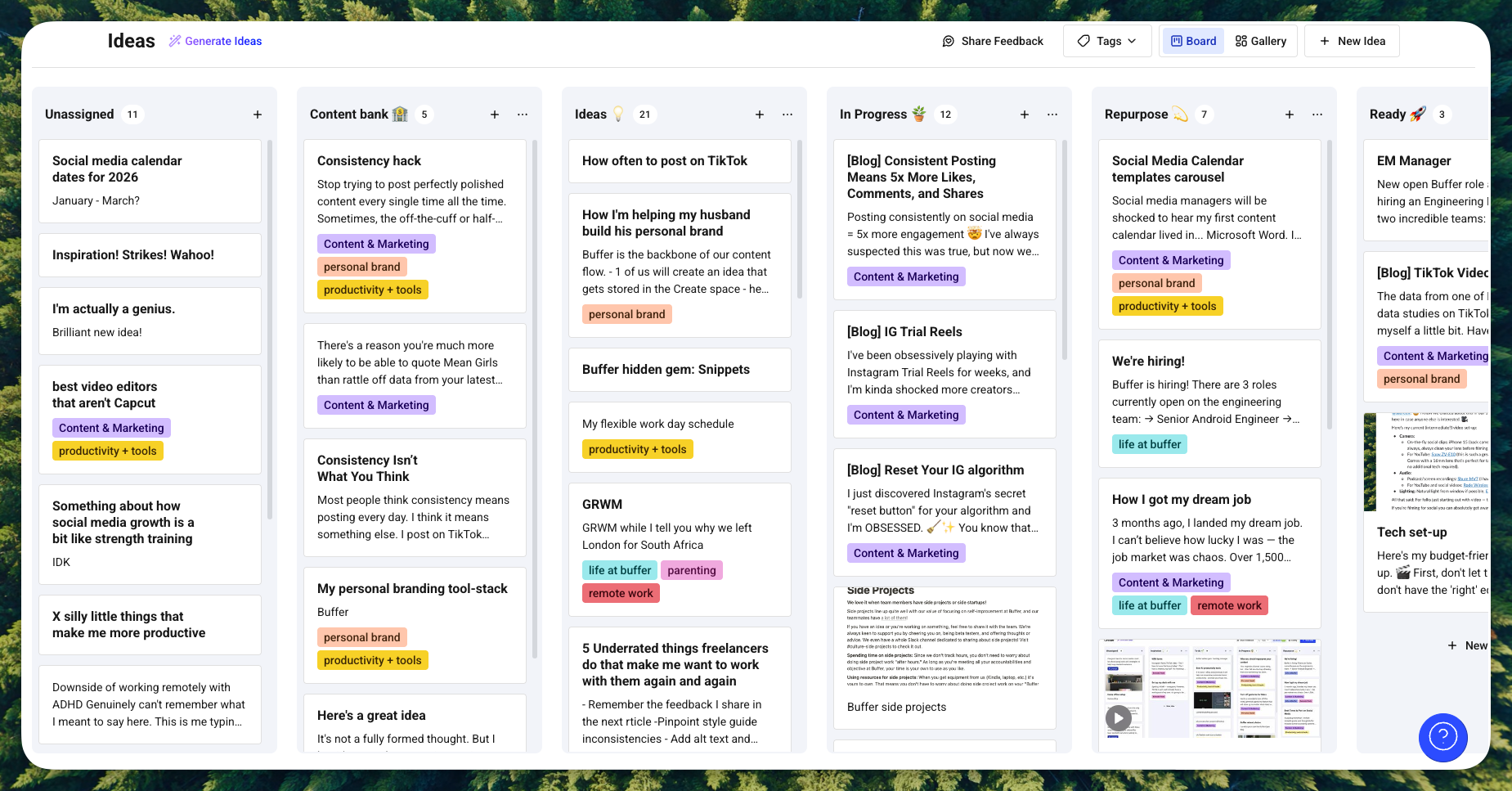
2. Writing: Buffer + Notion
Posts are written in Buffer and move from the Create space right into my content calendar, where they’re scheduled or saved as a draft. Scripts sometimes require more formatting and are usually written and stored in Notion.
3. Video editing: CapCut
I often create short-form vlogs and other videos for TikTok, Instagram, YouTube, and even LinkedIn. I usually edit these on the desktop version of CapCut, but there are loads of other great video options out there.
4. Posting: Buffer
I’ve been scheduling using Buffer since before I joined the team. Since I’m active on multiple platforms, it makes it easy to crosspost similar content across all of them.
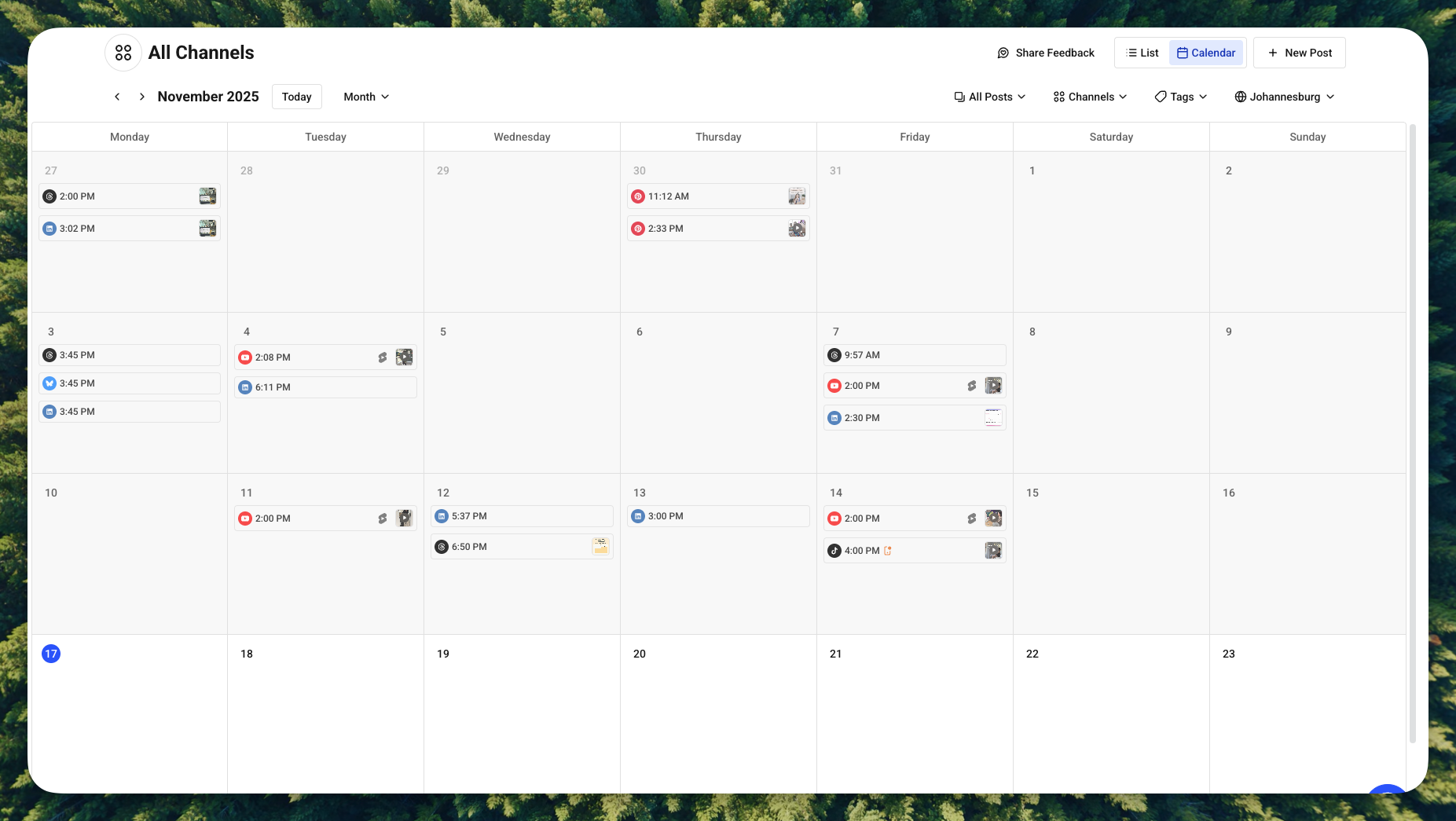
⚡️ Pro tip: For videos, I save two versions in CapCut: One with music and subtitles and one without. The first version is scheduled automatically on LinkedIn and YouTube. The second version I schedule to TikTok and Instagram via notification posting.
When the time comes to post, I’ll get a notification on my phone for each post, which I can tap on to open the video and caption within TikTok and Instagram’s composer. From there, it takes me 2-3 minutes to add native captions and trending audio in the editors and post. Native captions help the algorithms properly categorize the content and serve it to the most relevant audience. Adding the audio within the apps gives me access to new music without copyright issues.
Best part? Buffer opens my content directly within the platform’s composer, so there’s no risk of falling into a feed.
I use Buffer’s Community feature to reply to comments without opening the apps. I can stay on top of engagement across Instagram, LinkedIn, TikTok, Facebook, Threads, and Bluesky from one single, calm interface. No notifications pulling me in ten directions, or accidentally falling into a scroll hole while trying to reply to a comment.
This last one is a biggie, so let’s unpack that a little more:
Managing engagement without losing hours
One of the trickiest parts of being a creator is staying on top of comments. We know from a recent Buffer study that replying to comments boosts your engagement significantly — we’re talking 42% on Threads, 30% on LinkedIn, 21% on Instagram.
But staying on task when you set out to engage can be incredibly tough.
Native platform notifications are chaotic. And some of them don’t even apply to you! “So-and-So posted his first Thread, would you like to see it?” “Thingamajig shared a reel edited with Edits, download the app!” “Whatshisname is getting loads of traction on his post, you should check it out!”.
It’s all competing for attention in an overwhelming feed.

Unlike this, Buffer’s Community feature actually respects my time and wants to make the process as calm and efficient as possible:
- All my comments in one place. I can see comments from Instagram, Facebook, Threads, Bluesky, X, and LinkedIn in a single dashboard. No app-hopping required.
- Notifications that actually help. I can choose to get notified when new comments arrive, organized in a way that makes sense. I can filter by unanswered comments, newest, oldest, or resolved.
- Comments don’t disappear. On native platforms, comments get buried under follow notifications and profile views. In Buffer, every comment stays visible until I respond or dismiss it.
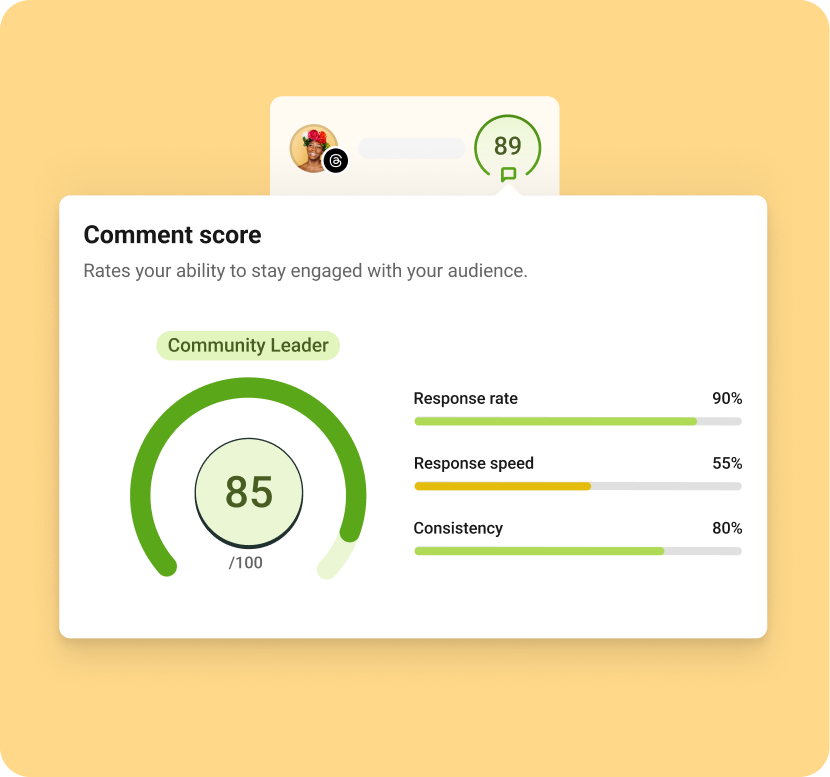
- A Comment Score feature to add some extra dopamine to the mix. This tracks my engagement habits across consistency, reply speed, and response rate. For a competitive person like me, this has been surprisingly fun! I’m only competing against myself, but still — it’s a bit like having an accountability buddy.
I’m not saying you should never scroll.
As a creator, staying on top of trends and finding inspiration is part of the job. Consumption mode is necessary work. But it needs to be intentional.
When I do go into consumption mode, I’m deliberate about it:
- I set a time limit. “I’m scrolling TikTok for 20 minutes to find trending audios.” Not two hours of aimless scrolling.
- I have a clear purpose. Am I looking for content ideas? Saving audio that will fit my style? Looking for inspiration from other creators in my niches? Whatever it is, I name it.
- I save things to come back to. If I find a trending audio or a post format I want to try, I save it in a collection. Unless I’m super inspired (this happens!) I don’t create on the spot. That’s creation mode work, and I’ll do it later in Buffer.
The key is going into the scroll with this mindset: “I’m in consumption mode right now. This is part of my work as a creator, and I don’t need to feel guilty about it.”
But I also know that consumption mode has a clear start and end time. It’s not the default state I slip into whenever I open my phone.
The surprising compound effect of this shift
Since I started being more intentional about creation mode vs. consumption mode, a few things have changed:
- I actually finish what I start. I sit down to create three posts, and I create three posts. I’m not distracted mid-flow by something in my feed.
- I’m more consistent. Consistency can be make or break when it comes to success as a creator (we have loads of data to back this up — one of our biggest studies showed that consistency can 5X your engagement). When I’m not losing hours to distraction, I have way more capacity to show up regularly.
- I feel less guilty about scrolling. Because I’ve given consumption mode its own space and time, I don’t feel like I’m “wasting time” when I do scroll. It’s part of the job.
- My engagement has gone up. Because I’m using Buffer to manage comments across all my platforms in one place, I’m way more responsive — and this shows. Just this week, I had a LinkedIn post that got 48 comments!
If you’re reading this while procrastinating on your next post
Here’s my challenge to you: try separating creation mode from consumption mode this week.
Pick one session — maybe an hour on a Friday — where you commit to pure creation mode. Do not open the social media platform! It’s just you and Buffer (or whatever tools you use).
Then, later that day or week, give yourself dedicated consumption mode time. Scroll intentionally. Save what inspires you. But when the timer goes off, close the app.
The platforms want you in consumption mode all the time because that’s what keeps their ad revenue flowing. But you’re a creator. Your job is to make things, not just consume them.
🌱 Want to try creation mode without the distractions? Start using Buffer for free and see how much more you can create when you’re not battling the algorithm for your own attention.
You can manage your content creation, scheduling, analytics, and engagement across Instagram, Facebook, TikTok, LinkedIn, Threads, and Bluesky — all from one calm interface designed to help you actually get stuff done.
And if you want to chat about this — or share your own strategies for staying in creation mode — come find me on LinkedIn or Threads. I’d love to hear what’s working for you.