The railway station in my city has been under construction for years, and every time I catch a train from there, I wonder what is holding the project back. That curiosity pushed me to explore the best construction estimating software and understand how contractors use digital takeoff, cost databases, bid management, job costing, and project handoffs to keep construction work on track.
After speaking with people in the construction industry, I realized that project delays are rarely caused by one issue. A delayed tender, inaccurate construction cost estimating, poor contractor coordination, overestimated material costs, labor inefficiencies, and weak project tracking can all slow a project down.
That is when I started evaluating construction estimating software more closely. I wanted to understand how these tools support the full estimating lifecycle, from quantity takeoff and proposal creation to construction bidding, labor cost planning, change orders, and closeout.
For this guide, I reviewed 20+ tools, including Autodesk Forma, Procore, HCSS, Handoff, STACK Takeoff & Estimate, Methvin, Sage Construction Management, formerly Corecon, and Contractor+. I compared them based on estimate accuracy, ease of use, pricing visibility, bid workflows, cost control, integrations, customer feedback, and overall fit for different construction teams.
In this article, I’ll break down my top picks, who each tool is best for, and how they can help improve construction estimating, bidding, and job costing in 2026.
8 best construction estimating software I’d recommend in 2026
-
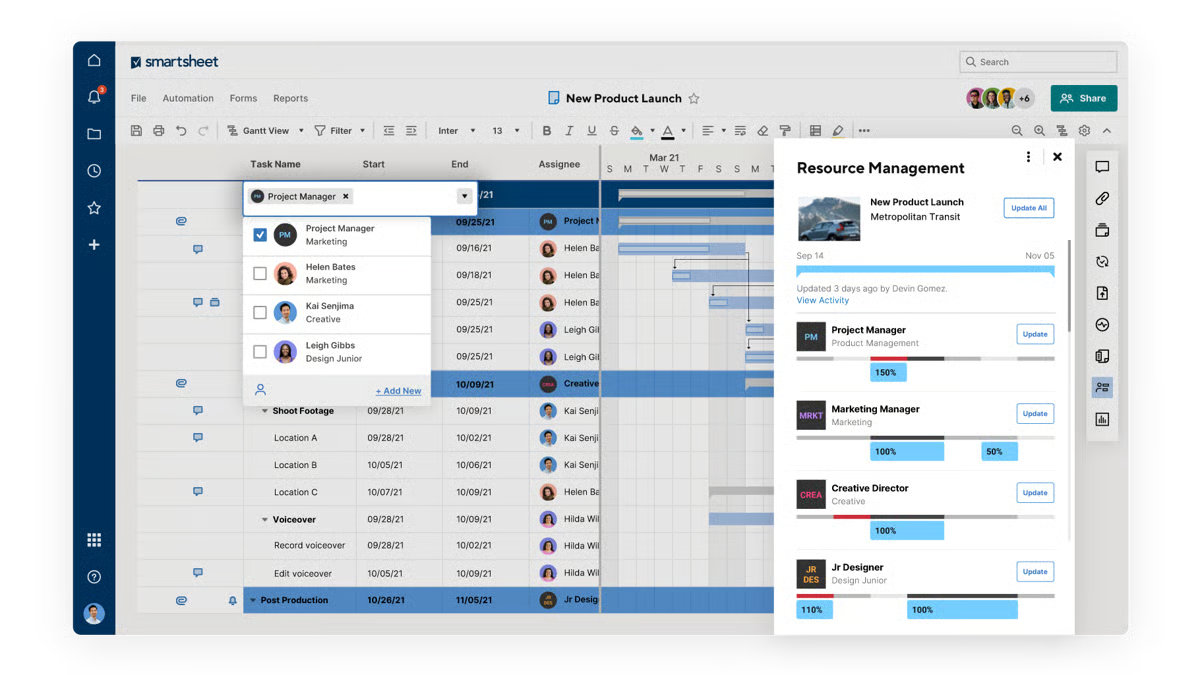
Autodesk Forma: Best for project tracking and field service management
Provides Project tracking, field service management, and on-field operations support. (Pricing available on request)
-
Procore: Best for accounting integration and profitability tracking
Construction accounting integration, site progress monitoring, and profitability optimization. (Pricing available on request)
-
HCSS: Best for proposal creation and bid management
Proposal creation, bid management, and visual project tracking for streamlined management. (Pricing available on request)
- Handoff: Best for AI-powered estimating and proposal generation
AI-driven estimate generation, natural language bid creation, and customizable client catalogs. ($119/month) - STACK Takeoff & Estimate: Best for cloud-based digital takeoffs
Browser-based takeoff measurements, cloud-accessible plan management, and multi-user collaboration. ($249/month) - Methvin: Best for first-principles estimating and job costing
First-principles cost breakdowns, real-time collaborative estimating, and integrated job costing ($79/month) - Sage Construction Management (formerly Corecon): Best for cloud-native project controls
Cloud-based project hub, PO and contract administration, and QuickBooks accounting integration. (Pricing available on request) - Contractor+: Best for all-in-one field service and estimating
Unified estimating, invoicing, scheduling, and CRM for small contractors and field service teams. ($29/month)
According to the G2 Spring 2026 Grid Report, these construction estimating software programs are top-rated in their category. I have included their starting prices of paid plans for easy comparison.
8 best construction estimating software I recommend
The best construction estimating software does more than calculate project costs. It helps contractors manage digital takeoff, quantity takeoff, cost databases, bid management, proposal creation, job costing, and project handoff in a more connected workflow.
Modern estimating tools are no longer just spreadsheet replacements. The strongest platforms help teams price materials, labor, equipment, overhead, and profit margins more accurately while reducing manual errors and improving bid confidence.
The demand for these tools is also growing fast. The global construction estimating software market is projected to reach $2.62 billion by 2030, growing at a 10.2% CAGR from 2025 to 2030. BIM adoption is a major driver, helping construction teams improve precision, reduce errors, and create more reliable project estimates.
For me, the best tools are the ones that help contractors answer three questions clearly: How much will the project cost? How accurate is the takeoff? Can the estimate move smoothly into bidding, job costing, and project management? The software that handles these steps well is what I consider the most useful for contractors trying to improve bid accuracy, reduce risk, and manage construction projects with more confidence.
How did I find and evaluate the best construction estimating software?
I started with G2’s category Grid report to build a shortlist of the best construction estimating software based on G2 Score, user satisfaction, and market presence. I also considered review recency, review volume, customer segments, and recommendation rates to prioritize tools with consistent, up-to-date feedback from real construction professionals.
Next, I analyzed G2 reviews at scale to understand what actually matters to contractors, estimators, project managers, and construction teams: how well each platform handles digital takeoff, quantity takeoff, cost estimating, bid management, proposal creation, job costing, and project handoff.
I paid close attention to feedback around ease of use, estimate accuracy, pricing transparency, implementation, integrations, reporting, customer support, and how effectively each tool helps teams move from preconstruction planning to project execution without slowing down workflows.
Since I couldn’t test these tools hands-on, I consulted professionals with direct experience using the software and validated their insights against verified G2 reviews.
The screenshots in this article may include images captured during my evaluation, along with screenshots from G2 vendor profiles and publicly available product documentation.
What makes construction estimating software worth it, in my opinion
I can say with confidence that it is imperative to select your circle of vendors and contractors and to compute cost estimates right from the project takeoff using construction estimating software. With this tool, it is not just about bidding for services but maintaining a healthy contractor and client network.
After a careful survey and analysis of these 8 best construction estimating software, here are my top feature picks, which would help you run your construction project within a defined budget and adjust your workflows for any additional product or service integration as you progress with the project.
- Dynamic cost database and real-time pricing integration: I shortlisted construction estimating software that maintained a dynamic cost database that automatically updates materials, labor, and equipment costs for a project in progress. Fluctuating market prices are a reality in construction, and I paid special attention to software that integrated with industry pricing databases (such as RS Means or Trade Service) to ensure accurate cost estimates and stabilize the overall project budget. Without this, I might have put my project at risk of underbidding or overpricing, thus affecting the profitability.
- AI-powered takeoff and quantity extraction: Manually performing takeoffs is time-consuming and doesn’t ensure alignment among all project stakeholders and contractors. Apart from cost integration, I also selected estimating tools that offered project management or project accounting features. These features support both 2D and 3D takeoff, allowing me to work across different project complexities and pull cost details automatically for contractor services.
- Multi-level assemblies and parametric estimating: Every construction company works with multiple contractors across multiple trade specialties, like mechanical fittings, electrical fittings, and so on. I also looked for an estimating solution that considers all technical facets and contractor cost-control workflows to produce accurate project estimates for construction companies and their subsequent clients. Having a parametric estimate of all technical operations will provide convenience to contractors and vendors with convenience and enable them to plan their takeoffs more effectively.
- Automated bid management and proposal generation: To speed up the bid estimates and tender or proposal creation workflows, I noticed an updated feature of automated bid management that tracks your bid metrics, cost breakdowns, scope clarifications, alternates, and exclusions to generate client proposals or tenders without breaking a sweat. The automated bid management also empowers you to get the right bid trade-off and follow the previous cost-estimation protocols for vendor services to stay within your budget.
- Integration with project management and construction accounting systems: While I noticed that most of the construction estimating tools offer full-fledged suites for end-to-end construction management, my minimum criteria for other solutions were that they should have seamless compatibility with construction project management and construction accounting. This ensures that my estimates of materials flow directly into budgeting, scheduling, procurement, and job costing pipelines, thus affirming that the updates reach out to all stakeholders across various spending categories and contractors hiring new staff.
- AI-driven risk analysis and contingency planning: Last but not least, these software solutions also incorporate AI-driven risk analysis and contingency planning, as the market is prone to price fluctuations and vendor requirements. I decided to shortlist software that offers predictive modeling features to interpret market patterns and give alerts on pricing so that the teams are aware of the latest price trends. It also makes teams readjust the budget or make any modifications to it to manage expenses better.
Out of the 20+ tools I initially shortlisted, these 8 construction estimating software programs met all industry standards and provided comprehensive coverage of construction management services for companies, clients, and contractors.
The list below contains genuine user reviews from the Construction Estimating Software category page. To be included in this category, a solution must:
- Generate accurate estimates, bills of quantities (BoQs), or takeoffs for potential construction projects.
- Digitize quantities
- Generate or offer templates for bids, proposals, cost reports, or other types of project cost documentation.
- Facilitate the markups of line items, proposals, and customer or job site information.
- Offer or provide access to cost databases.
*This data was pulled from G2 in 2026. Some reviews may have been edited for clarity.
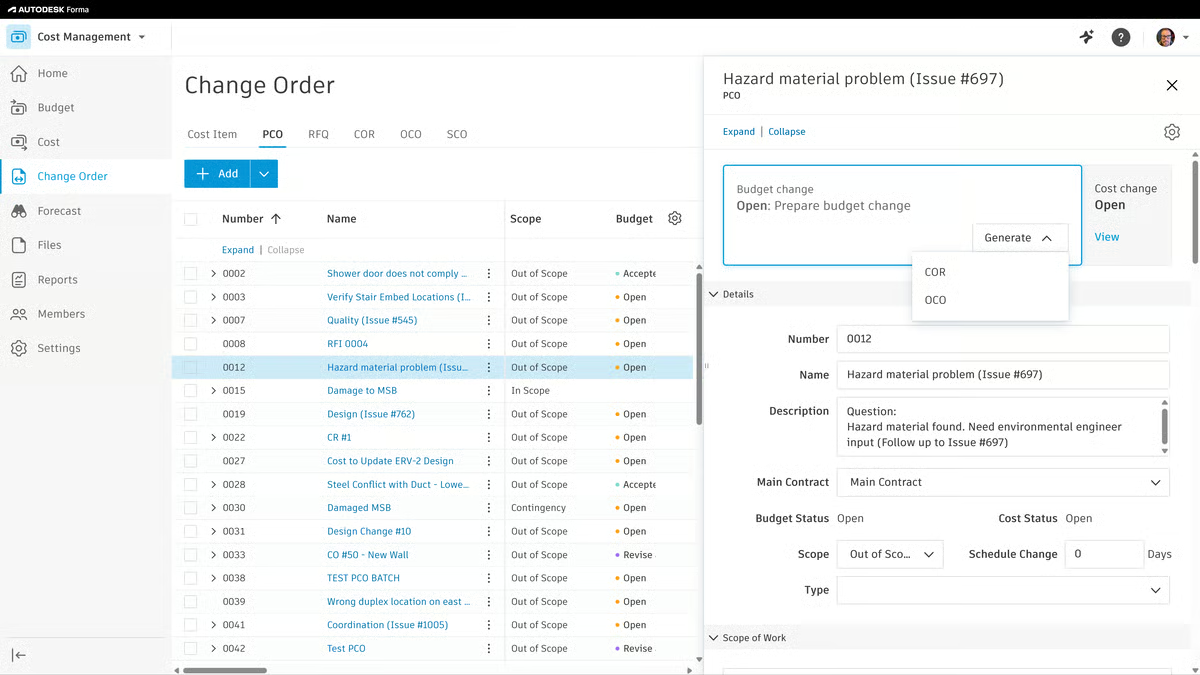
1. Autodesk Forma(formerly Autodesk Construction Cloud): Best for project tracking and field service management
Autodesk Forma(formerly Autodesk Construction Cloud) brings together CAD design, cost estimation, and construction workflows under one unified platform. Based on what I read through in G2 reviews, they consistently highlight that the tool centralizes everything from document control to estimating capabilities, consolidating processes that are often spread across multiple disconnected systems in construction management.
Cloud-based document management with robust version control is among the most frequently praised capabilities. Reviewers regularly point out how the platform ensures every team member works from the most current set of files, removing the risk of outdated blueprints and improving cross-team alignment. According to the G2 Grid Report, Autodesk Forma earns an 86% rating for meeting requirements, reflecting how well the platform covers the breadth of needs construction teams bring to it.
Deep integrations with tools like BIM 360, PlanGrid, and BuildingConnected receive strong positive feedback. Users describe how these connections enable smooth takeoffs and provide seamless access to project data across devices, making collaboration practical whether working from an office or out on a job site.
From what I’ve gathered, users also value real-time updates and issue tracking. This functionality helps reduce miscommunication across teams, enabling faster resolutions and minimizing the risk of costly delays or rework.
One standout capability, especially for those working in virtual design and construction, is parametric modeling and clash detection. I’ve read in G2 reviews that overlaying 2D and 3D models helps users identify trade-offs early and coordinate more efficiently across disciplines, which is crucial for large projects.
Analytics and reporting tools also get frequent praise. Across multiple reviews, users mention that these insights help predict delays and track project milestones effectively, keeping all stakeholders aligned on progress.
With its cloud-first architecture and mobile accessibility, Autodesk is regularly cited among the best cloud-based construction estimating solutions for teams that need field-to-office continuity. The platform serves a diverse customer base, with 45% of its G2 reviewers coming from mid-market organizations and 28% from enterprise-scale firms, reflecting its scalability across different company sizes. Given its breadth, governance controls, and BIM depth, Autodesk Forma is frequently cited among the top-rated estimating platforms for large construction firms managing multi-stakeholder programs.
Autodesk Forma stands out for its comprehensive collaboration tools and seamless integrations that connect teams, data, and workflows at every project stage. The platform’s ability to centralize communication and documentation has earned consistent recognition from reviewers looking to reduce errors and improve efficiency across complex builds.
While the platform offers broad functionality, I’ve noticed in G2 reviews that the initial rollout demands a meaningful time investment. Getting every department onboarded and comfortable with the system takes planning, particularly for teams that are new to the Autodesk ecosystem. That said, users consistently report that the effort pays off once teams are up and running, with day-to-day workflows becoming noticeably smoother.
A few reviewers also mention that integrating Autodesk with third-party or competing platforms isn’t always seamless, especially when collaborating with external partners who rely on different tools. Even so, the platform’s native integration depth across its own product suite remains one of its strongest advantages, and most users find that the breadth of built-in capabilities reduces the need for outside connections in the first place.
Even so, Autodesk Forma remains a trusted platform for firms looking for reliability, depth, and integration. Once teams get familiar with its tools, the platform’s power and precision make it a standout choice for professional construction management software.
What I like about Autodesk Forma:
- One feature that I see getting a lot of praise is the built-in CAD software, which helps users design layouts and estimate costs across utility departments.
- Something G2 reviewers seem to really appreciate is the real-time price integration, which keeps teams aligned on the latest cost data across a shared project.
What G2 users like about Autodesk Forma:
“As a welding/pipefitter mechanic who is constantly jumping between jobs, Autodesk Forma helps me keep my project prints and notes in one place with instant access.“
– Autodesk Forma review, Thomas W.
What I dislike about Autodesk Forma:
- I’ve noticed in G2 reviews that while the platform offers a robust onboarding framework, getting all departments fully up to speed takes considerable planning, though users agree the payoff in daily efficiency makes the investment worthwhile.
- Based on G2 reviewer feedback, the platform’s native integrations are a major strength, but connecting with third-party tools used by external partners can require workarounds, even as Autodesk’s own ecosystem depth reduces the need for outside connections.
What G2 users dislike about Autodesk Forma:
“The areas could be improved – Deeper integrations with other tools, handling of complex projects and more customization.”
– Autodesk Forma review, Vishal M.
Get started with a free version of construction estimating software to visualize your construction process and learn about trendy market job costs.
2. Procore: Best for accounting integration and profitability tracking
Procore is a comprehensive construction management platform that helps users handle bidding, track financials, manage documents, and collaborate across contractor teams. From what I’ve gathered through G2 reviews, it’s widely used to speed up project timelines and make more accurate, cost-effective estimates.
One feature that I see getting a lot of praise is workflow integration. Many G2 reviewers value how Procore unifies accounting, scheduling, documentation, and communication into one hub, and users regularly note how this consolidation eliminates the need to bounce between disconnected tools, a benefit that compounds as project complexity grows.
I’ve also noticed strong feedback around workflow automation is another highlight across reviews. Because estimates tie directly to budgets, RFIs, and schedules, Procore stands out as one of the best platforms for integrating estimating with project management, keeping costs, scope, and timelines in one place. I’ve noticed users mention how automation helps them stay on top of key milestones such as RFI creation, tenders, financial tracking, and timelines. It’s often described as a useful feature that keeps projects on track with minimal manual follow-up.
According to the G2 Grid Report, Procore receives a 96% score for product going in the right direction, signaling sustained confidence in the platform’s development trajectory among its user base.
A commonly appreciated element is the ability to manage submittals, drawings, and change orders in one place. G2 reviewers frequently mention that this centralization improves communication between internal teams, clients, and contractors. I’ve also seen strong feedback about the mobile app, which many users say is as intuitive as the desktop version and helps them manage projects on the go.
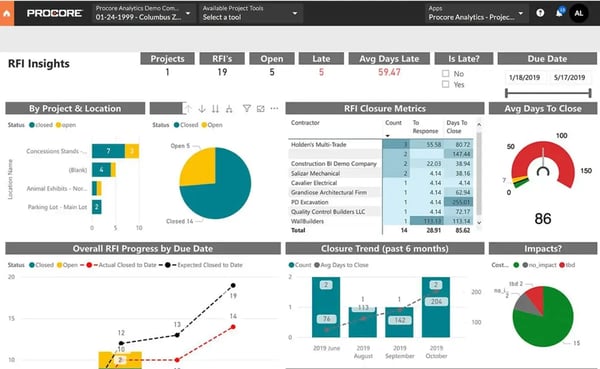
I’ve noticed a lot of love for the mobile functionality, which serves as a strong differentiator for Procore. Users report that the mobile app mirrors the desktop experience closely, allowing project managers to update logs, review documents, and approve items directly from the field without sacrificing functionality.
Third-party integration compatibility rounds out Procore’s appeal. I’ve read in G2 reviews that the platform connects well with tools like Bluebeam and QuickBooks, extending its usefulness into adjacent workflows. Procore’s customer base spans a wide range, with 50% of G2 reviewers representing small businesses and 44% from mid-market firms, showing that its accessibility stretches well beyond large-scale operations.
Something G2 reviewers seem to really appreciate is the free certification programs Procore offers. Multiple users highlight how these self-paced courses help team members build platform proficiency without disrupting daily project responsibilities, making it easier to scale adoption across an organization.
While Procore’s breadth of features is widely valued, I’ve noticed in G2 reviews that the reporting and data retrieval tools can feel cumbersome when working with complex projects. Some users describe difficulty locating specific fields within reports, and data that overlaps across modules occasionally requires additional processing outside the platform. That said, the out-of-the-box reports still provide solid visibility for most project needs, and teams find them useful for tracking performance and costs at a day-to-day level.
Based on G2 reviewer feedback, certain features behave differently across modules; for instance, auto-save is available in some tools but not others, and bulk-action capabilities vary. These inconsistencies can slow things down for teams that work across multiple Procore modules daily. Even so, users consistently acknowledge that the platform’s overall cohesion and range of capabilities outweigh these friction points, especially once teams establish their workflows.
For organizations seeking a dependable, all-in-one construction management platform with strong field-to-office connectivity, Procore remains a compelling choice that scales well across project sizes and team structures.
What I like about Procore:
- I see Procore’s free certification is getting a lot of praise, which help users build construction expertise and advance their careers.
- G2 reviewers seem to really appreciate the real-time data sharing between teams, which keeps everyone aligned on the latest cost information throughout a project.
What G2 users like about Procore:
“I like how Procore is so easy to use and that everything is in one place. I also appreciate being able to track our files, emails, and daily logs all in one place.”
– Procore review, Randie H.
What I dislike about Procore
- I’ve noticed in G2 reviews that while Procore captures a wealth of project data, the reporting tools can feel cumbersome when locating specific fields or generating fully custom reports, though the built-in reports cover most day-to-day tracking needs well.
- Based on G2 reviewer feedback, the platform’s breadth of tools is a clear strength, but feature behavior can vary across modules in areas like auto-save and bulk actions, even as the overall cohesion continues to improve with updates.
What G2 users dislike about Procore
“Some tools have different features and don’t offer the same options across the board. For example, bulk actions are available in some places but missing in others, which makes the experience feel inconsistent.”
– Procore review, NADIA N.
3. HCSS: Best for proposal creation and bid management
HCSS offers a comprehensive solution for construction companies and contractors, providing tools to explore and select the best bids, outline estimation costs, and manage job hiring and staff budgeting. From what I’ve seen in G2 reviews, it’s a platform that is valued for improving the efficiency of selecting, bidding, and purchasing materials for construction projects.
One standout capability, according to users, is bid management. I’ve frequently seen G2 reviewers highlight how much time this feature saves compared to traditional spreadsheet methods. Many users, including those from large and small companies, appreciate that it allows for accurate and competitive bids to be generated quickly, leading to more jobs and less hassle during the bidding process.
I’ve also come across strong praise for the global changes functionality. Users appreciate being able to update cost data and project variables across multiple bids simultaneously, a feature that eliminates repetitive manual edits and significantly streamlines estimation workflows for teams handling concurrent projects.
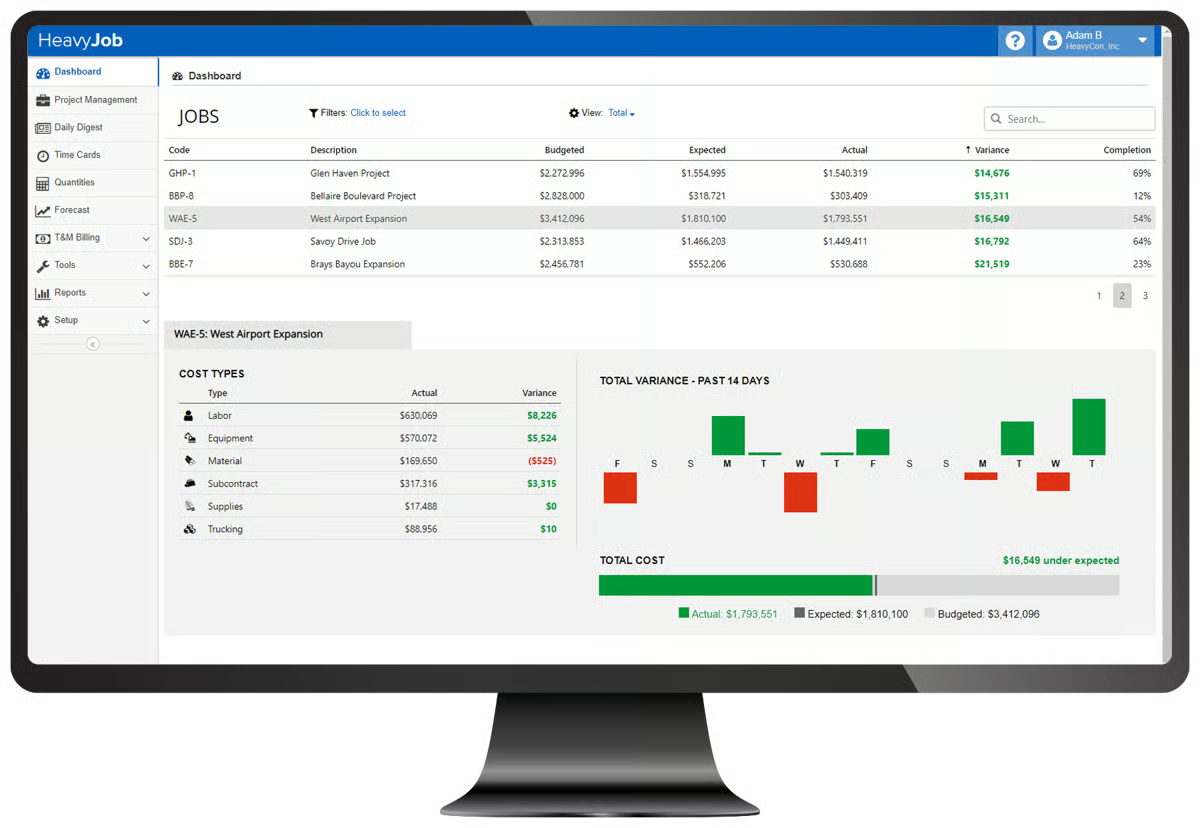
In terms of equipment tracking, I’ve read in G2 reviews that users managing fleets of heavy machinery value the real-time capabilities for monitoring usage, maintenance schedules, and associated costs, ensuring that equipment budgets stay on track and downtime is minimized. The G2 Data reflects this operational depth: HCSS earns a 97% quality of support rating, the highest among tools in this lineup, and a testament to the responsiveness that reviewers emphasize.
I’ve noticed a lot of love for the real-time job tracking feature as well. G2 reviewers frequently mention that this tool improves field operations by providing instant updates, eliminating the need for outdated spreadsheets, and enhancing visibility directly from mobile devices.
Collaboration is another strong suit; many teams regard HCSS as one of the best tools for multi-user estimating collaboration, enabling concurrent bid work without version sprawl.
HCSS is widely recognized as a robust, all-in-one construction estimation tool that helps automate bid management and streamline job workflows. Many reviewers highlight its ability to save time and centralize complex processes, making it a reliable choice for larger teams and enterprises.
Something G2 reviewers seem to really appreciate is the customer support experience. Across multiple reviews, users describe the support team as exceptionally responsive and knowledgeable, with several noting that the quality of assistance has remained reliable over years of partnership.
While HCSS offers deep functionality across its product suite, I’ve noticed in G2 reviews that the user experience doesn’t always feel consistent across the platform. Some areas of the interface have a more polished, modern feel than others, which can make navigation less intuitive when moving between different workflows.
According to G2 reviews, connecting HCSS with tools and systems outside its own ecosystem can take extra effort. Teams that rely on a mix of platforms for different parts of their workflow sometimes find that data doesn’t move between them as fluidly as they’d like. Even so, the breadth of what HCSS offers natively means most teams can operate comfortably within the platform, and the company’s responsiveness to user feedback gives confidence that interoperability will continue to improve.
For heavy civil contractors seeking a reliable, feature-rich platform that pairs industry-specific estimating tools with strong field operations support, HCSS continues to set the standard in its category.
What I like about HCSS:
- One standout capability, according to users, is the real-time job tracking from mobile devices, which gives field teams instant production visibility and helps project managers course-correct faster.
- From what I’ve gathered through G2 reviews, the dedication of the customer service team is a recurring highlight, known for prompt ticket resolution and acting on user feedback.
What G2 users like about HCSS:
“Your support is amazing. I work in IT, so support is what I interact with most, aside from Credentials. Your team is always ready to help, quick to respond, and extremely knowledgeable about the system. If there’s one thing I hope never changes, it’s your outstanding support.”
– HCSS review, Jordan N.
What I dislike about HCSS
- I’ve noticed in G2 reviews that while the platform’s underlying functionality is consistently strong, the user experience can feel uneven across different areas, though modernization efforts are actively underway.
- According to G2 reviews, HCSS covers most operational needs natively, but connecting with outside tools and systems can require extra effort for teams working in mixed environments.
What G2 users dislike about HCSS
“The products have gotten away from the user-friendly experience they once had. Too many new products and platforms that don’t live up to previous versions.“
– HCSS review, Sarah U.
Maintain a streamlined account pipeline and supervise your financial operations for free with free construction accounting software to monitor your bottom line and improve net income.
4. Handoff: Best for AI-powered estimating and proposal generation
Handoff takes a different approach to construction estimating by placing artificial intelligence at the center of the bid preparation process. Rather than requiring estimators to build every line item from scratch, the platform uses natural language inputs to generate detailed estimates, scopes of work, and client-facing proposals, a workflow that I’ve seen G2 reviewers describe as transformative for small and mid-sized contracting businesses.
From what I’ve gathered through G2 reviews, the AI-driven estimating engine is the platform’s headline capability. Users explain that describing a project in plain language produces a structured estimate with material costs, labor breakdowns, and pricing pulled from real-world sources like Home Depot. According to the G2 Grid Report, Handoff earns a 96% likelihood to recommend score, the highest in this lineup, reflecting how quickly the tool delivers value to the contractors who adopt it.
I’ve noticed a lot of love for the time savings the platform delivers. Multiple users describe how Handoff compresses what used to be hours of manual estimating into minutes, allowing them to respond to more bid opportunities and close jobs faster, a competitive advantage that smaller firms find especially significant.
One feature that I see getting a lot of praise is customizable catalogs. Reviewers working with multiple property managers or repeat clients appreciate the ability to standardize pricing, materials, and markup rates for specific relationships, ensuring consistency across bids while cutting down on repetitive setup work.
I’ve read in G2 reviews that the CRM and proposal management features built into Handoff also draw positive attention. Users note that having estimates, change orders, payment tracking, and client communication in one workspace reduces the need for separate tools, keeping the entire client relationship organized from first contact through project closeout.
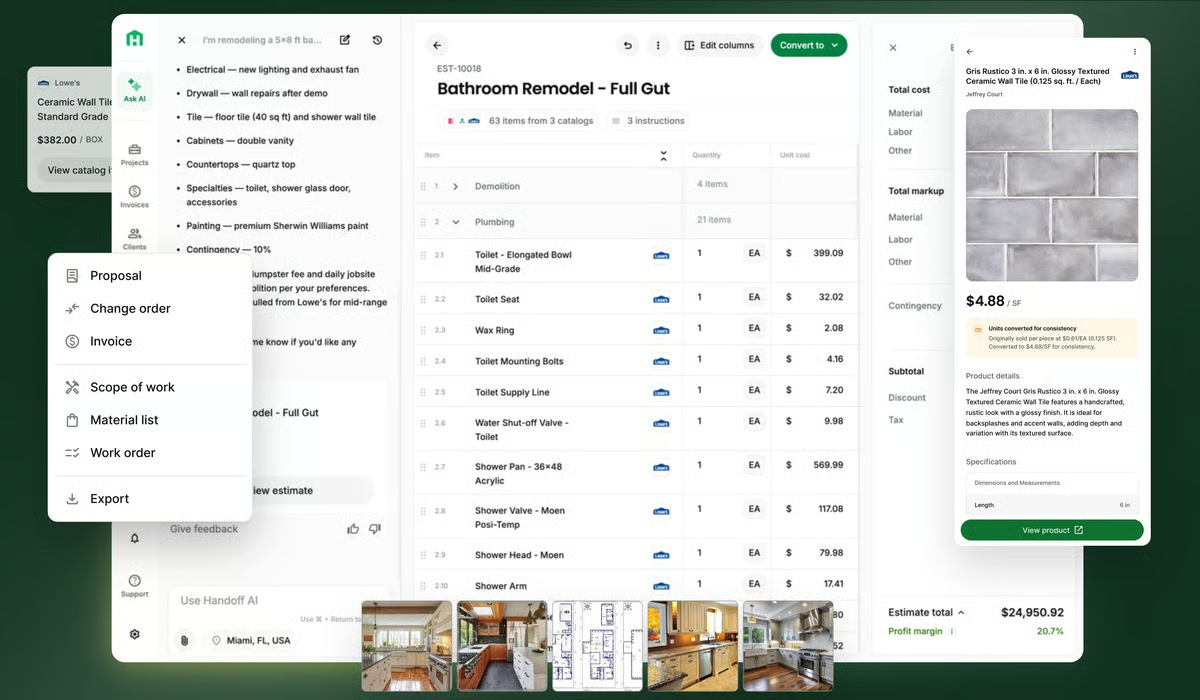
The platform’s learning capability adds long-term value as well. I’ve come across several reviewers who observe that Handoff becomes more accurate and efficient the more it is used, adapting to a contractor’s typical project types and correcting itself when users flag errors. Handoff’s estimated ROI payback period is just 3 months according to the G2 Grid Report, making it one of the fastest tools in this category to deliver measurable returns.
Based on what I’ve seen in G2 reviews, scope of work documentation is another area where the platform simplifies a traditionally tedious task. Users highlight how Handoff organizes consultation notes and project details into polished, client-ready documents that clearly define deliverables and expectations.
Handoff has carved out a distinct position in the construction estimating space by making AI a practical, everyday tool for contractors who need speed and accuracy without the overhead of enterprise-scale platforms.
While the AI engine accelerates the estimating process considerably, I’ve noticed in G2 reviews that accuracy remains an area where the platform is still maturing. Like most AI-powered tools, the system can occasionally hallucinate details or produce estimates that don’t fully align with the actual scope. That said, reviewers consistently note that the accuracy improves the more the platform is used, and the development team has been receptive to feedback on tightening these results.
I’ve also seen some users mention that the absence of a dedicated client-facing portal or dashboard means they still rely on separate tools for certain client communication and document-sharing workflows. Even so, the platform’s built-in proposal and payment tracking features handle the majority of client-facing needs, and many reviewers expect portal functionality to arrive as the product continues to mature.
For contractors looking to modernize their estimating workflow with AI assistance, Handoff offers a compelling combination of speed, adaptability, and practical features that grows more valuable with continued use.
What I like about Handoff:
- Something G2 reviewers seem to really appreciate is the AI-powered estimating engine, which generates detailed bids from natural language descriptions in minutes.
- I’ve read in G2 reviews that the customizable catalog system is another frequent highlight, standardizing pricing and materials for repeat clients across bids.
What G2 users like about Handoff:
“This system makes it easy to send estimates, work scope breakdowns, and change-of-scope documents or pricing updates. It has helped us keep our clients informed throughout the work process. It’s straightforward to use, and it has made running our business much easier overall.”
– Handoff review, Mikayla Z.
What I dislike about Handoff:
- I’ve noticed in G2 reviews that while the AI engine saves significant time, generated estimates still require manual review for accuracy, though the platform’s learning capability continues to improve with each use.
- From what I’ve gathered through G2 reviews, Handoff covers most client-facing needs through its built-in proposal tools, but the absence of a dedicated client portal means some users rely on separate tools for document sharing, a feature many expect to arrive as the product matures.
What G2 users dislike about Handoff:
“I feel like the AI-generated estimate quantities and hours can vary drastically at times. We’re also having trouble getting Handoff and QuickBooks to work together efficiently, which makes the overall workflow harder than it should be.”
– Handoff review, Jeff R.
5. STACK Takeoff and Estimate: Best for cloud-based digital takeoffs
STACK Takeoff & Estimate is built around one core promise: making digital takeoffs fast, accurate, and accessible from anywhere with an internet connection. As a cloud-native platform, it eliminates the need for desktop-bound software installations, and from what I’ve gathered through G2 reviews, this accessibility transforms day-to-day estimating workflows for both office and field teams.
One feature that I see getting a lot of praise is the measuring and takeoff toolset. Reviewers describe how the built-in tools capture linear, area, and count measurements with precision, making it straightforward to handle everything from small residential projects to large multi-unit developments. According to the G2 Data, STACK earns a 92% ease of use rating, reflecting the intuitive experience that reviewers call out repeatedly.
I’ve read in G2 reviews that cloud-based access is a differentiator that comes up in nearly every evaluation. Users value the ability to work on takeoffs from any device with a browser, and multiple reviewers note that this portability is especially useful for field teams who need to reference or verify quantities on-site without carrying laptops or relying on offline files.
From what I’ve seen across reviews, the document management and navigation features also receive strong feedback. Reviewers appreciate the ability to upload plans, search through sheet sets by keyword, and move between drawings efficiently, capabilities that save significant time on projects with extensive documentation.
I’ve noticed a lot of love for the collaboration tools built into the platform. Users highlight how STACK allows concurrent work on shared projects without version conflicts, and the ability to assign specific sheets or sections to different team members keeps workflows organized. The G2 Data shows STACK has a 79% average user adoption rate with an estimated 3-month payback period, indicating that teams see measurable returns quickly after deployment.
Export functionality is another area that I’ve come across positively in reviews. Reviewers frequently mention the convenience of exporting quantities directly to Excel spreadsheets or other cost databases, creating a smooth handoff between measurement and pricing stages.
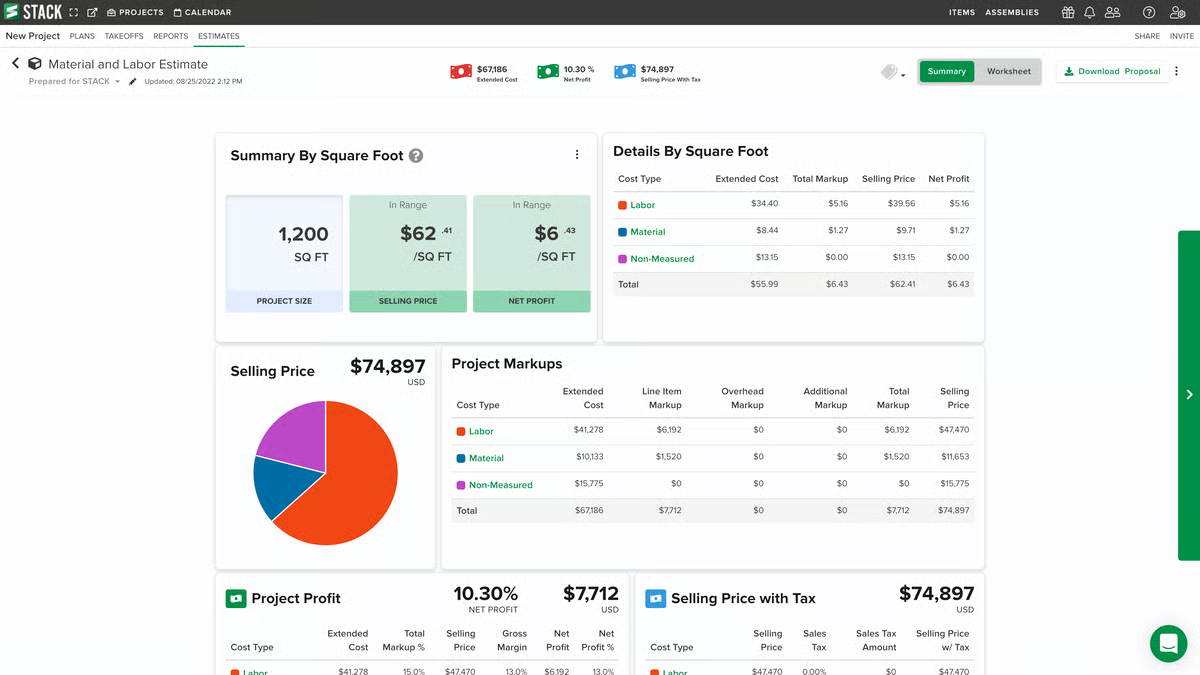
Something G2 reviewers seem to really appreciate is the customer support responsiveness. Multiple users note that when issues arise, the STACK team is quick to respond and willing to incorporate feature suggestions from its user community, creating a feedback loop that keeps the product evolving in line with real contractor needs.
STACK Takeoff & Estimate fills a clear niche for contractors and estimators who want a lightweight, browser-based takeoff tool that prioritizes speed and simplicity without sacrificing measurement accuracy.
While STACK performs well on typical projects, I’ve noticed in G2 reviews that performance can slow noticeably on very large or complex takeoffs, particularly high-rise or multi-unit apartment projects with dense plan sets. Users working on these larger-scale jobs report occasional lag that extends completion time. That said, the platform handles the vast majority of project sizes smoothly, and most reviewers consider this acceptable given the convenience of cloud-based access and the speed it provides on standard takeoffs.
Based on G2 reviewer feedback, certain advanced features and export capabilities could be more developed, with requests for improved undo functionality, better library management, and the ability to copy takeoffs between projects. Even so, reviewers acknowledge that the platform’s core takeoff tools are reliable and that the STACK team actively tracks feature requests, giving users confidence that these refinements are on the product roadmap.
For estimating teams that prioritize accessibility, ease of adoption, and fast turnaround on quantity takeoffs, STACK Takeoff & Estimate delivers a focused, cloud-first solution that keeps workflows moving without unnecessary complexity.
What I like about STACK Takeoff & Estimate:
- I’ve noticed a lot of love for the cloud-native access, which lets estimators and field teams work on takeoffs from any device with a browser.
- One capability that consistently stands out in G2 reviews is the precision of the built-in measuring tools, which handle linear, area, and count takeoffs accurately across project sizes.
What G2 users like about STACK Takeoff & Estimate:
“I really like the variety of built-in tools and how easy it is to complete material count takeoffs, whether it’s for small homes or 360-unit buildings. These tools help speed up takeoffs while keeping them accurate, and they also make it easier to find and flag crucial information needed for quotes and for after the project is won. I’ve loved how straightforward STACK Takeoff & Estimate has been since our trial, and we now have 15 memberships. The initial setup was simple and went smoothly.”
– STACK Takeoff & Estimate review, Brennan M.
What I dislike about STACK Takeoff & Estimate:
- I’ve noticed in G2 reviews that the platform handles most project sizes smoothly, but performance can slow on very large or complex takeoffs like high-rise jobs, though standard projects run without any issues.
- Based on G2 reviewer feedback, STACK’s core takeoff tools are reliable and well-built, but certain advanced features like library export and undo functionality are still being developed, with the team actively tracking these requests on the roadmap.
What G2 users dislike about STACK Takeoff & Estimate:
“I’m not very familiar with the estimate function in STACK. I have always used an Excel spreadsheet for my estimate. I find it hard to figure out some general condition items like lift rental and travel, per diem & lodging for out-of-town projects. To me it seems easier to do that portion in my Excel spreadsheet. I would very much like to see the “Multiplier” on the “measure” page to be able to use decimal figures like 2.5 or 3.75. Now we are only allowed to use whole numbers.”
– STACK Takeoff & Estimate review, Jeff W.
6. Methvin: Best for first-principles estimating and job costing
Methvin approaches construction estimating from a fundamentally different angle than most tools in this category. Instead of relying on historical averages or rough benchmarks, the platform builds every estimate from first principles, breaking costs down into labor, materials, plant, and equipment at a granular level. From what I’ve gathered through G2 reviews, particularly from senior project managers and quantity surveyors, this methodology represents a significant advantage for accuracy and stakeholder confidence.
One standout capability, according to users, is the first-principles estimating methodology. I’ve read in G2 reviews that building costs from the ground up produce transparent, auditable estimates where every assumption is visible, making it far easier to defend bids during tender submissions and client negotiations. According to the G2 Data, Methvin earns a 99% score for product going in the right direction, the highest in this lineup, and a strong signal of user confidence in the platform’s trajectory.
I’ve noticed a lot of love for the cloud-based collaborative estimating capabilities. Multiple reviewers highlight how distributed teams, estimators, project managers, and finance professionals can work on the same bid simultaneously from a single source of truth, reducing version conflicts and improving coordination during time-sensitive tender periods. This positions Methvin among the best tools for multi-user estimating collaboration, particularly for firms where multiple stakeholders contribute to a single bid.
From what I’ve seen across reviews, integrated job costing and cost-versus-allowable reporting give the platform practical value well beyond the estimating phase. Users describe how these tools provide real-time visibility into actual expenditures against budgeted amounts, enabling early detection of cost overruns rather than post-project explanations. The G2 Grid Report also shows Methvin achieving a 99% quality of support rating, matching the highest in this category and reflecting the hands-on assistance reviewers consistently mention.
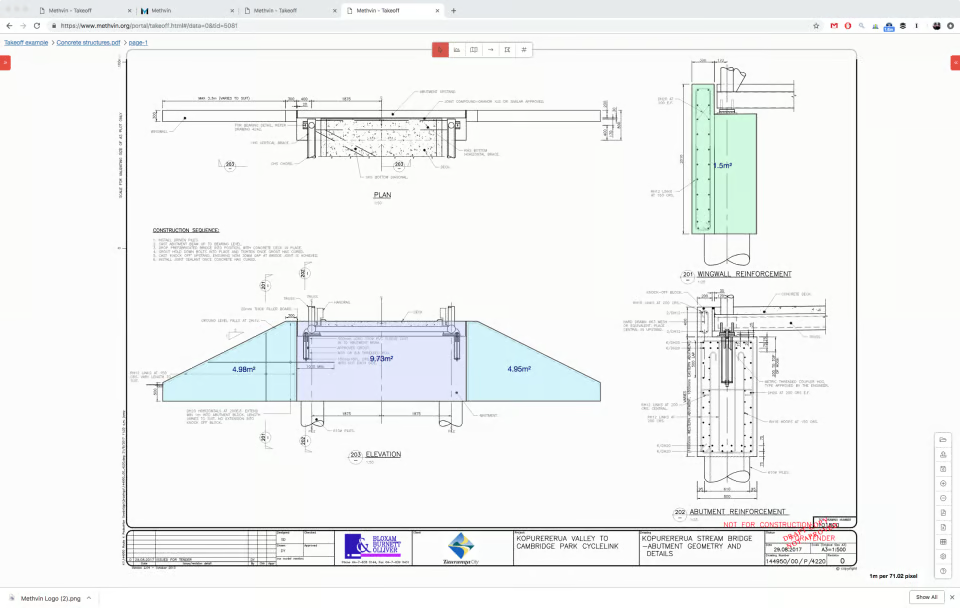
I’ve come across positive feedback around customizable workflows and templates that support organizational standardization. Reviewers in leadership roles appreciate how Methvin adapts to different business structures without forcing a one-size-fits-all approach, allowing firms to enforce consistent estimating practices across teams while tailoring processes to specific project types.
Based on what I’ve gathered, the Gantt chart scheduling tools round out the integrated experience. Users value having cost, scope, and timeline data connected within one platform, which simplifies resource planning and reduces the need to switch between separate scheduling applications.
One theme that I see recurring across reviews is scalability for complex, multi-trade projects. Users managing large infrastructure or industrial work describe how Methvin handles detailed scopes and multiple work packages without losing clarity, making it suitable for enterprise-level operations that demand both precision and oversight.
Methvin occupies a specialized position in the construction estimating market, delivering the kind of granular financial discipline that firms focused on risk management, bid accuracy, and cost transparency find indispensable.
While Methvin’s depth is widely valued, I’ve noticed in G2 reviews that the platform requires a meaningful investment in initial setup and team onboarding. Configuring workflows, templates, and cost structures to match internal procedures takes upfront planning, and teams transitioning from simpler spreadsheet-based methods may need dedicated training time to adopt the methodology fully. That said, reviewers consistently note that this investment pays dividends once teams are operational, with the structured approach improving both estimating speed and accuracy over the long term.
I’ve also observed in some reviews that the interface prioritizes functionality over visual polish, with certain areas feeling denser or less modern compared to newer SaaS platforms. Even so, users emphasize that this functional depth is exactly what makes the tool valuable for complex estimating work, and that the clarity of the underlying data structure more than compensates for aesthetic simplicity.
For construction firms that prize estimating rigor, transparent cost structures, and integrated project controls, Methvin provides a disciplined platform that rewards the organizations willing to invest in its methodology.
What I like about Methvin:
- Based on what I’ve seen in G2 reviews, the first-principles estimating approach is a defining strength, building every cost line from the ground up for transparent, auditable bids.
- Another area that users frequently call out is the cloud-based collaboration, which lets distributed teams work on the same estimate simultaneously without version conflicts.
What G2 users like about Methvin:
“What makes Methvin stand out is its first-principles estimating approach. Instead of depending heavily on historical averages, the platform builds estimates from detailed labor, plant, and material calculations. This creates more realistic bid preparation and helps reduce the risk of costly project overruns. The platform also improves collaboration between estimators, project managers, and commercial teams by giving everyone access to the same data in real time. From an organizational perspective, this helps reduce communication gaps and creates more consistency in how projects are managed.”
– Methvin review, Dian M.
What I dislike about Methvin:
- I’ve noticed in G2 reviews that while the structured methodology pays off in long-term accuracy, initial setup and onboarding require meaningful time and planning, especially for teams moving away from spreadsheet-based methods.
- From what I’ve gathered through G2 reviews, the platform’s functional depth is exactly what makes it valuable for complex work, but the interface can feel denser than newer SaaS platforms, though users note the underlying data clarity more than compensates.
What G2 users dislike about Methvin:
“The platform can feel quite detailed and rigid for smaller teams or firms that are used to faster, experience-based estimating methods. There is a learning curve, especially for professionals who are not used to building estimates from the ground up. From a recruitment standpoint, I’ve also noticed that some organizations may underutilize the depth of the tool. They adopt it, but don’t fully restructure their internal estimation or hiring workflows around it, which limits the overall impact.”
– Methvin review, Cameron J.
7. Sage Construction Management (formerly Corecon): Best for cloud-native project controls
Sage Construction Management, formerly known as Corecon, provides a cloud-based project management suite designed to bring every moving piece of a construction operation into one accessible workspace. From what I’ve gathered through G2 reviews, contractors and project managers value how the platform consolidates estimating, contract administration, procurement, time tracking, and correspondence under a single login, replacing the patchwork of spreadsheets and disconnected tools that many firms rely on.
One feature that I see getting a lot of praise is the centralized, cloud-based project hub. Reviewers consistently describe how having estimating, POs, subcontracts, billing, and documentation in one system eliminates the need to switch between multiple platforms. According to the G2 Data, 77% of Sage CM’s G2 reviewers come from small businesses, reflecting how well the platform’s accessibility and scope resonate with smaller contracting firms that need enterprise-level organization without the overhead.
.png?width=600&height=334&name=Sage%20Construction%20Management%20(formerly%20Corecon).png)
I’ve read in G2 reviews that PO management, expense tracking, and real-time job costing are among the platform’s most relied-upon capabilities. Users highlight how the system makes it straightforward to create purchase orders, monitor cost centers, and allocate labor hours, giving project managers a clear, up-to-date picture of where money is going across active jobs.
From what I’ve seen across reviews, the QuickBooks integration is a major differentiator for Sage CM. Multiple users describe how the sync between the two platforms streamlines invoicing, payroll processing, and accounting workflows, reducing manual data entry and ensuring that financial records stay consistent between project management and accounting systems. The G2 Data shows Sage CM earning a 96% score for product going in the right direction, signaling strong user confidence in the platform’s development trajectory.
I’ve noticed a lot of love for the reporting and dashboard capabilities. Reviewers in operations and finance roles describe how built-in report templates, custom dashboards, and Excel export options give them real-time visibility into project budgets, cost trends, and workload forecasting, turning raw project data into actionable insights without needing external analytics tools.
Based on what I’ve gathered, the customer support experience and training resources stand out as a consistent strength. Users describe the support team as responsive and genuinely invested in resolving issues, while the weekly webinars, detailed help articles, and video tutorials make it easier for teams to ramp up quickly and get the most out of the platform’s capabilities.
I’ve also come across frequent praise for the platform’s overall ease of use. Despite offering a comprehensive suite of modules, reviewers note that the system logic is accessible and the interface is straightforward enough for team members across different roles to learn without extensive technical backgrounds, a quality that helps firms onboard field staff and office teams alike.
Sage Construction Management occupies a practical middle ground for construction firms that want the organizational depth of a full project management suite without the complexity or cost footprint of larger enterprise platforms.
While Sage CM brings a wide range of project management capabilities under one roof, I’ve noticed in G2 reviews that the platform can feel restrictive when users try to extend workflows beyond core functions like POs and contracts. Certain document editing tasks require deleting and recreating records rather than revising in place, and save behavior isn’t always consistent across modules.
According to G2 reviews, performance and loading speed are another area where some users experience friction. A few reviewers describe occasional slowness when navigating between modules or loading larger project files, and intermittent connectivity issues have been noted during peak usage. Even so, most users find that the platform runs smoothly for routine daily tasks, and the convenience of cloud-based access from any device outweighs the occasional speed bumps.
For construction firms seeking a cloud-native project management platform that balances comprehensive functionality with accessibility and affordability, Sage Construction Management delivers a well-rounded solution that grows with the organization.
What I like about Sage Construction Management:
- From what I’ve seen in G2 reviews, the all-in-one cloud-based hub is a standout, centralizing estimating, POs, contracts, and billing in one accessible workspace.
- I’ve also noticed strong praise for the QuickBooks integration, which streamlines invoicing and accounting workflows with minimal manual data entry.
What G2 users like about Sage Construction Management:
“Very easy to use and adaptive to our construction company.”
– Sage Construction Management review, Tammy T.
What I dislike about Sage Construction Management:
- I’ve noticed in G2 reviews that while the core PO and contract workflows operate reliably, the platform can feel restrictive when extending into less common tasks, though the team actively incorporates user feedback into updates.
- According to G2 reviews, the platform handles routine daily tasks smoothly, but loading speed can slow down during peak usage or when navigating larger project files, even as cloud-based accessibility remains a net advantage.
What G2 users dislike about Sage Construction Management:
“It’s a bit closed-ended when you want to do anything further from POs.”
– Sage Construction Management review, Srinidhi S.
8. Contractor+: Best for all-in-one field service and estimating
Contractor+ is built specifically for small contractors and field service professionals who want every aspect of their business, estimating, invoicing, scheduling, CRM, and team management, accessible from a single mobile-friendly platform. From what I’ve gathered through G2 reviews, users consistently describe it as the tool that finally replaced their patchwork of disconnected apps, spreadsheets, and manual workflows.
One feature that I see getting a lot of praise is the all-in-one centralized workspace. Reviewers highlight how Contractor+ brings quotes, jobs, invoices, payments, time tracking, and client documentation into one dashboard, eliminating the need to juggle multiple platforms throughout the workday. According to the G2 Grid Report, Contractor+ earns a 92% likelihood to recommend score, reflecting the strong satisfaction that small business users report once the platform is integrated into their daily operations.

I’ve noticed a lot of love for the estimating and invoicing capabilities. Multiple users describe how Contractor+ makes it easy to build professional-looking quotes with categorized line items, markup options, and group pricing, and then convert those quotes directly into jobs and invoices without re-entering data, a workflow that saves significant administrative time.
I’ve read in G2 reviews that the affordability and value relative to competitors is a recurring highlight. Users who have tried platforms like HouseCall Pro and other field service tools frequently note that Contractor+ delivers comparable or broader functionality at a lower price point, making it particularly accessible for independent contractors and small teams operating on tighter budgets.
From what I’ve seen across reviews, QuickBooks integration and third-party app connectivity earn consistent positive feedback. Users describe how syncing financial data between Contractor+ and their accounting software reduces manual entry and keeps invoicing, payroll, and expense tracking aligned without duplicated effort. The G2 Grid Report shows Contractor+ achieving a 5-month estimated ROI payback period, indicating quick returns for businesses that adopt the platform.
Based on what I’ve gathered, the customer support experience is another area where Contractor+ stands out. Multiple reviewers describe the team as responsive, approachable, and genuinely invested in helping users succeed, with several noting that the company actively listens to feature requests and incorporates user feedback into product updates.
I’ve also come across strong praise for the ease of setup and onboarding experience. Reviewers consistently describe the initial configuration as quick and intuitive, with step-by-step guidance, demo walkthroughs, and helpful video resources that make it practical for even non-technical users to get up and running without outside assistance.
Contractor+ has positioned itself as the go-to operating system for small contractors who need professional-grade tools without enterprise-level complexity or cost.
While Contractor+ offers a broad set of features, I’ve noticed in G2 reviews that certain advertised or anticipated capabilities are still being developed. Users mention features like subcontractor portals, AI phone agents, and advanced takeoff tools as areas where the platform hasn’t fully delivered yet, even though development appears to be actively underway. That said, the team has a track record of shipping new features based on community feedback, and most reviewers express confidence that these additions will arrive as the platform continues to mature.
From what I’ve gathered from G2 reviews, the sheer number of features packed into the platform can take some time to explore and understand. Users transitioning from simpler tools or manual processes describe a period of familiarization before they feel fully comfortable navigating every module. Even so, reviewers consistently note that once they invest a few sessions in learning the system, the workflow becomes intuitive, and consolidating tools into a single platform saves far more time than the onboarding period requires.
For small contractors and field service professionals looking for an affordable, mobile-first platform that covers estimating, invoicing, scheduling, and client management in one place, Contractor+ delivers exceptional breadth for its price point.
What I like about Contractor+:
- One thing that consistently stands out in G2 reviews is the all-in-one platform, which consolidates estimating, invoicing, scheduling, and CRM into a single mobile-friendly dashboard.
- I’ve also noticed that G2 reviewers frequently praise the affordability, with many comparing it favorably to competitors while noting it delivers broader functionality at a lower cost.
What G2 users like about Contractor+:
“Everything! I’ve used more software programs than I can count, and Contractor+ is the ONLY one that checks all the boxes! Every software I’ve ever tried was always missing something, but NOT contractor+”
– Contractor+ review, Chris S.
What I dislike about Contractor+
- I’ve noticed in G2 reviews that while the platform is actively evolving, certain advertised features like subcontractor portals and AI phone agents are still under development, though the team’s responsiveness to user feedback gives confidence they’re on the way.
- From what I’ve gathered through G2 reviews, the breadth of features is a major strength, but it can take new users a few sessions to fully explore the platform, even as the intuitive layout and onboarding resources make the ramp-up period manageable.
What G2 users dislike about Contractor+:
“It may be tough for beginners to learn the system and actually understand it. Again, Contractor+ has so many features to learn about that, for beginners, it may be overwhelming. Personally, after a few nights of browsing through the system, creating test quotes, jobs, invoices, etc. I learned core features and understood the basics. So it does require a little learning curve at first. Another thing to point out, we really don’t want to overwhelm the client if we give them access to their Client Portal. Currently, the client portal doesn’t have the ability to hide what we don’t want the client to see or just doesn’t apply to them, such as work orders, since we mainly stick to the job.”
– Contractor+ review, Jon L.
Construction estimating software: Frequently asked questions (FAQs)
Got more questions? Get your answers below!
Q1. What is the best construction estimating software for small businesses?
The best construction estimating software for small businesses depends on budget and needs, but Handoff, STACK Takeoff & Estimate, and Methvin are strong choices. They offer cloud-based estimating, takeoff tools, and cost-tracking features tailored to small contractors.
Q2. Which estimating software offers real-time cost updates?
Handoff pulls real-world pricing from retail sources during estimate generation, while Procore integrates with industry pricing databases to keep budgets aligned with current material and labor costs.
Q3. Which software supports industry-specific estimating templates?
For heavy civil, infrastructure, or specialized trades, HCSS provides industry-specific modules like HeavyBid and HeavyJob with built-in templates. Methvin also supports customizable templates that adapt to different trade specialties.
Q4. What are the top platforms for generating detailed material cost breakdowns?
Methvin and HCSS are the top platforms for detailed material cost breakdowns. Methvin’s first-principles methodology builds every estimate line by line, while HCSS ties granular cost data directly to bid preparation and job costing.
Q5. What are the top-rated estimating platforms for large construction firms?
For enterprise-scale projects, Autodesk Forma and Procore lead the conversation. Both offer scalability, multi-team collaboration, and deep integration ecosystems suited to large construction operations.
Q6. Which construction estimating software is easiest to learn?
STACK Takeoff & Estimate earns a 92% ease of use rating on the G2 Grid Report thanks to its intuitive cloud-based interface. Handoff’s natural language estimating approach also reduces the onboarding curve for contractors who prefer conversational workflows.
Q7. Which is the best free construction estimating app for making estimates?
Methvin is a strong option for a free construction estimating app, offering online estimating, customizable formulas, project templates, and job costing tools to manage projects from takeoff to closeout at no charge.
Q8. Which is the best free residential construction estimating software?
Methvin is one of the best free residential estimating options available. It offers first-principles cost breakdowns and project templates at no charge, letting contractors generate data-driven estimates without relying on rough benchmarks.
Q9. How does cloud-based construction estimating software improve collaboration and accuracy compared to on-premise solutions?
Cloud-based estimating software lets multiple users access and update estimates in real time, integrates live material costs, automates version control, and reduces errors that come from manually exported spreadsheets.
Q10. What key integrations should construction estimating software have to streamline project workflows?
Look for integrations with project management tools like Procore, accounting software like QuickBooks, and supplier databases. These connections reduce manual data entry and improve accuracy across budgeting, invoicing, and procurement workflows.
Q11. Which is the best estimating software for estimation and costing in civil engineering?
Procore and HCSS are the top choices for civil engineering estimation and costing. Procore suits large enterprise-scale projects, while HCSS provides specialized heavy civil tools through HeavyBid and HeavyJob for infrastructure and road construction.
Q12. Which construction estimating tools offer reliable cloud-based access from any computer or device?
STACK Takeoff & Estimate, Methvin, Handoff, and Autodesk Forma are all fully browser-based, giving owners and estimators access to live project data from any computer without software installations or file transfers.
Q13. What are the top tools for creating accurate project cost estimates?
Methvin, HCSS, Handoff, and Procore are the top tools for accurate project cost estimates. Methvin builds from first principles, HCSS grounds estimates in historical bid data, Handoff uses AI with live pricing, and Procore connects estimates to budgets and schedules.
Q14. Which is the best construction estimating software for contractors based on verified user reviews?
Based on verified G2 reviews, Handoff suits small contractors who need speed, STACK excels at digital takeoffs, HCSS serves heavy civil bid pipelines, and Procore and Autodesk Forma scale for enterprise operations.
Q15. What should small construction firms evaluate when selecting estimating software for field-office alignment on measurements?
Look for cloud-based access, real-time measurement sync between field and office teams, and multi-device compatibility. STACK Takeoff & Estimate and HCSS are strong fits, letting field and office teams work from the same live data to prevent measurement discrepancies and costly rework.
Q16. Which construction estimating platforms are best suited for owners at asphalt and concrete firms managing takeoffs?
HCSS is the primary choice for asphalt and concrete contractors, with HeavyBid and HeavyJob built specifically for heavy civil workflows. Reviewers consistently cite long-term daily adoption well past initial onboarding, making it a reliable fit for paving and civil operations of all sizes.
Q17. Which construction estimating software supports auto-count tools for items like bollards and ADA signs across multiple plan sheets?
STACK Takeoff & Estimate supports auto-count takeoffs across multiple plan sheets, letting estimators count repetitive items like bollards and ADA signs quickly and accurately. Its keyword search also helps locate and flag specific items across large sheet sets.
Q18. Which construction estimating platforms integrate with accounting software and allow takeoff quantities to be pushed directly into Excel?
STACK exports takeoff quantities directly to Excel, making the handoff to pricing straightforward. HCSS pushes data to accounting and ERP systems, Sage Construction Management syncs with QuickBooks, and Procore connects estimating to its broader financial management suite.
Q19. Which construction estimating platforms require significant upfront time to build custom formulas for trade-specific calculations?
Methvin and HCSS both require meaningful setup time to configure trade-specific formulas, codebooks, and templates. Teams that invest in this upfront work consistently report faster, more accurate estimating over time — worth factoring into your implementation timeline.
Q20. Which construction estimating platforms have the strongest continued adoption among owners and estimators past initial deployment?
HCSS, Procore, and Handoff are frequently cited by G2 reviewers for sustained daily use well past onboarding. HCSS reviewers highlight years of consistent use, Procore is embedded across project lifecycles at most firm sizes, and Handoff improves in accuracy the longer it is used.
While I analyzed and experimented with multiple construction estimating software to understand what goes behind construction projects, the actual processes and workflows of companies might differ.
While I took dummy or demo variables to design contractor or vendor workflows, real companies have to make wise investments in talent acquisition, pitch contractor proposals, and create bids and tenders to monitor all facets of construction projects.
Before scouring multiple software-based websites or articles, I would suggest outlining your resources, expenses, manpower, bandwidth, financial liquidity, and annual revenue to factor in real-world technical and network tools and check for a compatible solution. While you are at it, feel free to refer to my two cents as well!
If you are looking to delve into electronics-specific construction projects, check out this list of the 7 best PCB design software programs that my peer wrote.