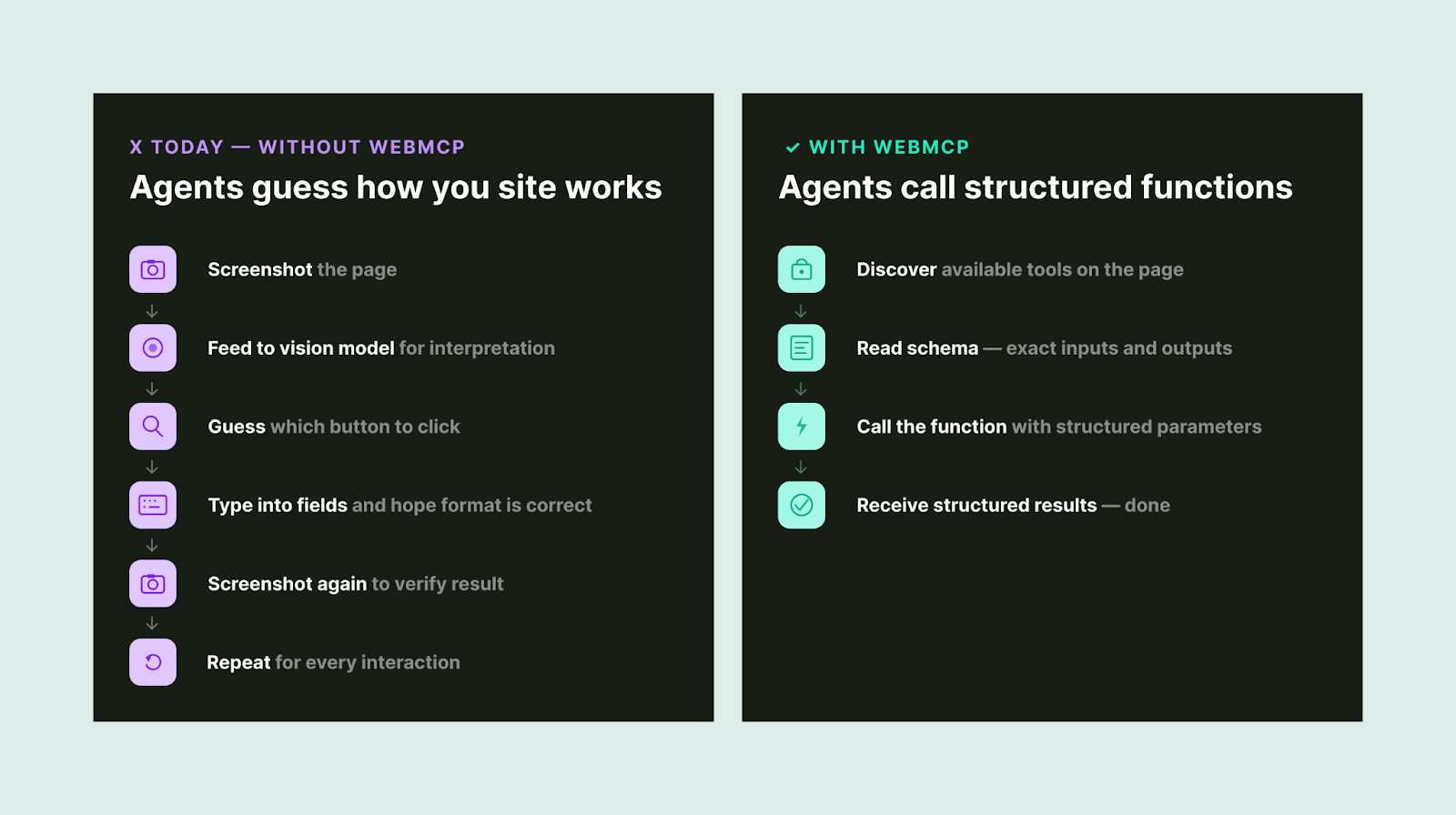
Right now, AI agents interact with websites like a tourist navigating a foreign city without a map.
They take screenshots. They parse raw HTML. They guess which button does what. And if a site redesign moves a single element? The whole thing breaks.
It’s slow. It’s expensive. And it’s comically unreliable.

How AI agents interact with websites today vs. with WebMCP.
WebMCP changes that.
Without WebMCP: An AI agent crawls your page, guesses which input fields need what data, hopes the form accepts its input, and crosses its fingers.
With WebMCP: Your website says “Here’s a function called searchFlights. It needs an origin, destination, and date. Call it, and I’ll give you structured results.” The agent calls the function. Gets the data. Moves on.
Think of it this way: WebMCP turns your website into an API that AI agents can use—without you having to build or maintain a separate API.
Why does this matter for marketers? Because optimization is no longer just about being found. It’s about being usable. The sites that make it easy for agents to complete tasks will capture the next wave of traffic. The ones that don’t will get skipped.
In this guide, I’ll break down what WebMCP is, how it works under the hood, and—most importantly—what it means for SEO professionals and marketers who need to stay ahead of the agentic web.
Shoutout to Vinicius Stanula at LOCOMOTIVE for inspiring this article!
What Is WebMCP?
WebMCP (Web Model Context Protocol) is a proposed browser-level web standard that lets any webpage declare its capabilities as structured, callable tools for AI agents.

WebMCP sits between your existing website and AI agents as a structured bridge layer.
The web was originally built for humans to read and click. WebMCP adds a parallel layer built for machines to understand and execute.
And the backing is serious: This is a joint effort from Google’s Chrome team and Microsoft’s Edge team, incubated through the W3C. Broader browser support is expected by mid-to-late 2026.
How Does WebMCP Work?
WebMCP gives developers two ways to make websites agent-ready: a Declarative API and an Imperative API.
The Declarative API (HTML-Based)
This is the low-lift option. If your site already has standard HTML forms, you can make them agent-compatible by adding a few attributes.
A restaurant reservation form, for example, would get a toolname and tooldescription attribute. The browser automatically translates its fields into a structured schema that AI agents can interpret.

The Declarative API: Add two attributes to any HTML form to make it agent-ready.
When an agent calls the tool, the browser fills in the fields and submits the form.
The takeaway: Existing websites with clean HTML forms can become agent-ready with minimal code changes.
The Imperative API (JavaScript-Based)
This is for more complex, dynamic interactions.
Developers register tools programmatically through a new browser interface called navigator.modelContext. You give the tool a name, a description, an input schema, and an execute function.

The Imperative API: Register tools via JavaScript for dynamic, complex interactions.
The agent sees the tool, knows what inputs it needs, and calls it directly.
Here’s what makes this especially powerful: Tools can be registered and unregistered based on page state. A checkout tool only appears when items are in the cart. A booking tool shows up after dates are selected. The agent only ever sees what’s relevant to the current context.
The Three-Step Flow

Discover → Schema → Execute: One tool call replaces dozens of browser interactions.
One structured tool call replaces what used to be dozens of sequential browser interactions—clicking filters, scrolling results, screenshotting pages—each one burning tokens and adding latency.
Why Should Marketers & SEOs Care?
AI Agents Are Becoming a Primary Web User
In January 2026, Google shipped Chrome auto browse, powered by Gemini. OpenAI’s Atlas browser launched with Agent Mode. Perplexity’s Comet is doing full-task browsing across platforms.
These aren’t experiments. They’re products with real users:
|
Product |
Company |
Launched |
Key Capability |
|
Chrome Auto Browse |
|
Jan 2026 |
Gemini-powered autonomous browsing |
|
Atlas (Agent Mode) |
OpenAI |
Oct 2025 |
Multi-step task execution |
|
Comet |
Perplexity |
Jul 2025 |
Search-first agentic browsing |
|
Disco |
Google Labs |
Dec 2025 |
Custom app generation from tabs |
Major agentic browser products on the market as of March 2026.
The websites that make it easy for these agents to complete tasks will capture more of this traffic. The ones that don’t will get skipped for competitors that do.
It’s the Responsive Design Moment for AI
When mobile arrived, the sites that adopted responsive design early won the distribution game. The late movers scrambled to catch up while traffic shifted.
WebMCP is the same dynamic. The sites that become agent-ready first will have a compounding advantage as agentic commerce becomes mainstream.
And unlike many “next big thing” predictions, this one has Google, Microsoft, and the W3C building the infrastructure together.
Your Forms Are Already 80% of the Way There
If your website has clean, well-structured HTML forms, you’re most of the way to WebMCP readiness already.
Adding toolname and tooldescription attributes to existing forms is a lightweight implementation. The heavy lifting is having good form hygiene in the first place—clear labels, predictable inputs, stable redirects.
That’s technical SEO fundamentals. The foundation you’ve been building already applies here.
Real-World Use Cases
Here are some concrete scenarios where WebMCP could change the game:

WebMCP use cases span ecommerce, travel, B2B SaaS, and customer support.
The common thread: WebMCP makes websites executable, not just readable.
WebMCP vs. Traditional MCP: What’s the Difference?
If you’re familiar with Model Context Protocol (MCP), you might wonder how WebMCP relates.
Short answer: They’re complementary, not competing.
|
Traditional MCP |
WebMCP |
|
|
Architecture |
Client-server (JSON-RPC) |
Browser-native (in-tab) |
|
Runs in |
Standalone server |
Browser tab |
|
Authentication |
Requires separate setup |
Inherits browser session (SSO, cookies) |
|
Best for |
Backend / API operations |
Web UI interactions |
|
Page State Access |
No direct access |
Full access |
|
Scope |
Tools, Resources, Prompts |
Tools only (for now) |
|
Status |
Widely adopted |
Early preview (Chrome 146) |
MCP and WebMCP are complementary—use both for full coverage.
The key difference: Traditional MCP runs on a separate server, while WebMCP runs inside the browser tab and inherits your existing authentication. A product might use both—MCP for headless backend operations and WebMCP for its dashboard or customer-facing UI.
One caveat: WebMCP currently handles tool calling only. It doesn’t yet include MCP’s concepts of resources or prompts. If your use case depends on agents accessing documents or structured data sources, traditional MCP is still the path for that.
How to Test WebMCP Today
WebMCP is live behind a feature flag in Chrome 146. Here’s how to get hands-on:
Step 1: Make sure you’re running Chrome version 146.0.7672.0 or higher. You may need to download Chrome Beta.

Step 2: Navigate to chrome://flags/#enable-webmcp-testing and set the flag to “Enabled.”

Enable WebMCP in Chrome 146 via the experimental flags page.
Step 3: Relaunch Chrome.
Step 4: Install the Model Context Tool Inspector Extension from the Chrome Web Store. It lets you inspect registered tools on any page and test them with custom parameters.

Google has also published a live travel demo where you can see the full flow—from discovering tools to invoking them with natural language.

The Model Context Tool Inspector shows discovered WebMCP tools on any page.
Important: This is an early preview, not production-ready. The spec is still evolving. But the developers who understand navigator.modelContext today will be the first ones agents prefer tomorrow.
What This Means for AI Visibility
WebMCP represents a new surface in the broader AI visibility picture.
Up to now, AI visibility has focused on getting your brand mentioned and cited in AI-generated answers. That’s still critical—and it’s not going anywhere.
But WebMCP adds a layer beyond content retrieval. It’s about making your website’s functionality accessible to AI agents. Not just “Can an LLM find and recommend my product?” but “Can an AI agent actually complete a purchase on my site?”
The visibility stack is expanding:

The expanding visibility stack: Each layer builds on the last.
Each layer builds on the last. You can’t be agent-ready without strong SEO foundations. You can’t build AI visibility without authority and entity clarity. And you can’t capture agentic traffic without clean, structured, well-labeled web experiences.
Here’s the practical implication: While WebMCP is still in early preview, the first two layers of that stack are actionable right now.
Tools like Semrush One already track how brands appear across ChatGPT, Perplexity, Gemini, and Google AI Mode—measuring AI mentions, citation sources, and share of voice in AI-generated responses. That gives you a baseline for the visibility that agents will eventually act on.

Because that’s the thing about WebMCP: Agents still need to discover your brand before they can use your site. The brands that are already visible in AI answers are the ones agents will route users to first. Getting mentioned and cited today is how you earn the right to be executed on tomorrow.
What to Do Right Now
WebMCP is early. The spec will change. But the foundations you build today carry forward regardless of how the standard evolves.
Start here:
Get Your AI Visibility Baseline
Before you worry about agent readiness, understand where you stand in AI search today. Are you being mentioned in ChatGPT responses for your core topics? Are competitors getting cited where you’re not?
If you’re an enterprise team managing multiple brands or regions, this is where scaled tracking matters. Semrush’s Enterprise AIO extends AI visibility reporting across ChatGPT, Perplexity, Gemini, and other LLMs with sentiment analysis and stakeholder-ready dashboards—so you can communicate progress to leadership while the WebMCP standard continues to mature.

Either way, the point is the same: Measure what’s happening in AI search now so you have context for what comes next.
Audit Your Key User Actions
Identify the five to 10 most important actions on your site: lead forms, booking flows, product searches, checkout, support tickets.
For each one, ask:
- Are the labels clear?
- Are the inputs predictable?
- Are redirects stable?
- Is the form clean HTML or a tangle of JavaScript workarounds?
Think in Actions, Not Just Content
A lot of SEO strategies focus on informational content. WebMCP rewards transactional clarity. What can someone do on your site, and how easy is it for a machine to figure that out?
Map your site’s most valuable actions alongside your content strategy. The sites that win in an agent-driven web will be the ones that make it easy for AI to complete tasks, not just find information.
Start the Conversation
Talk to your developers. Share this article. Point them to the Chrome early preview documentation and the W3C Web Machine Learning Community Group. Even if full implementation is a year away, the teams that start experimenting now will move faster when the standard lands.
Introduce this to your clients and stakeholders. If you’re an agency, a consultant, or an in-house team reporting to leadership, this is a conversation worth starting now. Not with urgency—with awareness. Frame it the way you’d frame any emerging standard: “Here’s what’s coming, here’s why it matters, and here’s how the work we’re already doing positions us well.”
The Bottom Line
The web is being rebuilt for two types of users: humans and AI agents.
WebMCP is a serious attempt to give those agents a native, structured way to interact with websites—without the fragility of screen scraping or the overhead of maintaining separate APIs.
The trajectory is clear.
The websites that make themselves legible to agents early—that declare their capabilities rather than waiting for agents to infer them—will compound their advantage as AI-driven workflows become the norm.
The same principle applies here that has always applied in SEO: Move early, build on fundamentals, and let the compounding do the work.








![Building Sustainable B2B Content with Devin Reed [+Video]](https://mgrowtech.com/wp-content/uploads/2025/06/G2CM_FI1177_Learn_Article_Industry_Insights_Devin_Reed_V1a-350x250.png)