
Search engines don’t crawl every page on your site every day. They have a limit, and if your site is large or messy, the wrong pages end up getting crawled while the important ones get skipped. That’s the crawl budget problem.
This guide covers what crawl budget is, what affects it, and how to fix it.
Key Takeaways:
- Crawl budget is the number of pages search engines will crawl on your site within a given time. It’s not unlimited.
- Small clean sites rarely have crawl budget issues. Larger sites with duplicate content, broken links, or poor structure often do.
- If pages on your site aren’t getting indexed, a crawl budget issue is one of the first things to check.
- Improving crawl budget doesn’t require a full site overhaul. Most of the impact comes from a few targeted fixes covered in this guide.
- Budget spent crawling low-quality or unnecessary pages is budget not spent on the content that actually matters.

Link building cheat sheet
Gain access to the 3-step strategy we use to earn over 86 high-quality backlinks each month.
What is Crawl Budget?
Crawl budget is the number of pages Googlebot and other search engine bots will crawl on your site within a set period of time. Google determines this number based on two things: crawl rate limit and crawl demand.
Crawl rate limit is the maximum crawl capacity Google is willing to use on your site without overloading your server. If your server is slow or unstable, Google pulls back to avoid making things worse. If your server handles requests well, it crawls more.
Crawl demand is how much Google actually wants to crawl your site based on how popular and fresh your content is. High-traffic pages that update frequently get crawled more often.
Pages that haven’t changed in months and get no links pointing to them barely get touched.
Together these two factors set your effective crawl budget. That’s the real number that matters.
For a 10-page site, none of this is worth worrying about. Search engines will crawl the whole thing easily.
But if your site has thousands of pages, pagination, filtered URLs, duplicate content, or a complicated structure, crawl capacity becomes a real constraint. Google only has so many crawl requests to go around, and it’s constantly making decisions about where to spend them.
The problem is that those decisions aren’t always aligned with what you actually want crawled.
That’s why crawl budget optimization exists. It’s about making sure search engines spend their time on your important content instead of wasting it on pages that don’t need to be crawled at all.

You can check how Google is crawling your site under Crawl Stats in Google Search Console. It shows crawl activity over time and is usually the first place to look when something feels off with your indexing.
Factors Affecting Crawlability
Several things affect how well crawlers can get through your site. Some are technical, some are structural, and most of them compound each other.
Site speed
Slow pages reduce your crawl rate limit. If your server takes too long to respond, search engines pull back to avoid overloading it. That means fewer pages crawled per day, and your crawl budget gets eaten up faster. Site speed is one of the most direct levers you have on crawl efficiency.
Site structure
How your site is organized has a big impact on crawl budget. If important pages are buried deep in the architecture, crawlers may not reach them consistently.
Pages that are easy to find from the homepage tend to get crawled more frequently. Pages that require six clicks to reach often don’t get crawled at all.
Duplicate content
Duplicate or near-duplicate content is one of the biggest sources of wasted crawl budget. If search engines are spending time crawling ten versions of the same page, that’s budget not going toward your actual content. This includes things like URL parameters, session IDs, and paginated pages that generate multiple URLs for the same content.
Low quality pages
Thin content, soft 404s, broken pages, and pages with no incoming links all signal to search engines that a page isn’t worth prioritizing. The more of these you have, the worse your overall crawl stats tend to look.
Server reliability
If your server goes down frequently or returns errors, crawlers notice. Consistent crawl errors over time can reduce how often search engines attempt to crawl your site. You can monitor this directly in the Coverage report inside Google Search Console.
Internal linking
Pages with no internal links pointing to them are nearly invisible to crawlers. Internal link structure is one of the clearest signals search engines use to understand which pages on your site are important content worth crawling regularly.
Submit Pages for Indexing Manually
The fastest way to get a specific page crawled is to request indexing directly through Google Search Console.
Open Search Console, paste the URL into the inspection tool at the top, and hit request indexing. Google will queue it for a google crawl usually within 48 hours.
It’s not instant, but it’s significantly faster than waiting for Googlebot to find the page on its own.

This is most useful when you’ve just published an important page and don’t want to wait, updated existing content and want Google to pick up the changes quickly, or fixed a technical issue on a page that was previously not indexing correctly.
It’s not a fix for crawl budget problems at scale.
If you have thousands of pages that aren’t getting crawled, manually submitting each one isn’t the answer. But for individual important pages where timing matters, it’s the most direct tool available.
Upload a Sitemap
A sitemap is a file that lists all the pages on your site you want search engines to crawl and index. Submitting one through Google Search Console tells bots exactly where your indexable pages are without making them discover everything through internal links alone.
For most sites, the bigger benefit is consistency. Crawlers check your sitemap regularly, so when new content goes live it gets picked up faster than if you relied on Google finding it through links.
The best setup is a sitemap that updates itself automatically. If you’re on WordPress, Yoast SEO and Rank Math both generate and maintain a sitemap for you without any manual work.
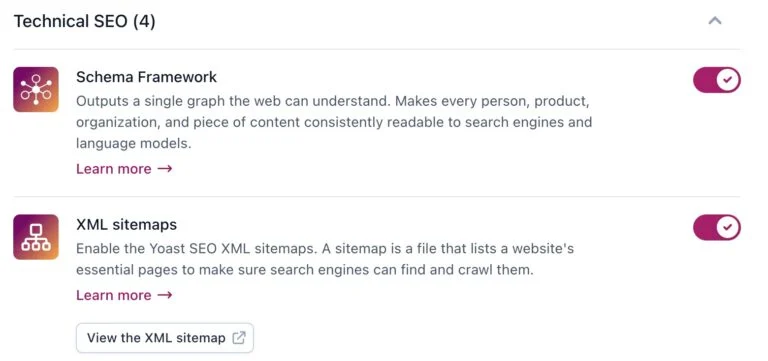
Every time you publish a new page or post it gets added to the sitemap automatically. That’s the ideal situation for crawl budget optimization because you’re never accidentally leaving new content out.
Optimize Site Speed
Faster sites get crawled more. When your server responds quickly, search engines can work through more pages in the same amount of time, which raises your effective crawl capacity.
Slow sites force crawlers to pull back, which means your crawl rate limit drops and your budget gets used up on fewer pages.
The easiest place to start is Google PageSpeed Insights. Paste in your URL and it gives you a score for both mobile and desktop along with a specific list of what’s slowing the page down.

It doesn’t just flag problems, it tells you exactly what to fix and roughly how much each fix would improve load time
Ensure Click Depth of 3 or Less
Click depth is how many clicks it takes to reach a page from your homepage. A page that’s one click away gets crawled constantly. A page that’s six clicks deep might barely get touched.
The general rule is to keep every important page within three clicks of the homepage. Beyond that, crawling drops off and so does search engine visibility.
It’s also just bad for users. If people can’t find a page easily, they probably won’t.
If you have pages sitting at four, five, or six clicks deep, the fix is usually a combination of better navigation, stronger internal linking, and in some cases restructuring how content is organized.
A flat site architecture where most pages are reachable in two or three clicks keeps crawl budget focused on the right places and reduces the risk of important content getting missed entirely.
Optimize Internal Link Structure
Internal links are how crawlers navigate your site. The more internal links pointing to a page, the more often it gets crawled and the more authority it carries in search results.
A good rule of thumb is that every page on your site should have at least five internal links pointing to it.

That applies to new pages especially. When you publish something new, go back to existing content and add links to it. That small step alone can meaningfully speed up how quickly search engines find and index the new page.
It also helps redistribute pagerank across your site. If you have older pages with strong authority, linking from them to newer or lower-performing pages passes some of that strength along.
It’s one of the more underused levers in crawl budget optimization.
On the flip side, check for orphan pages. An orphan page is any page with zero incoming internal links.

Crawlers find pages by following links, so if nothing on your site links to a page, there’s a good chance it’s not getting crawled at all. That’s wasted crawl budget at best and completely invisible content at worst.
Robots.txt
Your robots.txt file tells crawlers which pages they’re allowed to crawl and which ones to skip. It’s one of the most direct tools you have for controlling how your crawl budget gets spent.
The main use case is blocking low value pages that don’t need to be crawled.
Things like admin pages, internal search result URLs, filtered ecommerce parameters, staging areas, and duplicate content variations. If a page serves no purpose in search results, there’s no reason to let crawlers spend crawl capacity limit on it.
Fix Broken Links, Redirects, & Duplicate Content
These three issues are some of the most common sources of wasted crawl budget and they’re all fixable with a basic site audit.
Broken links
When a crawler follows a link and hits a 404, that’s a dead end. The crawl activity stops there and the budget spent reaching that URL is wasted. On a small site this barely matters.
On a site with thousands of pages and hundreds of broken links it adds up fast. Run a crawl through Screaming Frog or Ahrefs, find the broken links, and either fix the destination URL or remove the link.
Redirect chains
A single redirect is fine. A chain of three or four redirects in a row is a problem. Each hop in the chain costs crawl capacity and dilutes pagerank.

Google bot will usually stop following a chain after a certain number of hops anyway, which means the final destination page may not get crawled at all.
Audit your redirects and flatten any chains down to a single direct redirect where possible.
Duplicate content
Duplicate content forces search engines to crawl multiple versions of the same page and then decide which one to index. That decision process burns through budget and often produces the wrong result.
Use canonical tags to tell search engines which version of a page is the one that matters. For ecommerce sites with filtered URLs and sorting parameters, this is usually the biggest crawl budget issue on the whole site. A soft 404, which is a page that returns a 200 status code but has no real content, has a similar effect and should be cleaned up the same way.
The fastest way to find all of these issues at once is a full site audit using a tool like Screaming Frog, Sitebulb, or the site audit feature in Ahrefs or Semrush.
Run it, sort by issue type, and work through the list. Learn more about each issue as you go and you’ll start recognizing the patterns quickly across different sites.
Link building cheat sheet
Gain access to the 3-step strategy we use to earn over 86 high-quality backlinks each month.
Now Over to You
Crawl budget isn’t something most people think about until pages stop showing up in search results.
But if your site is growing, adding content regularly, or has accumulated technical debt over time, it’s worth auditing sooner rather than later.
The good news is that most crawl budget optimization comes down to a handful of things: clean structure, fast pages, a solid internal linking setup, and making sure crawlers aren’t wasting time on pages that don’t matter.
Fix those and search engines will spend their budget where you actually want it.
If you’ve got the on-site technical seo dialed in and want to work on the off-page side, that’s where digital marketing and content marketing efforts like link building come in.
Respona handles that part for you end to end. Place an order and we’ll take it from there.
Frequently Asked Questions (FAQ)
What is crawl budget?
Crawl budget is the number of pages search engines will crawl on your site within a given time period.
It’s determined by two factors: crawl rate limit, which is how fast Google can crawl without overloading your server, and crawl demand, which is how much Google wants to crawl based on your content’s popularity and freshness.
How do I check my crawl budget?
The best place to start is Google Search Console. The Crawl Stats report shows you how much crawl activity your site is getting over time, how many pages are being crawled per day, and whether there are any server response issues affecting your crawl rate.
Does crawl budget matter for small sites?
For most small sites with clean structure and under a few hundred pages, crawl budget is rarely a limiting factor.
Search engines can usually get through the whole site without any issues. It becomes more important as your site grows, especially once you have thousands of pages, lots of dynamic URLs, or significant duplicate content.
What causes crawl budget issues?
The most common causes are duplicate content, broken links, redirect chains, slow server response times, bloated sitemaps with low value pages, and poor internal linking. Any of these can pull crawlers toward pages that don’t matter and away from the ones that do.
How does site speed affect crawl budget?
Site speed directly affects your crawl rate limit. When pages load slowly, Google pulls back to avoid overloading your server, which means fewer pages get crawled in the same amount of time.
Improving server response time and page load speed is one of the most direct ways to increase crawl capacity.
What is crawl demand?
Crawl demand is how much Google wants to crawl your site based on signals like popularity, backlinks, and how frequently your content is updated. High-traffic pages that change often have high crawl demand.
Pages that haven’t been updated in years and have no links pointing to them have very low crawl demand and may barely get crawled at all.
What is an orphan page?
An orphan page is a page with no internal links pointing to it. Because crawlers navigate sites by following links, orphan pages often don’t get crawled or indexed at all. They’re easy to miss and can quietly sit outside your crawl activity without you realizing it.
Most SEO tools can identify them in a site audit. Learn more by running a full crawl of your site and filtering for pages with zero inbound internal links.
Can I block pages from being crawled?
Yes. Your robots.txt file lets you tell bots which pages to skip. This is useful for admin areas, filtered URLs, duplicate content variations, and anything else that doesn’t need to appear in search results.
Just remember that robots.txt controls crawling, not indexing. Use a noindex tag if you want to remove a page from search results entirely.
What’s the difference between crawling and indexing?
Crawling is when a search engine bot visits and reads a page. Indexing is when that page gets added to the search engine’s database and becomes eligible to show up in search results.
A page can be crawled without being indexed if it has thin content, a noindex tag, or other issues that make it unsuitable for the index. If a page isn’t showing up in search results, check whether it’s being crawled at all before assuming it’s an indexing problem.