
- October 8, 2017
- Vasilis Vryniotis
- . 3 Comments
 On October 19 2017, Ubuntu 17.10 will be released and as many of you know it packs lots of significant changes. I spend a week testing the Beta 2 and in this “last minute” review, I document some of the less obvious features/gotchas of Ubuntu 17.10. I also share with you my experience and provide a few workarounds for some problems that I spotted. For a more conventional review, have a look at OMGUbuntu’s excellent blogpost.
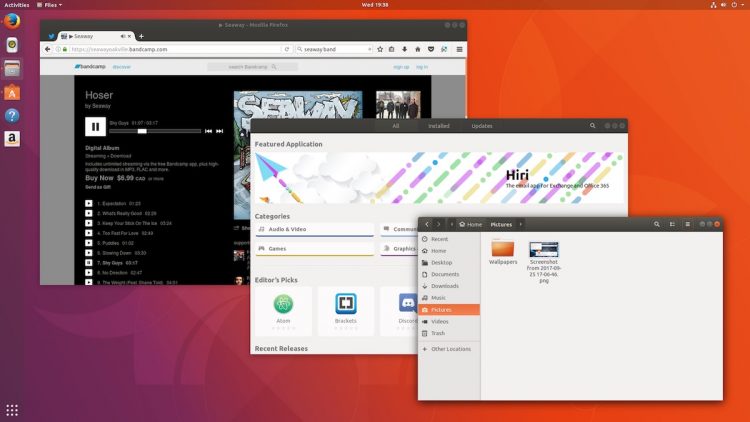 For those of you who don’t know me, I’m a creature of habit and an Ubuntu fan-boy, so when Canonical announced that they are ditching Unity I was not particularly happy. Nevertheless, even though Unity had some great features and it was particularly appealing to me, I find it a bit pointless to try and go against the flow of the river (manually installing Unity 7, using one of the community forks etc). What it’s done is done and from my point of view one should try to adjust to the new reality or choose a different distro.
On the positive side, Unity always shipped with a very large number of Gnome programs so most of the applications you used are still available by default. Moreover there are lots of interesting Gnome Extensions that can help you configure your desktop to be more unity-like. For instance the Dash to Dock extension will allow you to customize the Dash (location, launcher button, styles etc) and offers significantly more options than the default forked extension offered by Ubuntu. For those of you who are fond of the Indicator Applets, Canonical forked the Top Icons Plus extension (which is now discontinued). For me the official Indicator extension was enough and covered most of the functionalities that I want but your mileage may vary. Another useful extension is the Stay Overlay in Application View which is a not very intuitive way of saying that you will get the Application View (Gnome’s equivalent of Unity Dash) if you press the Windows/Super button. These 3 plugins were enough for me to reproduce the bare minimum of Unity and make Gnome more user-friendly. For those of you who liked the Global Application Menu/HUD you can use an unofficial plugin; I personally have not tested it.
Wayland is the default session for Ubuntu 17.10 and replaces Xorg (even though Xorg is still available). Unfortunately at the time of writing the article, a serious bug remained unresolved which led to the crashing of several applications. The problem seems to affect pkexec’ed, su-to-root and gksu/gksudo applications and according to the bug reports popular programs such as synaptic, backintime, gui-ufw and bleachbit do not work. Several workarounds have been proposed such as running xhost +si:localuser:root and then sudo synaptic or switching to Xorg until this is patched. Not the end of the world but definitely annoying.
Even though Unity packed a large number of Gnome applications, most of them were seriously modified. As a result on Ubuntu 17.10 you should expect to find some noticeable differences. For example the Archive Manager does not support exports by drag and drop (maybe it’s a bug?), the save dialog of gedit changed, Nautilus’ navigation and right click menus are different etc. Finally some programs such as the system-config-lvm are not yet available on the latest version.
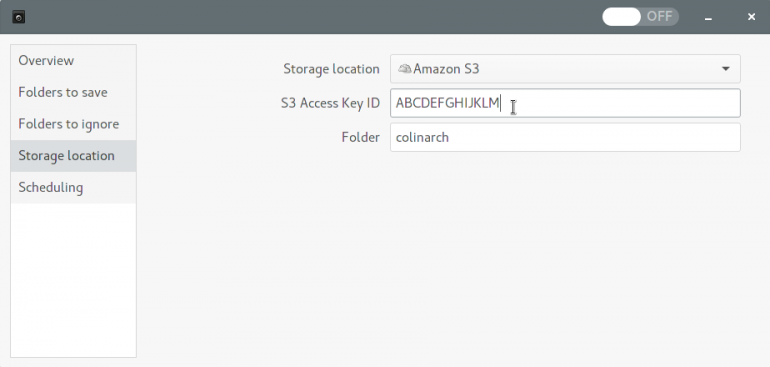
The default Backup application of Unity had a very cool feature. By installing a simple plugin, one could take automated backups on Amazon S3. Deja Dup supports also encryption so this yielded a cost effective and secure solution. Unfortunately the developers of the application decided to Deprecate several storage services, among them Amazon S3. They provide a series of reasons of why they did it, but for me this is a very poor choice. One of their core arguments is that Google Drive is more user-friendly than Amazon S3 for the casual users. Fair enough but I thought that Linux was all about the freedom of customization and choice. Moreover Linux typically attracts a large number of power-users comparing to other conventional operating systems. Removing Amazon S3, a solid cloud storage option, makes Ubuntu poorer not richer in terms of options and usefulness.
Thankfully for now the plugins are still supported but they are hidden. So if you have setup the required libraries (check the first linked article) and run the following command on terminal gsettings set org.gnome.DejaDup backend 's3' you should still be able to take backups on S3.
My laptop manufacturer mapped special operations such as Increasing/decreasing the lighting of the screen and the sound volume on the F1-12 buttons. Thankfully to activate them you need to press them along with the “Fn” button. So far so good. Unfortunately, they also had the amazing idea of placing the sleep button next to the sound volume button, which leads to accidents and drives me crazy. On Unity it was relatively straight forward to disable it, either via gui (dconf editor) or via the console using the following commands:
gsettings set org.gnome.settings-daemon.plugins.power button-suspend 'nothing'
gsettings set org.gnome.settings-daemon.plugins.power button-sleep 'nothing'
gsettings set org.gnome.settings-daemon.plugins.power button-hibernate 'nothing'
Unfortunately on Gnome these commands don’t work for my laptop. Thankfully it’s Linux, you can customize everything! So after searching for an hour and reading random forum messages and blogposts, I found the following working solution:
xmodmap -e 'keycode 213 = NoSymbol' #XF86Suspend
xmodmap -e 'keycode 150 = NoSymbol' #XF86Sleep
Ubuntu 17.10 looks good and with some customization you can make it more usable. There are some gotchas/bugs/problems but hopefully they will all be addressed before the 18.04 LTS. We all need to keep in mind that this is not a LTS version and Canonical tries to iron out the transition from Unity to Gnome. Having said that, it’s a no-brainer that you should not install 17.10 on a production machine. It’s worth trying it out on your secondary PC or on a Virtual Machine; hopefully this will smooth your transition.
For me testing Ubuntu 17.10 was a good opportunity to move all of my installation scripts from ugly bash scripts to Ansible. For those of you who have not used Ansible, it’s an open-source free automation engine which simplifies provisioning, configuration and management of servers. You write scripts in YAML and Python, which beats coding in Bash any day. During the process I ended up writing an Ansible role for installing Jprofiler since I could not find any existing solution on Ansible Galaxy. I ended up open-sourcing it so if you use JProfiler in your development give it a try. 🙂