Grab some of their writings and let’s go.
This story was originally published on Oct. 14, 2025. We’re republishing it as part of our countdown of top stories of the year.
One of the most popular uses of AI among communicators is to create a bot that can replicate their executive’s voice.
Using speeches, emails, videos or other materials capturing a leader’s authentic voice, AI tools purport to be able to reproduce their style and tone in seconds, rather than a human laboring away at ghostwriting and still not quite hitting the mark.
Creating a tool to achieve this is fast – but it’s the fine-tuning that will take more time and attention.
Here’s a step-by-step look at how to create your own custom AI tool for ghostwriting success.
- Choose your tool.
For this exercise, I used my company-provided ChatGPT Business accounts. Creating custom GPTs is not available on free tiers, and using a secured company environment ensures that data is kept private and not used for training purposes.
Other tools have similar build-your-own bot options, but this guide will be specific to ChatGPT.
- Ask your executive.
Before you start this, get permission from the person whose voice you want to recreate. It’s the right thing to do. Also make sure you have a conversation about how the content will be used: Always with heavy editing, always with fact checking.
For this experiment, I trained on my own voice. We’ll talk more about how later.
- Get started.
While logged into your ChatGPT account, visit this URL. In the upper right corner, click “+ Create.” This will take you to the GPT Creation page.
ChatGPT will helpfully greet you by asking you what kind of tool you want to make. You can describe this in plain language. I wrote, “I want to create a bot that mimics the writing style of Allison Carter, editor in chief of PR Daily and Ragan.com, using her LinkedIn posts and written content.”
ChatGPT immediately told me what to expect from my new bot, and makes it clear that this bot would not claim to be me or create its own facts; when it needs to know something, it would insert placeholders or ask.
Here’s what ChatGPT said it could do once we got it set up:
- Draft or edit LinkedIn posts, headlines, newsletter blurbs, story outlines, subject lines
- Give punchy alternatives and rationale (what to cut, tighten, elevate)
- Suggest hooks, formats (listicles, Q&A, playbooks) and social snippets
- Ask for goals, audience, channel and constraints—but make smart assumptions if missing
You’ll get a friendly welcome that asks for 3–5 sample posts or links (optional), plus prompt starters like:
- “Rewrite this LinkedIn post in Allison’s vibe for execs.”
- “Punch up these headlines; give 5 stronger options.”
- “Edit this article for clarity and flow—what would Allison cut?”
- “Draft a LinkedIn thread about [topic] with a sharp hook.”
It immediately started trying to get me to name the bot, but I had additional questions first, which it quickly answered.
In the absence of any uploaded materials, it would basically assume what I should sound like based on its knowledge of other people with my job title and the kinds of content those people write. But it could not free search the web, for instance to read articles I’d published or pull from LinkedIn. It could, however, search connected tools – such as Outlook or Google Drive – for materials I’d written there.
I didn’t have documents I wanted to share from those locations, so I moved on to manual upload.
- Uploading documents.
Here’s what ChatGPT suggested I supply:
Manual import:
Copy a few sample posts or article excerpts from Allison’s LinkedIn profile and paste them here. Even 3–5 posts (around 100–300 words each) is enough for me to build an accurate stylistic model — tone, cadence, rhythm, sentence structure, emotional register, etc.
I wanted to follow its directions closely, so I copy and pasted five of my LinkedIn posts directly into the box. You can also upload files like Excel sheets and PDFs.
Once that was done, it praised me but asked for more.
These posts alone already give a well-rounded snapshot of Allison Carter’s style, but adding a few long-form articles would be extremely valuable.
Here’s why:
-
LinkedIn posts reveal her voice and rhythm — her tone, humor, and audience engagement style.
-
Articles reveal her structure and editorial logic — how she develops arguments, uses transitions, balances authority with accessibility, and lands takeaways.
-
With both types, I can build a composite tone model that understands when to sound like a social post (punchy, scroll-stopping, personality-driven) and when to sound like an editorial piece (organized, authoritative, nuanced).
I shared three recent stories, again just copy and pasting into the text input box.
ChatGPT told me its next steps: conducting a behind the scenes “style analysis,” building a style guide and then integrating it into the GPT.
But before it did that, it had a question: Should it just mimic my tone or should it offer suggestions about how I would approach something? Basically, should it be an interactive style guide or more strategic in nature? “That choice will determine how directive vs collaborative the bot feels.”
I asked it just to mimic me.
Perfect — got it. We’ll make the GPT strictly mimic Allison Carter’s voice — not interpret, not blend, but write as if it were her. That means:
-
Every response will sound like one of her Ragan or PR Daily pieces, or a LinkedIn post she’d plausibly write herself.
-
It will use her cadence, syntax, humor, and rhetorical style — even down to her editorial pacing and headline rhythm.
-
It won’t add personal commentary or meta analysis (no “here’s how Allison would say this”); it will just write it.
-
When editing text, it will transform it into her tone completely, not annotate.
Finally, it asked me if it should be able to write new content in my voice or retrofit existing content into my voice. I asked for both.
- Finalizing
ChatGPT wanted me to name the bot. I asked, circularly, what I would call it. It offered me a list of suggestions and I went with “Carter’s Cut.” It also wanted an image for the GPT and offered a red fountain pen sitting on top of a document. We went back and forth a bit and eventually settled on a stylized C with the fountain pen.
It asked a few additional questions about what it should emphasize most when it writes or edits and then we were good to go. It offered to let me just start tinkering or to show me a demo. I opted for the demo.
- Fine-tuning
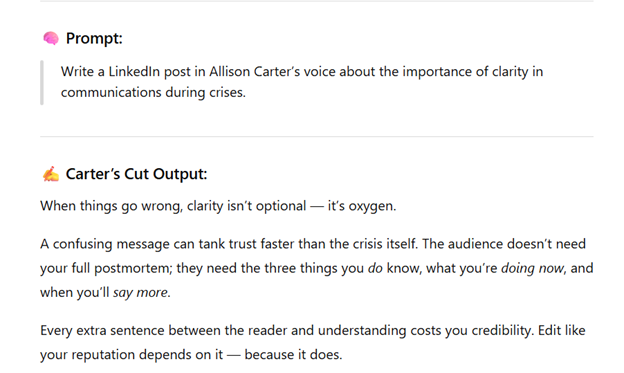
Did I think this sounded like me? Not really. It showed some general signs of AI, and I asked if Allison often used either italics or metaphors. (I don’t.)
It analyzed my writing and agreed with me: Both are used sparingly. It updated its style book in real time to reflect that. I asked for another prompt – this one about a topic I’d trained it on, the Cracker Barrel rebrand brouhaha.

I questioned it on what I saw as another AI tell – “you’re not just X, you’re Y,” which it uses twice in this piece. I asked if Allison uses that, and it agreed not really – but it could use it once per piece, as a treat.
Again, it regenerated.

This time, I felt it was in the ballpark of my voice. Not quite right, but perhaps enough to give a solid base someone else could tweak.
This entire process took less than half an hour. The longest part was finding which writing samples to upload.
I asked how I could continue to optimize this bot, and it gave several suggestions:
- Add context modules for specific use cases.
- Upload more writing samples.
- Add functional tools, like a headline generator or a voice comparison tool.
- Script mini-flows for repetitive tasks, like editing.
- Integrate with analytics or content planning.
And I may just take it up on those suggestions.
This story was written for members of Ragan’s Communications Leadership Council. Find more information.
Allison Carter is editorial director of PR Daily and Ragan.com. Follow her on LinkedIn.
The post Top Stories of 2025: How to create a GPT to mimic your executive’s voice in less than half an hour appeared first on PR Daily.