Synthetic Dataset Generation with Faker
Image by Author | Ideogram
In this article, you will learn:
- how to use the Faker library in Python to generate various types of synthetic data.
- methods to create single data records and full datasets, and how to export them into different formats.
- how to simulate real-world data imperfections (e.g. missing values, duplicates) for testing purposes, especially in ETL pipelines.
Introduction
The commonly over-used phrase “data is the new oil (or gold)” genuinely holds somewhat true in many scenarios where obtaining sufficient high-quality data for undertaking insightful analyses or building effective machine learning models becomes a challenge. Synthetic data generation is, therefore, a frequently resorted-to approach to cope with this challenge. Thanks to Python libraries like Faker, generating synthetic data for purposes such as bootstrapping existing datasets, testing, or even anonymizing sensitive information is easier than ever.
This article introduces the Faker library for generating synthetic datasets. Through a gentle hands-on tutorial, we will explore how to generate single records or data instances, full datasets in one go, and export them into different formats. The code walkthrough adopts a twofold perspective:
- Learning: We will gain a basic understanding of several data types that can be generated and how to get them ready for further processing, aided by popular data-intensive libraries like Pandas
- Testing: With some generated data at hand, we will provide some hints on how to test data issues in the context of a simplified ETL (Extract, Transform, Load) pipeline that ingests synthetically generated transactional data.
Don’t feel intimidated: we’ll adopt a gentle approach to showcase Faker’s basic capabilities under a very introductory and rather untangled perspective.
Step-by-Step Data Generation
1. Install and Import Faker
If this is your first time using Faker, you’ll need to install it as follows:
Now we will import the necessary libraries and modules:
|
from faker import Faker import pandas as pd import random |
2. Create Your Very Own “Faker”
The first thing to do is create an instance of the Faker class that will be able to generate different types of “fake” data — I do personally prefer utilizing the term synthetic over fake, hence I’ll stick to it hereinafter. We will also set a fixed seed for the random number generator: a cornerstone element behind synthetic data generation. Setting a seed helps make the code reproducible and debug it effectively, if necessary.
|
fake = Faker() Faker.seed(42) |
3. Write a Data-Generating Function
Next comes the most critical part of the code: the function that will generate synthetic, real-world-like instances of data. Concretely, we will generate bank customer records containing basic personal and socio-demographic attributes.
|
def generate_user_for_learning(): “”“This function generates real-world-like bank customer data.”“” return { “id”: fake.uuid4(), “name”: fake.name(), “email”: fake.email() if random.random() > 0.1 else None, “phone”: fake.phone_number(), “birthdate”: fake.date_of_birth(minimum_age=16, maximum_age=85), “country”: random.choice([“US”, “UK”, “India”, “Germany”, None]), “income”: round(fake.pyfloat(left_digits=5, right_digits=2, positive=True), 2) if random.random() > 0.05 else –1000.00 } |
That’s probably a lot to digest, so let’s analyze the code further, line by line:
- The function generates and returns a Python dictionary representing a bank customer: dictionary keys contain attribute names, and dictionary values contain, of course, the values.
- The
"id"attribute contains a unique user identifier (UUID) generated with theuuid4()function for this end. - The
"name"attribute contains a randomly generated customer name with the aid of thename()function. - Similarly, the
"email"attribute contains a randomly generated email address, but in this case, the email generation functionemail()has a 10% chance of not being used, thus simulating the chance that about 10% of the data may contain missing values for this attribute. This is an interesting way to simulate real-world data imperfections. Notice here that the process to randomly generate email addresses and that for the previous attribute containing customer names are independent, hence if you wanted customer names and emails to be related, you may have to use an alternate, probably not random approach to create email addresses upon customer names. - As we can see, the rest of the attributes’ values are also generated by using dedicated Fake functions, thereby providing plenty of flexibility in generating data of many types, and even supporting levels of customization, as seen for instance with the age range specified for the date of birth attribute. The
choice()function is used to generate categorical attribute values within a limited number of options. - The
"income"attribute value is generated as a floating value within a specified range, rounded to two decimal places. Besides, there is a 5% chance it will be set as -1000, which indicates an invalid or missing value: again, a way to simulate real-world data imperfections or errors.
In a single line of code, we can now iteratively call this method to create any number of customer instances and store them in a Pandas DataFrame object.
4. Call the Function to Create Data
Let’s do so for 100 such customers:
|
users_df = pd.DataFrame([generate_user_for_learning() for _ in range(100)]) users_df.head() |
The first few data instances should look like this:

Use Case: ETL Pipeline Testing
Suppose another scenario in which we are interested in testing an ETL pipeline that ingests bank transactional data. The following code generates some simplified customer instances with fewer attributes than in the previous example, plus a new dataset containing bank transactions associated with some of these customers.
|
1 2 3 4 5 6 7 8 9 10 11 12 13 14 15 16 17 18 19 20 21 22 23 |
def generate_user_for_testing(): return { “id”: fake.uuid4(), “name”: fake.name(), }
def generate_transaction_for_user(user_id): return { “transaction_id”: fake.uuid4() if random.random() > 0.02 else “DUPLICATE_ID”, “user_id”: user_id, “amount”: round(random.uniform(–50, 5000), 2), “currency”: random.choice([“USD”, “EUR”, “GBP”, “BTC”]), “timestamp”: fake.date_time_this_year().isoformat() }
users_test = [generate_user_for_testing() for _ in range(50)] transactions_test = [generate_transaction_for_user(user[“id”]) for user in users_test for _ in range(random.randint(1, 5))]
df_users = pd.DataFrame(users_test) df_transactions = pd.DataFrame(transactions_test)
print(“Sample Transactions:”) df_transactions.head() |
Note that the transaction data generation is designed so that 2% of transactions are labeled as duplicated, and some negative values are also accepted as transactions, to simulate both income and payments.
Let’s look at some generated transactions:
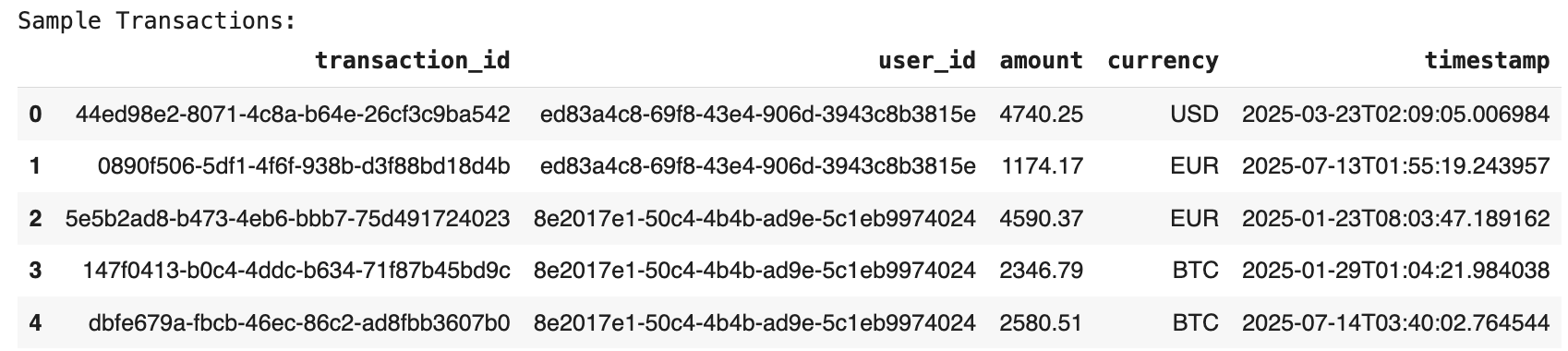
Areas to focus on for testing data quality in a scenario like this, especially if transactions are collected into an ETL pipeline, could include:
- Orphaned transactions, that is, possible transactions whose
user_idattribute is not associated with any user ID in the customers dataset - Duplicate transaction IDs
- Invalid currency codes
Wrapping Up
This article has presented Python’s Faker library, and has outlined its capabilities for generating synthetic datasets: a common need in real-world scenarios where data may be scarce to enable analysis, testing, and training of machine learning models upon sufficient realistic data.