Key takeaways:
- Power BI Pro is $14 per user per month, and Premium Per User is $24; capacity starts to beat both at roughly 390 users.
- Free report viewing begins at F64 and exists nowhere below it; an F32 costs $30,016 a year and still charges you for every viewer.
- Power BI Report Server rights come only from SQL Server core licenses or a Fabric reservation; pay-as-you-go capacity carries none.
- SQL Server 2025 dropped both the Enterprise-only and the Software Assurance requirement for Report Server, which quietly cut the cheapest on-premise route.
- Six line items external users, embedded analytics, storage, refresh limits, non-production capacity and governance labor routinely add 100% to the approved figure.
A CFO approves $152,000 for Power BI. Fourteen months later, the run rate is $305,000, and nobody can name the moment it doubled.
Nothing went wrong. No one overspent. The Power BI licensing cost that got signed off was the price of seats and capacity, which is roughly half of what running Power BI across a large organization actually costs. The other half arrives quietly: a second capacity for non-production, gateway servers, external users who suddenly need seats, a refresh ceiling that forces an upgrade three weeks before quarter-end.
This is a breakdown of the whole number. Not the pricing page, the invoice. Enterprise BI licensing has three moving parts most cost models treat as one, and Power BI Report Server, the piece that decides your on-premises bill, changed materially in 2026.
Sizing a Power BI estate right now?
Send us your author-to-viewer split, and we’ll tell you which SKU you actually land on.

What Power BI licensing actually costs in 2026
There are only four things you can buy. Every enterprise bill is some combination of them.
| What you buy | US list price | What it gets you |
|---|---|---|
| Microsoft Fabric (Free) | $0 | View content only on F64+ capacity with a Viewer role; build non-Power BI Fabric items |
| Power BI Pro | $14 / user/month, billed yearly | Publish and share; 1 GB models, 8 refreshes a day, 10 GB storage per license |
| Power BI Premium Per User (PPU) | $24 / user/month, billed yearly | 100 GB models, 48 refreshes a day, XMLA read/write, advanced dataflows |
| Fabric capacity (F SKU) | From ~$262/month (F2) to ~$8,410/month (F64) pay-as-you-go | Shared compute for the whole tenant; free viewers at F64 and above |
Two facts do most of the damage.
The first is that Power BI Pro is bundled into Microsoft 365 E5 and Office 365 E5. Enterprises running E5 often discover they have been paying for Pro seats they already owned and equally often discover the reverse: that a “free” Pro entitlement made 4,000 people licensed users without anyone deciding to license them.
The second is that Power BI Premium per-capacity P SKUs are gone. Microsoft removed them from the purchase flow for new customers on July 1, 2024, closed renewals for non-EA customers on January 1, 2025, and left Enterprise Agreement holders able to renew only until their agreement ends. If your Power BI enterprise licensing still says “P1,” it has a termination date attached to it.
 Power BI Premium vs Pro: the comparison that stopped being about features
At enterprise scale, the feature list is not the decision; the shape of the bill is.
- Pro is a collaboration license. It caps you at 1 GB of semantic models and eight scheduled refreshes a day. Neither limit matters until a finance team wants an intraday refresh during close, and then both matter at once.
- Premium Per User lifts those ceilings for $10 more per user per month, or a $14 per user per month step-up if the user already holds Pro, Microsoft 365 E5 or Office 365 E5. What PPU does not do is provision a Fabric capacity. Lakehouses, warehouses, notebooks and Direct Lake models all still require an F SKU. Enterprises that bought PPU expecting Fabric workloads bought the wrong thing.
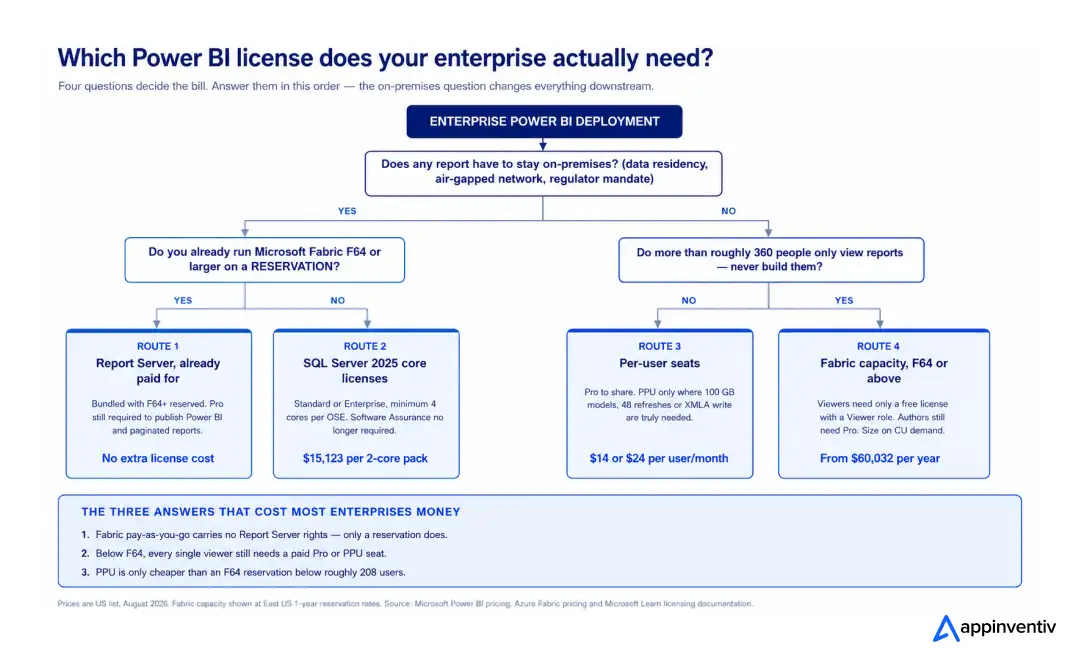
- Power BI Premium vs Pro pricing for enterprises resolves to a single number. An F64 reservation costs $60,032 a year. At $288 per PPU seat, PPU stops being the cheaper option at 208 users. Microsoft’s own guidance puts the threshold “under 250 users,” which is the same answer with the rounding done in their favor.
Below 208 users needing Premium features, buy PPU. Above it, buy capacity and note that the capacity also gives you free viewers, which PPU never does.
The break-even nobody calculates
Here is the question that decides how much Power BI costs for enterprises, and almost nobody models it: how many of your users only ever look at a report?
Every viewer on Pro costs $168 a year. An F64 reservation costs $60,032 a year and makes viewers free. Divide one by the other, and the crossover is 358 viewers. Add the authors who still need Pro, and the total tenant break-even lands near 390 users.
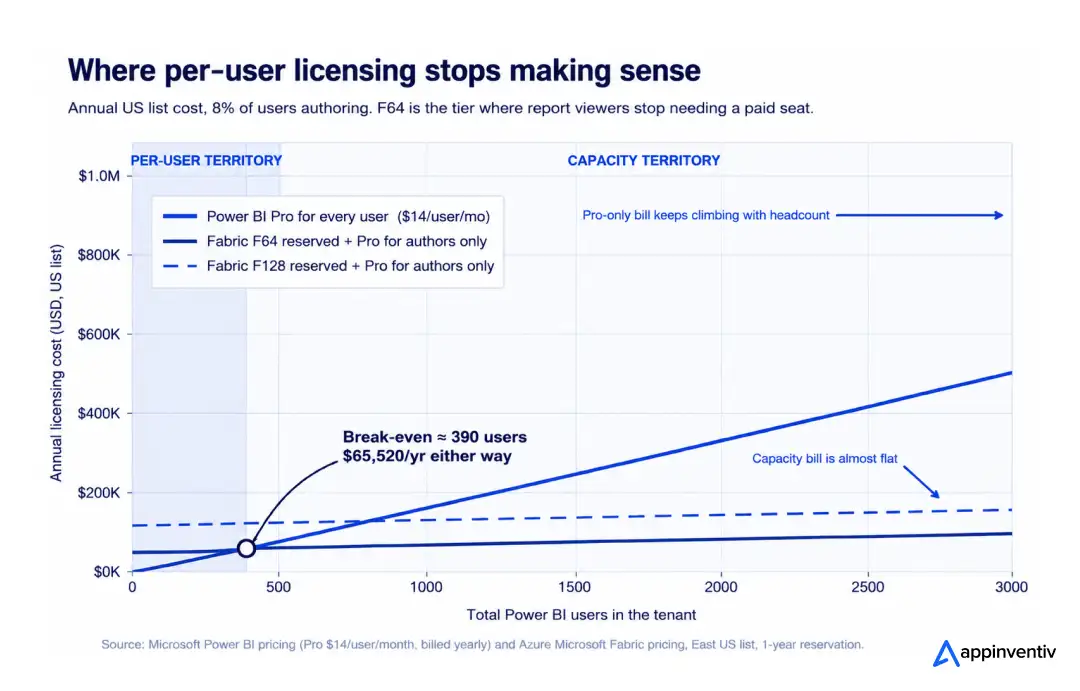
Three scenarios, US list, assuming eight percent of users author content.
| Estate | Pro for everyone | Capacity + Pro for authors | Difference |
|---|---|---|---|
| 500 users | $84,000 | $68,432 (F64) | −19% |
| 2,000 users | $336,000 | $145,264 (F128) | −57% |
| 5,000 users | $840,000 | $290,528 (F256) | −65% |
Power BI licensing cost for 500 users
$84,000 a year on Pro. $68,432 on an F64 reservation plus 50 Pro seats. Capacity wins, but not by enough to justify the migration on price alone; do it for the Fabric workloads, not the 19%.
How much does Power BI cost for enterprise teams above 2,000 users
This is where the curve does the arguing. At 2,000 users, the capacity route is $6.05 per user per month against $14.00 on Pro. At 5,000, it is $4.84. The per-user cost of capacity falls with every person you add, which is the opposite of how per-seat licensing behaves and the entire reason Power BI licensing for large organizations converges on F SKUs.
One caution that gets skipped: the break-even is a floor, not a guarantee. F64 gives you 25 GB of semantic model memory and eight Power BI v-cores. If 1,850 people hit it at 8:30 a.m. on the first of the month, you will be buying F128 regardless of what the break-even math said. Size on capacity units consumed, never on headcount.
Your break-even is not a number you can Google.
Send us your user split, and we’ll model the SKU your estate actually lands on.

Six costs that never reach the business case
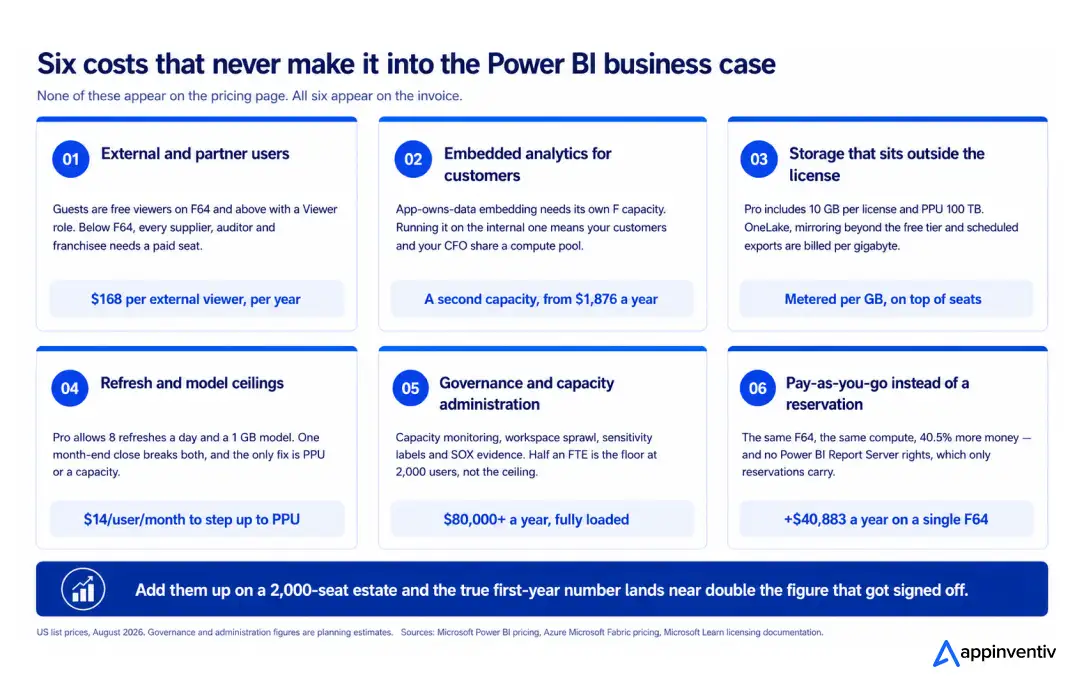
- External and partner users. Guests invited through Microsoft Entra B2B view content free on F64 and above with a Viewer role. Below F64, every supplier, auditor and franchisee needs a paid seat or brings their own Pro license from their home tenant, which works but is not something you can plan around.
- Embedded analytics. App-owns-data embedding for customers needs its own F capacity. Running customer-facing dashboards on the same capacity as internal reporting means your customers and your month-end close compete for the same compute, and one of them loses at the worst possible moment.
- Storage. Power BI native storage is 10 GB per Pro license and 100 TB on PPU, and that part is included. OneLake storage, mirroring beyond the free per-SKU allowance and scheduled exports, is metered per gigabyte on top, which is the moment most teams realize their enterprise data warehouse and their BI layer are now on the same bill.
- Refresh ceilings. Eight refreshes a day sounds generous until the first month-end close. The fix is PPU or capacity, and it always gets bought under time pressure at whatever price is quickest.
- Governance and capacity administration. Capacity monitoring, workspace sprawl, sensitivity labels, and the SOX evidence trail your auditors will ask for. Half a full-time equivalent is the floor at 2,000 users.
- Pay-as-you-go instead of a reservation. Identical F64, identical compute, 40.5% more money and, critically, no Power BI Report Server rights.
Stack them onto a 2,000-seat estate and the arithmetic is unforgiving.
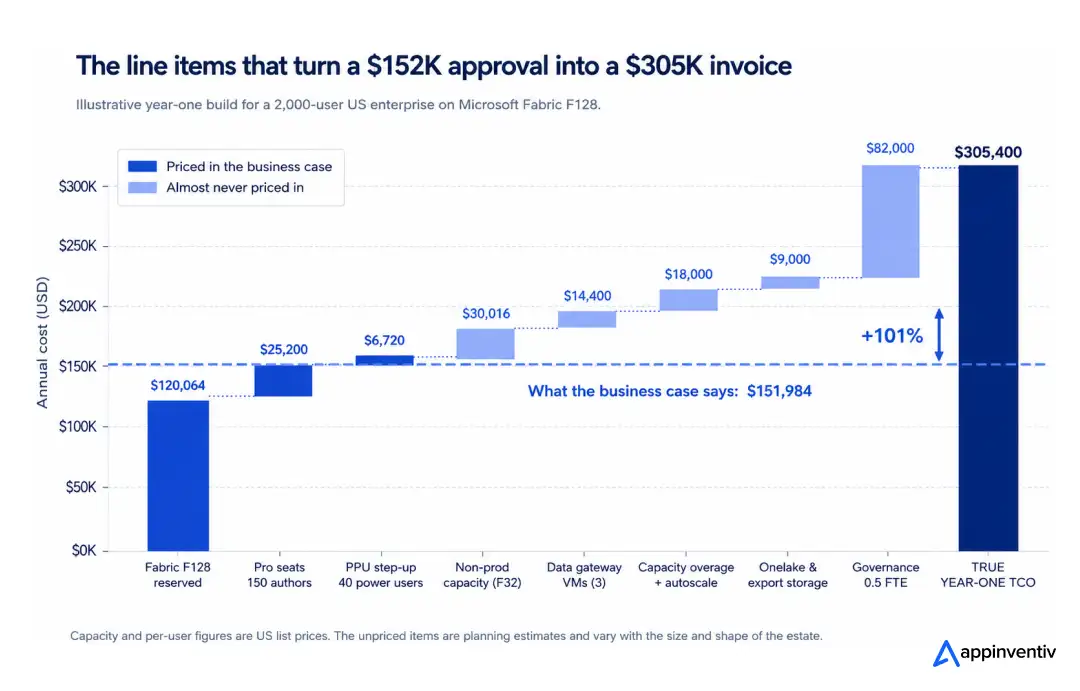
The invoice always finds the line items the business case missed.
A licensing review prices the whole estate before your renewal does. We can use our experience to give you correct quotes.

Power BI Report Server: the on-premise question, answered properly
For a meaningful share of US enterprises regulated financial services, healthcare systems under HIPAA, defense suppliers, anyone with data that legally cannot leave the building, Power BI Report Server is not a legacy decision. It is the only compliant one. And its licensing changed materially in 2026.
How Power BI Report Server is licensed in 2026
Power BI Report Server runs on a core-based model with exactly two legal routes.
Route one: SQL Server. From SQL Server 2025, Power BI Report Server can run on either Standard or Enterprise core licenses, subject to a minimum of four core licenses per operating system environment. Software Assurance is no longer required. For versions released before 2025, Report Server rights attach only to Enterprise Edition cores with active SA, and the right expires the moment that SA coverage lapses.
That is the single most consequential licensing change of the last two years, and almost nobody has repriced against it. Standard edition instead of Enterprise, with no SA renewal attached, is a different order of cost for the same capability.
Route two: Fabric. Power BI Report Server is available through F64 or larger reserved instances only. Not pay-as-you-go. Not F32. Microsoft’s documentation is explicit that Report Server is not included with any F SKU under an F64 reserved instance, and that it comes with P SKUs but not EM SKUs.
The pay-as-you-go trap
Read that again, because it costs real money.
An enterprise running F64 pay-as-you-go pays $100,915 a year. An enterprise on an F64 reservation pays $60,032. The pay-as-you-go customer is paying $40,883 more per year and receives no Report Server rights at all. Teams choose pay-as-you-go for the flexibility to pause capacity, then discover their on-premises reporting estate has no license behind it.
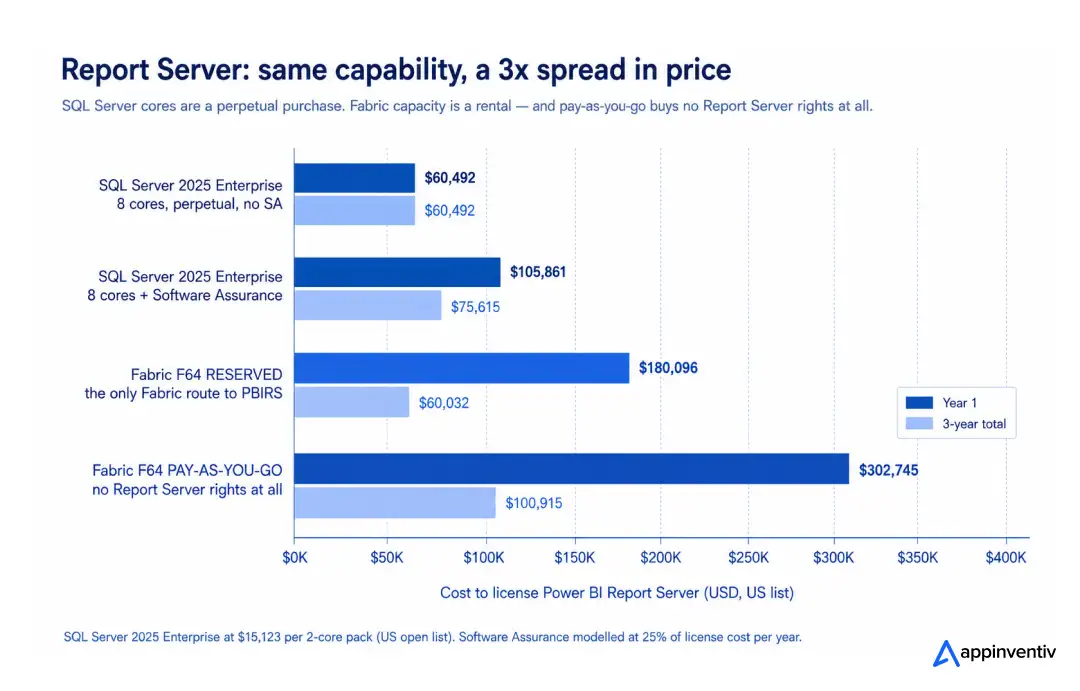
On-premises Power BI licensing cost, in numbers
SQL Server 2025 Enterprise lists at $15,123 per 2-core pack. An eight-core Report Server is $60,492 once, perpetually. The same three years of F64 reservation is $180,096, a 3x difference, though the reservation also buys the entire cloud platform while the SQL cores buy only Report Server and SQL Server.
The comparison that actually matters is not price. It is cost shape. Core licenses are a capital purchase that keeps working. Capacity is a rental that stops.
Power BI Report Server vs Premium licensing explained
The old shorthand “Report Server comes with Premium” is now wrong in a way that gets people into trouble. It came with P SKUs, and P SKUs are being retired. It does not come with PPU capacity, because PPU is not a capacity. It does not come with F SKUs below F64, and it does not come with pay-as-you-go F64.
If your Report Server entitlement traces back to a P1 subscription, find its expiry date this quarter, not at renewal.
Power BI Report Server vs Power BI Service for enterprise deployments
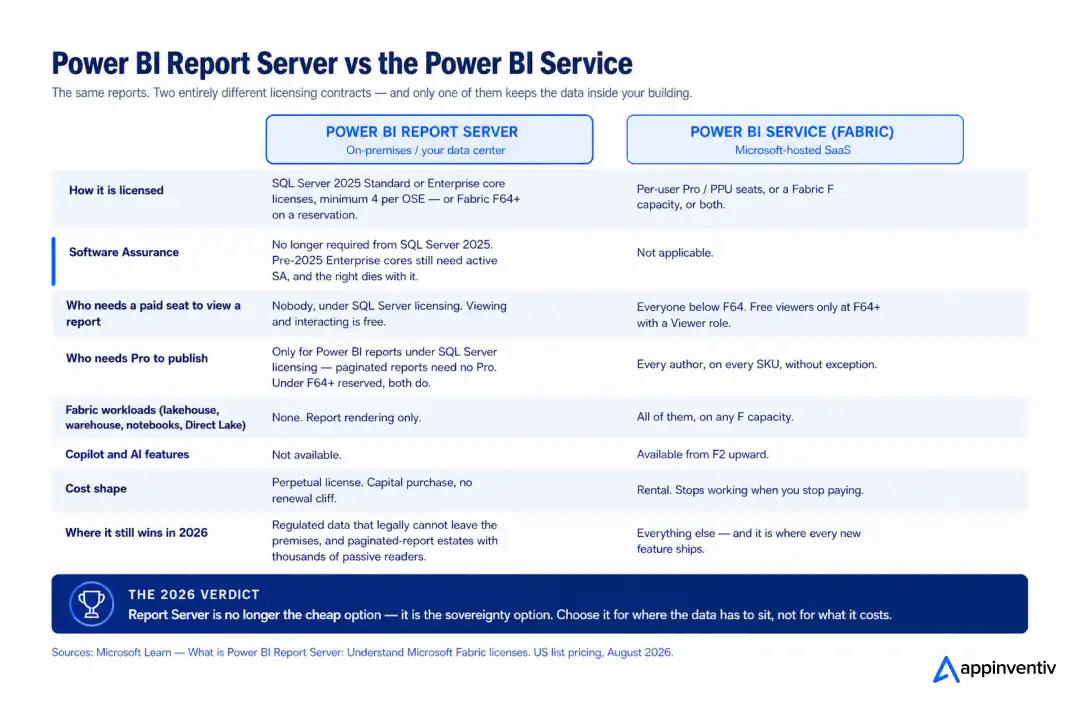
The licensing asymmetry is the interesting part. Under SQL Server licensing, nobody needs a paid seat to view a report on Report Server, and Pro is required only for publishing; Power BI reports and paginated reports need none. Under an F64+ reservation, Pro is required to publish both.
So a 4,000-person manufacturer distributing paginated production reports to the plant floor can license Report Server on SQL Server cores and pay for a handful of author seats. The same estate in the Power BI Service needs F64 or larger before those 4,000 readers stop costing $168 each.
This is why business intelligence in manufacturing still skews on-premise more than any other sector; the reader-to-author ratio is extreme, and Report Server is the only model that does not charge for readers.
Is Power BI Report Server still worth using in 2026?
Yes, for a narrower set of reasons than five years ago.
Keep it when data residency, air-gapped networks or a regulator’s mandate makes cloud hosting genuinely non-viable; when you have large paginated-report estates with thousands of passive readers; or when SQL Server cores you already own make it close to free.
Leave it when the on-premise requirement is habit rather than obligation. Report Server gets no Fabric workloads, no Copilot, no Direct Lake, and no new features. Every capability Microsoft ships now lands in the service first and on-premise never. If your roadmap includes AI-driven predictive analytics on top of the same models, Report Server is a dead end; those workloads only exist on an F capacity.
Report Server in 2026 is not the cheap option. It is the sovereignty option. Choose it for where the data has to sit, not for what it costs.
Copilot in Fabric bills against the same capacity your close reports run on.
We build the AI layer over BI without letting it eat the reporting capacity.

How to calculate TCO for Power BI at enterprise scale
Seven lines. Anything shorter is a quote, not a total cost of ownership model.
- Author seats people who publish. Pro at $168 a year, PPU at $288 where Premium features are genuinely used.
- Viewer seats zero above F64, $168 each below it. This line alone decides your SKU.
- Production capacity reserved for the discount and, if you run Report Server, for the entitlement.
- Non-production capacity dev, test and UAT. Pay-as-you-go and paused outside business hours cuts roughly 64% of the hours.
- Report Server cores SQL Server 2025 Standard or Enterprise, minimum four per OSE, or the F64+ reservation you already hold.
- Adjacent infrastructure gateway servers, OneLake and export storage, capacity overage, autoscale. If Copilot and model-serving sit on the same capacity, the AI infrastructure draw belongs on this line too.
- Operating labor capacity administration, governance, and the license reclamation nobody has been doing.
Line seven is where the recoverable money is. Every 100 dormant Pro seats is $16,800 a year, and dormant seats are the default state of any Power BI rollout that ran a “request access” form in year one. Run the reclamation before you negotiate the renewal, not after.
Power BI licensing for large organizations across multiple business units
Thousands of users across business units break the tenant-wide licensing model in two specific ways.
- Chargeback. A single shared capacity means one Azure bill and no natural way to attribute it. The workable pattern is one capacity per major business unit sized to that unit’s consumption, billed to that unit’s cost center with a shared capacity for enterprise-wide content. It costs marginally more in aggregate, and it ends the annual argument about who is consuming the CUs.
- Noisy neighbors. One team’s unoptimized model can throttle everyone. Fabric provides surge protection to cap background activity per workspace and capacity overage to absorb spikes without throttling. Both are opt-in. Neither is on by default. Turn them on before the first incident, not after.
Underneath both sits the same discipline that governs any enterprise business intelligence program: a certified semantic layer, a workspace taxonomy people follow, and one team accountable for the capacity. Licensing efficiency is a downstream effect of architecture. It is not something you can negotiate your way to, which is also why data science and analytics governance and license governance are the same conversation at this scale.
Renewal coming up?
We’ll price your full Power BI estate seats, capacity, Report Server and the lines nobody counts before Microsoft does.

How can Appinventiv help you?
Most Power BI licensing problems are architecture problems with a price tag attached. We work on both ends.
Licensing and capacity modeling. We take your actual author-to-viewer split, capacity metrics and refresh patterns and produce the number your CFO can sign — including the five lines that usually surface after the purchase order.
Right-sizing before renewal. Capacity sized on consumed CUs rather than headcount, reserved where the 40.5% discount applies, paused where it does not. On one 2,000-seat estate, that distinction alone is worth six figures a year.
P SKU and Report Server migration. If your entitlement traces back to a P1, it has an expiry date. We map what moves to Fabric, what has to stay on-premises for compliance, and which SQL Server licensing route is cheapest now that SQL Server 2025 has changed the rules.
Governance that keeps the bill flat. Per-business-unit chargeback, surge protection, workspace taxonomy, a certified semantic layer, and quarterly license reclamation — the operating model that stops year two costing more than year one.
As a business intelligence services partner to enterprises across US financial services, healthcare, retail and manufacturing, we also do the unglamorous half: telling you when a cheaper SKU is the right answer and when the real problem is a semantic model nobody has optimized since 2022.
FAQs
Q. How do you calculate the total cost of ownership for Power BI at enterprise scale?
A. Model seven lines: author seats, viewer seats, production capacity, non-production capacity, Report Server cores, adjacent infrastructure, and operating labor. Seats and capacity are the two everyone counts. The other five are where a $152,000 approval becomes a $305,000 invoice.
Q. How much does Power BI licensing actually cost for an enterprise with 500 to 5,000 users?
A. At US list, roughly $68,000 a year at 500 users on an F64 reservation with 50 Pro authors, $145,000 at 2,000 users on F128, and $291,000 at 5,000 users on F256. Licensing everyone on Pro instead costs $84,000, $336,000 and $840,000, respectively.
Q. What is the most cost-effective Power BI licensing model for large organizations?
A. Above roughly 390 users, a Fabric reservation at F64 or higher with Pro seats limited to actual authors. Reserve rather than pay as you go; the 40.5% discount is the largest single lever available, and reservations are the only Fabric route that carries Report Server rights.
Q. Is Power BI Report Server still worth using in 2026?
A. Yes, where data residency, air-gapped networks or regulatory mandate rule out the cloud, and where large paginated-report estates serve thousands of passive readers who would otherwise need paid seats. No where the on-premises requirement is habit. Report Server receives no Fabric workloads, no Copilot and no new feature development.
Q. Power BI Report Server vs Power BI Service: which is better for enterprise deployments?
A. The Service, unless something specific stops you. Report Server wins on two counts: viewers need no paid license under SQL Server licensing, and the data never leaves your network. It loses on everything else: no Fabric workloads, no Copilot, no Direct Lake, no roadmap.
Q. How do large enterprises manage Power BI licensing across thousands of users?
A. One capacity per major business unit for clean chargeback, plus a shared capacity for enterprise content. Surge protection and capacity overage enabled before the first throttling incident. Quarterly reclamation of dormant Pro seats. Authors on Pro, viewers on free licenses above F64, and PPU reserved for the small group who genuinely need 100 GB models or 48 daily refreshes.





![Transparency in B2B Branding with Focus Lab’s Bill Kenney [Video]](https://mgrowtech.com/wp-content/uploads/2026/08/G2CM_FI1124_Learn_Article_Images-Professional_Spotlight_Bill_Kenney_V2a-75x75.png)