[ad_1]
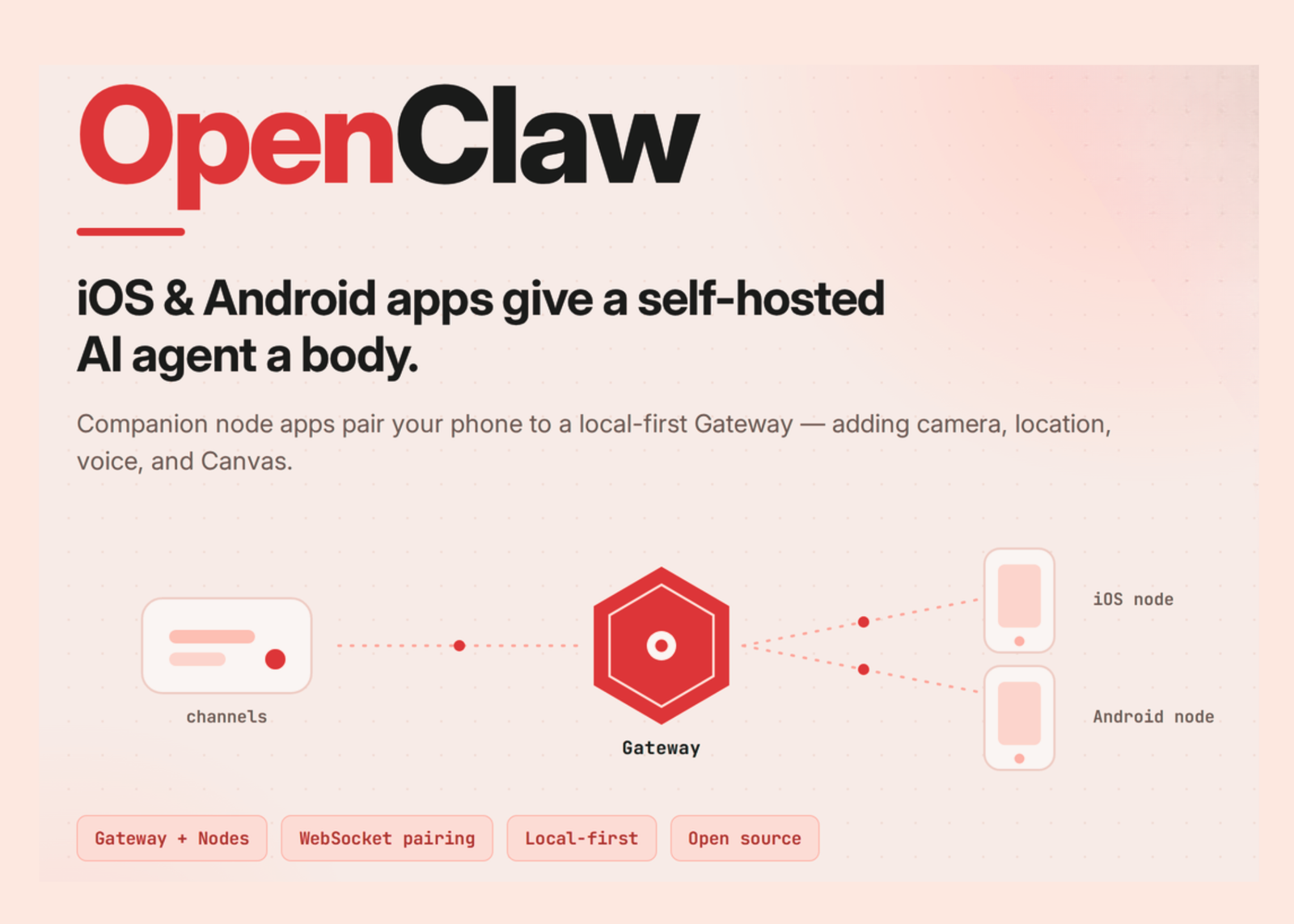
OpenClaw just released native companion apps for iOS and Android. The iOS app is listed as ‘OpenClaw – AI that does things.’ Both apps are free to download. They are not standalone chatbots. Each phone becomes a node in a self-hosted agent network. The assistant itself runs on a separate Gateway. That separation is the whole design.
TL;DR
- OpenClaw’s iOS and Android apps are companion nodes, not standalone assistants.
- The Gateway runs the agent; phones add camera, location, voice, and Canvas.
- Nodes pair over WebSocket on port 18789 and require explicit approval.
- Privacy-heavy commands stay off until you allowlist them.
- A Gateway on macOS, Linux, or Windows (WSL2) is required.
What is OpenClaw?
OpenClaw is an open-source personal AI assistant/agent. It was created by Peter Steinberger with community contributors. The project is independent and not affiliated with Anthropic. Its core is written in TypeScript. The runtime is Node 24 (recommended) or Node 22.19+. The Gateway runs on macOS, Linux, or Windows via WSL2. You talk to it from chat apps you already use. Supported channels include WhatsApp, Telegram, Discord, Slack, Signal, and iMessage. The agent can browse the web, run shell commands, and read and write files. It works with hosted, subscription-backed, gateway, or local models. You bring an API key from your chosen provider. It keeps persistent memory and supports community skills and plugins.
How the Gateway-and-Nodes Architecture Works?
The Gateway is the single control plane. It owns sessions, routing, channels, tools, and events. You run one Gateway process on your own machine or server. Chat messages always land on the Gateway, never on a phone. A node is a companion device that connects to that Gateway. Nodes connect over a WebSocket on default port 18789. Each node registers with role: "node" during pairing. Nodes expose a command surface through node.invoke. Those command families include canvas.*, camera.*, device.*, notifications.*, and system.*. The documentation is explicit:’Nodes are peripherals, not gateways.’ On a local network, apps discover the Gateway via mDNS/Bonjour. For remote access, OpenClaw recommends Tailscale with a wss:// endpoint.
What does Mobile Apps Add?
The phone gives the agent a body. It grants device-specific hardware to your workflows. The iOS app pairs by QR code or setup code. It supports chat, realtime and background Talk mode, and approvals. You can share text, links, and media from iOS into OpenClaw. Optional capabilities include camera, screen, location, photos, contacts, calendar, and reminders. The Android app is a companion node, not a standalone gateway. It offers streaming chat replies, image attachments, and full session history. Talk Mode uses ElevenLabs or system TTS. A live Canvas surface lets the agent render dashboards and tools. Android grants permissions one by one. A foreground service keeps the Gateway connection alive.
iOS Node vs Android Node
| Capability | iOS — OpenClaw – AI that does things | Android — OpenClaw’ node |
|---|---|---|
| Role | Companion node | Companion node |
| Pairing | QR code or setup code | Setup code or manual host/port |
| Chat | Chat from iPhone | Streaming replies, image attachments, full session history |
| Voice | Realtime and background Talk mode | Talk Mode (ElevenLabs or system TTS) |
| Canvas | Canvas surface | Live Canvas surface |
| Device capabilities | Camera, screen, location, photos, contacts, calendar, reminders | Camera, photos, screen capture, location, notifications, contacts, calendar, SMS, motion sensors |
| Action approvals | Reviewable from the iPhone | Managed on the Gateway |
| Data collection | None declared (App Store) | None declared (Google Play) |
| Requirement | iOS 18.0+ and a running Gateway | A running Gateway on macOS, Linux, or Windows (WSL2) |
Use Cases With Examples
Consider field data collection on a job site. The agent uses iOS camera capture to photograph conditions. Location tags each photo with GPS coordinates. Consider a context-aware reminder. The agent triggers a task when you reach a place. Consider an incoming notification on Android. The agent reads it and drafts a reply. Consider a live dashboard. The agent pushes a Canvas surface to your screen. Consider hands-free use. Talk Mode holds a continuous voice conversation. One caveat applies to camera and screen capture. They require the app in the foreground. Background calls return an error.
Pairing a Phone: A Minimal Walk-Through
First, run the Gateway on a supported host.
# On the Gateway host (macOS, Linux, or Windows via WSL2)
npm install -g openclaw@latest
openclaw onboard --install-daemon
Next, open the app and select a discovered Gateway. Or enter the host and port manually. The app connects with role: "node" and sends a device pairing request. Approve it from the Gateway CLI.
openclaw devices list
openclaw devices approve <requestId>
openclaw nodes status        # confirm the node is paired and connected
Privacy-heavy commands stay off by default. Examples include camera.snap, camera.clip, and screen.record. You opt in explicitly through gateway.nodes.allowCommands in your config.
// ~/.openclaw/openclaw.json
{
  gateway: {
    nodes: {
      allowCommands: ["camera.snap", "screen.record"],
    },
  },
}
A deny list (gateway.nodes.denyCommands) always wins over the allowlist.
Security and Approvals
Pairing credentials are stored on the device. Every node connection requires approval before it reaches the Gateway. The device pairing record is the durable role contract. Token rotation cannot upgrade a node into a different role. Camera and screen capture are permission-gated and run only in the foreground. Cleartext ws:// is limited to LAN and .local hosts. Public or Tailscale endpoints require a real wss:// TLS endpoint.
Interactive Explainer
Interactive Explainer
Explore the Gateway-and-Nodes architecture, simulate a chat command flowing to a phone’s hardware, and walk through device pairing — all in your browser.
Illustrative simulation · runs locally · no real Gateway is connected
① Architecture map
② Command-flow simulator
③ Pairing walkthrough
The Gateway is the single source of truth
Click any block to see its role. Messages always land on the Gateway — never directly on a phone.
Chat apps + plugins
⬡ Gateway
sessions · routing · channels · events
Surfaces the Gateway drives
OpenClaw agent
tools · memory
CLI / Web UI
control plane
iOS / Android nodes
role: “node”
⬡ Gateway
The single control plane. Runs on macOS, Linux, or Windows (WSL2). It owns sessions, routing, channels, tools, and events. One Gateway process serves every channel and every node at once.
Simulate a command reaching your phone’s hardware
Pick a channel and a task, then run it. Watch the request flow through the Gateway to a node’s node.invoke command surface.
Telegram
Discord
Photograph the shelf in front of me
Where am I right now?
Show a live dashboard on my phone
Read my latest notification and draft a reply
# Select options above and press Run.
active hop
completed
requires foreground / opt-in
Pair a phone as a node
Nodes connect over WebSocket on port 18789 and require explicit approval. Press play to step through the handshake.
1
Start the Gateway on a host
Run openclaw onboard --install-daemon on macOS, Linux, or Windows (WSL2).
2
App discovers the Gateway
On the same Wi-Fi, the app finds it via mDNS/Bonjour. Remote uses a wss:// Tailscale endpoint.
3
Phone sends a pairing request
The node connects to the WebSocket with role: "node" and a device identity.
4
Operator approves on the Gateway
openclaw devices list → openclaw devices approve <requestId>
5
Node is paired and connected
openclaw nodes status shows paired · connected. Privacy-heavy commands stay off until allowlisted.
Strengths and Limitations
Strengths:
- Local-first design keeps keys, config, and data on your own machine.
- One Gateway serves many channels and many nodes at once.
- Phones add device hardware: camera, location, voice, and Canvas.
- Both store listings report no data collection.
Limitations:
- The mobile apps need a running Gateway to do anything.
- Setup involves WebSocket pairing, mDNS, and sometimes Tailscale.
- Camera and screen capture require the app in the foreground.
- The Android listing shows 10+ downloads, an early-stage signal.
- Full system access is broad and demands careful allowlisting.
Check out the Android and the iOS app. Also, feel free to follow us on Twitter and don’t forget to join our 150k+ML SubReddit and Subscribe to our Newsletter. Wait! are you on telegram? now you can join us on telegram as well.
Need to partner with us for promoting your GitHub Repo OR Hugging Face Page OR Product Release OR Webinar etc.? Connect with us
[ad_2]
Source_link