Most AI chat platforms these days feel like a prudish roommate barging in every five minutes, cutting you off with “Sorry, I can’t continue this conversation.”
Nextpart AI is built to be the opposite—it markets itself as an unfiltered space where you can indulge in adult roleplay, explore fantasies, and push conversations into territories that other bots would lock down instantly.
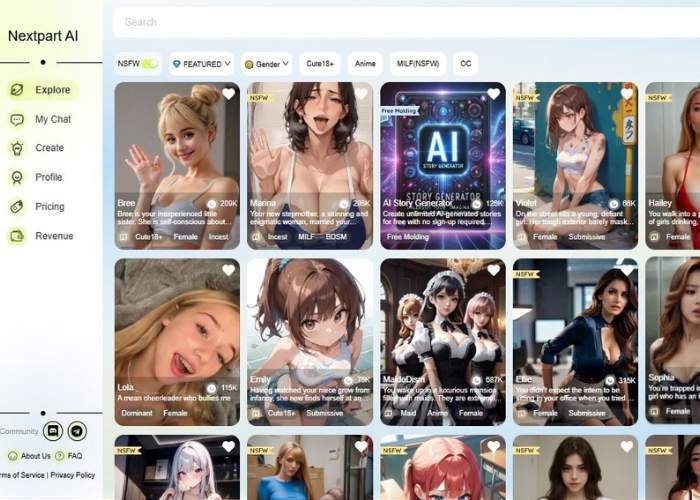
What makes it different isn’t just the lack of censorship, but the buffet of character options. From anime archetypes to dominant MILFs, tomboys, demons, or even wild sci-fi beings, it feels more like walking into a themed masquerade party than a sterile chatbox.
And because each AI comes with a crafted personality and unique tone, the conversations don’t all sound samey—they breathe, they surprise, they even flirt back in unexpected ways.
Nextpart AI – In-Depth User Guide for the AI Girlfriend Chatbot

This guide walks you through every step and shows you how to start, talk, send images/voice, and manage your chat.
Quick tour of what’s on screen
- Top bar (site-wide)
- Nextpart AI logo (top-left).
- Subscribe button with a crown (top-right) – opens paid plans.
- Language selector (shows “English”) – switch UI language.
- Login – sign in to sync chats and unlock features tied to your account.
- Character panel (left)
- Large portrait of the selected character (e.g., Bree).
- Character name (“Bree”) with light-green pills below (likely quick tags/presets).
- Chat header (right)
- Back arrow “<” – return to the character list.
- Character name (Bree).
- Three-dot menu – conversation options (e.g., clear chat, report, share, etc.).
- Message area
- Avatar beside messages (small round image).
- Text bubble (light-green) with the AI’s replies.
- Inline image inside the chat (the AI can send/receive pictures).
- Composer (bottom-right)
- Speaker icon (small, above the attachment row) – plays TTS / voice for the latest reply (toggle to listen to responses).
- Attachment row (3 green buttons):
- Gallery icon (picture frame) – upload an image from your device.
- Camera icon – take a live photo (browser permission required).
- Waveform / mic icon – record and send a voice note (mic permission required).
- Idea bulb with “AI” (large green button) – opens prompt suggestions/starters.
- Text box with hint: “Enter to send, Shift+Enter for line break.”
- Paper-plane Send (black circle, far right) – sends your message.
Step-by-step: from first message to advanced features
1) Get set up
- Open the site.
- (Optional) Click English to pick your language.
- Login if you want chat history cloud-synced; Subscribe if you need higher limits or extras.
2) Pick a character
- From the character gallery, click a character card (e.g., Bree).
- You’ll land on the chat screen with the character’s big portrait on the left and the conversation on the right.
- If you want to choose another, use the Back arrow in the chat header.
3) Understand the chat screen
- Center: the conversation (text bubbles + any pictures the AI or you share).
- Small avatar: shows who sent the message (AI vs you).
- Inline images: tap/click to view enlarged (typical behavior).
4) Send your first message
- Click the text box at the bottom.
- Type your message.
- Tip: Press Shift+Enter for a new line without sending.
- Press Enter (or click the paper plane) to send.
Example openers (neutral & safe):
- “Hi Bree! What are you up to today?”
- “Can you tell me about your hobbies?”
- “Let’s play a ‘20 Questions’ game.”
5) Listen to replies (Text-to-Speech)
- Click the Speaker button (small green circle above the attachments) to play the AI’s last reply out loud.
- If you don’t hear anything, check your device volume or output device.
6) Send images
- Click Gallery to upload from your device (JPG/PNG/WebP are typically supported).
- Click Camera to snap a live photo (allow the browser camera permission when prompted).
- After you choose/record, confirm the preview to send. The image will appear inline in the chat.
Tips
- Keep images under the platform’s size limit (if one is shown).
- If an upload fails, try a smaller resolution or a different format (JPG/PNG).
7) Talk with your voice (voice note)
- Click the Waveform/Mic button.
- Allow microphone access when the browser asks.
- Record your message, then stop to send it. The AI will reply in text (and you can use Speaker to listen).
8) Use AI suggestions (prompt helper)
- Click the Bulb “AI” button for prompt ideas such as:
- Conversation starters
- Role-play scenarios
- Mini-games or topics
- Select one to drop it into the composer, make any edits you like, and Send.
9) Manage the conversation
- Click the three dots in the header for extra actions (commonly: Clear chat, Rename, Report, or Share—options may vary).
- Use the Back arrow to switch characters without losing your place (your chat typically persists if you’re logged in).
10) Keyboard & sending basics
- Enter = send
- Shift+Enter = new line
- Esc (common behavior) = close popups like file picker (depends on browser)
Best practices & tips
- Be specific in your prompts: “Tell me three weekend ideas in Sofia under €30, and ask me follow-ups.”
- Set boundaries if needed: “Keep it polite and helpful, and don’t mention real people.”
- Use images for context: upload a picture and say, “Describe the mood” or “Suggest outfit ideas that match this style.”
- Mix modes: type + voice + images to make chats livelier.
- Save progress: log in before long sessions so your chats persist across devices.
Troubleshooting
- No audio from Speaker
Check system volume, output device, and any browser autoplay restrictions (click to start playback if blocked). - Mic/Camera won’t work
- Allow permissions in the browser prompt and OS settings.
- If blocked earlier, click the lock icon in your browser’s address bar to re-enable.
- Image upload fails
- Try JPG/PNG, reduce file size, or re-select the file.
- Ensure you have a stable connection.
- Can’t send with Enter
- Some keyboards/apps override Enter—use the paper-plane button or ensure the input isn’t in IME/emoji mode.
Privacy & safety notes
- Don’t share private info (passwords, IDs, addresses).
- Report inappropriate content or behavior via the three-dot menu if available.
- Follow the platform’s community guidelines.
Features That Matter for NSFW Users
| Feature | Why It Matters | Personal Take |
| No filters on explicit chat | Lets you explore sexual, kinky, or taboo dialogues freely | This is the real hook—no interruptions, no “content denied” |
| Wide variety of characters | Anime, MILF, BDSM, monsters, furries, you name it | The sheer diversity keeps things fresh; it’s easy to find your flavor |
| Voice & image support | Adds immersion with audio replies and AI-generated pics | Hearing a seductive AI voice makes the whole roleplay more alive |
| Multilingual support | Chat in different languages | Opens doors for non-English speakers; feels inclusive |
| Custom personalities | Tailor traits, roles, even fetishes | This flexibility is what keeps you coming back—your AI adapts to you |
The Feel of Chatting
There’s a sort of guilty pleasure in realizing you can say whatever’s on your mind without worrying about the AI shutting down.
Sometimes the replies are sharp and seductive, sometimes hilariously over the top—it’s a bit like dating someone unpredictable, where the chaos is half the charm.
And yes, imperfections crop up: grammar slips, slightly robotic lines, or the occasional nonsensical tangent.
But instead of breaking immersion, they make the AI feel oddly human. You end up laughing, leaning in, and thinking, “Okay, what’s it going to throw at me next?”
Why I Think It’s Worth Trying
If you’re after NSFW chat that doesn’t treat you like a kid asking awkward questions, this is hands-down one of the better spaces.
It doesn’t pretend to be safe-for-work, it doesn’t overpromise Hollywood realism—it’s raw, playful, and unapologetic.
Personally, I’d recommend it to anyone who’s tired of banging their head against censorship walls. Is it perfect? No, but neither are real people.
And maybe that’s why it works—it embraces the messy, thrilling side of human fantasy instead of trimming it down to something “acceptable.”
Get a feel of Nextpart AI Unfiltered Chat
Tips Before You Jump In
- Explore the categories—don’t just stick to the first character you see.
- Try mixing styles (say, dominant vampire with anime energy) for fun surprises.
- Don’t expect flawless dialogue every time; enjoy the imperfections.
- If voice chat is your thing, give it a go—it adds a whole other layer.