I reviewed dozens of operating systems to find the seven best operating systems for work, creativity, development, and everyday use. These are iOS, Windows 11, Chrome OS, Android, macOS Sierra, Ubuntu, and Red Hat Enterprise Linux.
I’ll be honest: choosing an operating system felt like it should be simple. It wasn’t.
When I started researching this, I kept running into the same problem: most guides told me which OS was the most powerful, but that wasn’t actually what I needed to know. What I needed to know was which one was right for me and that turned out to be a completely different question.
Talking to people around me, I noticed the same pattern. My friend in college just wanted something reliable that wouldn’t crash before a deadline. A colleague in finance needed airtight security and seamless productivity tools. My developer friends wanted full control over their environment. And honestly? Most people just want a system that works — no surprise updates, no weird compatibility errors, no learning curve that eats up a Saturday afternoon.
The tricky part is that all the major operating systems look pretty similar on the surface. You can browse the web, run apps, and manage files on any of them. The real differences — software compatibility, security, customization, performance, ecosystem lock-in — only show up when you start digging. And that’s exactly where the right choice starts to matter.
I compared the most widely used operating systems based on actual user reviews from G2 across real-world use cases, so you don’t have to start from scratch. By the end, you’ll know what each platform is good at, where it falls short, and who it’s actually built for.
7 best operating systems for 2026: My top picks
- iOS: Best for users seeking a seamless Apple ecosystem
Delivers a simple, secure experience with deep integration across Apple devices and services. -
Windows 11: Best for gaming and broad software compatibility
Supports a wide range of applications, hardware, and workflows across personal and professional use cases, including gaming. -
Chrome OS: Best for users who want a simple, cloud-first computing experience
Offers a streamlined, low-maintenance experience for users who primarily work online. -
Android: Best for users who value customization and device flexibility
Provides flexibility, personalization, and access to a diverse ecosystem of devices and applications. -
macOS Sierra: Best for creative professionals and Apple ecosystem users
Combines strong performance, reliability, and seamless integration with the broader Apple ecosystem. -
Ubuntu: Best for developers and users who want greater control over their computing environment
Gives users greater control, flexibility, and access to a powerful open-source ecosystem. -
Red Hat Enterprise Linux: Best for enterprise environments that prioritize stability and security
Delivers the reliability, support, and management capabilities organizations need for mission-critical workloads.
*These operating system software are top-rated in their category, according to G2’s Summer 2026 Grid Report. Pricing information is not included, as most of these systems come pre-installed with their supported devices or can be upgraded at no additional cost.
7 best operating systems: My recommendations
When I began evaluating different operating systems, it quickly became clear that an OS is far more than just a platform for launching apps. The global operating systems market is projected to grow from $65.54 billion in 2026 to $110.2 billion by 2035, reflecting a compound annual growth rate of 7% during the forecast period.
It’s the silent engine behind every task, managing everything from file storage to software execution, and ensuring that devices operate efficiently and reliably.
An operating system serves as the bridge between users and their hardware, translating everyday actions into machine-level instructions. Whether it’s sending an email, editing graphics, or running complex programs, the OS is constantly working behind the scenes to ensure smooth performance. The best operating systems don’t just function; they feel intuitive, like a digital assistant that anticipates and supports your workflow seamlessly.
How did I find and evaluate these best operating systems?
I started with G2’s latest Grid Report to identify the most popular and highly rated operating systems. To narrow down the list, I looked at factors such as user satisfaction, market presence, review volume, and overall adoption across different user groups and use cases.
From there, I analyzed user reviews to understand how these operating systems perform in real-world environments. I paid particular attention to feedback around ease of use, performance, security, reliability, software compatibility, customization, and ecosystem integration. My goal was to understand not just what each operating system offers, but how well it supports users in their day-to-day work.
I also used AI to analyze verified G2 reviews and identify recurring strengths, limitations, and common use cases. This helped me uncover patterns in user feedback and evaluate which operating systems consistently deliver value across different needs and environments.
To supplement my research, I consulted colleagues and other professionals with hands-on experience using these operating systems and validated their insights against verified user reviews.
The screenshots featured in this article come from G2 vendor listings and publicly available product documentation.
This isn’t about one-size-fits-all solutions. The best OS for you depends on what you need and value most. But if you’re looking for consistently delivering options, the ones I’ve chosen are worth considering.
How did I choose the best operating systems? My checklist
One key insight that emerged from my evaluation of a range of operating systems is this: the “best” OS isn’t defined by flashy features or market dominance, it’s about how well it aligns with a user’s workflow. The operating systems that stood out in this list consistently excel in areas users care about most: speed, reliability, and flexibility.
Surface-level appeal, like sleek aesthetics or trendy features, only goes so far. The true value of an OS becomes clear when it’s put to the test under real-world conditions: managing tasks efficiently, maintaining system stability, and integrating smoothly with the tools people rely on daily.
Based on patterns I noticed from user feedback and performance observations across diverse work environments, here are the key factors I considered when evaluating each operating system:
- System resource management: An operating system’s ability to allocate resources is critical, especially when running multiple applications or heavy software, such as video editors, design tools, or development environments. I paid attention to how well the OS manages RAM and CPU usage, particularly when running numerous open tabs or applications. Some OSs are more efficient with resources, while others consume more, leading to lag or slowdowns.
- File system and storage management: Certain systems have advanced features like journaling (which keeps track of changes to avoid data loss) or better support for large file transfers. I considered how the OS organizes and transfers files and the speed of its internal file system. I also checked if the OS offers robust support for external storage and can efficiently manage disk space without constant reminders about storage errors or space management.
- Multitasking and window management: Managing multiple apps simultaneously is a given, whether it’s a browser with numerous tabs, a messaging app, a project management tool, or testing environments. A functional OS lets you switch between windows, resize, and organize them without excessive friction. I evaluated features like virtual desktops, split-screen options, and task switching, vital for enhancing productivity. I also considered responsiveness when switching tasks—any stuttering or lag is a dealbreaker.
- Security and granular permissions: Beyond the basics, such as antivirus protection and firewalls, I sought operating systems that provided granular control over permissions and security. Features such as mandatory access control (MAC), sandboxing, and file-level encryption ensure that sensitive data stays protected. I also assessed whether the OS lets users control which apps can access their files, camera, or microphone, and whether security patches are delivered without disrupting the workflow.
- Package management and software installation: When it came to installing or updating software, I examined how easy the process was. OS package managers, like APT for Linux or Homebrew for macOS, make a big difference in facilitating installation. I also evaluated how the OS addressed dependencies and versioning—whether users needed to resolve conflicts manually or if the OS managed them automatically.
- Power management and battery optimization: A great OS optimizes battery life by dynamically adjusting performance depending on workload. I checked if the system included power-saving modes for idle periods and automatically adjusted CPU usage when running on the battery. It’s essential that the OS conserves the battery without sacrificing performance, especially during more demanding tasks.
- Network and connectivity: Solid network support is essential for efficient workflow. I reviewed how the OS handled network connections, especially when switching between Wi-Fi, Ethernet, or VPNs. I also looked at how well it integrated with cloud services and managed multiple network connections while prioritizing bandwidth for critical tasks.
If there’s one takeaway from evaluating top operating systems, it’s this: the best ones adapt to the user, not the other way around. They go beyond simply getting the fundamentals right; they also include thoughtful touches that enhance the day-to-day experience. Whether it’s built-in multitasking tools or seamless updates that don’t interrupt your workflow, these small but impactful features are often what set a great OS apart from the rest.
The list below contains genuine user reviews from G2’s Operating System Software category. To be included in this category, a solution must:
- Manage a device’s software and external hardware
- Allow for simultaneous use of applications
- Connect with the central processing unit for memory and storage allocation
*This data was pulled from G2 in 2026. Some reviews may have been edited for clarity.
1. iOS: Best for users seeking a seamless Apple ecosystem
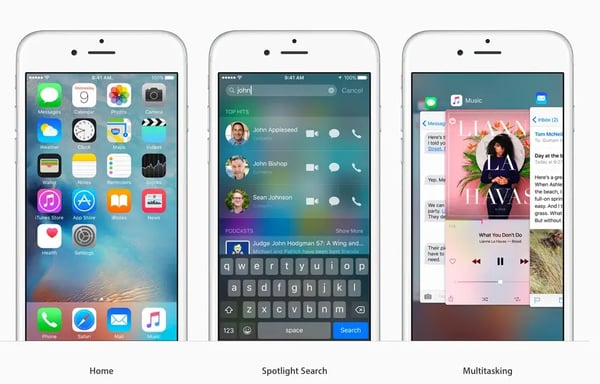
When I evaluated iOS, I expected security and ease of use to be recurring themes in user feedback. While both areas received plenty of praise, what stood out most was how often reviewers talked about the overall experience rather than individual features. Many users seem to value iOS because it removes friction from everyday tasks and makes technology feel predictable.
The first pattern I noticed was usability. Across reviews, users consistently describe iOS as intuitive, easy to navigate, and approachable for both new and experienced users. That feedback aligns with the platform’s 95% ease-of-use score on G2, suggesting that Apple has been successful in creating an experience that requires very little learning or adjustment.
Getting started appears to be another advantage. Many reviewers mention that setting up a new device feels straightforward, with minimal configuration required before they can begin using it. That experience is reflected in iOS’s 94% score for ease of setup and administration, one of its strongest-performing areas.
As I dug deeper into reviews, reliability emerged as a major reason users stay with the platform. Rather than discussing specific technical capabilities, many reviewers simply describe iOS as dependable. Users frequently mention that apps, settings, and core functionality work consistently without requiring constant troubleshooting or maintenance.
One insight that surfaced repeatedly was the value of Apple’s ecosystem. Users often describe how seamlessly iPhones work with Macs, iPads, Apple Watches, and iCloud services. Features like AirDrop, shared files, synchronized messages, and device continuity appear throughout reviews and are often cited as meaningful productivity benefits.
I was also drawn to feedback around privacy and security. Many reviewers express confidence in Apple’s approach to protecting personal information through regular updates and built-in security controls. For some users, that trust is just as important as performance or functionality when choosing an operating system.
Data continuity is another area where iOS appears to deliver significant value. Users frequently mention being able to restore devices, access files across products, and recover settings with minimal effort. That sentiment aligns with iOS’s 93% satisfaction score for data backup capabilities, which supports the platform’s reputation for creating a connected user experience.
That said, some reviewers would like more flexibility when it comes to customization. Compared to more open operating systems, iOS offers fewer options for modifying the interface, managing files, or accessing deeper system settings. However, many users also acknowledge that Apple’s more structured approach contributes to the simplicity and consistency they appreciate.
I also came across feedback suggesting that iOS delivers its greatest value when paired with other Apple devices. While that can increase the overall investment for users entering the ecosystem, many reviewers view the seamless integration between products as a worthwhile trade-off once they’re fully invested.
After reviewing the feedback, I see iOS as a strong choice for users who prioritize simplicity, security, and seamless device connectivity. Among the operating systems on this list, it’s particularly well suited for people who want their devices, files, and workflows to work together with as little effort as possible.
What I like about iOS:
- What stood out most to me is how consistently users describe iOS as intuitive. The platform’s ease-of-use score reinforces the positive experience reviewers repeatedly mention.
- I also noticed that ecosystem integration comes up throughout the reviews. Users frequently highlight how easily iPhones work with Macs, iPads, Apple Watches, and iCloud services.
What G2 users like about iOS:
“I use Apple iOS for everyday tasks like calling, messaging, browsing the internet, checking emails, and using social media apps. What I like most is that everything stays connected between my phone and laptop, which makes things easier when I am working. I also really like how my photos, notes, and messages stay in sync. Apps open quickly, and the updates are easy to manage. The initial setup was easier than I expected.”
– iOS review, Rahul M.
What I dislike about iOS:
- Some reviewers would prefer greater freedom to customize the interface and access deeper system controls, although many also believe that Apple’s structured approach helps maintain the consistency they value.
- Several users note that the strongest benefits emerge when using multiple Apple products together, which may require a larger investment, but many feel the connected experience justifies the added cost.
What G2 users dislike about iOS:
“I think some of the widgets could be even more customizable. It seems to be very closed off and limited. On competitor devices, you can change so much of the look and feel of things like an analog clock on the lock screen. On Apple, it doesn’t really seem to be an option. And one of the features they changed last year was this glass effect, which looks a little bit gimmicky to me. It’s okay, but it’s not really to my preference, and you can’t change the setting. Older handsets don’t get the latest features and updates, which is disappointing.”
– iOS review, Adam M.
Explore our comparison of Android vs. iOS to find out which operating system offers better features, performance, and user experience for your needs.
2. Windows 11: Best for gaming and broad software compatibility
As I compared operating systems for different types of users, Windows 11 consistently appeared in the widest range of scenarios. Whether reviewers were using it for business applications, creative work, education, gaming, or general productivity, many described it as a platform that adapts to their needs rather than forcing them into a specific workflow.
What stood out most during my evaluation was the balance between familiarity and modernization. Many users appreciate that Windows 11 feels recognizable while introducing a cleaner interface and updated navigation. That positive sentiment aligns with its 93% ease-of-use score on G2, suggesting that Microsoft has managed to refresh the experience without making it difficult to learn.
Productivity emerged as one of the platform’s strongest themes. Reviewers frequently mention features like Snap Layouts, multiple desktops, and improved window management. Rather than being flashy additions, users often describe them as practical tools that make it easier to organize work across multiple applications.
Software compatibility was another advantage I kept seeing across reviews. Unlike operating systems that work best within a particular ecosystem, Windows 11 supports a wide variety of business applications, productivity tools, and third-party software. For many users, that flexibility removes concerns about whether a critical application will run properly.
As I dug deeper into the feedback, I noticed that Windows 11 performs particularly well for users who wear multiple hats throughout the day. Several reviewers explained that they can move from spreadsheets and meetings to content creation and entertainment without needing a different device or operating system.
Another insight that emerged was how approachable the platform feels from an administration standpoint. Users frequently mention straightforward setup and device management experiences, which is reflected in Windows 11’s 91% ease-of-administration score on G2.
I also came across positive feedback related to system performance and device management. Many reviewers describe Windows 11 as responsive and capable of handling demanding workloads, while its strong ratings for I/O management and data backup suggest users are generally satisfied with how the platform handles day-to-day operations behind the scenes.
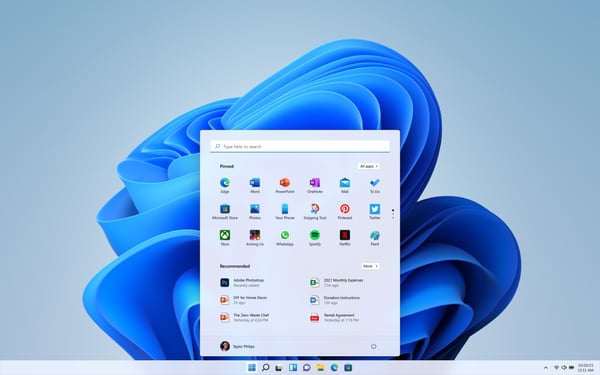 Source: Windows
One trade-off I encountered involves hardware requirements. Some reviewers noted that upgrading older systems can be challenging due to Windows 11’s stricter compatibility requirements. However, many users also acknowledge that these requirements help support newer security and performance capabilities.
There was also feedback from users adjusting to interface changes introduced in Windows 11. Features and settings that were familiar in previous versions occasionally require a different navigation path. While this creates a learning curve for some long-time Windows users, most reviewers indicate that the adjustment period is relatively short.
I see Windows 11 as the strongest option for users who need flexibility above all else. If your work depends on running a wide variety of applications, connecting different types of hardware, and supporting multiple use cases from a single device, Windows 11 offers one of the most adaptable experiences on this list.
What I like about Windows 11:
- I was impressed by how often users described Windows 11 as a platform that can support work, creativity, learning, and entertainment without forcing compromises.
- Features like Snap Layouts and desktop organization tools come up repeatedly in reviews, suggesting they provide meaningful productivity benefits rather than just cosmetic improvements.
What G2 users like about Windows 11:
“I love how Windows 11 provides a stable and smooth environment for both my official and personal work. It helps me multitask efficiently with Snap Layouts and virtual desktops, which make it much easier for me to stay organized and focused. Setting up Windows 11 was really easy compared to the early days of Windows.”
– Windows 11 review, Muhammad Asim G.
What I dislike about Windows 11:
- Some users report that hardware compatibility requirements can make upgrades more challenging on older devices, though many also recognize that these requirements support newer security and performance standards.
- Long-time Windows users occasionally mention needing time to adapt to interface and navigation changes, but most reviewers indicate that the learning curve becomes less noticeable with regular use.
What G2 users dislike about Windows 11:
“Windows 11 improves design and productivity, but trades away some flexibility and introduces small annoyances—especially for advanced users who liked tweaking their system.”
– Windows 11 review, May-Anne T.
Did you know the idea of a computer dates back to the 1600s? Read all about the history of computers in our informative guide.
3. Chrome OS: Best for users who want a simple, cloud-first computing experience
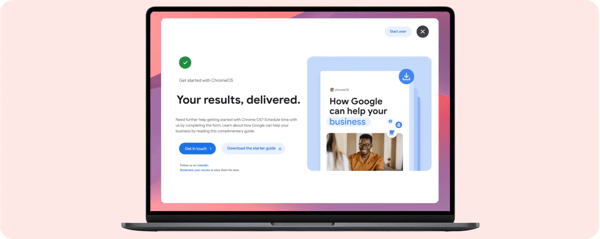
While evaluating Chrome OS, I found that many users weren’t choosing it because it offered the most features. Instead, they seemed to value what it removes. Across reviews, users frequently describe Chrome OS as lightweight, straightforward, and easy to manage, making it particularly appealing for students, remote workers, and anyone who spends most of their time in a browser.
The clearest pattern in the feedback was ease of use. Many reviewers mention that Chrome OS feels approachable from day one, with minimal setup and a simple interface that doesn’t require much technical knowledge. That experience aligns with its 94% ease-of-use score on G2, one of its strongest-performing areas.
I also noticed that users consistently praise how quickly they can get started. Whether setting up a new Chromebook or signing into an existing device, reviewers often describe the onboarding process as seamless. Chrome OS’s 94% ease-of-setup score reinforces the idea that simplicity is one of the platform’s defining strengths.
Another theme that emerged was speed. Users frequently mention fast boot times, responsive performance, and the ability to move between tasks without noticeable slowdowns. Rather than focusing on raw computing power, many reviewers appreciate that the operating system remains efficient while handling everyday workloads.
As I read through the feedback, cloud integration appeared to be a major reason people choose Chrome OS. Many users rely heavily on Google Workspace applications such as Gmail, Docs, Drive, and Meet. The ability to access files, settings, and work from virtually any device creates a level of convenience that reviewers mention repeatedly.
I was also interested in how often users referenced maintenance, or more accurately, the lack of it. Several reviewers describe Chrome OS as an operating system that requires very little attention after setup. Automatic updates, built-in security protections, and simplified administration reduce the amount of ongoing management users need to perform.
Data accessibility emerged as another strength. Many users appreciate how easily files synchronize through Google’s ecosystem and how quickly they can recover information when switching devices. That sentiment aligns with Chrome OS’s strong ratings for data backup and device management capabilities.
 Source: Google Chrome
That said, I found some reviewers wanting broader software support. Users who rely on specialized desktop applications occasionally encounter limitations compared with more traditional operating systems. However, for browser-based workflows and cloud applications, many reviewers report that Chrome OS provides everything they need.
I also came across feedback from users with more demanding performance requirements. While Chrome OS performs well for everyday productivity tasks, some reviewers noted that power users running resource-intensive workloads may benefit from a platform designed for heavier local computing. For its intended audience, though, that trade-off appears reasonable.
After reviewing the feedback, I see Chrome OS as a strong choice for users who prioritize simplicity, speed, and low maintenance. Among the operating systems on this list, it’s particularly well suited for people whose work happens primarily in the cloud and who want technology that requires as little management as possible.
What I like about Chrome OS:
- I was surprised by how often users described Chrome OS as something they rarely have to think about. Automatic updates and simple administration seem to remove a lot of everyday friction.
- The deep integration with Google’s cloud ecosystem stands out throughout the reviews, especially for users who rely heavily on Workspace applications.
What G2 users like about Chrome OS:
“Chrome OS has been one of the best product I have ever used . What I like most is how fast and easy it is to use . the system starts quickly, stays responsive even after long usage. its performance is really good.”
– Chrome OS review, Harsh G.
What I dislike about Chrome OS:
- Some reviewers mention that certain desktop applications aren’t available or don’t offer the same functionality as they do on traditional operating systems, although browser-based users generally encounter few limitations.
- Users with highly specialized or resource-intensive workloads occasionally outgrow Chrome OS, but many reviewers acknowledge that the platform was designed for simplicity and efficiency rather than maximum computing power.
What G2 users dislike about Chrome OS:
“One area where Chrome OS could be improved is support for specialized desktop applications that are commonly used in engineering, design, and advanced technical workflows. While web-based tools work well for most daily activities, some professional software requires alternative solutions or additional configuration to run effectively.”
– Chrome OS review, Vinay P.
4. Android: Best for users who value customization and device flexibility
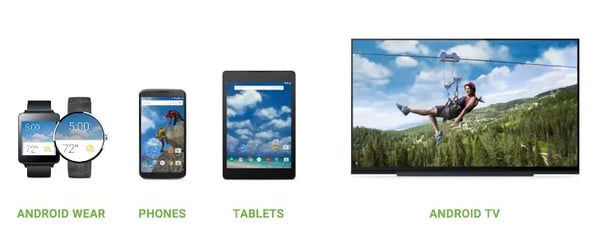
One thing that separates Android from many operating systems is the amount of freedom it gives users. Rather than delivering a single, tightly controlled experience, Android allows people to choose from a wide range of devices, customize how their phones work, and tailor the experience to their preferences. Based on G2 reviews, that flexibility is one of the platform’s defining strengths.
Personalization emerged as one of the most frequently mentioned advantages. Many reviewers appreciate being able to customize home screens, widgets, app layouts, and device settings without feeling restricted by the operating system. Despite offering this level of flexibility, Android still earns a 94% ease-of-use score on G2, suggesting users find it approachable and easy to navigate.
The variety of available devices also stood out during my research. Users frequently mention being able to choose hardware that fits their needs rather than adapting to a limited set of options. Whether they prioritize premium features, affordability, battery life, or screen size, reviewers appreciate having more choice across manufacturers.
App availability appears to be another major reason users gravitate toward Android. Many reviewers highlight the breadth of applications available through the Google Play ecosystem and appreciate having access to tools that support both personal and professional use. Several users also mention the flexibility of installing and managing apps in ways that better suit their workflows.
Google’s ecosystem plays a significant role in the overall experience as well. Reviewers regularly reference Gmail, Google Drive, Google Photos, Maps, and other Google services as essential parts of their daily routine. For users already invested in those applications, Android often feels like a natural extension of how they work and communicate.
Versatility was another theme that surfaced repeatedly. Users describe using Android devices for productivity, communication, entertainment, navigation, and content creation throughout the day. That broad usability aligns with Android’s 93% score for meeting requirements, indicating that the platform successfully supports a wide variety of use cases.
The feedback also pointed to strong device management capabilities. Many users appreciate features such as cloud backups, file synchronization, and seamless access to data across devices. Android’s high satisfaction scores for data backup and I/O management support the positive experiences reviewers frequently describe.
The Android experience can vary depending on the device manufacturer. Several reviewers noted differences in interface design, pre-installed software, and update schedules across brands. For users who value having more hardware options, this variability is often an acceptable trade-off, but those seeking complete consistency may need to be more selective when choosing a device.
Long-term software support appears to depend heavily on the manufacturer as well. Most reviewers are satisfied with Android’s overall capabilities, but users who prioritize receiving updates as quickly as possible often recommend paying attention to a vendor’s track record for software support before making a purchase.
Android stands out most for users who want technology that adapts to them rather than the other way around. Compared with other operating systems on this list, it offers one of the strongest combinations of customization, device choice, and flexibility, making it particularly appealing to people who want more control over their mobile experience.
What I like about Android:
- The amount of customization users describe is impressive. Android gives people the flexibility to shape their devices around their preferences instead of forcing everyone into the same experience.
- Device choice comes up constantly in reviews. Users appreciate being able to find hardware that matches their needs, priorities, and budget.
What G2 users like about Android:
“It allows us to use and install multiple applications that is one of the best advantage about android and the support that it gives you the UAE is also know the android 15 and above is having amazing UX UI design and the cross integration is also amazing. Google Assistant is also the AI performance. Also, pretty decent with lower level low budget devices. It’s a value for money is good. Good performance.”
– Android review, Ashwin R.
What I dislike about RHEL:
- Because Android is available across many manufacturers, the experience isn’t always identical from one device to another, though many users see that variability as the price of having more choice.
- Long-term update experiences can differ between vendors, making manufacturer selection an important consideration for users who prioritize ongoing software support.
What G2 users dislike about Android:
“One minor issue for a student like me is that some manufacturers include pre-installed apps (bloatware) that take up storage space, which can be limited on student-budget devices. Also, while the customization is great, it sometimes makes the system feel a bit cluttered compared to simpler operating systems.”
– Android review, Vansh N.
5. macOS Sierra: Best for creative professionals and Apple ecosystem users
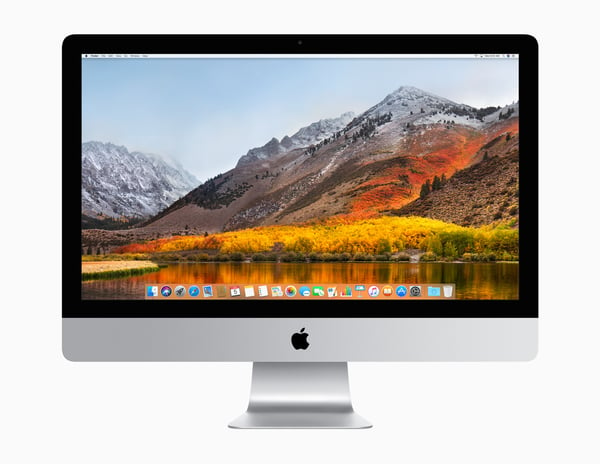
Many operating systems focus on features first and user experience second. What makes macOS Sierra different is how closely the software is designed around the hardware it runs on. As I looked through user feedback, I found that reviewers often talked less about individual capabilities and more about how polished and cohesive the overall experience feels.
Design and usability emerged as recurring strengths throughout the reviews. Users frequently describe macOS Sierra as intuitive, visually appealing, and easy to navigate. That feedback aligns with its 94% ease-of-use score on G2, suggesting that Apple’s emphasis on simplicity continues to resonate with users.
A pattern that appeared repeatedly was performance consistency. Rather than focusing solely on speed, reviewers often mention how smooth the operating system feels during daily use. From switching between applications to managing multiple tasks simultaneously, users describe an experience that remains responsive even during demanding workloads.
Creative work is another area where macOS Sierra appears to stand out. Several reviewers mention using the platform for design, content creation, video editing, and other creative projects. Many appreciate the stability and optimization they experience when running professional applications on Apple hardware.
The connection between macOS Sierra and the broader Apple ecosystem also received significant praise. Users regularly reference features such as AirDrop, iCloud synchronization, Handoff, and seamless connectivity with iPhones and iPads. For people already using Apple devices, these integrations often become part of their everyday workflow.
Looking across recent reviews, reliability appears to be one of the platform’s biggest advantages. Many users describe macOS Sierra as dependable and easy to maintain over time. Its 92% score for meeting requirements supports the positive experiences reviewers frequently report across both personal and professional use cases.
Resource management was another capability that caught my attention. Users often mention smooth performance even when working across multiple applications. That feedback aligns with macOS Sierra’s 94% satisfaction score for RAM management, one of its highest-rated capabilities in the G2 data.
 Source: Apple
The strongest benefits often emerge when users are already invested in Apple’s ecosystem. Several reviewers note that features like device synchronization, shared services, and continuity become more valuable as additional Apple products are added. For users working across mixed ecosystems, some of those advantages may be less noticeable.
Application compatibility generated occasional discussion as well. Most users report positive experiences with the software they rely on, but reviewers who depend on niche or Windows-specific applications sometimes mention needing workarounds or alternative solutions. For many users, the trade-off is worthwhile because of the overall experience macOS provides.
I see macOS Sierra as a particularly strong choice for creative professionals, Apple users, and anyone who values a refined computing experience. Among the operating systems on this list, it stands out most for people who prioritize reliability, performance, and seamless integration between hardware and software.
What I like about macOS Sierra:
- I was impressed by how frequently users described the experience as polished. Rather than highlighting individual features, many reviewers focused on how smoothly everything works together.
- The combination of strong performance and Apple ecosystem integration appears throughout the feedback, especially among creative and professional users.
What G2 users like about macOS Sierra:
“My favourite feature of macOS Sierra is Universal Clipboard, which lets you copy something on an iPhone or iPad and paste it directly on a Mac. It makes working across Apple devices much more convenient and moreover it has introduced me to the AI model siri where i can easily do search files, get information, and perform tasks using voice commands, and it included auto unlock using my apple iwatch. And i have used music production apps such as mainstage and logic pro x where it runs seamlessly n this os and gave me a better experience.”
– macOS Sierra review, Prasanna Kumar D.
What I dislike about macOS Sierra:
- Much of the platform’s unique value comes from Apple’s ecosystem, so users working primarily with non-Apple devices may not experience all of its advantages.
- Reviewers who rely on specialized Windows-only software occasionally need alternative workflows, though many feel the stability and user experience offset that limitation.
What G2 users dislike about macOS Sierra:
“Some older third-party applications occasionally had compatibility issues after updates, and certain features depended heavily on the Apple ecosystem to provide full value. Siri integration on desktop was useful but still felt limited compared to what users expected from a desktop assistant. File management flexibility was also not as open as some other operating systems.”
– macOS Sierra review, Manish R.
6. Ubuntu: Best for developers and users who want greater control over their computing environment
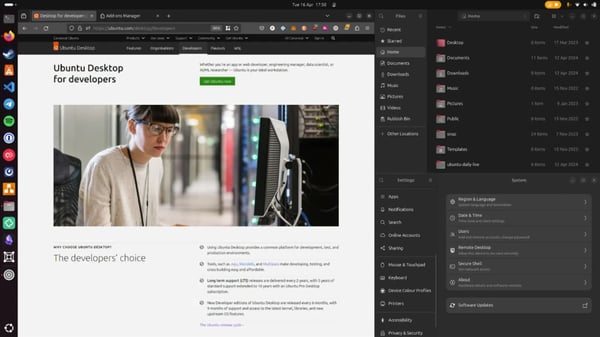
Ubuntu takes a different approach from most operating systems on this list. Rather than focusing primarily on convenience or ecosystem integration, it gives users more control over how their systems are configured and managed. As I reviewed the feedback, it became clear that many users choose Ubuntu because they want flexibility, transparency, and the freedom that comes with an open-source platform.
One area that received particularly strong praise was stability. Many reviewers describe Ubuntu as a dependable operating system that performs consistently over long periods of time. Users frequently mention running development environments, servers, and everyday workloads without experiencing the slowdowns or interruptions they encountered elsewhere.
The conversation around Ubuntu often centers on development work. Several reviewers highlight its compatibility with programming tools, containerized environments, scripting frameworks, and command-line workflows. For developers and IT professionals, Ubuntu appears to provide an environment that feels both powerful and approachable.
Resource efficiency emerged as another advantage. Unlike some operating systems that require increasingly powerful hardware, Ubuntu is often praised for running smoothly on both modern and older machines. Users regularly mention being able to extend the lifespan of hardware while maintaining a responsive experience.
Open-source flexibility was another theme I encountered throughout the reviews. Many users appreciate being able to customize their systems, choose their preferred tools, and configure workflows without being locked into a specific vendor ecosystem. For technically inclined users, that level of control is frequently cited as one of Ubuntu’s biggest strengths.
The platform also appears to perform well when managing demanding workloads. Users often describe Ubuntu as reliable for hosting applications, running virtual machines, and supporting development projects. That sentiment aligns with its 92% score for meeting requirements and strong ratings for RAM management, one of its highest-rated capabilities on G2.
Community support plays a larger role here than with many other operating systems. Several reviewers mention finding solutions through Ubuntu’s extensive documentation, user forums, and developer communities. For users willing to learn, this ecosystem appears to provide valuable guidance and troubleshooting resources.
New users coming from Windows or macOS may encounter an adjustment period. Multiple reviewers mention that Linux-based workflows, terminal commands, and software installation processes can feel unfamiliar at first. However, many also note that Ubuntu is one of the more approachable Linux distributions and becomes easier to navigate with experience.
Application availability generated some discussion as well. Most users find suitable alternatives for their everyday needs, but reviewers who depend on certain proprietary applications occasionally report compatibility challenges. For development, server administration, and technical workloads, though, these limitations appear less significant.
Ubuntu stands out most for developers, IT professionals, and users who want more control over their computing experience. Compared with the other operating systems on this list, it offers one of the strongest combinations of customization, performance, and openness for people who prefer flexibility over a tightly managed environment.
What I like about Ubuntu:
- I was impressed by how frequently reviewers described Ubuntu as stable and dependable, particularly for development environments and long-running workloads.
- The level of control users have over their systems stands out throughout the feedback, making Ubuntu especially appealing to developers and technical users.
What G2 users like about Ubuntu:
“If you want to have a free and strong operation system, Ubuntu is a great starting point. This distribution is so easy reachable and if you want, it can be used as portable and you like, it can be installed very easily. It has a lot of application in its marketplace.
Another good point, there is long term support, even if you have 3-year-old installation, there is still support option for especially security vulnerabilities.
As I mentioned above, there is a great marketplace, from your desktop, you can find a lot of great tools like open office etc.”
– Ubuntu review, Emrah .
What I dislike about Ubuntu:
- Users transitioning from Windows or macOS occasionally need time to adjust to Linux-based workflows and command-line tools, though many reviewers describe Ubuntu as one of the easier Linux distributions to learn.
- Certain proprietary applications are not always available natively on Ubuntu, but users working in development, server administration, and open-source ecosystems generally report fewer compatibility concerns.
What G2 users dislike about Ubuntu:
“The only downside of using Ubuntu is that some Windows apps aren’t available on it. That said, since my work is mostly development-related, I’ve never really had any issues. One more thing I’ve noticed is that on laptops it doesn’t feel very battery-optimized.”
– Ubuntu review, SatVeer S.
7. Red Hat Enterprise Linux (RHEL): Best for enterprise environments that prioritize stability and security
Unlike most operating systems, Red Hat Enterprise Linux (RHEL) isn’t designed primarily for everyday computing. Its reputation is built around powering servers, enterprise applications, cloud environments, and mission-critical workloads. As I analyzed user feedback, I found that organizations often choose RHEL not because it’s the easiest option, but because they need a platform they can trust over the long term.
Reliability was the theme that surfaced most consistently throughout the reviews. Many users describe RHEL as a stable operating system capable of supporting critical business operations without frequent disruptions. Rather than emphasizing flashy features, reviewers often focus on its ability to run important workloads predictably over extended periods.
Enterprise support appears to be another major differentiator. Users frequently mention the value of Red Hat’s documentation, knowledge base, and professional support services. That sentiment aligns with RHEL’s 90% quality of support score on G2, which performs above the category average and reflects the confidence many organizations place in the vendor’s support model.
Security also plays a central role in why organizations adopt the platform. Several reviewers specifically reference RHEL’s security capabilities, update management, and compliance readiness. For teams operating in regulated industries or managing sensitive systems, these features often factor heavily into purchasing decisions.
A pattern that emerged across the feedback was RHEL’s suitability for large-scale infrastructure. Users commonly describe deploying the platform across servers, virtualized environments, cloud workloads, and enterprise applications. Its 92% score for meeting requirements suggests that it performs particularly well in the complex environments it was designed to support.
The discussion around administration was also interesting. While RHEL is often used in highly technical environments, many reviewers appreciate the management tools and enterprise controls available to administrators. For IT teams overseeing large deployments, these capabilities appear to simplify ongoing operations.
Resource management received positive feedback as well. Users frequently mention strong performance under demanding workloads, particularly in server and infrastructure environments. That aligns with RHEL’s high ratings for RAM management and I/O management, both of which are important for organizations running resource-intensive applications.
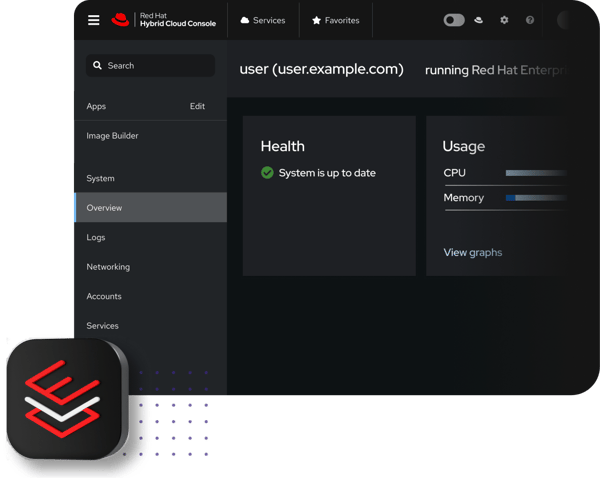 Source: Red Hat
The platform’s enterprise focus can create a steeper learning curve for users without Linux experience. Several reviewers mention that administrators and technical teams generally get the most value from RHEL, while less technical users may require additional training and familiarity to take advantage of its capabilities.
Licensing and subscription costs also generated discussion in the reviews. Some organizations note that RHEL requires a larger investment than community-supported Linux distributions. However, many reviewers view the cost as justified by the platform’s enterprise support, security features, and long-term reliability.
I see Red Hat Enterprise Linux as the strongest option on this list for organizations running business-critical systems at scale. For teams that prioritize stability, security, vendor support, and enterprise-grade management capabilities over consumer-focused convenience, RHEL offers a level of maturity that few operating systems can match.
What I like about RHEL:
- I was impressed by how consistently users describe RHEL as a dependable platform for mission-critical workloads where downtime isn’t an option.
- The combination of enterprise support, security capabilities, and long-term stability appears throughout the reviews and helps explain why organizations continue to rely on it.
What G2 users like about RHEL:
“I really appreciate Red Hat Enterprise Linux for its stability, security, and reliability when handling enterprise workloads. It provides a consistent operating environment and is great for production systems that need long-term support and predictable performance. Additionally, I use it to host back-end services, data processing workloads, and application environments, where reliability and security are crucial. The long-term support and enterprise tooling that come with it help reduce operational risk, making it very valuable for my use cases.”
– RHEL review, Atharva P.
What I dislike about RHEL:
- Organizations without Linux expertise may encounter a learning curve during deployment and administration, though technical teams often view that complexity as a reasonable trade-off for the platform’s depth and control.
- Subscription costs are higher than some open-source alternatives, but many reviewers believe the enterprise support, security updates, and reliability justify the investment.
What G2 users dislike about RHEL:
“Yeah. The cost involves an additional 20 to 25% just due to the fact that Red Hat Enterprise Linux is supported. The second issue is that the initial setup can get complex for large enterprises, with a pretty strict learning curve. Another one is subscription management, which requires complex licenses. We have to perform a lot of administrative tasks.”
– RHEL review, Mallik C.
Frequently asked questions about operating system software
Have more questions? Find more answers below.
Q1. What is an operating system?
An operating system (OS) is software that manages a device’s hardware and software resources. It serves as the interface between users and applications, handling tasks such as memory management, file storage, security, device communication, and application execution. Examples include Windows 11, macOS Sierra, Ubuntu, Android, iOS, Chrome OS, and Red Hat Enterprise Linux.
Q2. How do you compare the total cost of ownership across leading enterprise operating systems before selecting a vendor?
Total cost of ownership includes licensing fees, hardware requirements, support costs, maintenance, training, and long-term administration. Ubuntu can reduce software licensing expenses through its open-source model, while Red Hat Enterprise Linux offers enterprise support through a subscription model. Windows 11 may provide lower training costs due to user familiarity, while macOS Sierra can reduce support overhead in Apple-centric environments.
Q3. How do you evaluate deployment automation capabilities across different operating system platforms for teams looking to streamline operations?
Deployment automation capabilities should be evaluated based on support for scripting, infrastructure automation, configuration management, and large-scale device provisioning. Ubuntu and Red Hat Enterprise Linux are often preferred for DevOps and infrastructure automation, while Windows 11 provides deployment and device management tools that integrate well with Microsoft environments.
Q4. What are the highest-rated operating systems for enterprise IT infrastructure deployment for organizations prioritizing reliability and ease of management?
Red Hat Enterprise Linux and Ubuntu are widely used for enterprise infrastructure because of their stability, scalability, and administrative controls. Windows 11 is also commonly deployed across enterprise environments due to its broad software compatibility and management capabilities. The best option depends on the organization’s workloads, expertise, and infrastructure strategy.
Q5. How do you assess integration capabilities between operating systems and existing enterprise applications to identify the best fit?
Organizations should evaluate application compatibility, identity management integration, cloud connectivity, and support for existing business tools. Windows 11 generally supports the widest range of enterprise software, while Ubuntu and Red Hat Enterprise Linux integrate well with development tools, cloud platforms, and server environments. macOS Sierra often works best in Apple-focused ecosystems.
Q6. How do you mitigate compatibility risks during large-scale operating system migrations in regulated industries where data security is critical?
The most effective approach is to conduct application audits, validate hardware requirements, test critical workloads, and run pilot deployments before full migration. Organizations should also review compliance requirements, backup procedures, and vendor support policies to minimize disruption and maintain security throughout the transition.
Q7. What are the most trusted operating system platforms by IT directors based on user reviews?
Windows 11, Red Hat Enterprise Linux, Ubuntu, macOS Sierra, and iOS consistently receive positive feedback for reliability, security, usability, and performance. Trust often depends on the use case, with RHEL and Ubuntu commonly trusted for infrastructure workloads, while Windows 11 and macOS Sierra are frequently selected for end-user productivity.
Q8. How do you approach operating system selection for organizations transitioning from legacy infrastructure to support growing teams?
Organizations should evaluate scalability, application compatibility, security requirements, administrative overhead, and long-term support. Windows 11 is often chosen for workforce productivity and compatibility, while Ubuntu and Red Hat Enterprise Linux are common choices for organizations modernizing infrastructure and supporting cloud-native growth.
Q9. Which operating systems have the strongest enterprise support and patch management processes?
Red Hat Enterprise Linux is widely recognized for enterprise support, security updates, and long-term maintenance. Windows 11 also provides extensive patch management and device administration capabilities, while Ubuntu offers regular updates and both community and commercial support options.
Q10. What security and compliance considerations should organizations evaluate when choosing enterprise operating systems?
Organizations should assess patch management practices, encryption capabilities, access controls, compliance certifications, update frequency, and vendor security policies. Red Hat Enterprise Linux, Ubuntu, Windows 11, and iOS are commonly selected by organizations that place a strong emphasis on security and regulatory compliance.
Q11. How do security vulnerability response times compare across major operating system vendors before committing to a multi-year investment?
Security response times vary by vendor, product, and vulnerability severity. Vendors such as Red Hat, Microsoft, Apple, Canonical, and Google regularly release security updates and maintain dedicated security teams. Organizations should evaluate not only response times but also the availability of long-term support, patch management tools, and update deployment processes before making a long-term decision.
Q12. Which operating system has the best backward compatibility for older software?
Windows 11 generally offers the strongest backward compatibility for older software. Many legacy Windows applications continue to run without modification, making it a practical choice for businesses and users who rely on older programs. However, compatibility may still vary depending on the application’s age and system requirements.
Q13. What is the best operating system for software developers?
Ubuntu is one of the best operating systems for software developers because of its open-source foundation, extensive development tools, and support for programming languages, containers, and server environments. Developers who work within Apple’s ecosystem may also prefer macOS Sierra, while Windows 11 is a strong option for those developing Windows applications or working across multiple platforms.
Q14. What is the best operating system to run applications?
Windows 11 is generally the best operating system for running the widest variety of applications because it supports an extensive software ecosystem across productivity, business, creative, and gaming workloads. If your applications are primarily web-based, Chrome OS is a strong option, while macOS Sierra, Ubuntu, and Red Hat Enterprise Linux are better suited to users with specific ecosystem or enterprise requirements.
Operating a smarter decision
Choosing the best operating system isn’t about finding the platform with the most features. Throughout my evaluation, I found that the right choice depends on how you work, the devices you use, and the experience you want from your technology.
Some users prioritize simplicity and seamless integration, while others value flexibility, customization, security, or enterprise-grade reliability. Each operating system on this list excels in different areas, which is why understanding your priorities is often more important than comparing feature lists.
The good news is that today’s leading operating systems are more capable than ever. By focusing on your specific needs, you can narrow down the options and choose a platform that supports your workflow both today and as your needs evolve.
Choosing the right operating system is only part of building a productive digital workspace. Next, explore the best browsers to find the software that helps you work, research, and collaborate more efficiently.