I evaluated 40+ tools to identify the seven best order management software solutions for inventory management, fulfillment, invoicing, and multi-channel operations. Based on the G2 reviews and product data I analyzed, QuickBooks Online, Salesforce Order Management, SAP Commerce Cloud, Unicommerce, Katana Cloud Inventory, Increff WMS, and Webgility stood out for different operational needs.
As I went through these tools, I kept checking how well they hold up once orders move beyond the initial step. It’s easy to process an order. It’s harder to keep inventory, fulfillment, and invoices aligned without needing manual fixes. In several cases, I found myself tracing where things would need to be corrected later — that’s where the differences between tools became clearer.
When I looked at G2 reviews alongside that, the same issue showed up in how users described their day-to-day workflows. A lot of the feedback wasn’t about missing features — it was about how often teams had to step in after the order was already placed to correct mismatches across systems.
That’s where the evaluation shifts. Buyers aren’t just comparing features — they’re looking at how well a system holds everything together. Tools that handle top order management tools with real-time invoice creation and payment acceptance without duplicate fee surprises tend to reduce that downstream cleanup, especially when fulfillment and accounting workflows are tightly connected.
The tools in this list solve that in different ways. Some are stronger on financial accuracy, others on fulfillment visibility or warehouse control. I’ll break down where each one fits and what to watch for depending on how your workflow is set up.
7 best order management software in 2026: my top picks
-
QuickBooks Online: Best for accounting-first order workflows with built-in invoicing
Manage invoices, accept payments, sync orders with accounting, automate reconciliation, and track cash flow from a single system. (Starts at $14/month for Plus that includes inventory module)
-
Salesforce Order Management: Best for unified order lifecycle across sales, service, and fulfillment
Connect order capture, routing, fulfillment, and service workflows with real-time visibility across Salesforce apps and customer touchpoints. (Custom pricing)
-
SAP Commerce Cloud: Best for enterprise-grade commerce and order orchestration
Centralize product catalogs, manage complex order flows, integrate ERP systems, and support large-scale B2B and B2C commerce environments. (Custom pricing)
-
Unicommerce: Best for multi-channel order processing across marketplaces and D2C operations
Sync inventory, manage orders across marketplaces, automate fulfillment workflows, track shipments, and handle returns from a centralized dashboard. (Custom pricing)
-
Katana Cloud Inventory: Best for production-led order management with inventory and manufacturing sync
Manage production planning, inventory tracking, order flows, and raw material usage while keeping sales and manufacturing operations aligned. ($299/month)
-
Increff WMS: Best for warehouse-first order management with real-time inventory accuracy
Optimize picking, packing, and inventory movement with real-time visibility, barcode workflows, and warehouse performance tracking. (Custom pricing)
-
Webgility: Best for e-commerce accounting sync with automated order-to-cash workflows
Sync orders, inventory, and financial data with QuickBooks, automate bookkeeping, reconcile transactions, and manage multi-channel sales operations. ($69/month)
*These order management software are top-rated in their category, according to the G2 Summer 2026 Grid Report. I’ve included their standout capabilities and current pricing to make comparisons easier.
7 best order management software that I recommend
Order management software becomes a real decision point when inventory, fulfillment, and invoicing start interacting across systems. At that stage, I’m not just looking at how a tool processes orders — I’m looking at whether it can keep stock, shipments, and financial records aligned without creating extra work later. That’s the lens I used while evaluating the best order management software in this category.
As I worked through these tools, I kept checking how each one handled orders once they moved beyond the initial step. In some cases, the inventory would update, but wouldn’t match what was actually shipped. In others, invoices needed adjustments after the fact. That’s usually the point where teams either tighten their workflows, or start relying more on systems built specifically for fulfillment, like warehouse management software.
I also noticed that this becomes harder to manage as operations scale. The order management software market is projected to reach $3.17 billion by 2032, growing steadily as more teams rely on these platforms to coordinate inventory, fulfillment, and financial workflows. For teams already working across multiple systems, especially those using ERP systems for financial control, the expectation isn’t just visibility; it’s making sure everything stays consistent without extra reconciliation work.
How did I find and evaluate the best order management software?
I started by narrowing down the best order management software based on G2’s latest Grid Reports, focusing on products with strong market presence, high user satisfaction, and consistent review activity. From there, I looked beyond rankings to understand how these tools perform when inventory, fulfillment, and financial workflows need to stay aligned.
As I worked through each product, I evaluated how well it met core operational requirements, including order processing, real-time inventory tracking, fulfillment coordination, and invoicing accuracy. I focused on how reliably these systems hold up when orders move across multiple workflows and systems, rather than looking at features in isolation.
I also used AI to analyze G2 reviews at scale, which helped surface recurring patterns in how teams use these tools day to day. This included identifying where platforms reduce manual work, where mismatches tend to happen, and how different tools perform as order volume increases.
The final list reflects a combination of G2 data, review insights, and workflow fit. I prioritized tools that consistently reduce operational friction across inventory, fulfillment, and financial coordination, rather than tools that perform well only at the feature level.
The screenshots featured throughout this article come from G2 vendor profiles and publicly available product documentation.
What makes the best order management software worth it: my criteria
Choosing the best order management software comes down to how reliably a system performs once orders start moving through workflows. As I evaluated these tools, I focused less on feature availability and more on how consistently each platform handles real operational pressure without requiring manual intervention.
I also paid attention to where systems start to break. Some tools work well in isolation but struggle when connected to fulfillment, accounting, or warehouse systems. That’s where the difference shows up, especially for teams managing higher-order volumes or operating across multiple channels.
The tools that made this list performed consistently across the following areas:
- Integration readiness across business systems: I looked for platforms that connect cleanly with CRM, ERP, and commerce tools without requiring heavy custom setup. Strong integration support becomes critical when working alongside systems like payment gateways, where order and transaction data need to stay aligned.
- Inventory accuracy across channels and locations: I focused on how reliably each tool maintains stock levels across warehouses and sales channels. Systems that combine tracking with predictive analytics tend to reduce stockouts and over-ordering as demand fluctuates.
- Order routing and fulfillment control: I evaluated how orders are assigned and processed once placed. Tools that can automatically route orders based on availability, location, or cost help reduce delays, especially when paired with dedicated warehouse management software.
- Handling operational exceptions: I reviewed how each platform handles changes after an order is placed. This includes modifying shipments, splitting orders, or managing delays without disrupting the rest of the workflow.
- Reporting and decision visibility: I looked at how clearly each system surfaces operational data. Platforms that integrate with big data analytics tools make it easier to track fulfillment performance, returns, and order trends without relying on manual reporting.
- Workflow flexibility as operations scale: I paid attention to whether systems remain manageable as order volume increases. Tools that allow teams to adapt processes without constant reconfiguration tend to perform better over use long term.
- Ease of adoption for operational teams: Beyond features, I considered how quickly teams can start using the system effectively. Platforms that balance capability with usability reduce onboarding time and day-to-day friction.
The list below contains genuine user reviews from the Order Management Software category page on G2. To qualify for inclusion, a product must:
- Provide real-time inventory availability and stock levels
- Allow order fulfillment by entering and converting orders or quotes
- Update shipping preferences, such as carriers, rates, and insurance options
- Track orders from quotes to pickup and invoicing to delivery
*This data was pulled from G2 in 2026. Some reviews may have been edited for clarity.
1. QuickBooks Online: Best for accounting-first order workflows with built-in invoicing
QuickBooks Online became more relevant to me at the stage where billing and recordkeeping start carrying the weight of the workflow. Once invoices, payments, and expense entries begin stacking up, even small inconsistencies create extra cleanup for lean teams. Based on the G2 reviews I read, QuickBooks Online works best when the priority is keeping those financial workflows organized, accurate, and manageable day after day.
That’s where the financial workflow feels strongest. In G2’s feature data, payment data scores 88%, which aligns with how closely invoicing and payment activity are connected within the platform. Based on the G2 reviews I read, that connection matters because teams are not trying to manage accounting in isolation. They want billing, payments, and transaction records to stay aligned without extra cleanup once order volume picks up.
I also found the product easier to operate than some accounting-heavy systems in this category. According to G2 data, ease of use, meets requirements, and ease of admin all sit at 88%, which gives a good picture of where the product lands. That felt especially relevant because QuickBooks Online is heavily represented among accounting and small-business users in G2, where teams often need something reliable without building a more involved finance workflow from scratch.
Automation is another reason it holds up well. As I went through the reviews, I kept seeing the same themes around recurring invoices, bank feeds, categorization rules, and connected workflows that reduce manual effort. That’s also where the product starts to fit naturally alongside systems like payroll, where financial data has to remain consistent across multiple business functions.
The product’s strongest capabilities in G2 also help explain why it works so well for routine bookkeeping. Register scores 90% and entry scores 88% in G2, which supports the idea that QuickBooks Online is built for steady day-to-day financial processing more than deep operational orchestration. I found it useful for teams that need reliable bookkeeping rather than advanced warehouse or fulfillment logic.
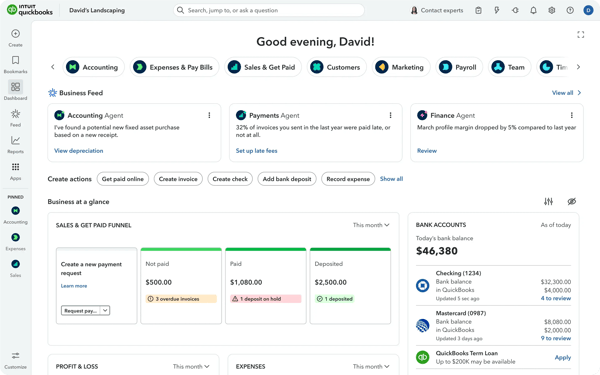
Integrations also carry significant weight here. From the G2 reviews I reviewed, users consistently value QuickBooks Online’s integration with third-party apps and broader business tools. That becomes more relevant when accounting needs to stay connected to sales-channel activity.
Inventory is where the boundaries become clearer. G2’s lowest-rated feature set is Reserving Goods at 82%, suggesting the platform is less suited to businesses that need deeper stock allocation or operational inventory control. I think that’s the point where many teams start pairing it with inventory control software rather than expecting QuickBooks Online to stretch into a more operational role.
The product also feels easier to adopt than to deeply extend. G2 rates ease of setup at 86% and ease of doing business at 86%, which supports the idea that smaller teams can get moving without too much friction. At the same time, adaptive learning at 53% and natural language interaction at 57% suggest that newer AI-style assistance is not the reason people choose this product. The appeal is still the accounting core.
For teams that want invoices, payments, and reporting to stay accurate without overbuilding the workflow, QuickBooks Online holds its ground well. It won’t replace a full OMS for inventory-heavy operations, but it gives smaller businesses a stable financial base.
What I like about QuickBooks Online:
- Based on the G2 reviews I read, one of the biggest advantages is how tightly invoices, payments, and expense records stay connected, which helps smaller teams keep financial workflows accurate without relying on multiple disconnected tools.
- G2 reviewers also mention automation repeatedly, especially around recurring invoices, bank feeds, and categorization, and that lines up well with the product’s strong G2 performance in core bookkeeping and payment-related workflows.
What G2 users like about QuickBooks Online:
“The functionality is there for managing the books for small local businesses, alongside an accounting firm for year-ends, etc. When I need more functionality, I utilize the Zapier integration or the extensive API service. QBO also has a pretty broad range of third parties it integrates with natively. I end up saving time and making fewer mistakes by automating my basic tasks. Pricing has been pretty good for our usage; it comes with all we need.”
– QuickBooks Online review, Mark E.
What I dislike about QuickBooks Online:
- According to G2 reviewers, QuickBooks Online starts to feel narrower when inventory workflows move beyond basic tracking, especially across multiple locations, though many teams handle that by adding dedicated inventory tools instead of replacing the accounting system.
- From the G2 feedback I reviewed, categorization and reconciliation can require closer attention in more complex setups, particularly when several integrations are feeding data in, but the core accounting workflow still appears dependable once those rules are settled.
What G2 users dislike about QuickBooks Online:
“It tends to automatically categorize charges, which can add extra time when reconciling the books… sometimes the summaries I tried to pull were still troublesome.”
– QuickBooks Online review, Christine D.
If you’re evaluating QuickBooks Online as your accounting layer, this breakdown of the best accounting software reviewed helps compare how it performs across bookkeeping, reporting, and financial workflows.
2. Salesforce Order Management: Best for unified order lifecycle across sales, service, and fulfillment
The more I looked at Salesforce Order Management, the less I thought about order capture and the more I focused on coordination. What I kept testing in my head was whether one order could move across sales, service, and fulfillment without teams losing context along the way. That’s the use case this product is really built around.
I saw that most clearly in the visibility layer. According to G2 data, order status scores 94%, and that fits with how I read the product’s core value. Based on the G2 reviews I went through, teams don’t just like that they can see an order. They like that everyone who touches the order can work from the same record, which matters more as support and order fulfillment start overlapping.
Another area I kept coming back to was communication. G2 shows email notifications at 95%, which is one of the strongest signals in the screenshot you shared. That stood out to me because order workflows often slow down when updates require manual system checks. Here, the update flow feels more operationally useful, especially when multiple teams need to react to changes quickly.
Inventory tracking also feels more grounded in process than in presentation. In G2’s feature data, stock levels come in at 93%, and I found that relevant in workflows where item-level accuracy has to stay intact from order creation through delivery. That becomes easier to manage when the system is tied to a consistent SKU number, especially across larger catalogs or multi-step fulfillment paths.
What made the product feel credible to me, beyond its individual features, was its broader fit. G2 rates meets requirements at 91%, which is a strong sign that the platform works well for more layered order operations. That also aligns with the industries reflected in G2, including retail, IT and services, software, and financial services, where order data typically needs to remain connected to customer records and service workflows rather than living on its own.

I also found it easier to understand this product when I thought about the surrounding stack. Salesforce Order Management makes more sense for teams already running customer and commerce workflows in connected systems, not for teams looking for a lightweight standalone OMS. That’s especially true for businesses already selling across e-commerce platforms and trying to keep commerce activity tied back to the same operational lifecycle.
The place where I’d slow buyers down is setup. The same G2 snapshot that makes the enterprise case also shows where the work begins: ease of setup is 81%, and ease of admin is 81%. As I read through the reviews, that came through clearly. Teams often need time to define order states, orchestration rules, and workflow logic before the product starts to feel fully settled. Once that structure is in place, though, the day-to-day flow appears much more manageable.
I’d say the same about usability. G2 puts ease of use at 85%, which is good, but not so high that I’d frame this as instant for every team. For buyers already comfortable with Salesforce, that probably won’t feel like a major barrier. For leaner teams that want something faster to configure and operate, it may feel more involved, even if the long-term workflow control is stronger.
If the goal is to manage one order across sales, service, and fulfillment without splitting the experience across disconnected tools, Salesforce Order Management makes a compelling case. It asks for more upfront structure than lighter systems, but that added rigor is also what makes it better suited to larger, more coordinated operations.
What I like about Salesforce Order Management:
- Based on the G2 reviews I read, one of the biggest strengths is how clearly the platform keeps order status, customer context, and fulfillment activity tied to the same workflow, which makes cross-team coordination feel more controlled and less fragmented.
- G2 reviewers also mention automation and notification flow as meaningful advantages, and these points align well with the platform’s strong G2 scores for email notifications, order status, and stock visibility in more structured operating environments.
What G2 users like about Salesforce Order Management:
“I like the simplicity of Salesforce Order Management. Even though I’m not a Salesforce super user, I can easily navigate through the details of orders, such as sales prices, discounts, serial keys, and documents sent during the process. Additionally, it keeps everything in the same place, so it’s easy to track any orders and POs.”
– Salesforce Order Management review, Leo G.
What I dislike about Salesforce Order Management:
- According to G2 reviewers, Salesforce Order Management can take more effort to configure when teams need detailed orchestration, fulfillment rules, and custom order states, which may lengthen implementation, though that structure does support better control once the system is properly set up.
- From the G2 feedback I reviewed, the interface can take some adjustment for teams that are newer to Salesforce or working across larger datasets, but the workflow appears easier to navigate once the operating model becomes more familiar.
What G2 users dislike about Salesforce Order Management:
“The setup and configuration process is quite complex. Getting everything up and running initially can take a significant amount of time and requires considerable technical expertise. In many cases, you need skilled Salesforce developers or consultants to properly configure flows, manage order states, and set up integrations.”
– Salesforce Order Management review, Felipe C.
3. SAP Commerce Cloud: Best for enterprise-grade commerce and order orchestration
SAP Commerce Cloud started making sense to me when I looked at the parts of commerce work that usually break first at scale: catalog consistency, pricing logic, regional storefront control, and the handoff between commerce and ERP. Based on the G2 reviews I read, this is the kind of platform teams pick when they would rather spend more time setting the system up correctly than keep fixing fragmented workflows later.
That enterprise fit is easy to justify with the product’s G2 scores. SAP Commerce Cloud sits at 92% for meets requirements, and I kept seeing that reflected in reviews from teams managing large catalogs, multi-store setups, and more demanding B2B or B2C environments. When a platform has to support layered commerce operations without losing control over the data model, this one feels built for that job.
Its SAP alignment still handles much of the heavy lifting. I came away thinking that the real value is not just native connectivity, but the fact that commerce, inventory, pricing, and financial data can stay close to the same system of record. That matters in scenarios like which order management platforms give accountants read-only access for tax reporting and P&L visibility? SAP Commerce Cloud makes a stronger case there when the broader SAP finance stack is already in place, especially for teams that also rely on EDI software for partner data exchange.
Another strength is its ability to handle structured merchandising. G2 shows adaptive learning at 93%, which points to the platform’s strength in personalization and rule-driven commerce experiences. I saw that come through in reviews that talked about controlling catalogs, promotions, and regional variations without introducing constant manual work.
Transaction handling looks solid, too. In G2’s feature scores, automatic payments sit at 92% and register at 91%, which supports the platform’s position as a dependable commerce engine rather than just a storefront layer. I found that especially relevant for teams trying to keep checkout, payment movement, and order records steady across higher-volume programs.

The support and usability picture is stronger than I expected for a platform this deep. SAP Commerce Cloud scores 91% for quality of support, 89% for ease of use, and 89% for ease of doing business with in G2. That does not make it lightweight, but it does suggest that once teams are in the product, they are not left to figure everything out without support.
Shipping and fulfillment coordination also benefit from that structure. I kept noticing how often reviewers tied the platform’s value to operational consistency rather than just website presentation. That becomes more useful when brands are balancing inventory visibility, service expectations, and faster delivery promises across regions and storefronts.
The first real caution point is implementation weight. G2 rates ease of setup and ease of admin at 86%, which is respectable, but the review language makes it clear this is not a casual rollout. Teams without SAP experience or dedicated technical support may find the platform heavy at first, even though that upfront structure usually pays off once the environment settles.
Cost is the other consideration I would flag. Several G2 reviewers mention that licensing, implementation, and customization can stretch budgets, especially outside enterprise contexts, though the investment tends to make more sense for organizations that can fully use the platform’s depth.
If you are comparing the best order management software for enterprise commerce and you already operate close to SAP, this platform earns its place. It requires more planning than simpler tools, but it gives large teams the control, consistency, and cross-system discipline they often struggle to achieve with lighter options.
What I like about SAP Commerce Cloud:
- Based on the G2 reviews I read, one of the clearest strengths is how well SAP Commerce Cloud handles complex catalogs, pricing rules, and multi-store commerce without letting data consistency drift across regions or storefronts.
- G2 reviewers also repeatedly mention SAP ecosystem alignment, which aligns with the product’s stronger enterprise fit when commerce workflows need to stay closely connected to ERP, payments, and downstream operational systems.
What G2 users like about SAP Commerce Cloud:
“What I like best about SAP Commerce Cloud is its enterprise-grade flexibility and how well it supports complex digital commerce operations. The UI/UX is clean and well-structured for managing catalogs, orders, and customer journeys, although new users may need some onboarding time due to the platform’s depth. Its native integrations with SAP solutions like S/4HANA and third-party systems make data synchronization smooth and reduce operational complexity. Performance is highly reliable and scalable, even for large transaction volumes, which is critical for business growth. From a pricing and ROI perspective, the initial investment can be significant, but the long-term value is strong because of automation, reduced maintenance overhead, and improved customer conversion rates. The onboarding resources, documentation, and SAP support ecosystem are comprehensive and helpful during implementation. I also appreciate the AI-driven intelligence features such as personalized recommendations, smarter search, predictive insights, and automated merchandising optimization, which significantly enhance customer experience and business efficiency.”
– SAP Commerce Cloud review, Vedant G.
What I dislike about SAP Commerce Cloud:
- According to G2 reviewers, SAP Commerce Cloud can feel heavy during setup, updates, and routine configuration work, especially for teams without strong SAP familiarity, though that same structure does support better long-term control once the environment is established.
- Users on G2 also say pricing and customization effort can be difficult to justify for leaner organizations, particularly when implementation needs are extensive, but the value appears easier to defend in larger commerce programs with more demanding requirements.
What G2 users dislike about SAP Commerce Cloud:
“The overall usability of SAP Commerce Cloud feels quite heavy, especially during routine updates. Even simple catalog changes or configuration tweaks can take more steps than expected and aren’t always intuitive, especially if you haven’t used it for a while. Additionally, its performance and flexibility around changes can be limiting when working in fast-moving commerce setups. While it’s great for stability, this stability sometimes slows down iteration and experimentation.”
– SAP Commerce Cloud review, Praney M.
4. Unicommerce: Best for multi-channel order processing across marketplaces and D2C operations
Unicommerce came into focus for me at the point where marketplace orders, warehouse updates, and dispatch data all need to move together without someone constantly checking whether one system lags behind another. Based on the G2 reviews I read, that is the real reason teams adopt it. It is less about adding another dashboard and more about keeping fast-moving commerce operations under one operational layer.
The strongest signal in G2 is how easy the platform is to get live and use consistently. Unicommerce scores 95% for ease of setup, 93% for ease of use, and 91% for ease of admin, which is unusually strong for a product handling this many moving parts. As I reviewed the feedback, I kept seeing the same pattern: teams were able to onboard quickly and start using it for day-to-day execution without a long adjustment period.
The core workflow coverage also holds up well. That feels accurate when you look at how often reviewers mention orders, inventory, returns, dispatches, and warehouse activity together instead of as separate tasks. That bundled control is a big reason Unicommerce stands out in conversations around the best order management software for brands selling across marketplaces and D2C channels at the same time.
Inventory visibility is another clear strength. In G2’s feature data, register scores 95%, while information access and reserving goods both sit at 92%. I found that especially relevant for businesses trying to reduce stock mismatches, keep fulfillment accurate, and apply smarter strategies to reduce inventory holding costs without losing speed on order movement.
The platform’s fit for fashion and retail also comes through clearly in the G2 snapshot. Apparel and fashion account for the largest industry segment in its user base, followed by retail, which helps explain why so many reviews talk about multi-warehouse visibility, channel synchronization, and large SKU catalogs. From what I saw, Unicommerce is built for teams that need operational consistency more than presentation-layer polish.
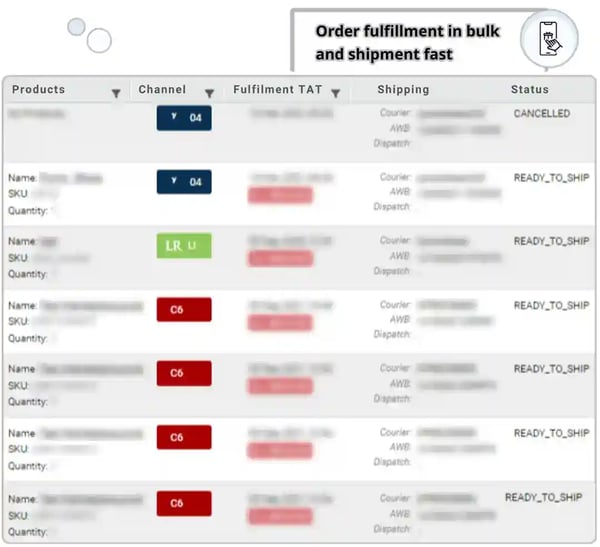
I also put weight on how well it handles synchronization across different sales and fulfillment paths. That question comes up often: Which order management systems reliably handle complex syncs across multiple fulfillment channels? Unicommerce makes a strong case because G2 reviewers repeatedly describe clean marketplace syncing, near-real-time updates, and more structured order data across warehouses and channels. That makes it relevant for teams comparing broader retail distributed order management systems.
The business case is also easier to defend than I expected. The additional stat you shared shows an average adoption rate of 72% over a 5-month ROI period, and it fits the rest of the G2 picture well. When a platform is this operationally central and still scores 90% for ease of doing business with, I can see why teams stick with it once the process layer is in place.
Where it would slow buyers down is workflow edge cases. G2’s lower feature scores still remain decent, but Backorder at 82% suggests that more nuanced fulfillment scenarios may need closer attention than core order routing and inventory syncing. That does not take away from the product’s main strength, though it does tell me this platform works best when the underlying process rules are clearly defined.
I would also flag that some specialized use cases still seem to require follow-up. In the G2 reviews I read, custom report changes, certain B2B requirements, inactive SKU mappings, and connector-related issues came up often enough to matter. Those do not undermine the platform’s day-to-day value, but they do suggest that growing teams should expect some process refinement as operations mature.
For brands trying to bring marketplaces, warehouses, and order execution into one place, Unicommerce feels like a practical operator’s tool rather than a flashy one. It earns its place by helping teams keep commerce activity accurate, visible, and manageable as scale exposes gaps between systems.
What I like about Unicommerce:
- Based on the G2 reviews I read, one of the biggest advantages is how smoothly Unicommerce brings orders, inventory, returns, dispatches, and warehouse activity into one workflow, which helps teams avoid manual coordination across separate systems.
- G2 reviewers also mention setup and daily usability repeatedly, and that lines up with the product’s strong G2 scores for ease of setup, ease of use, and admin efficiency in multi-channel commerce environments.
What G2 users like about Unicommerce:
“I like using Unicommerce to manage marketplace orders and sync structured data into our internal systems, such as SAP B1 and the Frappe framework. The platform provides consistent order, item, and tax details, which help automate processes and reduce manual efforts. I appreciate the API-based updates that allow near real-time tracking, enabling my team to trigger workflows like invoicing, POD processing, and return handling. The return-item structure also supports SAP credit-note automation with clearer traceability. Overall, Unicommerce has streamlined our order operations, improved turnaround time, and enabled several automation projects in inventory, logistics, and finance. Everything works best for me, and I don’t have any issues right now.”
– Unicommerce review, Yogesha K.
What I dislike about Unicommerce:
- According to G2 reviewers, Unicommerce can slow down during heavier order loads or when teams need more customized workflows, which may create extra follow-up for operations teams, though the core order and inventory flow still appears dependable once stabilized.
- Users on G2 also say that some advanced reporting, B2B processes, and connector-dependent workflows may need additional support or cleanup, but those issues seem more concentrated in edge cases than in the platform’s everyday operations.
What G2 users dislike about Unicommerce:
“The main issue with Unicommerce seems to be that everything takes a lot of time, especially for work done on customization queries like PO report customization and HSN implementation. There’s also a need for constant POC support whenever required.”
– Unicommerce review, Siddharth J.
5. Katana Cloud Inventory: Best for production-led order management with inventory and manufacturing sync
Katana Cloud Inventory earned my trust once I started looking at order flow from the production floor backward rather than from the storefront forward. In the G2 reviews I read, the strongest value wasn’t just stock visibility. It was the way manufacturing teams use the system to keep raw materials, finished goods, sales orders, and fulfillment activity connected without losing control once production starts moving.
That manufacturing focus is clear in G2’s user profile. Manufacturing is the largest represented industry, and the feature scores support that fit: entry scores 92%, stock levels scores 92%, and order status scores 88%. I found that combination especially telling because it points to a platform built for teams that need item-level accuracy and production visibility to stay aligned while orders are still being planned, assembled, and shipped.
The support profile is another reason the product stands out. G2 rates support quality at 94%, and that came through consistently in the feedback I reviewed. Several users describe onboarding as intuitive, quick to grasp, and well supported by the Katana team, which matters more here because inventory and manufacturing systems can become hard to trust if setup feels confusing from the start.
Usability is strong as well, but in a practical way rather than a simplified one. Ease of use is 90%, ease of admin is 91%, and ease of doing business with is 94% on G2. I read that as a sign that Katana is approachable for growing product businesses without feeling stripped down. It gives teams structure without immediately forcing them into the heavier setup work that usually comes with more traditional manufacturing software.
What I liked most in the reviews was how often users tied Katana to real operational clarity. They weren’t just talking about stock counts. They were describing smoother invoicing, better shipping-label workflows, cleaner QuickBooks sync, and easier PO and quote handling from one place. That makes the platform especially relevant for the highest-rated order management platforms for fashion and apparel companies needing end-to-end inventory and accounting sync, where production, order status, and financial handoff all need to stay visible at once.
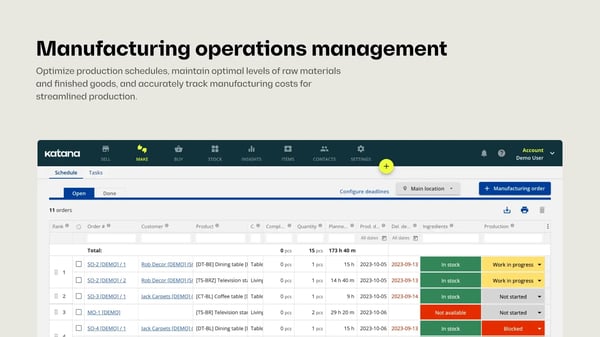
The setup experience also looks stronger than I expected for a system crossing inventory and production. G2 shows Ease of Setup at 87%, which is not perfect, but it does support the broader pattern that teams can get moving without an extended rollout. For businesses comparing lighter inventory tools or even free inventory control software, Katana makes a clearer case when the need goes beyond stock tracking and into manufacturing coordination.
Katana also seems to sit in an interesting middle ground. It is more operations-focused than a basic inventory app, but it is not trying to become a full-scale ERP environment either.
The limits start to show when workflows become highly specific. In G2’s lower-rated feature set, payment gateway is 65%, Adaptive Learning is 64%, and Natural Language Interaction is 60%, which tells me buyers are not choosing this product for AI-led guidance or embedded payment depth. That fits with what reviewers describe: Katana works best when the priority is production and inventory synchronization, not broad front-office coverage.
I would also caution that some process areas still need refinement depending on the operation. According to the G2 feedback I reviewed, PO tracking, batch-level quality controls, certain add-ons, and more tailored invoicing or quoting needs can require extra workarounds. Those gaps do not erase the platform’s day-to-day usefulness, but they do suggest that more specialized operators may need to shape the process around it as they grow.
For product-based businesses that need production, stock, and order execution to stay coordinated, Katana Cloud Inventory makes a strong case.
What I like about Katana Cloud Inventory:
- Based on the G2 reviews I read, one of Katana’s biggest strengths is how clearly it connects inventory, production activity, sales orders, and fulfillment steps, which gives growing product teams better operational control without forcing them into a much heavier system.
- G2 reviewers also often mention onboarding, support, and daily usability, which aligns with Katana’s strong G2 scores for support, admin experience, and business ease in production-led inventory environments.
What G2 users like about Katana Cloud Inventory:
“I find Katana Cloud Inventory to be relatively simple and easy to use, yet it still offers a lot of features of a ‘modern’ MRP system and doesn’t feel clunky. The API is a big plus as it makes it easy to connect to other systems. I really like how it allows someone with no software engineering skills to build tools to improve our workflows, like posting updates on Slack when a sales order is delivered or getting data to build our own dashboards. The initial setup was pretty easy, especially uploading data with Excel sheets.”
– Katana Cloud Inventory review, Ryan N.
What I dislike about Katana Cloud Inventory:
- According to G2 reviewers, Katana can feel less flexible when teams need more specific PO controls, batch-status handling, or niche operational features, though the core inventory and production workflow still appears solid once those processes are defined.
- Users on G2 also say certain add-ons, invoicing details, and customer-facing workflow pieces may not fit every small team out of the box, but the platform still seems easier to manage than broader manufacturing systems for everyday use.
What G2 users dislike about Katana Cloud Inventory:
“I think Katana is over-built for our needs. It might be nice to grow into, though. I also think stock adjustments, stocktakes, and stock data uploads are confusing to decide what to use when. We linked it to QuickBooks, but I don’t like it. Packing slips and invoices used to include our logo and were flashier, but I haven’t figured out how to do that on Katana yet.”
– Katana Cloud Inventory review, Evan R.
6. Increff WMS: Best for warehouse-first order management with real-time inventory accuracy
Increff WMS clicked for me when I treated the warehouse as the source of truth rather than the last stop after an order is placed. In the G2 reviews I read, the value shows up in the way stock visibility, picking accuracy, and order movement stay aligned while operations are still in motion. That makes it a strong fit for teams that care less about storefront polish and more about what happens once inventory starts moving through bins, scans, and dispatch queues.
The speed-to-value story is one of the first things I noticed. You shared an additional stat showing it takes 1.4 months to go live, and that feels believable when paired with Increff’s G2 scores for ease of setup at 94% and ease of use at 94%. For a warehouse system, that matters. Teams usually lose patience with tools that promise control but take too long to become usable on the floor.
The operational core is strong where I would expect it to be. In G2’s feature data, information access scores 93%, stock levels 91%, and order status 90%. I kept coming back to those numbers because they support the same pattern I saw in the reviews: users trust Increff when they need real-time visibility into stock, tighter order processing, and cleaner day-to-day execution inside the warehouse.
Its admin profile is even more impressive. G2 puts ease of admin at 97%, which is unusually high for a product this operations-heavy. I read that as a sign that teams are not fighting the system once it is live. That also helps explain why Increff looks appealing for brands evaluating the best order management software from a warehouse-first perspective rather than a commerce-first one.
There is also a clear industry signal here. Apparel and fashion account for the largest share of Increff’s G2 user base, followed by retail. That fits the product’s strengths well because those teams are often balancing high SKU counts, fast replenishment cycles, and omnichannel stock pressure.
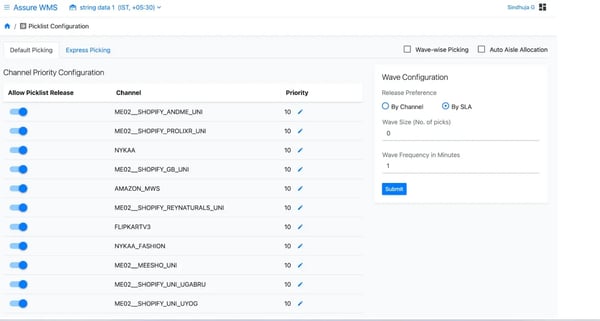
What makes the product especially convincing is how often reviewers talk about near-real-time syncing without framing it as a fragile process. That matters for the question: order management systems that sync cloud inventory across channels without requiring manual field re-entry, because Increff’s value seems to come from reducing duplicate entries and giving each unit better traceability within the warehouse itself. I saw that point come through in feedback around unique identifiers, stock synchronization, and more dependable allocation decisions.
Support also seems to play a meaningful role in adoption. According to G2 data, the quality of support is 93%, and the ease of doing business with is 93%. That lines up with reviews that mention responsive help during setup, training, and ongoing issue resolution. For warehouse teams, that kind of support is not a bonus feature. It often determines whether process changes actually stick.
The limits are easier to spot in reporting and surrounding workflow layers than in core warehouse execution. In G2’s lower-scoring features, tracking lands at 87%, billing at 87%, and automatic payments at 86%. Those are not weak scores, but they do tell me this is not the kind of platform you choose for broad finance or downstream workflow depth. It is stronger when inventory accuracy and warehouse flow are the main priorities.
I would also slow buyers down around analytics flexibility and some integration edge cases. In the G2 feedback I reviewed, users mention wanting richer live dashboards, better report downloads, more flexible integrations, and smoother feature development timelines. Those are reasonable considerations for growing teams, even if they do not seem to undermine the platform’s core warehouse discipline once it is in place.
For operations teams that want cleaner stock accuracy, stronger control on the warehouse floor, and faster execution after orders drop in, Increff WMS makes a compelling case. It feels especially well-suited to brands that are outgrowing lighter tools, including some evaluating warehouse management software for small businesses, but still want a system that becomes useful quickly.
What I like about Increff WMS:
- Based on the G2 reviews I read, one of Increff WMS’s biggest strengths is its ability to track inventory at the unit level while keeping warehouse operations, stock visibility, and order processing tightly coordinated in near real time.
- G2 reviewers also often mention fast onboarding, admin simplicity, and day-to-day usability, which align with the platform’s strong G2 scores for setup, ease of use, admin experience, and warehouse execution.
What G2 users like about Increff WMS:
“What I appreciate most about Increff WMS is its ability to assign a unique identifier to each physical unit rather than limiting tracking to the SKU level. This feature has significantly enhanced inventory accuracy, traceability, and control within our warehouse operations. The near real-time inventory synchronization is especially valuable during peak sales periods, enabling us to make quick and informed operational decisions. Additionally, features such as real-time stock visibility and automated order allocation have improved order processing efficiency and SLA adherence. The platform’s clean and intuitive user interface ensures ease of navigation, while the initial implementation process was smooth, allowing for seamless adoption by our team.”
– Increff WMS review, Kumar Aditya D.
What I dislike about Increff WMS:
- According to G2 reviewers, Increff WMS can ask for more flexibility in live dashboards, report handling, and deeper analytics, particularly for teams working with high-volume operational data, though the core warehouse workflow still appears dependable.
- Users on G2 also say some integrations, feature expansions, and exception-handling scenarios may need more refinement over time, but those issues seem to sit around the edges rather than at the center of daily warehouse performance.
What G2 users dislike about Increff WMS:
“I will not say this is a disadvantage, but ya ofcourse, if the system provides provide live dashboard to perform deep analysis, and one more thing, sometimes it will be frustrating while downloading the report.”
– Increff WMS review, Saurabh K.
For smaller sellers that need multichannel control without committing to a full warehouse stack yet, these free multichannel retail tools are a useful comparison point.
7. Webgility: Best for e-commerce accounting sync with automated order-to-cash workflows
Webgility caught my attention because it handles the kind of operational work most teams only notice when finance starts chasing mismatched numbers. Orders may come in correctly from storefronts and marketplaces, but that does not mean payments, taxes, invoices, and accounting records stay clean on their own. From the G2 reviews I went through, Webgility is most valuable when businesses want that back-office cleanup to stop eating into the day.
Its strongest case starts with movement and accuracy. In G2’s feature data, tracking scores 94% and flow of goods 90%. Those numbers fit the review themes well. Users repeatedly point to smoother posting from commerce channels into QuickBooks, fewer manual entries, and better continuity between transaction data and accounting records once order volume picks up.
The support story matters more here than it would for a generic order tool. G2 rates the quality of support at 92% and ease of doing business with at 94%, and I saw that reflected clearly in the reviews. Users talk about implementation help, training, and issue resolution in very practical terms, which is exactly why Webgility feels relevant for order management software, where support actively resolves sync failures before accounting deadlines.
Another reason the product feels distinct is the user mix. Retail leads the represented industries in G2, followed by wholesale and accounting. That explains a lot. Webgility is not trying to be a warehouse-first platform. It is more convincing as the layer that connects online orders and accounting, especially for teams balancing channel activity with finance operations.
The usability picture is solid, even if it is not the flashiest product in the lineup. According to G2, meets requirements is 89%, ease of admin is 87%, and ease of use is 86%. I read that as a practical signal: teams seem willing to work with a less polished interface when the sync itself saves time and reduces manual correction.
I also noticed that users rarely describe the value in abstract terms. The praise is usually specific: faster order syncing, less duplicate data entry, cleaner invoice creation, and better bookkeeping continuity.
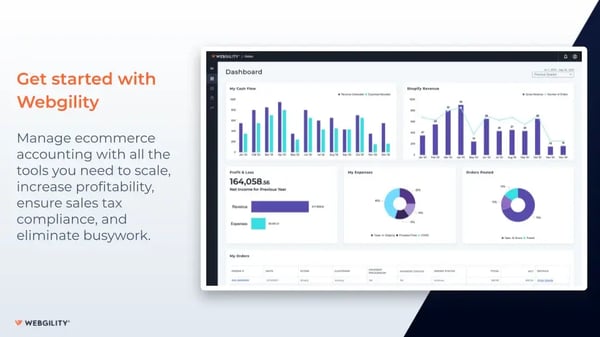
The Looker-backed feature scores also make its boundaries easier to explain. Backorder is 82% in G2, while stock levels and reserved goods each sit at 89%. That lines up with the review pattern I saw: users speak more strongly about accounting sync and transaction automation than about deeper inventory operations. For that reason, I would place Webgility closer to the accounting side of the workflow than the fulfillment side.
The review-level friction stays consistent with that positioning. G2 reviewers mention direct-payment issues in certain B2B workflows, channel-specific sync gaps, and some limitations tied to plans or more specialized use cases. Those pain points do not erase the product’s main value, but they do suggest that businesses with more complex reconciliation logic may still need occasional manual follow-up.
There is still a strong practical case for the right buyer. If the main objective is to reduce repetitive bookkeeping work while keeping orders and accounting aligned, Webgility does that better than many broader tools trying to cover every layer at once. It also fits naturally alongside adjacent finance tools like purchasing software and invoice management software when accounting operations start getting heavier.
For teams that care most about the order-to-cash handoff, Webgility earns its place. I would not choose it for warehouse orchestration depth, but I would absolutely consider it when the bigger problem is getting commerce activity into the books accurately and with less manual repair.
What I like about Webgility:
- Based on the G2 reviews I read, one of Webgility’s clearest strengths is its reliable push of commerce orders into accounting workflows, which helps reduce duplicate entries and keeps order-to-cash records more accurate.
- G2 reviewers also often mention support and onboarding, and those comments align well with the product’s strong G2 scores for support quality and ease of doing business during implementation.
What G2 users like about Webgility:
“The most helpful part of Webgility is the automated sync between WooCommerce and QuickBooks. It keeps inventory, pricing, and orders accurate without manual work. Their onboarding team made the setup very easy, and support has been great whenever we needed help. The biggest upside is the combination of automation and reliable customer service.”
– Webgility review, Kantha Subramanian D.
What I dislike about Webgility:
- According to G2 reviewers, some B2B payment scenarios still need manual follow-up when transaction details do not move into QuickBooks as cleanly as expected, though routine accounting sync still seems dependable for standard workflows.
- Users on G2 also say certain channel integrations and plan-level sync options can feel narrower once workflows become more customized, but the product still appears useful when accounting automation remains the main goal.
What G2 users dislike about Webgility:
“Webgility is not applying direct payments to B2B orders from Lightspeed to QuickBooks. These are term orders, and I can’t record payment right away, so later, when the customer pays, I have to manually go to LightSpeedPOS and QuickBooks Desktop to apply them. There is an update feature, but it unposts the invoices, which creates more problems. There is also no option to record the shipping address from QuickBooks’ existing customer.”
– Webgility review, Dillon J.
Frequently asked questions (FAQs) about order management software
Have more questions? G2 has the answers!
Q1. What is the most trusted order management software by small business owners for QuickBooks integration?
QuickBooks-focused buyers often trust Webgility and QuickBooks Online most for accounting-connected workflows, while Katana and Unicommerce also rate well for smaller teams. The best fit depends on whether you need direct bookkeeping sync, production visibility, or multi-channel order handling.
Q2. Which are the highest-rated order management platforms for fashion and apparel companies needing end-to-end inventory and accounting sync?
For fashion and apparel businesses, Unicommerce, Katana Cloud Inventory, and Increff WMS stand out because they connect inventory movement, order execution, and financial workflows more tightly. The right choice depends on whether your operation is warehouse-led, production-led, or marketplace-heavy.
Q3. Which order management software offers support that actively resolves sync failures before accounting deadlines?
Webgility is one of the strongest options when support responsiveness matters around accounting deadlines, especially for QuickBooks-connected workflows. Based on this list, products with stronger support reputations also include Katana Cloud Inventory and Salesforce Order Management for more structured operational environments.
Q4. Which order management systems handle complex syncs reliably when managing multiple fulfillment channels?
Unicommerce, Salesforce Order Management, and Increff WMS are strong choices for businesses handling complex syncs across multiple fulfillment channels. They are better suited to environments where inventory, warehouse actions, and order updates need to stay aligned without repeated manual correction.
Q5. What are the top order management tools with real-time invoice creation and payment acceptance without duplicate fee surprises?
QuickBooks Online and Webgility are the strongest options here because they keep invoicing, payment activity, and accounting records closely connected. If your priority is avoiding duplicate entries and reconciliation cleanup, they offer more financial workflow control than warehouse-first systems.
Q6. Which order management platforms let accountants pull tax information without IT overhead or complexity?
QuickBooks Online, Webgility, and SAP Commerce Cloud are strong options for accounting visibility, though they serve different levels of operational complexity. For most teams, the best order management software here is the one that keeps tax data accessible without forcing custom reporting work.
Q7. Which order management software offers seamless QuickBooks Online sync without gaps or workarounds?
Webgility is the clearest fit for businesses that want tighter QuickBooks Online synchronization across orders, payments, and accounting records. Katana Cloud Inventory also works well when production and inventory visibility matter, while QuickBooks Online itself is strongest for finance-first workflows.
Q8. Which order management systems sync cloud inventory across channels without requiring manual field re-entry?
Increff WMS, Unicommerce, and Katana Cloud Inventory stand out for cloud inventory synchronization across channels because they reduce duplicate entry and improve stock visibility. The best option depends on whether your workflow starts in the warehouse, on marketplaces, or in production.
Q9. Which order management platforms give accountants read-only access for tax reporting and profit and loss visibility?
SAP Commerce Cloud and QuickBooks-connected tools like Webgility are stronger choices when accountants need cleaner access to financial and reporting data. The best order management software for this depends on whether your team needs ERP depth, accounting sync, or simpler operational visibility.
Q10. What is the best order management software for small retail teams that need seamless QuickBooks Online synchronization?
For small retail teams, Webgility and QuickBooks Online are usually the strongest options because they simplify accounting sync, invoicing, and order-to-cash workflows. Katana may fit better if inventory and production matter, while Unicommerce suits heavier marketplace-driven retail operations.
Orders in check, margins next
The best order management software is rarely the one with the longest feature list. It’s the one that removes the kind of friction your team deals with every day, whether that’s accounting sync, warehouse accuracy, production planning, or multi-channel order flow. That’s why the tools in this list solve different problems instead of pushing the same workflow on every business.
As I compared them, the clearer split was between teams that need tighter financial control and teams that need stronger operational control. That matters even more if you’re evaluating the best order management software for small retail teams that need seamless QuickBooks Online synchronization, because the right choice there is usually the one that keeps orders, payments, and reporting aligned without adding extra complexity somewhere else.
The next step is to narrow your shortlist based on where mistakes cost you the most today, then see which platform gives you the cleanest path forward.
Once your order workflows are under control, explore these best expense management trackers to tighten spend visibility and protect the margins your operations team is working hard to improve.