• About Us
  • Disclaimer
  • Contact Us
  • Privacy Policy
Saturday, April 25, 2026
mGrowTech
No Result
View All Result
  • Technology And Software
    • Account Based Marketing
    • Channel Marketing
    • Marketing Automation
      • Al, Analytics and Automation
      • Ad Management
  • Digital Marketing
    • Social Media Management
    • Google Marketing
  • Direct Marketing
    • Brand Management
    • Marketing Attribution and Consulting
  • Mobile Marketing
  • Event Management
  • PR Solutions
  • Technology And Software
    • Account Based Marketing
    • Channel Marketing
    • Marketing Automation
      • Al, Analytics and Automation
      • Ad Management
  • Digital Marketing
    • Social Media Management
    • Google Marketing
  • Direct Marketing
    • Brand Management
    • Marketing Attribution and Consulting
  • Mobile Marketing
  • Event Management
  • PR Solutions
No Result
View All Result
mGrowTech
No Result
View All Result
Home Al, Analytics and Automation

GPTZero Grammar Checker: My Unfiltered Thoughts

Josh by Josh
September 17, 2025
in Al, Analytics and Automation
0
GPTZero Grammar Checker: My Unfiltered Thoughts


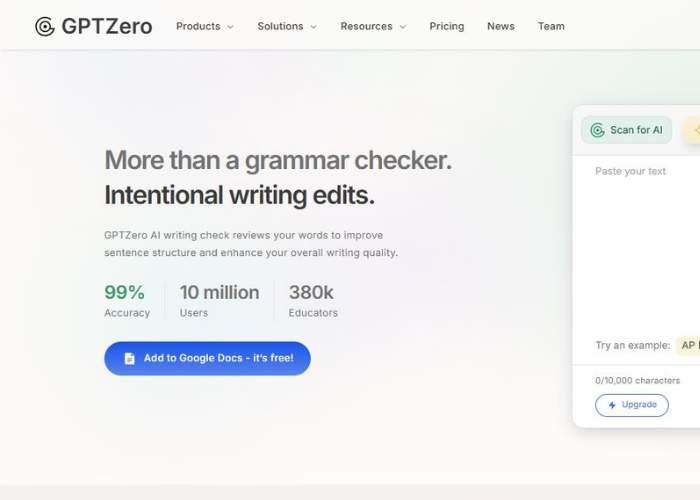
GPTZero offers a grammar tool that does more than simple spell checking. The description says it can:

  • catch grammar mistakes, typos, missing punctuation, incorrect usage.
  • provide feedback not just on small errors, but on clarity, structure, voice, tone. It flags when sentences are wordy or unclear, suggests improvements.
  • show suggestions inline (i.e. you see exactly where a comma is misplaced or where a word seems off) and let you accept or reject changes.
  • allow you to upload a file or paste the text. Free to start.
  • includes a chat-feature / follow-up ability: highlight a sentence/section and ask for more help or clarification.

It also supports feedback beyond just grammar: voice, tone, more polished structure. It tries to be like a coach, not just a proofreader.

Dive into GPTZero Grammar Checker

How It Works (From What I Saw + How I Think It Likely Works)

Here’s a rough breakdown of the process:

  1. You paste (or upload) your text into their dashboard.
  2. The system scans line by line to find grammar issues, spelling mistakes, punctuation problems, etc.
  3. It gives suggestions inline: you see errors highlighted, suggestions offered; you can choose to accept or reject.
  4. It also offers higher-level suggestions: clarity, sentence structure, possibly tone / voice adjustments. If a sentence is clunky or unclear, it points that out.
  5. There’s “focused feedback”: you can highlight a part and ask for more details or explanation.

Strengths & What Seems Good (Why You Might Want It)

These are the parts that made me think, “Hey, this could be pretty helpful.”

Strength Why It’s Valuable
Free / Easy Entry You can try it without paying, paste something you already wrote. Low friction.
Contextual Feedback It doesn’t just say “comma here” or “typo”; it explains, suggest better phrasing, point out unclear sentences. That helps learning, not just fixing.
Voice / Tone / Structure Help For people who care about not just being correct, but about sounding good, sounding human—this helps shape style.
Accept / Reject Suggestions You’re in control. If a suggestion doesn’t match your style, you can skip it. That’s good, because I hate when grammar tools force changes that kill voice.
Follow-Up Clarifications Want to know why a suggestion was made? The highlight + chat/feedback feature gives you that, rather than leaving you guessing.

Discover GPTZero Grammar Checker

Weaknesses / What Might Bug You

No tool is perfect. Here are the parts you’ll want to watch out for.

  • Sometimes suggestions might feel too “safe” or generic. In trying to correct, the tool might trim voice, or make things a bit bland. If you like flair or informal style, some suggestions might annoy you.
  • For non-native English writers or people using idioms/slang, grammar checkers often misfire: suggestions that are grammatically “correct” in standard form may not fit your intended expressiveness.
  • Limits: Free usage might have caps (word-limits or usage per time), though the site says it’s free to try. If you write long content a lot, you may hit those limits.
  • Sometimes “structure / clarity” feedback may require more rewriting than you expect. If you’re in a hurry, you might skip those; but then you miss some of the benefit.
  • Machine suggestions still can misinterpret meaning: if your sentence has nuance, irony, or you want ambiguity, the checker might push you to eliminate those, which might reduce your intended effect.

Who It Seems Best For (and Who Might Not Love It)

If I were you, I’d consider:

Good fit if you:

  • write often (blogs, essays, reports) and want to polish up writing quickly
  • like feedback, want to learn / improve, not just correct
  • care about sounding more professional or clearer
  • don’t want to pay a lot before knowing how useful the tool is

Might not love it if you:

  • write poetry, creative / experimental prose (where “rules” are sometimes to be broken)
  • use very informal / slang / dialect heavily — might get suggestions that try to normalize or standardize too much
  • you need super-tight academic or legal style and precision beyond general grammar + clarity; might need specialized editors

My Personal Opinion

I like this tool. It strikes a nice balance between helpfulness and letting your own style survive. It doesn’t try to replace you; it tries to elevate what you wrote.

When I type something casually and want it to be sharper, this kind of tool helps me cut out fluff, fix stumbles, polish commas without killing what made the draft interesting.

What I worry slightly about: letting it do too much. If I accept every suggestion blindly, I might lose what makes me me in writing.

Also, tools evolve: what seems excellent now may have quirks later, especially if people exploit “acceptable errors” or style-looseness to fool checkers, etc.

Would I Recommend You Try It?

Yes. I think you should try it. Especially since there’s a free version / free-to-try. Very low risk, good potential gain.

If you try, here’s how to get the most out of it:

  • Start with something you already wrote. Paste it, see what kinds of errors or suggestions it gives. Pay attention which suggestions feel right vs wrong.
  • After applying suggestions, read aloud or proofread to catch places where suggestions may have changed tone or voice.
  • Use the “focused feedback” / highlight-and-ask feature when you don’t understand a suggestion. Helps you learn.
  • Combine with your own read: grammar + meaning + voice. Don’t let it overwrite what you meant.



Source_link

READ ALSO

Google DeepMind Introduces Vision Banana: An Instruction-Tuned Image Generator That Beats SAM 3 on Segmentation and Depth Anything V3 on Metric Depth Estimation

MIT scientists build the world’s largest collection of Olympiad-level math problems, and open it to everyone | MIT News

Related Posts

Google DeepMind Introduces Vision Banana: An Instruction-Tuned Image Generator That Beats SAM 3 on Segmentation and Depth Anything V3 on Metric Depth Estimation
Al, Analytics and Automation

Google DeepMind Introduces Vision Banana: An Instruction-Tuned Image Generator That Beats SAM 3 on Segmentation and Depth Anything V3 on Metric Depth Estimation

April 25, 2026
MIT scientists build the world’s largest collection of Olympiad-level math problems, and open it to everyone | MIT News
Al, Analytics and Automation

MIT scientists build the world’s largest collection of Olympiad-level math problems, and open it to everyone | MIT News

April 24, 2026
Google DeepMind Introduces Decoupled DiLoCo: An Asynchronous Training Architecture Achieving 88% Goodput Under High Hardware Failure Rates
Al, Analytics and Automation

Google DeepMind Introduces Decoupled DiLoCo: An Asynchronous Training Architecture Achieving 88% Goodput Under High Hardware Failure Rates

April 24, 2026
Mend Releases AI Security Governance Framework: Covering Asset Inventory, Risk Tiering, AI Supply Chain Security, and Maturity Model
Al, Analytics and Automation

Mend Releases AI Security Governance Framework: Covering Asset Inventory, Risk Tiering, AI Supply Chain Security, and Maturity Model

April 24, 2026
“Your Next Coworker May Not Be Human” as Google Bets Everything on AI Agents to Power the Office
Al, Analytics and Automation

“Your Next Coworker May Not Be Human” as Google Bets Everything on AI Agents to Power the Office

April 23, 2026
Google Cloud AI Research Introduces ReasoningBank: A Memory Framework that Distills Reasoning Strategies from Agent Successes and Failures
Al, Analytics and Automation

Google Cloud AI Research Introduces ReasoningBank: A Memory Framework that Distills Reasoning Strategies from Agent Successes and Failures

April 23, 2026
Next Post
Groww, backed by Satya Nadella, set to become first Indian startup to go public after U.S.-to-India move

Groww, backed by Satya Nadella, set to become first Indian startup to go public after U.S.-to-India move

POPULAR NEWS

Trump ends trade talks with Canada over a digital services tax

Trump ends trade talks with Canada over a digital services tax

June 28, 2025
Communication Effectiveness Skills For Business Leaders

Communication Effectiveness Skills For Business Leaders

June 10, 2025
15 Trending Songs on TikTok in 2025 (+ How to Use Them)

15 Trending Songs on TikTok in 2025 (+ How to Use Them)

June 18, 2025
App Development Cost in Singapore: Pricing Breakdown & Insights

App Development Cost in Singapore: Pricing Breakdown & Insights

June 22, 2025
Comparing the Top 7 Large Language Models LLMs/Systems for Coding in 2025

Comparing the Top 7 Large Language Models LLMs/Systems for Coding in 2025

November 4, 2025

EDITOR'S PICK

Why Corporate Events Are Your Secret Growth Weapon

Why Corporate Events Are Your Secret Growth Weapon

September 29, 2025
Choosing the Right Path for B2B Startups

Choosing the Right Path for B2B Startups

August 12, 2025
AIAllure Video Generator: My Unfiltered Thoughts

AIAllure Video Generator: My Unfiltered Thoughts

October 26, 2025
24 BZTFLJ Code in Poppy Playtime Chapter 5

24 BZTFLJ Code in Poppy Playtime Chapter 5

February 23, 2026

About

We bring you the best Premium WordPress Themes that perfect for news, magazine, personal blog, etc. Check our landing page for details.

Follow us

Categories

  • Account Based Marketing
  • Ad Management
  • Al, Analytics and Automation
  • Brand Management
  • Channel Marketing
  • Digital Marketing
  • Direct Marketing
  • Event Management
  • Google Marketing
  • Marketing Attribution and Consulting
  • Marketing Automation
  • Mobile Marketing
  • PR Solutions
  • Social Media Management
  • Technology And Software
  • Uncategorized

Recent Posts

  • How to Do the Hungry for Horns Event (Pizza with Rhino Topping) in Goat Simulator 3
  • XChat, the standalone app for messaging on X, is available on iOS now
  • Google DeepMind Introduces Vision Banana: An Instruction-Tuned Image Generator That Beats SAM 3 on Segmentation and Depth Anything V3 on Metric Depth Estimation
  • MOVA Z70 Pro Sets a New Standard for Clean with a Four-Step Self-Cleaning Mopping System
  • About Us
  • Disclaimer
  • Contact Us
  • Privacy Policy
No Result
View All Result
  • Technology And Software
    • Account Based Marketing
    • Channel Marketing
    • Marketing Automation
      • Al, Analytics and Automation
      • Ad Management
  • Digital Marketing
    • Social Media Management
    • Google Marketing
  • Direct Marketing
    • Brand Management
    • Marketing Attribution and Consulting
  • Mobile Marketing
  • Event Management
  • PR Solutions