[ad_1]
Fair warning: I’m that person who will try every tool, test every feature, read every changelog, and build a whole workflow just to shave time off a task.
I’ve done all these things in Buffer and Sprout Social as a creator, small business owner, and social media consultant for an enterprise company. And after spending serious time on both platforms, one thing became clear: they’re built for very different versions of “someone who manages social media.”
Buffer is designed for creators, businesses, and agencies that want a flexible, affordable tool to manage their social media presence. Sprout Social is built for large, enterprise teams that need complex team workflows and advanced social listening.
Neither platform is universally “better,” and they both have plenty of great features for managing and growing your social media presence. The better fit comes down to how you work day to day, and what kind of setup makes that easier.
Here’s what I found when I compared them side by side.
Key takeaways
- Buffer offers a free-forever plan that includes three social channels, 10 scheduled posts per channel (refillable anytime), an AI Assistant, and basic analytics. Sprout Social has no free plan, only a 30-day trial.
- Buffer’s paid plans scale with the number of channels you connect, while Sprout Social’s scale with the number of users on your team. Buffer starts at $6/channel per month; Sprout Social starts at $99/seat per month. For a single user managing five channels, that’s $30 per month on Buffer’s Essentials plan vs. $99 per month on Sprout Social’s Essentials plan.
- Buffer’s Team plan ($12/channel per month) includes unlimited users. On Sprout Social, features that most teams need — like approval workflows — are available on the Professional plan ($399/seat per month) and higher. Adding a second person to your Sprout Social team would cost you $798 per month.
- Sprout Social’s Smart Inbox is a strength. It pulls direct messages, mentions, and comments from every connected platform into one unified inbox. Buffer’s Community inbox handles comment management but doesn’t track DMs and mentions.
- Sprout Social offers social listening and competitive benchmarking, which are features Buffer doesn’t have. If those are important for you, Sprout Social earns its price.
- Buffer supports 12 social platforms, including Mastodon, which Sprout Social doesn’t cover. Sprout Social supports WhatsApp and has a deeper YouTube integration.
- Both tools have AI features, but different features are available to teams at very different price points.
Buffer vs. Sprout Social at a glance
Let’s look at the differences in more detail.
Plans and pricing
Pricing gives you a practical sense of how each tool is set up and who it’s built for. Here’s what each one costs as of April 2026.
Buffer pricing (billed monthly)
- Free: 3 channels, 10 scheduled posts per channel (refill anytime), 1 user, AI Assistant, analytics, community inbox
- Essentials: $6/channel per month — unlimited posts, 1 user, analytics, hashtag manager, first comment scheduling
- Team: $12/channel per month — unlimited posts, unlimited users, approval workflows
Since Buffer charges per channel, not per seat, you can add as many people to your Team plan as you need to without worrying about the cost going up. A small business managing five channels on the Team plan pays $60 per month, whether it has two users or 10.
See Buffer’s full pricing guide here →
Sprout Social pricing (billed monthly, per seat)
- Essentials: $99/seat per month — 5 social profiles, optimal send times, profile and post-level reporting
- Standard: $249/seat per month — 5 social profiles, consolidated inbox, keyword monitoring, review management
- Professional: $399/seat per month — unlimited profiles, approval workflows, competitor insights, AI Assist (Enhance Post)
- Advanced: $499/seat per month — AI Assist reply, external approvals, sentiment analysis, Sprout API, helpdesk integrations, team productivity reports
- Enterprise: Custom pricing
It’s worth noting that, while you can have multiple users on the Essentials and Standard plans, you don’t get features like approval workflows that many teams need. If your team has some users whose posts need to be approved before they’re published, you’d have to choose the Professional or Advanced plans.
Sprout Social also offers add-ons — Social Listening, Premium Analytics, Employee Advocacy, Influencer Marketing, and Professional Services — each at an additional cost. These are available for teams on the Standard plan and higher.
See Sprout Social’s full pricing guide here →
What this means in practice
Here’s a real scenario: a three-person marketing team managing eight social channels.
- Buffer Team plan: 8 channels x $12/month = $96/month. All three team members are included.
- Sprout Social Professional: 3 seats x $399/month = $1,197/month.
That’s $1,101 savings in a month, or $13,212 in a year, with Buffer.
The question isn’t whether Sprout Social costs more — it does, significantly. Whether that gap is worth it depends on how much you’d actually use what you’re paying for.
Scheduling and publishing
For core scheduling — writing posts, choosing times, and publishing across platforms — both tools cover the basics well.
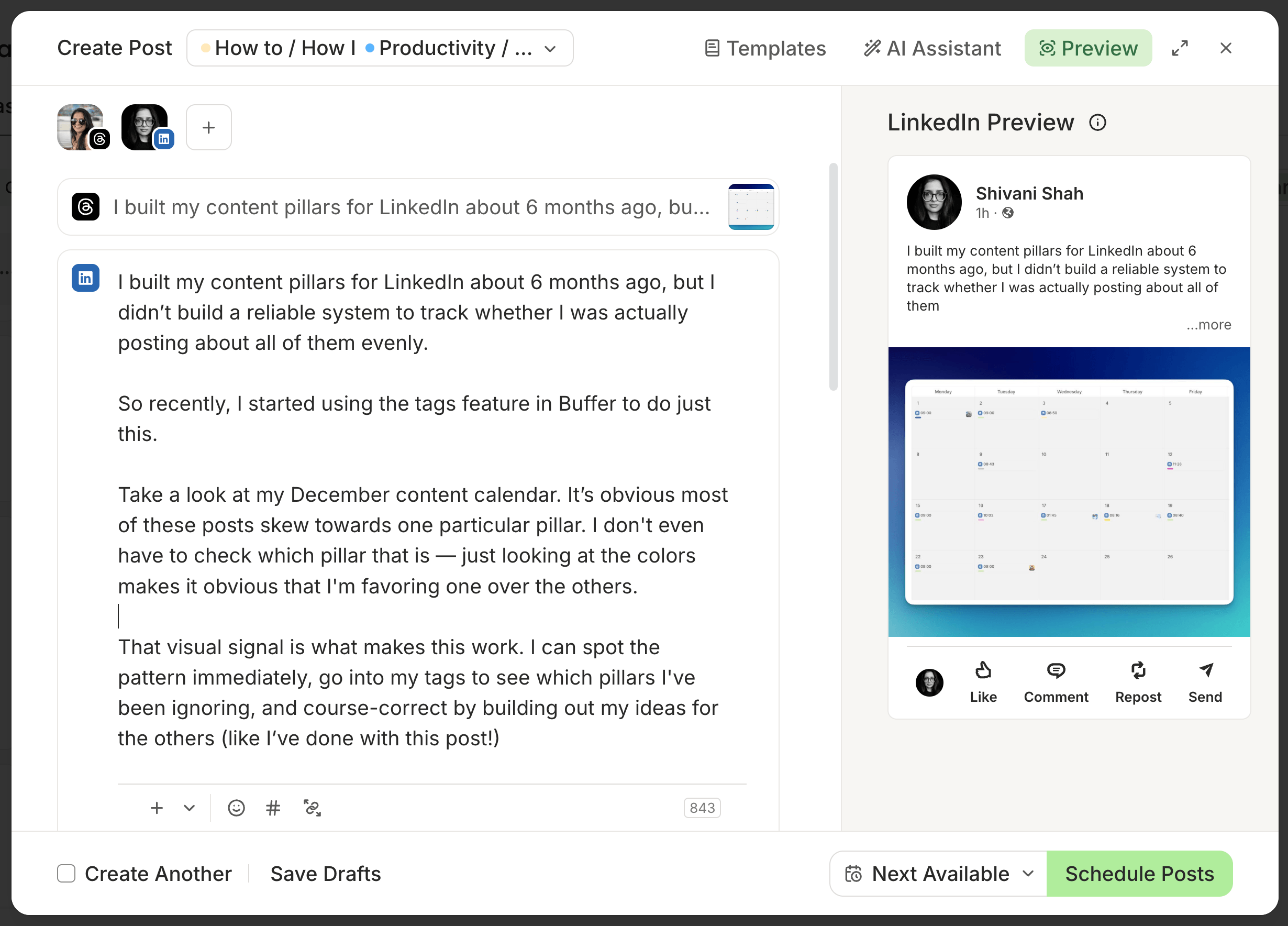
Buffer keeps things simple: write your post, choose your channels, customize for each platform if needed, and schedule. On the Team plan, anyone who needs sign-off hits “Save and Send for Approval” instead of scheduling, and whoever has approval permissions can edit, approve, or reject it. It’s intentionally designed to help you get your posts out quickly.
Sprout Social’s publishing interface is denser, and there’s a learning curve to it — but that’s partly because it does more. On the Professional plan and higher, you get features Buffer doesn’t offer, including a shared asset library for media, setting up and using different approval workflow configurations, and campaign planning and management built into the publishing tools.
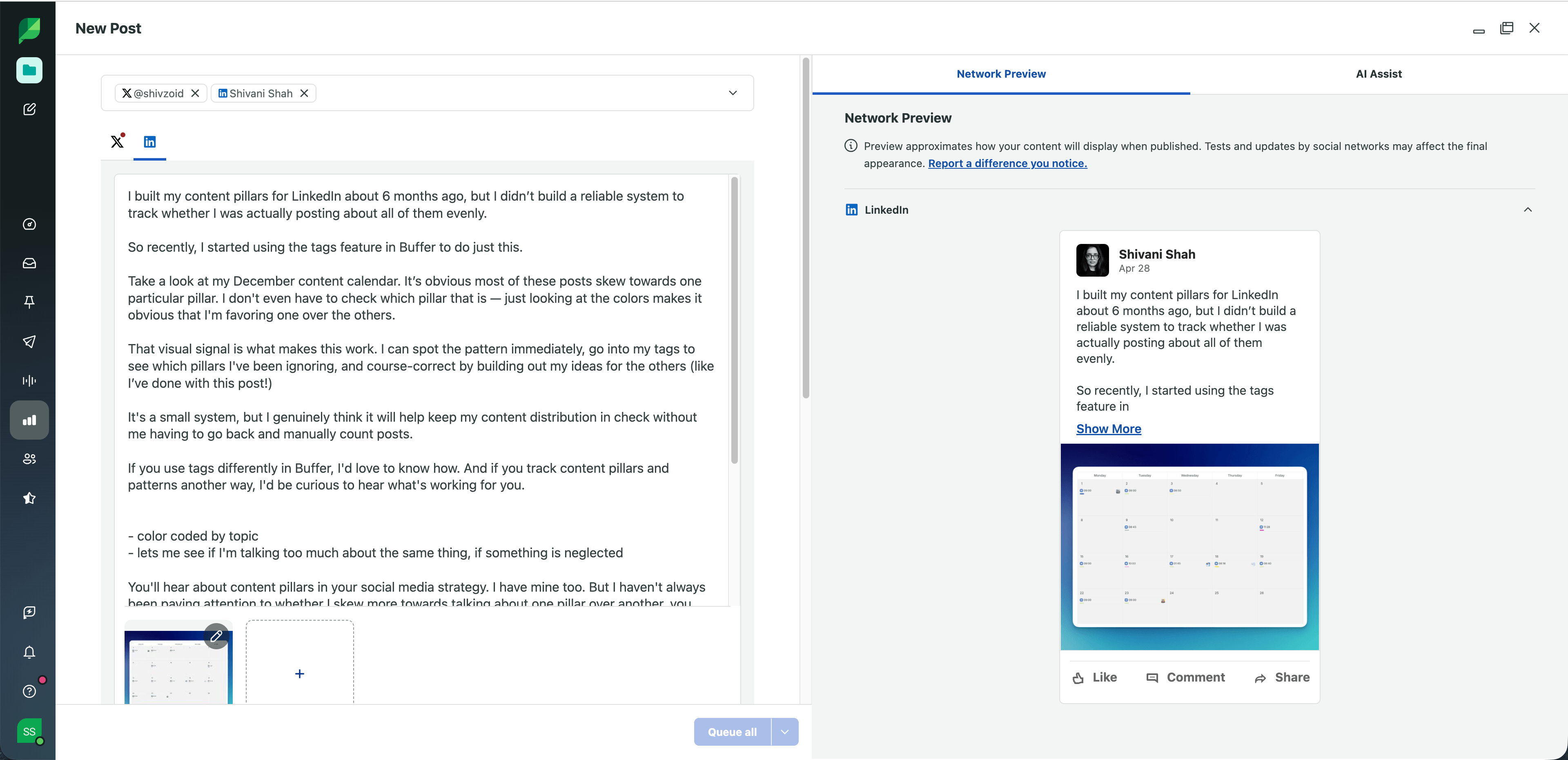
Both Buffer and Sprout Social have a queue system that makes it easy to set recurring time slots so posts go out consistently, without you picking individual times for each post. You can set up the queue times manually or let the platform suggest them based on the best times to post.
If you’re a solo creator or small team that wants to schedule posts quickly, Buffer’s simplicity is a strength, not a limitation. If you’re coordinating a content calendar across a larger team with different approval chains and campaign tracking, Sprout Social’s publishing tools are the better fit.
Analytics and reporting
Both tools offer analytics, but they work a little differently.
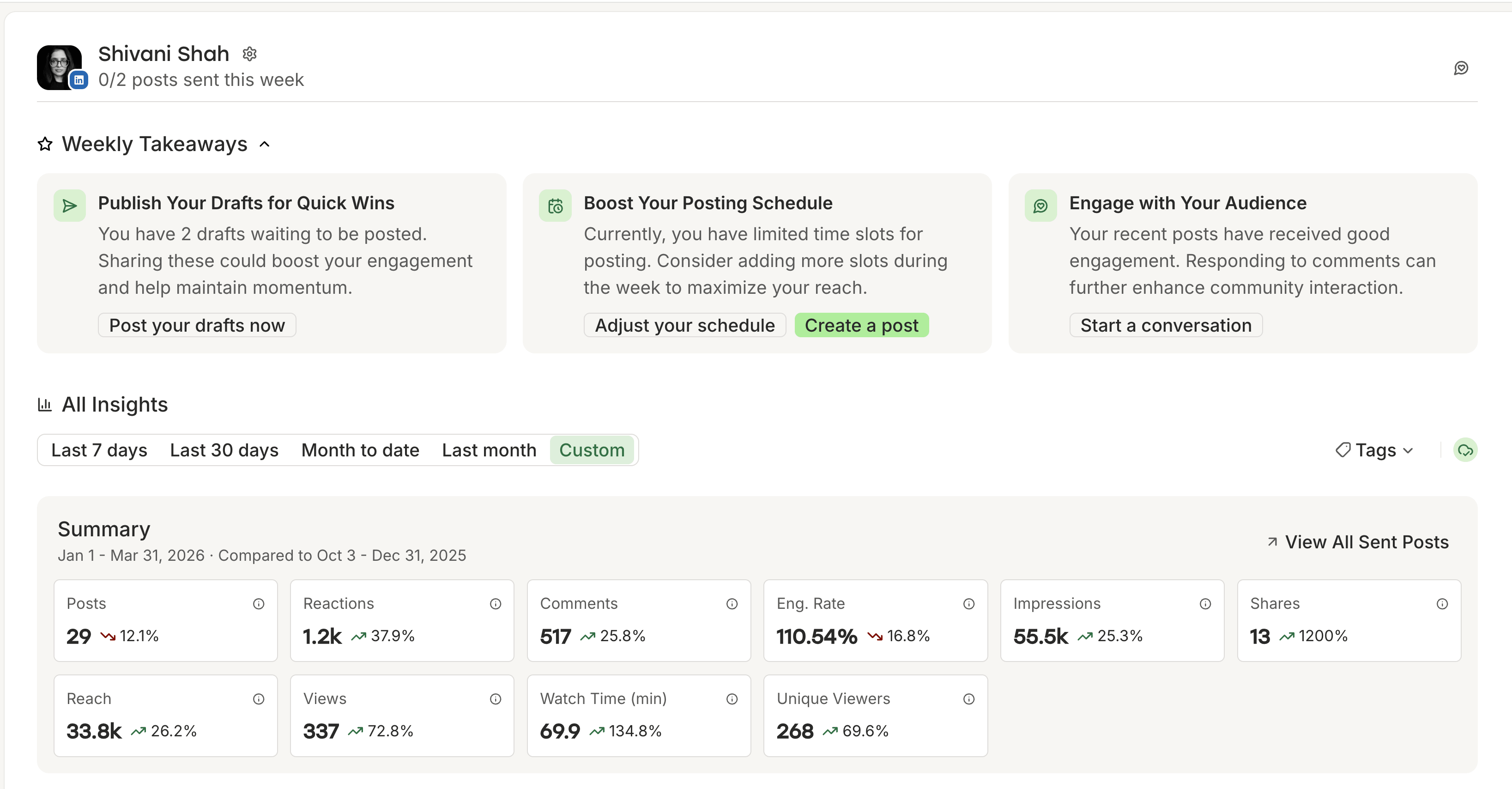
Buffer Insights (currently in beta!) is available on all plans and covers both the details and the big picture: how each channel is performing individually, and how your social presence looks as a whole.
Insights for individual channels include AI-powered takeaways that tell you what performed well, and what you might try next.
Post-level data and follower metrics round it out, so you can track both how individual posts land and how your audience is growing over time.
On paid plans, you can export your analytics in PDF, CSV, and Markdown formats. The latter can be incredibly useful if you’d like to take your data to Claude, ChatGPT, or a custom app for deeper analysis.
Insights replaces Buffer’s Analyze, offering many of the same features and more depth, especially with the weekly takeaways that are tailored to your channel’s performance.
📊
Sprout Social takes a deeper reporting approach. On Professional and higher, you get competitor insights, paid ad performance tracking, and detailed reporting on engagement, which are really useful if you’re running ad campaigns or answering support tickets on your channels.
On Advanced, team productivity reports give you a picture of how your social team is performing operationally, and you can connect to business intelligence tools if you need to. Sprout Social also has AI Insights, available with the Premium Analytics add-on for Standard and higher.
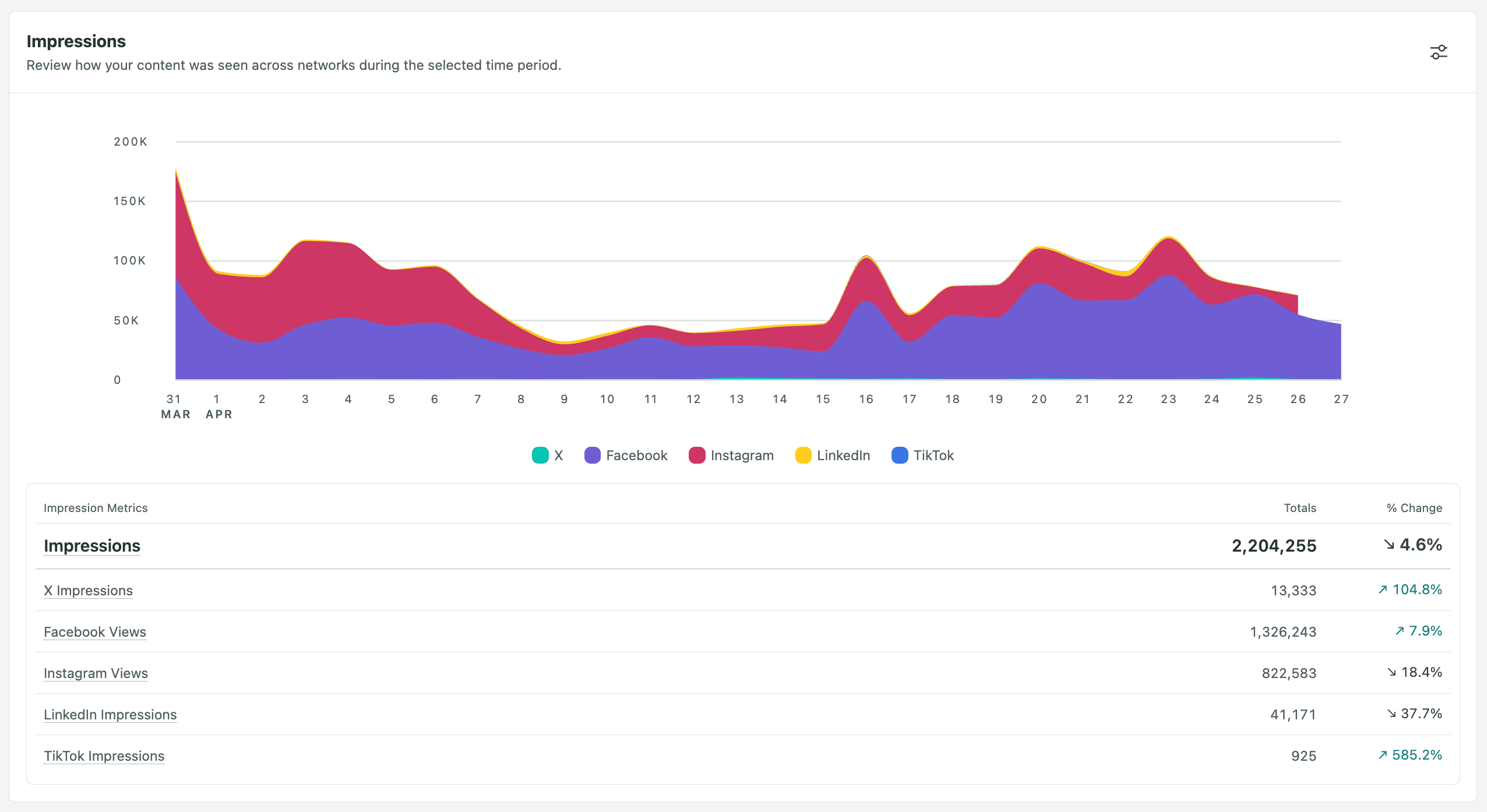
The difference shows up in how you use the data. If the goal is a regular stakeholder report with competitor benchmarks, sentiment trends, and branded outputs, Sprout Social handles that natively. If you need to understand what content is working and what to post more of, Buffer’s analytics focus more directly on that at a lower cost.
Social inbox and engagement
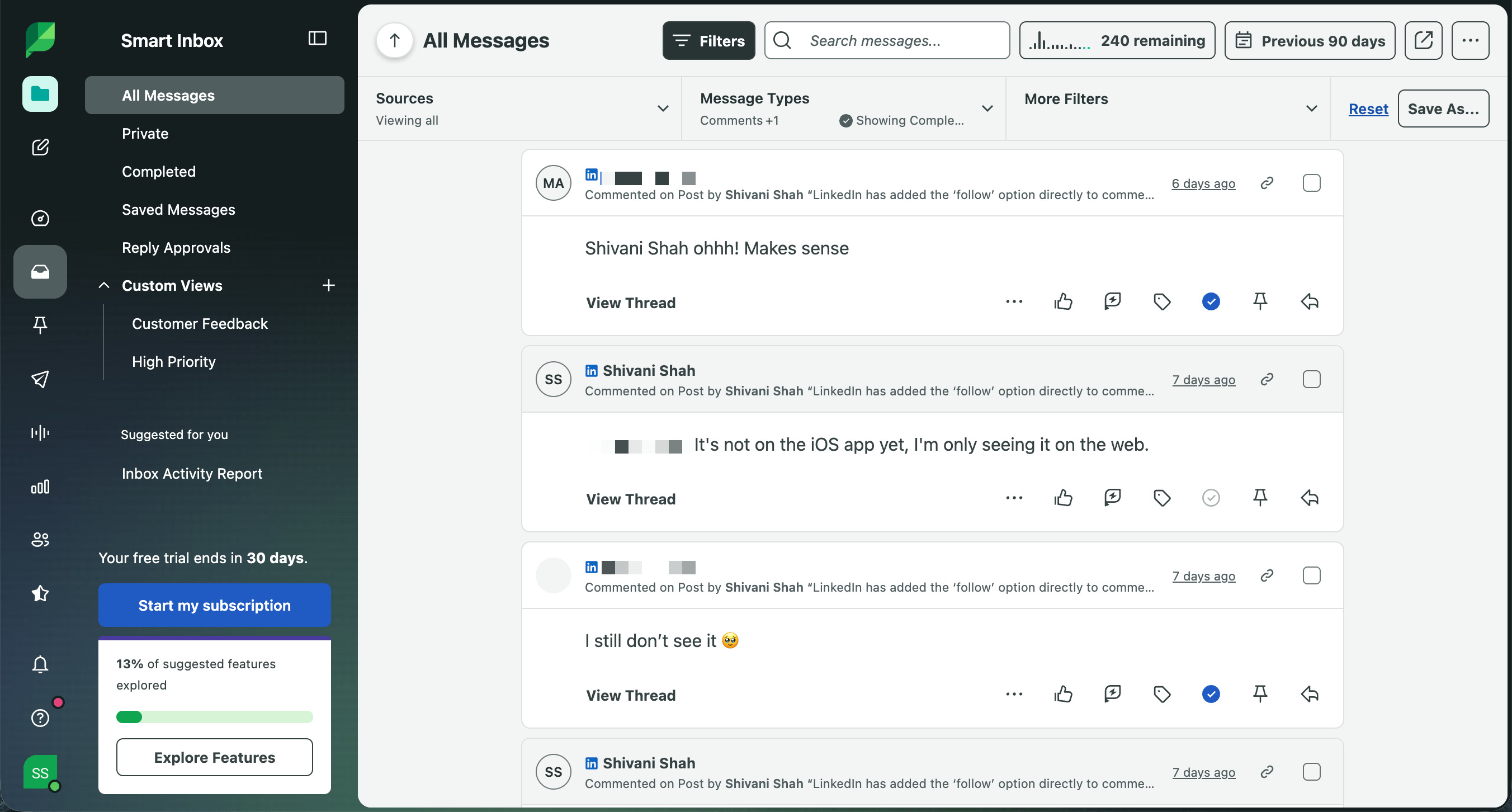
For teams that treat social as a customer support channel, Sprout Social’s Smart Inbox is tough to beat. It pulls messages, comments, mentions, and DMs from every connected platform into a single stream. You can assign conversations to team members, tag messages by topic or sentiment, and respond without switching between platforms.
Keyword monitoring on Standard and above also means you can keep tabs on brand mentions even when you’re not tagged.
Buffer’s Community inbox focuses on comment management. You can view and respond to comments on your posts from within Buffer. It’s practical for staying on top of engagement without logging into each platform separately, and it’s available on all plans. But it’s not a fully unified inbox like Sprout Social’s. It’s built for creators and small businesses that want to build relationships with their audience, not for handling support tickets.
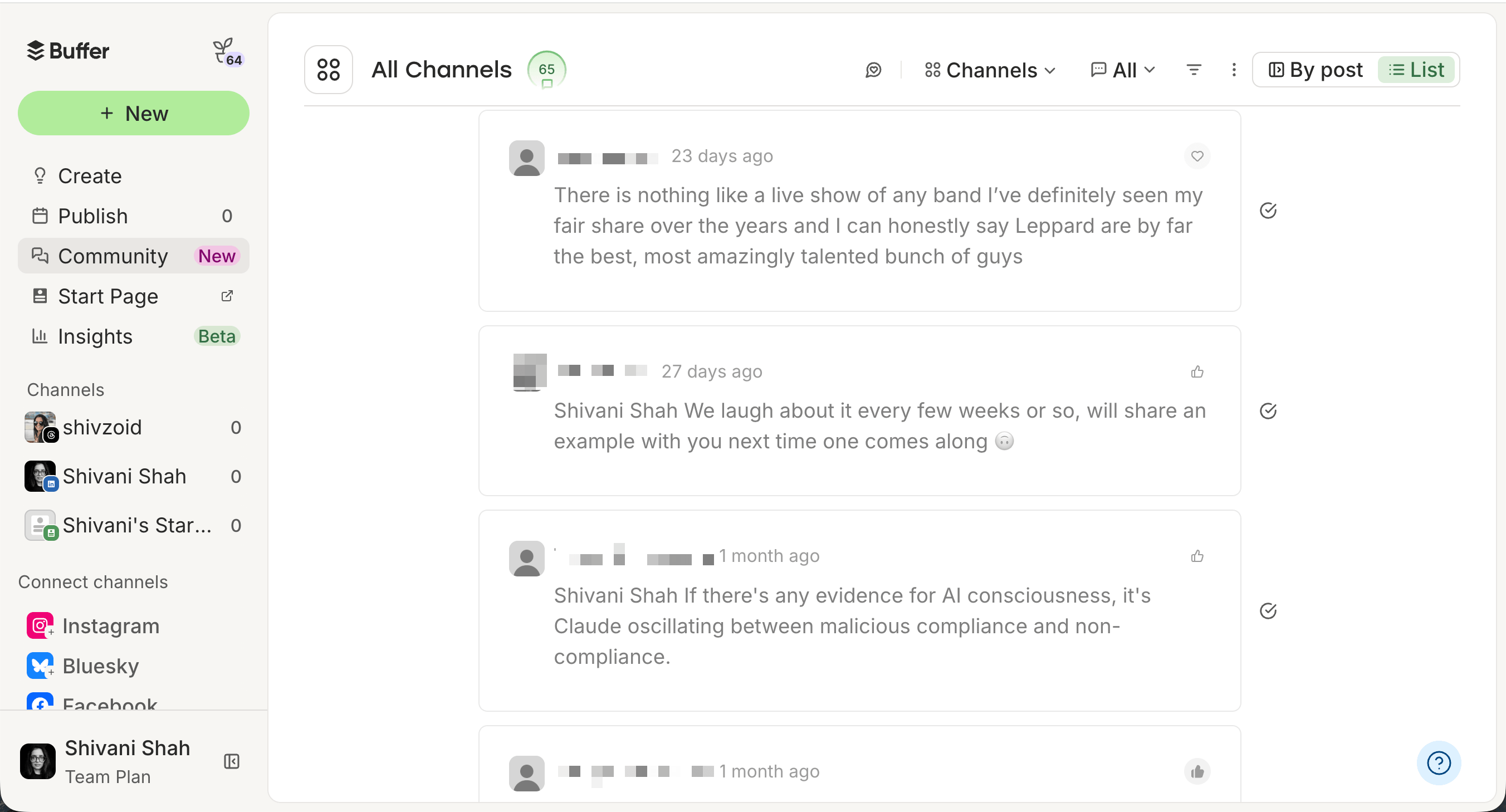
If managing inbound messages at volume is a core part of your job, Sprout Social’s Smart Inbox is the stronger choice. For creators and teams who need to stay on top of comments and conversations, Buffer’s Community inbox does that well. You can reply without jumping between apps, getting pulled into feeds you didn’t mean to open, or managing a full-fledged support queue.
AI features
Both Buffer and Sprout Social have invested in AI, which works differently depending on where you are in each tool.
If you’ve ever stared at a blank composer wondering what to post, Buffer’s AI Assistant takes some of that pressure off. You can use it to generate ideas, write drafts, and even repurpose content across channels. It’s available on every plan, including Free.
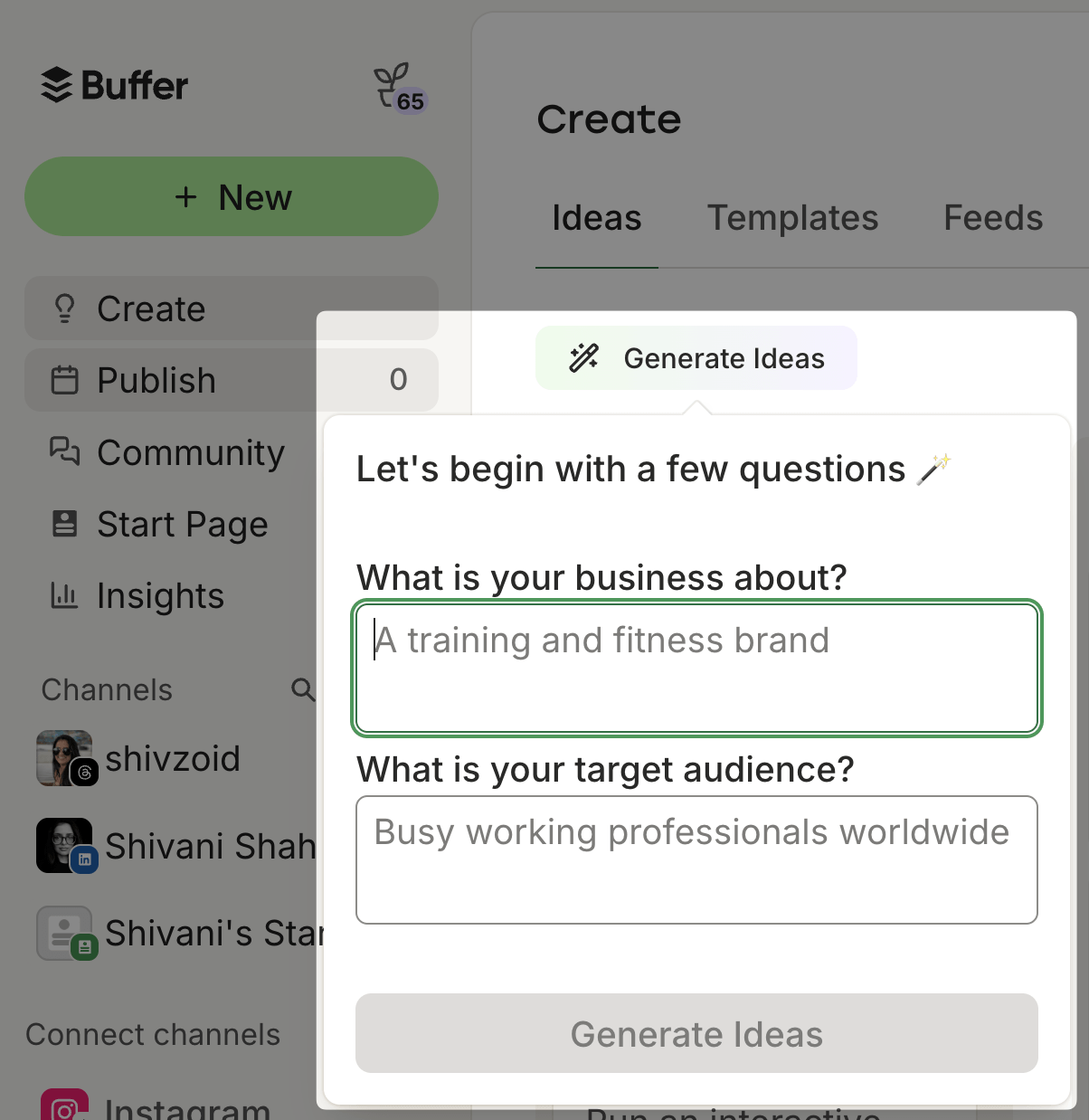
That same “remove the empty canvas” approach carries through to the Community inbox. AI-powered reply suggestions give you a starting point so you don’t have to write every response from scratch, though the Free plan caps these at five per week.
And in Insights, AI takeaways connect the dots between your numbers and suggest what to try next, instead of leaving you to interpret the data on your own.
Sprout Social’s AI also shows up across the platform, and what it can do expands significantly as you move up the plans. On Professional and higher, Enhance Post helps you tighten a caption, translate it, or spin up a new post based on your top-performing content.
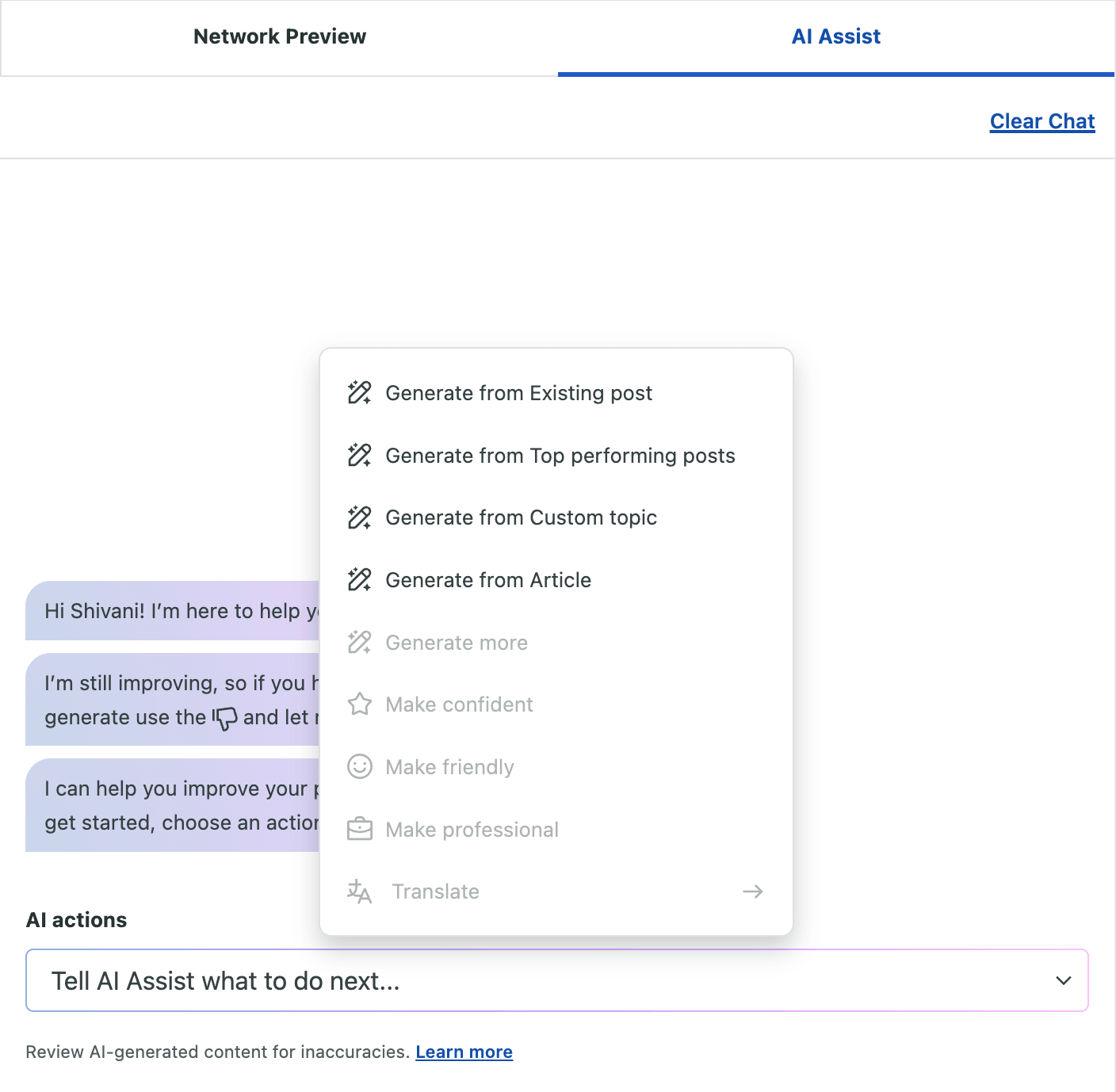
On Advanced, support teams get AI-powered reply suggestions that cut down response time, and Summarize Conversation means anyone picking up a long thread mid-way can get the full picture in seconds rather than scrolling back through pages of messages.
Sprout Social also has Trellis, an AI agent you can ask questions to and get insights and recommendations based on your data and social listening.
One thing to keep in mind if AI is a big part of your workflow: Buffer’s AI is built around individual creators and small teams, with access at every price point and a focus on making content decisions easier. Sprout Social’s AI also covers a lot of ground, but how much you can use depends more heavily on your plan.
API and MCP
Both Buffer and Sprout Social have public APIs and MCPs, and they come with different access points.
The Buffer API is available on all plans, and the plan you’re on will decide how many keys you can generate and the rolling rate limit windows. I can tell you from personal experience that it’s incredibly easy to use. As a non-technical person who loves to tinker, I’ve already built a weekly recap workflow and an app to help me plan LinkedIn content, and I’m now plotting a macOS menu bar app.
I use Buffer as a solo content creator, so I generated my own API keys. If you’re on a Team plan, your organization’s owner can generate a key that the team can use in workflows and apps.
💡
Buffer also has an MCP that you can use to connect to tools like Claude, ChatGPT, Perplexity, Cursor, and Raycast.
Sprout Social’s API comes at a high price point — it’s only available for teams on the Advanced plan. For enterprise teams, it offers access to both analytics and the Inbox, which means you can pull post performance, profile analytics, and inbox and customer care data into your own tools for reporting and monitoring.
Sprout Social also has an MCP, although it’s currently limited to TikTok data in ChatGPT.
Supported platforms and integrations
Buffer currently supports 12 platform types: Facebook, Instagram (personal, creator, and business profiles), LinkedIn, X/Twitter, Pinterest, TikTok, YouTube (Shorts only), Threads, Bluesky, Mastodon, Google Business Profiles, and Start Page.
Sprout Social supports Facebook, Instagram (business profiles only), LinkedIn, X/Twitter, Pinterest, TikTok, YouTube (brand accounts only), Bluesky, Google My Business, Threads, and WhatsApp.
| Platform | Buffer | Sprout Social |
|---|---|---|
| Yes | Yes | |
| Yes — personal, creator & business | Business only | |
| Yes | Yes | |
| X/Twitter | Yes | Yes |
| Yes | Yes | |
| TikTok | Yes | Yes |
| YouTube | Yes — Shorts only | Brand accounts only |
| Threads | Yes | Yes |
| Bluesky | Yes | Yes |
| Mastodon | Yes | No |
| Google Business Profile | Yes | Yes (as Google My Business) |
| Start Page | Yes | No |
| No | Yes | |
| Total platform types | 12 | 11 |
Sprout also integrates with helpdesk platforms (Zendesk, Salesforce, HubSpot), Google Play and Apple App Stores, and review platforms (TripAdvisor, Glassdoor, Yelp).
Where Buffer stands out: Buffer has been consistently early to adopt emerging platforms like Mastodon. If you’re active on decentralized or newer social networks, Buffer is likely to support them first.
Where Sprout Social stands out: WhatsApp messaging, YouTube (full video, not just Shorts), TripAdvisor, and Glassdoor review management. The helpdesk integrations are also significant if your social team needs to escalate issues to a Zendesk or Salesforce queue.
Ease of use
This is where Buffer really shines, and I’m not just saying that because we built it.
Buffer’s interface is intentionally simple. Setup takes just a few minutes — connect your channels, set your posting schedule, start creating. There’s no onboarding maze, and no feature overload on day one. The learning curve is almost flat, which means you spend time creating content instead of learning the tool.
Sprout Social’s interface is more complex. The depth of features means there’s more to get familiar with, especially if you’re using things like social listening, competitive reports, or multiple approval workflows. For teams that need that level of functionality, the time investment makes sense. For teams that don’t, it can be a little overwhelming.
On review sites, Buffer consistently scores high for ease of use, while Sprout Social scores high for advanced features. Those are different strengths, and which one matters more depends on how your team works.
Customer support
Both Buffer and Sprout Social have solid knowledge bases and resource libraries for self-serve support. If you help with something specific, they take slightly different approaches.
Buffer offers email support on every plan, including Free. Because we’re a global team, someone is always available, so you’re not waiting until Monday morning for a reply. Our advocacy team is also active in our Discord community, answering questions in a dedicated support channel and across the server. Most support queries get a response within two hours, regardless of what plan you’re on.
Sprout Social offers support five days a week via email, live chat, and, for North American customers, toll-free phone. Standard plan and higher also get onboarding support to help your team get set up. For teams that need guaranteed response times, the Premier Success option — available at an additional cost — includes a guaranteed two-hour first reply from the Support Team.
If you need live support on weekdays, Sprout Social covers that. If you’re looking for consistent response times across plans, including evenings and weekends, Buffer’s support is set up for that.
Both Buffer and Sprout Social have a solid set of features to manage your social media presence. Choosing between these two comes down to which tool that fits what you need. Here’s my honest recommendation:
Creators and solopreneurs
Pick Buffer. The free plan is a real free plan, not a 7-day trial. You get three channels, AI-powered content creation, and basic analytics without entering a credit card. When you’re ready to grow, Essentials at $6/channel per month gives you unlimited posts and advanced analytics. Sprout Social’s entry point — $99 to $249 per month, with limited features — is a tough sell for one person.
Small businesses and growing teams
Pick Buffer. The Team plan at $12/channel per month includes unlimited users, approval workflows, and branded reports. A five-person team managing eight channels pays $96 per month total. On Sprout Social, that same team would pay $1,995 to $2,495 per month. Unless you specifically need social listening or enterprise reporting, Buffer gives you everything you need at a price that scales sensibly.
Mid-size companies and agencies
It depends. If social listening, competitive benchmarking, and unified inbox management are central to your workflow — and your budget supports $399 to $499/seat per month — Sprout Social is purpose-built for this. The reporting depth and Smart Inbox are excellent for teams managing social at scale.
But if your needs are primarily scheduling, analytics, and team collaboration — and you’d rather invest that budget difference elsewhere — Buffer’s Team plan handles those core functions well.
Enterprise teams
Lean toward Sprout Social. At the enterprise level, you likely need helpdesk integrations, compliance features, sentiment analysis, and dedicated account management. Sprout Social’s Advanced and Enterprise plans are built for this. Buffer is not trying to be an enterprise platform, and that’s a deliberate choice.
The quick answer
Buffer and Sprout Social solve different problems at very different price points. If your needs include social listening, enterprise reporting, competitive benchmarking, or managing a large team with complex workflows, Sprout Social is worth the investment. Its pricing reflects the depth of what it offers.
For creators, solopreneurs, and growing teams, Buffer gives you everything you need to manage your social presence — scheduling, analytics, engagement tools — starting at $5/channel per month. Or free, if you’re just getting started.
We’d love for you to try Buffer. The free plan is an honest-to-goodness free plan, not a stripped-down trial. Sign up here to get started.
Frequently asked questions
Can I switch from Sprout Social to Buffer?
Yes. Buffer’s setup takes a few minutes — connect your channels, set your posting times, and start scheduling. There’s no automatic way to bring scheduled posts over from Sprout Social, but you can start creating new content in Buffer right away. If you have a spreadsheet of posts, you can upload them to Buffer in bulk! The Free plan lets you use Buffer indefinitely without a trial period or expiry date, so you can take your time deciding whether a paid plan makes sense for you.
Does Sprout Social have a free plan?
No. Sprout Social offers a 30-day free trial, but it does not have a free plan. After the trial, the lowest-priced option is the Essentials plan at $99/seat per month. Buffer’s free-forever plan includes three channels and 10 posts per channel, so you can use it indefinitely without paying anything.
Is Buffer good for agencies and teams?
Yes. Buffer’s Team plan costs $12/channel per month and includes unlimited users, approval workflows, custom access permissions, and branded reports. A five-person agency managing 10 channels pays $120 per month total. For comparison, Sprout Social’s plans with approval workflows start at $399/seat per month, so the same five-person team would be looking at $1,995 per month minimum.
Which tool has better analytics?
It comes down to what you’re trying to do with the data. Buffer Insights gives you post performance, follower metrics, and AI-powered takeaways on what to post more of. It’s available on all plans, with more depth on paid ones. Sprout Social offers competitor insights, paid ad performance tracking, and detailed engagement reporting on the Professional plan and higher, plus AI Insights with the Premium Analytics add-on. If you need to understand what’s working and act on it quickly, Buffer covers that well. If you’re producing regular stakeholder reports with competitor benchmarks and detailed engagement data, Sprout Social is the stronger fit.
Which social media platforms does Buffer support?
Buffer supports 12 platform types: Facebook, Instagram, LinkedIn, X/Twitter, Pinterest, TikTok, YouTube (Shorts), Threads, Bluesky, Mastodon, Google Business Profiles, and Start Page. Buffer tends to be early to support emerging platforms and was among the first tools to add Mastodon, Threads, and Bluesky.
[ad_2]
Source_link