Mybunny AI isn’t shy about why people use its image generator. It’s built around uncensored, erotic image creation, tied directly into the characters you can chat with.
Instead of dodging around filters or trying to “trick” an AI into generating something spicy, the platform gives you the green light to create explicit images—anime, realistic, or fantasy—without hesitation.
The generator feels more like an extension of roleplay than a standalone art tool. You pick a character, choose their outfit, pose, and even sexual action, then let the AI turn that setup into an image.
That level of control is what makes it addictive—you’re not scrolling through stock porn, you’re customizing your own.
Mybunny AI Image Generator — How to Create an Image?
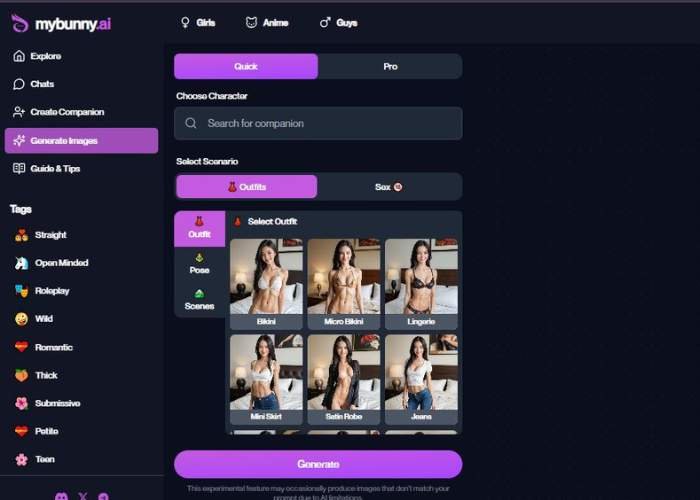
Mybunny AI creates AI images in a simple flow with three clear screens: Choose Mode → Choose Character → Select Scenario & Generate. Below is a thorough walkthrough of every control you can see in the interface and how to use it effectively.
1) Choose Mode (Quick vs Pro; I preferred the Quick mode)

Where: The first screen shows a two-option toggle: Quick (highlighted in purple when active) and Pro.
- Quick
- Best for fast results with sensible defaults.
- Minimal configuration; you’ll pick a character and a scenario and hit Generate.
- Recommended for beginners or when you need images rapidly.
- Pro
- Designed for power users.
- Unlocks advanced controls (not shown in the screenshot) that typically offer finer adjustments.
- Choose this when you want deeper creative control.
How to use: Click the pill-shaped button to switch modes. The active mode is the one filled in purple.
2) Choose Character

Where: The second screen shows a “Choose Character” section with a large search bar labeled “Search for companion” (magnifying glass icon inside).
What you can do:
- Search bar: Type a character name, style, or tag to locate the model you want to generate with.
- Results (not shown): You’ll typically see character cards—click one to select it.
Tips:
- Use descriptive queries (e.g., “redhead model,” “anime style,” “mature look”) to narrow results.
- If you plan multiple renders, stick with the same character for visual consistency.
3) Select Scenario & Generate

This is the creative control center. The screen is titled “Select Scenario” and contains four key areas:
- A) Scenario Category Tabs (top row)
- Outfits (selected in the screenshot, purple)
- Sex (18+) (clearly labeled with an 18+ badge)
Important: The Sex (18+) area is for adults only and may reveal explicit options. Use responsibly and only if it’s legal and appropriate in your region.
Click a tab to switch the scenario category you’re configuring.
- B) Left Sidebar (vertical)
A three-item navigation with icons:
- Outfit — choose clothing presets.
- Pose — select a body posture/stance (thumbnails appear when active).
- Scenes — choose the background/setting.
Click each to configure that aspect of your image.
- C) Main Selection Panel (center)
When Outfit is active, you’ll see a grid of visual presets. In the screenshot, examples include:
- Bikini
- Micro Bikini
- Lingerie
- Plus additional casual/bedroom looks (e.g., open shirt, tee + jeans), each represented by a thumbnail.
How to use:
- Click a thumbnail to select that preset.
- Switch to Pose to pick a stance (e.g., standing, seated, playful, etc.; exact options appear as thumbnails).
- Switch to Scenes to pick the environment (e.g., bedroom, studio, outdoor look; shown as thumbnails).
You can revisit Outfit / Pose / Scenes in any order before generating.
- D) Generate Button (bottom)
- A large purple Generate button spans the bottom of the screen.
- Once you’re happy with Outfit, Pose, and Scene, click Generate to create the image.
After You Click “Generate”
- The app will render your image based on the selected Character + Outfit + Pose + Scene (and any mode-specific defaults).
- Follow the on-screen options to save, download, or re-generate with tweaks.
Practical Tips for Better Results
- Start in Quick, refine in Pro: Try Quick to establish the look; if you want more control later, switch to Pro.
- Be consistent with your character: Keeping the same character across different scenarios yields cohesive sets.
- Outfit → Pose → Scene flow: Choosing in that order helps you spot mismatches early (e.g., a dynamic pose that clashes with a tight space).
- Use the thumbnails as intent: Thumbnails are visual presets; if a result drifts, re-select or try a nearby variant.
- Respect the 18+ area: Only access Sex (18+) if you are of legal age and local laws allow this content.
- Ethical use: Avoid real-person impersonation and any illegal or harmful content. Keep it consensual, respectful, and within platform rules.
Troubleshooting
- Image doesn’t match the thumbnail: Try a different but similar preset, or adjust Pose/Scene to reduce conflicts.
- Results look repetitive: Switch the Outfit or Scene, or pick a different pose to introduce variety.
- Nothing happens on Generate: Ensure you’ve selected a character and at least one scenario preset (Outfit/Pose/Scene), then try again.
Key Features of the NSFW Image Generator
| Feature | What It Means | Why It’s Appealing |
| Uncensored output | Explicit sexual images are allowed | Finally, no “content denied” screens—what you type is what you get |
| Character-linked generation | Create images tied to your chosen chatbot companion | Makes the experience more immersive, almost like visual fan service |
| Outfit & pose selection | Bikini, lingerie, yoga pants, satin robe, etc. | Lets you dress and position characters exactly as you want |
| Scene customization | Choose the setting or sexual action | Adds roleplay depth, not just generic nudes |
| Variety of styles | Realistic, anime, stylized | Covers both hardcore realism fans and hentai enthusiasts |
What It Feels Like
The first time you generate an image, there’s that “holy hell, it actually worked” moment.
Sometimes it nails the fantasy: sultry lighting, perfect curves, detailed outfits that match exactly what you picked.
Other times, you get the AI oddities—extra hands, weird shadows, or slightly off proportions.
Strangely, those quirks don’t ruin the experience; they make it feel a bit like experimenting with a sketchpad where mistakes are part of the fun.
The biggest difference from other platforms is how personal it feels. Because you’re generating images tied to your chats, the AI feels less like a generic porn tool and more like a customizable fantasy partner. It’s playful, imperfect, and weirdly intimate.
Why I’d Recommend Trying It
If you’ve ever wanted NSFW images that feel tailored to your imagination instead of recycled stock content, this is worth checking out.
It’s not flawless—no AI generator is—but the sheer freedom makes it stand out. In my opinion, it works best for people who like roleplay-heavy scenarios, because the visual side adds immersion to the conversations you’re already having with the AI.
What hooked me is the versatility. You can go from soft, sensual lingerie shots to wild, explicit fantasies without changing platforms.
That flexibility is rare, and it makes the generator feel like a creative sandbox instead of just a novelty.
Visit Mybunny AI Image Generator
Tips Before You Dive In
- Pick characters tagged “NSFW” for the best erotic results.
- Experiment with outfits and poses; sometimes small changes create drastically different vibes.
- Save your favorites immediately—the AI doesn’t always reproduce the same result twice.
- Don’t expect perfection; embrace the glitches as part of the ride.