You can turn off the new creative workflow…
Meta started rolling out the new creative workflow in April. Also known as Multimedia Experience, it allows advertisers to provide up to 10 images and videos for a single ad.

While I use and have generally been happy with the Multimedia Experience, I know I’m in the minority. Most advertisers hate it, mainly because it’s so buggy. Advertisers have had bugs both with ad creation and reporting using the breakdown by Media.
What most of these advertisers don’t understand is that you don’t need to keep dealing with these bugs. You can turn this off and switch to the old way.
How to Turn It Off
When creating an ad, hover over the Media tooltip. There, you can click a link to “Return to original single media experience.”
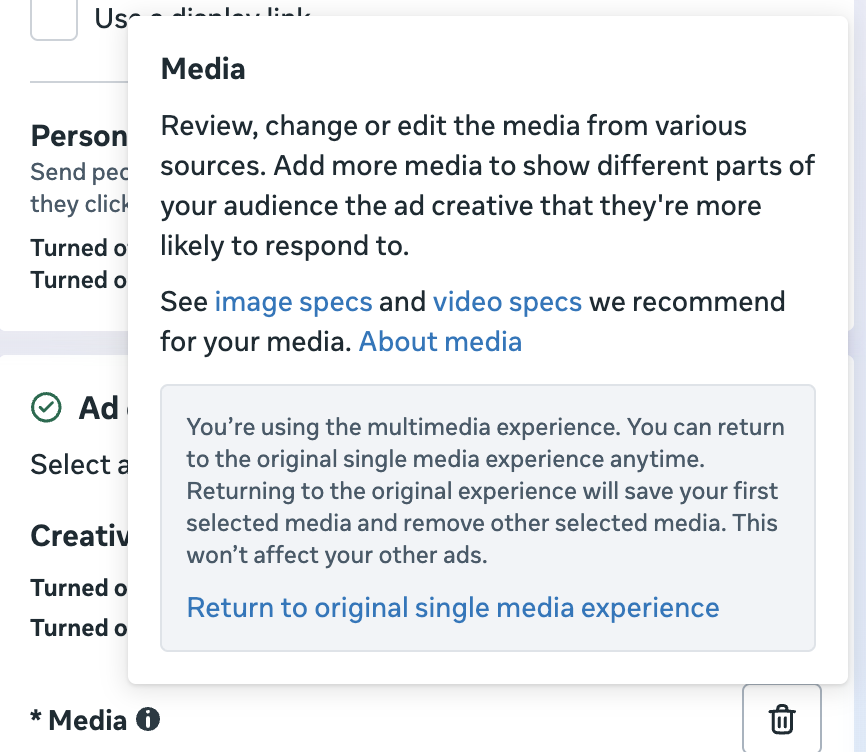
Even if you switch to single media, you can always hover over the same tooltip to switch back to multimedia if you want to in the future.
Switch While You Can
Presumably, you won’t be able to do this once the Multimedia Experience is officially launched, but you have an option for now. If you’re experiencing so many bugs that it’s not worth it, just switch back.