Reading Time: 21 minutes
Most shoppers who land on your Shopify store leave without buying. In Q2 2026, only 1.3% of global Ecommerce website visits converted into purchases. That’s why Shopify conversion rate optimization matters.
Even a small lift can change the math. At 10,000 visits, a 1.3% conversion rate means about 130 orders. Raise it to 2.3%, and you get 230 orders from the same traffic.
This guide explains what Shopify CRO (conversion rate optimization) is, how to calculate it, what’s a good conversion rate for Shopify, and how to improve it. Let’s dive in!
Quick Answer: Shopify Conversion Rate Optimization
|

What is Shopify Conversion Rate Optimization?
Shopify conversion rate optimization is the process of turning more of your store’s visitors into paying customers. It focuses on reducing friction, building trust, improving product pages, speeding up mobile shopping, simplifying checkout, and recovering shoppers who leave.
The idea is, instead of spending more on ads, you fix what’s stopping customers from buying, like slow pages or a clunky checkout.
It’s not a one-time task, though. You keep watching your numbers, testing small changes like Shopify email personalization, and nudging the percentage up a little at a time. A store that does this consistently for a year will always beat a store that did one big redesign and then forgot about it.
Before thinking of how to increase Shopify conversion rate, you need to know what the rate currently is. For that, you need to know how to calculate it.
How to Calculate Shopify Conversion Rate
For Shopify conversion rate calculation, divide the total number of Shopify orders by the total number of customers who visited your Shopify store. Then, multiply the result by 100.
How you want to calculate the conversion rate would also depend on what you’re trying to measure:
1. By Sessions
Shopify uses this method by default. For most stores, it usually calculates the conversion rate based on sessions, not individual customers. That means if 1 customer visits your store 3 times, Shopify may count those as 3 sessions.
The basic Shopify conversion rate formula by sessions is: (Total Orders ÷ Total Online Store Sessions) x 100
So, if your Shopify store gets 10,000 online store sessions and 250 orders, your conversion rate is: 250 ÷ 10,000 x 100 = 2.5%
That means 2.5% of sessions turned into purchases.
2. By Unique Visitors
This method is the opposite of the ‘sessions’ method, in that it counts actual customers, not visits. So if that same customer comes back to your store 3 times before buying, they only count once here.
The Shopify conversion rate formula by unique visitors is: (Total Purchases ÷ Total Unique Visitors) x 100
3. By Leads
This method is mostly for Shopify brands that don’t sell directly online, but instead collect emails or phone numbers first, and then follow up. It measures how many visitors turned into a real, contactable lead.
The Shopify conversion rate calculation by leads is: (Total Leads Collected ÷ Total Visitors) x 100
How to Find Conversion Rate in Shopify Analytics
Instead of calculating these numbers manually, here’s how to check conversion rate on Shopify:
- Log in to your Shopify Admin
- Go to ‘Analytics’
- Open your ‘Reports’
- Look for ‘Online store conversion rate’
Your Shopify home dashboard usually shows the Shopify conversion rate right on the main overview, no digging required. Check there first before going into the full ‘Reports’ section.
Key Shopify CRO Metrics to Track
The table below shows the major Shopify conversion metrics you should analyze:
| Shopify Conversion Metric | What it Means |
| Online store conversion rate | The percentage of sessions that become orders |
| Add-to-cart rate | The percentage of sessions where shoppers add a product to cart |
| Cart abandonment rate | The percentage of shoppers who add to cart but don’t buy |
| Checkout completion rate | The percentage of checkouts that become purchases |
| Desktop conversion rate | Shopify conversion rate from desktop sessions |
| Mobile conversion rate | Shopify conversion rate from mobile sessions |
| Reached-checkout rate | The percentage of sessions where shoppers start checkout |
| Revenue per visitor | Revenue divided by visitors or sessions |
| Average order value | The average amount customers spend per order |
These Shopify CRO metrics give you the raw material for Shopify conversion rate optimization. First, understand what each metric measures. We’ll use these same metrics later in this guide to diagnose funnel-stage drop-offs, such as low add-to-cart rate, checkout abandonment, and weak mobile conversion.
Once you know how to calculate and measure your online store conversion rate, the next question is, “What is a good Shopify conversion rate?”
What is Considered a Good Conversion Rate on Shopify?
A good conversion rate on Shopify is usually around 2% to 3%.
A strong Shopify conversion rate is usually 3% or higher.
But that depends on what you sell, how expensive your products are, and where your traffic comes from.
Average Shopify Conversion Rate by Industry: Global Ecommerce Benchmarks for Context
The average Shopify conversion rate varies by store, traffic source, device, product price, and brand maturity. But global Ecommerce conversion rate data by industry can still help Shopify brands understand why some categories naturally convert higher than others.
The table below uses Statista data on global online shopping conversion rates from Q2 2026 as directional industry context, not Shopify store conversion rate benchmarks.
| Industry | Global Online Shopping Conversion Rate (Q2 2026) |
| Skincare | 2.4% |
| Food and beverage | 2.3% |
| Health and beauty | 1.8% |
| General footwear | 1.7% |
| Active footwear | 1.5% |
| General apparel | 1.5% |
| Active apparel | 1.4% |
| Toys and learning | 1.4% |
| Electronics and accessories | 1.3% |
| Beauty and makeup | 1.3% |
| Home, dining, art, and decor | 1.2% |
| Sporting goods | 1.1% |
| General handbags and luggage | 0.8% |
| Home furniture | 0.7% |
| Home appliances | 0.7% |
| Luxury apparel and accessories | 0.3% |
As you can see, global Ecommerce conversion rates vary widely by industry. Lower-cost, repeat-purchase categories such as food, beverage, beauty, and personal care often convert higher, while higher-consideration categories such as furniture and luxury usually convert lower. Your Shopify brand should use industry data as context, then compare it with your own Shopify Analytics.
Shopify Conversion Rate by Traffic Source: What US Ecommerce Data Shows
Not all Shopify traffic converts the same way.
A shopper from your email list is usually warmer than someone who clicked a cold TikTok ad. A shopper searching for your brand on Google is usually closer to buying than someone seeing your product for the first time on Instagram.
That means your Shopify conversion rate will often vary by traffic source.
Note: The data below is based on US Ecommerce conversion rates from January 2026 according to Statista, not specific Shopify conversion rate benchmarks. Use it as directional context, then compare it with your own Shopify Analytics dashboard conversion rate by traffic source.
| Traffic Source | US Ecommerce Conversion Rate (January 2026) |
| Direct | 6.7% |
| Paid Search | 7.8% |
| ChatGPT | 7.1% |
If your paid search conversion rate is lower than your direct traffic conversion rate, that doesn’t automatically mean your Shopify store is broken. But if warm traffic like direct traffic also converts poorly, your store might have a Shopify CRO problem.
And if it does, the next step is to find out how to improve Shopify conversion rate in 2026.
What are the Best Strategies to Improve Shopify Conversion Rates?
Here are the highest-impact Shopify conversion rate optimization strategies to increase sales in 2026 from the traffic you already have.
1. Improve Site Search and Product Discovery
Shoppers can buy your product only after they can find it on your Shopify store. Good product discovery helps shoppers find the right item faster.
To optimize your Shopify conversion rate, improve site search and navigation with:
- A visible search bar at the top of every page on your website that handles misspellings and shows product suggestions
- Product filters by size, color, price, rating, or availability
- Clear product categories
- Easy-to-find bestsellers
For instance, if you sell 200+ skincare, apparel, supplement, or home products, strong product search and filtering can directly improve your Shopify store conversion rate.
2. Optimize Shopify Site Speed and Core Web Vitals
Picture this: someone taps your ad, your Shopify site takes 5 seconds to load, and they’re already gone.
If your Shopify store takes too long to load, shoppers hit the ‘back’ button and buy from someone else. A fast-loading store helps customers browse, add products to cart, and check out with less frustration.
According to Yotta’s 2025 Web Performance Index, Shopify pages loading in 1.5 seconds convert at 3.11%, and Shopify pages loading in 5 seconds convert at just 0.62%. That’s almost a 3x difference, and speed is the only thing that changed.
Here’s what your Shopify store can do to improve site speed:
- Compress every image before you upload it. Tools like TinyPNG shrink the file size without making the photo look worse.
- Uninstall unused apps. Every single app you install adds code your store has to load, every single time, for every single visitor. Go into your app list right now and ask, “Have I opened this in the last 30 days?” If not, uninstall it.
- Minimize heavy scripts. Every app adds code that slows your store down. Old tracking pixels, chat widgets you don’t use anymore, stuff a freelancer added 2 years ago. It all adds up.
- Check your site speed under Shopify Analytics > Reports > Online store speed. Another way to test your online store speed is with Google PageSpeed Insights or Lighthouse. Watch those numbers every week, right next to your sales number. You’ll start to see the connection yourself.
3. Design for Mobile-First Shopping
Your Shopify store should feel fast on a phone, not just on your laptop. That’s because most shoppers browse and buy on phones. According to Statista, revenue from mobile Ecommerce sales is projected to account for 63% of all global retail Ecommerce sales by 2028.
So your store should feel like it was built for a phone first, not squeezed onto a phone later. And if your desktop conversion rate is much higher than your Shopify mobile conversion rate, your mobile experience probably has friction.
To improve mobile conversion rate on Shopify, follow these mobile app personalization strategies:
- Avoid popups that block the screen or buying path. Popups can ruin the shopping experience on mobile. Don’t add multiple popups at once, or popups that hide the ‘Add to Cart’ button. If you use a mobile popup, make the close button easy to tap and keep the message short.
- Use a fast, mobile-friendly Shopify theme
- Use text you can read without pinching to zoom in or squinting. You can use 24-32px for major headings, depending on the design, and 16px or larger for body copy. 18-22px should work for important product-page text.
- Keep paragraphs short and use white space
- Make buttons big enough to tap comfortably with a thumb, not a fingernail. Use 44×44 CSS pixels or larger for important mobile buttons, especially ‘Add to Cart’ and ‘Checkout’. The button height should be around 48-56px. Make sure the CTA buttons have enough color contrast.
- Make forms easy to fill on phones. Ensure shoppers can check out without typing too much. Use form fields that are at least 44-48px tall, and 16px input text so phones don’t zoom in automatically. Ask only for information you truly need.
To test the Ecommerce customer experience on mobile, open your Shopify store on your own phone and try to buy a product. If anything feels annoying, fix it.
3. Optimize Your Shopify Product Pages
Don’t just add features on your product pages to tell shoppers what the product is. Add benefits to tell shoppers why they should care about your product in the first place.
For Shopify conversion rate optimization on the product page, check whether every product page has these items:
- A clear product title
- Price near the top of the page
- Star rating near the product name
- Multiple strong product photos from different angles
- Product videos or photos showing how the product works, if possible
- Clear product size, color, or variant options
- Images of packaging, if packaging matters
- A simple, benefit-focused product description
- Shipping cost, delivery time, and product return policy visible before checkout and not as a surprise at the end
- Reviews and user-generated photos and videos from real customers
- FAQ section for common questions
- A clear ‘Add to Cart’ button that stands out from everything else on the page
Another thing to remember is that your product images and videos have to do the selling, since you can’t interact with shoppers in person. So, you need to add high-quality product images and videos.
For example, if you sell apparel, show the product on different body types. If you sell beauty products, show texture and before/after use cases where appropriate. If you sell home products, show the product in a real room. You get the gist.
4. Build Trust with Reviews Near Purchase Friction Points
Customers don’t buy from Shopify stores they don’t trust. This is especially true if your Shopify brand is new or the shopper found you through TikTok, Instagram, Meta ads, or Google.
Check if your site has trust signals where people make decisions:
- Feature star ratings near product titles
- Ensure every product page has at least 5 product reviews, and photo and video reviews where possible
- Add testimonials on key landing pages
- Feature trust badges near the ‘Add to Cart’ button
- Feature accepted payment logos on the checkout page
- Have warranty or guarantee information on every product page, if applicable
- Make sure there’s real contact or support information just a click away, not buried at the bottom
Don’t hide your best trust signals in the footer. Put reassurance where shoppers really need it.
5. Recover Browse Abandonment
Not every shopper adds products to their shopping cart. Some customers view a product, think about it, and leave. That’s where Shopify browse abandonment campaigns help.
Check these to improve the Shopify conversion rate while browsing:
- Trigger messages using the best Shopify SMS apps when someone views a product but doesn’t add it to their cart
- Recommend similar products
- Show bestsellers from the same product category
- Use the best Shopify email marketing tools to send different, personalized messages for first-time and returning visitors
- Don’t send too many reminders
For example, if someone views running shoes but leaves, sending them a random hoodie doesn’t make sense. Either send them the running shoes again, or show related running gear.
That’s basic Ecommerce personalization, and it works because it matches what the shopper already showed interest in.
6. Simplify and Streamline Shopify Checkout
A good Shopify checkout conversion rate depends on reducing effort. Your job is to make checkout feel fast, safe, and easy for your customers.
Here are some Shopify checkout conversion rate tips:
- Enable mobile payment options like Shop Pay, PayPal, Apple Pay, and Google Pay for one-click checkout. Typing a full address and credit card number, especially on a phone, is annoying.
- Make payment options easy to understand
- Offer ‘Buy Now, Pay Later’ if it fits your product price
- Allow guest checkout
- Use address autocomplete when possible
- Ensure discount codes are easy to apply
- Don’t have any surprise fees at the last step
Every extra form field is like a tiny speed bump. Too many speed bumps might lead to an abandoned checkout, and nobody wants that.
7. Make Shipping, Delivery, and Returns Transparent
Shoppers shouldn’t have to hunt for basic buying information. If a shopper only learns about shipping fees at checkout, they might leave. You can’t blame them, because you’d do the same if you were a shopper in such a situation.
To further improve your Shopify checkout conversion rate, ensure you:
- Show the shipping cost before checkout
- Explain free shipping thresholds
- Add a return policy that’s easy to understand
- Mention exchanges, warranties, or guarantees
- Make taxes, fees, and discounts crystal-clear
A good example is: ‘Free shipping on orders over $50. Easy 30-day returns.’
Something like ‘Shipping calculated later’ keeps your customers in a fog, and they hate that.
8. Recover Abandoned Carts With Email, SMS, and Push
One of the easiest ways to improve Shopify conversion rate is to set up abandoned cart recovery. A simple abandoned cart flow can recover sales you already almost won.
Check off these items:
- Send your first abandoned cart email within an hour (using a cart abandonment email template). It should include the exact product left in the cart, with the product image, price, and checkout link. It should also remind the shopper about shipping or returns, and include customer reviews, if possible.
- Send a second reminder after 24 hours
- Send a final incentive, like free shipping or a small discount, after 48 to 72 hours
- Set up SMS reminders for customers who opted in, as SMS gets opened a lot more than email
- Use email, push notifications, or SMS based on customer consent (as per the new TCPA rules) and your current martech stack
9. Analyze and Run A/B Tests and Continuous Experiments
You can’t start Shopify conversion rate optimization by guessing, but by checking your actual numbers.
Before you change your theme, add another app, or launch a discount, follow these steps:
- Monitor your Shopify conversion rate report in Shopify Analytics every month
- Regularly check your add-to-cart rate, checkout completion rate, cart abandonment rate, product page performance, revenue per visitor, and other key Shopify CRO metrics
- Look for sudden drop-offs after theme edits, new app installs, pricing changes, or shipping changes
- Use heatmaps or session recordings to see where shoppers click, scroll, or get stuck
- Choose an element, like a headline, photo, offer, or button text, and A/B test it long enough to get an answer
Don’t test tiny or random things first, like a button color, if your product page has no reviews or your checkout is confusing. Fix big problems first, then test smaller changes.
And, this is important: Only test one major change at a time. Like, instead of changing the price, headline, image, and offer all at once, you can test ‘Free shipping over $50’ against ‘Free shipping over $75’. That way, you know what actually improved your Shopify conversion rate.
Shopify Conversion Rate Optimization Checklist
Use this Shopify conversion rate optimization checklist to find the conversion leaks, fix the big ones first, and increase your Shopify conversion rate without spending more money on ads.
Your Shopify CRO Checklist
|
 Improve site speed
Nevertheless, this Shopify conversion rate optimization checklist is only useful if you know what to fix first. If you try to fix your speed, your checkout, your product pages, and your reviews all in the same week, you’ll do all four badly. And you still won’t know which one actually moved your numbers.
So, don’t start with random changes. Start with a simple diagnosis instead.
How to Increase Shopify Conversion Rate by Funnel Stage
Not every Shopify conversion rate problem has the same cause. Different problems live at different stages of your funnel. For example, fixing your checkout won’t help if nobody’s even adding products to their cart in the first place. You need to know where customers are dropping off in the customer purchase journey before you know what to fix and how to prioritize fixes.
Use this funnel-stage table as a quick Shopify conversion rate optimization audit.
| Funnel Stage | Likely Problem | What to Fix First |
| Visitors view products but don’t add them to cart | Product page | Product clarity, images, reviews, price, CTA |
| Shoppers add product to cart but don’t start checkout | Cart | Cart layout, shipping info, discount clarity |
| Shoppers start checkout but don’t purchase | Checkout | Payment options, form fields, surprise fees |
| Mobile conversion rate is lower than the desktop rate | Mobile experience | Speed, buttons, layout, mobile checkout |
| Paid Shopify traffic gets clicks but no sales | Landing page | Message match, offer, audience quality |
Now, let’s look closely at each funnel stage and what needs to be fixed for conversion rate optimization on Shopify.
- If visitors are not adding products to cart: Your product page probably isn’t doing enough work. The product benefit may be unclear, the photos may not answer key questions, the price may feel too high, or shoppers may not see enough reviews or trust signals. Start by improving product page clarity before touching checkout.
- If shoppers add product to cart but do not start checkout: Your cart might be creating doubt. Shoppers liked the product enough to add it, but something stopped them from moving forward. Common causes include unclear shipping costs, confusing discounts, a weak checkout button, or too many distractions in the cart.
- If shoppers start checkout but do not purchase: This is usually a Shopify checkout conversion rate issue. These shoppers were close to buying, so look for final-step friction: surprise fees, too many form fields, limited payment options, missing Shop Pay or PayPal, or a checkout that feels slow on mobile.
- If Shopify mobile conversion rate is lower than the desktop rate: Your personalized customer experience on mobile may be harder than your desktop experience. The issue could be slow loading, small buttons, hard-to-use menus, annoying popups, or too much typing during checkout. Since many Shopify shoppers buy on phones, this can drag down your whole Shopify store conversion rate.
- If paid traffic is not converting: Your ads might be attracting the wrong visitors, or the landing page might not match the ad promise. For example, if your ad promotes ‘clean skincare for sensitive skin’, the landing page should clearly show clean skincare for sensitive skin, not send shoppers to a generic homepage.
Now that you know where the leak is, you need a simple plan to help you fix the biggest problems first, instead of making random changes.
Your 30-Day Shopify Conversion Rate Optimization Plan
For most Shopify stores, here’s how to build and execute a plan over the next 30 days:
- Week 1 – Do a Shopify Conversion Rate Audit: First, you need to find the biggest conversion leak. Open your Shopify Analytics dashboard and look at where shoppers drop off. In case of a low Shopify mobile conversion rate, for instance, your mobile site may be hard for shoppers to use.
- Week 2 – Fix Speed, Mobile, and Checkout Friction: Once you know the leak, fix the part of your store closest to the purchase. Checkout, cart, and mobile and speed problems are almost always broken on most stores; every single visitor touches them, and a lot of the fixes (like compressing images and turning on guest checkout) take just an afternoon, not a developer.
- Week 3 – Improve Product Pages and Trust: Now that customers can actually get through your site fast, make sure what they’re looking at is worth buying. Your product page usually matters more than your homepage, because that’s where shoppers decide whether to buy. Start with your highest-traffic or best-selling product pages and fix them according to the Shopify conversion rate optimization product page checklist.
- Week 4 – Launch Cart Recovery Campaigns and Your First A/B Test: Focus first on customers who showed buying intent, like shoppers who added products to cart, or started checkout, or viewed the same product multiple times, and returning shoppers who browsed but didn’t buy. These shoppers are warmer than brand-new visitors. So abandoned cart, browse abandonment, email, SMS, and push campaigns usually belong after you’ve fixed the biggest on-site friction. Start A/B testing one thing at a time, so next month you’re not guessing anymore.
After you know what to fix, choose tools based on the problem. A good Shopify conversion rate optimization tool should help you diagnose, improve, or measure not just the whole funnel, but a specific part of it, too. But which one should you use?
What are the Best Tools to Optimize Shopify Conversion Rates?
The best Shopify conversion rate optimization tools by category include Shopify Analytics, MoEngage, Hotjar, and Gorgias.
Of course, the right tool depends on the conversion problem you’re trying to fix. Some tools help you find where shoppers drop off, while others help you build trust, test offers, improve product discovery, or recover shoppers after they leave.
Use the table below to match each Shopify CRO problem with the right tool category.
| CRO Goal | Shopify CRO Tools to Consider |
| Shopify and customer journey analytics | Shopify Analytics, Google Analytics 4, MoEngage |
| Heatmaps and session recordings | Hotjar, Microsoft Clarity |
| A/B testing | Shoplift, Optimizely |
| Site search | Searchspring, Algolia |
| Email and SMS marketing | MoEngage, Attentive, Klaviyo |
| AI agents for segmentation and campaigns | MoEngage |
| Web personalization and product recommendations | MoEngage |
| Popups and on-site offers | Privy, Justuno |
| Loyalty and referrals | LoyaltyLion, Smile.io, Yotpo Loyalty |
| Reviews and social proof | Judge.me, Loox |
| Customer support and live chat | Zendesk, Gorgias, Shopify Inbox |
The main rule is simple: don’t add tools to your stack just because they’re popular. Add a Shopify conversion rate optimization tool only when it solves a specific problem, such as low add-to-cart rate, checkout abandonment, poor product discovery, weak retention, or lack of personalization. Too many apps can slow down your Shopify store and hurt conversions.
Now let’s break this down by store size, because a small Shopify store doesn’t need the same CRO stack as a mid-market or enterprise brand does.
Best CRO Tools for Small Shopify Stores in 2026
Small Shopify stores don’t need a giant tech stack. You need a simple setup that shows you what is happening, builds trust, and helps recover shoppers who leave.
- Shopify Analytics: Already built in, already free. Check it before buying anything else.
- Hotjar or Microsoft Clarity: Free or cheap at this stage, and shows you exactly where visitors click and where they leave.
- Loox or Judge.me: Get real reviews on your product pages as early as possible. It’ll have one of the biggest impacts for the least effort at this store size.
- Klaviyo or Attentive: Use these for email and SMS marketing, especially abandoned cart reminders, welcome flows, and first-purchase offers. Klaviyo is often a strong email-first choice for small Shopify stores, since it’s the tool they already know well. Attentive makes sense when SMS is already a priority, purely because Klaviyo pricing for SMS gets expensive fast.
This stack works if you’re still learning what your shoppers do, you don’t have a large marketing team, and you need affordable Shopify conversion rate optimization apps.
Best Shopify CRO Tools for Mid-Market B2C Brands in 2026
Mid-market B2C Shopify brands usually have more traffic, more campaigns, and more customer segments.
At this stage, you need more than basic apps. You need Shopify conversion rate optimization tools that help you understand customer behavior, run experiments, and personalize the customer journey.
A strong mid-market Shopify CRO stack in 2026 includes Shopify customer retention apps like:
- Shoplift or Optimizely: You now have enough online store traffic to actually get statistically meaningful A/B test results, so use a proper testing platform.
- Smile.io: A loyalty program that rewards repeat customers, which at this size is far cheaper than acquiring new ones.
- MoEngage: Abandoned cart flows, browse abandonment, Shopify post-purchase email sequences, all running on autopilot instead of sent manually. At the same time, MoEngage runs email, SMS, push, and on-site personalization off the same customer data from one platform, so you’re not stitching 4 separate tools together. MoEngage’s Merlin AI agents can also build a segment straight from a plain-language description (‘customers who bought twice but haven’t opened an email in 30 days’) instead of someone manually pulling that list together, and can adjust send timing per customer automatically, rather than everyone getting blasted at the same hour regardless of when they actually engage.
For mid-market Shopify brands, the biggest shift is moving from one-off fixes to repeatable Shopify conversion rate optimization systems. Instead of only fixing pages, you start optimizing the full customer journey: first visit, product view, cart, checkout, post-purchase, and repeat purchase.
Best Shopify CRO Tools for Enterprise Shopify Brands in 2026
At enterprise scale, the tools matter less than whether they’re actually connected. A dozen point solutions that each do one thing well, but don’t share customer data, create more problems than they solve. For example, customer segments built in one tool might conflict with data in another. If your tools don’t share data, your customer experience becomes messy fast.
Another important point is that enterprise Shopify brands need tools that can handle scale. That usually means more traffic, customer segments, campaigns, markets, and internal teams.
Keeping both these points in mind, a strong enterprise Shopify conversion rate optimization tool stack in 2026 includes:
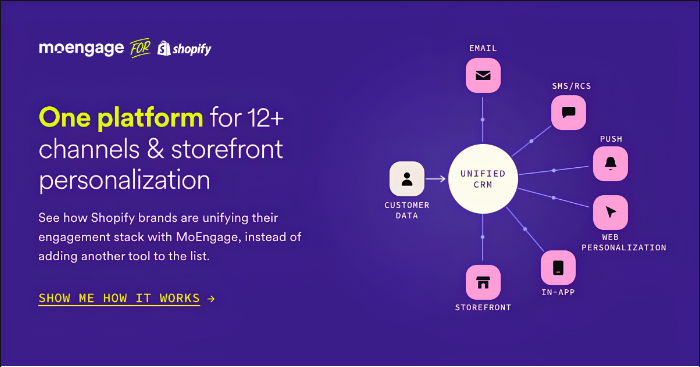
- MoEngage: Built to unify Shopify’s customer and order data with 16+ engagement channels (email, SMS, RCS, push, WhatsApp, and real-time on-site personalization), so segments, personalization, and reporting all run off one unified platform. At this scale, agentic decisioning with Aampe by MoEngage takes over a lot of the manual optimization work a growing team can’t keep up with manually. It automatically adjusts campaign creatives, timing, and targeting based on live performance, rather than someone checking dashboards and tweaking things a week later. That matters more the bigger you get, since the number of active campaigns, segments, and channels running at once starts to outpace what any team can optimize manually. MoEngage also gives you a support team that understands your growth goals, not just your bug reports. Because at this size, a support ticket queue isn’t enough.
- LoyaltyLion or Smile.io: At enterprise scale, customer loyalty programs need to support complex tiering and large customer bases, not just a basic points system.
- Optimizely or Shoplift: Enterprise-grade experimentation that can run more simultaneous tests across more traffic and segments than smaller tools handle well.
- Algolia or Searchspring: At this volume, generic keyword search isn’t good enough; you need search that understands intent and adjusts to real-time inventory and behavior.
- Justuno or OptinMonster: Enterprise popup and on-site offer tools with advanced targeting, letting you show different offers to different segments instead of one generic popup for everyone.
For enterprise Shopify brands, the best tools to improve the Shopify conversion rate should make your customer data, campaigns, and channels work together. That’s where the next layer of Shopify conversion rate optimization starts.
How MoEngage Helps Shopify Brands Improve Conversion Rates at Scale
Basic Shopify conversion rate optimization fixes the store experience. But what about the next layer?
MoEngage is an agentic customer engagement platform that helps Shopify brands improve online store conversion rates at scale by unifying customer data, personalizing journeys across channels, optimizing campaigns with AI, and tying customer engagement to revenue goals.
The table below shows common CRO challenges for growing Shopify brands and how MoEngage helps solve them.
| Shopify CRO Challenge at Scale | How MoEngage Helps |
| Email tool, SMS tool, and on-site personalization each have a different version of the customer, so campaigns overlap or contradict each other | Brings Shopify order and behavior data together with every engagement channel into one customer record, updated in real-time |
| Reporting is scattered across 5 dashboards, so nobody has one true number for online store conversion rate or revenue per visitor | Centralizes analytics across channels so performance can be measured from one place |
| Testing different send times or creative variations for every campaign takes time most teams don’t have | Agents automatically generate campaign creatives and adjust send timing and most preferred channel per customer |
| Campaigns often get set up once and left alone, even as performance changes | Agents continuously optimize live campaigns based on results |
| Product recommendations are usually rule-based (‘if X, show Y’), not adjusted to the actual visitor | Delivers real-time product recommendations tailored to each shopper’s behavior |
| Every visitor sees the same homepage and hero banner, no matter what they’ve already browsed | Personalizes hero banners and on-site content in real-time based on individual browsing behavior |
| Support tickets get ‘resolved’ without anyone checking whether the underlying growth problem actually improved | Pairs Shopify brands with a dedicated Shopify success manager focused on outcomes like conversion rate and AOV |
In short, MoEngage supports Shopify conversion rate optimization at scale by helping stores and brands use shopper behavior to personalize journeys, recover high-intent visitors, and improve repeat purchases across channels.
Let’s see how those capabilities show up in practice.
Unify Data, Channels, and Analytics in One Platform
As Shopify brands grow, customer data gets messy. One tool has email data, another has SMS data, Shopify has purchase data, and your website has browsing behavior.
MoEngage helps bring all of that data together, so Shopify marketing teams can understand what shoppers do across the Ecommerce customer journey.
That means you can build segments based on real customer behavior, such as customers who:
- Viewed a product but did not buy
- Added to cart but did not check out
- Bought once but never returned
- Usually respond to SMS
- Prefer one product category
- Have high repeat-purchase potential
This matters for Shopify conversion rate optimization because better data leads to better targeting. In turn, better targeting means fewer generic campaigns.
Autonomous Agents for Segments, Creative, and Campaign Optimization
At a mid-market and enterprise scale, Shopify marketing teams can’t manually optimize every segment, message, and campaign. There are too many customers, channels, and possible customer journeys.
MoEngage’s Merlin AI and agentic decisioning capabilities can help teams speed up campaign work by supporting segment discovery, campaign recommendations, creative variations, send-time and channel optimization, journey performance analysis, and next-best-action decisions.
Think of it like having a smart assistant that helps answer, “Who should we target, what should we say, where should we send it, and what should we improve next?”
This helps Ecommerce brands improve the Shopify Ecommerce conversion rate with faster decisions, not more guesswork.
Real-Time Web Personalization and Merchandising
A new store visitor, returning customer, cart abandoner, and loyal buyer, all need different messages while interacting with your Shopify brand.
MoEngage can help Shopify brands personalize web experiences using customer behavior and intent signals.
That can include:
- Personalized product recommendations
- Category-based offers
- Returning-customer messages
- Abandoned cart reminders
- Recently viewed products
- Dynamic website content
- Merchandising based on shopper interest
It’s useful because the Shopify conversion rate improves when shoppers see products and offers that match what they actually care about.
Outcome-Driven Support Built Around Growth Goals
You’ve probably seen this pattern with other tools: you submit a ticket, someone closes it, and nothing about your actual growth improves. The problem got ‘resolved’, but nobody looked at whether your Shopify conversion rate moved because of it.
MoEngage pairs Shopify brands with a dedicated Shopify success manager focused on outcomes like conversion rate, average order value, retention, not just ticket-closing speed. That’s a different relationship than most Shopify conversion rate optimization tools offer.

Summing Up: How Can Brands Do Shopify Conversion Rate Optimization in 2026?
Shopify conversion rate optimization in 2026 is about making the buying journey easier for shoppers.
Start with the basics: speed, mobile experience, product pages, trust signals, and checkout. Then use your Shopify Analytics data to find where shoppers drop off.
Once the on-site experience is solid, the next layer is customer engagement. That means recovering abandoned carts, personalizing product recommendations, sending relevant messages across channels, and increasing repeat purchases.
And that’s exactly where MoEngage can help Shopify brands improve conversion rates at scale. It turns shopper behavior into personalized journeys across email, SMS, push, web, and more.
Want to convert more Shopify store visitors into your loyal customers from one unified platform? Schedule a MoEngage demo today.
The post Shopify Conversion Rate Optimization Guide for 2026: Tips, Tools, and Checklist appeared first on MoEngage.