I’ve seen project portfolios come apart not because teams lacked ambition, but because the platform running their work couldn’t connect resource decisions to strategic priorities fast enough to matter.
When that gap exists, the best project and portfolio management software isn’t a productivity upgrade. It’s the difference between a PMO that leads and one that reports after the fact.
The tools that hold up at scale share a few specific characteristics. Resource forecasting that surfaces capacity conflicts before they affect delivery. Reporting that doesn’t require a manual assembly job before every leadership review. Automation that actually reduces coordination overhead rather than just existing as a listed feature. Not every platform on this list does all three well, which is why the right pick depends on where your current setup is costing you the most.
To build this guide, I worked through G2 Data and G2’s Winter 2026 Grid Report, evaluating platforms across company sizes from small teams to enterprise PMOs, weighting most heavily for portfolio visibility, resource forecasting, and reporting flexibility under real operational pressure.
The platforms covered in this guide include Smartsheet, monday AI Work Platform, ClickUp, Hive, Quickbase, Octave Sequence Enterprise (EcoSys), Bordio, Oracle Primavera, Celoxis, and ServiceNow Strategic Portfolio Management. Each recommendation is matched to a specific use case so you can move straight to what fits your context.
10 best project and portfolio management software for 2026: My top picks
- Smartsheet: Best for enterprise project and portfolio management
Work management platform that combines spreadsheet-style project tracking, automation, and reporting. (Free trial available; Paid plans start at $9/user/month.) - monday AI Work Platform: Best for customizable project workflow management
Project management platform that helps teams organize tasks, workflows, and projects with visual boards and automation. (Free plan available; Paid plans start at $9/user/month.) - ClickUp: Best for all-in-one project and portfolio management
All-in-one productivity platform that combines task management, documents, goals, and collaboration tools. (Free plan available; Paid plans start at $7/user/month.) - Hive: Best for collaborative project management and team workflows
Collaborative project management platform for planning projects, managing tasks, and team communication. (Free plan available; Paid plans start at $5/user/month.) - Quickbase: Best for low-code project and process management
Low-code platform for building custom apps to manage projects, workflows, and operational processes. (Free trial available; Pricing available on request.) - Octave Sequence Enterprise (EcoSys): Best for enterprise capital project portfolio management
Enterprise project performance platform designed to manage large project portfolios, budgets, and schedules. (Demo available; Pricing available on request.) - Bordio: Best for simple team project planning and scheduling
Task and project planning tool for organizing work, schedules, and team activities. (Free plan available; Paid plans start at $3.99/user/month.) - Oracle Primavera: Best for large-scale capital project scheduling and controls
Enterprise project planning platform for managing complex schedules, critical path analysis, resource planning, and cost controls across capital programs. (Pricing available on request) - Celoxis: Best for advanced project portfolio and resource management
For planning projects, managing resources, and tracking budgets. (Free trial available; Paid plans start at $10/user/month.) - ServiceNow Strategic Portfolio Management: Best for enterprise strategic portfolio governance
Connects business strategy to funded project delivery through demand management, resource planning, and executive reporting. (Pricing available on request)
*These project and portfolio management platforms are top-rated in their category based on G2’s Winter 2026 Grid® Report.
10 best project and portfolio management software I recommend
My evaluation kept returning to one dividing line: platforms built for portfolio oversight versus platforms that grew into it by adding features. The difference shows up under pressure. G2 Data shows mid-market PMOs, SaaS operations teams, and consulting firms gravitating toward tools in which resource planning, roadmap visibility, and reporting share a single data layer rather than syncing across separate systems. When those functions are genuinely integrated, replanning a shifted priority doesn’t cascade into a manual reporting rebuild. When they’re not, it does.
What surprised me across the reviews was how consistently the organization type predicted which capability gaps surfaced first. Enterprise teams hit reporting configurability walls. Smaller PMOs ran into resource forecasting limits faster than expected as project volume grew. That split shapes how I’ve framed each recommendation below.
Some tools didn’t make the final list despite strong overall ratings. G2 Data pointed to three consistent disqualifiers: resource planning too shallow for multi-project environments, reporting that required exporting to work at all, and integration gaps that forced teams to maintain parallel workflows outside the platform.
How did I find and evaluate the best project and portfolio management software?
The shortlist came from G2’s Winter 2026 Grid Reports for the project and portfolio management category, filtered by verified user satisfaction scores and market presence across small businesses, mid-market organizations, enterprises, and PMO teams. This kept the focus on platforms actively used for project planning and portfolio oversight rather than general task management tools with limited strategic planning depth.
From there, AI-driven analysis across a large volume of verified G2 reviews helped surface what consistently comes up in real-world use: not feature inventories, but workflow signals. How teams use these platforms under pressure, where adoption stalls, and what breaks when project complexity increases.
Because I have not personally implemented every platform covered here, I validated findings against reviews from project managers, PMO leaders, operations teams, and enterprise planners using these tools in production environments. All visuals and product references are sourced from G2 vendor listings and publicly available product documentation.
What makes the best project and portfolio management software worth it: My criteria
After reviewing a large volume of G2 user reviews, here’s what I prioritized when evaluating the best project and portfolio management software:
- Portfolio visibility across projects and teams: A platform that shows project status within individual workstreams but loses coherence at the portfolio level creates blind spots where priority conflicts and resource constraints go unnoticed until they’ve already affected delivery. The strongest tools surface dependencies, timelines, and performance across the entire portfolio in one view.
- Resource planning and workload management: Knowing who is assigned is not the same as knowing who has capacity. I rated tools higher when reviewers described the ability to forecast staffing requirements, identify overloaded team members early, and redistribute work before timelines slipped rather than after.
- Reporting configurability: Platforms that require manual data assembly before every leadership review, or that can’t produce project health summaries without exporting to a spreadsheet, add overhead at exactly the wrong moment. I prioritized tools where dashboard configuration matched the actual audience range teams described in reviews.
- Workflow automation: Status updates, approval routing, and deadline notifications handled manually introduce inconsistency that compounds across a large portfolio. I weighted tools where automation was described as genuinely reducing administrative coordination, not just available as a listed feature.
- Scalability and integration fit: A platform that works well at 10 projects often becomes the bottleneck at 50. I evaluated whether tools could absorb growing project pipelines without performance degradation, and whether their integrations connected PPM data to the financial, CRM, or communication systems organizations already depend on.
Based on these criteria, I narrowed the list to platforms with a consistent track record across the dimensions that drive real buying decisions in this category. No single tool leads across all five, so the right choice comes down to where your current setup is costing you the most. Start there.
Below, you’ll find authentic user reviews from the Project and Portfolio Management Software category. To appear in this category, a tool must:
- Support planning, tracking, and coordination of multiple projects across teams
- Provide portfolio-level visibility into timelines, resources, and project performance
- Enable reporting and analytics for monitoring project progress and outcomes
- Deliver scalable tools that help organizations manage complex project portfolios
This data was pulled from G2 in 2026. Some reviews may have been edited for clarity.
1. Smartsheet: Best for enterprise project and portfolio management
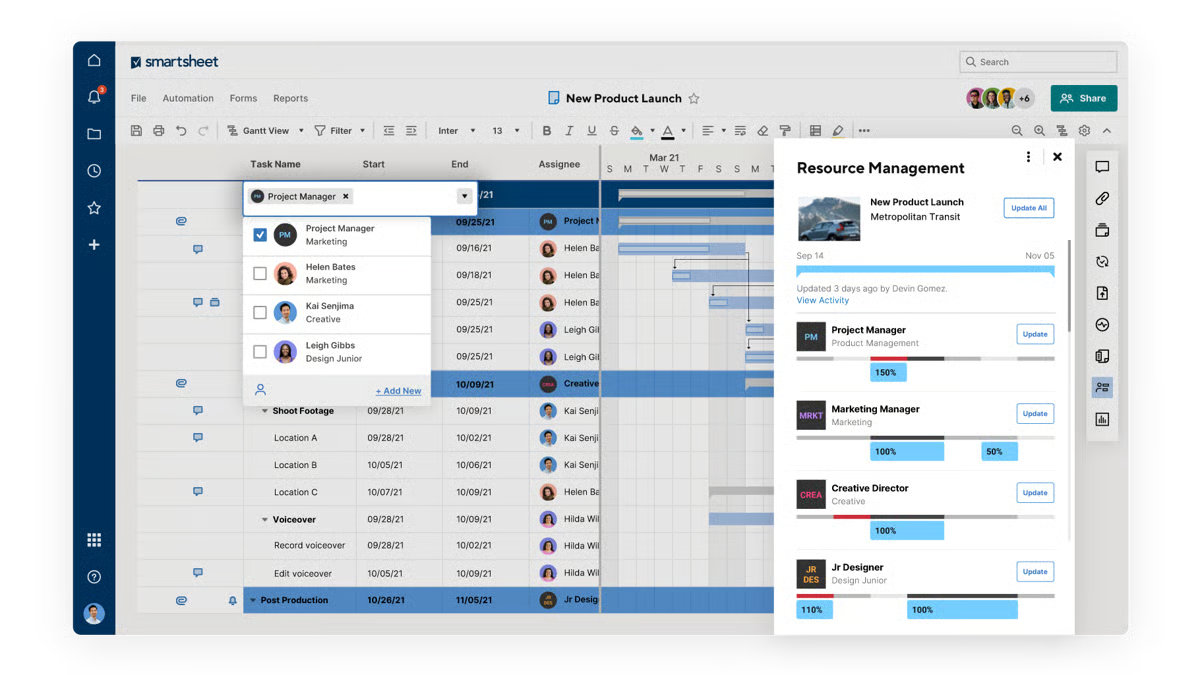
Smartsheet centralizes project planning, execution, and reporting within a collaborative work management environment built around a spreadsheet-style interface. Teams organize projects through grid-based sheets that track tasks, owners, and timelines while supporting automation rules, dashboards, and reporting in the same workspace.
G2 reviewers frequently mention that the layout feels intuitive for teams already familiar with Excel-style workflows. Tasks, owners, and timelines can be organized clearly within rows and columns. Teams can build detailed project plans while keeping the working environment approachable enough for contributors at every level.
Customization capabilities allow organizations to tailor project tracking to different operational frameworks, with G2 users describing how they build sheets with custom columns, workflows, and task statuses aligned with internal processes. Teams often adapt the structure for product roadmaps, milestone planning, or cross-team initiatives. This flexibility allows work management systems to evolve as project requirements change.
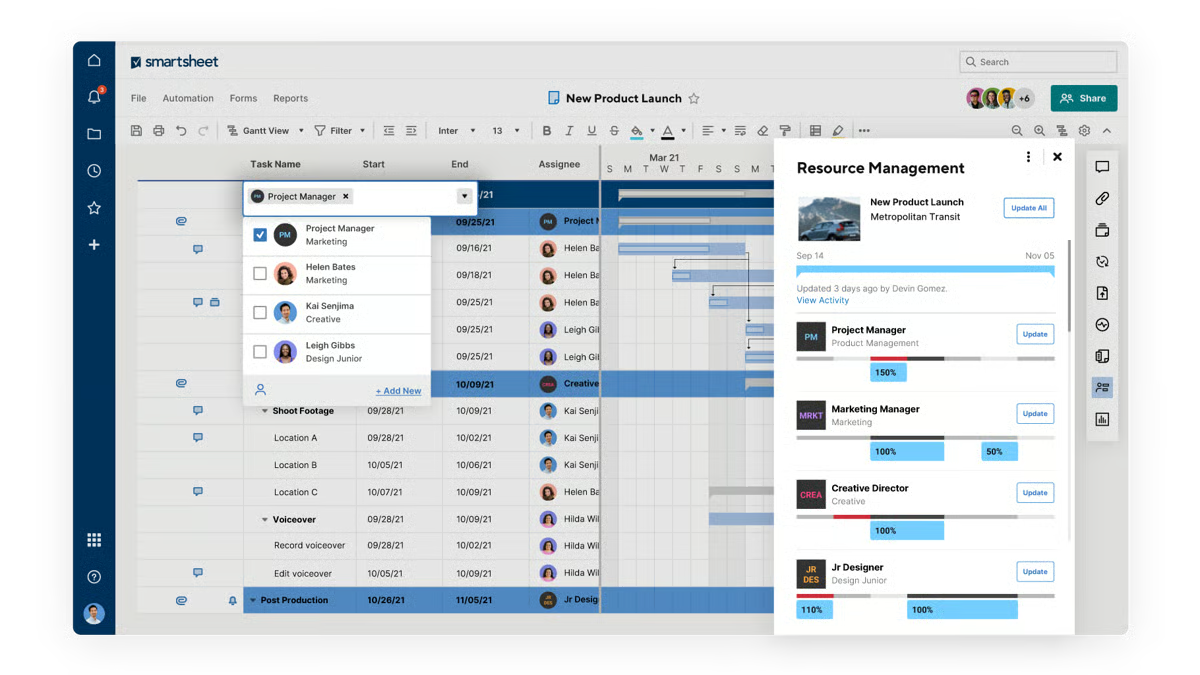
What struck me while going through the review data is that teams describe the collaboration environment as genuinely shared rather than just accessible. Multiple users edit sheets simultaneously while changes stay visible through activity history, and notifications and task ownership indicators help teams track responsibilities across departments. This centralized environment reduces fragmented communication.
What I noticed in G2 reviews is that automation capabilities reduce manual coordination and repetitive project updates. G2 reviewers reference automated reminders, workflow triggers, and alert systems that notify teams when deadlines approach or statuses change, consistent with Smartsheet’s priorities score of 86% on G2. These automated processes help maintain project momentum without constant follow-ups. Teams gain more consistent execution across projects involving multiple contributors.
While evaluating the G2 reviews, I found that dashboards summarize timelines, task completion, and outstanding work clearly, and filtered views support standardized reporting across projects without requiring teams to compile updates manually. This is consistent with a performance score of 84% on G2. These insights help project managers and leadership teams monitor progress efficiently.
Here’s what G2 reviews actually showed me: multiple project visualization modes support different stages of planning and execution. Users frequently reference switching between grid, Gantt, card, and calendar views depending on their needs. Grid views allow detailed planning while Gantt charts display dependencies across timelines. Card views simplify task monitoring during active project phases.
According to G2 reviews, large sheets with heavy formulas can slow loading times, most noticeably for teams managing many cross-sheet dependencies. That said, Smartsheet’s grid structure and cross-sheet reporting handle planning depth reliably once sheets are organized around consistent data standards. The planning depth and cross-sheet reporting that teams build their workflows around remain fully functional;
Advanced automations, cross-sheet configurations, and dashboard setups carry a learning curve during initial build, as stated by G2 reviews that I came across. Assigning someone to own the initial setup makes a real difference in how quickly teams reach a working configuration. However, many say the platform’s documentation and template library give teams a clear path through setup without starting from scratch.
Overall, Smartsheet focuses on organizing complex project execution through a flexible and collaborative work management platform. For organizations managing cross-department initiatives or large operational programs, Smartsheet provides a structured solution within the project and portfolio management category.
What I like about Smartsheet:
- Familiar spreadsheet-style interface makes it easy for teams to organize tasks, timelines, and ownership without extensive onboarding, especially for users already comfortable with Excel workflows.
- Flexible customization, automation rules, and dashboards help teams track progress, standardize reports, and coordinate projects across departments while maintaining real-time collaboration and visibility.
What G2 users like about Smartsheet:
“I like that Smartsheet actually helps me to make reports and standardize some reports. It’s friendly at some point, and the feature is valuable to me because it saves time in my reports and my job. The standardized reports allow us to create a survey, upload it, and then generate a specific report with filters, making it efficient by just filtering.”
– Smartsheet review, Enya L.
What I dislike about Smartsheet:
- Large sheets with heavy formulas can slow loading times for teams managing many cross-sheet dependencies. Teams coordinating complex programs are most exposed during high-activity periods. Loading performance is consistent across standard project tracking workflows outside those peaks.
- Advanced automations and dashboard setups carry a learning curve during initial build. Teams with simpler coordination needs and no dedicated PM resource may find setup more involved than their workload requires. The template library and help documentation give teams a clear starting point.
What G2 users dislike about Smartsheet:
“The interface can feel a bit overwhelming at first, especially for new users. Some advanced features aren’t very intuitive and take time to learn. It can also get expensive as you add more users or need higher tier features.”
–Smartsheet review, Manuel P.
2. monday AI Work Platform: Best for customizable project workflow management
While analyzing G2’s review data, I came across a consistent theme: monday AI Work Platform organizes projects and operational workflows through visual boards and configurable processes that allow teams to track tasks, coordinate collaboration, and monitor progress across multiple initiatives. Built on monday.com’s Work OS, the platform combines boards, dashboards, automations, and templates to help organizations structure work and manage projects within a centralized system.
One thing I kept seeing across G2 reviews was how often teams described monday Work Management as the tool that finally replaced their spreadsheets. Visual project boards bring tasks, updates, and project details into a structured shared workspace. This reduces confusion around responsibilities and deadlines while helping teams to monitor progress and keep information accessible rather than spread across multiple tools.
The dashboarding capabilities play an important role in day-to-day project oversight. Teams highlight the ability to monitor timelines, workload distribution, and project status from a centralized dashboard, reflected in a visualizations score of 87% on G2. Visibility into tasks and milestones allows stakeholders to quickly understand whether work is in progress, pending review, or completed.
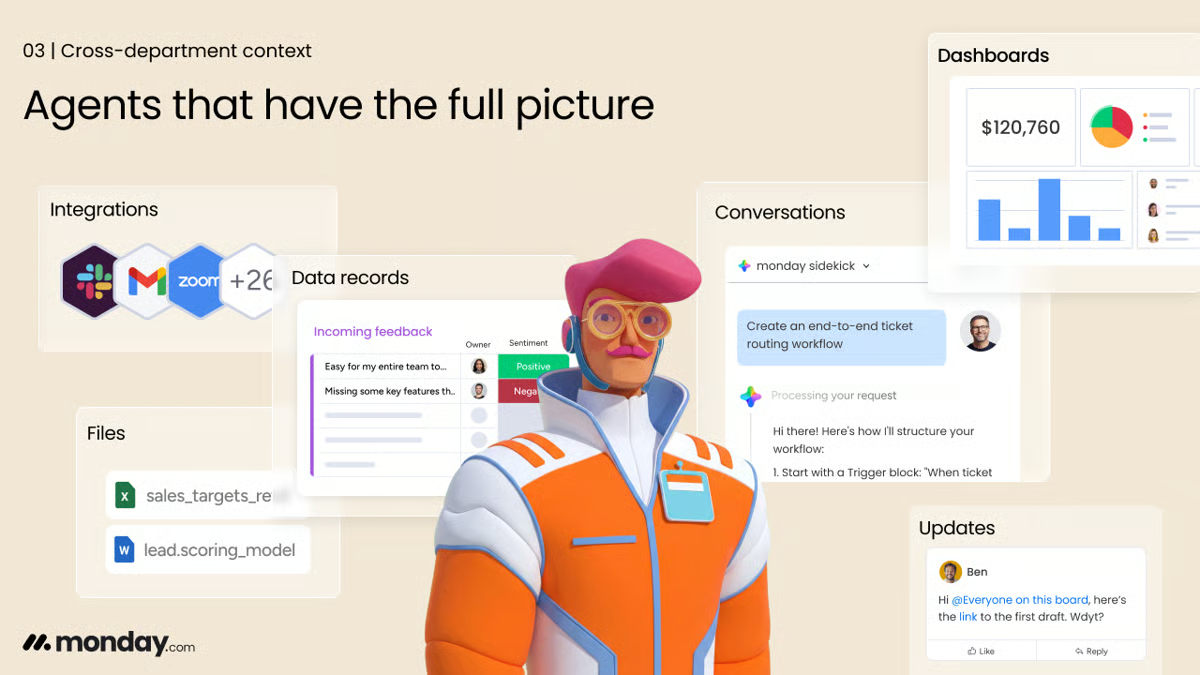
Workflow automation is reflected in users frequently mentioning automations that trigger notifications, assign tasks, or update statuses based on predefined conditions. These automated workflows help reduce repetitive administrative work while keeping projects moving through defined processes without requiring constant manual updates.
What I noticed in G2 reviews is that customization is less about preference and more about operational fit. Teams configure boards, column types, templates, and dashboards to reflect their internal workflows, managing marketing campaigns, client projects, product development, and operational planning within the same system. The platform’s planning score of 90% on G2 reflects this structured project visibility.
Cross-team collaboration becomes easier when tasks, files, and updates are managed within a shared workspace. G2 users explain that the platform helps coordinate work across departments by assigning responsibilities, sharing documents, and tracking discussions directly within project boards. This centralized structure helps teams stay aligned on project goals and timelines.
The mobile app extends project visibility beyond the desk. Tasks, contact details, and project updates remain accessible from a phone, allowing teams to pull up information and manage work outside of a traditional office setup. G2 reviewers mention accessing candidate information and project data on the go, keeping work moving when team members are away from their computers.
Despite the many strengths, some G2 reviewers state areas of improvement. Navigating large boards with extensive datasets can occasionally feel slower when switching views or loading dashboards. Although, the visual board structure, task ownership tracking, and status visibility that teams use most in daily work continue to perform well at standard operating scale.
Configuring boards and workflows for new team members requires setup time before they can contribute fully. Teams expecting an immediately usable out-of-the-box experience may find initial configuration more hands-on than anticipated. The template library and onboarding resources give new teams a functional starting point. The visual boards, task ownership, and workflow automation that teams rely on day to day are well-built; the setup time is the friction, not the functionality itself.
What I picked up while studying G2’s review data is that monday AI Work Platform is best suited for organizations coordinating projects across multiple teams that require clear task ownership, centralized collaboration, and structured workflow management.
What I like about monday AI Work Platform:
- Visual boards and multiple views such as Kanban, Gantt, and calendar make it easy to track project status and priorities. Teams can quickly understand responsibilities and timelines without relying on scattered spreadsheets or manual tracking.
- Automation features reduce repetitive tasks like status updates, notifications, and task assignments. This frees teams to maintain consistent workflows while improving efficiency across project coordination and daily operations.
What G2 users like about monday AI Work Platform:
“I really appreciate being able to view the workload for a single project, as well as how the workflow diagrams are displayed in a clear, organized way. The platform feels compact and user-friendly, which makes it easy for me to set up new projects quickly. The features are explained clearly, and I also like how fast I can organize and manage tasks once everything is in place .”
– monday AI Work Platform review, Josh K.
What I dislike about monday AI Work Platform:
- Navigating large boards with extensive datasets can occasionally feel slower when switching views or loading dashboards. The visual board structure, task ownership tracking, and status visibility that teams use most in daily work continue to perform well at standard operating scale.
- Configuring boards and workflows for new team members requires setup time before they can contribute fully. That said, the visual boards, task ownership, and workflow automation that teams rely on day to day are well-built; the setup time is the friction, not the functionality itself.
What G2 users dislike about monday AI Work Platform:
“I find it difficult to track ad performance in monday Work Management. The integration with Meta Ads performance is challenging because it’s hard to match the columns and KPI names exactly as they are in Meta. Ideally, it would be better if it could be entirely copied the way it is in Meta.”
– monday AI Work Platform review, Joe-san O.
3. ClickUp: Best for all-in-one project and portfolio management
ClickUp is designed to help teams manage projects, tasks, documentation, and collaboration within a single work management platform organized through spaces, folders, and lists. Multiple views such as lists, boards, calendars, and Gantt charts help teams track progress and manage workflows from different perspectives within the same workspace.
What became clear to me while reading G2 reviews is that the centralized workspace is the feature teams come back to most. Tasks, comments, documents, and related project information connect to the same workspace. This structure helps organizations move work between team members while keeping context intact and keeping project context intact as work moves between contributors.
The platform allows teams to create custom statuses, task fields, and project hierarchies that reflect how their work is organized. G2 reviewers often mention that different views such as lists, boards, calendars, and Gantt charts make it easier to monitor timelines and visualize progress from multiple perspectives. ClickUp’s planning score of 92% on G2 reflects this capability.
If G2 reviewers are telling us anything, it’s that automations for assigning tasks, updating statuses, or sending notifications when certain conditions are met genuinely reduce manual updates and help teams manage projects more efficiently while maintaining visibility into task progress.
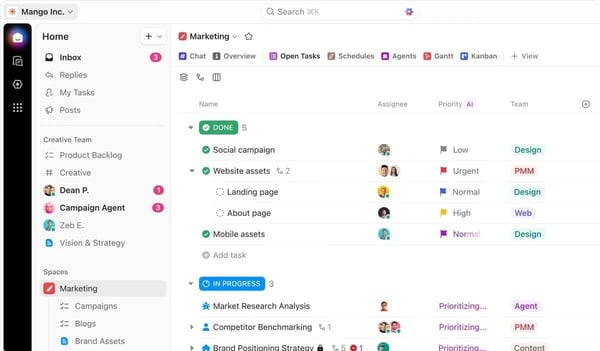
Reviewers note that dashboards allow teams to see project updates, track task activity, and monitor overall progress without needing to open each individual project, consistent with a priorities score of 90% on G2. This provides a consolidated view of project activity and performance. This visibility helps teams stay aligned and maintain oversight across multiple initiatives.
The built-in AI functionality gets specific mentions for summarizing long documents and turning unstructured notes into task-ready checklists. Reviewers working across documentation and development workflows describe it as a productivity gain. Teams managing research-heavy or technically complex projects get a layer of assistance that keeps work moving.
Integrations came up far more often than I expected as a daily practical benefit rather than a setup feature. Connections with tools such as Google Drive and Google Calendar let teams link files, schedules, and project updates directly within the platform, keeping project information and resources accessible without switching between systems.
According to G2 reviewers, the large number of features and configuration options can make the interface feel busy for very small teams needing basic task tracking. Although, most reviewers note that the task management, project hierarchy, and automation capabilities that make ClickUp useful for complex coordination are well-built and hold up reliably across demanding workflows.
The mobile app delivers a more limited experience than desktop, with G2 users describing slower performance when editing tasks or managing dependencies on the go. For teams that need to regularly check or update work from a phone, this is a real gap. The task management depth, automation capabilities, and cross-project visibility that make ClickUp useful for complex work all perform consistently on desktop, which is where the platform’s strengths are most apparent.
One thing I couldn’t overlook in G2’s review data is how directly ClickUp addresses the challenge of organizing projects, tasks, and team communication within a single system. The platform helps teams coordinate work and maintain visibility across projects. It works particularly well for small and mid-sized organizations seeking a flexible platform to manage projects and collaboration without relying on multiple disconnected productivity tools.
What I like about ClickUp:
- ClickUp helps teams keep tasks, documents, comments, and project updates organized in one workspace, simplifying progress tracking and responsibility management across projects without relying on multiple separate tools.
- The platform offers strong customization and automation capabilities, including flexible task views, customizable workflows, and automated triggers that help teams streamline project coordination and reduce manual task updates.
What G2 users like about ClickUp:
“I love the visualization of everything on the ClickUp Dashboard, which updates with a brief text summary. The templates make it easy for me to start with a map tailored to my projects like Podcast, Branding, and Sprint. The Whiteboards allow me to see another angle with sketches and help me connect ideas, concepts, and ground them. The Summary makes it easy for me not to have to think and write everything myself, it’s very agile and speeds up my process flow. Also, the Dashboard offers me everything at a glance without having to see the progress by project. I also like that you only have to provide an email to register and I can start using a template very quickly. In fact, I would recommend it with a 10 as it has given me the best results, with an affordable price and usability.”
– ClickUp review, Silvy O.
What I dislike about ClickUp:
- The range of features and configuration options can make the interface feel busy for users who only need basic task tracking. Teams with a clearly organized workspace find navigation more straightforward. The space and list hierarchy gives contributors a consistent structure as complexity grows.
- Speed and lag issues come up occasionally, most noticeably in the mobile app or when switching between complex views. Desktop performance across standard task and project workflows is consistently described as stable in G2 feedback.
What G2 users dislike about ClickUp:
“I don’t like the lack of clarity about the roles of the members and their applied values. Furthermore, there are features that are paid, but it is not mentioned that they are paid before the plan is created, such as the AI Notetaker.”
– ClickUp review, Miguel B.
4. Hive: Best for collaborative project management and team workflows
Hive is a project and portfolio management platform built around action cards that store task details, attachments, comments, and sub-tasks in one place.
Teams are not just using one view and ignoring the rest. They switch between Kanban boards, Gantt charts, calendars, and tables depending on what a project phase demands, and updates stay consistent across every layout, reflected in Hive’s planning score of 93% on G2. Built-in chat, email integration, time tracking, automated workflows, and analytics keep communication and performance insights connected inside the same workspace.
Hive brings project communication and task coordination into the same workspace. G2 reviewers describe teams managing tasks, tracking progress, sharing files, and communicating through comments or chat without leaving the platform. What stood out in the feedback is how often teams framed this as something that changed how they coordinated work day to day, rather than just a convenience.
What I kept finding as I went through G2’s reviews is that task views, progress tracking tools, and reporting dashboards allow teams to monitor project status while keeping individual responsibilities clearly defined. These views help teams stay aligned on priorities while keeping delivery timelines visible.
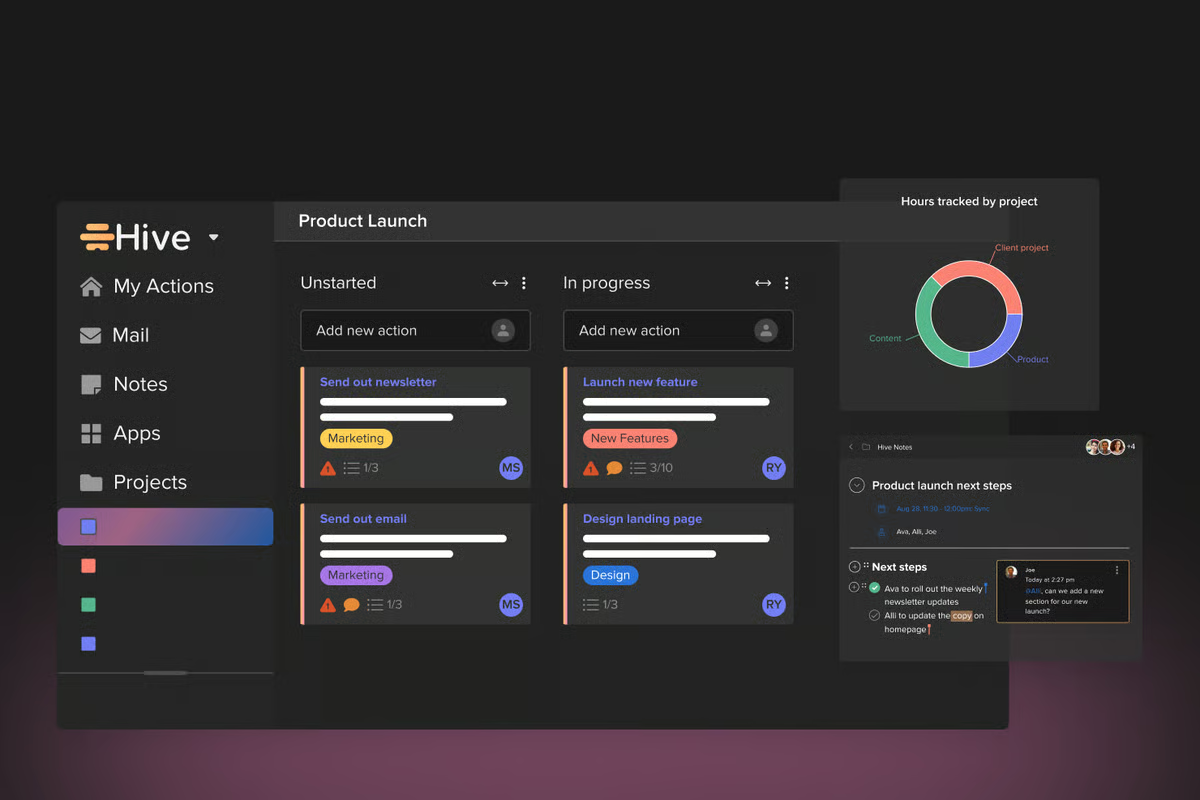
Many teams also point to the platform’s workflow structuring tools. Features such as task labels, sub-tasks, templates, and customizable fields allow projects to be organized in ways that match internal processes. Templates are especially useful for repeatable workflows to duplicate project structures, adjust timelines, and maintain consistent task dependencies across recurring work at scale.
Time tracking is built directly into the platform, keeping timelines and effort visible without requiring a separate tool, consistent with a performance score of 88% on G2. G2 reviewers describe using it alongside task management and automated workflows to monitor how work progresses. For teams tracking time against deliverables, this integration keeps operational reporting contained within a single workspace.
While going through hundreds of G2 reviews, I noticed that setup and onboarding are consistently described as straightforward, with teams able to configure projects, customize workflows, and scale usage without extended ramp-up periods. Individual team members adopt the platform with little friction, even when IT rollout requires more deliberate coordination. Organizations moving from informal tracking tools benefit from a structured environment that does not require extensive training.
Some G2 reviewers mention occasional interface and performance concerns, noting that the interface can feel somewhat dated and that larger boards may experience intermittent lag or unresponsive cards. However, the platform’s structured environment works well for teams prioritizing centralized workflow coordination and stable project ownership. Task coordination, ownership tracking, and workflow structure all function reliably.
Bulk task reassignment during team transitions requires going through items one at a time when members leave or shift roles. From what I read in G2 reviewers, this adds up quickly during larger team changes, so it is worth treating reassignment as a planned task rather than something to handle on the fly. Although, Hive’s task labeling and ownership structure keep responsibilities clearly visible throughout the process.
While analyzing G2’s review data, I kept coming back to the same conclusion: Hive brings project planning, task coordination, and team collaboration into a single platform, improving visibility and workflow organization across teams. It works particularly well for small businesses and growing teams seeking centralized project coordination and collaborative work management within a unified environment.
What I like about Hive:
- Hive consolidates project tasks, team discussions, attachments, and progress tracking into a single workspace, helping teams keep communication and execution connected instead of spread across multiple tools.
- Users value the platform’s workflow flexibility, including templates, task dependencies, and multiple project views that make it easier to structure timelines and manage repeatable processes across projects..
What G2 users like about Hive:
“Hive is software that offers the most advanced digital features and resources to manage your work projects from your preferred devices and operating systems, facilitating the customization and management of all your work processes. I can also say that Hive stands out for the quality of its business project visualization features, improving business collaboration across all departments of your business.”
– Hive review, Martin P.
What I dislike about Hive:
- Lag and unresponsive cards can appear on larger boards, most noticeably during periods of high activity across complex workspaces. Across standard project sizes and typical team workflows, card responsiveness and board performance are consistently described as stable in G2 reviews.
- Reassigning tasks when team members leave or change roles requires going through them one at a time, adding coordination steps during transitions. Hive’s task labeling and ownership structure keep responsibilities clearly visible, making it straightforward to track what has and has not been reassigned.
What G2 users dislike about Hive:
“Visually, it’s not as intuitive and helpful as other platforms, but easy to work through. The rollout was more intensive for our IT team, but was easy for individual teams to adopt.”
– Hive review, Matthew H.
5. Quickbase: Best for low-code project and process management
Quickbase is a low-code platform that helps organizations build custom applications to manage projects, workflows, and operational data in one centralized system. Instead of adapting processes to rigid project management software, teams use Quickbase to design applications that match their internal operations. Departments can configure workflows, automate tasks, and generate reports while maintaining visibility across projects, resources, and operational activities.
Here’s what G2 reviews actually showed me on configuration: ease of setup is highlighted consistently during onboarding and everyday use. Many teams note that Quickbase allows non technical users to create applications and automate workflows without requiring extensive programming expertise. This accessibility allows departments to build systems that support their operational needs, from project tracking and reporting to internal workflow management and process automation.
Customization is another capability repeatedly mentioned in user feedback as users describe building applications tailored to their own processes rather than adapting workflows to fixed software structures. Teams configure systems to manage bookings, track project progress, organize operational data, and generate department specific reports, allowing them to maintain visibility into key activities while keeping their systems aligned with evolving operational needs.
G2 reviewers frequently highlight automated reminders, workflows, and task updates that reduce the amount of manual work required to manage operational processes, consistent with a performance score of 88% on G2. These automation capabilities help teams standardize workflows, minimize repetitive administrative tasks, and improve coordination across departments that rely on structured processes.
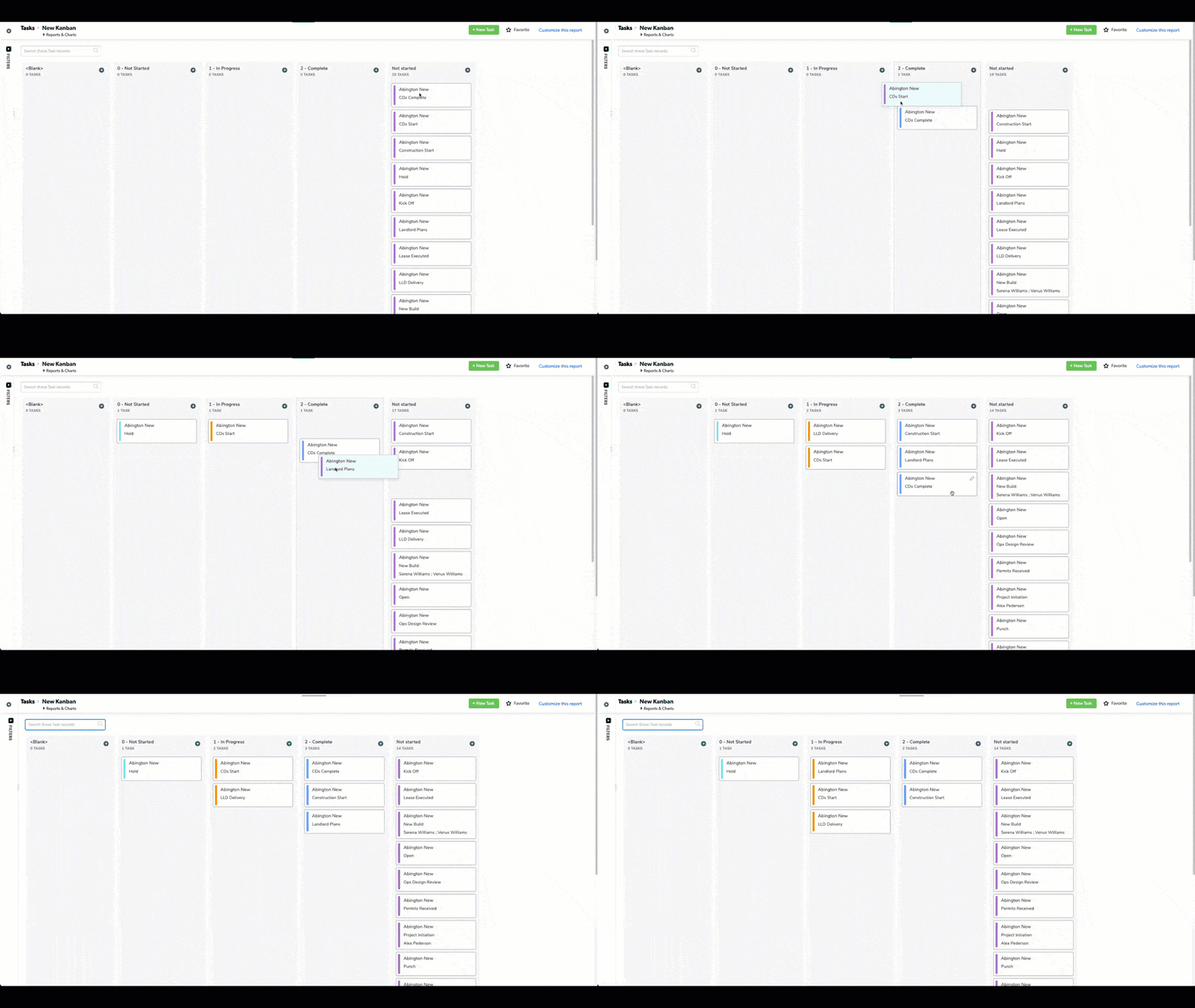
If G2 reviewers are telling us anything, it’s that Quickbase users are not replacing their existing tools, they are connecting them. G2 users describe linking Quickbase to CRM systems and operational databases, pulling information from multiple sources into a single operational view so departments work from the same data rather than maintaining separate records. This connectivity reduces the need to manually reconcile data from multiple platforms.
Organizations with operational needs that fall outside standard project management templates find Quickbase a practical fit. Because the platform does not enforce a fixed project structure, teams in varied environments configure applications around the specific data, approvals, and reporting their work demands. Reviewers from construction, property management, and cross-functional operations describe building systems matched to their actual workflows.
One thing I couldn’t overlook in G2’s review data is how centralizing operational information across teams is one of Quickbase’s clearest strengths, reflected in a data consolidation score of 87% on G2. Departments that previously managed data in disconnected systems can access and act on shared information within a single environment, reducing time spent reconciling information across tools.
Some G2 reviewers say the interface can feel somewhat dated, and the extensive customization options mean teams often spend time structuring applications, reports, and workflows around their operational needs. This flexibility works well for organizations designing highly tailored systems, while teams seeking more standardized project management environments may find the setup requires extra planning.
Despite the strengths above, G2 users highlight that platform updates can occasionally create a short transition period when newer features and older configurations overlap. Teams with established workflows may notice some inconsistency while both versions are active. However, Quickbase’s support team is described in reviews as responsive in helping teams navigate configuration changes during update cycles.
What I kept finding as I went through G2’s reviews is that Quickbase consistently helps organizations replace fragmented operational tools with customizable applications that centralize workflows, project information, and operational data. By enabling teams to design systems tailored to their own processes while automating repetitive work and connecting multiple departments, the platform provides a structured way to manage projects and operational workflows across a wide range of industries.
What I like about Quickbase:
- Quickbase makes it easy for teams to build custom applications and workflows without heavy development work. Reviewers highlight how non technical users can configure processes, track projects, and automate tasks directly within the platform.
- The platform centralizes operational data and connects with other systems, allowing teams to manage projects, resources, and reports in one place. This visibility helps departments collaborate more easily and keep track of business activities in real time.
What G2 users like about Quickbase:
“As a user of Quickbase’s digital features and resources, I am very satisfied because it has allowed me to improve the technical quality of all my business processes and workflows, facilitating the digital management of all my virtual operations. I can also say that Quickbase stands out for its technical process automation features, reducing the execution of manual tasks and improving the commercial results of your entire business..”
– Quickbase review, Justin P.
What I dislike about Quickbase:
- The interface can feel dated, and the range of customization options means teams often spend time structuring applications and workflows before things run smoothly. Quickbase’s documentation and support resources give teams a structured path through that configuration phase without relying entirely on trial and error.
- Platform updates can create a short period where new features and existing configurations overlap. Quickbase’s support team is consistently described in reviews as available and technically capable when teams need help navigating those transition periods.
What G2 users dislike about Quickbase:
“The interface may be a little outdated and with all the customization choices, it would require time before learning how to make the best use of it. But when you are so used to it, the force and the strength can never be compared.”
– Quickbase review, Anand D.
6. Octave Sequence Enterprise (EcoSys): Best for enterprise capital project portfolio management
Octave Sequence Enterprise (EcoSys) is a project and portfolio management platform built for organizations managing large capital projects and complex project controls. Integration with enterprise systems such as SAP, Oracle, and Primavera connects scheduling and financial data, giving organizations a unified view of project execution across departments.
While going through hundreds of G2 reviews, I noticed how frequently reviewers highlight EcoSys’s ability to centralize project data into a single source of truth, supported by a planning score of 93% on G2. Instead of tracking budgets, forecasts, schedules, and reporting metrics across multiple tools, teams access everything within one environment. This consolidation reduces manual data reconciliation and allows project managers to focus on analyzing performance rather than locating information.
Real-time visibility into financial performance and project status is noted by users as EcoSys connects budgets, commitments, and financial actuals in a way that allows teams to monitor performance against plan as projects progress. This visibility helps organizations identify potential overruns, schedule delays, or cost deviations earlier, allowing project leaders to take corrective action before issues escalate.
EcoSys allows organizations to tailor dashboards, reports, and approval workflows to align with internal processes and governance models. G2 reviewers often note that these dashboards make it easier to present project performance updates to leadership and stakeholders without requiring additional reporting tools or manual data preparation.
Enterprise integration is not a secondary feature for EcoSys users. EcoSys synchronizes project information with ERP systems and scheduling tools, aligning operational project data with financial systems so stakeholders across finance, engineering, and project management work from consistent information. For organizations managing large portfolios or infrastructure programs, this integration reduces data silos across departments.
Portfolio decisions carry more weight when risk data is built into the planning process. Reviewers point to EcoSys’s forecasting and scenario analysis as tools that help teams model potential overruns and evaluate options before issues escalate into active problems. That proactive risk visibility, consistent with a priorities score of 92% on G2, gives project leaders a structured basis for prioritizing interventions across large capital programs.
.png?width=600&height=338&name=Octave%20Sequence%20Enterprise%20(EcoSys).png)
One thing I couldn’t overlook in G2’s review data is how consistently efficiency gains from reducing manual reporting and administrative work are highlighted by users. Because project data, budgets, and forecasts are maintained within the same platform, teams can generate updates and reports without manually consolidating spreadsheets. Many reviewers mention that this allows them to spend more time evaluating project performance and less time collecting information for reporting.
Across G2 reviews, one limitation comes up consistently:Initial setup requires significant time when defining workflows, financial structures, and integrations before the platform is ready for daily use. That said, EcoSys’s implementation support and documentation are described in reviews as structured throughout the configuration. Core project controls functionality delivers reliably once the platform is properly configured.
Despite the strengths above, G2 users highlight that report generation on large portfolios can be time-consuming Although, the time-consuming aspect is in generating reports at scale, not in the underlying data or analysis. Core financial tracking and portfolio visibility hold up without friction in structured project controls environments.
What I kept finding as I went through G2’s reviews is that EcoSys fits organizations that want to consolidate project portfolio management, financial oversight, and reporting into a structured operational system rather than managing project data through multiple disconnected tools. By centralizing project controls, forecasting, dashboards, and enterprise integrations, the platform helps organizations maintain visibility across complex initiatives while reducing the administrative burden associated with large project portfolios.
What I like about Octave Sequence Enterprise (EcoSys):
- Centralizes project budgets, forecasts, schedules, and performance data into one platform, reducing reliance on spreadsheets and scattered files. This helps teams track project health and access key information quickly from a single system.
- Integrates smoothly with enterprise systems and offers customizable dashboards and reports, giving stakeholders clear visibility into project performance and financial metrics. Many users highlight how this improves reporting and decision-making across teams.
What G2 users like about Octave Sequence Enterprise (EcoSys):
“I value EcoSys for its ability to integrate complex project data into a single source of truth, allowing me to discard manual spreadsheets and focus on high-level variance analysis. It acts like a central hub for everything required to execute a project, unlike conventional tools where I would use Jira for tracking progress and separate Excel and Word documents for different purposes. EcoSys makes me more efficient and productive by using one tool to access everything needed for the project instead of wasting time locating folders and files.”
– Octave Sequence Enterprise (EcoSys) review, Ganji S.
What I dislike about Octave Sequence Enterprise (EcoSys):
- Initial setup involves defining workflows, financial structures, and integrations before the platform delivers its full value. Organizations managing large infrastructure or transformation programs are well suited to this investment. EcoSys’s implementation support and documentation are consistently described in reviews as structured and available throughout configuration.
- Report generation on large portfolios can be time-consuming, with teams managing extensive project data describing longer wait times when pulling comprehensive outputs. G2 reviewers consistently describe the financial tracking, cost monitoring, and portfolio data that feed those reports as reliable and well-structured.
What G2 users dislike about Octave Sequence Enterprise (EcoSys):
“I feel the UI can be improved more and a better built-in data visualization feature with more advanced AI agents. I feel a cleaner dashboard on the home screen with customization to add other data fields for a quick overview of important numbers and an option for real-time data updates once changes are made in the source.”
– Octave Sequence Enterprise (EcoSys) review, Sharath P.
7. Bordio: Best for simple team project planning and scheduling
Bordio is a project and portfolio management platform designed to simplify how small teams organize tasks, schedules, and day-to-day collaboration. By keeping projects, priorities, and timelines visible in one place, Bordio helps teams avoid scattered conversations and fragmented task tracking across messaging apps or spreadsheets.
I noticed a pattern pretty quickly in G2’s reviews: Bordio users almost always lead with the same thing in reviews. The single-board layout puts projects, deadlines, and assignments in one view without requiring teams to navigate multiple dashboards. Teams describe arranging tasks in folders, prioritizing work, and moving cards as part of a straightforward daily routine that keeps projects visible and organized as they progress.
Here’s what G2 reviews actually showed me on daily usability: users describe Bordio as functioning similarly to an enhanced calendar, with calendar integration allowing them to create tasks and events quickly while maintaining visibility across daily schedules. For teams juggling multiple deliverables or client activities, this structure helps coordinate responsibilities without needing separate planning tools.
G2 reviewers consistently highlight mobile accessibility as a practical advantage, describing how Bordio’s applications allow users to create tasks, check updates, and coordinate with teammates during meetings or while working away from their desks. This flexibility supports fast decision-making and keeps projects moving even when teams are working remotely or in the field.
G2 users describe using Bordio workspaces as personal boards for team members or sales representatives, assigning clients and responsibilities through organized folders. This structure allows managers to track progress and quickly understand workloads without manually checking in with each team member.
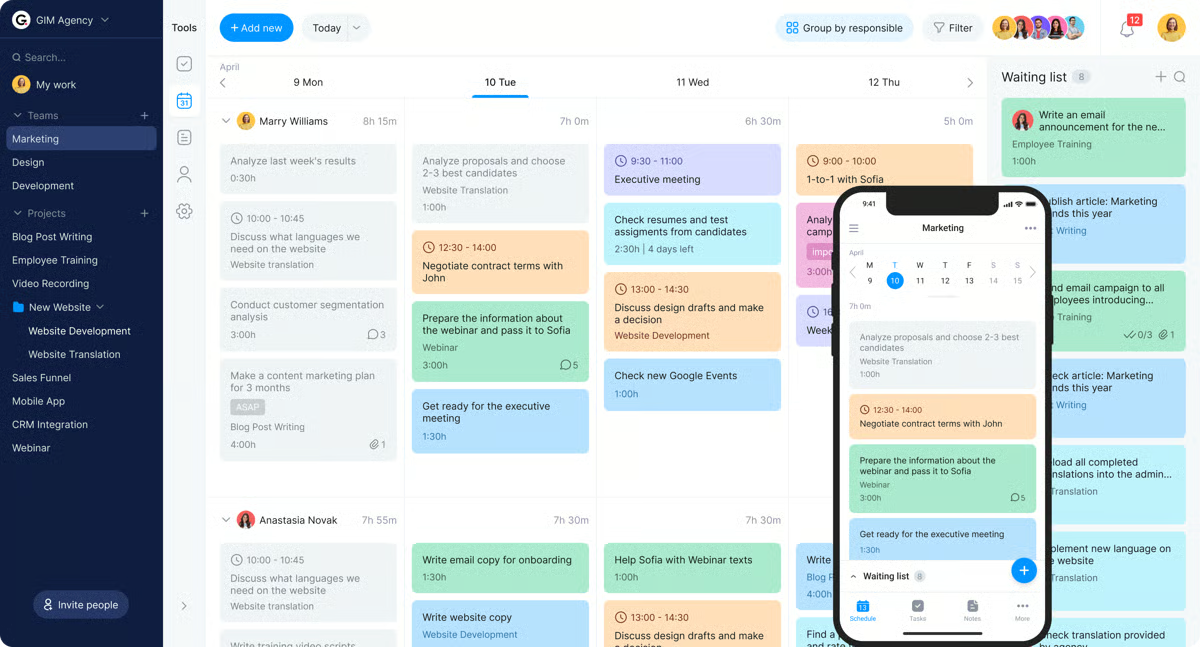
If G2 reviewers are telling us anything, it’s that the simplicity is a deliberate advantage, not a limitation. Teams describe the platform as including exactly the core features they need without complex configuration, and that clarity is what makes adoption stick for organizations moving away from informal task tracking through chat tools or email threads. This keeps adoption friction low while establishing a more structured workflow.
Real-time messaging is built into the workspace, allowing team members to communicate directly within the context of specific tasks rather than switching to a separate channel. G2 reviewers describe using the chat feature to send updates, share reminders, and coordinate with colleagues without leaving the platform. Keeping conversations tied to the relevant task helps small teams maintain alignment without fragmentation.
Some G2 reviewers note that certain operational features, such as exporting timesheets or a built-in timer for tracking task duration, are less prominent within Bordio. Although, the task planning, calendar integration, and scheduling structure that Bordio is built around work well and cover what most small teams need for day-to-day coordination.
Some reviewers also request additional visual customization, such as expanded color palettes or more folder color options. However, many users appreciate the clean, minimalist interface, which suits teams prioritizing clarity and fast task organization, while organizations seeking extensive visual customization may find the design intentionally simple. The core task and schedule structure remains easy to navigate and gives teams a clear view of what needs to happen and when, regardless of the visual options available.
While analyzing G2’s review data, I kept coming back to the same takeaway: Bordio makes project planning and team coordination accessible for small organizations that want structure without unnecessary complexity. With its single-board workspace, integrated calendar planning, and mobile accessibility, the platform helps teams organize work, track responsibilities, and maintain visibility across projects.
What I like about Bordio:
- The platform’s single-board workspace makes it easy to see tasks, schedules, and priorities in one place. This helps small teams organize daily work without constantly switching between different tools.
- Users highlight how simple the interface is to navigate, allowing teams to start assigning tasks and planning projects quickly. The reliable mobile apps also make it easy to check updates and manage work during meetings or while away from a desktop.
What G2 users like about Bordio:
“I like Bordio as a planning and productivity tool. The advantages that I would note: effective task management, calendar integration, joint planning, analytics and reporting, reminders and notifications, ease of use, mobile access.”
– Bordio review, Anete D.
What I dislike about Bordio:
- Timesheet export and built-in task timers are not prominently supported; teams focused on task planning and daily scheduling work well within the platform’s streamlined setup, and the core features it provides are well matched to small teams organizing work without detailed billing or time-reporting needs.
- Color and folder customization options are limited, which is most noticeable for teams that rely on visual differentiation to organize work across many concurrent projects. The platform’s core task and calendar structure remains clear and easy to navigate regardless of the available color options.
What G2 users dislike about Bordio:
“In reality, the problem for me is the mobile functionality when the signal strength is low. The offline functionality also lacks strength in that I continue to have a notebook to record the updates when I am offline.”
– Bordio review, Keith K.
8. Oracle Primavera: Best for large-scale capital project scheduling and controls
Oracle Primavera is a project planning and scheduling platform built for organizations managing large, complex projects where timeline control, resource management, and cost tracking need to operate from a single structured system.
The platform is widely used in construction, engineering, infrastructure, and capital project environments where critical path analysis, work breakdown structures, and earned value management are standard planning requirements. Its integration with Oracle’s broader enterprise suite, including ERP systems like SAP and Unifier, allows project data to connect with financial and operational systems across the organization.
Practitioners across construction and infrastructure describe Oracle Primavera as the tool they return to when timeline precision and financial accountability carry contractual weight. Reviewers describe it as the most dependable option at program scale, noting no alternative comes close where the focus is scope, time, cost, and risk management. That consistency across multi-year programs reflects a track record newer tools have not matched.
What I kept finding as I went through G2’s reviews is that project scheduling and critical path analysis are the capabilities reviewers return to most. Teams describe how the platform handles complex work breakdown structures, task dependencies, and milestone tracking across large multi-phase programs. Automatic critical path calculation saves planning engineers significant time during weekly updates. Oracle Primavera holds a G2 planning score of 89%, reflecting the structured scheduling depth reviewers consistently describe.
Here’s what G2 reviews actually showed me on reporting: output supports stakeholder communication directly on active programs. Gantt charts, KPI dashboards, and progress presentations are generated within the platform, allowing planning teams to update weekly progress and prepare client-facing reports without compiling data manually. A G2 priorities score of 88% reflects how consistently the platform surfaces critical milestones for stakeholders who need to act on them.
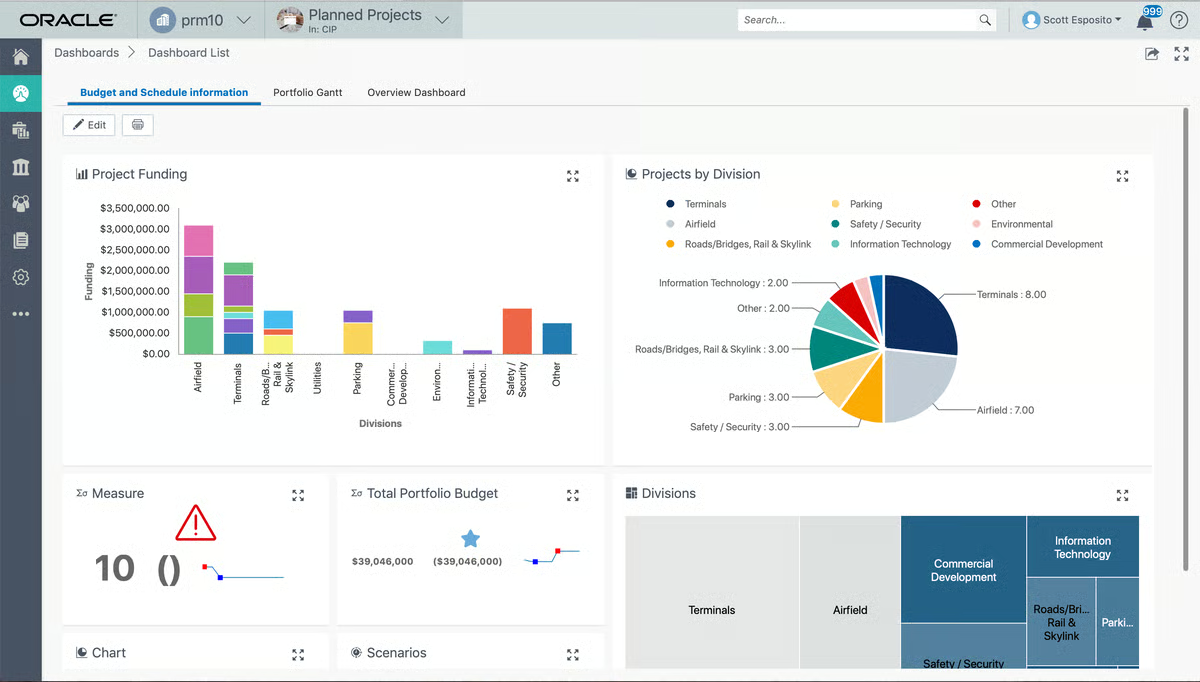
Integration with enterprise systems is a practical strength for organizations running Oracle Primavera alongside ERP platforms. Reviewers describe connecting the platform with SAP and Oracle Unifier to create end-to-end visibility from project scheduling through financial reporting, removing manual reconciliation when planning and cost data live in separate systems. This connectivity is a significant operational advantage, consistent with a performance score of 85% on G2.
Resource and manpower planning sit alongside scheduling inside the same workspace, allowing engineers to load resources, track utilization, and maintain forecasts without switching tools. Reviewers describe comparing current scenarios against baseline, identifying manpower constraints early, and generating KPI outputs that reflect both schedule progress and team capacity. A G2 dependencies score of 88% reflects how closely resource planning connects to task sequencing in practice.
One thing I couldn’t overlook in G2’s review data is how financial controls extend well beyond basic budget tracking, with reviewers describing support for bidding, contracts, change management, payment management, and fund tracking within the platform. For capital project environments where scope changes and delay analysis are routine, having these controls connected to the live schedule reduces coordination overhead. Reviewers also note the ability to compare estimated cost against cost-to-complete in real time.
G2 reviewers note that Oracle Primavera requires proper training before users can work in it effectively, and planners new to the platform face a real learning period with its logic and terminology. Though, this complexity also reflects the level of program control it is built to support. G2 practitioners who have used it on large capital programs tend to describe it as the benchmark everything else gets measured against.
Organizations deploying without adequate preparation often find adoption slower than expected, with the platform’s complexity making it harder to bring users up to speed quickly. Although, G2 reviews reflect that slower adoption rate tends to correlate less with the platform itself and more with how much runway teams give themselves before going live. Organizations that approach the rollout with the same rigour they bring to their programs tend to get up to speed without major disruption.
For organizations managing large capital programs, construction projects, and infrastructure initiatives where schedule control and earned value management are central to delivery, Oracle Primavera provides a structured and proven planning environment. It is best suited to teams with experienced project controls professionals who can configure and maintain the system to the standard the platform requires.
What I like about Oracle Primavera:
- Scheduling depth covers WBS, critical path calculation, look-ahead schedules, and recovery programs in one workspace, with teams reporting significant time saved on weekly progress reports and client-facing outputs.
- Cost and financial controls go beyond budget tracking to include bidding, contracts, change management, and payment management, all connected to the live schedule and eliminating reconciliation across separate systems.
What G2 users like about Oracle Primavera:
“I have been using and implementing Primavera for the last 10 years. So I can say this is best tool to manage and update schedule. User interface is so easy to use so anyone can learn within 2-3 days. It provides more functionality than scheduling like earned value management, resource management, role management. We have been integrated Primavera with Unifier and SAP ERP, it provides me complete end to end picture of project.”
– Oracle Primavera review, Oliver S.
What I dislike about Oracle Primavera:
- Oracle Primavera has a learning curve that hits hardest when onboarding planners from lighter scheduling tools. That said, G2 practitioners who have worked through it on large capital programs tend to describe it as the benchmark everything else gets measured against.
- Getting Oracle Primavera fully operational across a team takes more upfront preparation than most platforms require. Though, organizations that treat deployment planning with the same rigour they bring to their programs will find the transition significantly smoother.
What G2 users dislike about Oracle Primavera:
“I do feel it is overloaded with too much options while entering any details which makes time consuming compared to other competitive softwares available in the market.”
– Oracle Primavera review, Reenish M.
9. Celoxis: Best for advanced project portfolio and resource management
Celoxis brings project scheduling, budgeting, time tracking, resource capacity planning, and portfolio reporting into one workspace, designed for organizations where multiple projects are running in parallel, and the connections between timelines, people, and costs need to stay visible at all times. By centralizing project execution and portfolio analytics, Celoxis helps organizations coordinate complex initiatives while maintaining visibility into workload and margins.
While going through hundreds of G2 reviews, I noticed that Celoxis’s reporting and dashboard capabilities come up consistently as a key operational advantage. Reviewers note that customizable reports and real-time dashboards provide immediate insight into project health, team utilization, and financial performance, reflected in Celoxis’s visualizations score of 93% on G2. These capabilities help managers generate stakeholder updates quickly while identifying risks, bottlenecks, or delays before they escalate into larger project disruptions.
One thing I kept seeing across the Celoxis review data is that financial tracking in Celoxis is not a reporting add-on. It sits inside the same environment teams use for scheduling and task management every day. G2 feedback describes teams monitoring planned versus actual effort, tracking billable time, and evaluating project profitability without moving between systems. For service-based teams handling client projects, this helps maintain clearer visibility into margins and budget performance.
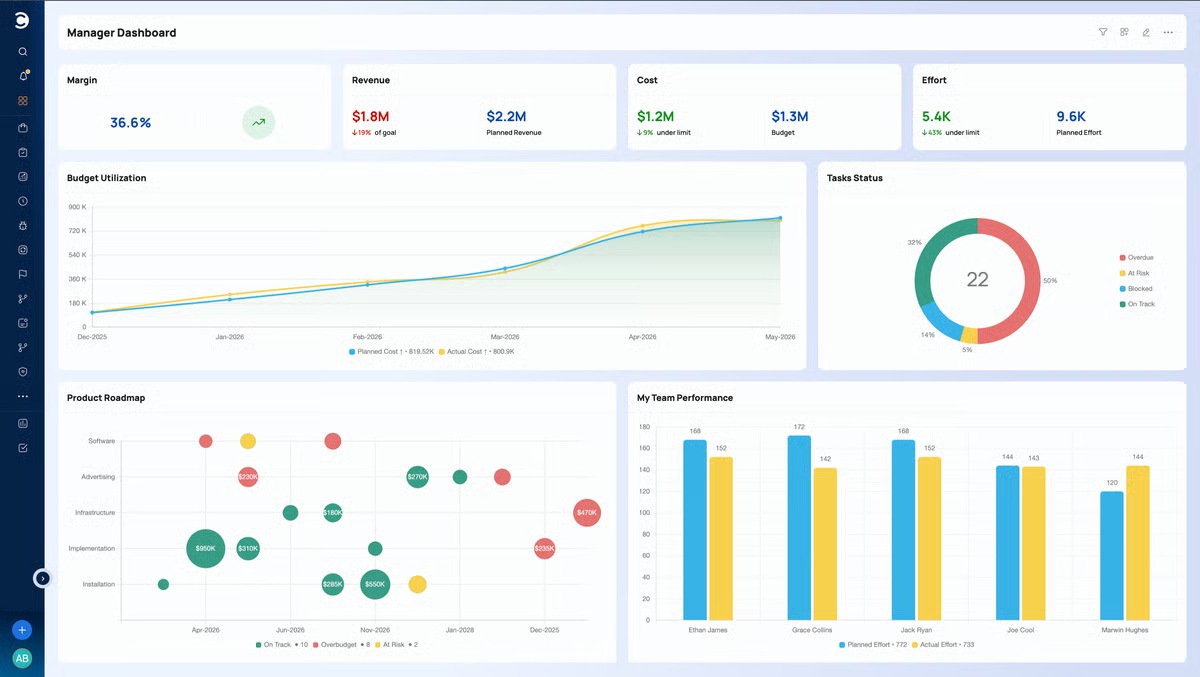
While analyzing G2’s reviews, I kept landing on the same insight around resource visibility. Teams describe the workload planning view as the feature that changed how they manage capacity, making it straightforward to identify overloaded employees, forecast staffing requirements, and redistribute work before delivery timelines are affected, consistent with an allocation score of 92% on G2. This visibility helps organizations balance team capacity while maintaining consistent delivery schedules across multiple projects.
Scheduling and dependency mapping are where the platform separates itself for teams running complex initiatives. Gantt charts, task dependencies, milestone tracking, and scenario planning help managers visualize timelines and understand how delays in one task affect downstream deliverables. These capabilities help teams anticipate scheduling impacts earlier and coordinate complex multi-phase projects more effectively.
Getting a platform this capable into productive use requires more than good documentation. Celoxis provides implementation support that helps teams configure scheduling, resource planning, and reporting workflows around their specific operational needs. Reviewers note that the setup experience is manageable given the platform’s depth, with assistance available at the points where configuration decisions have the greatest downstream impact.
Users note how project discussions, task updates, and team communication remain connected within the same workspace, reducing the need to move conversations across multiple tools. Features such as task boards, notifications, and tagging help teams keep context attached to project work rather than scattered across email or messaging platforms, improving alignment across teams managing shared projects.
G2 users flag one area worth noting: the interface has a lot going on, with many menus and configuration options that take time to navigate before the layout starts to feel familiar. This is a real friction point in the early weeks of using the platform. Yet, most reviewers who flag the interface complexity mention it in the context of their first few weeks, not their ongoing use. Past that point, the depth of what is available across scheduling, resourcing, and financial tracking makes the initial adjustment feel well worth it.
Reports generated in Celoxis often need additional formatting work before they are ready for executive or client-facing presentations. Teams putting together board updates or stakeholder reviews will typically spend time adjusting layouts and visual structure before the output meets presentation standards. Despite the time spent on formatting, G2 reviews praise the reports generated for being accurate. The information Celoxis surfaces is consistently described as reliable, and that is what stakeholders primarily rely on.
What I kept finding as I went through G2’s reviews is that Celoxis is well-suited to organizations coordinating multiple projects across teams, budgets, and timelines simultaneously. Centralizing planning, resource allocation, financial tracking, and reporting within one platform helps teams maintain visibility into project health, balance workloads, and manage complex portfolios with greater operational clarity.
What I like about Celoxis:
- Provides a unified environment for managing tasks, timelines, budgets, and timesheets, allowing teams to oversee project progress and financial performance without switching between multiple tools.
- Strong reporting and visualization capabilities give managers clear insight into project health, team capacity, and profitability through customizable dashboards and detailed reports.
What G2 users like about Celoxis:
“I like how everything related to a project sits in one connected space. Tasks budgets timesheets and client information are linked so I do not have to jump between different tools. The dashboards give me a clear picture of workload and profitability which helps me take decisions faster.”
– Celoxis review, Marcus F.
What I dislike about Celoxis:
- Celoxis has a busy interface that takes time to navigate comfortably, particularly in the first few weeks of use. Though, I must say that the G2 reviewers who flag this also tend to describe it as an early-stage challenge rather than something that follows them into day-to-day work.
- Reports frequently need layout adjustments before they are ready for client or board-level audiences. That said, the data Celoxis captures holds up under scrutiny, and that usually tends to be what determines whether a stakeholder meeting goes well.
What G2 users dislike about Celoxis:
“The system requires thoughtful setup to get the most value out of custom fields and workflows. Some reports need manual refinement to match executive presentation standards.”
– Celoxis review, Florian B.
10. ServiceNow Strategic Portfolio Management: Best for enterprise strategic portfolio governance
ServiceNow Strategic Portfolio Management is built for organizations that need to connect high-level business strategy directly to the work being planned, funded, and delivered across teams.
The platform’s defining capability is the structured connection between what an organization says its strategy is and what it is actually funding and delivering. Reviewers consistently describe how leadership gains a data-driven view of priorities, costs, risks, and outcomes in one place, making it easier to justify investment decisions, cut low-value initiatives, and redirect resources toward work that supports business goals.
While analyzing G2’s review data, I kept coming back to portfolio visibility as one of the most recurring themes, with teams describing a single organized place to track every task, dependency, and milestone. Real-time progress visibility means nothing needs to be manually compiled before a status meeting. For enterprise PMOs managing large volumes of concurrent work, this consolidated view significantly reduces portfolio reporting overhead.
Dashboards, reports, and visualizations are highlighted as a core operational strength, with a visualizations score of 86% on G2. Teams describe a wide variety of templates, dashboard configurations, and view options that allow information to be presented differently depending on the audience, from project teams needing task-level detail to executives reviewing portfolio performance against strategic objectives.
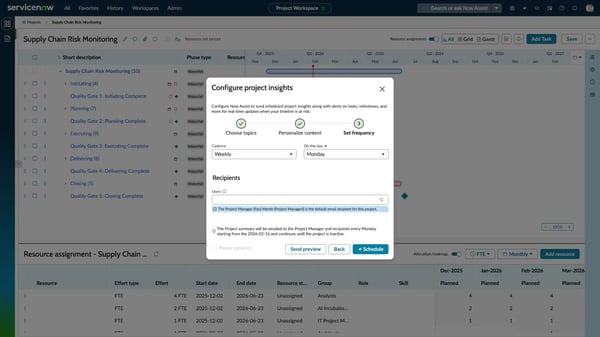
Integration with other ServiceNow modules and enterprise systems is where the platform earns particular strength for organizations already in the ServiceNow ecosystem. Reviewers describe seamless connections with ITSM, HR, and operational management modules that create a unified view of organizational activity, consistent with a planning score of 88% on G2. This removes data silos that form when portfolio management operates separately from day-to-day operations.
Going through G2 reviews, I kept running into the same description of how the platform handles end-to-end portfolio workflow from idea intake through demand management, project execution, and portfolio-level reporting as a connected journey. Reviewers describe moving planning details, cost and benefit data, resource plans, risks, and business cases from one stage to the next without re-entering information. For organizations managing competing project requests across departments, this makes prioritization more transparent.
One thing I couldn’t overlook in G2’s review data is how consistently configurability comes up, with teams describing how dashboards, workflows, approval processes, and field structures can all be shaped to match internal governance models. The roles and permissions feature receives specific attention for its ability to apply granular access controls so every team member sees exactly what is relevant to their function. This suits organizations where compliance, accountability, and controlled visibility are operational requirements.
G2 reviewers do point to a few trade-offs. The platform requires significant upfront configuration effort, and reviewers describe a learning period before the system delivers full value. That said, teams investing in proper configuration consistently justify the effort. Core portfolio tracking and reporting operate reliably for organizations that treat implementation as a governance initiative.
As more teams configure specialized workflows, dashboards, and portfolio structures, maintaining consistency across the environment becomes increasingly difficult. G2 reviewers describe this as a governance challenge that compounds as the platform scales, with operational complexity growing when customization is not actively managed. The organizations that describe this most tend to be the ones running the largest, most customized environments according to the G2 Data. That said, the organizations that invest in active governance consistently describe the platform as one that holds its structure well at enterprise scale.
Overall, ServiceNow Strategic Portfolio Management suits organizations that are serious about connecting strategy to execution at scale. The platform works best when implementation is treated as a governance initiative rather than a software rollout. For enterprise PMOs, transformation programs, and organizations managing large, interdependent portfolios, it provides the structural backbone that keeps strategic planning from drifting away from what is actually being delivered.
What I like about ServiceNow Strategic Portfolio Management:
- The platform connects strategy directly to execution by linking business goals to the projects being funded and delivered, giving leadership a transparent, data-driven view of portfolio priorities, costs, and outcomes in one place.
- Highly configurable dashboards, granular role-based permissions, and deep integration with the broader ServiceNow ecosystem make it well-suited to enterprise environments where governance, accountability, and cross-functional visibility are core operational requirements.
What G2 users like about ServiceNow Strategic Portfolio Management:
“I like most about ServiceNow Strategic Portfolio Management is the end-to-end visibility it provides across demands, projects, resources, and financials in a single platform. It makes it much easier to track progress, identify risks early, and make data-driven decisions. I also appreciate how well it integrates with other ServiceNow modules, which helps streamline workflows and reduces manual effort. Another strong point is the flexibility to customize processes, dashboards, and reporting based on business needs while still maintaining governance and standardization.”
– ServiceNow Strategic Portfolio Management review, Akshit G.
What I dislike about ServiceNow Strategic Portfolio Management:
- Initial setup and configuration require significant planning and governance investment before the platform delivers full value. Organizations without a dedicated implementation resource should factor this into their deployment timeline. ServiceNow’s partner ecosystem and documentation are consistently described as a reliable resource for navigating that process.
- Maintaining consistency across a heavily customized ServiceNow environment requires active governance effort, and that friction grows as more teams build out their own configurations. This tends to surface in the largest deployments, and organizations that invest in that oversight consistently describe the platform as one that holds its structure well at scale.
What G2 users dislike about ServiceNow Strategic Portfolio Management:
“It’s complex and requires a lot of time to understand and get used to. Basically, new users need proper training, which can sometimes be difficult for the organisation to provide, and as a result it often gets skipped and the tool doesn’t end up being used.”
– ServiceNow Strategic Portfolio Management review, Apoorva S.
Comparison of the best project and portfolio management software
|
Software |
G2 rating |
Free plan |
Ideal for |
|
Smartsheet |
4.4 / 5 |
Yes |
Enterprises managing large projects, workflows, and portfolio reporting |
|
monday Work Management |
4.7 / 5 |
Yes |
Teams managing projects, workflows, and collaboration with visual boards |
|
ClickUp |
4.6 / 5 |
Yes |
Organizations needing an all-in-one platform for tasks, docs, and projects |
|
Hive |
4.6 / 5 |
Yes |
Teams collaborating on projects, tasks, and workflows in one workspace |
|
Quickbase |
4.5 / 5 |
Yes |
Businesses building custom apps to manage workflows and projects |
|
Octave Sequence Enterprise (EcoSys) |
4.1 / 5 |
Yes |
Enterprises managing capital project portfolios, costs, and performance |
|
Bordio |
5.0 / 5 |
Yes |
Small teams organizing projects, tasks, and daily work schedules |
|
Oracle Primavera |
4.4 / 5 |
No |
Enterprises managing large capital project schedules, critical path analysis, and cost controls |
|
Celoxis |
4.6 / 5 |
Yes |
Teams managing complex projects with resource planning and reporting |
|
ServiceNow Strategic Portfolio Management |
4.1 / 5 |
No |
Enterprises connecting business strategy to funded project delivery and portfolio governance |
*These project and portfolio management software solutions are top-rated in their category based on aggregated user feedback reflected in G2’s Winter 2026 Grid® evaluations.
Best project and portfolio management software: Frequently asked questions (FAQs)
Got more questions? G2 has the answers!
Q1. What is the top-rated PPM platform for enterprises?
From what I found in G2 reviews, Celoxis and Smartsheet come up most consistently for enterprise PPM. Celoxis is the stronger fit when financial and resource visibility across a complex portfolio is the priority. Smartsheet works better when large teams need spreadsheet-familiar planning with flexible dashboards they can build without specialist knowledge.
Q2. What is the most affordable PPM software for SMBs?
ClickUp and Bordio are the two names that come up most in G2 feedback for cost-efficient options, and they serve slightly different needs. ClickUp suits teams that want automation and workflow depth without enterprise pricing. Bordio is the faster path when simplicity is the priority — a clean single-board setup that works immediately with minimal configuration.
Q3. Which tool supports both agile and waterfall project methodologies?
ClickUp handles hybrid methodology more fluidly than most tools at its price point, supporting agile boards, Gantt timelines, and task dependencies in the same workspace. OnePlan takes a more deliberate portfolio-level approach, allowing organizations to manage agile and waterfall delivery under the same strategic framework. If governance across mixed methodologies matters as much as execution flexibility, OnePlan is worth evaluating alongside ClickUp.
Q4. Which PPM platform offers the best portfolio visibility?
Celoxis comes out ahead when visibility needs to span tasks, budgets, timelines, and resource capacity simultaneously. Smartsheet earns strong marks for dashboard flexibility and a spreadsheet-style interface that non-specialists can work from confidently. What I found in G2 reviews is that the right choice depends on whether your visibility need is primarily financial and operational, or reporting and tracking focused.
Q5. What platform integrates PPM with resource management tools?
Celoxis goes deeper on capacity planning, with a workload view that surfaces overloaded team members and forecasts staffing requirements across concurrent projects. Smartsheet handles resource visibility well at the dashboard level. For teams where resource planning is a daily operational challenge, Celoxis tends to be the more purpose-built option.
Q6. What platform provides analytics on project portfolio performance?
Celoxis has strong reporting across timelines, budgets, and project progress, and its dashboards are one of the most consistently praised features in G2 reviews. OnePlan goes further for organizations that need portfolio performance data connected to strategic objectives rather than just delivery metrics. If your analytics need is primarily operational, Celoxis covers it well. If leadership needs strategic alignment visibility alongside delivery data, OnePlan is worth a closer look.
Q7. Which vendor offers advanced risk management in PPM tools?
EcoSys is purpose-built for the kind of risk tracking large capital and infrastructure programs require, with financial risk, schedule risk, and earned value analysis at its core. Celoxis covers risk monitoring as part of a broader PPM suite, which works well for teams that need early warning signals without running a full project controls operation. For most multi-project environments, Celoxis handles risk visibility without the implementation weight EcoSys carries.
Q8. What is the best PPM solution for enterprise project governance?
OnePlan and Smartsheet address governance from different angles. OnePlan is built around connecting strategic planning to execution through portfolio roadmaps and governance frameworks. Smartsheet takes a workflow-driven approach, with automation rules, approval flows, and standardized reporting that help large teams maintain process consistency. For strategic alignment and portfolio oversight, OnePlan is the more direct fit. For process consistency and reporting standardization across departments, Smartsheet handles it well.
Q9. Which solution supports multi-project financial tracking?
Scoro suits professional services firms where project profitability and client billing are daily operational concerns. Celoxis integrates financial tracking directly into project timelines and resource planning, making it the stronger fit for PMOs monitoring planned versus actual costs across a large portfolio. If your need is tied to client billing and margin visibility, Scoro is the more specialized option. For financial oversight embedded inside a full PPM environment, Celoxis is the more purpose-built choice.
Q10. Which vendor provides AI-powered project prioritization?
ClickUp’s AI is more directly embedded into task and workflow management, helping teams summarize meeting notes, suggest next actions, and manage workloads without manual triage. Smartsheet’s AI features lean toward automation and reporting, surfacing priorities across portfolios through structured dashboards. For task-level AI that reduces daily administrative overhead, ClickUp is the more direct fit. For AI-assisted insights across portfolio reporting, Smartsheet is the stronger option.
From project clutter to portfolio clarity
The tools in this list cover a wide range of organizational needs, from small teams looking for straightforward scheduling to enterprise PMOs managing complex, multi-year programs. What they share is the ability to bring structure to work that would otherwise drift.
Pricing, integrations, and feature sets will continue to evolve, and several platforms here are investing heavily in AI-assisted planning and automation capabilities that will change what day-to-day portfolio management looks like over the next few years.
It’s worth revisiting your shortlist periodically, not just at the point of initial selection.
Looking through both the features and the tradeoffs, ask yourself which software fits how your organization actually operates, and whether your team will adopt it consistently enough to get the value out. A focused pilot on one workflow tells you more than a broad feature comparison ever will.
Want to explore beyond project and portfolio management software? Discover G2’s best project management software products for project planning and team collaboration tools.