• About Us
  • Disclaimer
  • Contact Us
  • Privacy Policy
Wednesday, July 8, 2026
mGrowTech
No Result
View All Result
  • Technology And Software
    • Account Based Marketing
    • Channel Marketing
    • Marketing Automation
      • Al, Analytics and Automation
      • Ad Management
  • Digital Marketing
    • Social Media Management
    • Google Marketing
  • Direct Marketing
    • Brand Management
    • Marketing Attribution and Consulting
  • Mobile Marketing
  • Event Management
  • PR Solutions
  • Technology And Software
    • Account Based Marketing
    • Channel Marketing
    • Marketing Automation
      • Al, Analytics and Automation
      • Ad Management
  • Digital Marketing
    • Social Media Management
    • Google Marketing
  • Direct Marketing
    • Brand Management
    • Marketing Attribution and Consulting
  • Mobile Marketing
  • Event Management
  • PR Solutions
No Result
View All Result
mGrowTech
No Result
View All Result
Home Marketing Automation

What They Are + How to Get Buffer Capabilities

Josh by Josh
July 8, 2026
in Marketing Automation
0
What They Are + How to Get Buffer Capabilities

READ ALSO

comment informer vos contacts du tracking email ?

Le lead scoring, une technique qui met tous les commerciaux d’accord


You know how to schedule a week of posts in one sitting, keep up with comments across five channels, and ‘B2B, but make it fun’ is practically your middle name. Same!

The nod to ‘social media management’ on our LinkedIn profiles doesn’t quite cover all that, does it?

Allow me to introduce you to LinkedIn’s Connected Apps. As of June 2026, you can connect Buffer to your LinkedIn profile and have the work you actually do show up as a capability — validated by Buffer, based on your real activity.

Here’s what that means, which capabilities you can add, and exactly how to put one on your profile.

What are LinkedIn Connected Apps?

LinkedIn’s Connected Apps are LinkedIn-approved tools you can connect to your profile, turning your real product usage into credible, visible expertise.

You may have seen the idea already — perhaps you’ve spotted how Duolingo users can add their score to their profile? It’s exactly like that. And now a host of other tools (including Buffer!) are one of those connected apps.

When you link your LinkedIn profile to Buffer, the work you’re already doing (scheduling, replying, publishing, and building with the API) can appear on your profile as a capability statement like “Schedules and publishes posts across multiple social media accounts in Buffer.”

You don’t need to apply or submit anything for approval to get yours. All you need to do is toggle the feature on in your Buffer settings, and Buffer will flesh it out for you. Pretty cool, right?

How Buffer Capabilities work

The whole thing runs on real activity. Here’s the short version:

  1. You use Buffer the way you normally would — scheduling posts, replying to comments, publishing across your channels.
  2. Buffer recognizes it. When your Buffer usage matches a capability (say, publishing to two or more channels), Buffer picks that up and validates it.
  3. You choose to display it. Nothing appears on your profile automatically. You opt in and pick the capability you want to show.
  4. It shows up on LinkedIn, attributed to Buffer, with a link out so anyone viewing your profile can see what it represents.

This works on personal LinkedIn profiles only, not pages, and at launch, you can display one capability at a time. (More on the why behind that below.)

The capabilities you can add right now

Buffer is starting with four capabilities. Each maps to a specific kind of work in the product, so the only way to add one is to actually do the thing.

  • Schedules and publishes posts across multiple social media accounts in Buffer — based on publishing posts to two or more connected channels.
  • Responds to comments and tracks mentions across multiple social channels in Buffer — based on engaging with comments, replies, and mentions across your connected channels.
  • Publishes social content across Instagram and LinkedIn in Buffer for B2B and consumer audiences — based on publishing to both Instagram and LinkedIn through Buffer.
  • Uses the Buffer API to build applications that automate social publishing and scheduling workflows — based on building an API client or shipping a Buffer integration.

The first three will fit most people managing social media day to day. The fourth is for the developers and vibecoders in the community — if you’ve built on the Buffer API, you can feature this on your profile, too!

💡

More are on the way! Buffer has defined a wider set of capabilities covering things like analytics, automation with tools such as Zapier and Make, and managing multi-channel campaigns for a team or client portfolio.

How to add a Buffer capability to your LinkedIn profile

This will only take a few minutes:

Step 1: Connect LinkedIn OR refresh your connection

  1. If you haven’t already, connect your LinkedIn profile to Buffer by clicking New > Channel > LinkedIn and signing in.
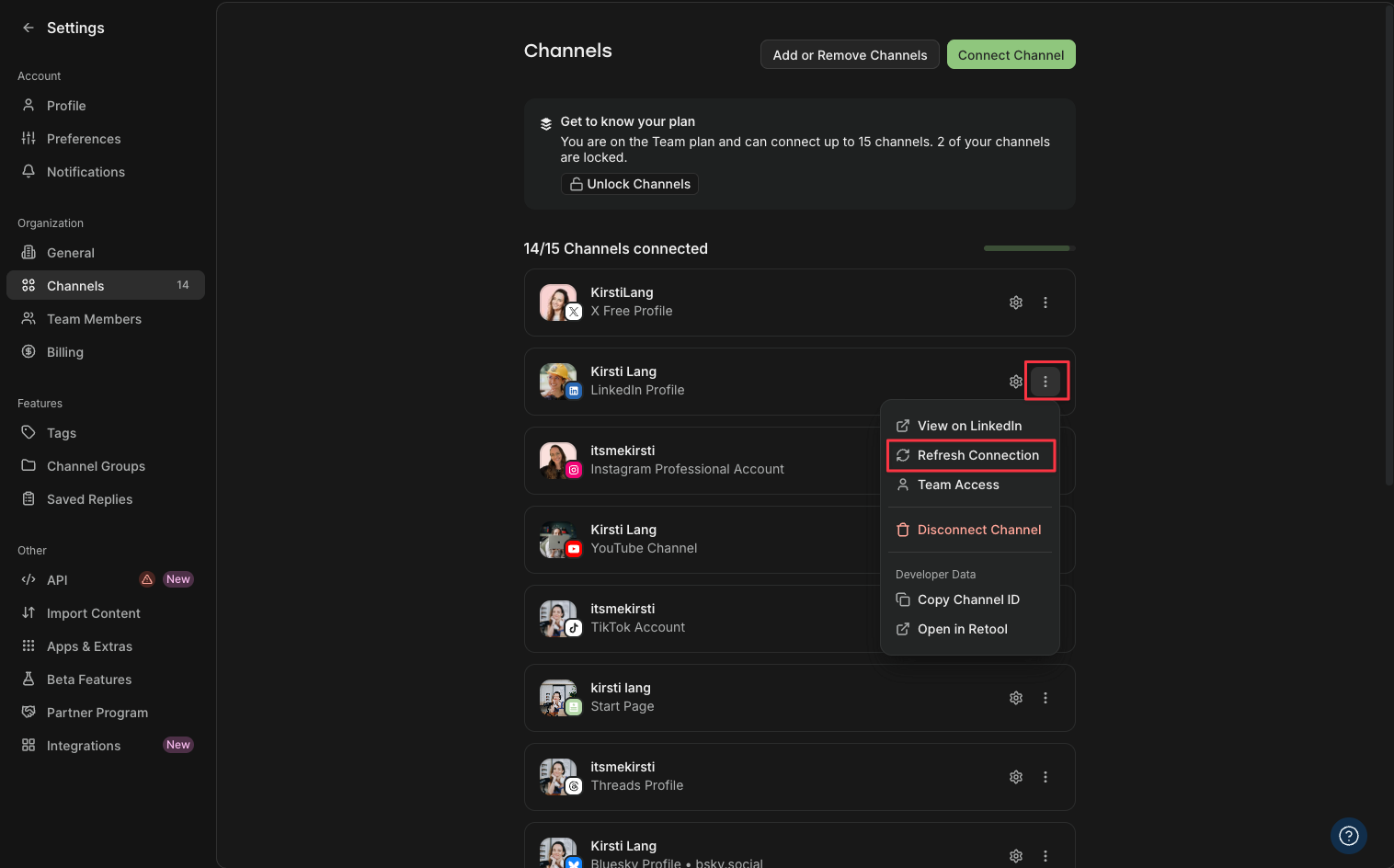
  2. If you’ve already got a LinkedIn profile connected, you’ll need to refresh the connection to unlock the feature. To do that, click on your name on the bottom left > Channels. From there, click on the gear icon next to your LinkedIn Profile (not page) and click Refresh Connection.
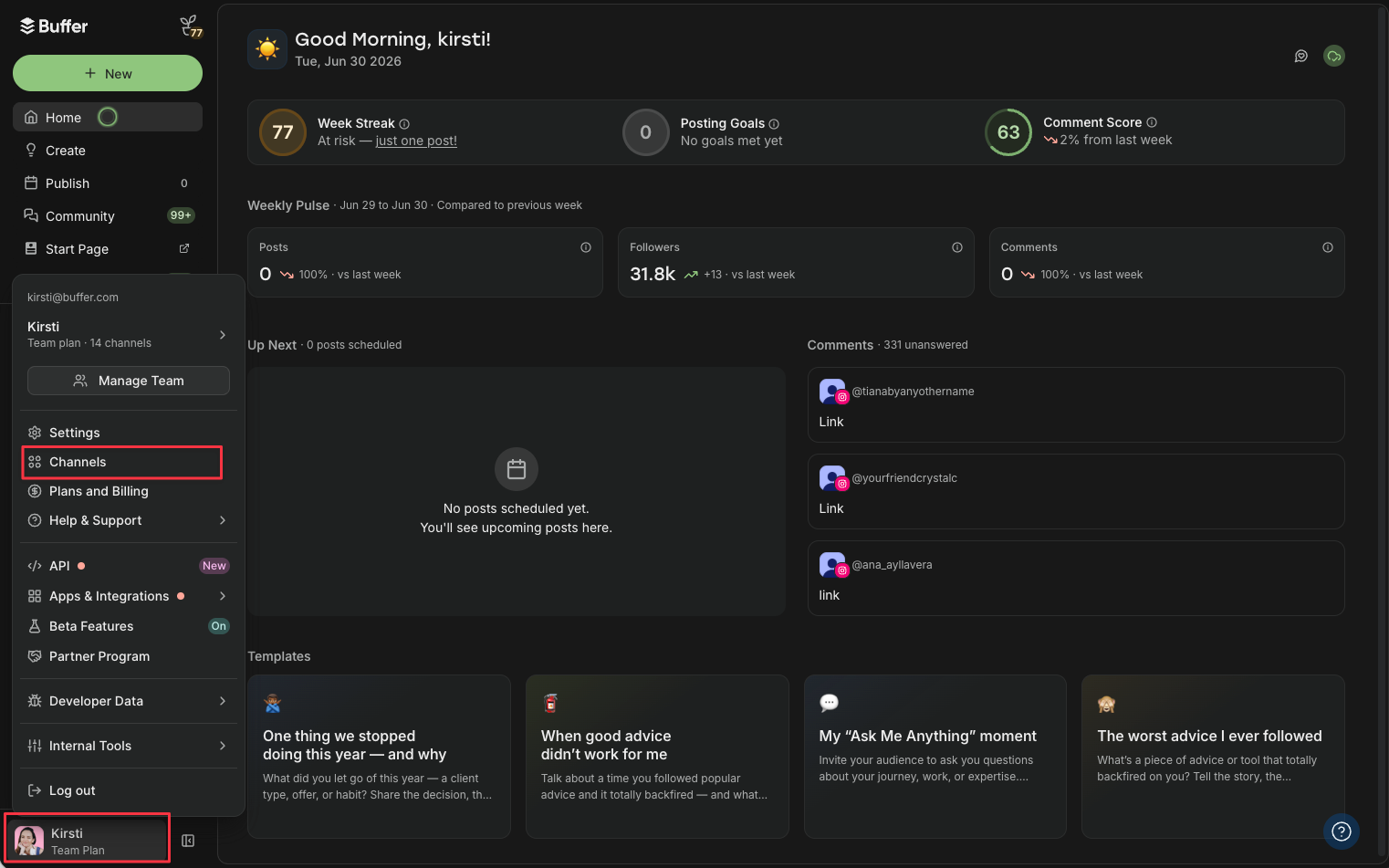
LinkedIn connected apps setup starts in Buffer's Home dashboard, with the account menu open and Channels highlighted
LinkedIn connected apps step in Buffer's Channels settings, with the LinkedIn Profile three-dot menu open and "Refresh Connection" highlighted

Step 2: Turn on capabilities

  1. Click on LinkedIn from your channels list on the left, then the gear icon at the top of the window (near your name).
  2. If you’ve already been using LinkedIn with Buffer for a while, you may already have some capabilities to choose from. Select the one you want to display on your LinkedIn Profile
  3. Check your LinkedIn profile. The capability appears, attributed to Buffer, with a “Learn more” link for anyone who wants the details.

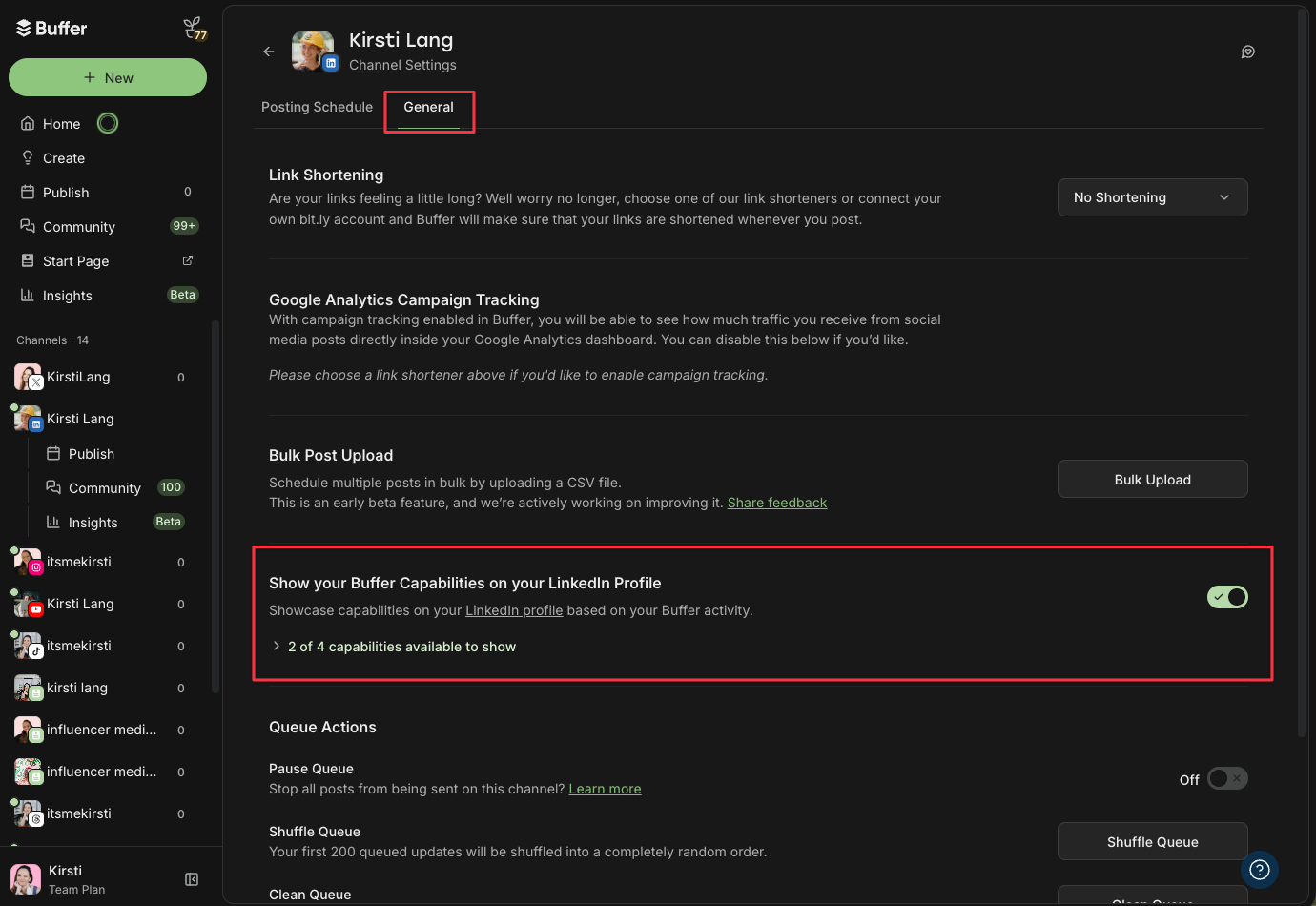
Click on General and scroll down to Show your Buffer Capabilities on LinkedIn. Toggle the button on.
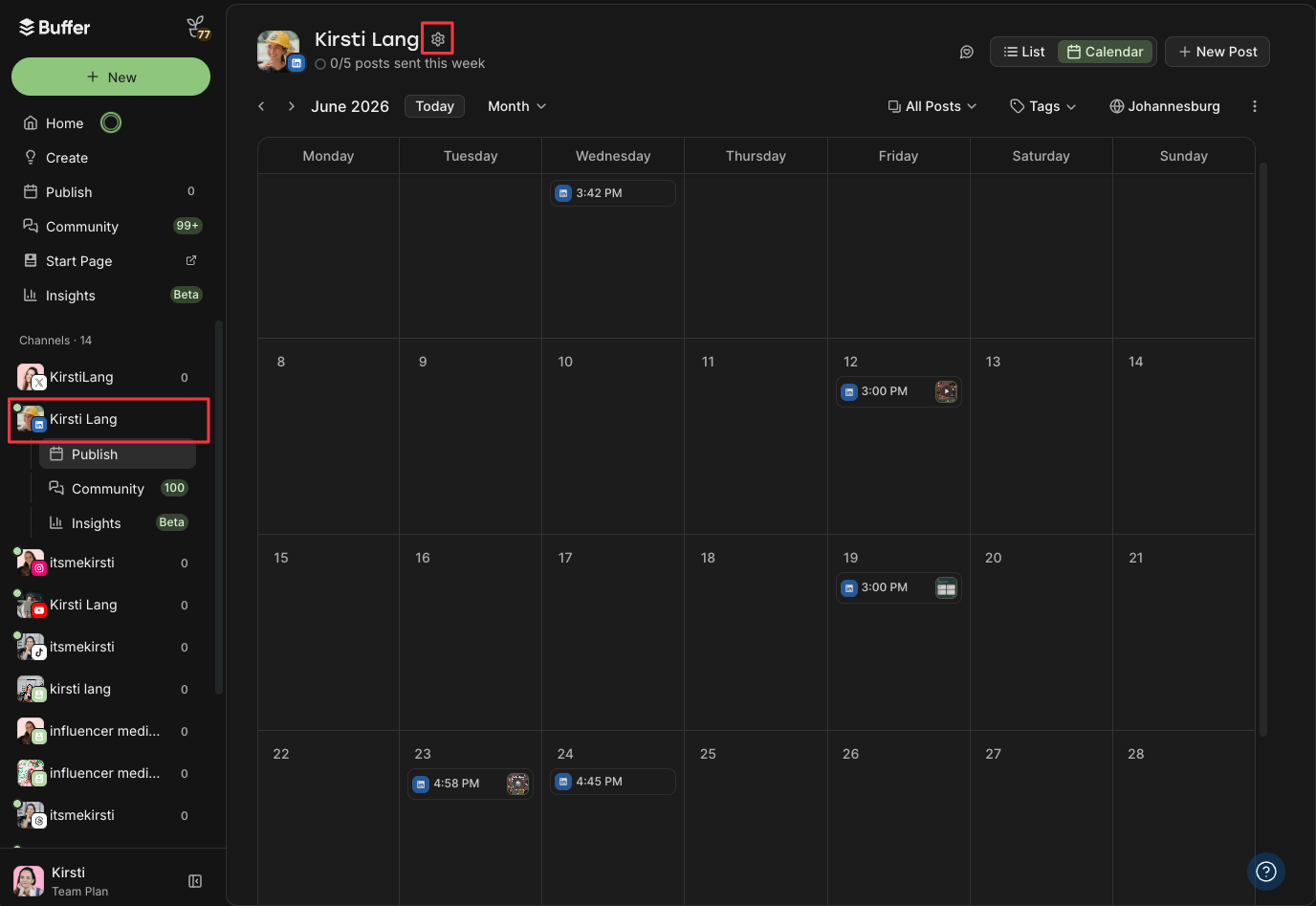
LinkedIn connected apps setup in Buffer: the LinkedIn channel's publishing calendar for June 2026, with the channel settings gear icon highlighted
LinkedIn connected apps toggle in Buffer channel settings — "Show your Buffer Capabilities on your LinkedIn Profile" switched on, with 2 of 4 capabilities available to show

Step 3: No capabilities showing yet? Give it time!

Keep using LinkedIn with Buffer to trigger your capabilities! If you have been doing this for a while and you don’t see anything straight away, give it a day and make sure you’ve refreshed your LinkedIn connection in Buffer.

Here’s how it looks on my profile:
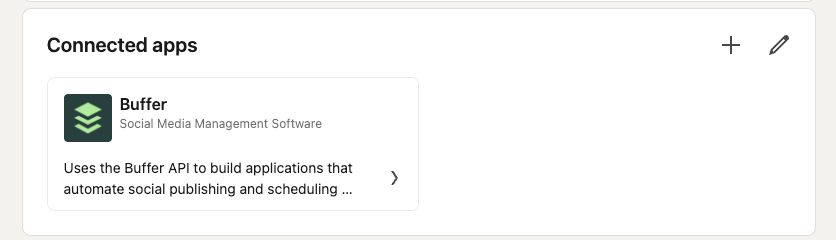
LinkedIn connected apps section on a profile showing the Buffer card, labelled Social Media Management Software, with a capability about using the Buffer API to automate social publishing

Why this matters for your profile

Social media work can sometimes feel a little intangible. You can grow an account into the thousands or run a multi-workflow content engine for a dozen clients, and still have very little on paper. A capability validated through a connected app is something you can actually point to when you’re talking to a new client, applying for a role, or pitching for a project.

It pairs well with the profile work you’re probably already doing. If you’re optimizing your LinkedIn profile to stand out or building a personal brand on the platform, a validated capability adds a layer of proof that endorsements never could.

And for the freelancers and consultants in the community, it’s one more credible signal when you’re trying to source new clients on LinkedIn.

Similarly, it’s super handy for hiring managers looking for experience in a specific tool.

Ready to add yours? Connect your LinkedIn profile to Buffer and turn the work you’re already doing into proof on your profile.


More LinkedIn

Kirsti Lang

Senior Content Writer @ Buffer

Kirsti is a journalist-turned-marketer and creator who’s built an audience on TikTok, Instagram, and LinkedIn. She writes for Buffer and hosts YouTube videos, sharing what actually works on social — backed by data and real-world experience.

Read more posts by Kirsti Lang


Source_link

Related Posts

comment informer vos contacts du tracking email ?
Marketing Automation

comment informer vos contacts du tracking email ?

July 7, 2026
Le lead scoring, une technique qui met tous les commerciaux d’accord
Marketing Automation

Le lead scoring, une technique qui met tous les commerciaux d’accord

July 6, 2026
6 Ways to Get Customers to Join Your Loyalty Program
Marketing Automation

6 Ways to Get Customers to Join Your Loyalty Program

July 3, 2026
3 Practical Unified CX Lessons for Modern Leaders
Marketing Automation

3 Practical Unified CX Lessons for Modern Leaders

July 2, 2026
Why Hiding Elephant Added Social Publishing Without Building It From Scratch
Marketing Automation

Why Hiding Elephant Added Social Publishing Without Building It From Scratch

July 2, 2026
Zeta Global to Participate in Upcoming Investor Event to Unveil Evolving AI Strategy
Marketing Automation

Zeta Global to Participate in Upcoming Investor Event to Unveil Evolving AI Strategy

July 2, 2026
Next Post
A survey of 600+ US business professionals

A survey of 600+ US business professionals

POPULAR NEWS

Trump ends trade talks with Canada over a digital services tax

Trump ends trade talks with Canada over a digital services tax

June 28, 2025
15 Trending Songs on TikTok in 2025 (+ How to Use Them)

15 Trending Songs on TikTok in 2025 (+ How to Use Them)

June 18, 2025
Communication Effectiveness Skills For Business Leaders

Communication Effectiveness Skills For Business Leaders

June 10, 2025
App Development Cost in Singapore: Pricing Breakdown & Insights

App Development Cost in Singapore: Pricing Breakdown & Insights

June 22, 2025
Comparing the Top 7 Large Language Models LLMs/Systems for Coding in 2025

Comparing the Top 7 Large Language Models LLMs/Systems for Coding in 2025

November 4, 2025

EDITOR'S PICK

How to create a social media portfolio (free template + examples)

How to create a social media portfolio (free template + examples)

August 4, 2025
The Future of Pet Marketing: Key Trends Emerging from Global Pet Expo and The Pet Summit 

The Future of Pet Marketing: Key Trends Emerging from Global Pet Expo and The Pet Summit 

April 2, 2026
What It Is, How It Works, and What You Need to Know

What It Is, How It Works, and What You Need to Know

August 7, 2025
My Evaluation of 7 Best Accounts Receivable Software in 2025

My Evaluation of 7 Best Accounts Receivable Software in 2025

September 16, 2025

About

We bring you the best Premium WordPress Themes that perfect for news, magazine, personal blog, etc. Check our landing page for details.

Follow us

Categories

  • Account Based Marketing
  • Ad Management
  • Al, Analytics and Automation
  • Brand Management
  • Channel Marketing
  • Digital Marketing
  • Direct Marketing
  • Event Management
  • Google Marketing
  • Marketing Attribution and Consulting
  • Marketing Automation
  • Mobile Marketing
  • PR Solutions
  • Social Media Management
  • Technology And Software
  • Uncategorized

Recent Posts

  • The whole Pixel line could get more expensive this year
  • A survey of 600+ US business professionals
  • What They Are + How to Get Buffer Capabilities
  • Andromeda, Lattice & GEM Explained
  • About Us
  • Disclaimer
  • Contact Us
  • Privacy Policy
No Result
View All Result
  • Technology And Software
    • Account Based Marketing
    • Channel Marketing
    • Marketing Automation
      • Al, Analytics and Automation
      • Ad Management
  • Digital Marketing
    • Social Media Management
    • Google Marketing
  • Direct Marketing
    • Brand Management
    • Marketing Attribution and Consulting
  • Mobile Marketing
  • Event Management
  • PR Solutions