[ad_1]
Reading Time: 19 minutes
Most Shopify stores put a lot of effort into getting the sale, then barely say anything after checkout. That’s usually where a solid Shopify post-purchase email strategy starts to matter.
Customers still pay attention once they buy. They open shipping emails, track order updates, and, in most cases, decide pretty quickly whether the brand feels reliable enough to come back to later.
Still, many brands waste that window with generic confirmations and follow-ups that nobody remembers.
A good Shopify automated email after purchase can bring repeat orders, cut down support questions, and keep the connection going without turning every email into a sales pitch. The difficult part is figuring out what to send, when to send it, and how to make people care enough to open the next message. That’s what this guide covers, including timing, setup, and examples that tend to work in real situations. Let’s dive in!
Key Takeaways
|

What are Shopify Post-Purchase Emails?
A Shopify post-purchase email is any email customers receive from a Shopify store after placing an order. These emails usually include order confirmations, shipping updates, delivery alerts, review requests, product usage tips, and sometimes cross-sell follow-ups based on what the customer ordered.
The purpose goes beyond simply checking in after a purchase. Good post-purchase emails keep customers informed, answer common questions before they turn into support tickets, and help the brand stay familiar after checkout. In many cases, they also encourage repeat purchases naturally, without making every email feel like another B2C sales follow-up email.
Why Do Post-Purchase Emails Matter for Shopify Stores?
Most Shopify stores spend a huge amount of time trying to get customers to click ‘Buy Now’. But what happens after checkout usually decides whether that customer buys again or disappears after a single order. In fact, according to Forbes, repeat customers spend 67% more than new customers, which is exactly why what happens after the first purchase matters so much.
That’s where a good Shopify post-purchase email flow starts becoming important. These emails aren’t limited to operational updates. They shape trust, retention, repeat purchases, and the overall post-purchase customer experience. And a lot of it starts with simple things many brands still overlook.
- Order confirmation reduces buyer uncertainty: Right after checkout, customers want reassurance that everything worked properly. This is especially true for first-time buyers. A clear confirmation email removes that uncertainty fast and makes the store feel more dependable from the start.
- Shipping updates keep customers engaged: Once an order is placed, most customers immediately begin checking for delivery updates. They open tracking links, shipping notifications, and estimated arrival emails more often than many brands realize. Keeping these emails timely and easy to understand usually reduces frustration and cuts down support tickets, too.
- Post-purchase emails can increase repeat orders: A well-timed Shopify automated email after purchase can bring customers back without feeling overly promotional. For example, suggesting refill products, matching items, or useful add-ons after delivery tends to work better because the product recommendation actually connects to something the customer already purchased.
- Product education builds confidence: Some products naturally need a little guidance after delivery. Skincare, electronics, supplements, and even clothing sizes, in some cases. Simple follow-up emails with setup instructions, usage tips, or care guidance help customers feel more comfortable with the purchase instead of figuring everything out alone.
- Review requests help build trust: Most customers aren’t going to leave a review unless they are asked at the right time. A thoughtful follow-up email can increase reviews quite a bit, which later helps future customers trust the store more quickly.
- Personalized emails feel more relevant: Customers recognize generic email sequences almost immediately. That’s why many Ecommerce brands now focus more on Shopify email personalization strategies that make follow-up emails feel connected to the customer instead of looking mass-sent.
9 Shopify Post-Purchase Emails You Should Send
A strong Shopify post-purchase email strategy is usually not about sending more automated email marketing campaigns to customers. It comes down to sending the right message at the right time. Some emails reassure customers after checkout. Some help reduce support questions before they happen. Others slowly bring customers back for another purchase without making every message feel promotional.
Timing matters quite a bit here. A customer who placed an order 10 minutes ago expects very different communication compared to someone who received their package 2 weeks earlier.
Here’s a simple breakdown of the most important post-purchase emails Shopify stores should include in their flow:
| Shopify Post-Purchase Email Type | When to Send |
| Order Confirmation Email | Immediately after checkout |
| Shipping Confirmation Email | As soon as the order ships |
| Thank-You Email | 1-3 days after purchase or delivery |
| Product Education / How-To Email | 2-5 days after delivery |
| Review Request Email | 7-14 days after delivery |
| Cross-Sell / Upsell Email | After delivery or initial product usage |
| Replenishment / Reorder Reminder | Based on the expected product usage cycle |
| Loyalty or Referral Invite | After a successful purchase or positive experience |
| Win-Back Email After Purchase Lull | 60-90 days after customer inactivity |
1. Order Confirmation Email
The order confirmation email is usually the first message customers get after finishing checkout. It tells them the order went through successfully and normally includes purchase details, payment confirmation, shipping information, and estimated delivery timelines.
Customers pay close attention to this email, especially when it’s their first order from a store. They want to know the payment worked, the address is correct, and everything looks reliable. In many Shopify stores, this ends up being one of the highest-opened emails across the entire Shopify post-purchase email sequence.
According to Forbes, email marketing delivers an average ROI of $36 for every $1 spent, and transactional emails like order confirmations are a big reason why, given how consistently customers engage with them right after purchase.
Subject line examples:
- Your order is confirmed — we’re getting it ready
- Thanks for your order, Maya. Here’s what happens next
- Order received. Tracking details coming soon
2. Shipping Confirmation Email
Shipping confirmation emails are sent once the package leaves the warehouse. These emails usually contain tracking links, carrier information, estimated delivery dates, and updates that customers can return to whenever they want to check the shipment.
Most customers actively wait for these emails. They often open them several times, sometimes more than marketing campaigns themselves. Clear shipping emails also help reduce support requests because customers can track the package on their own instead of reaching out to support for updates.
For example, a coffee subscription brand could send a shipping confirmation email with tracking details and a simple brewing guide that customers can look through while waiting for the order to arrive.
Subject line examples:
- Your order is officially on the way
- Good news — your package just shipped
- Track your delivery here
3. Thank-You Email
A thank-you email is usually sent shortly after purchase or after the order gets delivered. The purpose is simple. Customers should feel appreciated beyond the transaction itself. Compared to confirmation emails, these messages are usually more personal and less focused on operations.
A lot of brands move into another promotion almost immediately after checkout. Still, a simple thank-you email can make the experience feel more thoughtful and less mechanical. That matters quite a bit when customers are deciding whether they would order from the store again.
For example, a handmade jewelry brand might send a founder-led thank-you email with a short message explaining how each order is carefully packed before shipping.
Subject line examples:
- Just wanted to say thank you
- We’re really glad you ordered from us
- Your order made our day too
4. Product Education / How-To Email
A product education email helps customers understand how to use, maintain, or get better results from the product they ordered. These emails are usually sent a few days after delivery, once customers have had enough time to actually try what they purchased.
This type of Shopify post-purchase email works especially well for products that need setup instructions, routines, guidance, or a little explanation after arrival. In many cases, it reduces confusion, improves the Ecommerce customer experience, and can even lower return rates because customers feel more comfortable using the product correctly.
For example, a skincare brand could send a short routine guide explaining when to use each product and what kind of results customers should realistically expect during the first few weeks.
Subject line examples:
- How to get the best results from your new routine
- Before you start using your order, read this
- A quick guide to using your new products
5. Review Request Email
Review request emails are usually sent after customers have had enough time to use the product properly. The goal is fairly simple. Collect honest feedback while the experience is still fresh in the customer’s mind.
These emails matter because most customers usually will not leave a review unless they are asked directly. And for Shopify stores, reviews influence buying decisions more than many brands expect. A strong review section helps build trust, reduces hesitation during checkout, and gives future customers more confidence before purchasing.
For example, a supplement brand might send a review request email 2 weeks after delivery, asking customers how the product has been working for them so far, along with a direct review link to keep the process easy.
Subject line examples:
- How’s your order working out so far?
- We’d genuinely love your feedback
- Leave a quick review about your purchase
6. Cross-Sell / Upsell Email
Cross-sell and upsell emails recommend related products after a customer completes an order. These emails are usually sent after delivery or once the customer has had enough time to use the original purchase for a while.
When these emails are done properly, they feel more relevant than random promotions. The recommendation should connect naturally to what the customer already bought. That’s one reason this type of Shopify automated email after purchase often performs better than broad campaigns sent to every customer in the same way.
For example, a fitness brand selling resistance bands could follow up with workout mats, recovery tools, or beginner training guides that fit naturally with the customer’s original purchase.
Subject line examples:
- A few products that go well with your recent order
- Customers who bought this usually add these too
- You might want these before your next workout
This is also where better customer segmentation and personalization can help brands send recommendations based on actual customer behavior instead of broad assumptions.
7. Replenishment / Reorder Reminder
Replenishment emails remind customers to reorder products before they run out. These emails are usually timed based on estimated product usage, which means the timing matters just as much as the message itself.
This kind of Shopify post-purchase email works especially well for consumable products like skincare, supplements, coffee, pet food, or wellness products. Instead of waiting for customers to remember on their own, the brand reaches out at the right moment with a reminder that feels useful rather than promotional.
For example, a protein supplement brand might send a reorder reminder around 30 days after purchase when most customers are likely running low on the product.
Subject line examples:
- Running low on your last order?
- Time to restock your favorites
- Your refill reminder is here
8. Loyalty or Referral Invite
Loyalty or referral emails invite customers to stay connected with the brand after their purchase. These emails are usually sent once the customer has completed an order successfully and had a positive experience with the product or delivery process.
The value here goes beyond immediate sales. Customer loyalty programs increase repeat purchases over time, while referral programs help brands acquire new customers through existing ones. Customers are usually more willing to refer a store when the customer purchase journey already feels smooth and trustworthy.
For example, a premium candle brand could invite customers to join a rewards program where they earn points for future purchases or receive referral discounts for inviting friends.
Subject line examples:
- Earn rewards on your next order
- Invite a friend, get rewarded
- You’re officially invited to our loyalty program
This is also where stronger segmentation and Shopify email personalization can make loyalty offers feel more relevant to different types of buyers instead of sending the same rewards message to everyone.
9. Win-Back Email After Purchase Lull
Win-back emails are sent when a customer has not purchased again for a while. The goal is to send re-engagement emails to customers before they completely disconnect from the brand.
Not every customer becomes inactive for the same reason. Some simply forgot about the store. Others got distracted by competitors or never found a reason to return. A thoughtful win-back email helps restart that conversation without sounding desperate or overly sales-heavy.
For example, a fashion brand might send a win-back email to customers who have not purchased in the last 90 days, featuring new arrivals related to their previous orders along with a small returning-customer offer.
Subject line examples:
- It’s been a while since your last order
- Thought you might want to see what’s new
- A little something for your next purchase
Many retention-focused brands now build these campaigns using smarter automation flows instead of one-size-fits-all campaigns. That’s also why conversations around the best Shopify email marketing tools have become much more important for growing Ecommerce teams.
5 Real Examples of Shopify Post-Purchase Emails from Ecommerce Brands
The strongest Shopify post-purchase email examples usually feel useful before they feel promotional. Customers open them because the timing makes sense and the message connects naturally to something they already purchased.
Some brands focus more on reassurance after checkout. Others spend more time on education, loyalty, or bringing customers back for another order later on. Still, the best post-purchase emails usually feel intentional and thought-through instead of looking fully automated from the start. Ecommerce teams often underestimate how noticeable that difference actually is.
Here are a few real examples from Ecommerce brands that handle post-purchase communication particularly well.
1. Graza | Review Request Email

Source: https://reallygoodemails.com/emails/we-would-really-love-your-feedback
Graza asks customers to leave a product review using playful copy, recipe-focused content, and a tone that feels noticeably different from typical Ecommerce emails.
Sharing the specific item purchased makes the request feel more curated than mass-distributed. That difference usually decides whether customers ignore the email or actually engage with it.
Why it stands out
- The tone feels conversational and human instead of overly polished
- The email includes content connected to the purchase, not promotions
- The message makes the customer feel that their opinion matters
This kind of strategy usually works especially well for brands investing more heavily in retention-focused Shopify email personalization strategies.
2. Made In Cookware | Product Education Email
Source: https://reallygoodemails.com/emails/finally-a-stress-free-way-to-cook-risotto
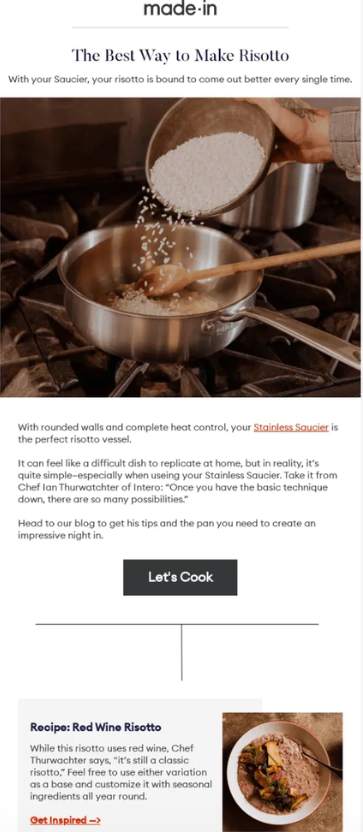
Made In Cookware uses post-purchase emails to help customers understand how to use their products after delivery, instead of ending communication after shipping updates.
What makes this approach work is how naturally the education fits into the customer experience. The email doesn’t interrupt the journey or feel overly promotional. It simply feels helpful. In most cases, that keeps customers more connected to the product long after the initial purchase.
Why it stands out
- The content feels genuinely useful instead of sales-focused
- The email extends the customer experience after delivery
- Product education helps strengthen trust in the product and brand
This style of Shopify post-purchase email usually works especially well for apparel, skincare, wellness, and lifestyle brands where long-term product usage matters.
3. ILIA Beauty | Referral-Focused Post-Purchase Email
Source: https://www.getvero.com/image-cache/wp-content/uploads/2020/11/image-5-7.jpg
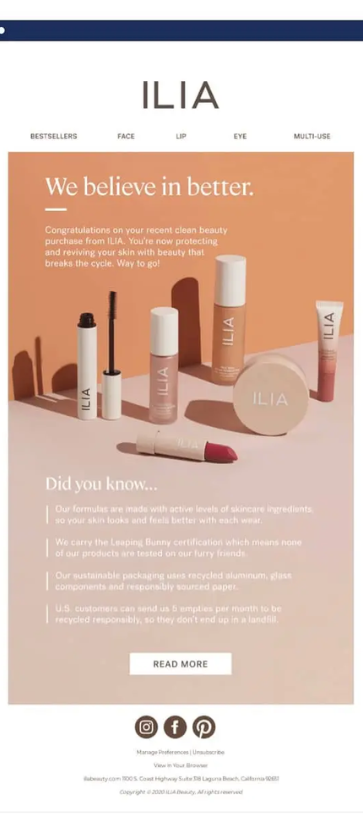
ILIA Beauty uses post-purchase emails to introduce referrals after customers have already spent time with the product. Instead of asking immediately after checkout, the referral invitation appears later in the journey once some level of trust has already been built.
That timing usually matters more than brands expect. Customers are naturally more willing to recommend a product after they have actually used it and had a good experience with it.
Why it stands out
- The referral message feels naturally timed instead of rushed
- The incentive is simple and easy to follow
- The email focuses more on advocacy than aggressive promotion
This is often where brands begin combining loyalty programs, referrals, and Shopify personalization to create more behavior-based post-purchase journeys instead of sending the same campaign to every customer.
4. Ritual | Shipping Confirmation Email
Source: https://www.bigblue.co/blog/8-post-purchase-email-examples-to-boost-customer-retention
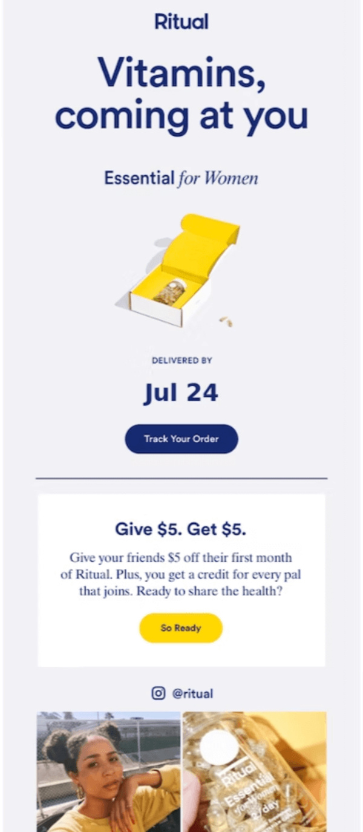
Ritual treats shipping confirmation emails as more than simple delivery updates. Alongside tracking details, the brand keeps customers engaged through clean design, educational content, and small community-focused touches throughout the email.
Most shipping emails are purely functional and stop there. Ritual still gives customers the information they expect, but the overall experience continues to feel connected to the brand even after checkout is complete.
Why it stands out
- Tracking details are clear and easy to find
- The visuals stay consistent with the overall brand identity
- Customers stay engaged without being overloaded with promotions
It’s a strong example of how a Shopify automated email after purchase can still feel thoughtful and customer-focused instead of reading like a standard transactional message.
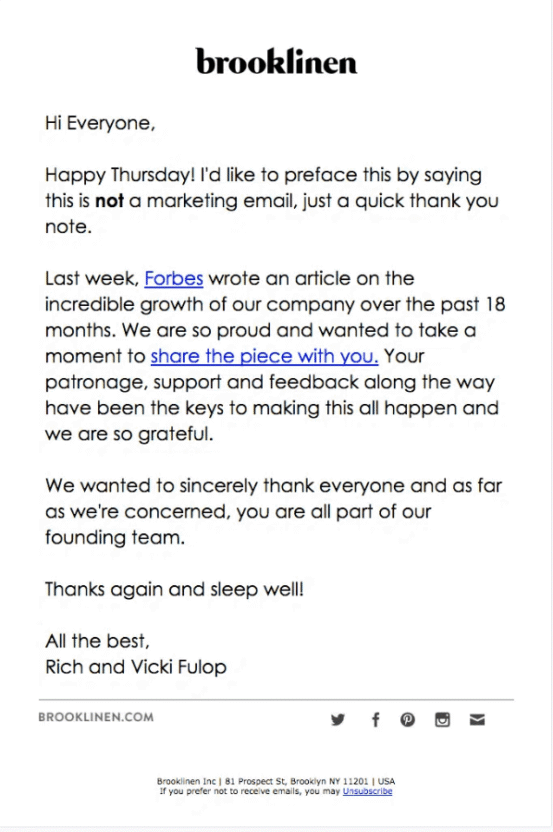
5. Brooklinen | Thank You Post-Purchase Email
Source: https://reallygoodemails.com/emails/not-a-marketing-email
Instead of sending a standard transactional follow-up, Brooklinen uses its post-purchase email to extend the overall brand experience.
Part of what makes this work is the pacing. The email spends time reinforcing the customer’s purchase decision without introducing anything promotional. That helps reduce post-purchase uncertainty and makes the interaction feel more natural after checkout.
Why it stands out
- The email stays simple and easy to scan
- The messaging focuses on improving the customer experience by thanking the customer, instead of pushing another sale too quickly
- It helps build an emotional connection immediately after the order
This is also where many Ecommerce brands begin investing in stronger segmentation and email marketing software to improve recommendation timing and accuracy throughout their post-purchase flows.
5 Best Practices for Shopify Post-Purchase Emails
A strong Shopify post-purchase email flow isn’t just about setting up automation; it also follows proven email marketing best practices that improve engagement and conversions. Timing, relevance, and the overall tone matter just as much as the emails themselves. Customers can generally tell when a brand is genuinely trying to help and when it’s simply pushing another promotion after checkout.
The best post-purchase emails usually feel connected to the customer’s experience with the order. That’s often the difference between emails customers open and emails they immediately skip.
- Useful first, promotional second: One of the quickest ways to weaken post-purchase emails is to turn every follow-up into a sales message. Right after checkout, customers are usually looking for reassurance, shipping details, support information, or product guidance more than another discount code. Promotional emails still matter in some cases. But usefulness should usually come first. For example, a clear shipping update with accurate tracking information will almost always perform better than an early upsell email that feels disconnected from the purchase.
- Personalize with product and customer data: Customers recognize generic messaging fairly quickly. Product recommendations, reorder reminders, and follow-up emails tend to perform better when they reflect what the customer actually bought or interacted with previously. For example, someone ordering skincare products probably should not receive the same follow-up drip email campaign sequence as someone buying gym equipment.
- Keep the CTA singular and clear: A lot of post-purchase emails try to push too many actions at once. Track the order. Follow on Instagram. Leave a review. Refer a friend. Shop again. That usually creates confusion instead of engagement. Each email should focus on one main action. If the purpose is shipment tracking, make that process simple. If the goal is to collect reviews, make leaving feedback easy and direct. Customers usually engage more when they aren’t being pulled in multiple directions at the same time.
- Match timing to the product lifecycle: Timing changes almost everything in a Shopify automated email after purchase flow. A reorder email sent too early can feel pushy. A review request sent before the package arrives feels careless and disconnected. Different products also need different timelines after purchase. Coffee subscriptions, skincare, fashion products, and electronics all create different customer behaviors. The email timing should reflect that instead of relying on one fixed automation sequence across every product category.
- Avoid email fatigue: Too many emails after purchase can eventually make even interested customers disengage. Not every small update needs its own message, and not every post-purchase flow needs constant follow-ups. In most cases, fewer well-timed emails perform better than excessive communication. This is why choosing the best email marketing automation software becomes important, because stronger automation platforms usually make it easier to manage frequency, segmentation, and customer engagement over longer periods of time.
How to Automate Post-Purchase Email Flows on Shopify
Manually following up with every customer after a purchase becomes difficult once order volume starts increasing. That’s usually why Shopify stores eventually move toward automation for post-purchase communication. A properly automated Shopify post-purchase email flow helps stores consistently send confirmations, shipping updates, review requests, reorder reminders, and follow-up campaigns without relying on manual effort every single day.
The actual setup is usually manageable. The harder part is building Ecommerce marketing automation flows that still feel relevant and properly timed instead of sounding repetitive or obviously robotic.
1. Using Shopify Automations
Shopify includes built-in automation tools that allow stores to create basic post-purchase workflows directly inside the Shopify Admin dashboard. For brands with simpler marketing automation needs, this setup is often enough to get started.
- Inside Shopify Admin, go to the Marketing section and open ‘Automations’. Shopify already provides several pre-built workflow templates, so stores do not always need to create everything manually from the beginning.
- Choose the type of automation flow you want to build. Shopify includes templates for actions like thanking customers after purchase, following up after fulfillment, or reconnecting with inactive shoppers.
- Set the automation trigger and delay timing for the workflow. In most cases, Shopify stores use triggers like “Order Created,” “Order Fulfilled,” or “Product Delivered” to automatically begin the sequence. After choosing the trigger, add delays based on when the email should realistically be sent. For example, a thank-you email may work best one day after purchase, while a review request usually performs better several days after delivery, once customers have had time to use the product.
- Segment the automation flow using customer behavior or product categories instead of sending the same emails to everyone. For example, stores may create different Ecommerce customer journey strategies for first-time customers, repeat buyers, VIP shoppers, or customers purchasing from certain collections. This helps the Shopify post-purchase email flow feel more connected to what customers actually purchased instead of looking generic.
- Review the automation workflow, test the customer journey, and activate the sequence once everything is working correctly. Most stores continue adjusting timing and messaging later based on open rates, clicks, and repeat purchase behavior.
2. Using the Shopify Messsaging App
For stores that want branded email templates without immediately depending on external platforms, the Shopify Messaging app is usually the next step.
- Install the Shopify Messaging app from the Shopify App Store and connect it directly to your store.
- Customize the email templates using your store branding, including logos, colors, fonts, and product images, so the emails stay visually consistent with the rest of the customer experience.
- Build automated email sequences tied to customer actions like purchases, deliveries, review requests, or reorder reminders.
- Set triggers and timing based on the customer journey itself. Shipping emails may go out immediately after fulfillment, while product education emails often perform better a few days after delivery.
- Analyze email marketing metrics like open rates, clicks, and engagement to understand which emails customers actually interact with and where the automation flow still needs improvement.
For smaller stores, this setup is usually enough to get started. But as customer journeys become more complex, many Ecommerce teams start exploring how to automate emails on Shopify together with other messages and retention campaigns.
3. Using a Third-Party Platform for Advanced Automation
As Shopify stores grow, built-in email tools usually stop covering everything brands need. This becomes especially noticeable for mid-market and enterprise Ecommerce brands managing larger audiences, multiple customer journeys, and communication across several channels.
That’s often when Ecommerce brands begin using specialized customer engagement platforms like MoEngage, Omnisend, or Klaviyo to manage automation across email, SMS, push notifications, on-site messaging, and analytics together.
- Your Shopify Store Has Multiple Customer Segments: Different customers usually should not receive identical post-purchase journeys. First-time buyers, repeat customers, high-value shoppers, and inactive customers all behave differently after purchasing. Advanced platforms make it easier to build more behavior-based flows instead of broad campaigns sent to everyone in the same way.
- Your Store Uses Too Many Disconnected Tools: Many growing Shopify brands eventually end up managing separate tools for email marketing, customer analytics, push notifications, retention tracking, and even Shopify SMS apps. Over time, that setup becomes harder to maintain and more difficult to scale efficiently.
- Your Store Needs Advanced Personalization and Analytics: Basic automation platforms can send emails, but deeper personalization usually requires customer behavior tracking, predictive analytics, dynamic recommendations, lifecycle segmentation, and omnichannel engagement insights.
For Shopify brands focused on long-term retention and Ecommerce customer engagement strategies, MoEngage stands out because it combines omnichannel automation, customer analytics, AI-driven personalization, and journey orchestration within one connected platform instead of forcing teams to manage several disconnected systems separately.
That naturally leads into the next step: how can you automate Shopify post-purchase email flows using a third-party omnichannel marketing platform like MoEngage?
How to Automate Shopify Post-Purchase Emails Using MoEngage
For Shopify stores that need deeper automation and stronger personalization, integrating Shopify with MoEngage helps create more connected post-purchase journeys across email, SMS, push notifications, and other engagement channels.
Instead of sending identical follow-up emails to every customer, MoEngage allows Shopify brands to build behavior-based customer journey maps that adjust depending on what customers purchase, how they engage, and where they are in the customer lifecycle.
Step 1: Define Your Post-Purchase Flow Goals
Before building the automation journey, decide what the post-purchase flow is actually meant to accomplish. Some Shopify stores focus more on repeat purchases, while others care more about reducing support tickets, collecting reviews, improving onboarding, or increasing loyalty signups.
Those goals usually shape the entire structure of the Shopify post-purchase email flow. For example, a skincare brand may need educational emails after delivery, while a supplement company may focus more heavily on replenishment reminders or subscription retention.
Step 2: Create a Post-Purchase Journey in MoEngage
Once the goals are clear, create the customer journey inside MoEngage using Shopify purchase events as the trigger point.
Most stores usually begin the flow using events like order placed, order fulfilled, or product delivered.
From there, the journey can split into different paths depending on customer behavior, purchase activity, or previous email engagement.
Step 3: Add Flow Conditions and Customer Segments
This is usually where the automation starts feeling smarter instead of fully linear.
MoEngage allows Shopify stores to segment customers using factors like purchase history, product categories, order value, location, engagement behavior, first-time purchases, or repeat buying patterns.
For example, first-time buyers may receive onboarding-focused emails, while repeat customers may move directly into loyalty or upsell journeys. This level of customer segmentation analysis helps the Shopify automated email after purchase sequence feel more relevant instead of looking mass-sent.
Step 4: Build the Post-Purchase Email Sequence
After defining the customer segments, structure the actual email flow around timing and customer intent.
A typical sequence may include:
- Order confirmations,
- Shipping updates,
- Product education emails,
- Review requests,
- Reorder reminders,
- And loyalty or referral follow-ups.
The spacing between emails matters quite a bit. A review request sent too early can feel disconnected, while a replenishment reminder sent too late may completely miss the buying window.
Step 5: Use Personalization in MoEngage’s Shopify Post-Purchase Emails
This is often where MoEngage becomes more useful than basic marketing automation software.
Brands can personalize emails using customer names, purchased items, browsing behavior, order value, preferred categories, engagement history, and predictive recommendations. Instead of broad generic campaigns, customers receive communication connected to products and actions they actually interacted with earlier.
That’s also one reason many Ecommerce teams invest heavily in Shopify personalization with MoEngage while scaling retention-focused customer journeys.
Step 6: Add Flow Controls
Before launching the automation journey, configure controls that stop customers from receiving too many emails or repeatedly entering irrelevant workflows.
MoEngage allows brands to add frequency capping, exit conditions, suppression rules, and conversion goals so customers automatically exit the journey after completing actions like placing another order, subscribing, or leaving a review.
This helps keep the Shopify post-purchase email flow cleaner and reduces unnecessary communication fatigue over time.
Step 7: Build Post-Purchase Email Templates
Once the journey structure is ready, design the actual email templates.
The strongest Shopify post-purchase emails usually stay fairly simple. Clear updates, useful information, clean hierarchy, mobile-friendly layouts, and one primary action generally perform better than crowded email designs trying to do too much at once.
Most Shopify brands also keep the branding consistent across confirmation emails, shipping updates, educational flows, and loyalty communication so the customer experience feels connected from beginning to end.
Step 8: Test and Launch the Flow
Before launching the journey, test the entire customer experience from the user’s side. Check triggers, delays, personalization variables, product recommendations, links, and email rendering across different devices.
Small automation issues usually go unnoticed until customers start receiving broken sequences or poorly timed emails. A short testing phase often prevents larger problems later and helps the automation feel much smoother once it becomes active.
Grow Customer Lifetime Value with Shopify Post-Purchase Emails
A well-planned Shopify post-purchase email strategy helps Shopify stores do far more than complete a single transaction. It keeps customers engaged after checkout, encourages repeat purchases, and strengthens long-term retention without depending entirely on constant customer acquisition.
For brands trying to scale post-purchase engagement and personalization more effectively, MoEngage’s Shopify customer engagement platform helps bring automation, analytics, and customer journeys together within a single connected system.
And if you want to see how advanced post-purchase automation would actually work for your store, the fastest place to start is probably to request a demo.
The post Shopify Post-Purchase Emails: Tips & Examples (+ How to Set Them Up) appeared first on MoEngage.
[ad_2]
Source_link