Reading Time: 19 minutes
Most Shopify stores start exploring Shopify automated emails after noticing the same pattern. Customers visit, add products to their cart, then disappear and never return. Others buy once and go silent. As order volume grows, manually sending every campaign also becomes difficult to manage.
That’s where automated email marketing campaigns on Shopify help. Instead of manually following up with every customer, stores can automatically send welcome emails, abandoned cart reminders, and post-purchase follow-ups at the right time. But there’s a big difference between setting up a few automated emails and building an email strategy that actually improves customer retention over time.
In this guide, we’ll look at how to send automated emails on Shopify, which workflows are actually worth setting up first, and where more advanced Shopify email marketing automation starts making sense.
Key Takeaways
|
What is Shopify Email Automation?
Shopify email automation is a system that sends emails automatically after specific customer actions. Instead of building and sending every campaign manually, stores can set up emails that trigger when customers sign up, place orders, browse products, or leave items behind in their cart.
Usually, the idea is pretty simple — reach customers while their campaign interaction is still fresh on their minds, and they’ve already engaged with your store.
Automated Emails vs. One-Time Campaigns
A lot of Shopify store owners mix up automated emails and regular campaigns at the beginning. Both are emails, that’s true. But the way they work is completely different.
One-time campaigns are manual sends. You create the email, pick the audience, and schedule or send it yourself. Most stores use them for promotions, product launches, seasonal sales, announcements, and similar events.
Shopify automated emails work more quietly in the background. They react to customer activity automatically. For example:
- A customer signs up > a welcome email gets sent
- A customer leaves products in the cart > a reminder email goes out
- A customer places an order > a Shopify post-purchase email sequence starts
That’s one of the main reasons why marketing automation scales more easily. Once a workflow is set up properly, it can run every day without someone manually sending emails over and over.
How Does Shopify Email Automation Work?
The Shopify email automation setup is fairly straightforward once you understand its structure.
First comes the trigger. That’s the customer action that starts the automation. It could be a newsletter signup, an abandoned cart, a completed purchase, or even something smaller, like viewing a product page.
Then comes the workflow. This is the actual sequence connected to the triggers, like emails, wait times, conditions, follow-ups, and sometimes multiple paths depending on customer behavior. Some workflows are just one email. Others continue for days or weeks.
The last part is the tool running everything. Shopify Email includes basic built-in automation features for simple workflows. More advanced Shopify email marketing automation usually happens through third-party apps that support customer segmentation, journeys, behavior-based targeting, testing, and more detailed reporting.
Why Does Shopify Email Marketing Automation Matter?
Most Shopify stores don’t lose customers because the products are bad. They lose them in the gap between customer actions and brand follow-ups. Someone visits once, adds a product to the cart, gets distracted, and never comes back. Or a customer buys once and completely forgets, two weeks later, that the brand exists.
That’s where Shopify email marketing automation starts doing work that manual campaigns usually can’t keep up with.
- It Recovers Revenue That Would’ve Been Lost Quietly: Cart abandonment emails are the obvious example, but the bigger point is timing. A customer who left 15 minutes ago behaves differently from someone who disappeared three weeks back. Automation reacts while intent still exists. And in many cases, that single workflow keeps generating revenue every day without anyone touching it again.
- It Keeps Repeat Purchases Moving Without Constant Promotions: Many stores rely too heavily on discounts because they lack post-purchase communication. Customers buy once, then hear nothing. Automated follow-ups change that pattern. Replenishment reminders, product education emails, review requests, or cross-sell recommendations keep the relationship active after checkout. Not every email converts immediately. Still, the brand stays familiar.
- It Makes Personalization Possible at Scale: Manually sending targeted emails to every customer segment becomes unrealistic once order volume grows. Automation makes behavior-based communication manageable. For example, first-time customers receive onboarding emails, repeat buyers get loyalty-focused messaging, high-intent customers receive browse or cart reminders, or inactive customers enter win-back flows. In such cases, the experience feels more relevant because the timing is tied to actual customer actions rather than random campaign schedules.
- It Reduces Manual Work Without Making Emails Feel Robotic: This part gets overlooked. Good Shopify automated emails don’t feel automated at all. They feel timely. Once those workflows are built properly, Shopify stores spend less time scheduling repetitive campaigns and more time improving messaging, offers, customer experience, and retention strategy. The system handles the repetition. The brand still controls the voice.
How to Send Automated Emails on Shopify
If you’re trying to figure out how to send automated emails on Shopify, the good part is that Shopify already has built-in marketing automation features ready to use. You don’t need some huge technical setup to get started. Still, the structure matters more than most people expect. Badly timed automations quickly feel repetitive. The better ones usually feel relevant enough that customers don’t even think about the system behind them.
Here’s the step-by-step setup process.
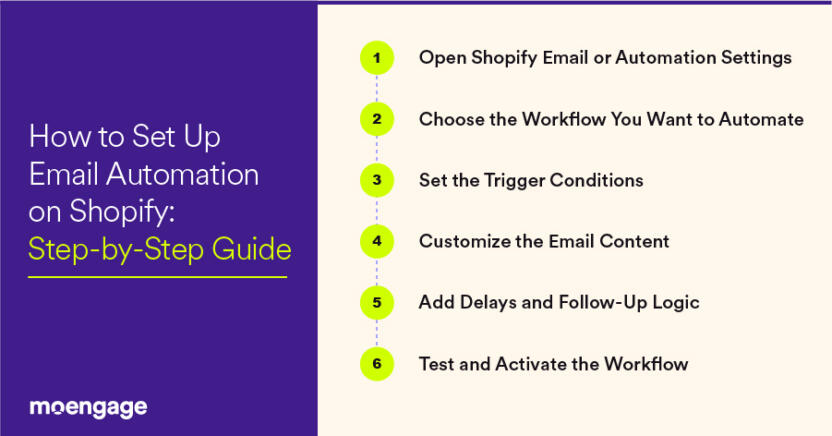
1. Open Shopify Email or Automation Settings
Inside the Shopify admin dashboard, go to: Marketing > Automations
This is where Shopify keeps its native email automation workflows. If Shopify Email hasn’t been enabled yet, the platform will usually ask you to activate it first before moving forward.
At this point, don’t spend too much time worrying about advanced segmentation or perfect email design. A lot of stores get stuck there early and end up delaying the actual automation setup.
2. Choose the Workflow You Want to Automate
Shopify already includes pre-built workflows for common customer actions. For example:
- Welcome emails
- Abandoned cart emails
- Browse abandonment emails
- First purchase follow-ups
- Customer win-back emails
Start with one or two workflows that usually have the biggest impact first. In most cases, welcome emails and abandoned cart flows generate results fastest because the customer intent already exists.
3. Set the Trigger Conditions
This is where Shopify automated emails become behavior-based instead of manual campaigns.
Every workflow starts with a trigger, whether the customer subscribes to the email list, abandons checkout, places an order, or stays inactive for a certain period.
Once the trigger happens, Shopify automatically runs the workflow attached to it.
4. Customize the Email Content
Now comes the actual email itself.
This part affects performance more than marketers sometimes realize. A lot of automated emails fail because they sound too obviously automated. Too polished. Too aggressive with sales language. They don’t sound like something a real brand would naturally send.
Keep the copy direct and conversational:
- Use the customer’s name where it makes sense
- Mention the actual product left in the cart
- Keep subject lines simple and readable
- Focus on clarity before trying to sound clever
And don’t rush to add discounts to every sequence right away. Sometimes a reminder alone is enough.
5. Add Delays and Follow-Up Logic
Not every automated email should be sent instantly.
For example:
- Welcome emails → send immediately or a few minutes later
- Cart reminders → usually perform better after 1-4 hours
- Review requests → send after delivery instead of after purchase
- Win-back emails → often after 30-90 days of inactivity
This timing layer is what makes Shopify email automation feel more contextual and less repetitive.
6. Test and Activate the Workflow
Before making anything live, send test emails to yourself or your team and check:
- Mobile formatting
- Broken links
- Personalization fields
- Timing logic
- Subject line clarity
Then activate the workflow.
That’s the basic foundation. After this point, most of the work shifts toward optimization: improving open rates, adjusting delays, testing subject lines, refining sequences, and figuring out which Shopify automated emails actually bring customers back rather than just generating clicks or opens.
9 Best Shopify Email Automations to Set Up First
Many Shopify stores install email tools, including email analytics tools, and immediately start building complex customer journeys. But early on, a small number of core automations usually drive most of the actual results. The better approach is to start with workflows tied to high-intent customer behavior rather than chasing random engagement numbers.
And realistically, not every automation matters equally. Some Shopify automated emails consistently perform better because they reach customers while interest, buying intent, or product curiosity still exists. Let’s see which ones those emails are.
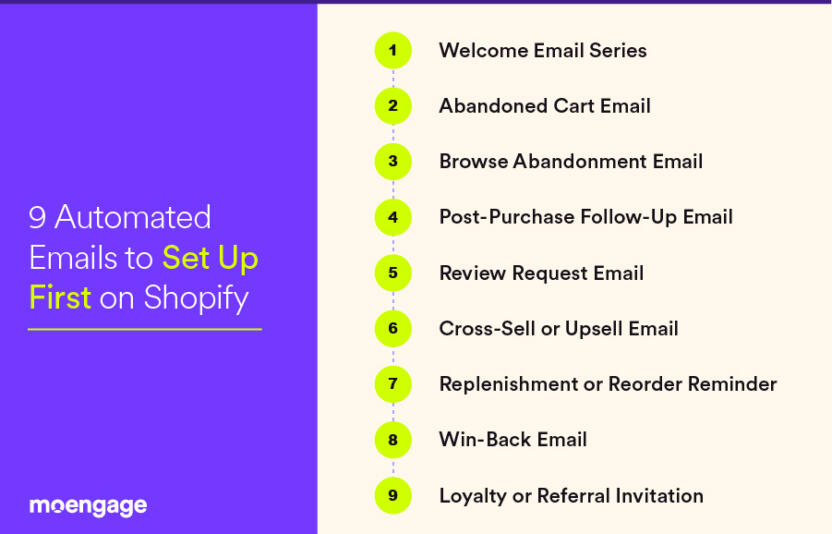
1. Welcome Email Series
The welcome email sequence is usually the first real interaction after someone subscribes.
A lot of brands waste this flow on a basic “Thanks for signing up” message and a quick discount code. But welcome emails should do a little more than that. They should help customers understand:
- What the brand sells
- Why customers stay subscribed
- What makes the products different
- What kind of emails they’ll receive going forward
This is also where Shopify email personalization starts becoming useful. Even small details like signup source, browsing category, or product interest can make the email feel less generic and more personal.
2. Abandoned Cart Email
This is usually the first automation most Shopify stores build. And for good reason. It works consistently.
Customers abandon carts all the time. Sometimes they get distracted halfway through checkout. Sometimes shipping costs slow them down. Sometimes they just need another look before making a decision.
A solid abandoned cart workflow usually includes a reminder about the product, a direct checkout link, light urgency, and reassurance around shipping or returns.
3. Browse Abandonment Email
Browse abandonment emails target customers who viewed products but never added anything to the cart.
This workflow matters because not every interested customer moves directly to checkout. Many customers compare products, research alternatives, or leave and come back later.
When done properly, browse reminders keep products visible without becoming annoying. This is usually where marketing automation software focused on Shopify personalization, such as MoEngage, tend to perform better, mainly because the messaging adapts to browsing behavior rather than sending the same campaign to everyone.
4. Post-Purchase Follow-Up Email
The purchase itself shouldn’t end the interaction.
Good Shopify post-purchase emails reduce uncertainty after checkout, improve retention over time, and create opportunities for repeat purchases later. Most strong flows include:
- Order confirmation
- Shipping updates
- Product education
- Care instructions
- Usage tips
That last part matters more than many stores expect. Customers who understand how to use the product properly usually stay more connected to the brand afterward.
5. Review Request Email
Sending a review request too early feels rushed. Waiting too long usually lowers response rates. Most stores see better engagement when review emails arrive after delivery and after customers have had enough time to actually use the product.
Keep the request simple. One clear CTA is usually enough.
6. Cross-Sell or Upsell Email
Not every customer wants another product immediately after buying something. Still, smart recommendations can work very well when timing and context line up properly.
For example:
- Skincare brands suggesting complementary products
- Supplement companies recommending refill bundles
- Fashion stores pairing related items together
The important part is relevance. Random upsells usually hurt trust faster than they increase revenue.
7. Replenishment or Reorder Reminder
This automation works especially well for consumable products.
If customers usually reorder every 30 or 60 days, automation can send reminders shortly before they run out. That timing window matters because many repeat purchases are driven by convenience rather than deep brand loyalty.
And once that habit disappears, getting the customer back often becomes harder.
8. Win-Back Email
Not every inactive customer is gone permanently.
Win-back workflows target customers who haven’t purchased or engaged for a while. Usually, this happens after 60, 90, or even 120 days, depending on the product cycle.
One mistake many stores make is jumping straight into large discounts. Sometimes customers simply need a reminder that the brand still exists, updates about new products, social proof, or just a reason to revisit the store.
Discounts are useful sometimes. Just not always as the first move.
9. Loyalty or Referral Invitation
Retention gets cheaper when existing customers naturally bring in new customers.
Loyalty and referral automations reward repeat buyers and encourage referrals. These emails usually perform better after a positive customer experience, rather than immediately after checkout.
A lot of this depends on timing, segmentation, and the platform handling the automation. Some of the best Shopify email marketing tools manage these workflows far more effectively than Shopify’s native setup, as they combine behavioral data, segmentation, and personalization with greater flexibility.
Shopify Email Automation Examples by Customer Journey Stage
One of the most common mistakes Shopify stores make with email automation is treating every customer the same. A first-time subscriber receives the same messaging as a repeat customer. Someone casually browsing products receives the same urgency as a customer who already abandoned checkout halfway through.
Over time, that usually hurts engagement.
Good Shopify automated emails adapt to customer intent. The messaging changes depending on where the customer is in the journey, what they’ve already interacted with, and how close they are to purchasing again. That’s what makes automation feel relevant instead of repetitive or overly scripted.
Below are some practical Shopify email automation examples organized by typical Ecommerce and retail customer journey stage.
1. For New Subscribers
New subscribers are still figuring out the brand. They may already be interested in the products, but trust hasn’t yet formed. At this stage, the focus is less on immediate conversion and more on reducing hesitation.
A welcome sequence should introduce the brand gradually rather than push multiple discounts immediately.
Example Workflow
- Email 1: Welcome email introducing the brand and setting expectations
- Email 2: Best-selling products or category recommendations
- Email 3: Customer reviews, testimonials, or creator content
- Email 4: First-purchase offer or educational content
For example, a skincare brand could explain which products work for different skin concerns before promoting bundles. A supplement company might explain routines, ingredients, or timing before aggressively selling products.
That extra context matters because first-time customers usually want reassurance before committing.
2. For Active Shoppers
These customers are already showing stronger buying signals. They’re revisiting products, returning to the site multiple times, or abandoning checkout midway through.
The goal here usually isn’t aggressive selling. It’s removing friction before attention fades.
Example Workflow
- Browse abandonment email: Reminder about recently viewed products
- Cart abandonment email: Checkout reminder with direct cart link
- FAQ or hesitation-reduction email: Shipping, sizing, returns, or product concerns
- Urgency email: Low-stock alerts or limited-time reminders
For example, if someone repeatedly views winter jackets without purchasing, the follow-up email could include sizing help, weather suitability, customer reviews, and shipping estimates.
Not just another “Complete your purchase” reminder.
This is where Shopify email personalization becomes noticeably useful, as the email reflects actual browsing behavior rather than sending identical campaigns to every customer.
3. For First-Time Customers
A lot of brands focus heavily on the first purchase itself and barely think about what happens afterward. But retention usually starts after checkout, not before it.
Customers often want reassurance during this stage, especially when buying from a brand for the first time.
Example Workflow
- Order confirmation email
- Shipping and delivery updates
- Product onboarding or usage instructions
- Review request email
- Cross-sell recommendation related to the purchase
For example, if someone buys coffee equipment, follow-up emails could include brewing tutorials, maintenance instructions, related accessories, and refill reminders later.
These Shopify post-purchase emails help reduce uncertainty while naturally creating opportunities for repeat purchases.
4. For Repeat Customers
Repeat customers already know the brand. The communication shouldn’t sound exactly like acquisition-focused emails sent to new subscribers.
At this stage, the focus shifts more toward loyalty, repeat purchases, and increasing customer lifetime value (LTV) without depending entirely on discounts.
Example Workflow
- VIP or loyalty rewards email
- Early access to product launches
- Personalized recommendations
- Referral invitation
- Exclusive bundle offers
For example, a fashion brand could recommend collections tied to previous purchases rather than randomly promoting products from its full catalog.
The more purchase history automation is used properly, the more relevant the messaging starts to feel. That’s one reason many mid-market and enterprise stores eventually move beyond Shopify’s native setup and start using more advanced Shopify email marketing automation platforms.
5. For Inactive Customers
Inactive customers usually don’t disappear all at once. Engagement tends to slow gradually first. Fewer email opens. Longer purchase gaps. Less site activity.
Win-back automations exist to rebuild attention before the customer fully disconnects from the brand.
Example Workflow
- “Still interested?” re-engagement email
- New arrivals or collection updates
- Personalized recommendations
- Limited-time return offer
- Final inactivity check-in email
But timing matters quite a bit here.
Sending a win-back email after only a couple of weeks usually feels unnecessary. Waiting 8 or 9 months often becomes too late. Most Shopify stores perform better when inactivity windows align with typical customer buying cycles.
And not every inactive customer needs a discount to return. Sometimes, a relevant product launch works better than another coupon.
6. For Subscription or Replenishment Customers
For consumable products, reorder timing directly impacts retention.
A lot of customers reorder out of convenience more than loyalty. If the reminder comes too late, they may buy from another brand simply because it was easier at that moment.
Example Workflow
- Replenishment reminder before products run out
- Subscription renewal notification
- Usage-based reorder suggestion
- Bundle upgrade recommendation
- Loyalty reward for repeat orders
For example:
- Protein powder brands sending reminders after 30 days
- Skincare brands recommending replenishment based on usage cycles
- Pet food companies sending reorder prompts before supplies run low
This is one of the more practical uses of Shopify automated emails because the automation follows real customer behavior rather than arbitrary campaign schedules.
When Shopify Native Email Automation Is Enough
For many small and mid-sized Shopify stores, the built-in automation features are honestly enough to start. Most brands don’t need extremely complicated customer journey mapping right away. They mainly need dependable Shopify automated emails that handle the important lifecycle communication without adding extra software, technical overhead, or operational complexity.
Shopify’s native automation setup usually works well when the focus is on straightforward customer communication rather than highly layered behavioral automation.
In most cases, it’s enough for stores that need:
- Welcome email sequences
- Abandoned cart recovery emails
- Basic post-purchase follow-ups
- Simple customer segmentation
- Quick setup with very little technical effort
- Lower software and maintenance costs
- Faster implementation without managing multiple integrations
For smaller teams, especially, simplicity matters. Not every brand needs enterprise-level automation immediately. Sometimes running a few workflows consistently is more useful than building complicated systems nobody fully manages properly.
When to Use Shopify Flow or a Third-Party Platform
As stores grow, customer journeys usually become harder to manage with basic workflows alone. Customer behavior starts varying more. Buying cycles become less predictable. And email often stops being the only communication channel involved.
That’s usually when Shopify Flow or a third-party email marketing automation platform becomes more useful.
More advanced Shopify email marketing automation platforms are generally better suited for stores that need:
- Advanced behavioral triggers and conditions
- Multi-step lifecycle journeys
- Deeper customer segmentation
- Real-time Shopify email personalization
- Dynamic product recommendations
- Omnichannel marketing automation across email, SMS, push notifications, and in-app messaging
- Stronger attribution and revenue reporting
- Automated re-engagement logic
- Integrations with loyalty, subscription, or CRM systems
For instance, a store may eventually want separate workflows, high-value repeat customers, seasonal buyers, inactive subscribers, subscription customers, and customers repeatedly browsing certain product categories
Managing that level of orchestration inside basic native workflows becomes difficult after a point. And once retention starts contributing heavily to revenue, most growing brands eventually need more flexibility than Shopify automated emails can provide.
How to Build a Better Shopify Email Automation Strategy
Setting up a few Shopify automated emails is relatively easy. Building a strategy that consistently improves retention, repeat purchases, and long-term customer engagement is the harder part.
Strong Shopify email automation strategies start with the right foundation. Using an omnichannel marketing automation platform like MoEngage ensures your emails work alongside SMS, onsite messages, and push notifications, all triggered from a unified customer dataset. That means every email workflow is part of a connected journey, instead of floating as a disconnected one-off campaign.
Here’s how leading mid-market and enterprise Shopify brands usually approach it:
1. Start With Customer Lifecycle Stages, Not Random Campaigns
Every customer sits in a different stage of the customer journey. They might be a new subscriber, an active shopper, a first-time buyer, a repeat customer, or an inactive customer.
The messaging should change depending on the customer’s journey stage.
For example, a new subscriber usually needs trust-building and education before anything else. A repeat customer may respond better to loyalty rewards, early access offers, or personalized product recommendations. Sending identical messaging to both groups often lowers engagement over time.
That’s one reason strong Shopify email marketing automation strategies rely heavily on segmentation and behavior-based triggers. With platforms like MoEngage, the system tracks customer activity across Shopify and other channels, then uses AI to help you build automated journeys for each stage in minutes. That way, new subscribers get trust-building content, repeat buyers get loyalty perks, and inactive customers get win-back offers timed to their intent.
2. Focus on Timing Before Frequency
Sending more emails doesn’t automatically increase conversions.
In many cases, poorly timed automation damages engagement faster than low email frequency ever will.
For example:
- Cart reminders sent too quickly can feel intrusive
- Review requests before product delivery create frustration
- Win-back emails sent too late lose relevance entirely
The timing should match the customer’s level of intent. As in, the best time to send emails is typically when the customer is already ready to buy from your Shopify store. That’s what helps Shopify automated emails feel contextual instead of robotic or repetitive.
MoEngage’s AI send-time optimization uses your customers’ behavior patterns to figure out the best moment to send across email, SMS, and push, so your automations land when engagement or buying intent is highest.
3. Coordinate Email With Other Channels
Customers don’t just hang out in their inbox. They bounce between email, texts, your site, your app, and social. And strong Ecommerce brands connect those dots into a smooth, seamless experience.
For example, a flow could be like:
- Customer abandons cart → receives an email reminder
- No response after several hours → receives SMS follow-up
- Customer revisits the store later → sees personalized on-site recommendations
- Customer completes purchase → automatically exits the recovery flow
That coordination creates a smoother experience because the messaging adapts instead of repeating itself everywhere.
This is one reason many growing Ecommerce brands eventually start exploring platforms focused on Shopify email personalization, such as MoEngage and similar lifecycle engagement tools. The focus gradually shifts from isolated campaigns toward connected customer journeys across multiple channels.
4. Personalization Should Go Beyond First Names
Is “Hi Sarah…” even real personalization anymore? Nah.
Modern Shopify email automation strategies typically rely more on browsing behavior, purchase history, category interests, reorder timing, engagement patterns, and lifecycle stage.
For example:
- Did a customer browse running shoes? Send them recommendations for new arrivals in that category.
- Did another customer buy skincare products? Send them replenishment reminders at the right reorder window.
MoEngage uses unified Shopify data, purchase history, and real-time behavior to feed AI‑driven recommendations that make each email feel tailor-made, even when you’re sending Shopify automated emails to thousands.
5. Optimize Based on Retention, Not Just Email Opens
Open rates can be misleading sometimes.
An automation may generate plenty of opens while doing very little to improve repeat purchases, customer retention, or long-term lifetime value.
The more useful customer engagement metrics are usually:
- Repeat purchase rate
- Recovery revenue
- Reorder frequency
- Unsubscribe rate
- Customer retention trends
- Revenue generated per workflow
Because in the end, the larger goal of sending Shopify automated emails is to build customer relationships that continue after the first purchase, rather than stopping there.
With MoEngage’s analytics module, you can track performance by lifecycle stage, channel mix, and campaign type, making it easier to double down on workflows that actually improve retention.
6. Choose an Omnichannel Platform to Tie It All Together
A common reason Shopify email automation plateaus is that workflows run in isolation. The fix is to use a single system that manages email, SMS, push, and onsite messaging in coordinated customer journeys.
An AI‑native unified customer engagement platform like MoEngage lets mid‑market and enterprise Shopify brands:
- Trigger campaigns from any Shopify store event in real time
- Keep messaging consistent across channels without manual syncing
- Build lifecycle-based flows that adapt automatically to customer behavior
- Analyze results across all touchpoints instead of guessing what worked
When your marketing automation tools communicate, your customer experience feels seamless, and your retention rates start climbing again.
How to Measure Shopify Automated Email Performance
If you’re running Shopify email automation campaigns, analyzing their performance is never optional.
Shopify provides basic email marketing metrics, such as opens and clicks. But to really know if automation is boosting retention, repeat purchases, and revenue, you’ll want more detailed, behavior‑based analytics. That’s where adding an AI-native omnichannel marketing automation platform like MoEngage makes the analysis smoother and deeper, all from one dashboard.
Here’s a step-by-step guide to measure your Shopify automated emails using both Shopify and MoEngage:
Step 1: Check Your Shopify Email Campaign Reports
Follow these steps inside Shopify Email:
- Log in to your Shopify admin page.
- Go to Marketing > Campaigns.
- Select your automated flow (e.g., welcome, abandoned cart, or post-purchase).
- Review the built-in metrics, such as open rate, click rate, total emails sent, orders attributed to the campaign, and total sales from emails.
Shopify’s built-in reports are good for quick performance snapshots, but they stop at basic engagement.
Step 2: Export Campaign Data from Shopify
Inside Shopify Email, from your campaign reporting page, use the Export feature to download CSV reports. These files include send dates, recipient lists, order IDs, and attributed revenue.
Keep these reports for comparison before and after optimization. This is useful if you need raw data for your team or to import into analysis tools like MoEngage.
Step 3: Connect Shopify to MoEngage
Inside MoEngage:
- Sign in to your MoEngage account.
- From the MoEngage dashboard, go to Settings > Integrations > Shopify.
- Authenticate your Shopify store. No complex API setup is required for most plans.
- Enable real-time sync for orders, customer profiles, product catalog, and browsing behavior.
This sync lets MoEngage monitor and analyze which emails influenced purchases, subscriptions, and retention across channels.
Step 4: Track Metrics That Actually Matter
Once Shopify data is flowing into MoEngage, head to Analytics > Campaign Reports.
Key metrics to analyze here:
- Revenue per workflow: Shows the exact dollar value generated by each automation.
- Repeat purchase rate: How many customers buy again after an automation?
- Cart recovery revenue: Total recovered from abandoned cart flows.
- Retention by lifecycle stage: See if new, repeat, or inactive customers respond differently.
- Multi-channel attribution: Determine whether SMS, push notifications, on-site messages, or any other channel assisted the purchase.
Unlike Shopify’s basic reporting, MoEngage can break these numbers down by customer stage and journey path.
Step 5: Compare Performance Across Journeys
In MoEngage, use the Journey Analytics feature:
- Select a specific automation (e.g., abandoned cart).
- View conversion paths. Did they convert via email alone, or email and SMS, or email and onsite recommendation?
- Identify customer journeys with the highest revenue and lowest drop-off rates.
- Apply winning structures to other automations.
Step 6: Run A/B Tests and Implement Winners
In MoEngage:
- Go to your automation flow builder.
- Set up A/B splits for email subject lines, offer types, send times, and product recommendations.
- Monitor the test results in real-time analytics.
- Deploy the winning variant automatically across the full audience.
Step 7: Automate Reporting
In MoEngage, schedule automated weekly or monthly reports to be emailed to your marketing team.
Include both Shopify metrics (opens, clicks, etc.) and MoEngage’s metrics (repeat purchase rate, lifecycle stage performance, revenue attribution, etc.).
Use these reports in your team’s strategy meetings to make fast adjustments.
This removes the manual step of downloading Shopify CSVs, as MoEngage consolidates everything into a single view.

Shopify Email Marketing Automation FAQs
1. Does Shopify automatically send emails?
Yes, Shopify can automatically send emails through its built-in automation features. Store owners can create workflows for customer actions like signups, abandoned carts, purchases, and reorder reminders. Once the automation is configured, the workflows continue running automatically in the background. Store owners don’t need to manually send emails every time a customer takes an action.
That said, Shopify’s native automation setup usually works best for simpler workflows. More advanced lifecycle automation often requires platforms that support deeper segmentation, personalization, and cross-channel orchestration.
2. How to set up automated emails in Shopify
To set up Shopify automated emails, go to: Shopify Admin → Marketing → Automations
From there, you can choose pre-built workflows like welcome emails, abandoned cart recovery, or post-purchase follow-ups. After selecting the workflow, customize the email content, define the triggers and timing rules, then activate the automation.
More advanced Shopify email automation can also be built using platforms like MoEngage for deeper personalization and cross-channel customer journeys.
3. How much does Shopify charge per email?
Shopify Email includes a limited number of free monthly emails depending on the Shopify plan and current pricing structure. After the free threshold, Shopify charges based on email volume.
Generally:
Smaller stores with low sending volume pay very little initially,
Costs increase gradually as subscriber lists and automation activity grow
Still, pricing should not be judged only by send volume. What matters more is whether the Shopify automated emails are actually generating revenue, improving retention, and increasing repeat purchases.
4. How to automate an email on Shopify to send every day
Daily automated emails are usually created using scheduled workflows or recurring campaigns inside an email automation platform.
In Shopify, this can be done through native automation tools or third-party platforms that support recurring triggers, customer segmentation, and behavior-based scheduling.
Still, sending emails daily to every customer is not always a good approach. Frequency usually works better when it aligns with customer engagement and lifecycle stage instead of fixed schedules alone.
5. Is Shopify email automation free?
Partially, yes.
Shopify includes native email automation features along with a monthly free email allowance. For many smaller stores, that setup is enough for now.
But more advanced Shopify email marketing automation, including behavioral segmentation, omnichannel journeys, AI-driven personalization, and deeper analytics – often requires third-party automation platforms.
6. Which Shopify automated emails bring the most revenue?
In most Ecommerce stores, the highest-performing Shopify automated emails are usually:
- Abandoned cart emails
- Post-purchase follow-ups
- Replenishment reminders
- Welcome sequences
- Win-back campaigns
Abandoned cart workflows often generate strong short-term revenue recovery, while post-purchase and replenishment automations contribute more toward repeat purchases and long-term retention.
7. What is the best email service to use with Shopify?
The answer depends on how advanced the store’s retention strategy needs to become.
For basic workflows, Shopify Email is often enough. But larger Ecommerce brands usually move toward platforms that support:
- Advanced segmentation
- Shopify email personalization
- Cross-channel automation
- Customer journey orchestration
- Predictive engagement analytics
Platforms like MoEngage are commonly used when stores want to coordinate email with SMS, push notifications, onsite messaging, and lifecycle automation, rather than managing each channel separately.
Start Sending Shopify Automated Emails Today
The best Shopify automated emails usually don’t feel automated at all. They feel timely, relevant, and connected to what the customer is actually doing. And once those workflows start working together across email, SMS, push, and on-site messaging, retention becomes much easier to scale without constantly increasing ad spend.
If you’re looking to build more advanced lifecycle journeys, personalized customer engagement, and cross-channel automation, explore MoEngage for Shopify to see how enterprise and mid-market Ecommerce brands are coordinating retention beyond basic email workflows.
You can also request a demo to learn how MoEngage supports Shopify email automation, personalization, journey analytics, and omnichannel engagement in one platform.
The post How to Send Shopify Automated Emails: Workflows & Tips appeared first on MoEngage.