I have been using ChatGPT for research and rephrasing purposes for two years now. In its initial phase, the research was generic. But I found my own way to make the most of it: I gave video transcripts as input to gather meaningful quotes from experts. AI helped me with quick quotes that I can use in my writing.
As ChatGPT evolved, its research started getting better. At present, ChatGPT’s Deep Research is exceptionally accurate as it supplies links to information sources that I can verify if needed. However, it has its limits on the Free and Plus plans. I decided to find an alternative AI chatbot and compared Claude vs. ChatGPT.
I started evaluating Anthropic’s Claude, not just for research but also for purposes relevant to my role as a content marketer. After spending some serious time with both platforms, I found that ChatGPT is great for deep research and image generation, while Claude is best for creative writing and coding.
Curious about my results? Let’s dig into the research on it!
TL;DR: From what I have seen, Claude and ChatGPT are both powerful general-purpose AI assistants—but they shine in slightly different ways. Claude is known for its strong long-context handling and thoughtful, structured responses, while ChatGPT stands out for its versatility, speed, and broader tool ecosystem (coding help, multimodal features, integrations, etc.).
- Choose Claude if your work involves deep reading, long documents, or you want highly nuanced, careful reasoning with a more “deliberate” tone. It’s especially strong for summarization, analysis, and maintaining coherence across large inputs.
- Choose ChatGPT if you want an all-rounder—fast, flexible, and capable across writing, coding, brainstorming, and everyday tasks. Its feature set (tools, multimodal abilities, customization) makes it more adaptable for a wide range of workflows.
Claude vs. ChatGPT at a glance
| Feature | Claude | ChatGPT |
| G2 rating | 4.4/5 | 4.7/5 |
| Models | Free: Claude Sonnet 4.6, Claude Opus 3, Claude Sonnet 3.7, Claude Haiku 3.5 Paid: Adds on Claude Opus 4.1, Claude Opus 4, Claude Cowork, Claude Code, more models |
Free: GPT-5 Paid: Adds on Sora for video generation, GPT-5.4 Pro, OpenAI o3‑pro, ChatGPT Agent |
| Context window | 200,000 for all models; 1 million tokens (General Availability for Opus/Sonnet 4.6) Output token ranges from 4096 to 64000, depending on models. |
GPT-5 context window: 400,000; Maximum output token: 128,000 |
| Best for | Creative writing and coding | Deep research and image generation |
| Research capability | Surface-level research with Claude models. Research features are still in beta testing. | Deep Research capabilities with information from credible sources. |
| Writing and editing | Engaging writing style that supplies complex information in a simple way. | Writing is simple but often academic until specified otherwise. |
| Coding | Claude Code can be added to your terminal; transforms complex functionality expectations into working code. | Strong at generating and debugging code across many languages, but doesn’t handle highly complex, multi-step functionality requirements effectively. |
| Image generation | Doesn’t have in-built image generation capabilities, but can attempt to create SVG illustrations from prompts. | Can generate detailed images in various styles and formats through built-in image generation in GPT-4o model. |
| Video generation | No | Yes, with Sora |
| Voice mode | Yes | Yes |
| Free plan | Available | Available |
| Pricing | Pro: $17/month Max: $100/month Team: $25/user |
Plus: $20/month Pro: $200/month Team: $25/month/user |
Note: Both Anthropic and OpenAI frequently roll out new updates to these AI chatbots. The details below reflect capabilities as of April 2026 and may change over time.
Claude does a good job of writing creatively and excels in summarization, editing, and complex reasoning. ChatGPT is a more versatile, broader all-purpose AI assistant, with built-in image generation, web browsing, deep research, and custom GPTs, making it better suited for a wider range of creative and research tasks.
The choice between the two ultimately converges into what is the one thing you want the AI sidekick to automate, which saves a lot of your time.
Claude vs. ChatGPT: Key differences and similarities
Before we begin the head-to-head testing, I want you to examine the AI chatbot platforms and their features more closely. They’re both impressive, but the devil’s in the details, isn’t it? Let’s break them down and see what sets them apart.
Claude vs. ChatGPT: What’s different?
Let’s talk specifics. Here’s where Claude and ChatGPT set themselves apart:
- AI models and processing power: Claude runs on Anthropic’s Claude 4 and Claude 3 family (Haiku, Sonnet, and Opus) with context windows up to 200K tokens, making it ideal for extended, uninterrupted conversations. ChatGPT now runs on OpenAI’s GPT-5, replacing its legacy GPT-4, GPT-4o, GPT-4o mini, and other models. GPT-5 offers 128K token context windows and improved reasoning speed and accuracy across a variety of task types.
- Multimodal capabilities: ChatGPT is fully multimodal in GPT-5, able to process and generate text, images, and audio directly in chat. Its image generation is integrated, producing visuals in various styles and formats on demand. Claude remains primarily text-based but can generate SVG illustrations by outputting code from prompts; it does not have a native image generation capabilities yet.
- Integrations: Both Claude and ChatGPT support the Model Context Protocol (MCP), which allows them to securely connect to external tools, APIs, and local files. ChatGPT connects with other applications and services via built-in connectors too, enabling it to pull in data or take actions across platforms like Google Drive and other supported third-party apps within its chat interface.
- Accuracy: ChatGPT seems pretty accurate in following the directions given in a prompt. However, when experimenting with image generation, I found Claude hallucinating while following clear instructions.
- Content generation: ChatGPT’s content generation is fairly straightforward. Sometimes, it produces repetitive responses regarding content structuring or uses repetitive, bland words. Although when prompted to do otherwise, it listens. Claude gives an open approach to set the style of its response while prompting, allowing users to set the tone proactively and get relevant outcomes.
- Customization: Claude offers ways to customize the interface, such as choosing the color mode and chat font. ChatGPT offers some customization options for themes and accent colors, but doesn’t offer customization when it comes to fonts, which might be crucial for some people.
Claude vs. ChatGPT: What’s similar?
There are a few similarities between Claude and ChatGPT, including:
- Writing engaging content: Both Claude and ChatGPT allow users to create engaging content based on textual prompts. With subsequent prompts, one might need to refine the style and tone on ChatGPT. On the other hand, Claude allows you to set the tone while writing the prompt.
- Availability of free plan: Both Claude and ChatGPT offer a free plan. On the free plan, you can use deep research in ChatGPT up to five tasks per user per month. Claude’s deep research is currently in the pro plan. It might also be available in a free plan up to a specific limit.
- Interface: The two AI chatbots have a clean, superintuitive interface. During onboarding, the platforms assist you with different things you can do using them.
- Web search: Both can retrieve real-time information from the internet with a built-in browsing tool for open-ended web searches.
- Agent-like capabilities: Both Claude and ChatGPT can act in an agent-like manner by executing multi-step tasks, pulling data from connected sources, and interacting with external tools. ChatGPT offers a more mature Agent Mode that integrates with its connectors and can operate across apps like Google Drive, Slack, and Jira. Claude provides similar automation through its Research mode and Integrations built on MCP, allowing it to work with external APIs, tools, and local files.
How I compared Claude vs. ChatGPT: my evaluation criteria
To make sure it was a fair fight, I used their free versions of Claude and ChatGPT, and tested them in research, writing and rephrasing, coding, and image generation capabilities.
I ensured complete fairness by using identical prompts for both, with no modifications or adjustments, just the same questions throughout. Finally, I evaluated the response for its accuracy, creativity, and usability.
I categorize an output as accurate when the prompt’s response is as expected. The response’s engagement and structure displayed creativity. Lastly, the ease of using a response as is determines its usability.
To add other user perspectives, I also cross-checked my findings with G2 reviews to see how different users experience these models.
Disclaimer: AI responses may vary based on phrasing, session history, and system updates for the same prompts. These results reflect the models’ capabilities at the time of testing.
Claude vs. ChatGPT: How they performed in my tests
I explored both platforms in-depth, highlighting why certain features stand out and what they mean for real users. By testing each tool, I uncovered its strengths and limitations for a clear, hands-on comparison. Let’s get started!
Research capabilities
To test both tools’ research capabilities, I used the same prompt: “Compare Claude and ChatGPT in terms of research, writing, coding, and pricing. The purpose is to research the two platforms.”
Claude gave me a well-structured overview of the differences between the two platforms, breaking them down into clear bullet points for each capability. What stood out was its ability to simplify complex ideas and present them in a way that felt easy to digest and internally consistent.
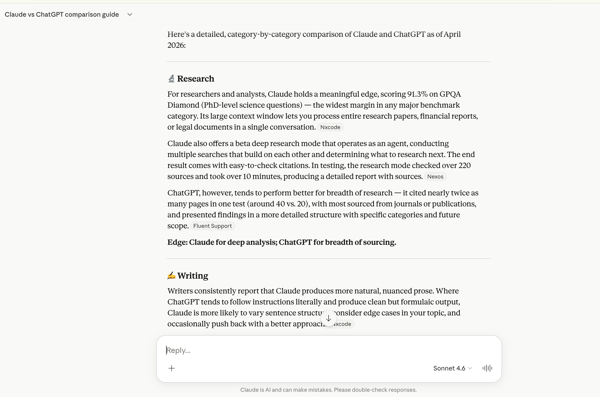
With its newer Research capabilities, Claude can now include sources as well. However, the experience felt more focused on building a deeper understanding of the topic rather than offering an extensive, highly structured list of references.
ChatGPT, on the other hand, approached the same prompt with a broader research lens. Its Deep Research feature provided a more comprehensive comparison, supported by clearly listed and clickable sources. This made it easier to verify claims and explore the topic further from multiple angles.

While ChatGPT focused on breadth and verifiability, Claude leaned more toward depth and clarity of explanation.
Based on my experience, both tools are effective for research but serve slightly different purposes: Claude for deeper understanding and synthesis and ChatGPT for broader exploration and source-backed validation.
Winner: Tie
Claude and ChatGPT are not the only AI chatbots worth testing. Here’s how Gemini and Copilot stack up.
Writing and rephrasing
I compared Claude and ChatGPT based on a prompt, “Write an informal essay on AI taking over the world.” Claude gave me an option to select the writing style while supplying the prompt.
Claude’s response appeared to be more engaging than ChatGPT’s. Claude used a Terminator analogy to help me visualize its writing. It used short sentences to maintain better readability and kept the tone conversational.

When I tested the same prompt in ChatGPT, I was surprised to see the result. The context it sets is better and more interesting than Claude’s. However, the writing style is pretty bland. ChatGPT covers different angles of the topic while conveying its real-world impact. At the end of its response, ChatGPT asks if a user would have a more conversational or humorous tone.

Claude and ChatGPT are tied in terms of writing. I tested the two platforms’ rephrasing capabilities to find a clear winner.
I gave them a prompt: “Edit this to transform it into a conversation between two people. Use first- and second-person narrative. Write in active voice. Use a more humorous tone.”

While rephrasing and editing the response, Claude does a great job of transforming the essay into a dialogue. It suggests the emotions or actions a person takes in addition to delivering their dialogue. You can easily convert it into a skit or a role play without making a lot of edits.
ChatGPT did a decent job of transforming this content into a dialogue. However, the flow and vocabulary weren’t as good as Claude’s. Therefore, when it comes to writing and rephrasing, Claude is a more suitable choice.
Winner: Claude
Coding
I tested the coding capabilities of the two AI chatbot platforms based on the prompt below.

I instructed the tools to write code for the homepage of DAYFIVE, a content marketing services company. I briefly overviewed how I visualized the homepage, including the necessary elements.
I was amazed to see the result on both platforms.
Anthropic’s Claude gave me a vibrant design. It delivered on the complex request, where I wanted testimonials to slide horizontally on scrolling. Overall, it gave me a code structure to work on to edit to make changes in the copy and graphics.

I used the same prompt on ChatGPT. However, it didn’t add horizontal movement to the testimonial. I was able to scroll through the testimonials manually. Overall, I liked Claude’s output better than ChatGPT’s when it comes to coding.
When it comes to functionality, ChatGPT allowed me to transform the HTML5 code into JavaScript and various other languages. In terms of flexibility, ChatGPT offered better options.

Based on what I observed, there is a tie between Claude and ChatGPT for a coding use case. A coding expert will be able to see the differences more clearly.
Since my initial testing, Anthropic has introduced Claude Code, which significantly expands Claude’s capabilities for developers. Claude Code can be integrated directly into a developer’s terminal, allowing it to assist with real-time coding tasks such as writing scripts, refactoring files, and navigating codebases more efficiently.
One of the standout aspects of Claude Code is its ability to work with large and complex codebases using its extended context window. It can process multiple files simultaneously, maintain context across longer interactions, and provide more cohesive suggestions when working on multi-step functionality. This makes it particularly useful for developers working on larger projects rather than isolated code snippets.
Additionally, Claude Code emphasizes structured reasoning and explanation. Instead of just generating code, it often explains the logic behind its approach, making it a valuable tool for debugging, learning, and improving code quality. This positions Claude as not just a code generator, but more of a collaborative coding assistant that supports deeper understanding.
With these advancements, Claude’s coding capabilities have evolved beyond basic generation and now cater more effectively to real-world development workflows.
Winner: Tie (According to my testing)
Image generation
I tested the two AI chatbot tools for their image generation capabilities on the same prompt. I asked the tools to “Create an image to depict a sunset with orange sky and a person standing in the middle of a lush green landscape. The person writes with a feather and sketches the landscape in their notebook.”
The winner stood out, and the output generated was way better than its counterpart. Here’s what Claude generated as a response to the image creation task:

Claude didn’t do a good job in terms of accuracy and visualization.
ChatGPT generated a beautiful picture that was close to expectations in the prompt. Here’s ChatGPT’s output:

Compared to Claude, ChatGPT’s free plan creates better images based on a prompt.
Winner: ChatGPT
Pricing
Both Claude and ChatGPT offer a free plan. Claude’s paid plans’ pricing is as follows:
- Pro: $17/month
- Max: $100/month
- Team: $25/month/member (minimum five members required)
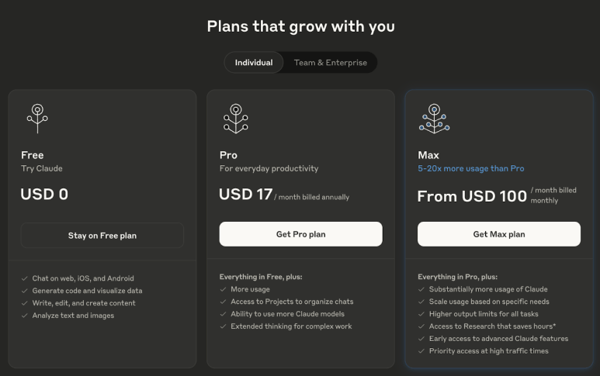
ChatGPT’s pricing is somewhat similar, except for a few plan differences. ChatGPT’s paid plans cost:
- Plus: $20/month
- Pro: $200/month
- Team: $25/month/user
The ChatGPT team plan requires more than 2 years and is billed annually.
Here’s the overview of ChatGPT pricing plans:

ChatGPT charges a little more than Claude in its mid-tier plan. However, this is justified considering its advanced research and image generation capabilities. At the same time, Claude offers decent value in writing and editing. I feel it’s a tie between the two AI platforms when it comes to pricing.
Winner: Tie (both Claude and ChatGPT)
Claude vs. ChatGPT: Head-to-head comparison table
Here’s a table showing the web builder software that wins.
| Feature and functionality | Winner | Why it won |
| Research capabilities | Tie | ChatGPT has its broad research capability. Claude’s Research has its deep contextual capability |
| Writing and rephrasing | Claude 🏆 | Claude offered a simple way to choose a writing style and deliver more engaging content. ChatGPT’s writing felt more academic. |
| Coding | Tie | Claude delivered a more visually appealing outcome with functionality as expected in the prompt. ChatGPT offered more flexibility in transforming code into different languages. |
| Image Generation | ChatGPT 🏆 | ChatGPT was able to create the image as expected in the prompt. Claude showed hallucinations. |
| Pricing | Tie | ChatGPT is slightly expensive but justifies it with its accuracy, research capabilities, and image creation proficiency. Claude does a good job of writing and rephrasing. |
Key insights on Claude vs. ChatGPT from G2 data
I looked at review data on G2 based on real users’ experiences to find strengths and adoption patterns for Claude and ChatGPT. Here’s what stood out:
Satisfaction ratings
- Claude excels in ease of use (97%), ease of setup (96%), and ease of doing business (94%).
- ChatGPT ranks high in ease of use (96%). It shows decent satisfaction ratings for ease of doing business (95%) and ease of setup (96%).
Industries used
- Claude dominates in IT and services, computer software, marketing and advertising, financial services, and consulting.
- ChatGPT has a strong presence in IT and services, computer software, marketing and advertising, education management, and higher education.
Highest-rated features
- Claude excels in understanding (89%), natural conversation (93%), and creativity (89%).
- ChatGPT stands out for natural conversation (94%), context maintenance within sessions (93%), and controlled LLM response generation (91%).
Lowest-rated features
- Claude struggles with error learning (77%), software integration (82%), and customizability (82%).
- ChatGPT also struggles with web widget & SDK embedding (80%), autonomous task execution (82%), and data security (82%).
We didn’t stop at testing Claude vs. ChatGPT. Take a look at our other AI face-offs to see which ones claimed the win.
Frequently asked questions on Claude vs. ChatGPT
Have more questions? Find more answers below.
Q1. What is the knowledge cutoff for Claude?
Currently, Claude Opus 4 and Claude Sonnet 4, (Anthropic’s latest models) have knowledge cutoff data of January 2026.
That means it was trained on data available up until that point and does not have built-in awareness of events or developments after that date unless updated through external tools or plugins.
Q2. What is the knowledge cutoff for ChatGPT?
The knowledge cut-off for ChatGPT, powered by GPT-5 is September 30, 2024.
This means the model was trained on data available up to that date and doesn’t have knowledge of events or developments after September 2024 unless accessed through tools like web browsing.
Q3. Is Claude AI free?
Yes, Claude offers a free plan with limited usage of its core models and beta access to some features like deep research. Paid plans unlock higher usage limits and advanced capabilities.
Q4. What are the limitations of Claude AI?
Claude has no native image or audio generation, fewer app integrations than ChatGPT, and its agent-like features are still developing compared to more mature automation tools.
Q5. Why do people like Claude AI?
People like Claude for coding and reasoning. Here’s what Amir, a G2’s validated reviewer, comments on why they like Claude:
“I use Claude mainly for coding help, content writing, and brainstorming ideas. It gives clear responses, understands context well, and helps me save a lot of time in daily tasks. I like most its natural and human-like responses. It gives detailed answers and helps me work faster and more efficiently. I also like how smooth and easy the conversations feel while using Claude. It handles long discussions well, stays accurate, and is very helpful for both creative and technical tasks. The initial setup was very easy and direct.”
– Claude AI Review, Jeni J, Software Developer , AI Agents Builder.
Q6. Why do people like ChatGPT?
People like ChatGPT for its image creation and research capabilities. Here’s what
Shilpi, a G2’s validated reviewer, says about ChatGPT:
“ChatGPT has genuinely become my go-to productivity partner. Whether I need to brainstorm ideas, write professional emails, explain complex topics in simple terms, debug code, or even just organize my thoughts, it delivers incredibly fast and high-quality responses. I especially love how good it has become at understanding context and tone. I can ask it to write something casual, formal, creative, or technical, and it nails the style almost every time.”
– ChatGPT Review, Ganesh B, Data Science
Q7. Is Claude better than ChatGPT?
It depends on your needs. Claude excels at summarization, editing, and handling long context windows, while ChatGPT is more versatile with built-in image generation, browsing, and broader integrations.
Q8. Which is better for coding: Claude or ChatGPT?
- Claude: Excels in reasoning, code explanation, and debugging walkthroughs. Great for learning while coding.
- ChatGPT: Strong in code generation, integrations with IDEs, and multimodal support (e.g., explaining code via screenshots).
Q9. Which AI assistant has better reasoning capabilities?
Claude is often praised for structured reasoning and summarization, especially with longer contexts. ChatGPT also performs well but is more focused on versatility and creativity across tasks.
Q10. Which is more creative, Claude or ChatGPT?
- Claude: Better at thoughtful, nuanced writing and long-form editing.
- ChatGPT: Stronger in creative generation (images, stories, marketing copy) due to multimodal tools.
Q11. Can Claude handle longer contexts than ChatGPT?
Yes. Claude is designed for very large context windows, making it ideal for analyzing lengthy documents or conversations. ChatGPT has large context support too, but Claude typically leads in this area.
Q12. Is Claude faster than ChatGPT at generating responses?
Both are fast, but ChatGPT often feels snappier thanks to OpenAI’s infrastructure and multimodal optimizations. Claude can sometimes take longer with large, complex prompts.
Q13. How does Claude compare to ChatGPT in terms of accuracy?
- Claude: Stronger in careful reasoning, document analysis, and avoiding hallucinations in structured tasks.
- ChatGPT: Accurate in many domains but may prioritize speed and fluency, which can sometimes introduce errors.
Q14. What can ChatGPT do that Claude cannot?
- Built-in image generation
- Web browsing for up-to-date information
- Voice and vision modes
Q15. What are the use cases where Claude outperforms ChatGPT?
- Summarizing or editing very long documents
- Providing step-by-step code explanations
- Supporting parallel file organization and workflows
Q16. Which is better, ChatGPT, Gemini, or Claude?
Each has strengths: ChatGPT offers the most features and integrations, Gemini focuses on tight integration with Google’s ecosystem, and Claude specializes in long-form reasoning and document analysis.
Q17. Is Claude better than ChatGPT for writing and content creation?
Claude generally excels at writing and content creation when it comes to tone, flow, and readability. Its responses tend to feel more natural, conversational, and well-structured, especially for long-form content, storytelling, and nuanced editing.
ChatGPT, on the other hand, is highly capable but often defaults to a more structured or slightly formal tone unless guided otherwise. With the right prompts, it can match or even exceed expectations in creative writing, but it may require more direction.
In short, Claude is often better out-of-the-box for writing, while ChatGPT offers more flexibility with prompting and style control.
Q18. Should I use Claude or ChatGPT for my work tasks?
It depends on the type of work you do.
- Choose Claude if your tasks involve:
- Writing, editing, or summarizing long-form content
- Deep thinking, reasoning, or analyzing complex documents
- Working with large inputs like reports or transcripts
- Choose ChatGPT if your tasks involve:
- Research with verifiable sources
- Image generation or multimedia content
- Using integrations, tools, or automation workflows
- A mix of tasks across writing, coding, and data handling
If your work is content-heavy, Claude can feel more intuitive. If it’s more multi-functional and research-driven, ChatGPT is the more versatile option.
Q19. What is the difference between Claude and ChatGPT?
The main difference lies in their strengths and approach.
- Claude focuses on:
- Deep reasoning and structured thinking
- Long-context understanding (handling large documents)
- Natural, human-like writing and editing
- ChatGPT focuses on:
- Versatility across multiple tasks
- Deep research with source-backed answers
- Multimodal capabilities like image and audio generation
- Integrations and broader ecosystem support
In simple terms, Claude is optimized for depth and clarity, while ChatGPT is designed for breadth and versatility.
Claude vs. ChatGPT: My final verdict
There’s no single winner between Claude and ChatGPT; each model excels in different scenarios depending on how and where you use it.
Although I found Claude to be better at writing, rephrasing, and code generation, I have second thoughts about its reliability. Its responses in my testing of research and image generation features make me question its accuracy in other use cases as well.
ChatGPT did a decent job for me when it came to research and image generation, especially in terms of accuracy. This increased the reliability of the AI chatbot solution. It has its limits on the Free and Plus plans. However, I’d want to test other alternatives before onboarding a new AI sidekick.
If you want to compare ChatGPT with other alternatives, check out my colleague Soundarya’s blog on Gemini vs. ChatGPT.