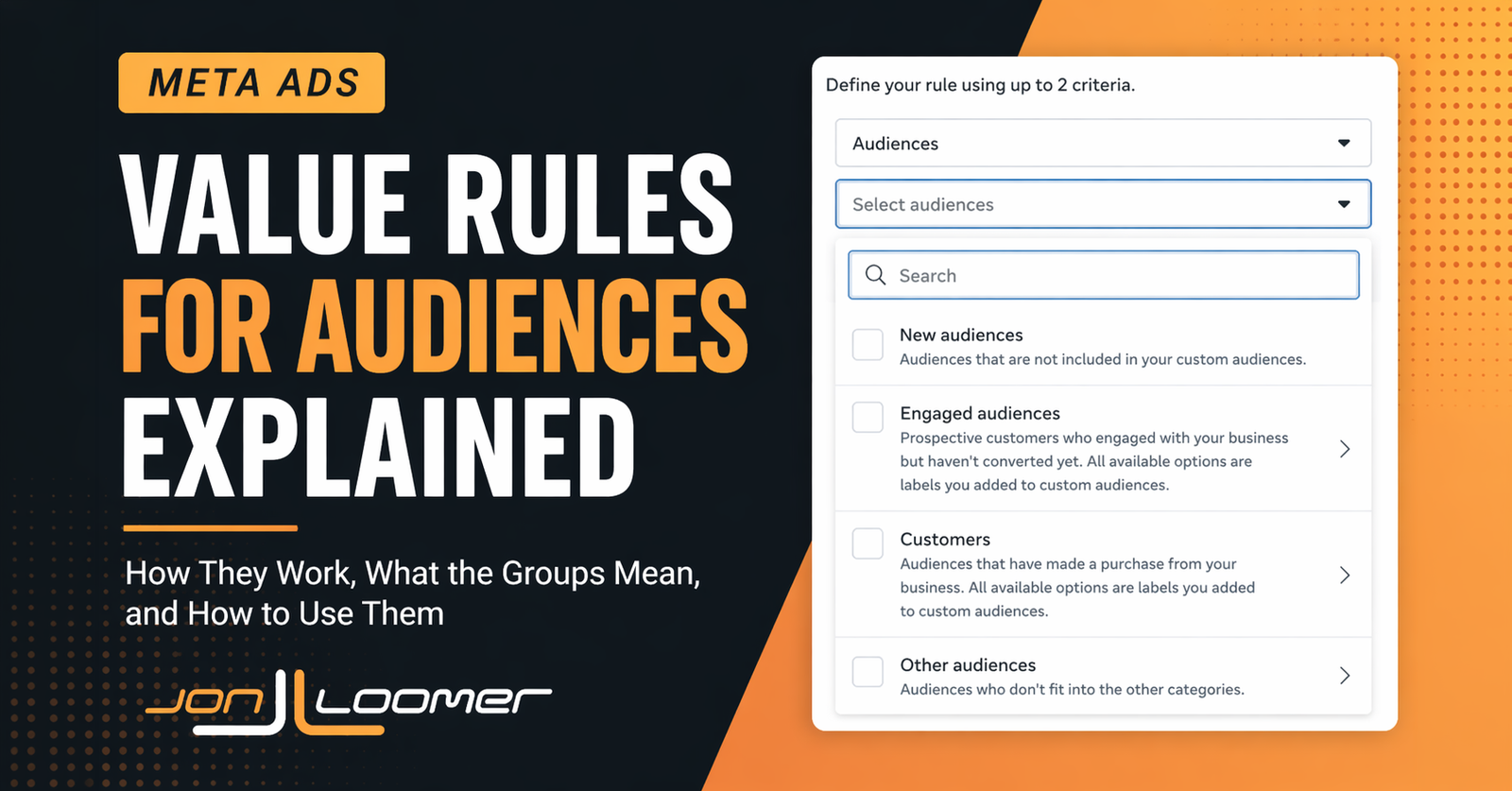
Some advertisers have access to a new set of value rule criteria: Audiences.

This is the most robust application of value rules yet. When creating a value rule for audiences, you can adjust your bid for people who belong to specific custom audiences. Bid more or less for people who are qualified leads, disqualified leads, high-value customers, low-value customers, and more.
While a sizable amount of effort is required to label these audiences, there could also be equal or greater payoff for specific types of businesses.
Let’s take a closer look…
General Overview
If you have access to audiences within value rules, you will see the following categories of options…

If you are seeing this option for the first time, it’s likely that all but “New Audiences” are grayed out.
New audiences: Audiences that are not included in your custom audiences.
Engaged audiences: Prospective customers who engaged with your business but haven’t converted yet. All available options are labels you added to custom audiences.
Engaged Audiences includes the following groups:
- Qualified leads: Leads that meet your qualification criteria
- Disqualified leads: Leads that don’t meet your qualification criteria
- App installers: People who have installed your app
- Trial users: People who started a trial of your product
- Cart abandoners: People who added a product to their cart but didn’t check out
- Other engaged users: People who showed interest but didn’t make a purchase
Customers: Audiences that have made a purchase from your business. All available options are labels you added to custom audiences.
The Customers category includes the following:
- High value: Customers you consider valuable to your business
- Low value: Customers who are of low or negative value to your business
- Recent purchasers: Customers who have made a purchase or converted recently
- At risk: Customers who are showing signs of disengaging or churning
- Disengaged: Customers who have not made a purchase recently or stopped subscribing
- Customers: People who have converted and become customers
Other audiences: Audiences who don’t fit into the other categories.
The Other Audiences category includes these final groups:
- Personas: People who fit your business’ customer personas
- Other 1: People who don’t fit into the other categories
- Other 2: People who don’t fit into the other categories
- Other 3: People who don’t fit into the other categories
How Are These Groups Defined?
When I first heard about value rules for audiences, I logically assumed that they’d leverage audience segments. These value rules specifically call out “customers” and “engaged audiences,” after all, which is how audience segments are defined.
But once I was granted access to this feature, I quickly discovered that this couldn’t be the case. Audience segments are broadly defined as engaged audiences and existing customers. Value rules rely on further segmenting those groups, in addition to defining an “other” category.
A couple of things jump out to make it clear that this isn’t about audience segments. First, the definitions all mention “custom audiences.” The New Audiences group is defined as those who aren’t in any of your custom audiences — not your audience segments, but any custom audience.
Second was the mention of “labels.” And that’s when I realized how this worked: Advertisers need to define these groups by adding labels to custom audiences.
What Are Labels?
Most advertisers have a basic version of audience labels for customer list custom audiences. When you create or edit a customer list custom audience, you will see the option to add a label.

But even in Meta’s documentation, this version of labels is only intended to categorize your custom audiences to make them easier to find. There’s no functional application. And the label options are limited to a handful: Qualified Leads, Disqualified Leads, Customers, High Value, and Low Value.

If you have this update, labels will extend to website custom audiences (and possibly others, though I’ve confirmed they don’t apply to video, page, and lead ad custom audiences). And most importantly, you’ll get to apply additional granularity to these labels.

These labels mostly match the options available for creating value rules by audience above. The main exception is “Restricted Audiences.” But this label is for people you can’t show ads to for legal or other reasons. There would be no reason to apply a value rule to this group since you’d want to exclude them entirely.
The other is “New Audiences,” which would imply a person not only doesn’t have a label, but isn’t in any of your custom audiences.
Labeling Your Custom Audiences
This all sounds interesting, but remember that some significant effort is required on your part. You now need to go through and label your custom audiences in order to use these options with value rules.
And that’s where things can get tricky. As long as you’ve determined that a website custom audience can be accurately defined with a label, that definition will be dynamic and update regularly.
But where you need to be careful is with customer list custom audiences. You need to be sure that they are updated regularly so that a person who has progressed from “low value” to “high value,” for example, is accurately moved from one label to the next. That will require technical effort and automation.
It’s also not clear what happens, if anything, if someone is given conflicting labels. While we know that Meta handles the overlap of engaged audiences and existing customer audience segments (Meta will only count a person as being an existing customer if found in both), there’s no clear indication that the same would apply here. And if someone is counted in two conflicting groups where you’re increasing and decreasing bids, that would obviously create a problem.
The Rule of Value Rules
While this all sounds amazing, there are three critical elements for assessing whether value rules for audiences would be worthwhile for you…
1. Use to solve a problem.
Possibly most importantly, I worry that advertisers will use value rules for audiences when they aren’t necessary. Advertisers will assume that they need to bid more on high-value customers or less on low-value customers. But Meta will be doing some of this automatically already.
The basic rule of value rules is to use them when you have information that Meta doesn’t and there’s a problem to be solved. A prime example is related to qualified and disqualified leads.
If you’re not getting the results you want and Meta is leaning heavily into remarketing to your leads, you may consider bidding more on qualified leads or less on disqualified leads. Since Meta doesn’t know that you value these people differently, they may both be targeted aggressively.
2. Data volume.
This just isn’t likely to be a small business solution. You need to have the volume of data required that would allow Meta to have an impactful audience of people to raise and lower bids on.
I’d consider my email list and website traffic to be well above average for most small to medium-sized businesses. But even I have doubts whether I have the volume that would make this worthwhile.
I could see potentially using this for the broader labels (all customers or qualified leads), but most of these refinements get too granular to be helpful.
3. Accuracy of labels.
As detailed above, you’ll need to dedicate a decent amount of effort to defining these audiences to make use of them. The accuracy of your work will have a significant impact on the output. That also includes dynamic updating and potentially the handling of conflicts.
Overall, I do think that the potential is significant for larger businesses with substantial data that can be parsed and segmented — especially when you can label information that gives Meta a better understanding of customer value. This could help Meta be more efficient in the delivery of your ads.
But truly, only in the cases where you are giving Meta information they don’t already have and there’s a problem to be solved.
How Would You Use This?
When I’ve spoken about this feature with others, I often need to add a clarifier regarding how and why you might use value rules for audiences. Otherwise, it’s easy to assume that this does something it doesn’t.
This isn’t about optimizing for higher value customers or qualified leads. It’s about spending more or less to reach the people who are already defined as that.
Now, there could be some spillover effect. If you bid less on disqualified leads, Meta will show your ads less to the people you’ve previously disqualified. By doing so, it’s reasonable to assume that this could also impact how much you reach people like them. Reasonable to assume, but all theory, of course.
With that out of the way, let’s think through ways you might use the new value rules for audiences…
1. Bid less on customers.
Let’s say you’ve determined that you want to lean more into prospecting. This could be because of company goals or you’ve seen that new customers are more valuable than existing customers. You could accomplish this without excluding current customers.
2. Bid less on disqualified leads.
Because they’re on your email list and have visited your website, Meta’s likely to keep targeting them. But if you’ve already disqualified them based on their answers on a form, you can bid less to reach them less often.
3. Bid more on cart abandoners.
You have a limited time offer that’s available to all new and existing customers. Bidding more on cart abandoners could make sense to make sure they know of this offer since they were seemingly a step away from completing the purchase. That assumes, of course, that Meta wouldn’t prioritize them already.
4. Bid more on high value customers.
You have a new high-ticket offer to announce, and you are going to target people broadly. But you want Meta to bid more on those who have proven to be loyal, high-value lifetime customers. Since lifetime value may be data that is hidden from Meta, it can help focus on what is otherwise low-hanging fruit.
Your Turn
Do you have access to value rules by audiences? How would you use them?
Let me know in the comments below!