Summary
| A CRM is your system of record for historical data like purchases and contact details, while a CDP is your system of action that unifies real-time behavioral signals into a single profile. Used together, they remove data lag, enable real-time personalization, and unify identities across channels. While a CRM shows who a customer is, a CDP shows what they are doing now, allowing marketers to trigger high-conversion emails based on live intent rather than static history. |
Most email programs still rely on separate CRM records and batch-based sending logic. The CRM holds contact records. The ESP sends the message. And somewhere in between, timing gets lost, personalization stays surface-level, and revenue slips through the cracks.
The issue is data recency, not the technology itself. A customer relationship management (CRM) platform tells you who someone is based on past transactions. A customer data platform (CDP) tells you what they’re doing right now. When both feed the same activation layer, your email program stops guessing and starts responding to real intent.
This guide explains how CRM and CDP tools for email work together to remove data lag, improve personalization, and increase conversion. You’ll learn what each system does, when to add a CDP to your stack, and how to connect them without ripping out your current infrastructure. If your team is ready to move beyond batch sends and static segments, this is where you start.
What should marketers know at a glance?
CRM stores relationship history, CDP unifies real-time behavior, and email programs perform best when both feed the same activation layer.
- CRM holds contact records and purchase history; CDP stitches behavioral events across channels into a single profile
- Combining them removes the data lag that causes mistimed sends and generic content
- Implementation starts with connecting existing data sources, not ripping out your current stack
A customer relationship management (CRM) platform is your system of record for known customer interactions. It stores names, email addresses, service tickets, and completed transactions. This data tells you who the customer is based on their past relationship with your brand.
A customer data platform (CDP) works differently. It ingests high-volume behavioral events, like page views, add-to-carts, and app sessions, from multiple sources in real time. Then it resolves those signals to a single profile. The CDP answers a different question: what is this customer doing right now?
Your email service provider (ESP) sits at the end of this chain. It delivers the message. In legacy setups, the ESP connects directly to the CRM. Modern stacks place the CDP between them to feed real-time data into the ESP before the send.
| System | Primary data | Typical owner | Email function |
| CRM | Declared data (contact info, sales history) | Sales, service, or IT | Provides the list and historical context |
| CDP | Observed behavior (web/app events) | Marketing or growth teams | Triggers messages based on intent |
| ESP | Campaign data (opens, clicks, bounces) | Marketing or CRM managers | Delivers the message and tracks engagement |
Why does this matter for CRM email marketing? Marketing is now ruled by signals and real time behavior; by integrating predictive scoring and online behavioral knowledge into a self-service CDP, marketing teams trigger emails based on real-time intent while using orchestration to manage message pressure and sending time optimization. not just static attributes like age or location.
When marketing teams control the CDP data, they can act on these signals without waiting for IT to run database queries.
What is the difference between a CRM and a CDP for email?
Picture this: a cart abandonment email fires late because the CRM only syncs with the commerce platform during a nightly batch job. By the time the email lands, the customer bought from someone else.
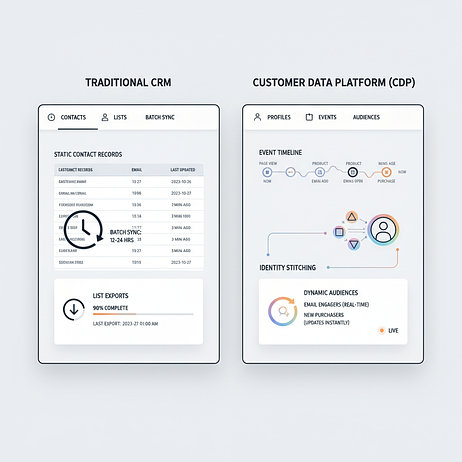
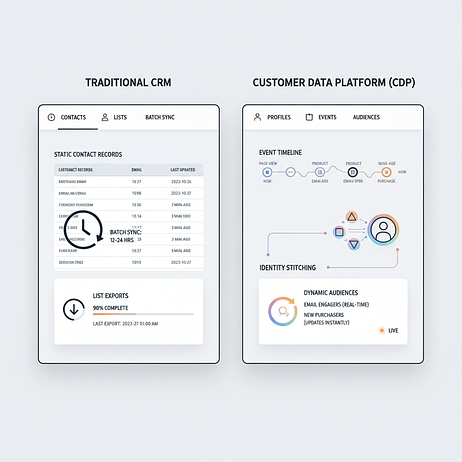
A CDP solves this by processing data streams continuously. The CRM manages long-term records. The CDP manages fast-moving event streams.
- Data scope: CRM captures declared data like form fills and completed transactions. CDP captures observed behavior, including anonymous browsing before a user logs in
- Update frequency: CRM systems sync data in batches, hourly or daily. CDPs update profiles in real time or near-real time
- Identity resolution: CRM relies on exact matches of email addresses or phone numbers. CDPs use probabilistic and deterministic matching to stitch anonymous web sessions to known profiles across devices
- Activation model: CRM pushes static lists to an ESP. CDPs stream dynamic audiences continuously based on changing criteria and predictive algorithms
| Capability | CRM | CDP |
| Data latency | High (batch updates) | Low (real-time streaming) |
| Identity logic | Linear (a record maps to a person) | Complex (cross-device stitching) |
| Email use case | Newsletters, transactional receipts | Behavioral triggers, individualized personalization |
Choose CRM-only if: your email list is small, your campaigns are primarily newsletters or operational updates, and a data delay doesn’t impact conversion rates.
Add a CDP when: you need to trigger emails based on real-time website behavior, you’re running cross-channel campaigns across email, SMS, and ads, or you have fragmented data across multiple systems that need unification.
One misconception in the CDP vs. CRM debate: that one replaces the other. The CDP sits alongside the CRM, enriching it with behavioral insights while relying on the CRM for historical truth.
Why CRM and CDP together improve email results?
A retailer’s welcome series converts well. Their win-back emails underperform. The CRM sees that a customer hasn’t purchased in a while and triggers a generic “We miss you” discount.
But the CDP sees something different: this same customer browsed the site multiple times recently without buying. They’re not lost. They’re active but undecided. With combined data, the email changes from a generic win-back to a specific product recommendation.
- Faster trigger response: Real-time behavioral events allow CRM and email automation to fire within minutes of high-intent signals like viewing a pricing page or adding an item to a wishlist
- Richer personalization: Product recommendations draw from cross-channel activity, suggesting items based on recent app views rather than just the last purchase made long ago
- Cleaner unification: Advanced identity resolution prevents sending the same promotional email to the same person twice because they have multiple email aliases in the database
- Measurable lift: When all touchpoints feed the same profile, you can run holdout tests to measure the incremental revenue lift of personalization efforts
Consider adding a CDP to your CRM + ESP stack when:
- Your email list has grown large enough that batch lag causes noticeable revenue loss
- You plan to launch cross-channel campaigns involving SMS, push notifications, or WhatsApp
- Your personalization strategy relies on behavioral signals the CRM doesn’t capture
If you want to see what “real-time intent in email” looks like on your own data, book a demo and we’ll walk through the trigger points that matter most.
What real-world email use cases do CRM and CDP support?
“Personalized email” often means inserting a first name into a subject line, yet most consumers expect companies to understand their needs, and true personalization requires behavioral context that a CRM alone can’t provide.
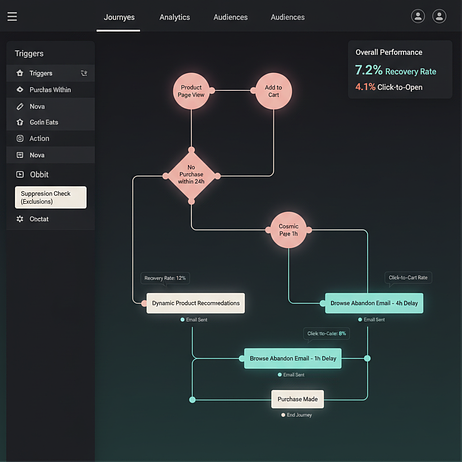
Cart abandonment
- Trigger: an add-to-cart event occurs without a purchase event within a specific time window.
- Data required: product SKU, price, name, and image from the commerce platform, combined with browsing history from the CDP.
- Personalization: a dynamic product block showing the exact items left behind, plus related recommendations based on category affinity.
- Timing: an initial email sent quickly, with a follow-up later if no conversion.
- KPI: cart recovery rate.
Browse abandonment
- Trigger: repeated views of a specific product or category page without adding to cart.
- Data required: page-view events and session duration from the CDP.
- Personalization: “Still thinking about [Category]?” messaging featuring the specific items viewed.
- Timing: sent within the same session window or the next morning.
- KPI: click-to-cart rate.
Post-purchase cross-sell
- Trigger: order confirmation event.
- Data required: purchase history from the CRM combined with affinity scores from the CDP.
- Personalization: recommendations for complementary products rather than generic bestsellers.
- Timing: sent after delivery confirmation once the customer has had time with the product.
- KPI: repeat purchase rate.
Win-back
- Trigger: no purchase or engagement recorded within a defined window.
- Data required: last purchase date from the CRM and last site visit timestamp or churn predictive scoring from the CDP.
- Personalization: an incentive tied specifically to the category the customer previously purchased or browsed most frequently.
- Timing: sent after a meaningful period of inactivity.
- KPI: reactivation rate.
Channel Fallback
- Trigger: a message delivery failure or no engagement detected within a defined window after the initial send.
- Data required: delivery status and engagement events (open, click) from the messaging platform, combined with channel reachability flags and preference data from the CDP.
- Personalization: same core content reformatted for the fallback channel (e.g., an email condensed into an SMS with a short link, or a push notification adapted into a direct mail piece).
- Timing: fallback triggered shortly after the undelivered or unengaged send, with channel priority ordered by each recipient’s historical responsiveness.
- KPI: overall message reachability rate.
Back-in-Stock / Price Drop
- Trigger: an inventory status change from out-of-stock to available, or a price update event falling below a defined threshold.
- Data required: product SKU, updated price, and real-time stock level from the commerce platform, combined with wishlist, save-for-later, and browse history from the CDP.
- Personalization: a dynamic product block featuring the exact item the customer previously viewed or wishlisted, with the new price or availability prominently highlighted.
- Timing: sent immediately upon the triggering event to capitalize on existing purchase intent before stock depletes again.
- KPI: conversion rate from alert to purchase.
If you’re evaluating which of these use cases will move revenue fastest in your stack, start in the product demo hub and see how real-time events turn into orchestrated email journeys.
How to get started with CRM and CDP for email.
Teams often delay CDP adoption because they assume it requires a massive data warehouse migration. Most CDPs connect to existing CRM and commerce platforms via prebuilt connectors or APIs. A focused first use case can go live quickly.
How do you connect email, CRM, and commerce data?
The data sources that matter most for email are:
- The CRM for contact records and purchase history
- The commerce platform for product catalogs and orders
- The website or mobile app for behavioral events
Map each source to a primary key, typically an email address or unique customer ID (or both). This allows the systems to communicate. You’ll face a choice: use native connectors or reverse ETL from a data warehouse. Native connectors deploy faster and work for most marketing use cases. Reverse ETL suits teams with existing warehouse infrastructure and dedicated data engineering capacity.
How do you authenticate sending and warm up your domain?
Email marketing CRM integration involves more than data mapping. It requires protecting sender reputation. When switching systems or adding a new sending layer, configure DKIM, SPF, and DMARC.
Once authenticated, IP warming is essential. Start by sending to your most engaged segments, those who have opened or clicked recently. Gradually increase volume over a few weeks. Skipping this step on a new sending domain can hurt inbox placement, and recovery takes months.
How do you define audience segments and triggers?
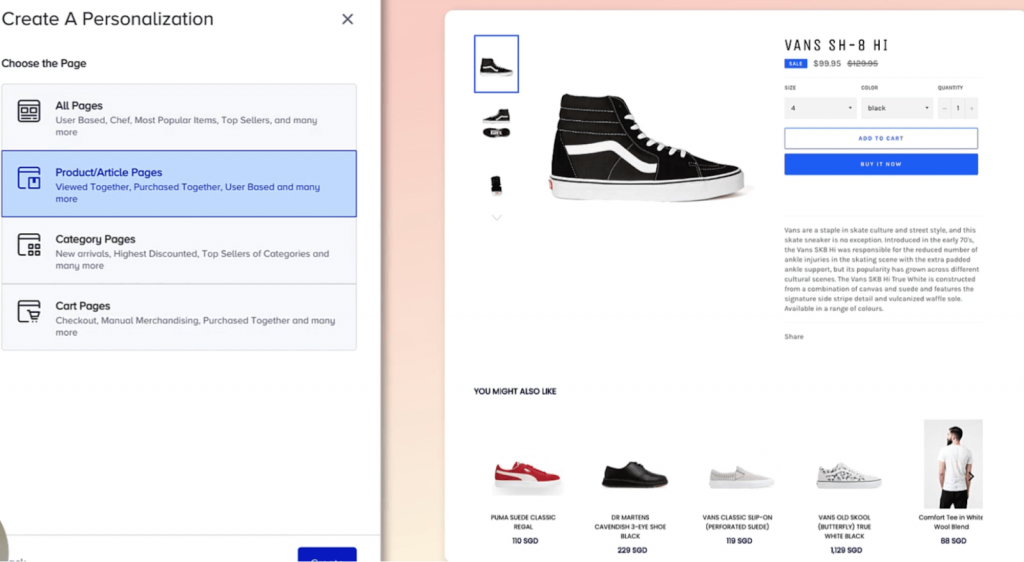
Segment architecture matters more than segment count. Start with a handful of high-value groups tied to lifecycle stages: new subscriber, first-time buyer, repeat buyer, at-risk, and lapsed.
Define triggers for each segment based on a combination of data. Triggers should reference CDP events like a cart update or app open alongside CRM attributes like lifetime value tier. A “High Value At-Risk” trigger fires when a VIP customer visits the cancellation page.
How do you launch lifecycle programs and measure results?
Start with an initial automated program, like a welcome series or cart abandonment flow, before attempting complex orchestration.
Use control groups to measure success. Suppress a small percentage of the audience from receiving the campaign and compare their conversion rate to the group that received it. While open rates and click rates are useful leading indicators, tie success to revenue metrics: recovery rate, repeat purchase rate, and revenue per email.
If you want a faster path from “idea” to “live,” book a demo and we’ll map a first-use-case rollout your team can actually execute.
How do CRM and CDP email programs affect deliverability and inbox placement?
Deliverability is often treated as an ESP problem. But data quality from the CRM and CDP directly affects sender reputation.
If your CRM contains multiple records for the same person, that customer receives the same promotional email multiple times. This triggers spam complaints, which hurts domain reputation. Deliverability is a data problem.
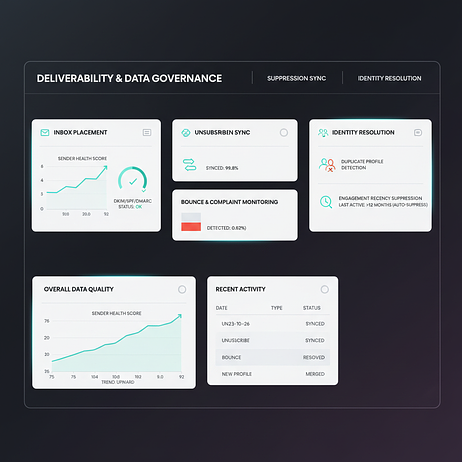
- Unsubscribes sync: Unsubscribes and hard bounces must propagate from the ESP back to the CDP and CRM quickly. Delayed syncs result in sending emails to users who have already opted out
- Identity resolution: A CDP with configurable identity resolution reduces duplicates before they reach the ESP. A user who shops on mobile and desktop gets recognized as one person
- Engagement recency: Sending to disengaged addresses degrades sender reputation. Use CDP engagement scores to automatically suppress or re-permission dormant contacts
Health checklist:
- Bounce rate: keep low
- Complaint rate: keep low
- Engagement recency: suppress users with no activity for an extended period
If you’re serious about inbox placement, don’t guess. Use the product demo hub to see how identity resolution and unsubscribes logic work before they ever hit your ESP.
How does a CDP support GDPR compliance in email programs ?
GDPR doesn’t just require that you collect consent, it requires that you act on it consistently across every system that touches customer data.
In a fragmented stack, this is where compliance breaks down. An unsubscribe recorded in the ESP may take hours or days to propagate back to the CRM, and longer still to reach a downstream ad platform or SMS tool.
During that window, a contact who has withdrawn consent can still receive communications, exposing the brand to regulatory risk.
A CDP solves this by acting as the central consent ledger. When a suppression event fires (an unsubscribe, a right-to-erasure request, or a consent withdrawal) it propagates instantly across every connected channel from a single point of truth, rather than relying on each system to sync independently.
For brands operating across the EU, this architecture isn’t just operationally cleaner, it’s the difference between demonstrable compliance and hoping your integrations hold.
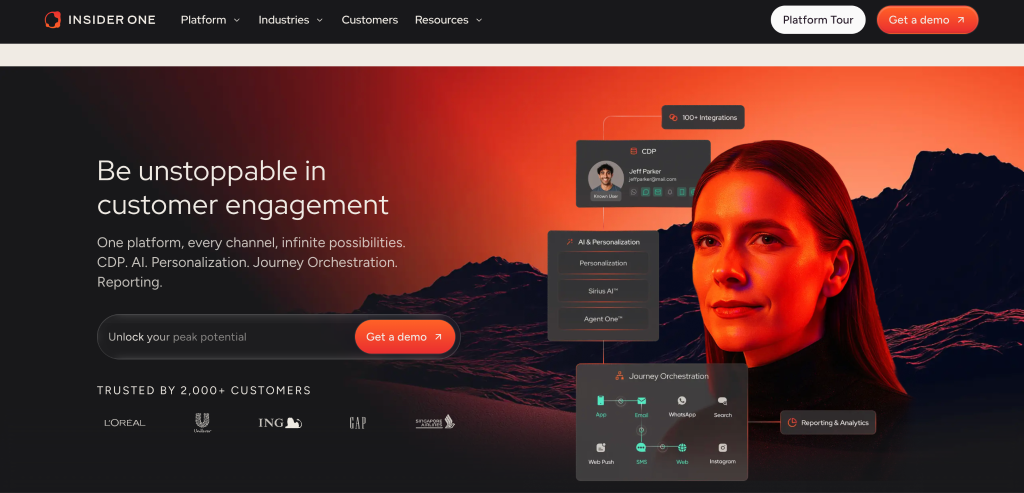
The strategies above require a platform that unifies data and executes on it without friction. Insider One brings these capabilities together in a single environment.
- Unified customer profiles: Insider One’s Customer Data Platform (CDP) ingests data from CRM, commerce, and behavioral sources into a single profile with configurable identity resolution, eliminating duplicates before they reach the activation layer
- Real-time triggers: Architect, Insider One’s customer journey orchestration solution, fires emails within minutes of behavioral events like cart abandonment or price drops rather than waiting for batch syncs
- Artificial intelligence (AI)-powered platforms: Sirius AI™, Insider One’s extensive set of AI capabilities, builds segments, journey and predictive scoring (likelihood to churn, likelihood to purchase, product affinity) reducing manual segment creation time. Generative capabilities including image generation or text modification also reduce time spent on content creation.
- Prebuilt connectors: Native integrations with Salesforce, HubSpot, Shopify, and major ESPs mean initial data connections are live in days.
- Send-time optimization: AI analyzes historical engagement patterns and reachability to select the optimal channel and send time for each individual recipient
- Next best channels: AI evaluates each recipient’s historical engagement patterns across all available channels to automatically select the one most likely to drive a response, and ensure reachability and conversion.
- Attribution reporting: Closed-loop revenue attribution connects email sends, behavioral triggers, and channel interactions to actual purchases, giving marketing teams the evidence they need to prove ROI and optimize journey logic based on what drives conversion, not just what drives clicks.
- Prebuilt templates: A library of 100+ marketer-tested templates for segments, journeys, and interactive emails allows teams to launch high-performing campaigns in minutes.
If you want to see how this looks end-to-end in your environment, from real-time events to triggered email to measurable lift, book a demo before you review the FAQs.
To get more insights on how Insider One helped brands of all verticals and industries, visit our case studies.
Why does Insider One’s unified platform outperforms a “stitched-together” stack ?
Most marketing teams running CRM + standalone CDP + ESP configurations spend more time managing data pipelines than acting on them. Every integration point between systems introduces sync latency, schema drift, and a new failure mode to monitor.
When identity resolution lives in one tool, journey orchestration in another, and sending in a third, a customer who browses on mobile, abandons a cart on desktop, and opens emails on their phone can still slip through as three separate records.
Insider One eliminates this by design. Because the CDP, orchestration, AI & decision layer, and channel execution share a single data model and coexist in the same platform, identity is resolved once and acted on everywhere, without the engineering overhead of keeping three vendor contracts, three data schemas, and three unsubscribe lists in sync.
FAQs
A CRM is a “System of Record” that tracks historical data (who the customer is and what they bought). However, it often suffers from data lag, updating in hourly or daily batches. In the age of real-time intent, waiting 24 hours to send a cart abandonment email means losing the sale to a competitor. You need a CDP to act as a “System of Action” that captures what the user is doing right now.
They don’t replace each other; they collaborate.
The CRM provides the historical context (lifetime value, past purchases).
The CDP ingests real-time behavioral signals (web browsing, app events).
When these feed into a single activation layer like Insider One, you can trigger emails based on live intent (e.g., a price drop on a wishlisted item) rather than just static segments.
Identity resolution is the process of stitching together anonymous web sessions, mobile app activity, and known email records into a single profile.
For the Marketer: It prevents sending duplicate emails to the same person with different aliases.
For Deliverability: It reduces spam complaints and unsubscribes caused by fragmented data, protecting your sender reputation.
Yes. A CDP acts as a central consent ledger. In a fragmented stack, an unsubscribe in your ESP might take days to reach your CRM. A CDP ensures that when a user withdraws consent, that status propagates instantly across all channels, significantly reducing regulatory risk.
You should consider adding a CDP when:
Your email list is large enough that “batch lag” is causing measurable revenue loss.
You want to move beyond “First Name” personalization to behavioral triggers (e.g., browse abandonment).
You are running cross-channel campaigns (Email, SMS, WhatsApp) that require a unified customer view.
No. Modern CDPs like Insider One are designed to connect to your existing CRM (Salesforce, HubSpot) and commerce platforms (Shopify, Magento) via prebuilt connectors. You can start with a single high-value use case, like real-time cart recovery, without a massive data migration.
Platforms like Sirius AI™ within Insider One take the heavy lifting out of data management by:
Predictive Scoring: Identifying users with a high likelihood to churn or purchase.
Send-Time Optimization: Analyzing when an individual is most likely to open an email.
Next-Best Channel: Automatically choosing between Email, SMS, or Push based on where the user is most responsive.
A stitched-together stack (separate CDP, CRM, and ESP) often suffers from schema drift and sync latency. A unified platform like Insider One ensures that identity is resolved once and acted on everywhere. This eliminates the engineering overhead of managing multiple vendor contracts and keeps your data and your customer journeys perfectly in sync.