[ad_1]
Meta Advertiser Field Notes
Weekly observations from inside Meta ads
A handful of small updates stood out this week, from new delivery controls and audience filters to questions about location targeting, video translation limits, and Threads ads.
- “Push delivery to this ad”
- Engagement frequency filter
- Did Meta change location targeting?
- Video translation limitations
- Threads ads updates
Let’s get to it…
1. “Push Delivery to This Ad”
Some advertisers have reported seeing a new “Push delivery to this ad” option.

I don’t seem to have it yet, but here’s what I’ve been able to figure out based on what I’ve seen so far…
For published ads that aren’t getting distribution.
I’ve seen versions of this where an advertiser sees an alert in the Delivery column that a published ad is getting “limited or no ad spend.” The advertiser is prompted to “push delivery” to that ad by dedicating a portion of their budget to it.
Similar to the creative testing tool.
The screenshot above may look familiar since it looks almost exactly like that of the creative testing tool. For example, here’s what that feature looks like…

In fact, it appears that Meta completely stole the functionality from the creative testing tool and applied it to “push delivery.” Meta even seems to have mistakenly included text related to it being a “test.” But this shouldn’t be a test since you’d only be pushing delivery to a single ad.
How it seems to work.
I can only make educated guesses about how this works, but I’ve seen enough that I think I can piece it together.
If an ad isn’t getting impressions, you can choose to dedicate a specific percentage of your campaign or ad set budget to the ad for a designated number of days. This will allow you to see what would happen if the ad were to actually get impressions so that you can decide whether any other changes need to be made.
The other difference between this and the creative testing tool is that it appears to be intended for ads that were already published and running (though it’s not clear if this can be applied for new ads when published). The creative testing tool is only for new ads, which is actually one of its annoying quirks.
This could change some things.
I have to admit I’m chuckling to myself a bit about how excited some advertisers have been about this. I’ve been pushing the creative testing tool for months for this precise purpose. The creative testing tool is part of my routine, as I start new ads with a test.
But the addition of “push delivery” could change that approach. One reason I used the test for all new ads is that we couldn’t apply the creative testing tool to active ads. But this new tool gives us flexibility.
Now you can publish an ad without an initial test and see how Meta distributes budget normally. If you have questions about why it’s not getting impressions, you can push budget to it for a few days and see what happens.
I’m looking forward to trying this out when I have it.
2. Engagement Frequency Filter
Here’s a change that’s only about eight years too late…
Advertisers who create engagement custom audiences for their Facebook page or Instagram profile will notice something new: A filter for either “in the past” or “at least.”

For example, you could create an audience of people who engaged with your Facebook page in the past 14-21 days.

Or you could isolate the people who engaged with your Facebook page at least 3 times in the past 90 days.

These filters apply to the following types of custom audiences for Facebook pages:
- People who engaged with your page
- People who visited your page
- People who engaged with any post or ad
- People who clicked any call-to-action button
- People who sent a message to your page
- People who saved any post
And they apply to the following types of custom audiences for your Instagram account:
- People who engaged with this professional account
- People who visited this professional account’s profile
- People who engaged with any post or ad
- People who sent a message to this professional account
- People who saved any post or ad
So… interesting. But like I said, it’s about eight years too late.
Why would Meta choose to do this now? Are you trying to tell me that Meta doesn’t already prioritize the people who engage most with our Facebook and Instagram accounts? This is the kind of remarketing that should be left mostly in the past.
Some people will be really excited about this. But it will likely be forgotten soon after.
3. Did Meta Change Location Targeting?
This is one of those very subtle changes that would be easy to miss, but it jumped out at me. It may not mean anything. Or maybe it means a lot.
Here’s what the location targeting box looks like today…

Do you see what’s missing? Here’s the exact same box from February 15th…

Meta removed the line that location targeting allowed you to “reach people living in or recently in this location.”
I’m not sure if Meta’s documentation changed, but it does mention “living in or recently in” within the explanation. But it’s quite possible that it’s been softened. Here’s how it reads now:
Location targeting lets you show ads to people who spend time in locations, such as people living there or recently there.
Maybe it’s always read that way. But the “such as” implies that it includes people beyond those “living there or recently there.”
It’s certainly vague. I have questions.
4. Video Translation Limitations
This isn’t necessarily ad-related, but I don’t know what this is all about…

I use Business Suite on desktop to schedule Reels. I first started using the video translation feature last September. It’s pretty awesome. It allows me to generate versions of my video that translate my voice into other languages.
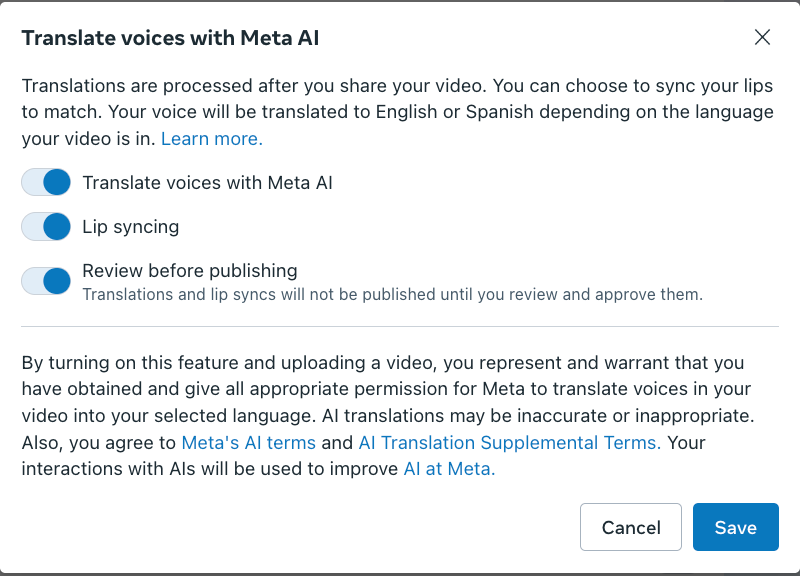
Last year, I published three of these per week without issue. Now I’m only publishing one per week. Then, without warning, I started seeing this message.
It’s a “limited new feature” now? Even though I was previously using it three times per week, now I’ve suddenly exceeded my max while using it once per week?
It’s not clear what the maximum is or what this is all about. But pretty annoying.
5. Threads Ads Updates
Meta made a couple of Marketing API updates to Threads ads:
App Ads now supported: App ads support the Threads Feed placement through the Marketing API globally. This is for the App Promotion campaign objective with performance goals related to link clicks and conversions (or at least that’s how I interpret it).
Reply Moderation Tooling: View, hide, and reply to top-level replies on your Threads ads. Reply moderation lets you manage the conversation on your ads by reading replies, hiding content, and adding your own replies.
These are Marketing API updates, so they apply to third-party tools that allow you to manage your ads. Presumably, this will also carry over to the main interface if it hasn’t already.
Your Turn
What do you think about these updates?
Let me know in the comments below!
[ad_2]
Source_link











![6 Tools to Find New Keywords [Free + Paid Options]](https://mgrowtech.com/wp-content/uploads/2025/08/find-new-keywords-sm-120x86.png)