Breakdowns are one of the most underutilized hidden features in Ads Manager. They’re great for uncovering context and meaning in your results.
These are available within a Breakdown dropdown menu next to the Columns dropdown.

There are seven breakdown categories (Time, Demographics, Geography, Delivery, Action, Dynamic Creative Element, and Creative) and one bonus option (Value Rules).

If you’re not actively using breakdowns, you’re missing out. They’re not new. But Meta does add new breakdown options often, and they’re easy to miss.
In this post, I highlight the eight breakdowns that I can’t live without and how I’m using them…
1. How Much Remarketing is Happening?
Category: Demographics
Name: Audience segments
This is listed first for a reason. The breakdown by audience segments helps uncover such useful information. I’m convinced that if more people used this, they’d approach the idea of remarketing differently.
More remarketing happens when using broad, algorithmic targeting than most advertisers think. This is because Meta will automatically prioritize the people most likely to perform your desired action — and that will often start with people who have visited your website, subscribed to your content, bought from your business, or engaged with your ads before.
When you use the breakdown by audience segments, you can see how your spend and results are distributed among your engaged audience, existing customers, and new audience (the people who aren’t in either of your audience segments).

In the example above, about 13% of the budget was spent on remarketing while running completely broad targeting. Not surprisingly, the registrations from remarketing were a bit cheaper, making up 15% of the total pool.
Two critical elements make the use of this breakdown possible…
Define Your Audience Segments
Audience segments are defined in your Advertising Settings. You’ll need to use custom audiences to define two groups of people:
- Engaged Audience: Anyone who has engaged with your business
- Existing Customers: Anyone who has bought from you
It’s important that the Engaged Audience segment is as thorough, broad, and complete as possible. Use every custom audience you have that reflects a touch point. This includes website visitors, email subscribers, and anything else you have.
Note: You do not need to exclude existing customers. This will happen automatically if there’s overlap between the two segments.
Use a Sales Campaign
Audience segments and their associated breakdown were initially made available for Advantage+ Shopping Campaigns. This was eventually rolled out to all sales campaigns (and Advantage+ Shopping Campaigns were replaced with Advantage+ Sales).
I keep waiting for Meta to roll this out to all campaign objectives. I don’t understand why it needs to be kept to one objective, as it is now.
The good thing is that you don’t need to optimize for purchases when using the Sales objective. So the workaround is to create a sales campaign when that objective allows you to use the performance goal that you want to use.
That includes link clicks, landing page views, daily unique reach, impressions, and any of the events available when maximizing the number or value of conversions. One exception is the “Lead” event, which is only available for the Leads objective.
I use the Sales objective most of the time, but I don’t always optimize for purchases. One of my priorities is sending people to lead magnets, but I use the Complete Registration event. This allows me to use the Sales objective, and I get that useful data from audience segments.
How I’m Using It
Yes, it’s nice to see that remarketing is happening naturally, which might make a general remarketing approach unnecessary. And I will often walk clients and members of my community through this when they create separate remarketing ad sets that may be unnecessary.
But I’ve found this to be helpful in other areas, too. Here are a couple of examples…
Is Meta leaning in to your remarketing audience too much? If you’re getting amazing results, it could be because Meta isn’t expanding much beyond people closest to you. That can hurt long-term growth.
Is one ad more effective than another due to the audience? This is actually a super interesting use case. I had an established ad that was running for several months. When I introduced a new ad, it performed about the same, but Meta continued to favor the established ad. When I used this breakdown, I saw that the new ad leaned into remarketing 3X as much.
This actually makes sense. The established ad had mostly exhausted the remarketing audience. But those closest to me hadn’t seen the new ad before, so Meta showed it to them more often. That well would dry up eventually, which is why Meta continued to favor the established ad.
2. Are Distribution Problems Related to Placement?
Category: Delivery
Name: Placement
This is a breakdown I’ll use when speaking with an advertiser who is getting results that seem too good to be true while optimizing for an action other than conversions. Meta will exploit weaknesses in placements to get you cheaper actions.
Here are some examples…
Audience Network
When optimizing for link clicks or landing page views, you can bet that a large percentage of your budget will be dedicated to Audience Network. Why? Cheap clicks.
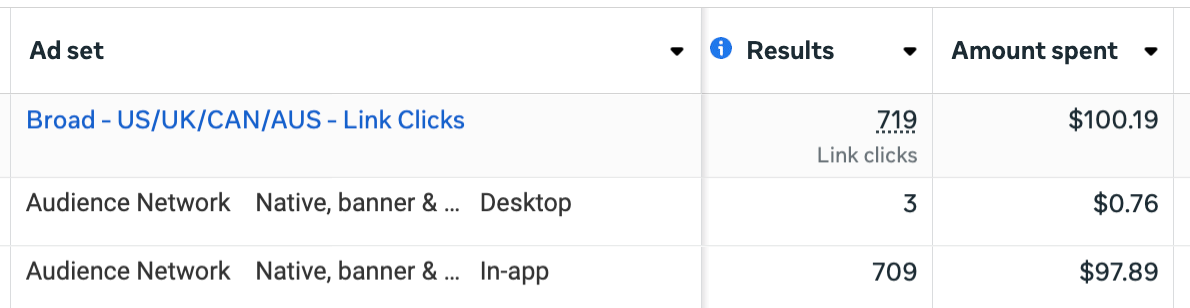
Of course, those clicks are likely to be very low quality. That could be due to accidental clicks, bots, or click fraud before it’s discovered. Once you define your performance goal as link clicks or landing page views, Meta knows that it can get cheap actions from that placement.
Audience Network Rewarded Video
A ThruPlay view is measured once someone watches at least 15 seconds of your video (or to completion if the video is under 15 seconds). If you get results that appear too good to be true (like more ThruPlay views than people reached), it’s probably because of Audience Network Rewarded Video.
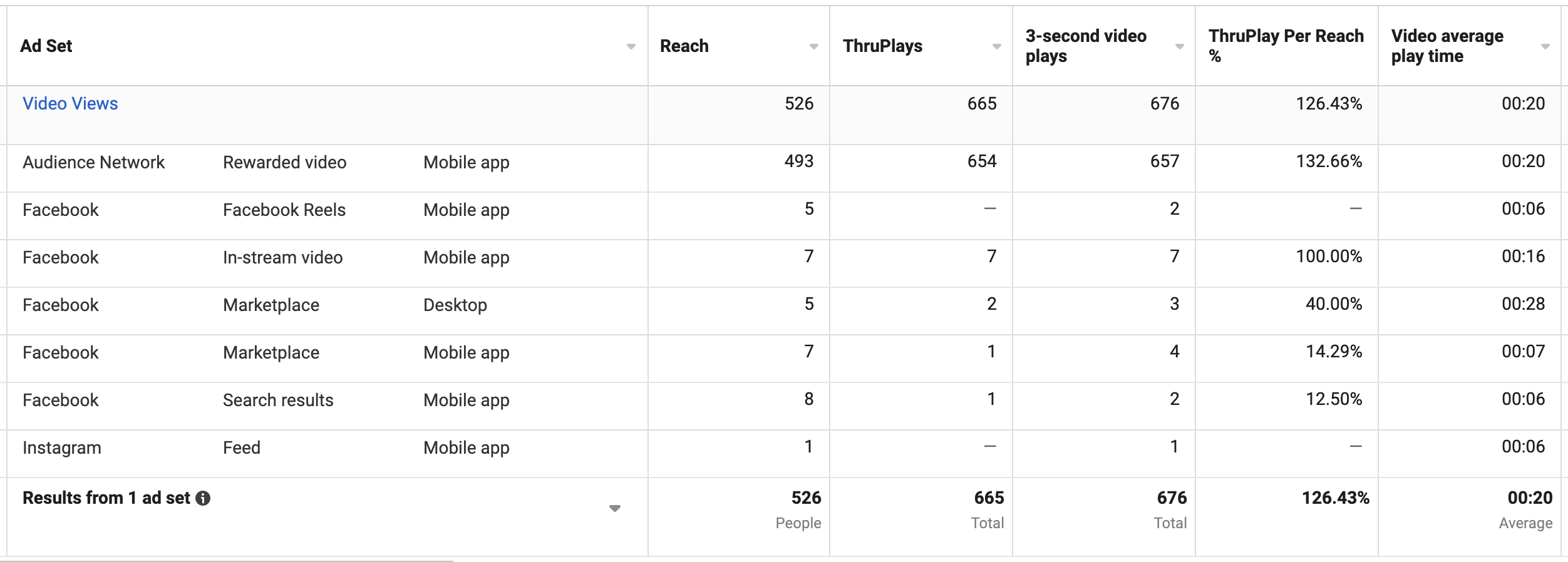
This is because people are incentivized to watch videos in exchange for virtual currency or other benefits in third-party apps. You think that watching your video for 15 seconds reflects interest, but that’s often not the case.
Ads on Facebook Reels
If you’ve ever run an Awareness campaign optimized for Reach, watch out for the Ads on Facebook Reels placement. It’s the source of very cheap impressions, mainly due to inventory and its limited visibility.

But if all you said you wanted was reach, Meta will use that placement into the ground — and at the expense of more prominent placements.
3. Are Distribution Problems Related to Age or Gender?
Category: Demographics
Name: Age, Gender, or Age and Gender
One of the primary reasons I use breakdowns is to solve the problem of results that appear to be too good to be true. That’s true of the examples above, but it can also apply to age and gender.
In general, I recommend sticking with age and gender defaults and resist the urge to edit demographic targeting settings. But there are times when Meta can exploit demographic groups to get you more results — at the expense of quality.
Here are a couple of examples…
Age Distribution
I ran into this while promoting a lead magnet. When I performed a breakdown by age, I realized that Meta was spending 45% of my budget on people over the age of 65. In fact, a whopping 70% of my budget was spent on people 55 and up.
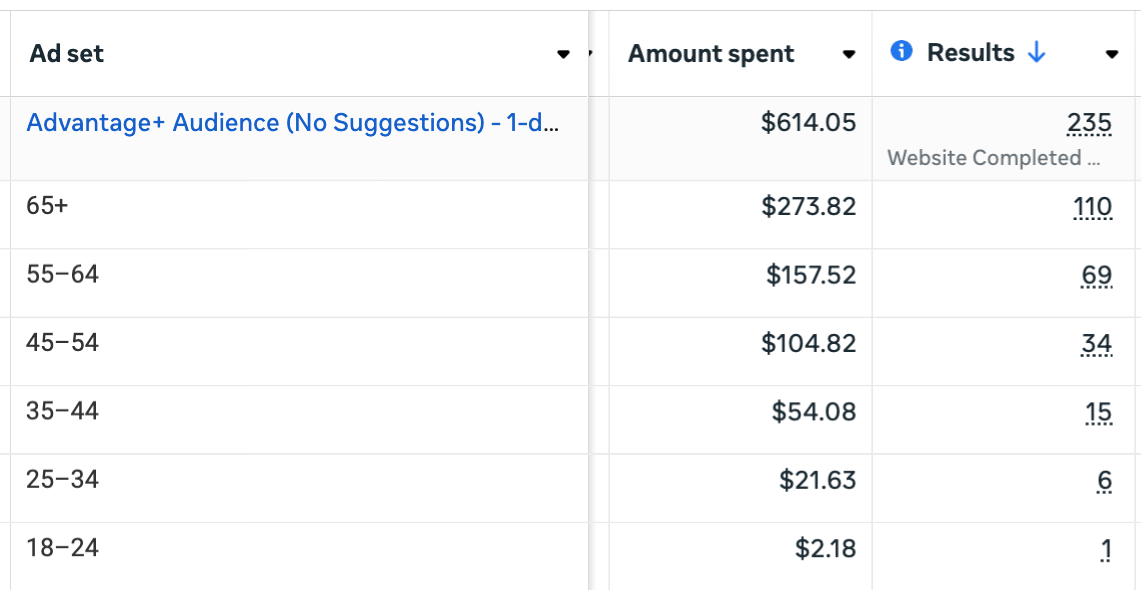
I’m fine with getting some registrations from older demographics, of course. But only if they are quality leads and people who might ultimately lead to business. And as I dug through the data, I found that these were often very low-quality leads who didn’t do anything after completing the form.
But Meta doesn’t care about that, of course. Once I defined my performance goal to maximize conversions where the event was a registration, Meta knew that I could get cheap registrations from that demographic.
Gender Distribution
A similar scenario can happen with gender. Understand that Meta’s not likely to waste a high percentage of your budget on a demographic without it leading to your performance goal. But unless you optimize for a purchase, the performance goal can lead to very low-quality actions.
Let’s assume that you are a woman-owned business who largely serves other women. If you were to optimize for purchases, I wouldn’t recommend limiting demographic targeting to women only. If men don’t buy, Meta should sort that out.
But this changes when optimizing for other actions, specifically those related to engagement. A man may not buy from you, but he’d watch a video, click on your ad, or add a comment. And if that happens while optimizing for any of those actions, Meta will assume that this is activity that you want.
By using this breakdown, you can get a clearer look into who is seeing and engaging with your ads and whether you are wasting your money on them.
4. Are Distribution Problems Related to Country?
Category: Geography
Name: Country
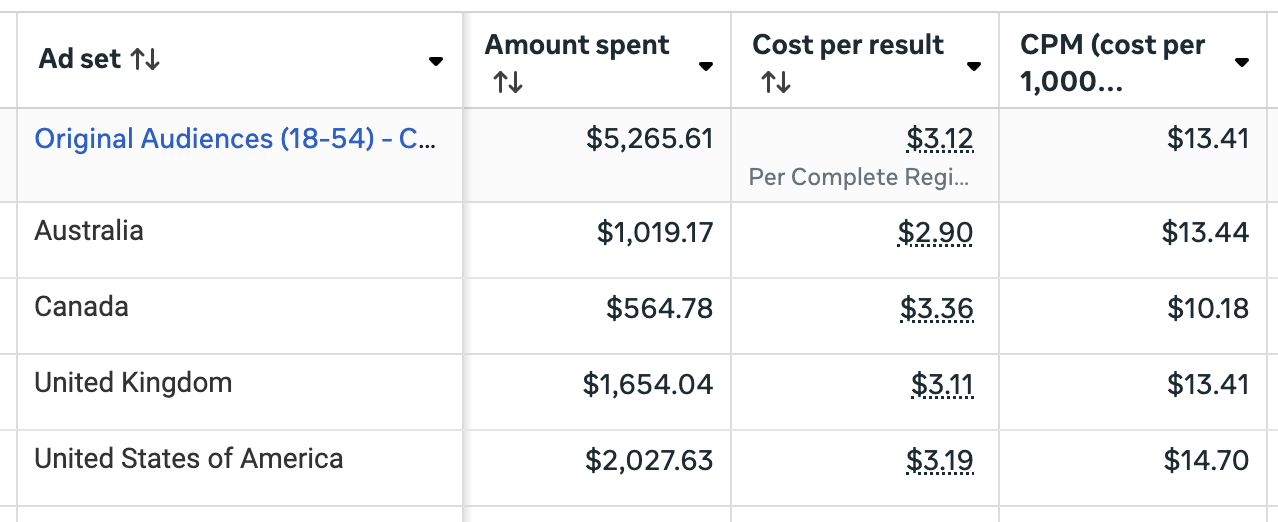
This breakdown will only be relevant if you’re targeting multiple countries at once. But it’s a reminder that Meta will not distribute your budget evenly between eligible countries. The goal remains the same: Get you the most optimized events as possible within your budget.
That means that if you include multiple countries where the costs to get that goal action differs, expect the distribution of your budget to be reflected accordingly. This could be because the simple cost to reach people (CPM) differs by country, but differences in cost per result could have other causes as well.
This is why I group similar countries together by cost, particularly when optimizing for anything other than a purchase. But even then, I’ll use the breakdown by country to make sure that one country isn’t dominating that spend.
5. How Did Each Format Perform?
Category: Dynamic creative element
Name: Image, video, and slideshow
Something I’m doing more these days is creating single ads that leverage different formats. Instead of the old approach of creating one ad for videos and one for static images, I’ll create a single ad and customize by placement to leverage the format that is most effective for that given placement. For example, I’ll use 9×16 15-second videos for all of the Reels and Stories placements.
The problem, of course, is getting visibility into how much each format was used and how it performed. While you can use the breakdown by placement to view how each individual placement performed, something that consolidates those placements into an aggregate result would be better.
With this breakdown, Meta will generate separate rows for each individual creative used. So that’s not only the different formats, but the different aspect ratios if you customized those by placement, too.
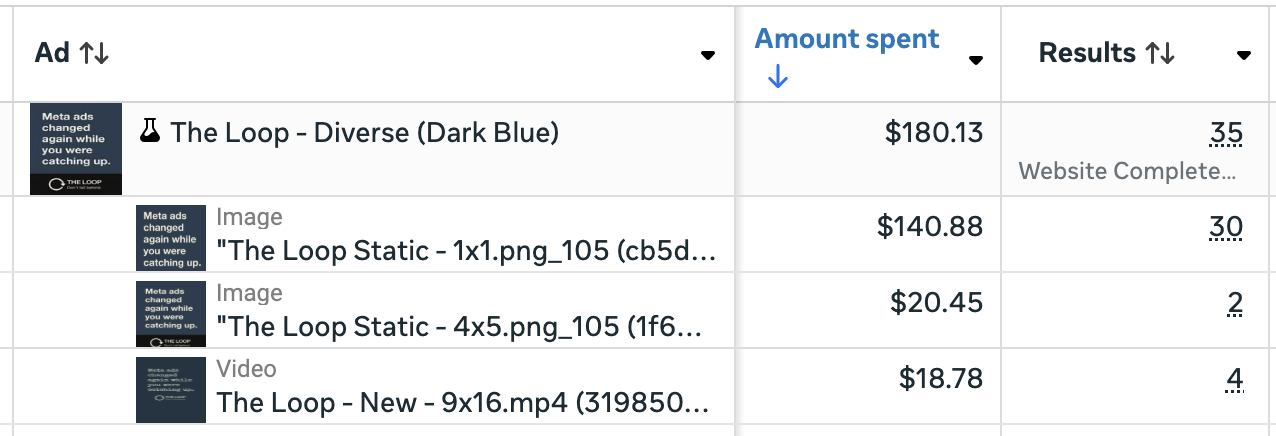
So in the example above, Meta showed static images far more than the video version. But we also know that the 1×1 version was chosen more often than the 4×5. In terms of pure performance, the video performed the same as the 1×1 static image.
6. How Did Each Text Option Perform?
Category: Dynamic creative element
Name: Text or Headline (ad settings)
When I create ads these days, I make use of the primary text and headline options. I almost always provide at least five of both — more if I also select some of the AI-generated recommendations (or edit them).
When I do this, I’m not necessarily worried about finding a winning primary text or headline option. But it’s still useful to know what was used and how each option performed. I can apply that learning to future ads.
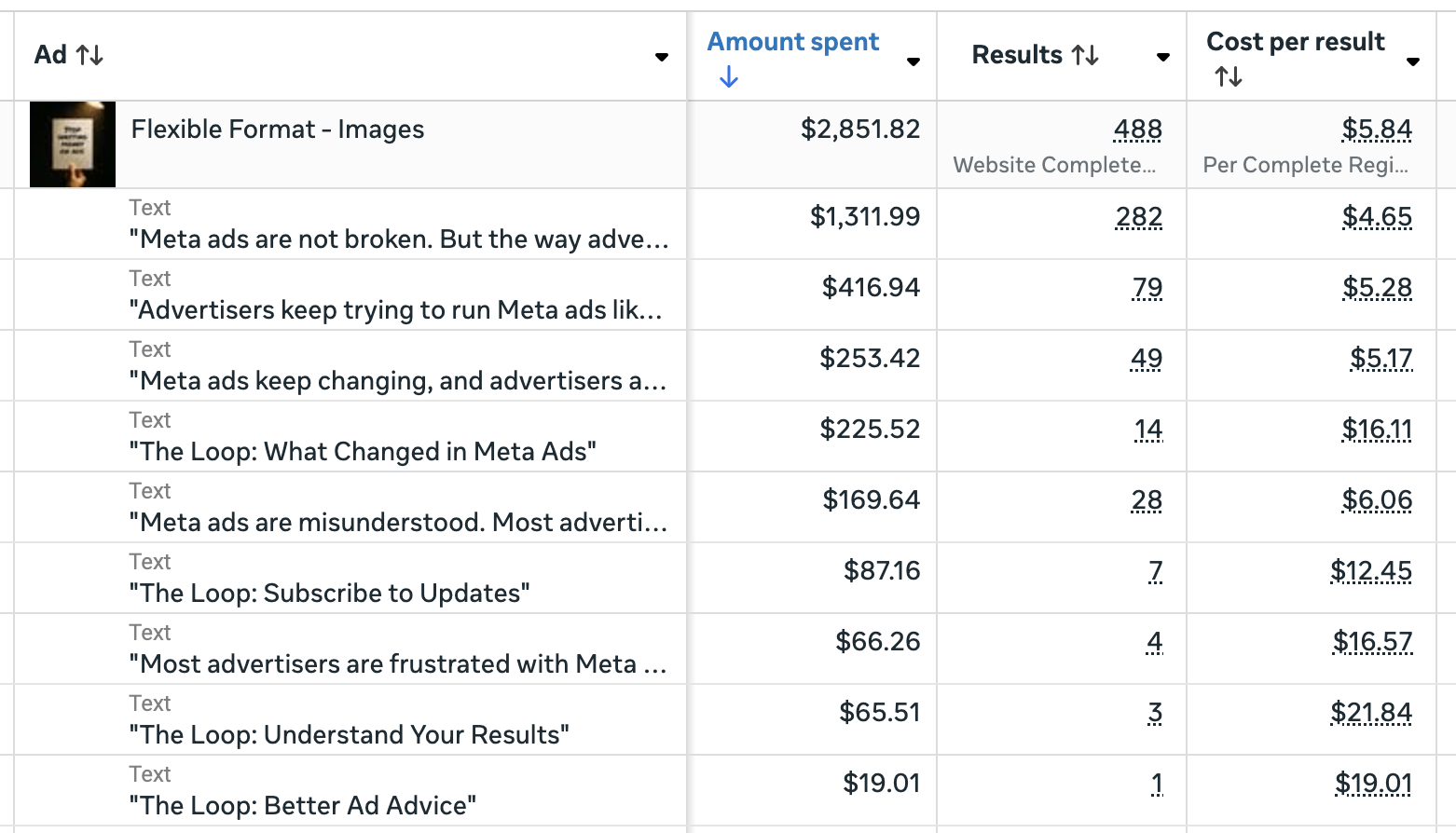
This will also help you see how often Meta swapped your headline and primary text (assuming you kept that enhancement on). And it could impact your approach to that enhancement going forward.
7. How is Performance Trending?
Category: Time
Name: Day, Week, 2 Weeks, or Month
This actually came up for me during the past few days. As we wrap up Black Friday and Cyber Monday, I was curious how costs have trended. While there are multiple ways to view this info, one is with the help of breakdowns.
Here’s a breakdown by month of CPM for a single campaign from September through November…
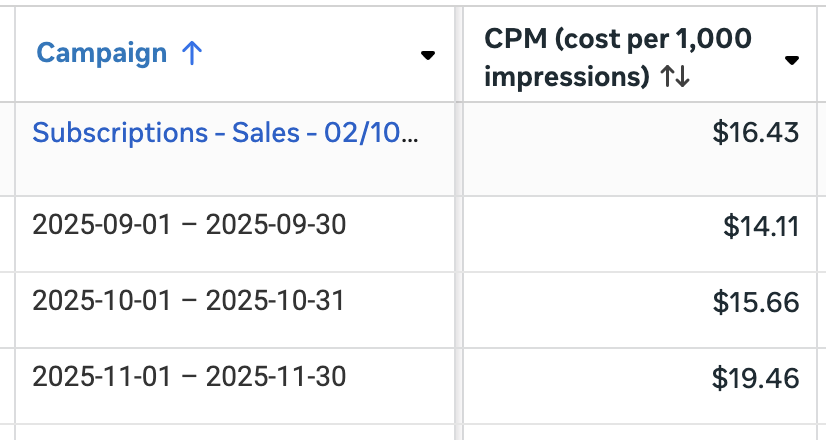
That’s not necessarily a huge jump, but it is an increase of about 27% from September to November. Let’s see what that change looks like from the middle of October through November when we go by week…
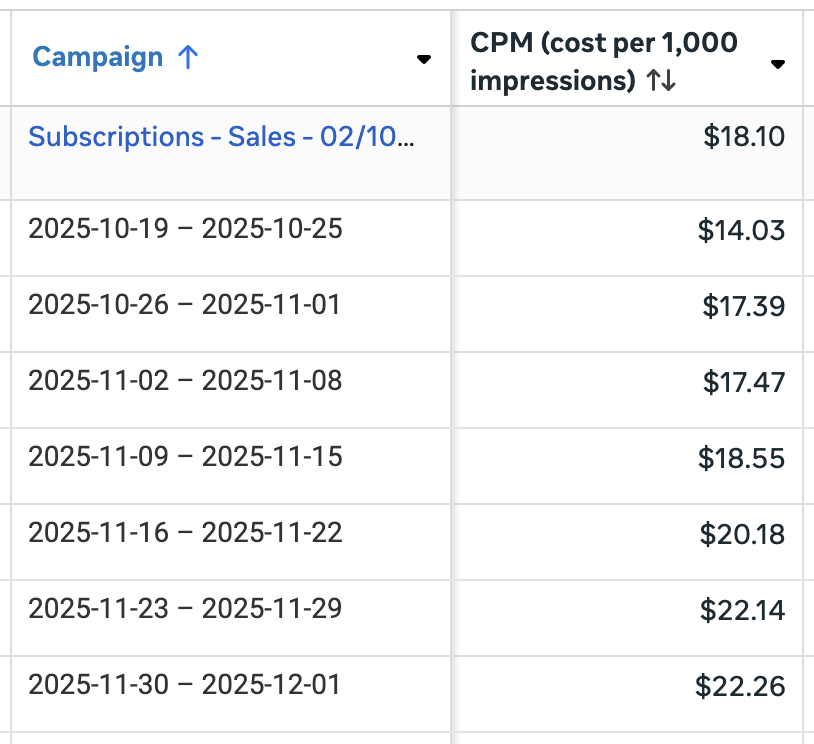
While this increase didn’t directly result in a corresponding increase in Cost Per Result, such an increase would’ve been understandable.
8. How Were Value Rules Applied?
And finally, the bonus breakdown, because it was added as a checkbox at the bottom of the menu.
Value rules allow you to bid more or less on the following variables:
- Conversion location
- Age
- Gender
- Device platform
- Mobile operating system
- Location
- Placement

What’s especially nice about value rules is that you can apply them for age, gender, location, or placement without removing a demographic, location, or placement entirely.
Value rules can be used for many of the issues I’ve mentioned in this blog post. You could bid less on Audience Network, for example, instead of removing it. But where I’ve used it most is for adjusting the bid for age when optimizing for registrations.
As noted above, Meta was spending 70% of my budget on people 55 and up when promoting lead magnets. That’s only a problem because the quality of those subscribers was low. To limit my spend on those groups (especially 65+), I applied value rules.
The value rules breakdown shows when rules were and were not applied.
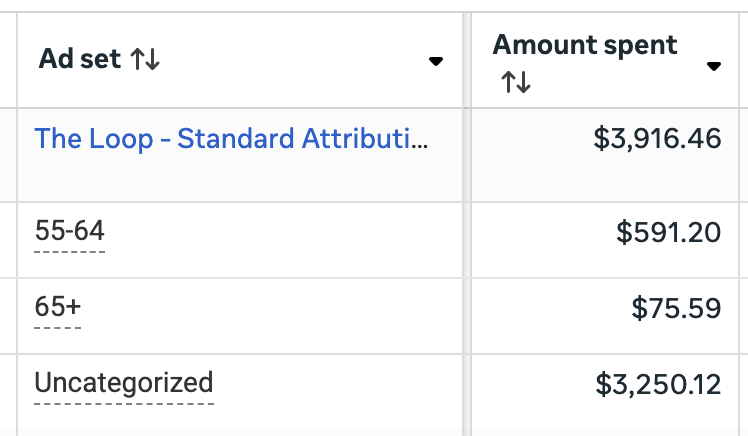
In the example above, “Uncategorized” means that a value rule did not apply (people were under the age of 55). Using value rules helped lower the distribution of my budget on people 55 and up from 70% to 17%.
While you could otherwise use the breakdowns by age, gender, location, and placement for relevant value rules, this particular breakdown is helpful because it shows specifically when rules are and aren’t applied.
Many More!
This blog post highlights my favorite breakdowns that I use most frequently, but the reality is that there are so many more that can be used. And you might just find a different breakdown that would be more valuable for your situation than it is for mine.
In particular, I didn’t cover any of the breakdowns by Action in this post. That category includes the following:
- Messaging purchase source
- Messaging outcome destination
- Conversion device
- Carousel card
- Destination
- Post reaction type
- Brand
- Category
- Video sound
- Video view type
Feel free to experiment and find which breakdowns are most valuable for you. And then make using them a part of your regular routine.
Your Turn
Are there any other breakdowns that you use regularly that weren’t listed here?
Let me know in the comments below!