Onboarding is where retention is won or lost, and most teams don’t have the right system to manage it. Ownership blurs. Timelines drift. Customers go quiet before value is proven. Choosing the best client onboarding software closes that gap.
In this guide, I map each tool to a specific onboarding problem. G2 reviewers commonly pick Rocketlane for milestone-driven, project-based onboarding. GUIDEcx fits teams needing structured, task-driven governance. Moxo works best for secure, client-facing onboarding coordination. Totango is commonly picked where lifecycle visibility and health scoring drive decisions. If you’re narrowing down the right platform, this guide is built to help you choose with confidence.
My conclusions are based on G2 Grid Reports, AI-assisted analysis across hundreds of verified G2 reviews, and cross-checking with customer success leads, implementation managers, and consultants running onboarding at scale.
8 best client onboarding software for 2026: My top picks
- Planhat: Best for structured, cross-team client onboarding at scale
Health scores, onboarding milestones, and account insights are designed to reduce early churn. (Pricing available on request) - ChurnZero: Best for high-volume client onboarding with automated engagement
Onboarding journeys, real-time alerts, and in-app communication built for scale. (Pricing available on request) - Rocketlane: Best for structured, customer-facing onboarding and implementations
Shared timelines, onboarding templates, and collaboration tools that accelerate time to value. (Plans start at $19 per team member/month billed annually) - Totango: Best for task-driven, highly structured client onboarding
Success playbooks, onboarding segmentation, and executive visibility for complex rollouts. (Pricing available on request) - Moxo: Best for guided, secure client onboarding experiences
Client portals, task flows, and secure messaging to streamline onboarding coordination. (Pricing available on request) - Vitally: Best for data-driven onboarding with deep product analytics
Custom onboarding health scores, real-time usage data, and workflow automation. (Pricing available on request) - GUIDEcx: Best for teams that need structured, task-driven client onboarding
Shared onboarding plans, milestone tracking, and transparency for implementation teams. (Starter plan at $5,000/year) - Process Street: Best for process-driven client onboarding workflow
Repeatable onboarding processes, approvals, and automations to standardize delivery. (Paid plans available on request) - EverAfter: Best for collaborative onboarding hubs and stakeholder alignment
Shared onboarding dashboards and success plans that keep clients engaged from day one. (Pricing available on request) - Custify: Best for SMB and mid-market client onboarding teams
Onboarding tracking, customer health monitoring, and lifecycle automation in a simple interface. (Pricing available on request)
*These client onboarding software platforms are top-rated in their category based on G2’s Winter Grid Report. I’ve highlighted their strengths and pricing transparency to help you choose the right solution.
8 best client onboarding software I recommend
Client onboarding software brings emails, kickoff notes, tasks, and expectations into a single, shared workflow that teams and customers can follow. The right tool brings structure to how onboarding moves from sale to value, without relying on constant follow-ups or manual coordination.
The strongest client onboarding platforms go beyond basic task tracking. They help teams understand where the onboarding stands, who owns each step, what’s at risk, and what needs attention next. Whether it’s highlighting stalled dependencies, coordinating internal and client-facing work, or standardizing repeatable onboarding motions, good tools reduce guesswork and replace it with clarity.
This isn’t limited to one type of organization. G2 review data shows adoption spread across small teams, mid-market companies, and enterprises. Each group uses client onboarding software differently, but the goal is the same: faster time to value and fewer breakdowns during early customer interactions. Most platforms are designed to get teams operational quickly, which matters when onboarding volume starts to scale.
Ultimately, good client onboarding software provides insight into visibility and predictability in execution.
How did I find and evaluate the best client onboarding software?
I started by reviewing G2’s Grid Report to identify the leading client onboarding software based on user satisfaction and market presence across small teams, mid-market organizations, and enterprises.
From there, I analyzed hundreds of verified user reviews using pattern-based analysis to understand how these tools perform in real onboarding workflows. I focused on recurring themes that matter during implementation and rollout, such as ownership clarity, timeline visibility, client collaboration, task dependencies, risk tracking, and how well teams manage handoffs between sales, delivery, and customer success. This helped separate platforms that support consistent onboarding execution from those that introduce friction as volume scales.
Because I haven’t personally used every platform, I validated these insights through conversations and workflow exposure with customer success teams, implementation managers, and consultants who actively run onboarding programs using these tools. Any product visuals or feature references in this article are sourced from vendor listings and publicly available documentation.
What makes the best client onboarding software worth it: My criteria
After reviewing thousands of G2 user reviews, studying onboarding workflows, and speaking with customer success leaders, implementation managers, and consultants, the same themes surfaced repeatedly. Below are the criteria I prioritized when evaluating client onboarding software.
- Ownership clarity across teams: The best client onboarding software makes responsibility unmistakable. G2 reviews consistently show that when ownership is unclear, tasks stall and accountability blurs between sales, implementation, and success. Strong platforms surface who owns each step, both internally and on the client side, without relying on manual follow-ups or side conversations.
- Timeline visibility that stays reliable: Onboarding timelines often drift before anyone realizes it. Effective tools maintain a clear view of progress, dependencies, and delays as they happen. G2 review patterns suggest that platforms with reliable timeline visibility help teams intervene early, while weaker tools allow slippage to compound until escalation becomes unavoidable.
- Support for real handoffs: Most onboarding workflows involve handoffs between multiple teams. Sales to delivery. Delivery to success. Internal teams to external stakeholders. The best client onboarding software is designed around these transitions. G2 reviews highlight that tools designed only for linear task completion often break when real-world handoffs introduce ambiguity and competing priorities.
- Client-facing collaboration: Onboarding doesn’t happen behind the scenes. Clients are part of the process. Strong platforms balance transparency with control, allowing clients to see progress, complete actions, and communicate without overwhelming internal teams. Across reviews, tools that handle this well reduce status chasing and improve alignment. Those who don’t often push teams back to email and spreadsheets.
- Standardization that still allows flexibility: Repeatable onboarding is essential for scale, but rigidity creates its own problems. Strong tools support templates, playbooks, and standard flows while allowing teams to adapt for customer complexity. G2 reviews consistently show that platforms leaning too far in either direction struggle. Over-standardization breaks trust. Over-flexibility breaks consistency.
- Operational reporting: Good onboarding software doesn’t just report activity. It answers operational questions. Where are we stuck? Which steps slow us down most? Which handoffs fail repeatedly? G2 review analysis shows that tools with meaningful reporting help teams improve onboarding over time, not just manage individual accounts.
Based on these criteria, I narrowed the list to tools that provide clear visibility, support coordination, and scale onboarding without creating extra operational effort. The right choice depends on your team’s workflow, whether that means lightweight structure, guided automation, client-facing collaboration, or more controlled, enterprise-grade execution.
Below, you’ll find authentic user reviews from the Client Onboarding Software category. To appear in this category, a tool must:
- Support structured client onboarding workflows after a deal is closed
- Enable coordination across internal teams and external client stakeholders
- Track tasks, timelines, ownership, and dependencies throughout onboarding
- Provide visibility into onboarding progress, risks, and completion outcomes
This data was pulled from G2 in 2026. Some reviews may have been edited for clarity.
1. Planhat: Best for structured, cross-team client onboarding at scale
Planhat is commonly adopted by teams that treat client onboarding as a defined operational process rather than an ad-hoc handoff.
Execution discipline is a core reason teams rely on Planhat during onboarding. Checklists and workflows (88%) and tasks (86%) are its highest-rated features on G2. Reviewers describe consistent use of onboarding playbooks to keep delivery predictable as teams grow.
G2 feedback consistently emphasizes Planhat’s approach to visibility. Dashboards surface onboarding progress, account health, and risk indicators early, helping teams identify stalled implementations before they escalate. Role-specific views allow CS, sales, support, finance, and leadership to work from the same onboarding data without unnecessary overlap.
Planhat also functions as a centralized system of record throughout onboarding. Teams reference it as the primary place to track onboarding status alongside customer health, product usage, revenue context, and communication history. Bringing this information together supports better decision-making during the early stages of the customer lifecycle.
Cross-team alignment improves once onboarding data is shared in a single environment. G2 reviewers describe smoother handoffs between sales, onboarding, and customer success as account context remains visible and up to date. This shared visibility reduces internal follow-ups and keeps onboarding momentum intact.
Automated workflows reduce the manual communication load during onboarding. G2 reviewers describe replacing manual email coordination with automated touchpoints that keep clients informed at each onboarding stage. This shift removes a recurring source of follow-up work and helps teams maintain consistent communication across accounts without adding overhead.
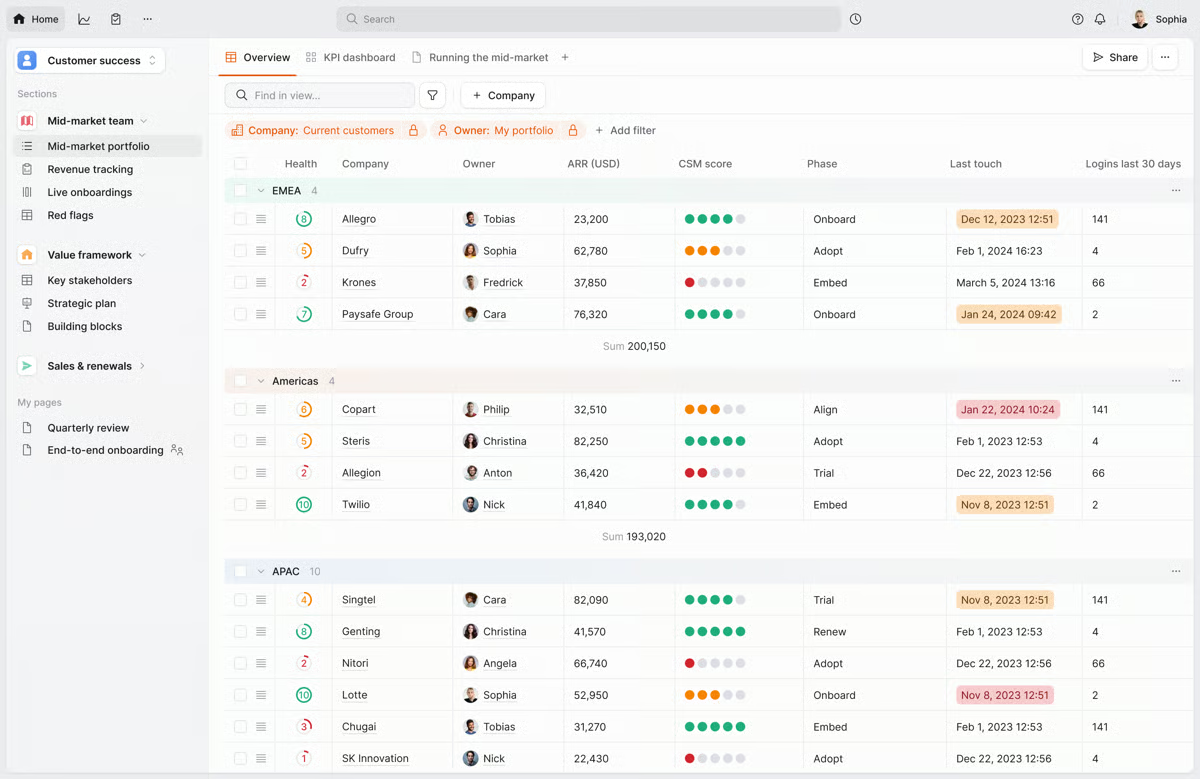
The customer portal extends onboarding collaboration to the client side. G2 reviewers describe it as one of Planhat’s most impactful features, enabling customers to stay engaged with onboarding progress alongside internal teams. This shared visibility keeps clients informed and reduces the coordination overhead that typically builds when onboarding activity stays hidden behind internal tools.
Planhat’s granular permissions and company-centric data model support complex onboarding workflows, but initial configuration requires more setup than a plug-and-play tool. Teams that need to align data models, fields, and permissions will feel this most during rollout. Once that groundwork is in place, the structure pays off in execution consistency and long-term flexibility.
Leveraging custom objects, dashboards, and newer UI elements takes time to develop familiarity with. Users who access the platform less frequently notice this more than daily operators. As teams become more comfortable with the platform, its capabilities support more tailored workflows and deeper operational insight.
Overall, based on G2 review patterns, it works best for teams scaling onboarding programs while maintaining visibility and accountability across functions. For organizations investing in long-term customer health from day one, Planhat remains a strong operational choice.
What I like about Planhat:
- Planhat brings onboarding execution and customer visibility into one structured system, supporting repeatable onboarding playbooks.
- Role-based views stand out. Different teams see only what matters to them, which keeps onboarding and account reviews focused.
What G2 users like about Planhat:
“I appreciate Planhat’s ability to provide a clear overview of our customers, their health scores, and satisfaction. The fact that we can use handy playbooks for onboarding and offboarding with Planhat is very beneficial because it ensures consistent execution of processes within the team. Planhat’s reporting functionality is also excellent and provides us with valuable insights. What I really love are the customized views per role. This makes it much easier for everyone in our company.”
– Planhat review, Sara D.
What I dislike about Planhat:
- Planhat’s data model and permissions setup require significant upfront configuration, which can slow initial rollout for teams expecting a quick, plug-and-play setup. Teams need to align fields, roles, and workflows early. Still, this structure supports highly controlled, scalable onboarding operations.
- Advanced reporting and custom views come with a learning curve, especially for occasional users who may find navigation and setup less intuitive at first. Teams that use the platform consistently benefit from deeper visibility and more tailored operational insights over time.
What G2 users dislike about Planhat:
“The data model of Planhat is centered on companies, which requires regularly building automations to transfer properties from the Companies object to other objects for management or automation purposes. This could be simplified with formula fields, allowing information to be synchronized without creating all these automations.”
– Planhat review, Romain S.
Want to connect onboarding with long-term retention? Explore the best customer success software to manage health scores, lifecycle visibility, and proactive engagement beyond onboarding.
2. ChurnZero: Best for high-volume client onboarding with automated engagement
When I read the reviews about ChurnZero, what stood out was how often it’s adopted by teams running onboarding at volume, where consistency and signal-driven execution matter more than manual oversight.
Operational visibility is a defining part of the onboarding experience. Communication history, milestones, usage signals, tasks, and revenue context are accessible from a single account view, reducing the need to switch between systems. G2 reviewers frequently connect this consolidation to faster preparation for onboarding calls and internal check-ins.
Automation plays a central role in how onboarding workflows are enforced. Features like workflows (91%) and monitoring and tasks (90%) are among ChurnZero’s highest-rated capabilities on G2, reflecting how often teams rely on them to standardize onboarding motions. Visual playbooks and rule-based actions help teams maintain consistency while adapting steps based on customer behavior.
Account health tracking during onboarding is tightly integrated into daily workflows. Usage data, engagement signals, and customer feedback are surfaced early, allowing teams to identify stalled or at-risk onboarding paths before issues escalate. Alerts and monitoring support proactive follow-ups based on real activity rather than assumptions.
Segmentation and configuration flexibility support evolving onboarding programs. G2 reviewers note that dashboards, segments, and workflows can be adjusted without specialized training, making it easier to refine onboarding processes as products or customer profiles evolve. This adaptability is especially relevant for teams iterating on onboarding at scale.
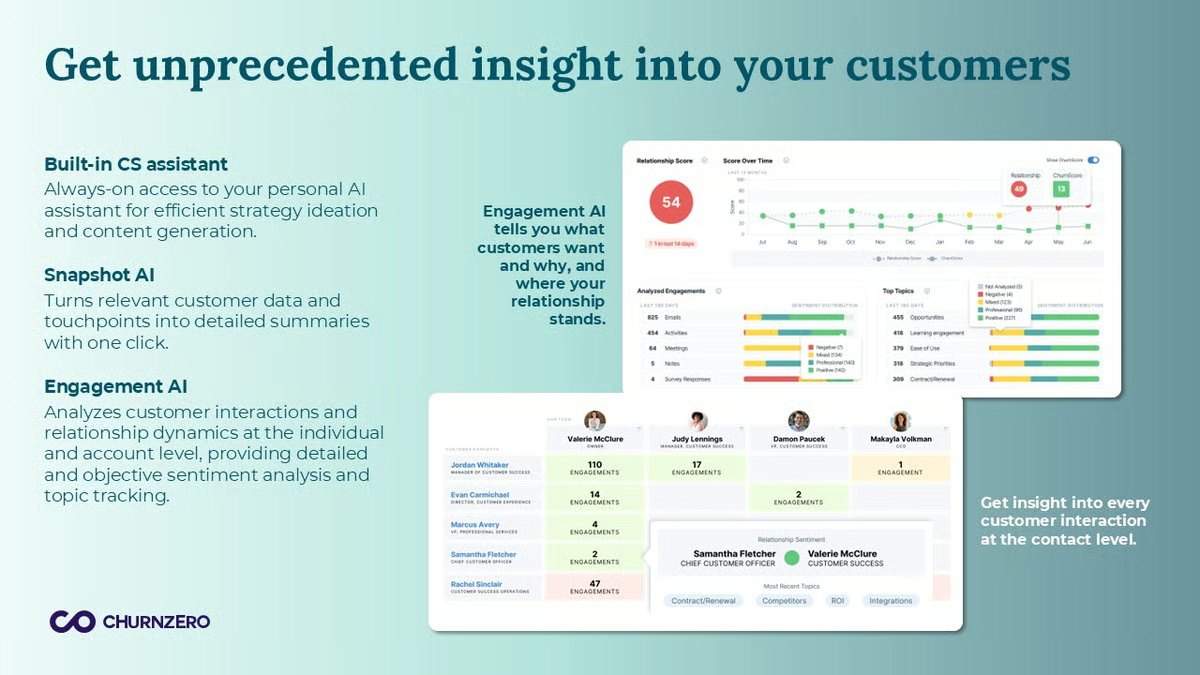
AI-assisted account management comes up repeatedly across G2 reviews. Reviewers describe using ChurnZero’s AI tools to generate call summaries, draft follow-up notes, and surface account history highlights without manual effort. This reduces preparation time during onboarding handoffs and keeps teams focused on client-facing work rather than internal documentation.
Salesforce integration is consistently described as frictionless. G2 reviewers connect this to reduced double entry and cleaner data flow between revenue and customer success workflows. For onboarding teams that rely on CRM context to prioritize accounts, this connectivity keeps execution aligned with pipeline reality without additional reconciliation work.
ChurnZero’s analytics sit closer to operational reporting than exploratory analysis. Custom or ad-hoc queries outside the predefined structure require additional effort to build. Teams focused primarily on execution and monitoring will find the reporting more than sufficient for day-to-day onboarding work.
Alerting and integrations offer meaningful flexibility, but aligning them with nuanced onboarding or churn-risk scenarios requires additional setup in complex data environments. Teams that work through that configuration phase typically find the alerting system dependable once aligned.
Taken together, ChurnZero fits organizations that want onboarding to run on rules, signals, and repeatable processes rather than manual follow-ups. For customer success organizations focused on enforcement and automation, ChurnZero remains a dependable choice.
What I like about ChurnZero:
- ChurnZero centralizes onboarding context in one workspace, bringing communication, milestones, usage, and health signals together for easier preparation and reviews.
- Playbooks and workflows support consistent onboarding execution, with automation and monitoring that scale across accounts while adapting to behavior.
What G2 users like about ChurnZero:
“I appreciate the automation, user-friendly interface, and the convenience of having all my account information accessible in a single dashboard. The playbooks have been especially helpful for managing recurring communications. ChurnZero has become the tool I rely on most for my daily tasks. Our success manager, Elise, is excellent at providing education and solving problems. I genuinely enjoy our interactions, and I always leave each call with actionable to-dos and real solutions.”
– ChurnZero review, Kimberly L.
What I dislike about ChurnZero:
- Teams that regularly need custom or ad-hoc analysis may find themselves working around the predefined views, though standard onboarding and engagement tracking stay clear and reliable.
- Setting up alerts and integrations for nuanced onboarding or churn scenarios takes upfront effort, especially in complex environments. Once configured, they support reliable, signal-driven execution at scale.
What G2 users dislike about ChurnZero:
“I wish there were more customizable features for in-app communications, such as linking pop-ups to specific features in the platform or on specific solution pages, or more complex, multi-step and visually pleasing notification designs.”
– ChurnZero review, Hayley C.
If onboarding depends heavily on sales handoffs and pipeline context, check out the best CRM software to keep customer data aligned from deal close to implementation.
3. Rocketlane: Best for structured, customer-facing onboarding and implementations
Rocketlane is designed for implementation teams. Its design centers on shared execution between internal teams and customers, where timelines, ownership, and progress must stay visible on both sides. This positioning aligns closely with implementation-led onboarding models.
Reviewers consistently describe clearer ownership and fewer status gaps once work is centralized in Rocketlane. Teams report fewer missed handoffs and less time spent chasing updates across onboarding projects.
User reviews reflect how frequently teams rely on it during live implementations. Templates also score the same well above category averages, allowing onboarding teams to reuse proven implementation structures while adjusting scope per customer.
Customer-facing visibility shapes how onboarding progresses. Shared timelines, documents, and updates give customers a clear view into what’s happening and what’s coming next. Teams connect this transparency to fewer check-in meetings and smoother coordination, especially in onboarding motions that require active customer participation.
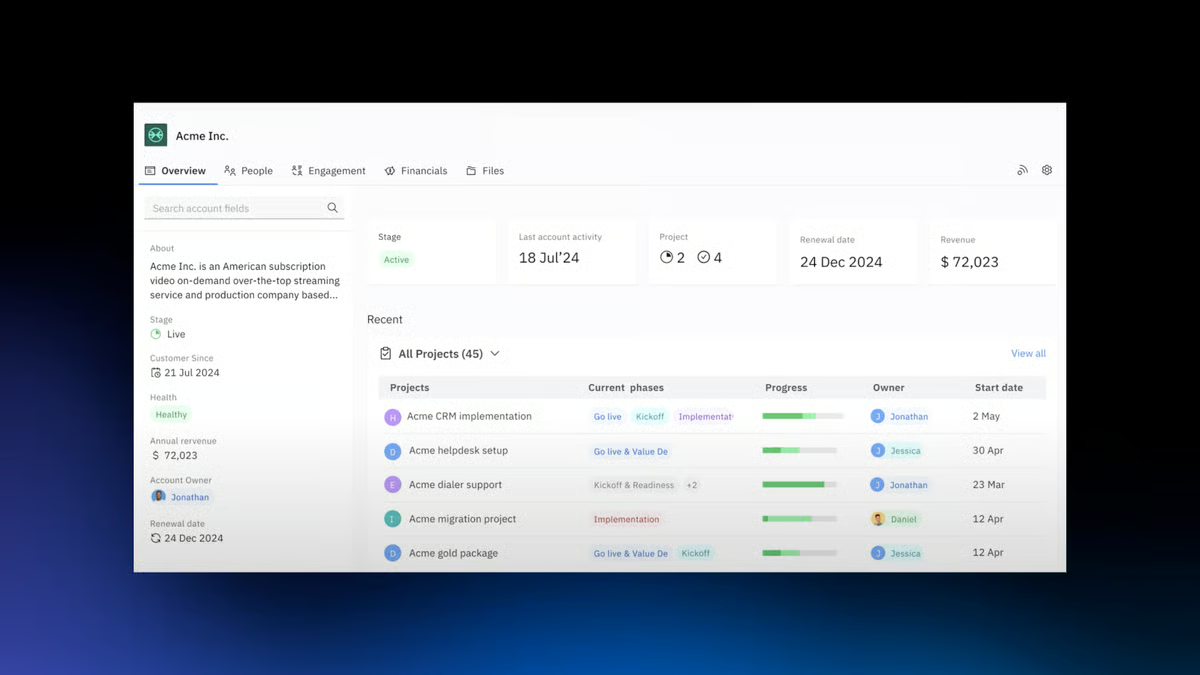
Standardization is supported without locking teams into rigid processes. Templates allow onboarding teams to reuse proven implementation structures while adjusting scope and sequencing per customer. G2 reviews often link this flexibility to reduced manual effort and more predictable onboarding delivery across accounts.
Tracking time and effort per account supports delivery accountability. Teams describe using Rocketlane to understand hours spent per account and monitor delivery efficiency alongside onboarding progress. This visibility helps align onboarding execution with resourcing and revenue expectations, particularly in services-led models.
Portfolio-level oversight becomes more valuable as onboarding volume increases. G2 reviewers mention improved visibility across multiple concurrent implementations, helping teams identify delays, workload imbalances, or stalled projects early. This perspective supports better coordination between onboarding managers and delivery teams.
The interface holds up well under daily use. G2 reviewers describe the layout as clean and intuitive, with quick load times that rarely interrupt delivery windows. Teams new to the platform find navigation straightforward from the start, which reduces the time needed before contributors can work independently inside active onboarding projects.
The template configuration and management of multiple project variations require upfront planning before workflows feel settled. Teams expecting minimal setup before going live will notice this most during early rollout. Day-to-day use becomes significantly more straightforward once templates are established.
Tracking changes across project versions involves manual steps when multiple revisions are active simultaneously. Mobile access is also more limited compared to the desktop experience. Teams whose workflows are primarily desktop-based and version-light will find neither factor affects their day-to-day delivery.
Overall, Rocketlane fits organizations that view onboarding as a customer-facing delivery motion with shared accountability. It holds an overall G2 Score of 80, fitting teams that want onboarding to operate as a structured, customer-facing delivery motion. For teams formalizing onboarding as a collaborative delivery discipline, Rocketlane remains a strong and well-aligned option.
What I like about Rocketlane:
- Rocketlane brings the entire onboarding workflow into one shared space. Tasks, timelines, documents, and conversations stay connected for smoother coordination.
- G2 reviewers highlight Rocketlane’s strength in execution and accountability. Clear ownership, collaboration, and reusable templates support consistent onboarding.
What G2 users like about Rocketlane:
“Finally, a project management tool designed for implementation projects! It is easy to use and easy to configure to meet your use cases, even if you have multiple, unique use cases within your org. The more you use it, the more you can streamline projects because of the visibility it provides, the ease of use, and the automations and AI features. It was so successful we literally had other teams in the org asking to move their work into Rocketlane. As a leader, it was great to be able to give my team the autonomy to improve their projects by enhancing templates and ever improving the system, because it was that easy to use.”
– Rocketlane review, Aya M.
What I dislike about Rocketlane:
- Template setup and multi-project variation management demand early investment before the platform feels ready to scale, though the payoff in delivery consistency is clear once workflows are live.
- Version tracking and mobile access have boundaries that show up in specific workflows. Teams anchored to desktops and working within defined project scopes rarely feel the gap in practice.
What G2 users dislike about Rocketlane:
“While Rocketlane offers a robust set of features, there’s a bit of a learning curve at the beginning. Some workflows, like setting up templates or integrating third-party tools, could be a bit more user-friendly. Also, mobile functionality feels somewhat limited compared to the desktop version.”
– Rocketlane review, Alexandra Z.
Struggling with scattered emails and client communication during onboarding? See how customer communication software helps centralize conversations and improve client alignment.
4. Totango: Best for task-driven, highly structured client onboarding
As onboarding programs scale, Totango emphasizes structure through tasks, reminders, and shared visibility.
Task execution plays a central role in how onboarding teams work inside Totango. The task features are rated 86% on G2, and reviews consistently describe teams relying on shared task lists, reminders, and ownership to keep onboarding activity on track. This reduces dependence on memory or side spreadsheets, especially when multiple accounts are moving through onboarding at the same time.
Customer visibility is maintained through connected views of activity, touchpoints, and onboarding progress. Features like monitoring and visibility are each rated at 85% on G2, reflecting how frequently teams use them to understand where each account stands. G2 reviewers mention clearer prioritization during onboarding and fewer missed follow-ups as a result.
Account health and lifecycle context extend onboarding beyond checklist completion. Teams use Totango to track churn risk, expansion signals, and engagement patterns alongside onboarding milestones. Segment building is often described as fast and flexible, while dashboards are trusted for consistent filtering and reliable data accuracy.
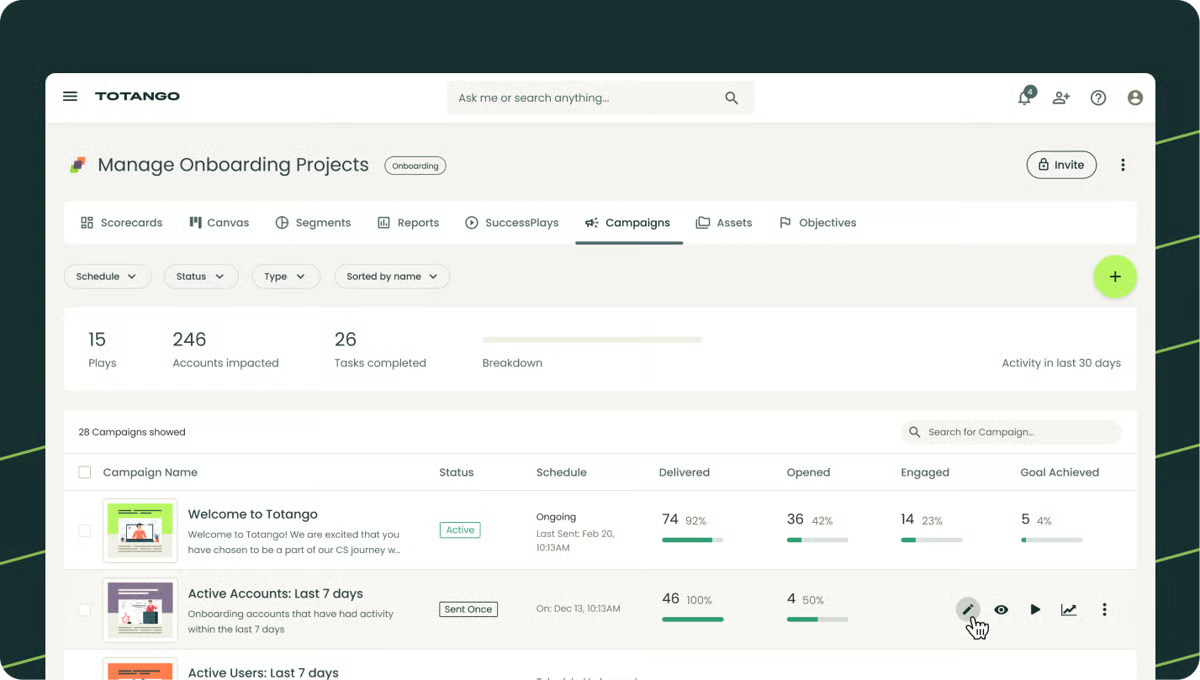
Totango also functions as a centralized workspace for customer-facing teams. G2 reviews describe moving client information, onboarding activity, and engagement history into one system, replacing fragmented tools. This consolidation helps teams align onboarding work with broader customer success goals from the start.
The platform supports teams operating at scale by reinforcing process discipline. G2 reviewers frequently mention improved follow-through, more predictable onboarding execution, and earlier identification of risk during initial customer engagement. For teams managing dozens or hundreds of accounts, this structure supports consistency without rigid playbooks.
Responsive vendor support is a recurring theme across G2 reviews. Reviewers describe prompt responses, hands-on involvement during issue resolution, and a team that stays engaged beyond initial setup. For onboarding teams adopting a new platform mid-growth, that level of responsiveness reduces the risk of getting stuck during critical rollout phases.
Totango surfaces information across multiple views rather than a single consolidated screen. Teams without clearly defined internal workflows may find it harder to get a complete view in one place. Once workflow structures are established, the multi-view approach supports flexible monitoring across onboarding and success functions.
Advanced customization supports complex onboarding models, but the configuration depth means initial setup takes time. Aligning fields, segments, and integrations with systems like Salesforce requires upfront planning before the platform delivers full value. Teams that invest in that setup phase find that the flexibility pays off as onboarding programs mature.
Totango is well-suited for organizations that want onboarding to operate as a disciplined, task-driven system tied closely to customer health. Based on G2 reviews and adoption patterns, it fits teams that value accountability, shared visibility, and structured execution as onboarding complexity grows.
What I like about Totango:
- Tasks and reminders are built directly into the workflow, giving teams shared visibility and keeping onboarding activities consistent as account volume grows.
- Onboarding work connects cleanly to health, engagement, and churn signals, with dashboards reviewers describe as accurate and easy to filter.
What G2 users like about Totango:
“I really appreciate how organized Totango is and the ability to set my own tasks while being reminded by others. The functionality for task setting and reminders makes managing responsibilities smoother. The tracking feature, in general, is incredibly effective, simplifying the monitoring of key activities and communication. This organization and ease of tracking are immensely helpful for managing customer success tasks efficiently.”
– Totango review, Crow S.
What I dislike about Totango:
- Totango’s multi-view structure can make it harder to get a single, unified view of onboarding at a glance. It works best for teams that prefer flexible, segmented views across onboarding and customer success workflows.
- The platform’s customization depth requires significant upfront setup, which can delay time to value. It’s well-suited for teams that need highly configurable onboarding processes tied closely to customer lifecycle data.
What G2 users dislike about Totango:
“I found the setup of Totango to be a bit difficult initially. It has a learning curve that I needed to overcome before it became easy to use. Additionally, I would like improved integration with Gmail and Outlook along with enhanced reliability.”
– Totango review, Ayden N.
5. Moxo: Best for guided, secure client onboarding experiences
Moxo is commonly associated with client onboarding workflows where presentation, consistency, and communication discipline matter. Its adoption profile skews heavily toward small businesses, aligning with service-led organizations where a polished, structured client experience matters from the first interaction.
A branded client portal shapes how onboarding work is delivered. G2 reviewers describe clients navigating documents, tasks, and updates without needing guidance, reducing inbound questions and status emails throughout onboarding. Portal (94%) is Moxo’s highest-rated feature on G2, reflecting how consistently the client-side experience lands as polished and easy to follow.
Structured workflows support day-to-day onboarding execution. Teams describe assigning tasks, looping in stakeholders, and advancing work without breaking context or introducing unnecessary steps. Workflows (92%) score above the category average on G2, reflecting how reliably teams use it to keep onboarding organized across multiple contributors and stages.
Document workflows accelerate onboarding requirements without manual coordination. G2 reviewers describe centralized e-signatures, approvals, and file sharing replacing scattered exchanges that previously slowed completion. Content (92%) scores above the category average on G2, and reviewers consistently link this to faster onboarding sign-offs and fewer delays caused by back-and-forth.
Communication stays attached to the work it relates to rather than drifting into separate inboxes or messaging tools. G2 reviewers describe conversations threaded directly alongside tasks and documents, which reduces noise and keeps accountability clear throughout onboarding. This structure is consistently linked to calmer client interactions and fewer coordination gaps across onboarding stages.
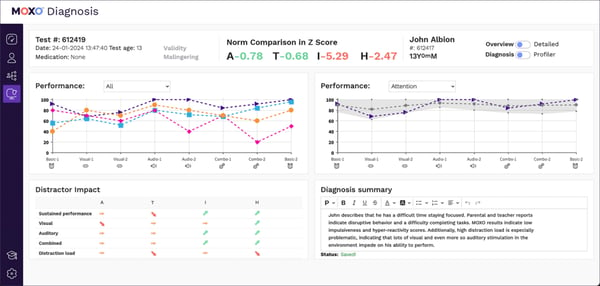
Branding flexibility extends the onboarding experience to the client side. G2 reviewers describe the ability to white-label portals as a meaningful differentiator, particularly for teams managing multiple client relationships under distinct brand identities. This capability helps onboarding feel intentional and professional rather than generic.
Customer support is a recurring theme across G2 reviews. Reviewers describe responsive, hands-on assistance during onboarding setup and platform adoption, with dedicated customer success managers frequently mentioned by name. This level of support is consistently linked to smoother rollouts and faster team adoption.
Getting both internal teams and clients onto the platform is consistently described as smooth across G2 reviews. Reviewers describe clients navigating the app without hand-holding, and internal adoption happening quickly, even for non-technical users. This low-friction onboarding onto the tool itself means teams can focus on delivering client value rather than managing platform adoption.
Deeper integrations and advanced features are tied to higher plan tiers, which can leave certain data outside the platform for teams on lower plans. This shows up most in complex environments where external system connectivity matters. Teams with simpler onboarding setups rarely encounter this boundary.
Notification controls and administrative options are streamlined rather than granular. Teams that need precise tuning across multiple workflows will find the controls more limited than expected. For teams running straightforward onboarding programs, the simplicity works in their favor.
Overall, Moxo fits organizations that want onboarding to feel intentional, secure, and client-ready from day one. Based on review patterns and G2 satisfaction signals, it works especially well for small, service-driven teams that value clarity, consistency, and reduced communication overhead. For teams prioritizing guided client experiences over system-heavy onboarding operations, Moxo remains a strong and focused choice.
What I like about Moxo:
- G2 users consistently describe moving away from scattered emails and folders to a single client portal where documents, tasks, and messages live together.
- Moxo is designed around structured workflows that are easy to execute, helping small teams reduce follow-ups and keep onboarding moving.
What G2 users like about Moxo:
“We are absolutely delighted with the app created for us; the result has far exceeded our expectations. The team’s professionalism, attention to detail, and genuine care made the entire experience not only efficient but also an absolute pleasure. Their responsiveness and kindness at every stage reflected a rare level of customer care that deserves recognition. We are genuinely grateful for their dedication and expertise, and we couldn’t recommend them more highly.”
– Moxo review, Suzie T.
What I dislike about Moxo:
- Integration depth is gated by plan tier, which can push certain data outside the platform in more complex environments. Teams with simpler onboarding setups find the available connectivity more than adequate.
- Notification and admin controls cover standard onboarding needs but leave limited room for granular tuning. Teams running straightforward programs find the simplicity an advantage rather than a gap.
What G2 users dislike about Moxo:
“While Moxo has greatly improved our onboarding workflows, my one concern is with the limitations of the base plan. The inability to use connectors, such as integrating with our CRM or Google Drive, creates extra work and forces us to manage some information outside of Moxo. Having these integrations included, even at a basic level, would make the platform far more powerful and reduce the need for manual duplication of data.”
– Moxo review, Matt H.
6. Vitally: Best for data-driven onboarding with deep product analytics
Vitally is most often adopted by customer success teams that treat client onboarding as an operational system. Within the Client Onboarding category on G2, Vitally has built a clear identity around customization and data control, which explains why 62% of its users come from the mid-market.
Playbooks and conditional logic are central to how teams structure onboarding in Vitally. G2 reviewers describe building custom if-then workflows that adapt onboarding steps based on client activity, account type, and product behavior. This flexibility allows different departments to run tailored onboarding motions without rebuilding workflows from scratch. Workflows (88%) reflect consistent reliance on this capability across the G2 review base.
Customization runs deeper than surface-level configuration. G2 reviewers frequently describe building custom Traits, health scores, and success metrics that reflect their specific onboarding definitions rather than generic defaults. Templates (88%) on G2 reinforce how consistently teams rely on reusable structures to standardize onboarding across accounts.
Dashboards and reporting help teams answer operational questions rather than just track activity. G2 reviewers describe building role-specific views that surface onboarding risks, stalled accounts, and next actions without relying on external BI tools. Custom reporting is frequently cited as the reason Vitally becomes the reference point for CS KPIs tied to retention and churn decisions.
AI capabilities are a recurring theme across G2 reviews. Reviewers describe using AI-powered summaries to brief colleagues on account status in minutes, reducing time spent on manual updates during onboarding handoffs. The AI Copilot is frequently linked to faster preparation for onboarding reviews and renewal conversations.

Tool switching drops significantly once onboarding models are established in Vitally. G2 reviewers describe handling meeting notes, calendar syncing, colleague collaboration, and account updates from one workspace without jumping between platforms. This consolidation keeps onboarding execution connected to renewal context without requiring parallel systems.
Two-way integrations extend onboarding visibility across the broader toolstack. G2 reviewers highlight the Zendesk integration as particularly valuable, allowing critical account data like implementation status and risk signals to flow between CS and support teams. This connectivity helps onboarding stay aligned with support workflows without manual reconciliation.
Setup and time to value are consistently described as faster than expected across G2 reviews. Reviewers describe getting Vitally operational within days, with integrations connecting quickly and dashboards becoming useful almost immediately. This quick ramp-up is particularly relevant for teams switching platforms mid-growth, where delays in tool adoption directly affect onboarding execution.
Managing users who appear across multiple accounts sits outside what the platform handles cleanly. Teams running partner programs or accounts with overlapping contacts feel this most. For organizations with straightforward one-to-one account structures, day-to-day operations remain unaffected.
Post-survey automation in Vitally stops at basic alerts and follow-up triggers. Teams building structured, multi-step feedback loops into onboarding will hit that boundary sooner. The core survey functionality holds up well, and the broader automation engine covers most onboarding workflows without issue.
Based on G2 reviews and adoption patterns, it works best for teams managing diverse account types and KPI-led onboarding motions. For organizations prioritizing customization, analytics, and operational control over presentation, Vitally remains a highly relevant choice in this category.
What I like about Vitally:
- G2 reviewers consistently highlight Playbooks and if-then logic that let teams tailor onboarding and health tracking based on real customer behavior.
- Teams frequently use Vitally to track onboarding, usage, revenue signals, and health in one place, reducing tool switching once models are set up.
What G2 users like about Vitally:
“I use Vitally to track customer onboarding and revenue. It allows me to track all of our revenue sources in one place and monitor customer usage, onboarding, and customer health. Once it’s set up, it provides a reliable source for measuring all of the CS KPIs that are vital to understanding the health of customers, onboarding, retention, and churn. The reporting is robust and customizable, which helps with accuracy. We can accurately assess success, risk factors, churn, and the health of customers and CSMs.”
– Vitally review, Elden D.
What I dislike about Vitally:
- Users appearing across multiple accounts can create overlap in how data is organized. Teams with standard one-to-one account structures rarely encounter this in practice. And it still supports consistent tracking in standard account setups.
- Post-survey alerts and follow-up triggers don’t extend far beyond standard actions. Teams with lightweight feedback needs find this sufficient, and the broader automation engine handles most onboarding workflows reliably.
What G2 users dislike about Vitally:
“ The new UI is good, but it takes a little getting used to, and I wish a few of the “pinned” fields were just editable on the fly, but you still have to go into the all fields section to update them. Ever so slightly misleading if you’re not used to it, but otherwise the new UI and layout are great.
I love the fact that Vitally is constantly integrating with new providers, and the list is growing; however, the features, such as meetings/calendars, the upcoming notes recorder, all seem to be tailored more to “Google” or “Gmail” emails, and don’t really provide a suitable alternative to Microsoft / Teams users. I can see Slack is now there, hoping for Teams too.”
– Vitally review, Michael H.
7. GUIDEcx: Best for teams that need structured, task-driven client onboarding
GUIDEcx is built for teams that treat client onboarding as a defined operational workflow rather than an informal handoff. Teams describe building detailed onboarding journeys made up of clearly sequenced tasks with assigned ownership. Tasks (91%) is among GUIDEcx’s highest-rated capabilities on G2, reflecting how consistently teams rely on structured task execution to keep onboarding moving.
Templates rated 91% allow these journeys to be reused across customers while still adjusting steps when delivery requirements differ. This approach helps teams manage complex onboarding motions without rebuilding workflows from scratch.
Multi-step onboarding flows remain easy to adapt at the customer level. G2 reviewers mention adjusting timelines, dependencies, and responsibilities without losing visibility into overall progress. This flexibility allows onboarding teams to maintain consistency while accommodating real-world delivery differences.
Progress remains visible across everyone involved in onboarding. Task ownership, projected completion dates, and automated reminders reduce the need for status meetings or manual follow-ups. Teams describe fewer surprises during onboarding and better momentum across longer implementations.
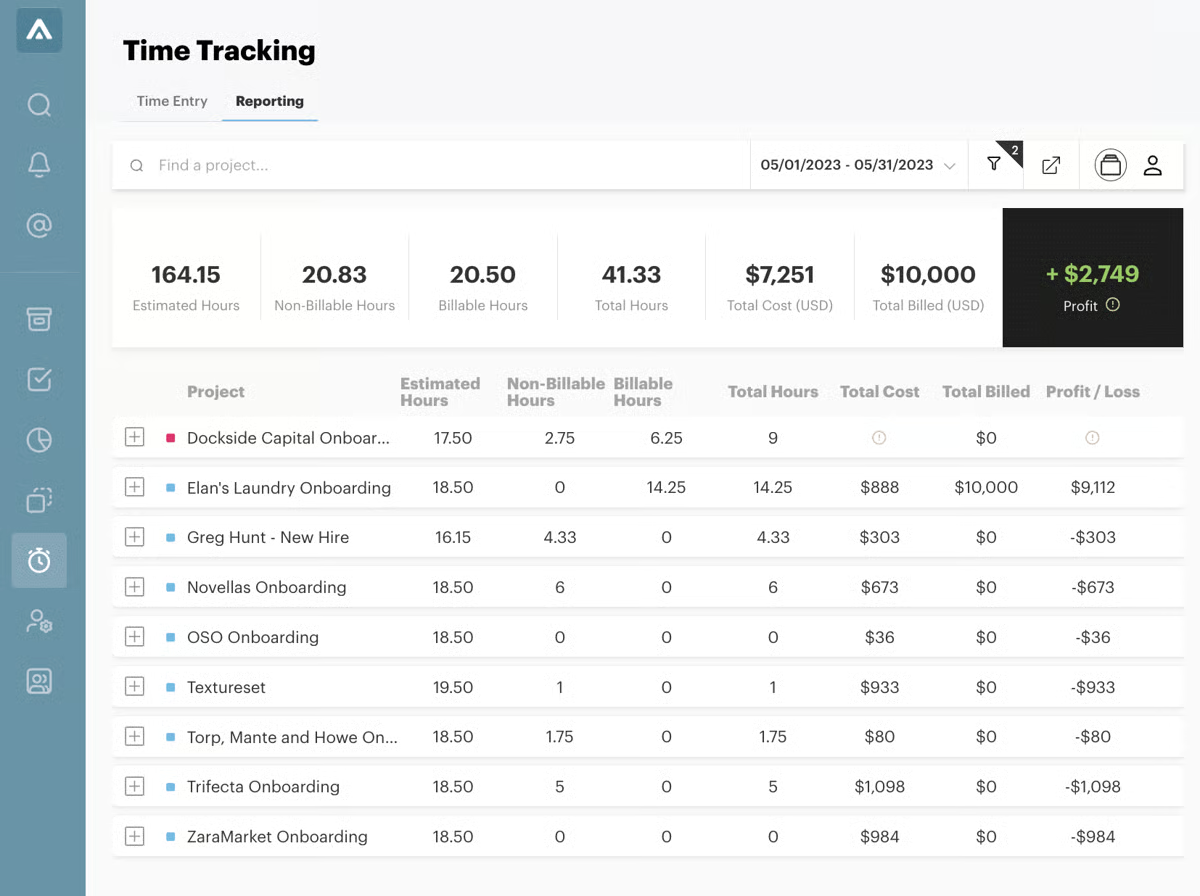
Internal teams and customers work from the same execution view. Ownership can be shared across functions and external stakeholders without breaking accountability. This coordination helps onboarding efforts stay aligned even when multiple teams contribute to delivery.
Onboarding activity stays connected to the broader account context through integrations. Connections with Salesforce, HubSpot, and Slack keep onboarding progress aligned with revenue and customer success workflows. Teams avoid duplicating updates while maintaining continuity across systems.
As onboarding programs become more complex, configuration depth becomes more noticeable. GUIDEcx supports detailed onboarding structures, which can take time to fully optimize for client-facing experiences. Teams managing highly customized delivery models feel this most, though the structural depth available makes that investment worthwhile at scale.
In larger implementations, occasional performance slowdowns and minor interface inconsistencies can surface. This shows up most when managing many concurrent onboarding journeys. For teams running a steady volume of standard programs, day-to-day performance remains consistent.
Overall, GUIDEcx fits teams that need onboarding to run with structure, accountability, and shared visibility. Based on G2 reviews and adoption patterns, it aligns best with organizations managing repeatable, task-driven onboarding programs at scale. For teams prioritizing predictable execution over ad-hoc coordination, GUIDEcx remains a solid operational choice.
What I like about GUIDEcx:
- G2 users like how GUIDEcx adds structure and visibility to client onboarding while keeping workflows flexible for multi-stakeholder projects.
- G2 reviewers consistently point out how intuitive setup feels, with client-level customization, clear roles, and strong CRM and collaboration integrations.
What G2 users like about GUIDEcx:
“I love how GUIDEcx allows us to set customized onboarding journeys at the client level, based on their unique needs. Our journeys are very robust and involve a multitude of tasks that might need to be sequenced differently or managed by various parties, including external stakeholders. GUIDEcx helps us manage all of that seamlessly, letting us focus on providing a good customer experience without getting bogged down by the administrative tasks. I also appreciate the initial setup process, which was pretty easy once we ironed out the details. Plus, GUIDEcx integrates well with tools like Salesforce, HubSpot, and Slack, which our business relies on.”
– GUIDEcx review, Morgan M.
What I dislike about GUIDEcx:
- Configuration depth grows more noticeable as onboarding programs become more complex. Teams managing highly customized delivery models should plan for optimization time upfront, after which the structural flexibility supports detailed client-facing workflows well.
- Performance characteristics become more relevant at higher implementation volumes. Teams running a steady, manageable number of concurrent journeys find that the platform holds up reliably in practice.
What G2 users dislike about GUIDEcx:
“I won’t be of much help for this part of the review since I currently only have positive things to say about GUIDEcx. I think, like any tool, it’s only as useful as you make it, and this tool gives us the ability to do everything we need to do for our clients. The only thing I would like to see is multi-factor authentication for logging in, just for security purposes.
– GUIDEcx review, Zack B.
8. Process Street: Best for process-driven client onboarding workflow
From the G2 reviews, Process Street emerges as a strong option for client onboarding teams looking for structure and accountability. It’s built for organizations that treat onboarding as a repeatable operational process, where ownership, sequencing, and accountability matter more than flexibility or customization. That focus shows up clearly in how teams rely on it for execution-heavy onboarding work.
Teams use Process Street to run onboarding through structured workflows that capture required inputs, approvals, and handoffs in sequence. Workflows (93%) are among Process Street’s highest-rated capabilities on G2, reflecting how consistently teams rely on it to keep onboarding steps documented and enforced. This approach helps reduce follow-ups and prevents key actions from being overlooked as onboarding moves across teams.
Step-by-step task execution supports day-to-day onboarding work without additional tooling. G2 users mention moving through client intake, internal handoffs, and approvals without relying on side spreadsheets or reminder emails. Tasks (90%) on G2 reinforce consistent reliance on structured task execution across onboarding programs. Automated notifications help keep timelines moving, especially when onboarding depends on contributions from multiple departments.
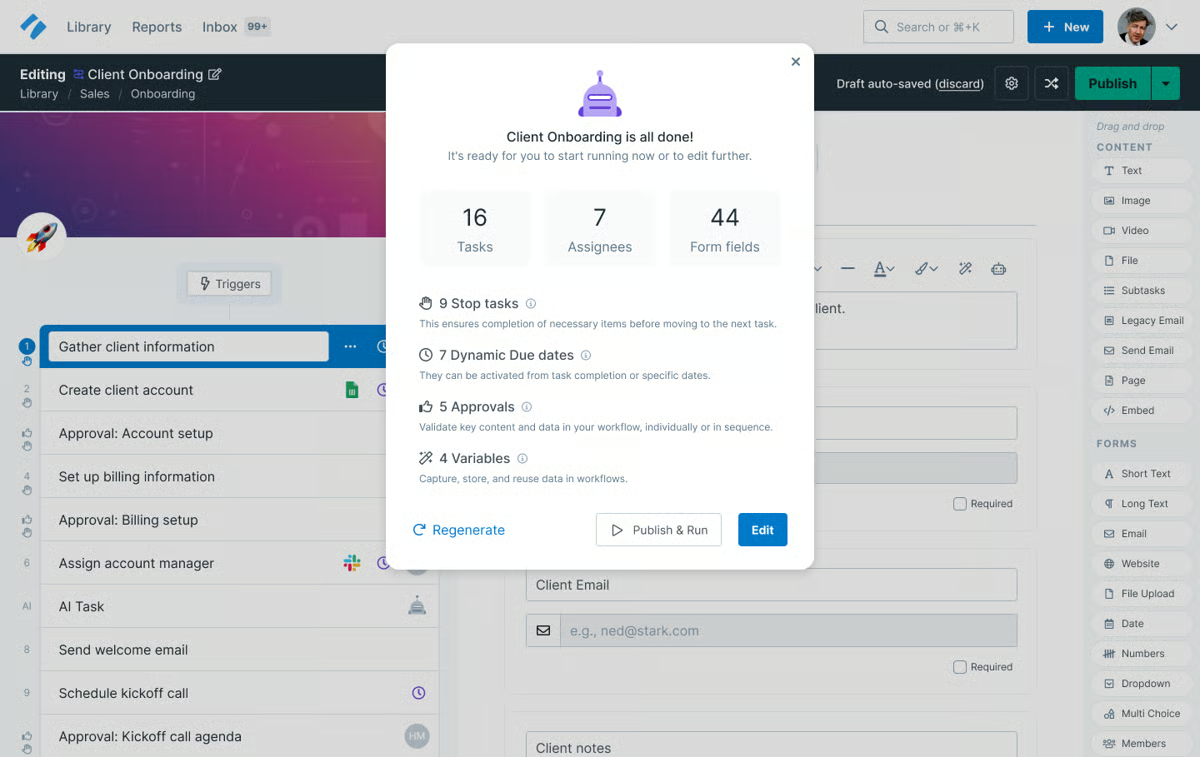
Consistency across onboarding engagements improves as volume increases. Teams rely on saved workflows to standardize how clients are brought live, which reduces variation between accounts. This repeatability helps protect onboarding quality as customer counts grow, without requiring constant manual oversight.
Internal coordination becomes easier when the onboarding activity is visible in one place. G2 reviews reference smoother collaboration between sales, delivery, and support teams once onboarding steps, ownership, and status are shared. Everyone involved can see what’s complete, what’s pending, and where attention is needed next.
G2 users frequently describe the interface as logically arranged and easy to navigate, allowing teams to get productive quickly. Minimal training is needed for contributors who interact mainly with onboarding tasks rather than workflow design. Process Street holds an overall G2 Score of 64, reflecting steady adoption among teams that prioritize execution discipline over feature breadth.
Email notifications keep contributors engaged with onboarding tasks without requiring them to monitor the platform constantly. G2 reviewers describe receiving timely reminders when actions are due, reducing the risk of tasks being overlooked across departments. This passive accountability layer helps onboarding move forward even when contributors are managing competing priorities.
Advanced workflow design requires upfront planning before automation-driven processes feel settled. Teams new to this model notice the setup investment most during early rollout. Organizations that work through that phase find the resulting workflows reliable and consistent across onboarding programs.
The client-facing presentation is scoped toward internal execution rather than external polish. Teams that need branded portals or highly visual customer-facing experiences will find the platform better suited to back-office onboarding coordination. For internal-first onboarding programs, this focus is a strength rather than a gap.
Process Street fits organizations that want onboarding to operate as a system rather than a series of informal tasks. Based on G2 reviews and adoption patterns, it works best for teams focused on consistency, ownership, and disciplined execution. For organizations treating onboarding as a repeatable operational function, Process Street remains a dependable and focused option.
What I like about Process Street:
- Process Street brings structure to onboarding with clear workflows, checklists, and task ownership that reduce follow-ups.
- Step-by-step processes are easy to follow, with reminders and approvals keeping teams aligned across stakeholders.
What G2 users like about Process Street:
“This system streamlines workflow requests and simplifies information updates across departments. It has significantly reduced the need for follow-ups, ensuring tasks are completed efficiently. The customizable workflows and integrated email features make communication seamless and enhance overall productivity.”
– Process Street review, Charles S.
What I dislike about Process Street:
- Advanced workflow setup requires early planning investment, particularly for teams coming from informal processes. Once that groundwork is done, the automation holds up consistently across onboarding programs.
- The platform is built around internal execution rather than client-facing presentation. Teams that prioritize branded, customer-visible onboarding experiences will find the focus sits elsewhere, while those running internal-first programs benefit from the structural clarity.
What G2 users dislike about Process Street:
“The only thing I wish could be added was somewhere to search for documents, content, and additional tasks. I think it would be great to have like an upload center for all the documents that will be needed, aside from having to look in the calendar link.”
– Process Street review, Quynn A.
9. EverAfter: Best for collaborative onboarding hubs and stakeholder alignment
EverAfter is most often used by teams that want onboarding to operate as a shared, customer-visible process rather than an internal checklist. It is designed to bring structure and coordination to onboarding programs where multiple stakeholders need to stay aligned without relying on manual updates or fragmented tools.
Onboarding journeys are organized around clear milestones and shared visibility. Checklists (93%) are among EverAfter’s highest-rated capabilities on G2, reflecting consistent reliance on structured milestone tracking.
Portals (91%) score well above category averages on G2, reflecting how consistently teams rely on a single customer-facing workspace from kickoff through early adoption. Teams centralize documentation, schedules, onboarding tasks, and renewal context in a single workspace, creating a consistent experience from kickoff through early adoption. This structure helps onboarding feel deliberate and predictable rather than reactive.
EverAfter aligns with teams scaling onboarding programs rather than established enterprise buyers. Adoption skews toward the mid-market (67%), followed by small businesses (23%) and limited enterprise usage (10%), aligning closely with teams scaling onboarding and customer success programs.
Digital-first onboarding is supported without removing human touchpoints. Customers can immediately access getting-started materials while still being guided toward calls, reviews, or success check-ins when appropriate. G2 reviews frequently reference time savings as repetitive coordination is replaced with guided self-service.
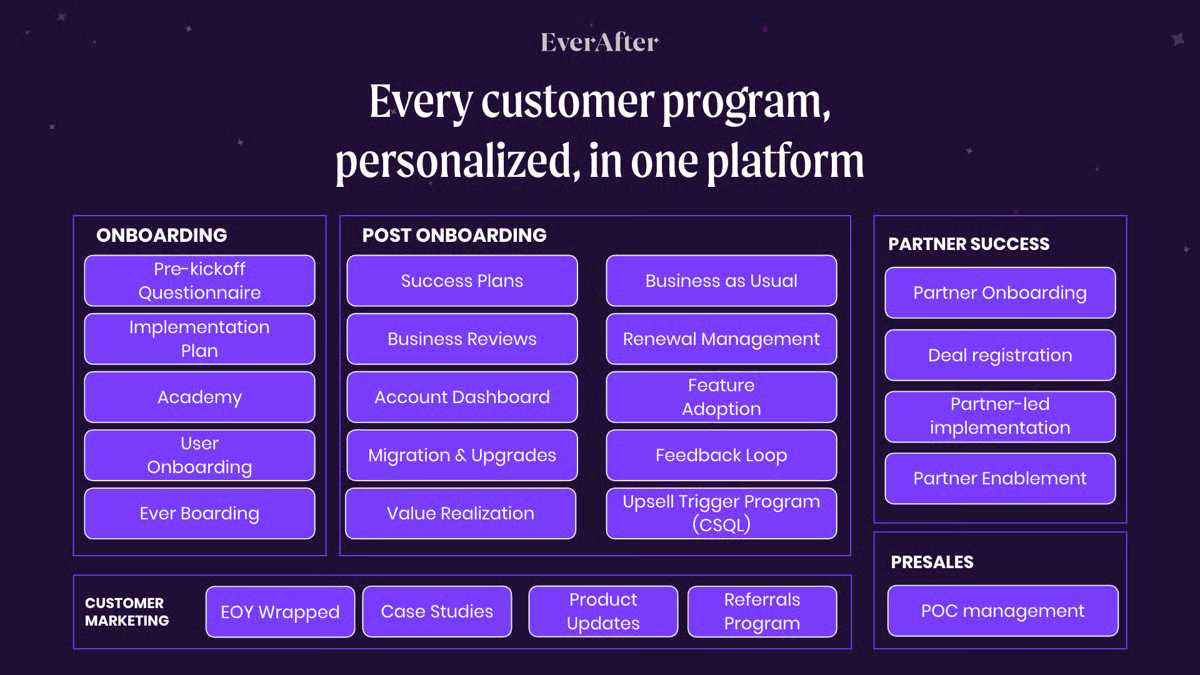
No-code configuration supports iteration as onboarding programs evolve. Teams describe updating onboarding kits, adjusting journeys, and refining customer-facing content without engineering involvement. This flexibility allows onboarding teams to respond quickly as product scope or customer requirements change. Visibility (91%) on G2 reinforces how reliably teams track onboarding progress across stakeholders without manual reconciliation.
Data from external tools flows directly into customer-facing hubs without manual updates. G2 reviewers highlight seamless Salesforce and HubSpot integrations that eliminate admin work and keep onboarding context current across systems. This connectivity allows teams to maintain a unified client experience without switching tools or copying information between platforms.
The EverAfter team is a recurring positive across G2 reviews. Reviewers describe implementation consultants and account managers who stay actively involved beyond initial setup, helping teams refine onboarding kits and scale digital experiences. This hands-on partnership is consistently linked to faster iteration and stronger onboarding outcomes.
Analytics and monitoring cover high-level progress and milestone visibility rather than detailed behavioral analysis. Teams that need deep engagement insights will find the reporting scope narrower than expected. For teams focused on alignment and onboarding progression, the visibility available covers day-to-day needs reliably.
Managing complex portal structures or multiple sub-accounts requires additional setup time in layered customer environments. Teams with straightforward account structures move through configuration quickly. Once the portal hierarchy is established, the shared visibility and milestone tracking work consistently across accounts.
EverAfter seems more fit for SMB and mid-market teams that want onboarding to feel shared, structured, and mutually accountable. For teams prioritizing stakeholder alignment and repeatable first impressions, EverAfter presents a focused and purpose-built approach.
What I like about EverAfter:
- EverAfter keeps client onboarding and success structured and visible. Checklists, milestones, and customer portals keep teams and customers aligned in one workspace.
- Teams highlight its strength for digital-first onboarding at scale. No-code setup, Salesforce integration, and shared resources reduce manual coordination.
What G2 users like about EverAfter:
“I really like the automatic renewal notifications and Milestone dashboards in EverAfter. It makes managing my account cycle from onboarding to renewal smoother. I can share product resources and offer a platform for customers to schedule calls with us, and they can easily see what stage of renewal they are at. The initial setup was easy although it was done by our HQ.”
– EverAfter review, Ludovic P.
What I dislike about EverAfter:
- Analytics don’t extend to detailed behavioral or engagement data. Teams focused on onboarding alignment and milestone progress find the available visibility covers their needs well.
- Complex portal structures and multi-account setups take more time to configure in layered environments. Teams with simpler account structures get up and running quickly, and the shared workspace delivers consistent value once established.
What G2 users dislike about EverAfter:
“The only downside I can think of for EverAfter is the fact that other parts of the company want to use it, so they’re making us build things for them! Ha. A positive negative, if you will.”
– EverAfter review, Maggie R.
10. Custify: Best for SMB and mid-market client onboarding teams
Custify is most often adopted by teams that want onboarding to follow clearly defined stages rather than informal handoffs. G2 reviews describe it as a platform that helps bring consistency to customer journeys, especially once onboarding and post-sale engagement start to scale across multiple accounts.
Tasks (92%) is among Custify’s highest-rated features on G2, reflecting how consistently teams rely on structured task execution to keep onboarding activity on track across multiple accounts.
Customer context remains centralized throughout onboarding. Health scores, lifecycle stages, usage signals, CSAT and NPS feedback, and alerts live in one place, which helps teams maintain continuity as accounts move from kickoff to adoption. G2 reviews frequently reference reduced manual effort once this information is consolidated, particularly during onboarding reviews and recurring check-ins.
Setup and early configuration are described as approachable for most teams. G2 users mention being able to get onboarding workflows (89%) live without deep technical involvement, with native surveys, segmentation, and automated alerts helping teams move toward proactive onboarding without assembling a large toolset.
G2 reviewers describe using Custify’s playbooks in place of rigid lifecycle structures, building engagement reminders and follow-up sequences tailored to different customer types and subscription stages. Checklists (91%) on G2 reflect how consistently teams rely on structured execution to keep onboarding predictable across accounts. Reviewers frequently connect playbook customization to more consistent engagement across diverse account types.
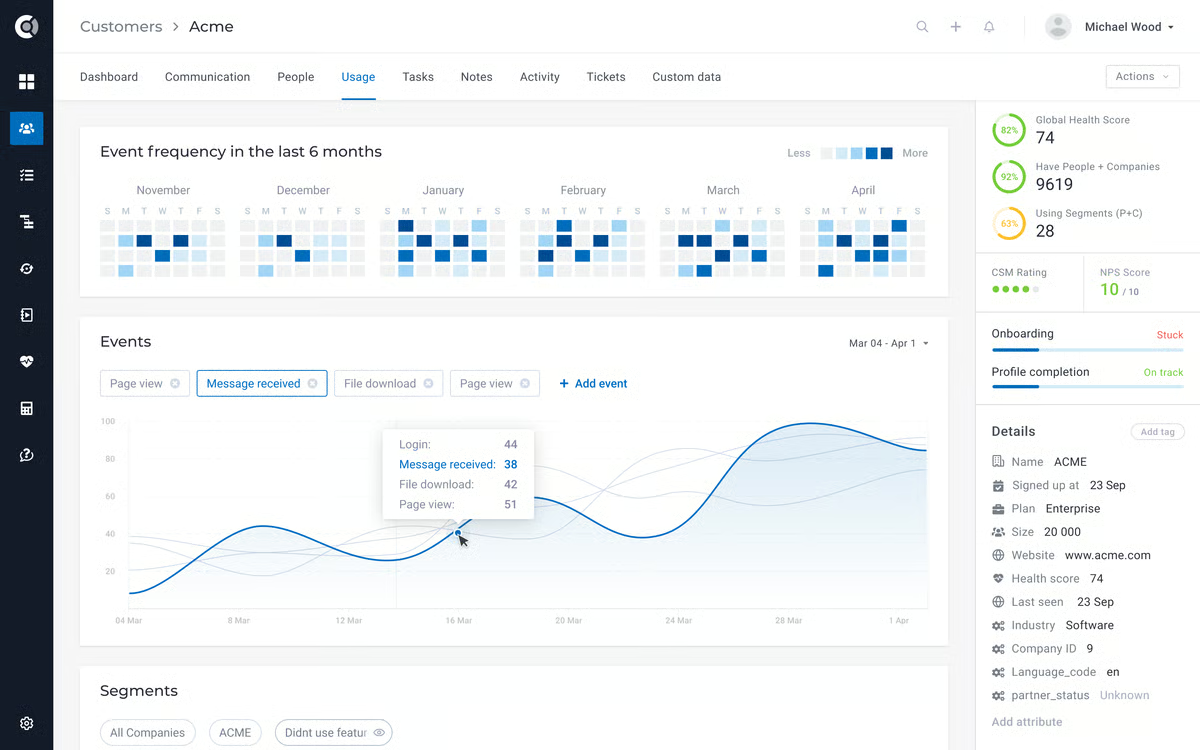
Connections with tools like HubSpot, data warehouses, and internal systems via API allow onboarding data to stay aligned with revenue and usage context. This helps customer success teams rely on Custify as a reference point rather than maintaining parallel systems.
The vendor relationship extends well beyond initial implementation. G2 reviewers describe dedicated CSMs who stay involved through onboarding iteration, answer questions as workflows evolve, and help teams unlock platform capabilities over time. This ongoing partnership is consistently linked to stronger long-term adoption rather than just smoother initial rollout.
Data filtering and workflow automation are consistently described as accessible across G2 reviews. Reviewers describe building automated processes, segmenting customer lists, and surfacing client activity without specialist knowledge. This ease of automation helps smaller CS teams stay proactive across growing account volumes without adding operational overhead.
Reporting depth and view configuration take time to feel intuitive, particularly for teams scaling usage quickly. This ramp-up is most noticeable for users coming from simpler tools. Once familiar, the reporting structure supports consistent onboarding and success tracking across accounts.
During high-activity periods, some G2 reviewers note slower load times. Larger email template libraries also take more effort to manage as they expand. Teams running leaner onboarding programs with smaller template sets rarely encounter either issue in practice.
Based on review patterns, it works best for SMB and mid-market organizations looking to formalize onboarding through tasks, checklists, and centralized customer context. For teams moving away from ad-hoc engagement toward disciplined onboarding programs, Custify remains a practical and well-aligned option.
What I like about Custify:
- Custify brings structure to onboarding and customer success through clear playbooks, tasks, and lifecycle stages, replacing spreadsheets and manual tracking.
- A single customer view stands out. Health scores, usage data, feedback, and alerts live together, making account status easy to understand at a glance.
What G2 users like about Custify:
“I like how easy Custify is to use, filter data, and build workflows to automate processes for our team. It’s also helped us collect feedback on the onboarding process using the native survey feature. The initial setup was very easy, and while we were able to set up most of it ourselves, Theo, our representative, was extremely helpful whenever we had questions we couldn’t figure out on our own.”
– Custify review, Jessica H.
What I dislike about Custify:
- Reporting depth and view configuration can take time to feel fully intuitive as usage scales, reflecting the platform’s structured approach to onboarding operations. As familiarity builds, the setup supports consistent and reliable onboarding tracking.
- Load times may slow during high-activity periods, and larger email template libraries require more active management as they expand. In more streamlined environments, these factors tend to have minimal impact on day-to-day onboarding workflows.
What G2 users dislike about Custify:
“In my experience, there are a few usability issues that could be addressed to enhance the overall use of the platform. For example, when I try to add bullet points, it sometimes causes entire paragraphs to shift unexpectedly. I also find it inconvenient that notes taken during meetings do not appear under the general notes section, and I wish there were options to personalize these preferences. Being able to do so would make it much easier to track and understand the activities related to each individual.”
– Custify review, Simeon M.
Comparison of the best client onboarding software
|
Software |
G2 rating |
Free plan |
Ideal for |
|
Planhat |
4.5/5 |
No |
Structured, cross-team SaaS client onboarding |
|
ChurnZero |
4.7/5 |
No |
High-volume onboarding with automated engagement |
|
Rocketlane |
4.7/5 |
Yes, (Free trial available) |
Customer-facing onboarding and implementation projects |
|
Totango |
4.3/5 |
No |
Task-driven, structured client onboarding programs |
|
Moxo |
4.5/5 |
No |
Guided, secure, client-facing onboarding experiences |
|
Vitally |
4.5/5 |
No |
Data-driven onboarding tied to product usage |
|
GUIDEcx |
4.6/5 |
No |
Structured, task-based onboarding with shared visibility |
|
Process Street |
4.6/5 |
Yes, (14-day free trial available) |
Checklist-driven onboarding workflow execution |
|
EverAfter |
4.6/5 |
No |
Collaborative onboarding hubs with customer alignment |
|
Custify |
4.7/5 |
No |
SMB and mid-market onboarding workflows |
*These client onboarding software products are top-rated in their category, based on G2’s Winter Grid Report. All offer custom pricing tiers and demos on request.
Best client onboarding software: Frequently asked questions (FAQs)
Got more questions? G2 has the answers!
Q1. Which are the top-rated client onboarding solutions for financial services?
For financial services, Moxo is usually the cleanest fit when secure client communication, document collection, approvals, and a branded portal matter most. If you need heavier internal orchestration across teams with structured workflows and visibility, Planhat or Totango can work well, but they’re typically stronger when onboarding is tied to CS operations rather than pure client-facing compliance flows.
Q2. Which is the best client onboarding software for agencies?
Rocketlane is one of the strongest fits for agencies because it’s built around implementation-style onboarding with shared timelines, templates, task ownership, and client collaboration in one workspace. If an agency wants a more polished, portal-first experience for clients (with less operational complexity), Moxo tends to align well.
Q3. Which platforms are best for onboarding SaaS customers?
For SaaS onboarding tied closely to customer health and lifecycle workflows, Planhat, ChurnZero, and Vitally tend to be the most aligned. Planhat works well for cross-team visibility, ChurnZero stands out for workflow automation and monitoring, and Vitally is a strong option when customization and data control matter across different customer segments.
Q4. Which onboarding tool integrates with CRM systems?
If CRM alignment is central, EverAfter is often highlighted for fitting naturally into Salesforce-driven workflows, keeping onboarding stages and customer context connected. For CS platforms, Planhat, ChurnZero, and Totango also integrate into revenue and CS ecosystems, but the “best” choice depends on whether you want CRM as the system of record or the onboarding tool to be the operational hub.
Q5. What are the best tools for tracking onboarding progress?
For pure onboarding progress visibility, Rocketlane and GUIDEcx are strong because they make task ownership, timelines, and dependencies highly visible to both internal teams and customers. If you want progress tracking paired with customer health signals and CS workflows, Planhat and ChurnZero do a better job connecting execution with risk and engagement.
Q6. Which onboarding software helps reduce churn rates?
Tools like Planhat, ChurnZero, Totango, and Vitally are most associated with churn reduction because they connect onboarding momentum to health scores, usage signals, and early risk indicators. They’re useful when you want onboarding to feed directly into proactive CS workflows, not just “complete the checklist.
Q7. Which onboarding software offers multi-language support?
Multi-language support is most commonly found in platforms serving global or enterprise customers. If multi-language is critical, Moxo and EverAfter are the most likely candidates to assess first because they’re client-facing portal experiences where language support tends to matter more.
Q8. Which are the top client onboarding platforms with analytics dashboards?
If dashboards need to answer operational questions like “what’s stuck” and “who needs attention,” Planhat and ChurnZero stand out because they combine onboarding execution with health signals and account monitoring. Vitally is also strong when teams want more configurable reporting tied to CS KPIs once the system is set up.
Q9. What are the top tools for automating new client workflows?
For automation-driven onboarding, ChurnZero is one of the strongest because workflows, monitoring, and task automation are core to how teams run repeatable onboarding motions at scale. Vitally and Planhat can also automate complex workflows, but they usually require more upfront configuration, which pays off most for teams that want long-term operational control.
Q10. Which platform is best for personalized onboarding journeys?
Vitally is often the best fit when personalization means if-then logic, custom traits, and onboarding paths that change based on behavior or segment. If personalization is more about giving clients a tailored, branded experience with a clear shared workspace, EverAfter and Moxo tend to fit better, depending on whether you want a lifecycle portal (EverAfter) or a portal-first onboarding hub (Moxo).
From kickoff to confidence
Early onboarding issues rarely announce themselves. They show up as quiet delays, blurred ownership, and moments where progress is assumed rather than verified. Left unattended, those small gaps accumulate. Teams lose time re-aligning timelines, clarifying responsibilities, and reassuring customers instead of driving adoption forward.
The difference is felt in day-to-day execution. When progress is explicit, responsibility is visible, and next steps are clear, onboarding moves with intent. Teams step in sooner, customers stay oriented, and momentum holds. When visibility breaks down, work fragments across tools and conversations. Decisions slow, handoffs weaken, and risk builds long before it is formally recognized.
That’s why onboarding software is more than a tooling choice. It shapes how work is coordinated, how accountability is enforced, and how confidence is established at the very start of the relationship. The safest option mirrors how your teams actually deliver onboarding under pressure, not how the process looks on paper. If the system keeps execution clear when the stakes are highest, it remains a decision you can stand behind long after go-live.
Want better control over capital projects? Explore leading capital project management software on G2 to manage timelines, budgets, and execution with confidence