It all started when I noticed the constant ringing of the phone at our family business. There were questions, inquiries, order updates, you name it. No matter how hard we tried, there was always someone we couldn’t reach in time. I couldn’t help but think that there had to be a better way.That’s when I decided to explore the best live chat software solutions. The idea seemed simple: give customers a faster, easier way to connect with us. But as I started researching, I quickly realized how many options were out there. Each promised to be the best, but which was right for us? I couldn’t make that decision without some real insights.
So, I rolled up my sleeves and dove into hundreds of G2 reviews. I focused on how each platform handles common customer support needs—looking at usability, integration capabilities, and how well they perform during peak traffic times. I also paid close attention to user feedback on setup experience, responsiveness, and how these tools fit into real-world workflows. The goal was to understand which options truly streamline support without adding friction for agents or customers.
After my evaluation of 20+ such tools, I shortlisted the seven best live chat software. These include Agentforce Service (formerly Salesforce Service Cloud), Zendesk for Customer Service, Podium, Zoho Desk, Fin by Intercom, Birdeye, and Freshdesk.
And now, I’m here to share what I learned. If you’ve been wondering which live chat software could make life easier for your business and customers, you’re in the right place.
Best live chat software I evaluated in 2026
- Agentforce Service: Best for CRM-driven support
AI-powered case management, automation, and analytics for personalized customer interactions. ($25/user/month) - Zendesk for Customer Service: Best for multi-channel customer support
AI-powered chatbots, email, phone, and social media integrations for full support coverage. ($19/user/month) - Podium: Best for SMS-based engagement
SMS-based customer engagement, review management, and lead conversion tools. (Pricing on request) - Zoho Desk: Best for flexible, omnichannel customer support
Multi-channel ticketing, automation, and customizable workflows for scalable customer service. ($4.51/user/month) - Fin by Intercom: Best for AI-powered chat and customer service
Smart chatbots, proactive messaging, and omnichannel support for seamless conversations. ($29/user/month) - Birdeye: Best for online reputation management
Multi-location customer engagement, review tracking, and competitor insights. (Pricing on request) - Freshdesk: Best for streamlined ticket-based support
Centralized ticketing, automation, and omnichannel support to manage customer queries efficiently. ($16.11/user/month)
*These live chat software solutions are top-rated in their category, according to G2 Spring 2026 Grid Reports. I’ve also added their top features and monthly per-user pricing to make comparisons easier.
When I looked at G2’s data, I was surprised to see that only 4% of software and services earned Leader recognition. That really shows how competitive the live chat software market is. Since this recognition is based on user satisfaction and market presence, I knew it was important to focus on top-rated solutions that deliver real value.
7 best live chat software I handpicked after evaluating
When I think about live chat software, I see it as more than just a chatbox on a website. It’s a real-time communication tool designed to bridge the gap between businesses and customers. At its core, live chat software integrates with a website or application, creating a seamless channel for visitors to ask questions, get support, or even make purchasing decisions without leaving the platform.
I wasn’t surprised to learn that the global live chat software market is projected to grow from $1.14 billion, as calculated in 2025 to $2.43 billion by 2035, growing at a rate of 7.86% per year. It just confirms what I’ve seen firsthand: businesses need real-time communication now more than ever.
And it’s not just about convenience; studies show that 44% of online shoppers say having instant answers via live chat is the most important website feature. If customers expect this level of service, it’s time we deliver.
How did we find and evaluate the best live chat software?
I spent time evaluating a wide range of live chat software—from simple chat widgets to advanced platforms with AI-driven automation. To understand real-world performance, I analyzed hundreds of G2 reviews and paid close attention to what everyday users had to say about usability, reliability, and key features. Using AI to identify patterns in the feedback, I was able to spot both strengths and recurring challenges across the tools—giving me a clearer picture of how each platform holds up in practice.
I looked at G2’s Grid Reports, assessing each tool based on ease of use, functionality, and value for money. I also consulted a professional with hands-on experience and validated their insights using verified G2 reviews. The screenshots featured in this article may be a mix of those obtained from the vendor’s G2 page or publicly available material.
From a technical perspective, I’ve found that most live chat tools work by embedding JavaScript widgets directly into web pages. These widgets serve as the customer’s interface while syncing with agents’ backend dashboards to manage conversations.
In my experience, modern live chat software often includes features like chatbot automation, AI-powered suggestions, detailed analytics dashboards, and integrations with customer relationship management systems or help desks. Some platforms even go a step further, offering omnichannel capabilities that allow agents to handle chats from the web, social media, and messaging apps like WhatsApp, all from a single platform.
The best live chat tools use lightweight code that won’t slow down the website, use cloud-based servers to maintain uptime and speed, and support encrypted communication to safeguard user data. I’ve also noticed that many of these platforms provide application programming interfaces (APIs) and webhooks, making it easy for developers to customize workflows, trigger events, and seamlessly integrate with existing tools.
How I sifted through the options to find the best live chat software
When evaluating live chat software recommended by G2, I went beyond the basic features and dived into the technical aspects that affect performance, scalability, and how well it integrates with our existing systems. Here are the key technical factors I focused on:
- Integration capabilities: I focused on platforms that integrate seamlessly with common tech stacks like CRM systems (like Salesforce or HubSpot), help desk software (like Zendesk or Freshdesk), and e-commerce platforms (like Shopify or Magento). The software should offer APIs, webhooks, and pre-built connectors for these platforms. I also checked for the ability to integrate with email marketing tools, analytics software, and payment gateways.
- Customization options: The live chat widget should allow changes in colors, fonts, button styles, and greetings to align with the users website’s look and feel. Beyond aesthetics, technical customization options like chat routing logic, user behavior triggers (e.g., automatic chat invitations based on time spent on a page), and chatbot scripting capabilities are vital.
- Ability to handle increasing user demands: I also looked at how well the live chat software handled high traffic volumes. This involved reading user experiences with server architecture and performance benchmarks. If it’s cloud-based, I dug up on the hosting infrastructure (e.g., AWS, Google Cloud, or Azure) to understand its scalability mechanisms. I considered hardware requirements, database scalability, and whether the software supports load balancing to ensure consistent performance under stress for on-premise solutions.
- Security: I checked for data encryption (AES-256 or similar) for data in transit and at rest. The software should support multi-factor authentication (MFA) for agents and administrators. It’s essential to ensure the tool complies with industry standards and regulations like GDPR, HIPAA (for healthcare), CCPA (for California residents), or PCI DSS (if handling payment-related information). Features like IP whitelisting, session timeout controls, and secure chat archives also matter.
- Analytics and reporting: In evaluating live chat software, I focused on key metrics like chat volume, peak hours, geographic distribution, and time spent per chat. I also looked at agent performance indicators such as first response time (FRT), average resolution time, and satisfaction scores. Understanding the customer journey—where users drop off or convert—was another priority. I gave extra weight to platforms that integrate with tools like Google Analytics, Tableau, or Power BI to support deeper reporting and data visualization.
- Deployment: Deployment flexibility was another critical factor. I considered whether a cloud-based (SaaS) or self-hosted setup would be a better fit depending on infrastructure needs. For cloud options, I looked at data residency controls, uptime SLAs, and server redundancy. For self-hosted solutions, I evaluated database requirements (MySQL, PostgreSQL), server compatibility (Linux, Windows), and the availability of Docker images or Kubernetes support to ensure scalability and ease of management.
- AI integration: I considered whether the software includes chatbot features or allows integration with third-party AI solutions. The chatbot must support natural language processing (NLP) and machine learning to handle queries efficiently. I also focused on training options for custom intents, the ability to seamlessly transfer chats from bots to humans, and compatibility with platforms like Dialogflow or IBM Watson.
While evaluating over 20 live chat software solutions, I analyzed each one against key criteria to identify the best fit. I focused on integration capabilities with existing systems, customization options for brand alignment, scalability to support growth, and security features like encryption and compliance standards.
I also reviewed feedback on user interface design, mobile responsiveness, deployment flexibility, and AI or chatbot functionality. Performance metrics such as uptime and latency were considered, along with the strength of analytics and reporting tools for turning data into actionable insights. After a thorough evaluation of user reviews and platform capabilities, I narrowed the list down to the top solutions that stood out across these areas.
To be included in the live chat software category, a product must:
- Provide instant messaging capabilities between customer service representatives and website visitors
- Allow chat windows to either initiate conversation or live independently on a website for potential inquiries
*This data was pulled from G2 in 2026. Some reviews may have been edited for clarity.
1. Agentforce Service: Best for CRM-driven support
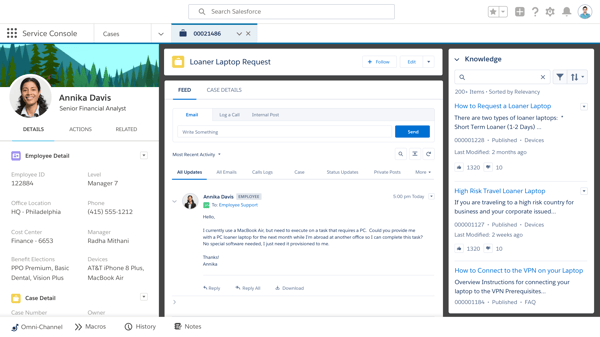
In Agentforce Service (formerly called Salesforce Service Cloud), humans and AI agents work together to drive customer success. According to G2 Data, it is used by 42% of mid-market teams and 44% enterprises. It provides a comprehensive view of customer interactions, enabling businesses to deliver personalized and context-aware support.
Agentforce Service is frequently praised in G2 reviews for its robust reporting features and Gantt chart capabilities. Users highlight how these tools enhance project tracking and help teams stay on schedule with greater clarity and accountability.
AI-powered features like proactive article suggestions and task automation also get strong feedback. Reviewers note that these tools help agents resolve issues faster while minimizing repetitive work, boosting both productivity and customer satisfaction.
Collaboration features are another high point. Many users appreciate being able to log time, attach files and emails, and leave public or private comments, all within the platform. These tools help streamline issue tracking and ensure smoother cross-team communication.
A major strength of Agentforce Service is its deep customization and scalability. Reviewers emphasize the ability to tailor workflows, case management processes, permissions, and integrations to fit specific business requirements.
Users liked that the platform is backed by responsive support and extensive training resources, empowering them to maximize its potential and stay up to date on new features.
I also liked its robust integration capabilities, enabling businesses to seamlessly connect customer support with the broader Salesforce ecosystem and external tools.
Some G2 users note that the platform can be expensive, particularly when adding advanced features, AI capabilities, or scaling across larger teams. Licensing and add-ons can increase total costs quickly, which may be a consideration for smaller businesses or teams with tighter budgets. That said, many reviewers also acknowledge that the pricing reflects the platform’s depth, extensive feature set, and ability to support complex, enterprise-grade service operations over the long term.
Setting up workflows, permissions, and integrations often requires technical expertise or admin support, especially for more advanced use cases. However, once implemented and properly configured, many users find that the platform becomes significantly easier to manage and offers powerful flexibility to support sophisticated service environments.
Overall, Agentforce Service stands out as a powerful, enterprise-grade solution that combines depth, flexibility, and advanced automation to deliver exceptional customer support.
What I like about Agentforce Service:
- Provides accurate reports and detailed Gantt charts, making managing projects and tracking activities so much easier.
- AI-powered tools and features like proactive suggestions and task automation save a lot of time and make resolving customer issues incredibly efficient.
What G2 users like about Agentforce Service:
“I appreciate how Agentforce Service combines powerful AI with real‑time context, allowing agents to resolve issues faster and with greater accuracy. Its ability to automate routine tasks, integrate seamlessly with Salesforce data, and provide intelligent, human‑like responses makes customer service smoother and more efficient. I also value its 24/7 availability, scalability, and the way it helps teams focus on more complex, high‑value work.”
– Agentforce Service Review, Jose P.
What I dislike about Agentforce Service:
- Some G2 users note that costs increase with advanced features, AI capabilities, and additional licenses, which may be challenging for smaller teams. However, many acknowledge that the pricing aligns with its depth and enterprise-grade capabilities.
- Configuring workflows, permissions, and integrations often requires technical expertise or admin support. That said, once implemented, the platform becomes easier to manage and offers strong flexibility for complex service operations.
What G2 users dislike about Agentforce Service:
“The Catch: The ‘Salesforce Tax’: It’s expensive, and nearly every ‘cool’ AI feature comes as a pricey add-on that can quickly inflate your monthly bill.
Complexity: This isn’t ‘plug-and-play.’ In practice, you’ll usually need a dedicated admin or a consultant to keep everything running smoothly.
Bloat: The interface is undeniably powerful, but it’s also heavy. It can feel ‘click-heavy,’ and it may run slowly on older hardware.
The Bottom Line: It’s a great fit for large companies that need to scale complex support operations, but for smaller or simpler teams, it can easily become ‘expensive overkill.’”
– Agentforce Service Review, Priyeta S.
2. Zendesk for Customer Service: Best for multi-channel customer support
Zendesk for Customer Service equips agents with tools, insights, and context to deliver personalized service across all channels, including social messaging, phone, and email. According to G2 Data, it is used by 44% small businesses and 45% mid-market teams.
G2 users appreciate how Zendesk Support Suite’s live chat lets them communicate with their customers in real time. Whether customers are asking a quick question or need detailed assistance, users can respond immediately, which makes a huge difference in customer satisfaction.
Zendesk’s live chat stands out for its proactive engagement features. G2 reviewers appreciate the ability to set up behavior-based triggers, such as time spent on a specific page, to automatically invite customers to chat. This allows businesses to address questions early and has been linked to improved conversion rates.
Multilingual support is another highly valued feature. Users note that Zendesk enables teams to serve a global audience without needing separate language-specific agents. The built-in language capabilities help deliver more personalized service at scale.
Chat routing is also frequently praised. Based on predefined rules, the system can direct technical queries to specialists while general inquiries go to other team members. This helps reduce wait times and ensures customers are connected with the right person from the start.
Customization is also spoken highly of. The chat widget is easily tailored to match a brand’s look and feel, right down to colors and greetings. According to reviewers, this creates a more cohesive, on-brand experience across the customer journey.
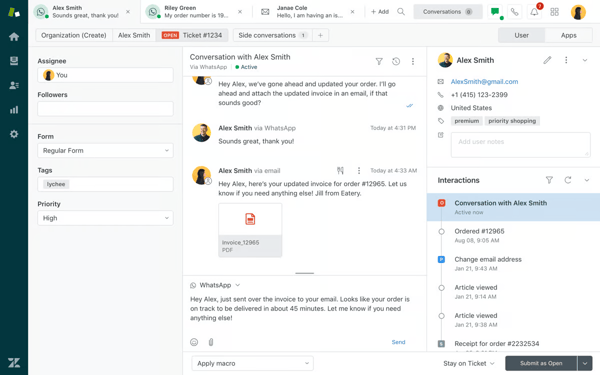
Zendesk’s ticket management system is consistently praised for bringing structure, visibility, and efficiency to customer support operations. Reviewers highlight how it centralizes requests from multiple channels, like email, chat, and social media, into a single, organized workspace, making it easy to track, prioritize, and resolve issues without losing context.
Some G2 users note that creating highly customized reports or extracting deeper insights can require additional time and expertise. That said, once teams become familiar with the system or integrate external BI tools, many find it capable of delivering meaningful performance insights.
It is generally reliable for day-to-day support operations, but some reviewers mention occasional slowdowns when handling high ticket volumes or multiple workflows simultaneously. This can include lag when loading tickets, switching views, or working within dashboards during peak usage. However, for most teams, these issues are situational, and the platform continues to perform well for managing large-scale support operations overall.
Based on my evaluation, Zendesk stands out for balancing proactive engagemnet with powerful features. Its strong ticketing system, omnichannel capabilities, and flexibility make it a solid choice for teams looking to deliver efficient, high-quality support at scale.
What I like about Zendesk for Customer Service:
- Its ability to support proactive customer engagement. Users highlight how easy it is to set up triggers, such as offering help when someone spends too long on a checkout page.
- Another commonly praised feature is the visibility into customer history. When a chat begins, agents can see past interactions, purchase details, and even the page the customer is currently viewing.
What G2 users like about Zendesk for Customer Service:
“It makes it easy to manage, prioritize, and track customer requests across multiple channels like email and chat. I also really like the automation features, such as triggers, macros, and SLAs, which help streamline repetitive tasks and ensure timely responses. Another big advantage is the flexibility and customization. You can tailor views, forms, and workflows to match your support structure. Lastly, the reporting and analytics tools provide valuable insights into team performance.”
– Zendesk for Customer Service Review, Ashu M.
What I dislike about Zendesk for Customer Service:
- Building highly customized reports isn’t always intuitive and may need additional effort or tools. However, once familiar,or when paired with external BI tools, it delivers meaningful performance insights.
- While reliable for daily use, some reviewers report lag when handling high ticket volumes or switching views during peak times. That said, these issues are typically situational, and the platform performs well for large-scale support overall.
What G2 users dislike about Zendesk for Customer Service:
“While Zendesk Support Suite is powerful, the interface can sometimes feel a bit plain and not very modern. There’s also a learning curve — if you’re not fully trained on all the features, it can seem more basic than it actually is. More guided onboarding and feature discovery would help teams unlock their full potential faster.”
– Zendesk for Customer Service Review, Jose G.
Related: Read my colleague’s in-depth review of Zendesk based on 6,000+ G2 reviews to know if Zendesk suits your team.
3. Podium: best for SMS-based engagement
Podium is a messaging-first live chat platform designed to help businesses connect with customers. According to G2 Data, it is used by 64% small businesses and 33% mid-market teams.
G2 reviewers consistently highlight Podium’s ease of use, noting its clean interface and simple navigation. Teams appreciate how quickly they can get started, which makes day-to-day operations more efficient. This ease of adoption enables businesses to onboard staff faster and maintain consistent usage across teams, even for non-technical users.
Podium simplifies customer communication through multiple channels, enabling them to maintain smooth interactions. It integrates messaging into one centralized platform, making it efficient for responding to customer queries without switching between apps. This centralization enhances response times and ensures no message goes unnoticed.
Podium combines SMS, webchat, and social media messaging into one dashboard. This omnichannel approach helped customers engage on their preferred platforms, improving accessibility and convenience.
I noted that the platform allows multiple team members to manage and respond to customer conversations from a shared inbox. Users highlight how conversations can be assigned, tracked, and picked up by different team members without confusion, ensuring continuity even when staff are unavailable.
Podium’s automation tools, like bulk messaging and automated follow-ups, are frequently praised in reviews for reducing manual effort and keeping customer communication consistent and timely.
A standout feature is its review management system. G2 users highlight how Podium makes it easy to request, collect, and respond to customer reviews, helping businesses strengthen their online reputation and gather valuable feedback.
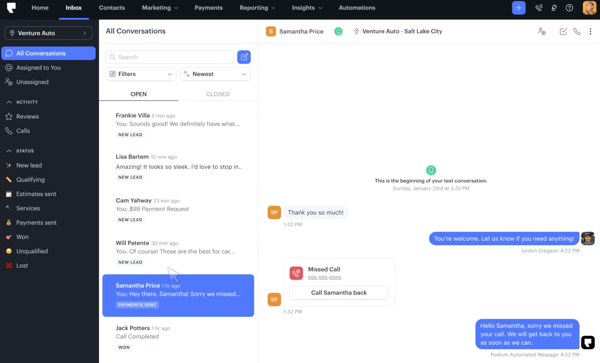
As message volumes increase, managing conversations can require more structured workflows. Factors like organizing threads or maintaining visibility across interactions may take some adjustment during busy periods. However, for small to mid-sized teams or businesses with moderate communication needs, the platform continues to deliver a smooth and responsive messaging experience.
Customer support experiences can vary depending on the complexity of the request. Teams working through more advanced configurations or unique scenarios may require additional guidance. That said, once the platform is fully implemented, many users find that day-to-day operations run efficiently, minimizing the need for ongoing support.
Overall, Podium stands out as a practical, easy-to-adopt platform for businesses looking to simplify customer communication and drive engagement through messaging.
What I like about Podium:
- Users love how Podium makes it so easy to communicate with their customers through one platform. Whether it’s SMS, web chat, or social media, they can manage everything in one place.
- The automated features help users send bulk messages, schedule follow-ups, and even send reminders without lifting a finger. I can imagine this making a huge difference in keeping customer interactions consistent and professional.
What G2 users like about Podium:
“Podium combines all messages from diverse channels, and this makes it effective to control them. The tool helps in reviewing all the feedback that the company gets from clients, and this ensures they get a positive reputation. Podium is brilliant in monitoring all the messages and interactions made with clients. The engagement from Podium is straightforward and faster, creating a real-time one-on-one discussion.”
– Podium Review, Samantha L.
What I dislike about Podium:
- As volumes grow, organizing threads and maintaining visibility can require more structured workflows. However, for small to mid-sized teams, Podium remains smooth and responsive for everyday communication.
- Some users note that more advanced use cases may require additional guidance. That said, once fully implemented, the platform runs efficiently with minimal ongoing support needs.
What G2 users dislike about Podium:
“While Podium is powerful, some advanced features and customization options can feel limited depending on the use case. Pricing can also be on the higher side for smaller teams, and certain AI or automation features require additional configuration or support to fully optimize. More flexibility in reporting and analytics would be a helpful improvement.”
– Podium Review, Zakir S.
4. Zoho Desk: Best for flexible, omnichannel customer support
Zoho Desk is a cloud-based help desk platform designed to streamline customer support through automation, omnichannel communication, and deep integration with business tools. According to G2 Data, it is used by 71% small businesses and 23% of mid-market teams.
The intuitive interface, quick implementation, and minimal training requirements make it easy for teams to get started. Combined with competitive pricing, Zoho Desk offers strong value for businesses looking for a feature-rich support solution without significant overhead.
Zoho Desk brings together communication across multiple touchpoints, including email, live chat, phone, and social platforms, into one unified dashboard. This allows agents to maintain full context across conversations and deliver faster, more consistent support without switching between tools.
Users frequently praise features like workflow automation, ticket routing, and Blueprint processes that standardize support operations. These tools reduce manual effort, ensure consistency, and help teams respond proactively while maintaining service quality.
The ticketing system is consistently highlighted in G2 reviews as a core strength. It consolidates customer queries from email, chat, social media, and web forms into a single, organized interface, making it easier to track, prioritize, and resolve issues efficiently. Features like auto-assignment, SLA tracking, and structured workflows help teams stay on top of high volumes without losing visibility.
Businesses can tailor workflows, ticket fields, automation rules, and reporting dashboards to align with their specific processes. The ability to adapt the platform to different industries and use cases makes it especially valuable for teams with evolving or complex support needs.
Integration with the broader Zoho ecosystem and third-party tools is another key advantage. Zoho Desk connects seamlessly with apps like Zoho CRM, Slack, WhatsApp, and other business tools, helping teams unify operations and maintain a consistent flow of information across departments.
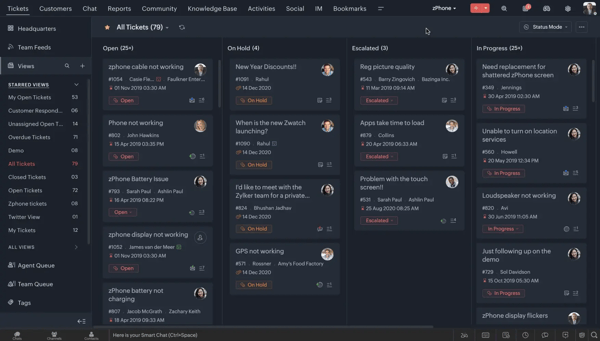
Configuring advanced workflows, automation rules, and navigating multiple modules may require some time to fully understand. However, this depth also enables teams to build highly tailored support systems, and once familiar, many users find the platform intuitive and well-suited for long-term scalability.
Reviewers mention that occasional slowdowns can occur when handling high ticket volumes or loading detailed reports. This can be more noticeable during peak usage or when working with complex dashboards. That said, for most day-to-day tasks, the platform performs smoothly and continues to support efficient ticket management and team productivity.
Overall, Zoho Desk stands out as a flexible and feature-rich support platform that balances affordability with powerful capabilities.
What I like about Zoho Desk:
- Brings email, chat, social, and web queries into one organized dashboard, making it easy to track, prioritize, and resolve customer issues efficiently.
- Offers configurable workflows, SLA management, and automation rules that help teams streamline processes and scale support operations effectively.
What G2 users like about Zoho Desk:
“What I like best about Zoho Desk is its ability to centralize multi-channel communication into a single view, its powerful automation features like Blueprints that standardize workflows, and its seamless integration within the wider Zoho ecosystem, which provides a holistic view of the customer journey.”
– Zoho Desk Review, Riaan V.
What I dislike about Zoho Desk:
- Configuring workflows, automation, and navigating modules can require some initial learning. However, this depth enables highly tailored systems and supports long-term scalability.
- Occasional slowdowns can occur with high ticket volumes or complex reports. That said, the platform runs smoothly for most day-to-day support tasks.
What G2 users dislike about Zoho Desk:
“What I like least about Zoho Desk is that some important integrations, like WhatsApp, are not native and require additional configurations or external tools, which can increase cost and complexity. I also notice that the difference between the plans is significant: more strategic features, such as more advanced automations and more comprehensive reports, are restricted to the higher plans. For those who are still structuring the process, this can create doubt about which plan really meets the needs without paying more than necessary. Another point is that the initial setup requires a lot of attention. If departments and channels are not well configured from the start, chat and ticket may behave differently, which can cause confusion in the operation. Overall, it is a good tool, but it requires technical understanding to get the best out of it.”
– Zoho Desk Review, Milena D.
5. Fin by Intercom: Best for AI-powered chat and customer service
Fin by Intercom is an AI-powered live chat and support agent designed to automate customer conversations using your existing knowledge base, delivering fast, accurate responses across channels while seamlessly handing off to human agents when needed. According to G2 Data, it is used by 61% small businesses.
Fin by Intercom’s AI-powered chatbot is highly praised in several reviews. It automates responses while maintaining a human-like tone, allowing users to handle large volumes of customer inquiries without hiring additional staff. Its ability to gather leads and manage inquiries helps users stay competitive in customer engagement.
G2 reviewers often highlight Intercom’s analytics tools as a major strength. The platform makes it easy to track customer behavior and identify patterns in user activity. These insights help teams refine their marketing and support strategies, spot friction points in the customer journey, and ultimately improve conversion rates. The visual dashboards are also praised for making data easier to interpret and act on during strategic planning.
The help center functionality is another key benefit. Users appreciate being able to build a self-serve library of articles, tutorials, and FAQs. Not only does this empower customers to find answers independently, but it also helps lighten the load for support teams. Intercom also tracks help content performance, allowing teams to improve articles based on what users engage with most.
Intercom’s customer segmentation capabilities stand out in G2 reviews. Users highlight how easy it is to target audiences based on behavior, demographics, or activity, making messaging campaigns more personalized and effective. This precision helps boost engagement and marketing ROI, especially when paired with advanced targeting features like A/B testing for ongoing optimization.
I noted how flexible Fin by Intercom is in adapting to different business needs, brand voices, and customer scenarios. Reviews highlight the ability to tailor tone, escalation rules, workflows, and source content so responses feel aligned with company policies and support goals.
Users also praise its multilingual capabilities, noting that Fin can respond accurately across languages without requiring teams to recreate content from scratch, making it especially useful for global support operations.
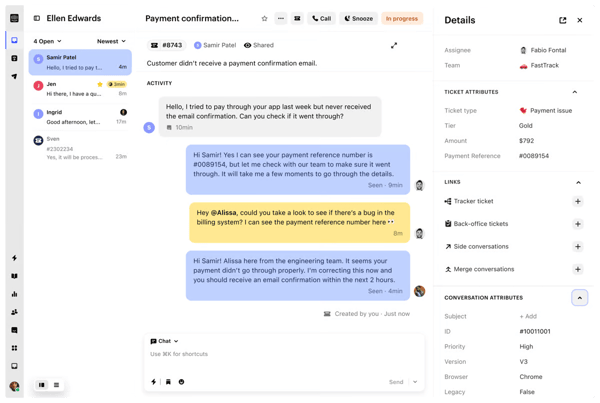
Responses can depend on the quality and depth of the underlying knowledge base, especially for more complex or edge-case scenarios. In such cases, additional tuning, content updates, or guidance rules may be needed to improve accuracy. However, teams that actively maintain their help content and refine Fin’s behavior often see strong improvements over time, making it increasingly reliable for a wider range of queries.
Some reviewers mention that costs can increase as usage grows or when leveraging more advanced AI features across teams. This can be an important consideration for smaller teams or those just starting with AI-driven support. That said, many users view this as a trade-off for the efficiency gains, reduced ticket volumes, and ability to scale support operations without proportionally increasing headcount.
Overall, Fin by Intercom stands out as a powerful AI support solution that helps teams scale efficiently while maintaining high-quality customer interactions.
What I like about Fin by Intercom:
- G2 reviewers frequently praise Intercom’s chatbot for automating repetitive tasks while still delivering a personal, responsive experience. It helps teams handle inquiries more efficiently.
- Proactive engagement is another standout. Features like in-app messaging and targeted pop-ups let teams reach customers at the right moment.
What G2 users like about Fin by Intercom:
“What I like most about Fin is how effectively it automates customer support by providing fast, relevant answers based on existing knowledge base content. It significantly reduces response times and helps handle a large volume of repetitive queries without requiring constant human intervention. The integration with Intercom is seamless, and it’s easy to deploy and scale, which makes it a valuable tool for improving support efficiency.”
– Fin by Intercom Review, Farhan M.
What I dislike about Fin by Intercom:
- AI accuracy depends on the knowledge base quality. Performance can vary for complex or edge-case queries, requiring ongoing tuning and content updates. However, teams that actively optimize their help content see improved accuracy and reliability over time.
- Pricing may scale as adoption grows, especially for smaller teams. That said, many users view it as a worthwhile trade-off for efficiency gains, reduced ticket volume, and scalable support without added headcount.
What G2 users dislike about Fin by Intercom:
“One thing I feel could be better is that sometimes Fin does not fully understand complex or very specific customer queries. In such cases, the response may not be very accurate, and the conversation needs to be handled by a support agent. Also, the answers depend a lot on the quality of the help articles, so if the content is not very clear, then the responses may not be perfect. Apart from this, it works well for most common queries.”
– Fin by Intercom Review, Sunny Y.
Using WhatsApp for customer support? Learn how to use WhatsApp chatbots to provide instantaneous responses to customer queries.
6. Birdeye: Best for online reputation management
Birdeye is an agentic marketing platform for multi-location brands. The AI agents respond to reviews, publish social posts, engage leads via chat, and surface actionable insights automatically, at scale. According to G2 Data, the tool is used by 57% small businesses and 34% mid-market teams.
It consolidates feedback from multiple sources, making it easy to keep track of client sentiments. With everything in one place, users no longer need to chase reviews or sift through different platforms.
The web chat feature in Birdeye is frequently praised in G2 reviews for enabling real-time customer engagement. It makes agents more accessible to site visitors with immediate questions and often helps businesses convert more leads by driving direct inquiries.
Another standout is Birdeye’s unified inbox, which allows teams to manage email, SMS, and chat from a single platform. Users appreciate the convenience of communicating through customers’ preferred channels without switching tools.
The platform also supports localized marketing, helping businesses tailor outreach by location while maintaining a consistent brand identity, something reviewers say is especially valuable for multi-location teams.
Birdeye’s AI capabilities are frequently highlighted by users for helping teams respond to customers more quickly and efficiently. Features like AI-generated replies, automated responses, and content suggestions reduce the time spent on repetitive tasks while maintaining consistent communication.
Birdeye’s customer support and onboarding process are standout strengths. Users highlight the responsiveness of account managers, hands-on guidance during setup, and ongoing support that helps teams maximize the platform’s capabilities. This level of support makes implementation smoother and ensures businesses can quickly adapt the tool to their workflows, even with minimal technical expertise.
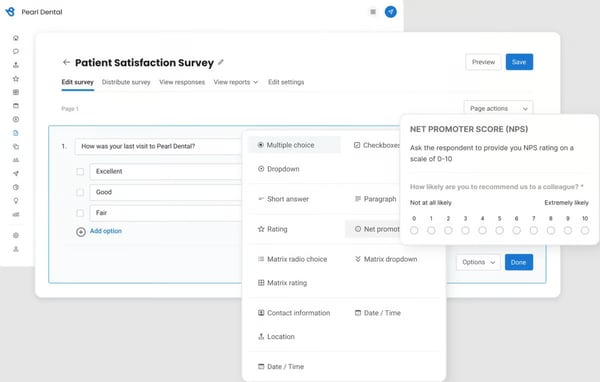
Birdeye offers useful analytics for tracking campaign performance, but some G2 users note that analyzing long-term trends or building more advanced reports can require additional effort or external tools. This may add an extra step for teams looking for deeper insights. That said, for everyday monitoring and communication tracking, the platform’s built-in reporting remains practical and effective.
Certain templates and features may feel less flexible for highly specific or niche business needs. More advanced customization may require workarounds or adjustments to existing workflows. However, for most standard use cases, the platform provides a well-structured and easy-to-manage environment that supports consistent communication and operations.
Overall, Birdeye stands out as a comprehensive, easy-to-use platform that brings customer communication, reputation management, and marketing into one place.
What I like about Birdeye:
- Users love how Birdeye consolidates all customer feedback in one place. It saves a lot of time compared to managing reviews across multiple platforms. This centralized approach lets them respond to clients quickly and maintain a strong connection.
- The webchat feature allows users to connect with customers in real-time directly from their website, which increases inquiries and improves lead conversion.
What G2 users like about Birdeye:
“What I like most is how Birdeye centralizes everything—reviews, listings, messaging, and social—into one clean platform. It makes it much easier to manage our online reputation across multiple locations without jumping between tools. The automation around review requests has been especially valuable, helping us consistently generate new reviews with minimal manual effort. It’s also fairly intuitive for our team, which makes adoption and day-to-day use smooth.”
– Birdeye Review, Nicholas K.
What I dislike about Birdeye:
- Deeper insights or long-term trend analysis may require additional effort or external tools. That said, the built-in reporting works well for day-to-day monitoring.
- Customization may be limited for niche needs: Some templates and features may feel less flexible for highly specific use cases, requiring minor workarounds. However, for most standard workflows, the platform remains structured, easy to manage, and consistent.
What G2 users dislike about Birdeye:
“I do think there is a pretty big learning curve (I am still learning). I do wish there were more training or walkthroughs when first starting out, especially with the constantly evolving features they create.”
– Birdeye Review, Ashley B.
7. Freshdesk: Best for streamlined ticket-based support
Freshdesk is a modern customer support platform designed to simplify ticket management and streamline communication across channels. According to G2 Data, it is used by 44% of small businesses and 41% mid-market teams.
Freshdesk’s ticketing system is one of its most praised features in G2 reviews. It converts customer queries from email, chat, phone, and social media into trackable tickets, making it easy to prioritize, assign, and resolve issues without losing context.
Freshdesk brings together conversations from multiple channels into a single dashboard, allowing teams to respond without switching between tools. This unified experience helps agents maintain context across interactions and deliver faster, more consistent customer support.
Automation features are frequently highlighted for reducing manual effort and improving efficiency. From automatic ticket routing and prioritization to SLA management and canned responses, Freshdesk helps teams handle high volumes of requests while maintaining consistency.
Its intuitive interface and ease of use are consistently praised in G2 reviews. Teams note that new agents can quickly get up to speed with minimal training, thanks to its clean layout and straightforward navigation. The quick setup process and user-friendly design make it easy for businesses to implement and start seeing value almost immediately.
The platform offers strong reporting and analytics capabilities. Users appreciate the ability to track performance metrics, monitor SLA compliance, and gain insights into team productivity and customer satisfaction. These dashboards help teams identify trends, optimize workflows, and continuously improve support operations.
Collaboration and integration capabilities further enhance Freshdesk’s value. Features like internal notes, shared ownership, and tagging make it easier for teams to work together on complex tickets. Additionally, integrations with tools like Slack, Jira, and CRM systems allow businesses to connect support with broader workflows and maintain operational efficiency.
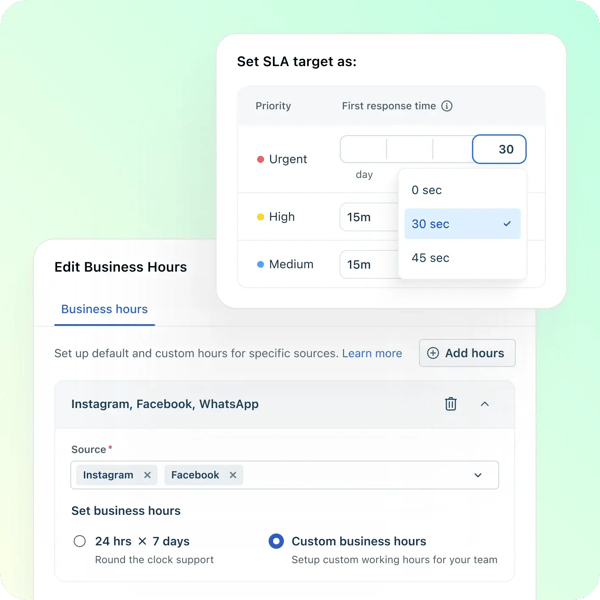
Freshdesk’s mobile app is useful for staying connected on the go, but some G2 users note that it is better suited for quick updates or simple responses rather than handling more complex tickets. The experience may feel less feature-rich compared to the desktop version, particularly for workflows that require multiple steps or deeper context. However, for basic support tasks and real-time notifications, the mobile app still provides a convenient way for teams to stay responsive outside the office.
Advanced configurations may require thoughtful structuring to maintain clarity and efficiency over time. That said, this flexibility allows teams to build tailored workflows that support more complex operations, making it a strong fit for organizations looking to scale their support processes.
Freshdesk stands out as a reliable and scalable support solution that combines simplicity with powerful functionality. Its strong ticketing system, automation capabilities, and ease of use make it a great choice for teams looking to deliver efficient and organized customer support at scale.
What I like about Freshdesk:
- It centralizes customer queries from multiple channels into organized tickets, making it easy to track, prioritize, and resolve issues without losing context.
- The intuitive interface, combined with automation features like ticket routing, canned responses, and SLA management, helps teams save time and handle high volumes efficiently.
What G2 users like about Freshdesk:
“What I like most about Freshdesk is that it keeps all customer conversations in one place. Earlier, it was difficult to track emails and support queries across different channels, but with Freshdesk, everything becomes a ticket, and it’s much easier to manage. The UI is also quite straightforward, so even new team members can get comfortable using it quickly. Automation rules are another thing I like because they help route tickets automatically and save a lot of manual effort.”
– Freshdesk Review, Shashwat P.
What I dislike about Freshdesk:
- While useful for quick updates and staying responsive on the go, the mobile app may feel less feature-rich for handling complex tickets or multi-step workflows compared to the desktop version.
- As configurations grow, maintaining clarity in workflows can require thoughtful setup. However, this flexibility allows teams to build tailored workflows that support more complex, scalable operations.
What G2 users dislike about Freshdesk:
“Reporting can be complex and sometimes difficult to navigate. I also experience occasional system lag, which can slow things down. Setting up automation is tricky and takes more effort than I expected. On top of that, the mobile app still needs improvement to feel as smooth and reliable as the rest of the platform.”
– Freshdesk Review, Themba N.
Live chat software: Frequently asked questions (FAQs)
Got more questions? G2 has the answers.
1. What are the best live chat options for business websites?
The best options are tools like Zendesk for Customer Service, Freshdesk, and Fin by Intercom that combine real-time chat, automation, and a unified inbox to manage customer conversations directly on your website.
2. What is the best live chat software for increasing conversion rates?
Live chat tools with proactive messaging, AI chatbots, and behavior-based triggers, like Fin by Intercom or Zendesk for Customer Service, help engage visitors at the right moment and convert them into leads or customers.
3. What are the best live chat solutions for websites?
Agentforce Service, Intercom, Podium, and HubSpot Service Hub offer the best live chat solutions for websites.
4. What is the best live chat software for small businesses?
Small businesses benefit from easy-to-use, affordable tools like Zoho Desk, Freshdesk, or Podium that offer quick setup, automation, and centralized communication without heavy complexity.
5. What is the best-rated live chat tool for startup companies?
Startups can choose tools like Fin by Intercom or Zoho Desk because they are scalable, easy to implement, and support growth with automation and integrations.
6. What are efficient live chat systems for real-time client support?
Efficient systems include platforms like Freshdesk, Zendesk for Customer Service, and Zoho Desk that centralize conversations, enable instant responses, and support multiple chats simultaneously.
7. What are the leading live chat apps to improve customer support?
Leading live chat apps include platforms like Zendesk, Fin by Intercom, Freshdesk, and Zoho Desk, as they combine real-time messaging with ticketing, automation, and analytics to streamline support workflows.
8. What is the top live chat service for tech support teams?
Tech support teams benefit most from platforms like Agentforce Service, Zendesk, and Freshdesk, as they combine structured ticketing, automation, and collaboration tools to manage high volumes of complex queries efficiently.
9. Which live chat software is best for e-commerce?
For e-commerce, tools like Zendesk for Customer Service, Freshdesk, and Fin by Intercom work best as they offer real-time chat, proactive engagement, and integrations that help reduce cart abandonment and guide customers through purchase decisions.
10. What are the recommended live chat platforms for SaaS businesses?
SaaS businesses typically choose Fin by Intercom, Zendesk, and Zoho Desk because they support customer onboarding, lifecycle engagement, and scalable support.
Time to elevate customer support
The market is shifting fast. G2 suggests that more and more businesses now prioritize platforms with AI automation and omnichannel support. That aligns with what I found: Agentforce Service leads in CRM integration, Fin by Intercom excels in AI, and Zendesk for Customer Service is great for multi-channel support.
The right live chat software helps you create meaningful connections with customers, solve their problems quickly, and make your business more efficient. Evaluating these platforms gave me clarity on what works, what doesn’t, and how even small tweaks can make a big difference.
I hope this list helps you find the perfect fit for your business, whether you’re looking to handle a rush of questions, boost sales, or make life easier for your team. The tools I’ve shared here stand out for a reason. They’re built to work for real businesses with real challenges. So take a look, try them, and see which one feels like it was made just for you.
Want to create an editable repository of service-related information? Check out the best contact center knowledge base software solutions that can help.