Saying marketing in 2025 is challenging would be an understatement.
AI is eating away organic traffic. CPC costs are skyrocketing across every platform. Social media algorithms shift weekly, and what worked last month becomes obsolete overnight.
For marketers, it feels like walking on shifting sand – every step forward risks sinking deeper into rising costs and shrinking reach.
The natural reaction? Pour more fuel on the fire. Increase ad spend. Chase the newest platform. Try another growth hack.
But here’s the brutal truth: it’s a zero-sum game. Everyone’s fighting for the same attention with the same tactics, driving costs up and results down.
So what’s the solution?
Instead of fighting harder for external traffic, what if you could maximize what you already have?
Think about it: despite all the platform chaos, qualified prospects are still reaching your website. The real question isn’t how to get more visitors – it’s how to convert the ones already showing up.
Most businesses treat their website like a digital brochure, missing countless opportunities to engage visitors who might never return.
That’s exactly why we built GetResponse Web Automation.
Meet Web Automation: Marketing that works before the subscribe
Until now, our Automation feature let you communicate with your audience only after they became email subscribers. But what about everyone else – the ca. 97% who browse, consider, and leave without ever sharing their contact details?
Web Automation changes this completely.
Now you can engage users across multiple channels from their very first visit. Whether they’re anonymous browsers, repeat visitors, or loyal customers, you can interact with them in real-time using personalized popups, web push notifications, and targeted emails.
Here’s how it works: create an automation workflow that responds to actual visitor behavior. Someone spending time on your pricing page? Trigger a personalized discount popup. Visitor returning for the third time? Send a web push with your bestseller. Cart abandoner about to leave? Deploy an email sequence automatically.
The result? You can finally squeeze every drop of value from your existing traffic, regardless of where it comes from or what external platforms decide to do next.
Ways to use web automation today
There are many ways you can use web automation.
Here are the ones our customers shown most interest in during our testing phase:
1. Interest-based popups that actually convert
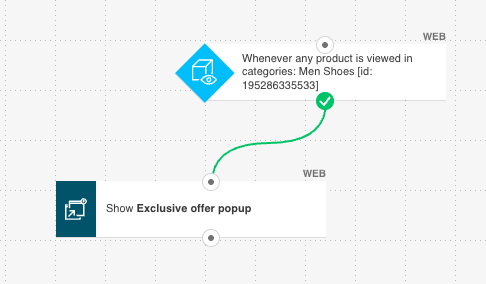
Running a sales campaign? Instead of showing generic popups to everyone, trigger personalized offers based on what visitors are actually viewing.
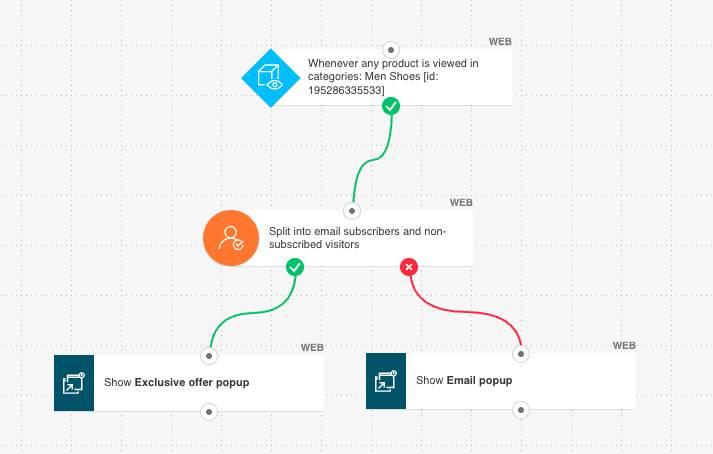
When someone browses your bestselling category or lingers on a specific product page, hit them with a targeted popup offering a discount in exchange for their email. It’s contextually relevant, so conversion rates soar.
Already have their email? Show them a different popup – maybe an exclusive flash sale or an invitation to enable web push notifications for instant deal alerts.
Pro tip: Take targeting further by customizing popups based on location and device. Show different messages, e.g. to countries where you don’t ship versus those with free delivery options.
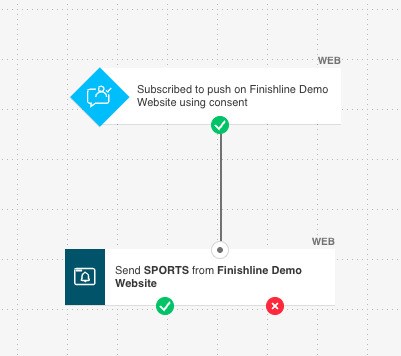
2. Welcome push notifications that build momentum
Someone just opted into your web push notifications – now what? Don’t waste this golden opportunity with silence.
Send an immediate welcome push message that thanks them for subscribing and delivers instant value: a welcome discount, your bestseller recommendations, or access to exclusive content.
3. Repeat visitor recognition
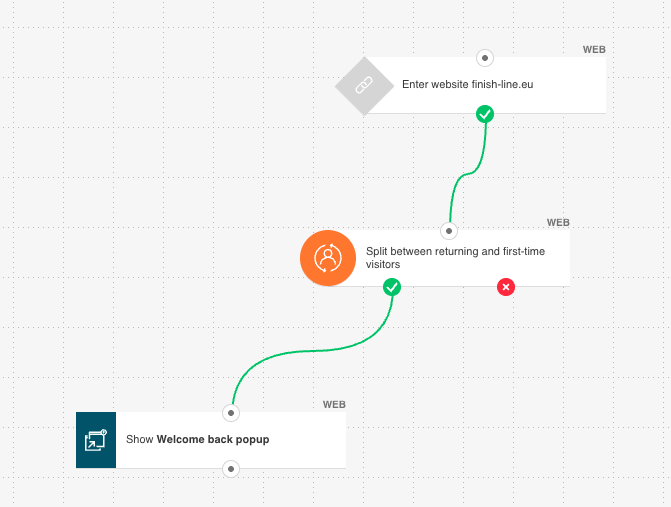
Repeat visitors are pure gold – they’re already interested enough to come back. When someone returns to your site, celebrate it with personalized engagement.
Trigger a “welcome back” popup with a special returning customer discount, or send an email highlighting new arrivals since their last visit. Make them feel valued for their loyalty.
4. First-time visitor engagement
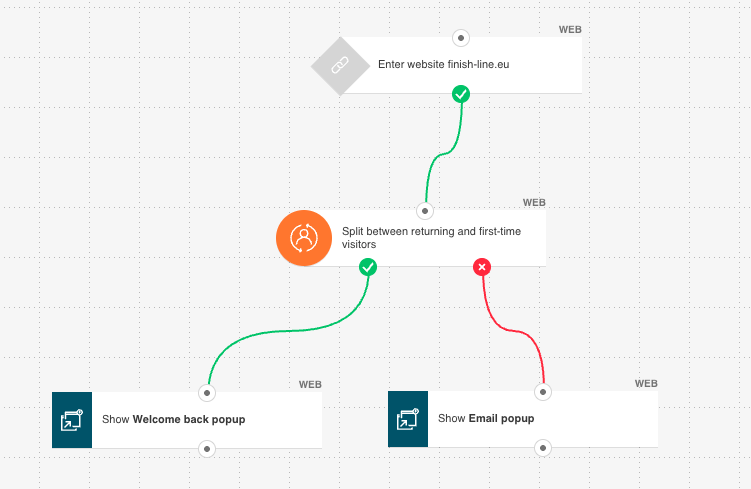
Every customer journey starts with that crucial first visit. Don’t let new visitors slip away unnoticed.
Welcome first-time browsers with a friendly popup introducing your brand, or invite them to subscribe to web push notifications for instant updates on sales and new products. First impressions matter – make yours count.
These are just the beginning. As more businesses start using Web Automations – and we continue expanding the feature – I’m excited to see what creative strategies emerge.
How to access Web Automation
Web Automation is available on Marketer, Creator, and MAX plans.
If you’re already on one of these plans, getting started takes just a few clicks:
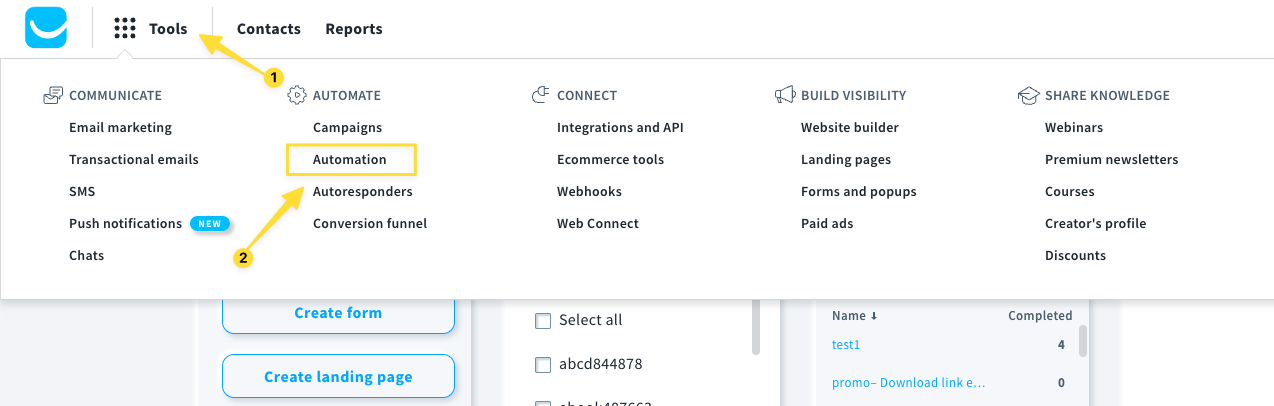
1. Navigate to Tools > Automation
2. Click Create workflow and browse the Automation templates gallery
Scroll down and look for templates labeled with ‘Web’ to find the pre-built Web Automation workflows
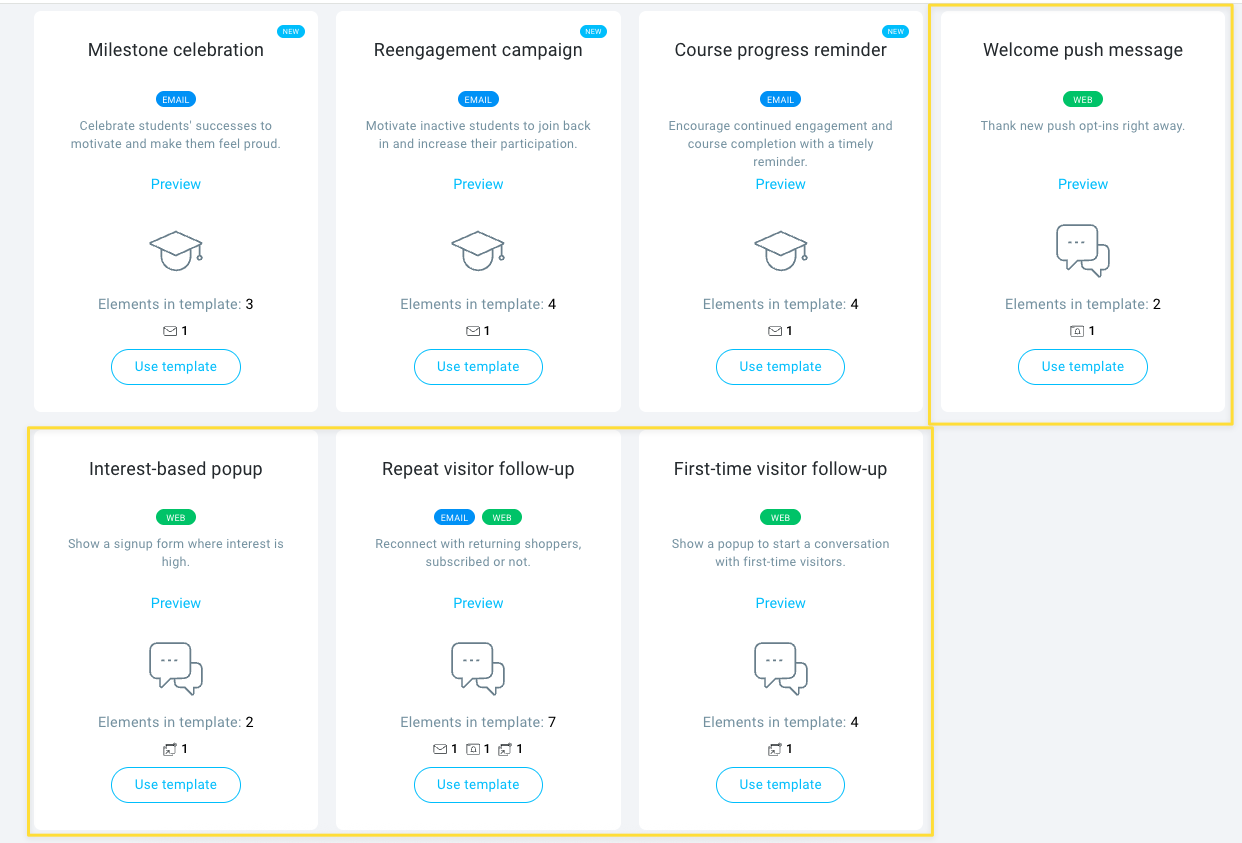
3. Click Use template on the one that fits your needs
4. Customize your automation in the workflow builder to match your brand and audience
(Not on a qualifying plan yet? You can upgrade anytime in your Account settings.)
The workflow builder lets you customize every element – from trigger conditions to message content – ensuring your automated communications reach the right people at exactly the right moment.

Start converting more visitors today
I’m genuinely excited about what Web Automation can do for your business. After years of watching marketers struggle with platform dependency and rising acquisition costs, it feels incredible to offer a solution that works entirely on your own digital property.
Ready to give it a try? Fire up Web Automation and start with one simple workflow – maybe an interest-based popup or a welcome sequence for new visitors. You might be surprised by how quickly you see results.
Already testing Web Automation? I’d love to hear how it’s working for you. What strategies are driving the best results? What features would make it even more powerful? Your feedback shapes everything we build, so be sure to share it with our Team via 24/7 chat or on our socials!
Don’t have a GetResponse account yet? You can test Web Automation and all our other features completely free for 30 days – no credit card required. Start your free trial here and see what automated engagement can do for your conversion rates.
Let’s turn those website visitors into customers – automatically.